battery MAZDA MODEL CX-3 2021 Owner's Guide
[x] Cancel search | Manufacturer: MAZDA, Model Year: 2021, Model line: MODEL CX-3, Model: MAZDA MODEL CX-3 2021Pages: 618, PDF Size: 64.58 MB
Page 328 of 618
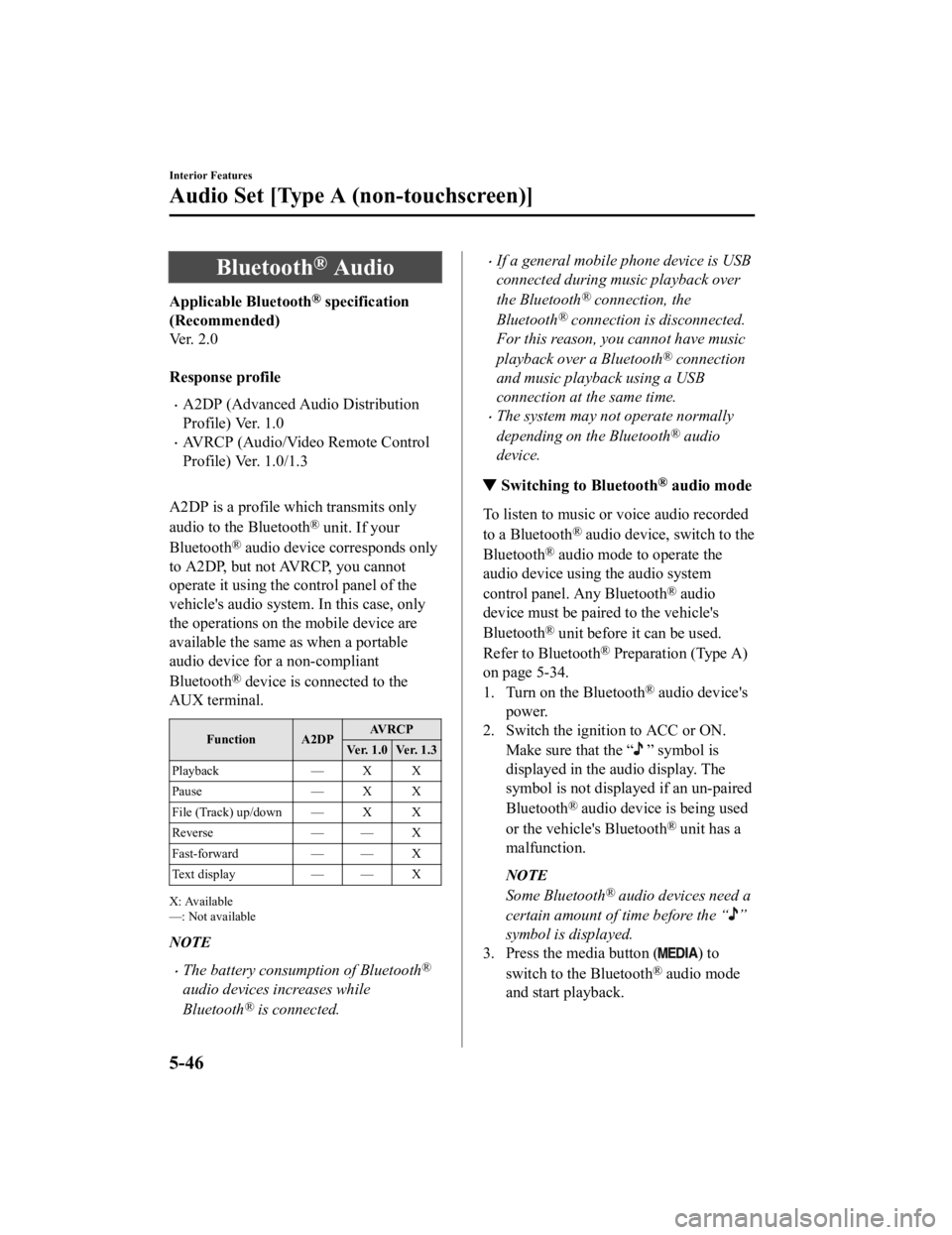
Bluetooth® Audio
Applicable Bluetooth® specification
(Recommended)
Ve r . 2 . 0
Response profile
A2DP (Advanced Audio Distribution
Profile) Ver. 1.0
AVRCP (Audio/Video Remote Control
Profile) Ver. 1.0/1.3
A2DP is a profile which transmits only
audio to the Bluetooth
® unit. If your
Bluetooth
® audio device corresponds only
to A2DP, but not AVRCP, you cannot
operate it using the control panel of the
vehicle's audio system. In this case, only
the operations on the mobile device are
available the same as when a portable
audio device for a non-compliant
Bluetooth
® device is connected to the
AUX terminal.
Function A2DP AV R C P
Ver. 1.0 Ver. 1.3
Playback — X X
Pause — X X
File (Track) up/down — X X
Reverse — — X
Fast-forward — — X
Text display — — X
X: Available
—: Not available
NOTE
The battery consumption of Bluetooth®
audio devices increases while
Bluetooth
® is connected.
If a general mobile phone device is USB
connected during music playback over
the Bluetooth
® connection, the
Bluetooth
® connection is disconnected.
For this reason, you cannot have music
playback over a Bluetooth
® connection
and music playback using a USB
connection at the same time.
The system may not operate normally
depending on the Bluetooth
® audio
device.
▼ Switching to Bluetooth® audio mode
To listen to music or voice audio recorded
to a Bluetooth
® audio device, switch to the
Bluetooth
® audio mode to operate the
audio device using the audio system
control panel. Any Bluetooth
® audio
device must be paired to the vehicle's
Bluetooth
® unit before it can be used.
Refer to Bluetooth
® Preparation (Type A)
on page 5-34.
1. Turn on the Bluetooth
® audio device's
power.
2. Switch the ignition to ACC or ON.
Make sure that the “
” symbol is
displayed in the audio display. The
symbol is not displayed if an un-paired
Bluetooth
® audio device is being used
or the vehicle's Bluetooth
® unit has a
malfunction.
NOTE
Some Bluetooth® audio devices need a
certain amount of time before the “
”
symbol is displayed.
3. Press the media button (
) to
switch to the Bluetooth
® audio mode
and start playback.
Interior Features
Audio Set [Type A (non-touchscreen)]
5-46
CX-3_8JL1-EA-20G_Edition1_old 2020-5-22 15:31:00
Page 343 of 618
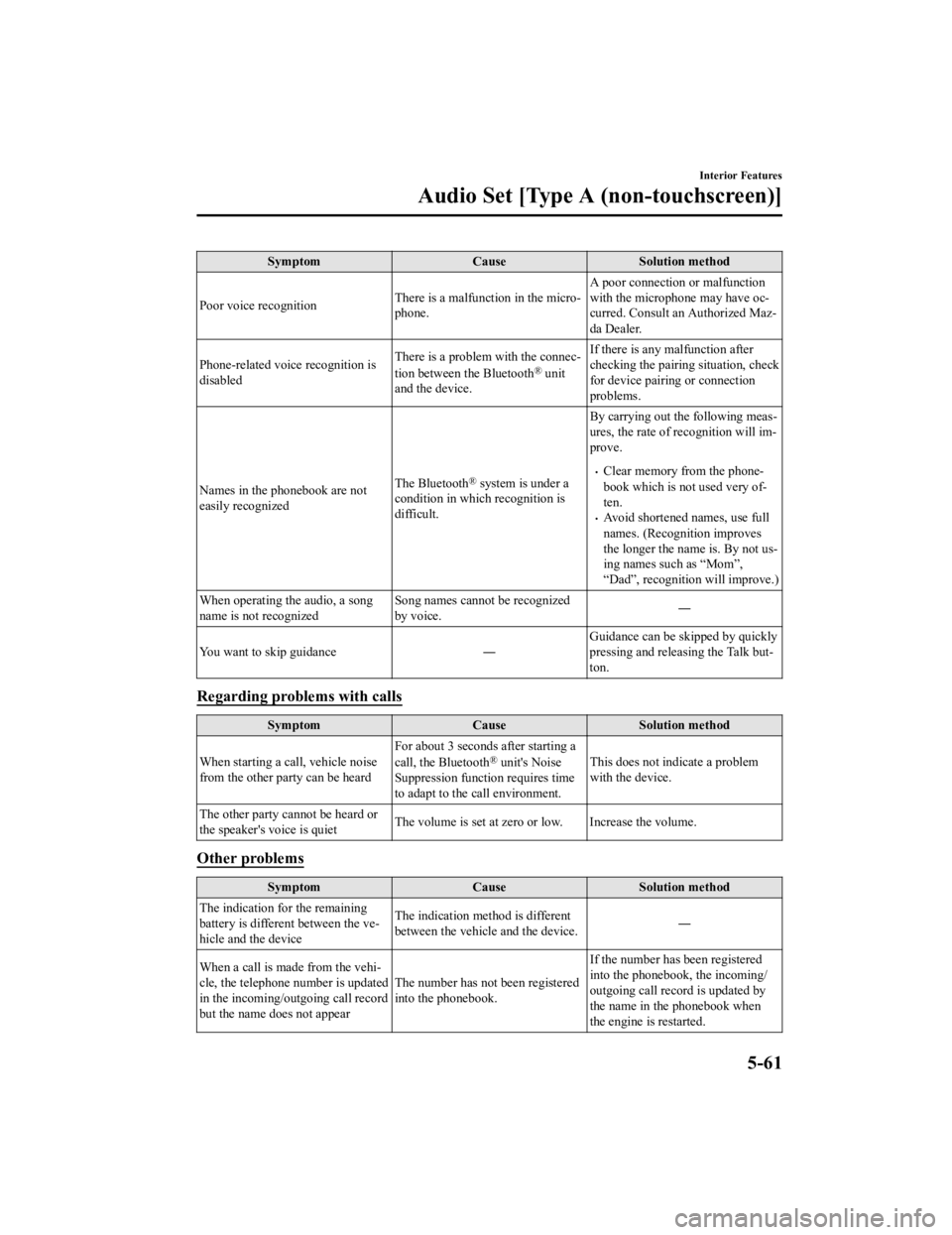
SymptomCauseSolution method
Poor voice recognition There is a malfunction in the micro‐
phone.A poor connection or malfunction
with the microphone may have oc
‐
curred. Consult an Authorized Maz ‐
da Dealer.
Phone-related voice recognition is
disabled There is a problem with the connec
‐
tion between the Bluetooth
® unit
and the device. If there is any malfunction after
checking the pairing
situation, check
for device pairing or connection
problems.
Names in the phonebook are not
easily recognized The Bluetooth
® system is under a
condition in which recognition is
difficult. By carrying out the following meas
‐
ures, the rate of recognition will im ‐
prove.Clear memory from the phone ‐
book which is not used very of ‐
ten.
Avoid shortened names, use full
names. (Recognition improves
the longer the name is. By not us ‐
ing names such as “Mom”,
“Dad”, recognition will improve.)
When operating the audio, a song
name is not recognized Song names cannot be recognized
by voice.
―
You want to skip guidance ―Guidance can be skipped by quickly
pressing and releasing the Talk but
‐
ton.
Regarding problems with calls
Symptom CauseSolution method
When starting a call, vehicle noise
from the other party can be heard For about 3 seconds after starting a
call, the Bluetooth
® unit's Noise
Suppression function requires time
to adapt to the call environment. This does not indicate a problem
with the device.
The other party cannot be heard or
the speaker's voice is quiet The volume is set at zero or low. Increase the volume.
Other problems
Symptom
CauseSolution method
The indication for the remaining
battery is different between the ve ‐
hicle and the device The indication method is different
between the vehicle and the device.
―
When a call is made from the vehi ‐
cle, the telephone number is updated
in the incoming/o utgoing call record
but the name does not appear The number has not been registered
into the phonebook.If the number has been registered
into the phonebook, the incoming/
outgoing call record is updated by
the name in the phonebook when
the engine is restarted.
Interior Features
Audio Set [Type A (non-touchscreen)]
5-61
CX-3_8JL1-EA-20G_Edition1_old
2020-5-22 15:31:00
Page 354 of 618

1. Select the icon to display the
Favorites list.
2. Select
.
3. Select
.
4. The station is added to the bottom of the Favorites list.
NOTE
If the battery is disconnected, your
Favorites list will not be deleted.
Selecting radio station from Favorites
1. Select the
icon to display the
Favorites list.
2. Select the radio frequency to tune in the radio station.
Deleting from Favorites
1. Select the
icon to display the
Favorites list.
2. Select
.
3. Select
.
4. Select the radio frequency you want to
delete.
5. Select
.
Changing Favorites list order
1. Select the
icon to display the
Favorites list.
2. Select
.
3. Select
.
4. Select a radio frequency. The selected radio station can be moved.
5. Slide the radio station or move it using
the commander switch, then select
.
▼Radio Broadcast Data System
(RBDS)*
Radio text info
rmation display
Radio text information sent from a
broadcasting station is displayed in the
center display.
NOTE
Radio text information is a function of FM
radio only. There is no text function on AM
radio. Text informati on is not displayed in
the following:
During reception
Not an RBDS broadcast
RBDS broadcast, but radio text is not
transmitted from the radio station
Genre Seek
Some FM stations transmit Genre codes
(Program type like Rock, News, and so
on). This code enables alternative stations
transmitting the same Genre code to be
found quickly.
(To scan for Genre Seek:)
1. Select the
icon while in the FM
mode.
2. Select
to open the genre list.
3. Select the genre type you want to select.
4. Select the
, icon.
NOTE
To change the desired genre, select the
icon.
Ex.)
89.3 is currently being received. With
Rock selected as the Genre, the radio
stations broadcasting Rock are at the
following frequencies.
Interior Features
Audio Set [Type B (touchscreen)]
5-72*Some models.
CX-3_8JL1-EA-20G_Edition1_old 2020-5-22 15:31:00
Page 369 of 618
(Wireless connection)
Wireless access to Apple CarPlay™ is available by connecting your iPhone
® with Mazda
Connect using Bluetooth
® and Wi-Fi™.
NOTE
There is no difference in the functions of Apple CarPlay™ when using the wireless
connection and the USB connection.
If the iPhone® is connected to the USB port while using the wireless connection, the
iPhone
® battery is charged.
Registering a device
You can register a device using either of the following methods.
Press and hold the talk button
Operate the audio unit
NOTE
If Apple CarPlay™ is not selected as the Wi-Fi™ mode, a dialog which prompts you to
enable Apple CarPlay™ mode is displayed. Select
.
If the Bluetooth® is off, a dialog which prompts you to turn it on is displayed. Select .
Up to 7 Bluetooth® supported devices can be registered. If you try to register more than 7
devices, the device with the oldest registration record is deleted.
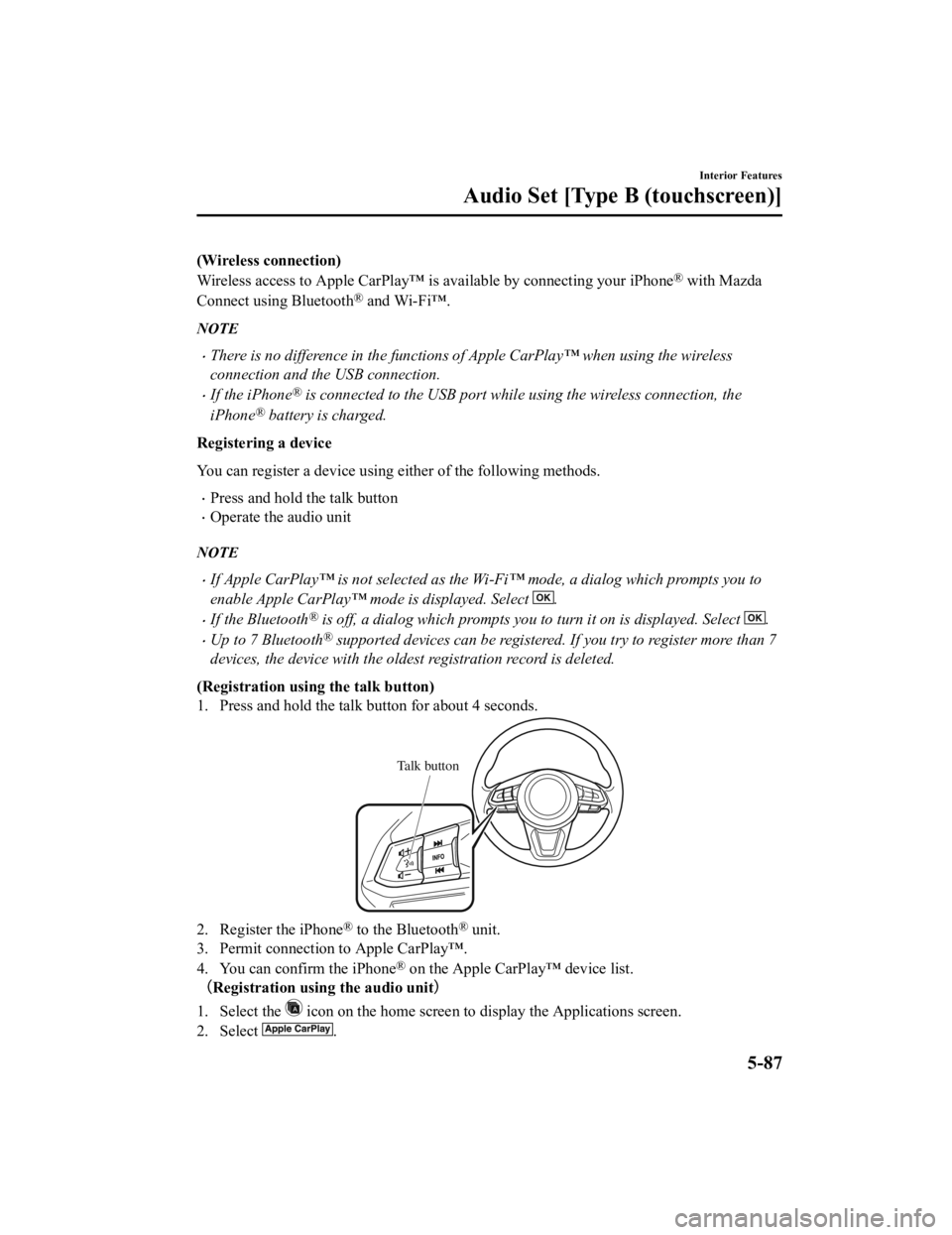
(Registration usin g the talk button)
1. Press and hold the talk button for about 4 seconds.
Talk button
2. Register the iPhone® to the Bluetooth® unit.
3. Permit connection to Apple CarPlay™.
4. You can confirm the iPhone
® on the Apple CarPlay™ device list.
(Registration using the audio unit )
1. Select the
icon on the home screen to display the Applications screen.
2. Select
.
Interior Features
Audio Set [Type B (touchscreen)]
5-87
CX-3_8JL1-EA-20G_Edition1_old 2020-5-22 15:31:00
Page 383 of 618
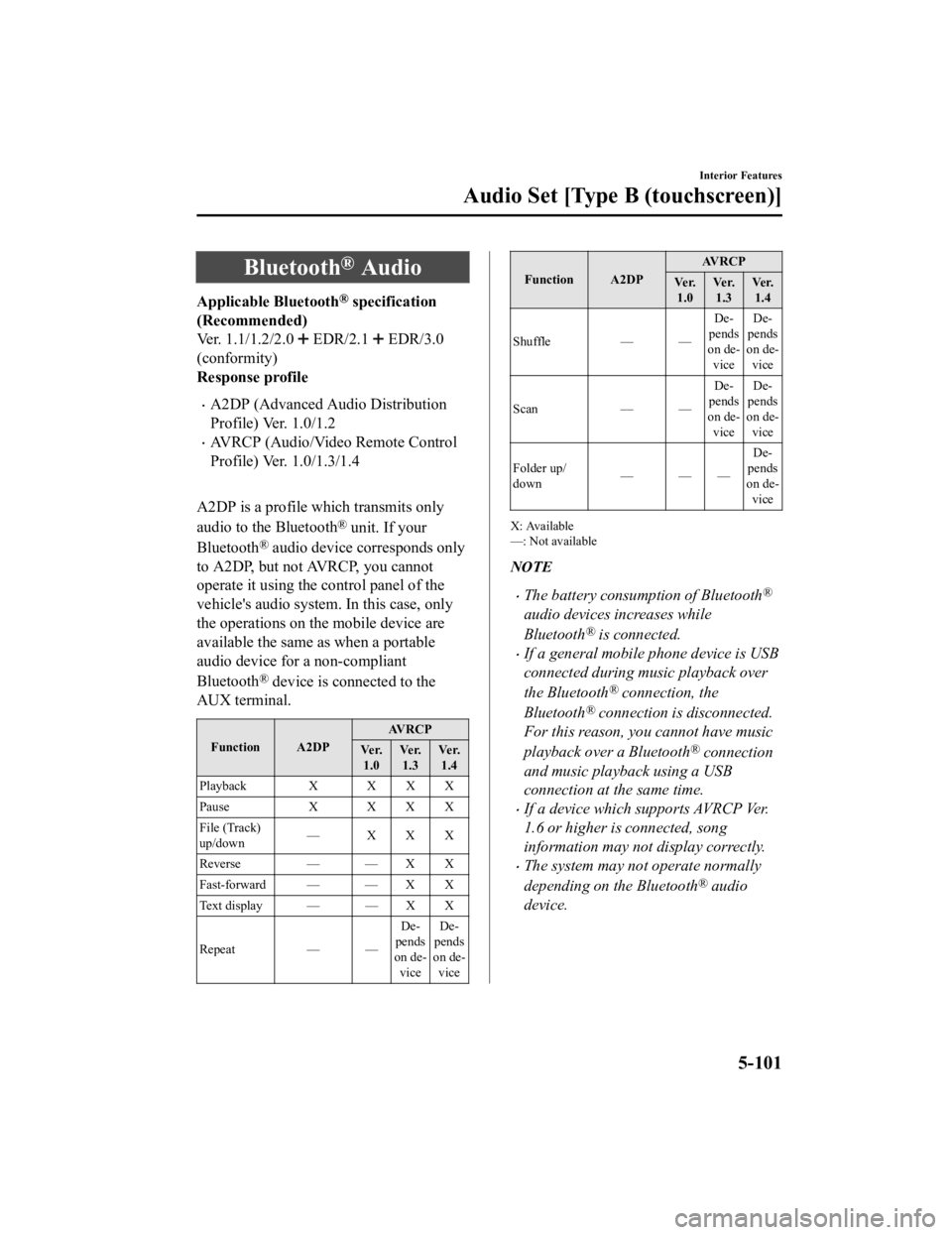
Bluetooth® Audio
Applicable Bluetooth® specification
(Recommended)
Ver. 1.1/1.2/2.0
EDR/2.1 EDR/3.0
(conformity)
Response profile
A2DP (Advanced Audio Distribution
Profile) Ver. 1.0/1.2
AVRCP (Audio/Video Remote Control
Profile) Ver. 1.0/1.3/1.4
A2DP is a profile which transmits only
audio to the Bluetooth
® unit. If your
Bluetooth
® audio device corresponds only
to A2DP, but not AVRCP, you cannot
operate it using the control panel of the
vehicle's audio system. In this case, only
the operations on the mobile device are
available the same as when a portable
audio device for a non-compliant
Bluetooth
® device is connected to the
AUX terminal.
Function A2DP AVRCP
Ve r. 1.0 Ve r.
1.3 Ve r.
1.4
Playback X X X X
Pause X XXX
File (Track)
up/down — XXX
Reverse — — X X
Fast-forward — — X X
Text display — — X X
Repeat — — De
‐
pends
on de ‐
vice De
‐
pends
on de ‐
vice
Function A2DP AV R C P
Ve r. 1.0 Ve r.
1.3 Ve r.
1.4
Shuffle — — De‐
pends
on de ‐
vice De
‐
pends
on de ‐
vice
Scan — —De‐
pends
on de ‐
vice De
‐
pends
on de ‐
vice
Folder up/
down ——— De
‐
pends
on de ‐
vice
X: Available
—: Not available
NOTE
The battery consumption of Bluetooth®
audio devices increases while
Bluetooth
® is connected.
If a general mobile phone device is USB
connected during music playback over
the Bluetooth
® connection, the
Bluetooth
® connection is disconnected.
For this reason, you cannot have music
playback over a Bluetooth
® connection
and music playback using a USB
connection at the same time.
If a device which supports AVRCP Ver.
1.6 or higher is connected, song
information may not display correctly.
The system may not operate normally
depending on the Bluetooth
® audio
device.
Interior Features
Audio Set [Type B (touchscreen)]
5-101
CX-3_8JL1-EA-20G_Edition1_old 2020-5-22 15:31:00
Page 385 of 618
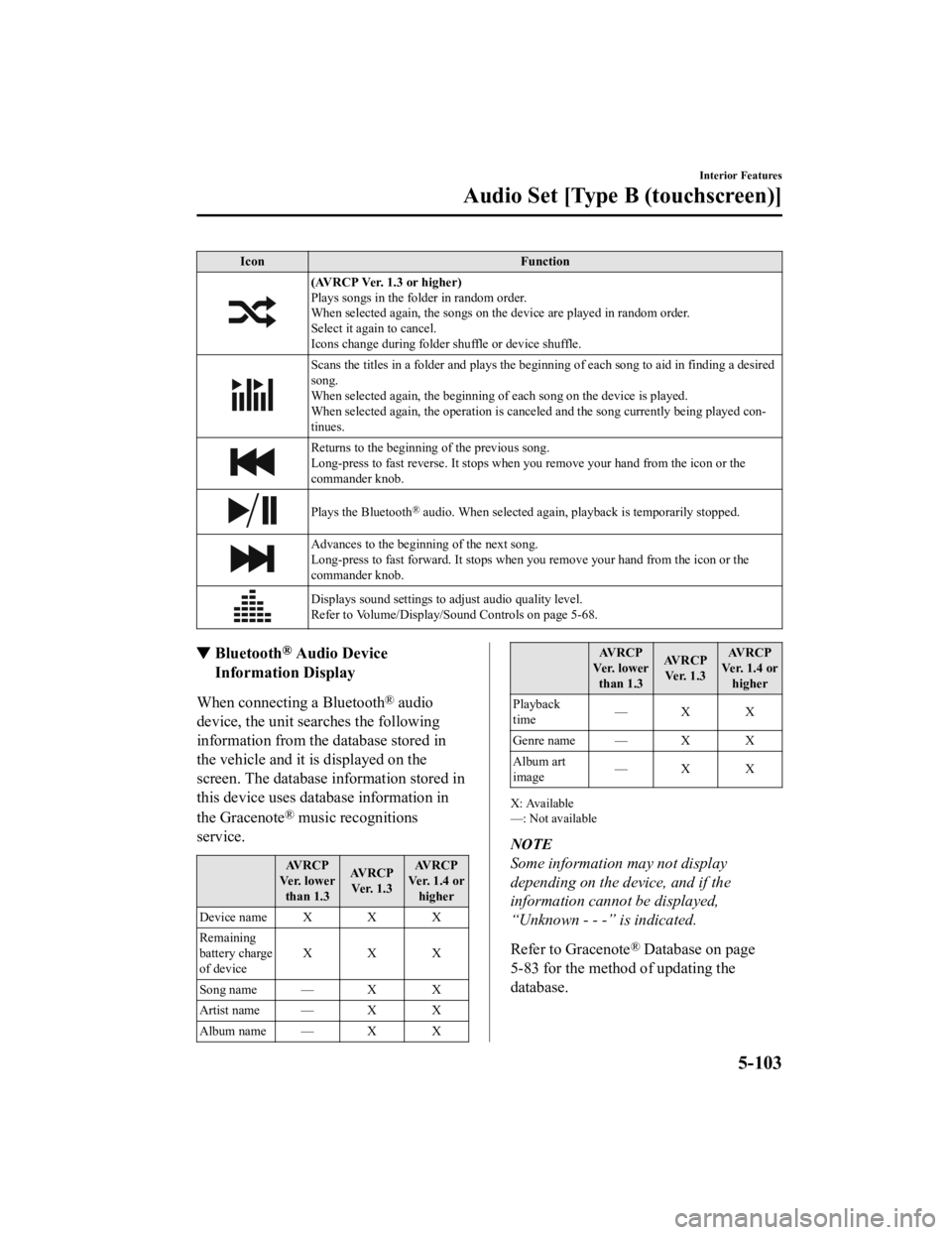
IconFunction
(AVRCP Ver. 1.3 or higher)
Plays songs in the folder in random order.
When selected again, the songs on th e device are played in random order.
Select it again to cancel.
Icons change during folder shuffle or device shuffle.
Scans the titles in a folder and plays the beginn ing of each song to aid in finding a desired
song.
When selected again, the beginning of each song on the device is played.
When selected again, the operation is canceled and the song currently being played con‐
tinues.
Returns to the beginning of the previous song.
Long-press to fast reverse. It stops when you remove your hand from the icon or the
commander knob.
Plays the Bluetooth® audio. When selected again, playback is temporarily stopped.
Advances to the beginning of the next song.
Long-press to fast forward. It stops when you remove your hand from the icon or the
commander knob.
Displays sound settings to adjust audio quality level.
Refer to Volume/Display/Sound Controls on page 5-68.
▼ Bluetooth® Audio Device
Information Display
When connecting a Bluetooth® audio
device, the unit searches the following
information from the database stored in
the vehicle and it is displayed on the
screen. The database information stored in
this device uses database information in
the Gracenote
® music recognitions
service.
AVRCP
Ve r. l o w e r than 1.3 AVRCP
Ve r. 1 . 3 AVRCP
Ver. 1.4 or higher
Device name X X X
Remaining
battery charge
of device XXX
Song name — X X
Artist name — X X
Album name — X X
AV R C P
Ve r. l o w e r than 1.3 AV R C P
Ve r. 1 . 3 AV R C P
Ver. 1.4 or higher
Playback
time —X X
Genre name — X X
Album art
image —X X
X: Available
—: Not available
NOTE
Some information may not display
depending on the device, and if the
information cannot be displayed,
“Unknown - - -” is indicated.
Refer to Gracenote
® Database on page
5-83 for the method of updating the
database.
Interior Features
Audio Set [Type B (touchscreen)]
5-103
CX-3_8JL1-EA-20G_Edition1_old 2020-5-22 15:31:00
Page 416 of 618

SymptomCauseSolution method
The other party cannot be heard or
the speaker's voice is quiet. The volume is set at zero
or low. Increase the volume.
The phone does not receive calls. The “Incoming Call Notifications”
setting in the Communication Set
‐
tings is off. Turn the “Incoming Call Notifica
‐
tions” setting on.
Other problems
Symptom CauseSolution method
The indication fo r the remaining
battery is different between the ve ‐
hicle and the device. The indication method is different
between the vehicle and the device.
―
When a call is made from the vehi ‐
cle, the telephone number is updated
in the incoming/outgoing call record
but the name does not appear. The number has not been registered
into the phonebook.If the number has been registered
into the phonebook, the incoming/
outgoing call record is updated by
the name in the phonebook when
the engine is restarted.
The cell phone does not synchronize
with the vehicle regarding the in ‐
coming/outgoing call record. Some types of cell phones do not
synchronize automatically.
Operate the cell p
hone for synchro‐
nization.
It takes a long time to complete the
function for changing the language. A maximum of 60 seconds is re
‐
quired. ―
Interior Features
Audio Set [Type B (touchscreen)]
5-134
CX-3_8JL1-EA-20G_Edition1_old
2020-5-22 15:31:00
Page 417 of 618

Things You Need to Know
WARNING
Always adjust the audio while the vehicle is
stopped:
Do not adjust the audio control switches
while driving the vehicle. Adjusting the
audio while driving the vehicle is
dangerous as it could distract your
attention from the vehicle operation which
could lead to a serious accident.
Even if the audio control switches are
equipped on the steering wheel, learn to
use the switches without looking down at
them so that you can keep your maximum
attention on the road while driving the
vehicle.
CAUTION
For the purposes of safe driving, adjust the
audio volume to a level that allows you to
hear sounds outside of the vehicle
including car horns and particularly
emergency vehicle sirens.
NOTE
To prevent the battery from being
discharged, do not leave the audio
system on for a long period of time when
the engine is not running.
If a cellular phone or CB radio is used
in or near the vehicle, it could cause
noise to occur from the audio system,
however, this does no t indicate that the
system has been damaged.
Do not spill any liquid on the audio
system.
▼ Radio Reception
AM characteristics
AM signals bend around such things as
buildings or mountains and bounce off the
ionosphere.
Therefore, they can reach longer distances
than FM signals.
Because of this, 2 stations may sometimes
be picked up on the same frequency at the
same time.
Station 2
Station 1 Ionosphere
FM characteristics
An FM broadcast range is usually about
40―50 km (25
―30 miles) from the
source. Because of extra coding needed to
break the sound into 2 channels, stereo FM
Interior Features
Appendix
5-135
CX-3_8JL1-EA-20G_Edition1_old 2020-5-22 15:31:00
Page 422 of 618

CAUTION
Remove the iPod when it is not in use.
Because the iPod is not designed to
withstand excessive changes in
temperature inside the cabin, it could be
damaged or the battery may deteriorate
due to the excessive temperature or
humidity inside the cabin if it is left in the
vehicle.
If data in the iPod is lost while it is
connected to the unit, Mazda cannot
guarantee recovery of any lost data.
If the iPod battery is deteriorated, the
iPod may not recharge and playback
may not be possible when it is connected
to the unit.
For details on using the iPod, refer to the
iPod instruction manual.
When connecting the iPod to a USB port,
all commands are made from the audio
unit. iPod control is not possible.
NOTE
The audio unit cannot display images or
videos stored in an iPod.
▼ Agreements and disclaimers related
to Apple CarPlay™
This unit is compatible with Apple
CarPlay™ which can operate an iPhone
®
using the vehicle's audio device.
iPhone, Siri and Apple Music are
registered trademarks of Apple Inc.
Apple CarPlay is trademarks of Apple
Inc.
iOS is a trademark or registered
trademark of Cisco in the U.S. and other
countries and is used under license.
May not be compatible depending on the
model or OS version.
CAUTION
For the purposes of safety, do not
operate your iPhone
® while driving.
Disconnect the iPhone
® when it is not in
use. If the device is left in the cabin, it
could be damaged or the battery may
deteriorate due to the excessive
temperature or humidity inside the
cabin.
If the iPhone
® battery has deteriorated, it
may not recharge or play audio even if it
is connected to this unit.
Before use, carefully read the user
instructions for the iPhone
®.
NOTE
To prevent loss or damage of stored data,
we recommend that you always back up
your data.
▼ Operating Tips for Android™
Requires the Android Auto app on Google
Play and an Android compatible
smartphone running Android™ 5.0
Lollipop or higher.
CAUTION
For the purposes of safety, do not
operate your Android™ Smartphone
while driving.
Disconnect the Android™ Smartphone
when it is not in use. If the device is left in
the cabin, it could be damaged or the
battery may weaken due to the excessive
temperature or humidity inside the
cabin.
Interior Features
Appendix
5-140
CX-3_8JL1-EA-20G_Edition1_old 2020-5-22 15:31:00
Page 423 of 618

If the Android™ Smartphone battery has
deteriorated, it may not recharge or play
audio even if it is connected to this unit.
Before use, carefully read the user
instructions for the Android™
Smartphone.
NOTE
To prevent loss or damage of stored data,
we recommend that you always back up
your data.
Google, Android, Android Auto and
other related marks are trademarks of
Google LLC.
Interior Features
Appendix
5-141
CX-3_8JL1-EA-20G_Edition1_old
2020-5-22 15:31:00