ad blue MAZDA MODEL CX-30 2020 Owners Manual
[x] Cancel search | Manufacturer: MAZDA, Model Year: 2020, Model line: MODEL CX-30, Model: MAZDA MODEL CX-30 2020Pages: 562, PDF Size: 83 MB
Page 151 of 562

▼Odometer, Trip Meter and Trip
Meter Selector
You can switch between the odometer
and trip meter display using the TRIP
switch.
1. TRIP switch
2. Odometer display
3. Trip meter A display
4. Trip meter B display
Odometer
The odometer records the total
distance the vehicle has been driven.
Tr i p m e t e r
The driving distance for a specified
interval is indicated. Two types (TRIP A,
TRIP B) of interval distance and the
average fuel economy for each can be
measured.
For instance, trip meter A can record
the distance from the point of origin,
and trip meter B can record the
distance from where the fuel tank is
filled.
When trip meter A is selected, TRIP A
will be displayed. When trip meter B is
selected, TRIP B will be displayed.
The trip meter and average fuel
economy can be reset by pressing the
TRIP switch for 1.5 seconds or more
while in each mode.
NOTE
Only the trip meters record tenths of
kilometers (miles).
The trip record will be erased when:
The power supply is interrupted
(blown fuse or the battery is
disconnected).
The vehicle is driven over 9999.9
km (mile).
▼Engine Coolant Temperature
Gauge
Displays the engine coolant
temperature. The blue range of the
gauge indicates that the engine coolant
temperature is low, and the red range
of the gauge indicates that the engine
coolant temperature is high and
overheating.
When Driving
Instrument Cluster and Display
4-15
CX-30_8HG6-EA-19I_Edition1_new
2019-6-13 18:45:11
Page 307 of 562

Viewing the screen
Display/IconContent
(1) Tire icon Indicates the tire direction. Moves in conjunction with
the steering wheel operation.
(2) Projected vehicle path lines (yellow & red) Indicates the approximate projected path of the vehicle.
Moves in conjunction with the steering wheel operation.
a) Indicates the path where the edge of the front bumper
is expected to travel.
b) Indicates the path where the inner side of the vehicle
is expected to travel.
(3) Extended vehicle width lines (blue) Indicates the approximate width of the vehicle.
(4) Projected vehicle path distance guide lines (yellow & red) Indicates the distance (from front end of bumper) in
front of the vehicle.
The red line indicates the point about 0.5 m (19 in)
from the front end of the bumper.
The yellow lines indicate the points about 1.0 m (39
in) and 2.0 m (78 in) from the front end of the bump-
er.
CAUTION
The parking sensor detection range has limitations. For example, obstructions
closing in from the side and objects shor
t in height may not be detected. Always
confirm the safety around the vehicle visually when driving.
For details, refer to the parking sensor ob struction detection indication and warning
sound.
Refer to Parking Sensor System on page 4-222.
When Driving
i-ACTIVSENSE
4-171
CX-30_8HG6-EA-19I_Edition1_new 2019-6-13 18:45:11
Page 310 of 562

Viewing the screen
Display/IconContent
(1) Extended vehicle width lines and distance guide lines (blue & red) Indicates the approximate width of the vehicle and the
distance (from front end of bumper) in front of the vehi-
cle.
The red lines indicate the points up to about 0.5 m (19
in) from the front end of the bumper.
NOTE
The front wide view screen displays the image in front of the vehicle at a wide angle
and corrects the image to help detect approaching obstructions from the side.
Therefore, it differs from the actual view.
▼
Side View
Use the side view to assist in checking the safety of the surrounding area when
accelerating from a stop, parking, or stopping the vehicle.
When Driving
i-ACTIVSENSE
4-174
CX-30_8HG6-EA-19I_Edition1_new
2019-6-13 18:45:11
Page 311 of 562

Display range
1. Target object
Viewing the screen
Display/IconContent
(1) Projected vehicle path lines (yellow) Indicates the approximate projected path of the vehicle. Moves in conjunction with the steering wheel operation.
The projected vehicle path lines (yellow) indicate the
path the inner side of the vehicle is expected to travel.
(2) Vehicle parallel guide lines (blue) Indicates the approximate vehicle width including the door mirrors.
When Driving
i-ACTIVSENSE
4-175
CX-30_8HG6-EA-19I_Edition1_new 2019-6-13 18:45:11
Page 312 of 562

Display/IconContent
(3) Vehicle front end guide lines (blue) Indicates the point about 0.25 m (9.84 in) from the front edge of the vehicle (front edge of the bumper).
NOTE
The setting can be changed so that the projected vehicle path lines are not
displayed.
Refer to the Settings section in the Mazda Connect Owner's Manual.
How to use the projected vehicle path line function
1. (Screen display)
2. (Actual condition)
Make sure that there are no obstructions within the projected vehicle path lines.
Turn the steering wheel so that the projected vehicle path lines travel inside of the
obstruction (A), and drive the vehicle forward until it passes the obstruction.
If the projected vehicle path lines are on an obstruction (B) or outside of the
obstruction (C), the vehicle may contact the obstruction when turning the vehicle
sharply.
CAUTION
The parking sensor detection range has limitations. For example, obstructions
closing in from the side and objects short in height may not be detected. Always
confirm the safety around the vehicle visually when driving.
When Driving
i-ACTIVSENSE
4-176
CX-30_8HG6-EA-19I_Edition1_new 2019-6-13 18:45:11
Page 314 of 562

Because images displayed in the top view screen are processed from each camera,
the top view screen may display in the following ways.
If an image containing an object with a conspicuous color is picked up by any of
the cameras, the screen area for each camera may be affected and it may display
in that color.
Obstructions displayed in the rear view may not display on the top view screen.If the position or angle of each camera changes due to tilting of the vehicle, the
image may appear distorted.
Lines on the road may appear distorted at the seams where each of the camera
images merge.
The screen area for each camera may appear bright/dark depending on the
illumination level around any of the cameras.
Viewing the screen
Display/Icon Content
(1) Tire icon Indicates the tire direction. Moves in conjunction with
the steering wheel operation.
(2) Projected vehicle path lines (yellow & red) Indicates the approximate projected path of the vehicle.
Moves in conjunction with the steering wheel operation.
a) Indicates the path where the edge of the rear bumper
is expected to travel.
b) Indicates the path where the outer side of the vehicle
is expected to travel.
(3) Extended vehicle width lines (blue) These guide lines indicate the approximate width of the vehicle.
When Driving
i-ACTIVSENSE
4-178
CX-30_8HG6-EA-19I_Edition1_new 2019-6-13 18:45:11
Page 319 of 562

Viewing the screen
Display/IconContent
(1) Extended vehicle width lines and distance guide lines (blue & red) These guide lines indicate the approximate width of the
vehicle and distance to a point measured from the rear
of the vehicle (from the end of the bumper).
The red lines indicate the points up to about 0.5 m
(19 in) from the rear end of the bumper.
NOTE
The top view/rear wide view screen displays the image at the rear of the vehicle at a
wide angle and corrects the image to help
detect approaching obstructions from the
side. Therefore, it differs from the actual view.
▼ Margin of Error Between Road Surface
on Screen and Actual Road Surface
There might be some margin of error between the road surface appearing on the
screen and the actual road surface. A margin of error in the perceived distance could
lead to an accident, therefore be aware of the following conditions which can more
easily produce errors in the perceived distance.
The vehicle tilts due to weight of passengers and cargo.
If the vehicle is tilted, obstructions picked up by a camera can appear farther or
closer than the actual distance from the vehicle.
Front camera
When Driving
i-ACTIVSENSE
4-183
CX-30_8HG6-EA-19I_Edition1_new 2019-6-13 18:45:11
Page 347 of 562

When the temperature around the lens is high/low.When the camera is wet such as on a rainy day or during periods of high
humidity.
When foreign material such as mud is stuck around the camera.When the camera lens reflects sunlight or headlight beams.The surroundings are illuminated by vehicle lights, fluorescent lights, or LED
lights (display may flicker).
Extremely small dark or white dots appear on the screen (dots may flicker).Image display may be delayed if the te mperature around the camera is low.
▼Viewing the Display
Predicted vehicle path assist lines display type
The projected path guidance mode displays
the predicted path of the vehicle after
you turn the steering wheel.
Use this mode for parking your vehi cle in a parking space or garage.
a) Projected vehicle path (yellow)
These lines are displayed as a reference for the projected path of the vehicle.
The lines displaying the projected vehicle path change after you turn the steering
wheel.
b) Extended vehicle width lines (blue) These lines indicate the vehicle's extended width.
These lines are not displayed when the vehicle's wheels are in the straight-ahead
position.
c) Distance guide lines (red) These lines indicate the approximate distance to a point measured from the
vehicle's rear (from the end of the bumper).
The blue line indicates the point about 50 cm (19 in) from the rear bumper.
The red and yellow lines, wh ich change position after you turn the steering wheel,
indicate the points about 50 cm (19 in) fo r the red line and 100 cm (39.3 in) for
the yellow lines from the rear bumper (at the center point of each of the lines).
A degree of error occurs when the wheels are not in the straight-ahead position.
In the above illustration, the right side of the vehicle is in a position closer to the
actual distance displayed by the distance guide lines (red: about 50 cm (19 in)
When Driving
Rear View Monitor
4-211
CX-30_8HG6-EA-19I_Edition1_new 2019-6-13 18:45:11
Page 379 of 562
What is Mazda Connect ?
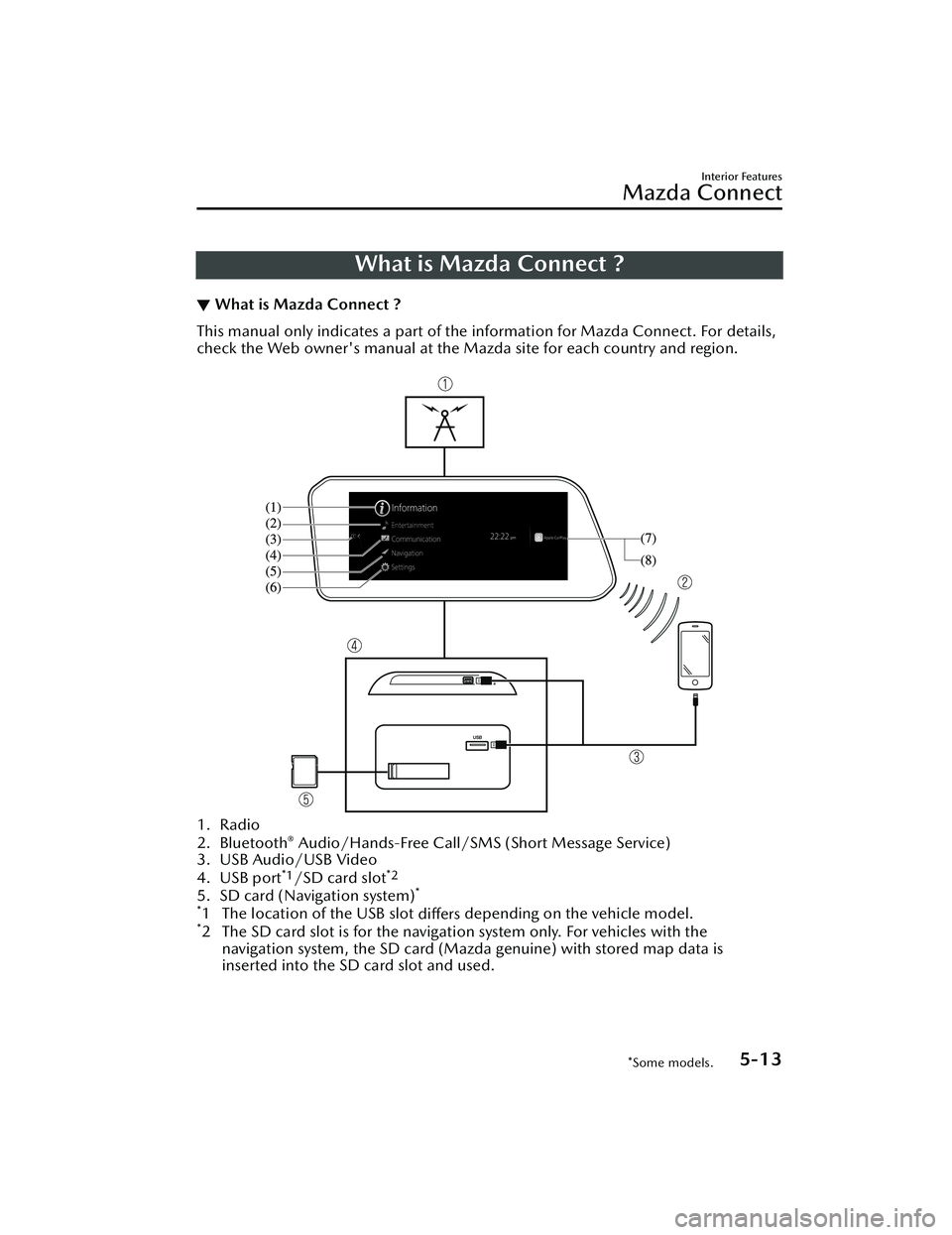
▼What is Mazda Connect ?
This manual only indicates a part of the information for Mazda Connect. For details,
check the Web owner's manual at the Mazda site for each country and region.
1. Radio
2. Bluetooth® Audio/Hands-Free Call/SMS
(Short Message Service)
3. USB Audio/USB Video
4. USB port
*1/SD card slot*2
5. SD card (Navigation system)*
*
1 The location of the USB slot differs depending on the vehicle model.*2 The SD card slot is for the navigati
on system only. For vehicles with the
navigation system, the SD card (Mazda genuine) with stored map data is
inserted into the SD card slot and used.
Interior Features
Mazda Connect
*Some models.5-13
CX-30_8HG6-EA-19I_Edition1_new 2019-6-13 18:45:11
Page 380 of 562
No. MenuExplanation
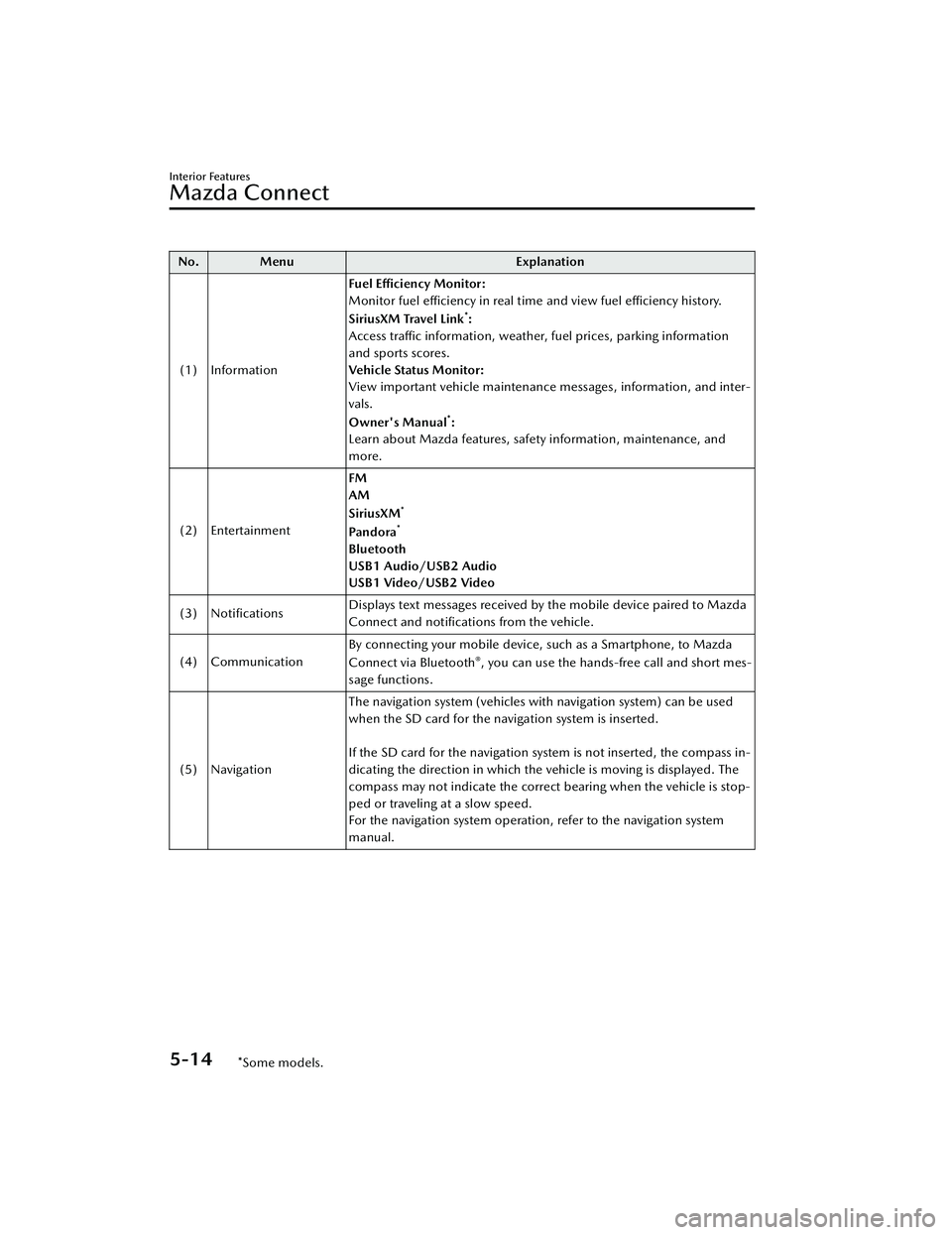
(1) Information Fuel Efficiency Monitor:
Monitor fuel efficiency in real time and view fuel efficiency history.
SiriusXM Travel Link
*:
Access traffic information, weather, fuel prices, parking information
and sports scores.
Vehicle Status Monitor:
View important vehicle maintenance messages, information, and inter-
vals.
Owner's Manual
*:
Learn about Mazda features, safety information, maintenance, and
more.
(2) Entertainment FM
AM
SiriusXM
*
Pa n d o ra*
Bluetooth
USB1 Audio/USB2 Audio
USB1 Video/USB2 Video
(3) Notifications Displays text messages received by the mobile device paired to Mazda
Connect and
notifications from the vehicle.
(4) Communication By connecting your mobile device, such as a Smartphone, to Mazda
Connect via Bluetooth
®, you can use the hands-free call and short mes-
sage functions.
(5) Navigation The navigation system (vehicles with navigation system) can be used
when the SD card for the navigation system is inserted.
If the SD card for the navigation system is not inserted, the compass in-
dicating the direction in which the vehicle is moving is displayed. The
compass may not indicate the correct bearing when the vehicle is stop-
ped or traveling at a slow speed.
For the navigation system operation, refer to the navigation system
manual.
Interior Features
Mazda Connect
5-14*Some models.
CX-30_8HG6-EA-19I_Edition1_new
2019-6-13 18:45:11