Seat MAZDA MODEL CX-30 2021 Owners Manual
[x] Cancel search | Manufacturer: MAZDA, Model Year: 2021, Model line: MODEL CX-30, Model: MAZDA MODEL CX-30 2021Pages: 594, PDF Size: 83.37 MB
Page 269 of 594

▼Setting the System
The MRCC system operates when all of the following conditions are met.
Vehicle speed is 30 km/h (
19 mph) to 145 km/h (90 mph)The MRCC is turned on.The brake pedal is not depressed.The parking brake is released (Electric Parking Brake (EPB) indicator light is turned
off).
There is no problem with the DSC.All the doors are closed.The driver's seat belt is fastened.The shift lever is in a position other than reverse (R) or neutral (N).The clutch pedal is not depressed.
Turning on the system
1. CANCEL switch
2. RES switch
3. MRCC switch
When the MRCC switch is pressed once, the MRCC system turns on, and the MRCC
standby indication (white) turns on and the vehicle speed and the distance between
the vehicles while in headway control can be set.
In addition, the MRCC system display indication is displayed on the
multi-information display and the active driving display at the same time.
NOTE
If the ignition is switched off while the MRCC system is operating, the system will be
operable when the ignition is switched ON the next time.
When Driving
i-ACTIVSENSE
4-123
CX-30_8JP5-EA-20K_Edition1_new 2020-7-22 15:50:09
Page 272 of 594
Changing the Set Vehicle Speed
(To accelerate/decelerate using the
RES switch)
When the RES switch is pressed up
(SET+), the vehicle accelerates and
when the RES switch is pressed down
(SET-), it decelerates.
Press and release immediately: 1
km/h (1 mph)
Press and hold: 10 km/h (5 mph)
(To increase speed using accelerator
pedal)
Depress the accelerator pedal and
press the RES switch up (SET+) or
down (SET-) at the desired speed. If
the switch is not operated, the system
returns to the set speed after you
release your foot from the accelerator
pedal.
NOTE
The warnings and brake control do
not operate while the accelerator
pedal is depressed.
Canceling the system
When the following operations are
performed, the MRCC system is
canceled, and the MRCC set indication
(green) switches to the MRCC standby
indication (white) at the same time.
The CANCEL switch is pressed.The brake pedal is depressed.The shift lever is in the reverse (R)
position.
Under the following conditions, the
MRCC cancel indication is displayed in
the multi-information display and a
single beep sound is heard.
The DSC has operated.
The Smart Brake Support (SBS) has
operated.
When traveling on a downslope for a
long period of time.
There is a problem with the system.The vehicle speed decreases to less
than 25 km (16 mph).
The shift lever is shifted to neutral
(N) for a certain period of time.
The clutch is depressed for a certain
period of time.
The engine stalls.The front radar sensor cannot detect
target objects (during rain, fog, snow
or other inclement weather
conditions, or when the radiator
grille is dirty).
The parking brake is applied.Any of the doors is opened.The driver's seat belt is unfastened.The operation frequency of the
braking by the MRCC control is high.
Resuming control
If the MRCC system is canceled, you
can resume control at the previously
set speed by pressing the RES switch
and after all of the operation
conditions have been met.
NOTE
If the set speed is not indicated in the
display, the control does not resume
even if the RES switch is pressed.
Tu r n i n g off the system
When the MRCC switch is pressed
while the MRCC is operating, the
MRCC turns off.
▼Shift-up/Shift-down Request
Display
The shift-up or shift-down request
display might be displayed while the
MRCC is operating. When this occurs,
shift gears because the gear position is
not appropriate.
When Driving
i-ACTIVSENSE
4-126
CX-30_8JP5-EA-20K_Edition1_new
2020-7-22 15:50:09
Page 278 of 594
▼Setting the System
The MRCC with Stop & Go function syst
em operates when all of the following
conditions are met.
Vehicle speed is 0 km/h (0 mph) to 145 km/h (90 mph)The MRCC with Stop & Go function is turned on.The brake pedal is not depressed.The parking brake is released (Electric Parking Brake (EPB) indicator light is turned
off).
There is no problem with the DSC.All the doors are closed.The driver's seat belt is fastened.The selector lever is in the drive (D) position or manual (M) position (manual
mode).
NOTE
In the following cases, the MRCC with Stop & Go function system is canceled
when the vehicle is traveling at 30 km/h (20 mph) or less and “Mazda Radar
Cruise Control Disabled Under 30 km/h” is displayed in the multi-information
display.
The Forward Sensing Camera (FSC) cannot detect target objects (There is
problem with the Forward Sensing Came ra (FSC) or windshield is dirty).
There is a problem with the stop hold control function.There is a problem with the Electric Parking Brake (EPB).It may not be possible to set the MRCC wi th Stop & Go function system directly
after starting the engine, while the DSC operation is being checked.
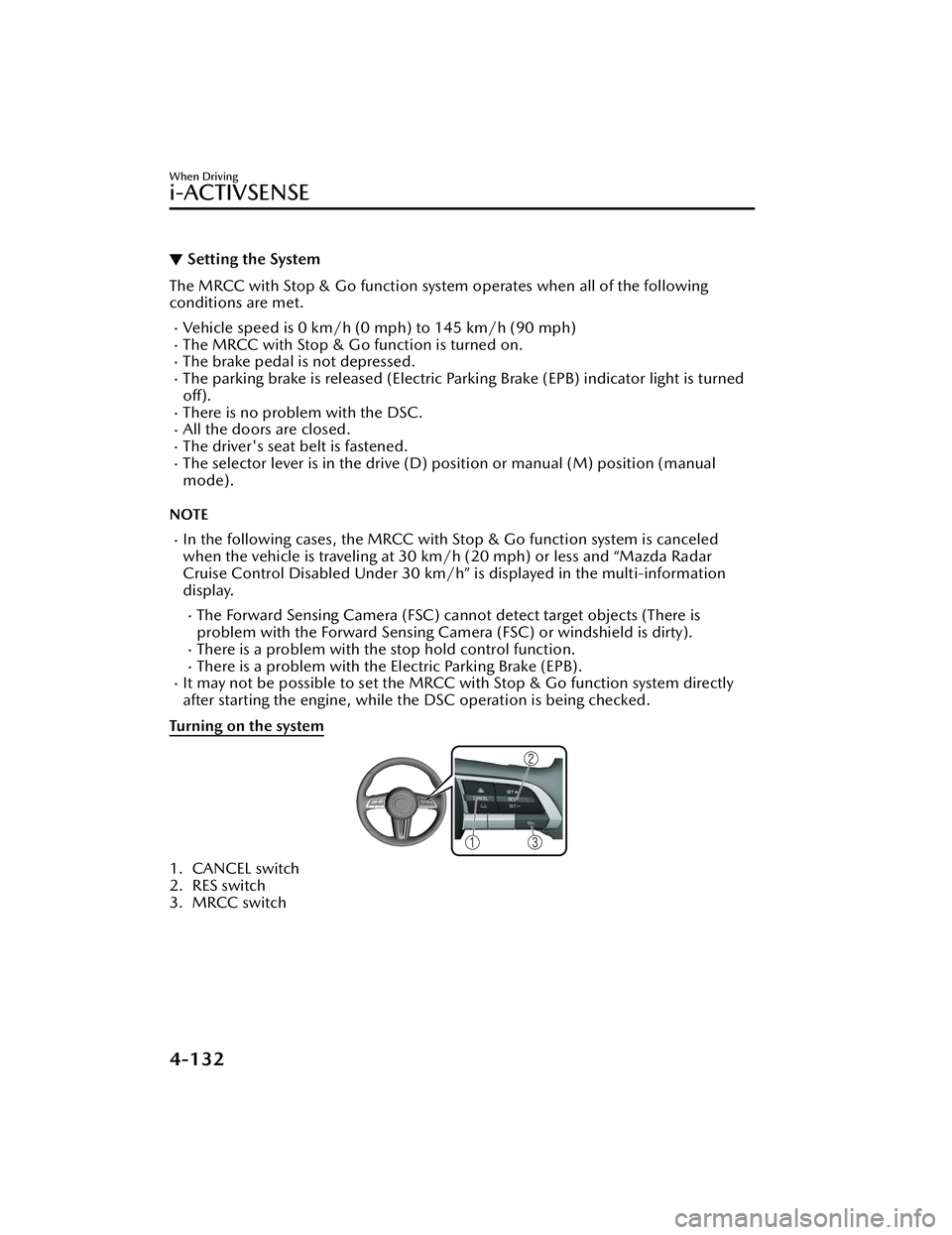
Turning on the system
1. CANCEL switch
2. RES switch
3. MRCC switch
When Driving
i-ACTIVSENSE
4-132
CX-30_8JP5-EA-20K_Edition1_new 2020-7-22 15:50:09
Page 282 of 594

The Smart Brake Support (SBS) has
operated.
When traveling on a downslope for a
long period of time.
There is a problem with the system.The parking brake is automatically
applied during stop hold control.
The front radar sensor cannot detect
target objects (during rain, fog, snow
or other inclement weather
conditions, or when the radiator
grille is dirty).
The parking brake is applied.Any of the doors is opened.The driver's seat belt is unfastened.The operation frequency of the
braking by the MRCC with Stop &
Go function control is high.
Resuming control
If the MRCC with Stop & Go function
system is canceled, you can resume
control at the previously set speed by
pressing the RES switch and after all of
the operation conditions have been
met.
NOTE
If the set speed is not indicated in the
display, the control does not resume
even if the RES switch is pressed.
Turning off the system
When the MRCC switch is pressed
while the MRCC is operating, the
MRCC turns off.
▼ Stop Hold Control
While in headway control using the
MRCC with Stop & Go function
system, your vehicle will stop when a
vehicle ahead stops. When the vehicle
is stopped and the stop hold control
operates, the MRCC with Stop & Go
function indicator light turns on.
NOTE
If the MRCC with Stop & Go
function system is canceled during
stop hold control, the vehicle is held
in its stopped position.
The parking brake is automatically
applied and the vehicle is held in its
stopped position when 10 minutes
have elapsed since the stop hold
control operated. At this time, the
MRCC with Stop & Go function
system is canceled.
The brake lights turn on during stop
hold control.
To resume driving
After the vehicle ahead starts moving
while your vehicle is stopped under
stop hold control, press the RES switch
or depress the accelerator pedal to
cancel the stop hold control and
resume driving.
When Driving
i-ACTIVSENSE
4-136
CX-30_8JP5-EA-20K_Edition1_new 2020-7-22 15:50:09
Page 286 of 594

The white (yellow) lane lines are
less visible because of dirt or paintflaking.
White (yellow) lane lines or
vehicles ahead are less visible
because of bad weather (rain, fog,
or snow).
The vehicle is driven on a
temporary lane or section with a
closed lane resulting from
construction where there might be
multiple white (yellow) lane lines,
or they are interrupted.
The camera picks up an obscure
line, such as a temporary line being
used for construction, or because
of shade, unmelted snow, or
grooves filled with water.
The road surface is wet and shiny
after rain, or there are puddles on
the road.
Heavy luggage is loaded in the
luggage compartment or on the
rear seat causing the vehicle to tilt.
A vehicle in front of your vehicle is
running near a white (yellow) lane
line making it less visible.
The windshield is dirty or foggy.The vehicle is driven through an
intersection, a junction, or a fork in
the road.
While white (yellow) lane lines
cannot be detected due to road or
weather conditions.
The surrounding brightness
suddenly changes such as when
entering or exiting a tunnel.
The illumination of the headlights
is weakened because of dirt or the
optical axis is deviated at night.
Back-light is reflected off the road
surface or the road surface is wet
and shiny after rain.
The shade of a guardrail parallel to
a white (yellow) lane line is cast on
the road.
The width of a lane is excessively
narrow or wide.
The road is excessively uneven.The vehicle is shaken after hitting a
road bump.
There are various road markings or
division lines (lane markings) of
various shapes near an
intersection.
The area in front of the camera is
soiled or an object that obstructs
the field of view is installed.
Exhaust gas from the vehicle in
front, sand, snow, and water vapor
rising from manholes and grating ,
and water splashed into the air.
The surroundings are dark such as
during the early evening or early
morning.
A vehicle ahead with a certain
taillight shape.
A vehicle ahead veers off course
from your vehicle's line of travel.
A vehicle ahead is driving
erratically.
The vehicle is driven on roads with
tight curves.
Headway control function
If a vehicle ahead is detected while
traveling at a constant speed, the
vehicle-ahead indication is displayed
and headway control is performed.
Steering assist function
When lane lines are detected, the
function assists the driver in keeping
the vehicle within the lane lines. If lane
lines are not detected, the function
provides the driver driving assistance in
keeping the vehicle along the motion
path with the vehicle ahead.
When Driving
i-ACTIVSENSE
4-140
CX-30_8JP5-EA-20K_Edition1_new 2020-7-22 15:50:09
Page 289 of 594

▼Setting the System
Operation conditions
Headway control function
The TJA operates when all of th
e following conditions are met.
(Automatic transmission vehicle)
The vehicle speed is about 0 km/h (0 mph) to 145 km/h (90 mph).The selector lever is in the D or M position (manual mode).(Manual transmission vehicle)
The vehicle speed is about 30 km/h (19 mph) to 145 km/h (90 mph).The shift lever is in a position other than the R or N position.The clutch pedal is not depressed.The TJA is operating.The headway control function of the Mazda Radar Cruise Control (MRCC) or
Mazda Radar Cruise Contro l with Stop & Go function (MRCC with Stop & Go
function) is set to operable (if it was set to inoperable, set it to operable using the
personalization function).
The brake pedal is not depressed.The parking brake is released (Electric Parking Brake (EPB) indicator light is turned
off).
There is no problem with the DSC.All the doors are closed.The driver's seat belt is fastened.
NOTE
(Automatic transmission vehicle)
Under the following conditions, the TJA cannot be used when the vehicle speed is
30 km/h (19 mph) or slower.
There is a problem with the stop hold control function.There is a problem with the Electric Parking Brake (EPB).The TJA may not launch directly after the engine starts.
Steering assist function
The steering assist function operates when all of the following conditions are met.
Your vehicle is moving and less than about 56 km/h (35 mph).White (yellow) lane lines on both sides are detected and you are driving near the
center of the lane, or your vehicle detects a vehicle ahead.
The steering wheel is not turned sharply.The turn signal lever is not operated.The headway control function is operating.
When Driving
i-ACTIVSENSE
4-143
CX-30_8JP5-EA-20K_Edition1_new 2020-7-22 15:50:09
Page 293 of 594

NOTE
The distance-between-vehicles differs depending on the vehicle speed, and the
slower the vehicle speed, the shorter the distance.
When the ignition is switched to ACC or OFF, the set distance-between-vehicles is
taken over automatically even when the engine is started again.
The function is temporarily canceled.
Headway control function
When the following operations are performed, the headway control function is
temporarily canceled and the TJA set indication (green) changes to the TJA standby
indication (white) at the same time.
The CANCEL switch is pressed one time.The brake pedal is depressed.(Automatic transmission vehicle)
The selector lever is in the P, N, or R position.
(Manual transmission vehicle)
The shift lever is in the R position.
In the following cases, the TJA cancel indica tion is displayed and a sound is activated
one time.
The DSC has operated.The Smart Brake Support (SBS) has operated.The vehicle is driven on a downslope for a long time.There is a problem with the system.The front radar sensor cannot detect target objects (during rain, fog , snow or other
inclement weather conditions, or when the radiator grille is dirty).
The parking brake is applied.Any of the doors is opened.The driver's seat belt is unfastened.The operation frequency of the braking by the TJA control is high.(Automatic transmission vehicle)
The parking brake is automatically applied during stop hold control.
(Manual transmission vehicle)
The vehicle speed decreases below 25 km/h (15 mph).The shift lever is in the neutral posi tion for a certain period of time.The clutch pedal is depressed for a certain period of time.The engine has stalled.
When Driving
i-ACTIVSENSE
4-147
CX-30_8JP5-EA-20K_Edition1_new 2020-7-22 15:50:09
Page 298 of 594

NOTE
The system may not operate normally
under the following conditions.
The white (yellow) lane lines are less
visible because of dirt or paintflaking.
White (yellow) lane lines are less
visible because of bad weather (rain,
fog, or snow).
The vehicle is driven on a temporary
lane or section with a closed lane
resulting from construction where
there might be multiple white
(yellow) lane lines, or they are
interrupted.
The camera picks up an obscure line,
such as a temporary line being used
for construction, or because of
shade, unmelted snow, or groovesfilled with water.
The surrounding brightness suddenly
changes such as when entering or
exiting a tunnel.
Back-light is reflected off the road
surface.
The road surface is wet and shiny
after rain, or there are puddles on
the road.
The width of a lane is excessively
narrow.
The vehicle is driven on roads with
tight curves.
Heavy luggage is loaded in the
luggage compartment or on the rear
seat causing the vehicle to tilt.
The vehicle is driven through a fork in
the road or a junction.
The shade of a guardrail parallel to a
white (yellow) lane line is cast on the
road.
The illumination of the headlights is
weakened because of dirt or the
optical axis is deviated at night.
The road is excessively uneven.The vehicle is shaken after hitting a
road bump.
A vehicle in front of your vehicle is
running near a white (yellow) lane
line making it less visible.
The windshield is dirty or foggy.Strong light is directed from the front
of the vehicle (such as sunlight, or
headlights (high-beam) of
on-coming vehicles).
▼System Operation
When the ignition is switched ON, the
i-ACTIVSENSE status symbol (warning/
risk avoidance support system) (white)
turns on and the system goes on
standby.
NOTE
If the i-ACTIVSENSE status symbol
(warning/risk avoidance support
system) (white) does not turn on, the
system is canceled using the
i-ACTIVSENSE OFF switch or the
personalization feature.
Operation conditions
When all of the following conditions
are met, the i-ACTIVSENSE status
symbol (warning/risk avoidance
support system) on the
multi-information display changes
from white to green and the system
becomes operational.
The vehicle speed is about 64 km/h
(40 mph) or faster.
The system detects white (yellow)
lane lines.
When Driving
i-ACTIVSENSE
4-152
CX-30_8JP5-EA-20K_Edition1_new
2020-7-22 15:50:09
Page 305 of 594

The vehicle speed is between
about 2 to 8 km/h (2 to 4 mph).
The SBS-R is not turned off.The DSC is not malfunctioning.In the following cases, the rear
ultrasonic sensor and rear camera
cannot detect obstructions and the
SBS-R may not operate.
The height of the obstruction is
low such as low walls or trucks
with low loading platforms.
The height of the obstruction is
high such as trucks with high
loading platforms.
The obstruction is small.The obstruction is thin such as a
signpost.
The surface of the obstruction is
not pointed vertically relative to
the vehicle.
The obstruction is soft such as a
hanging curtain or snow stuck to a
vehicle.
The obstruction is shaped
irregularly.
The obstruction is extremely close.In the following cases, the rear
ultrasonic sensor and rear camera
cannot detect obstructions correctly
and the SBS-R may not operate.
Something is stuck on the bumper
near a rear ultrasonic sensor.
The brake or accelerator pedal is
operated.
There is another obstruction near
one obstruction.
During inclement weather such as
rain, fog and snow.
High or low humidity.High or low temperaturesStrong winds.The path of travel is not
flat.Heavy luggage is loaded in the
luggage compartment or on the
rear seat.
Objects such as a wireless antenna,
fog light, or illuminated license
plate is installed near a rear
ultrasonic sensor.
The orientation of a rear ultrasonic
sensor has deviated for reasons
such as a collision.
The vehicle is affected by other
sound waves such as the horn,
engine noise, ultrasonic sensor of
another vehicle.
In the following cases, a rear
ultrasonic sensor and rear camera
may detect something as a target
obstruction which could cause the
SBS-R system to operate.
There is a steep slope or bump.There are wheel blocks or a
curbstone.
There are hanging curtains, gate
poles such as at toll gates and
railroad crossing.
When traveling near objects such
as foliage, barriers, vehicles, walls,
and fences along a road.
When driving off-road in areas
where there is grass and forage.
When passing through low gates,
narrow gates, car washing
machines, and tunnels.
A trailer is connected.An exterior accessory such as a
bicycle carrier is installed around a
rear ultrasonic sensor.
(Manual transmission)
If the vehicle is stopped by the SBS-R
operation and the clutch pedal is not
depressed, the engine stops.
When the system operates, the user
is notified by the multi-information
display.
The collision warning beep sounds
intermittently while the SBS-R brake
is operating.
When Driving
i-ACTIVSENSE
4-159
CX-30_8JP5-EA-20K_Edition1_new 2020-7-22 15:50:09
Page 349 of 594

NOTE
When the vehicle is driven on roads
in which there is an elevated road on
one side, the front radar sensor
function may be restricted
temporarily.
Under the following conditions, the
front radar sensor may not be able to
detect vehicles ahead or obstructions
correctly and each system may not
operate normally.
The rear surface of a vehicle ahead
does not reflect radio waves
effectively, such as an unloaded
trailer or an automobile with a
loading platform covered by a soft
top, vehicles with a hard plastic
tailgate, and round-shaped
vehicles.
Vehicles ahead with low vehicle
height and thus less area for
reflecting radio waves.
Visibility is reduced due to a
vehicle ahead casting off water,
snow, or sand from its tires and
onto your windshield.
The luggage compartment is
loaded with heavy objects or the
rear passenger seats are occupied.
Ice, snow, or soiling is on the front
surface of the front emblem.
During inclement weather such as
rain, snow, or sand storms.
When driving near facilities or
objects emitting strong radio
waves.
Under the following conditions, the
front radar sensor may not be able to
detect vehicles ahead or
obstructions.
The beginning and end of a curve.Roads with continuous curves.Narrow lane roads due to road
construction or lane closures.
The vehicle ahead enters the radar
sensor's blind spot.
The vehicle ahead is running
abnormally due to accident or
vehicle damage.
Roads with repeated up and down
slopes
Driving on poor roads or unpaved
roads.
The distance between your vehicle
and the vehicle ahead is extremely
short.
A vehicle suddenly comes close,
such as by cutting into your lane.
To prevent incorrect operation of the
system, use tires of the same
specified size, manufacturer, brand,
and tread pattern on all four wheels.
In addition, do not use tires with significantly different wear patterns
or tire pressures on the same vehicle
(Including the temporary spare tire).
If the battery power is weak, the
system may not operate correctly.
When driving on roads with little traffic and few vehicles ahead or
obstructions for the front radar
sensor to detect, “Safety and Driver
Support Systems Temporarily
Disabled. Front Radar Obscured.
Drive Safely” may be temporarily
displayed, however, this does not
indicate a problem.
The radar sensors are regulated by
the relevant radio wave laws of the
country in which the vehicle is
driven. If the vehicle is driven
abroad, authorization from the
country in which the vehicle is driven
may be required.
When Driving
i-ACTIVSENSE
4-203
CX-30_8JP5-EA-20K_Edition1_new 2020-7-22 15:50:09