Seat MAZDA MODEL CX-30 2021 Manual Online
[x] Cancel search | Manufacturer: MAZDA, Model Year: 2021, Model line: MODEL CX-30, Model: MAZDA MODEL CX-30 2021Pages: 594, PDF Size: 83.37 MB
Page 152 of 594
After starting a cold engine, the
engine speed increases and a
whining sound from the engine
compartment can be heard.
This is for improved exhaust gaspurification and does not indicate
any parts defect.
Engine-starting is controlled by the
spark ignition system.
This system meets all Canadian
Interference-Causing Equipment
Standard requirements regulating the
impulse electrical field strength of
radio noise.
1. Make sure you are carrying the key.
2. Occupants should fasten their seat belts.
3. Make sure the parking brake is on.
4. Continue to depress the brake
pedal firmly until the engine has
completely started.
5. (Manual transmission)
Continue to depress the clutch
pedal
firmly until the engine has
completely started.
(Automatic transmission)
Put the vehicle in park (P). If you
must restart the engine while the
vehicle is moving, shift into neutral
(N).
NOTE
(Manual transmission)
The starter will not operate if the
clutch pedal is not depressed
sufficiently.
(Automatic transmission)
The starter will not operate if the
selector lever is not in P or N
position and the brake pedal is
not depressed sufficiently.
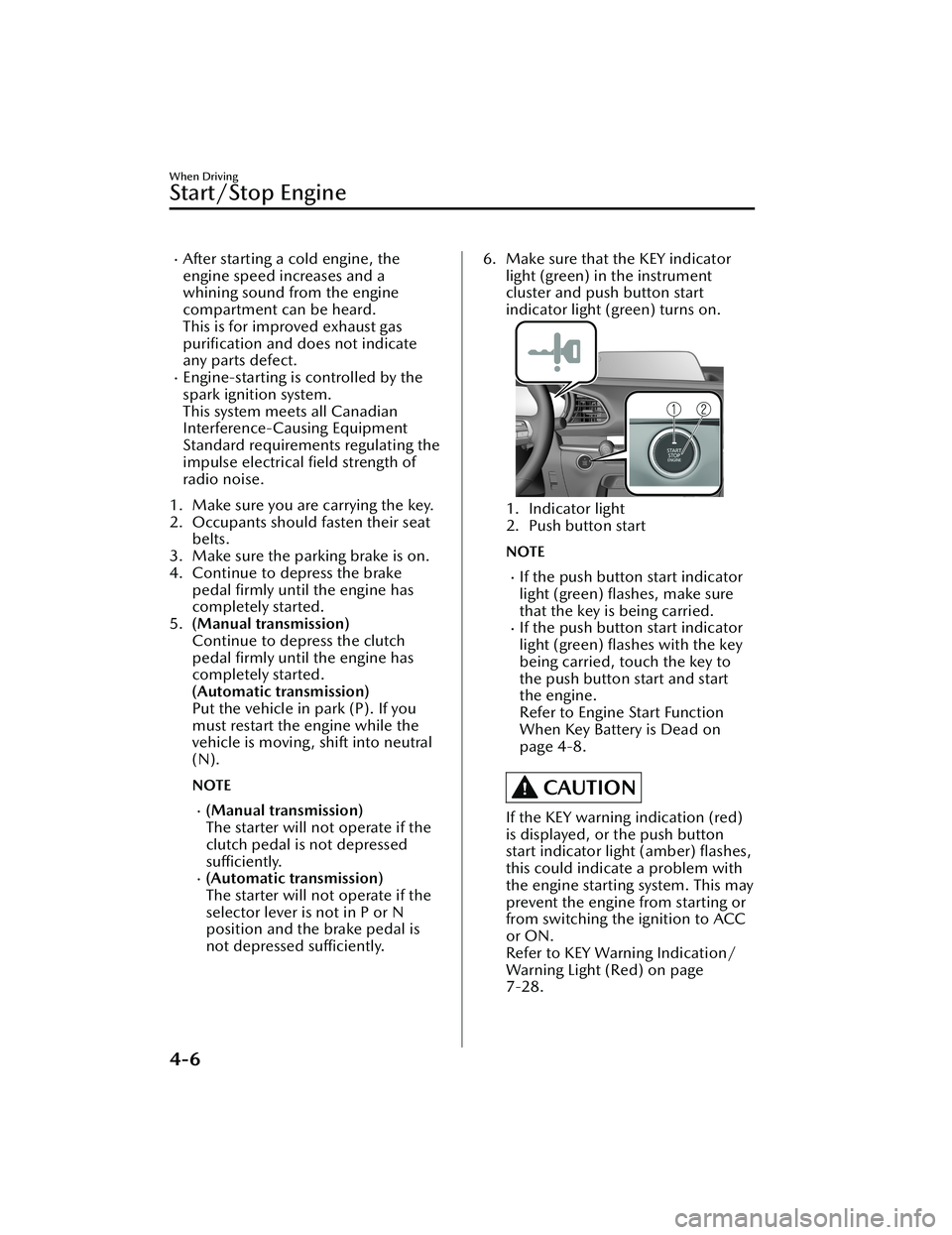
6. Make sure that the KEY indicator
light (green) in the instrument
cluster and push button start
indicator light (green) turns on.
1. Indicator light
2. Push button start
NOTE
If the push button start indicator
light (green) flashes, make sure
that the key is being carried.
If the push button start indicator
light (green) flashes with the key
being carried, touch the key to
the push button start and start
the engine.
Refer to Engine Start Function
When Key Battery is Dead on
page 4-8.
CAUTION
If the KEY warning indication (red)
is displayed, or the push button
start indicator light (amber) flashes,
this could indicate a problem with
the engine starting system. This may
prevent the engine from starting or
from switching the ignition to ACC
or ON.
Refer to KEY Warning Indication/
Warning Light (Red) on page
7-28.
When Driving
Start/Stop Engine
4-6
CX-30_8JP5-EA-20K_Edition1_new 2020-7-22 15:50:09
Page 169 of 594

SignalWarning Refer to
Air Bag/Front Seat Belt Pretensioner System Warning Indication/
Warning Light*17-27
Tire Pressure Monitoring System (TPMS) Warning Indication/Warning
Light*1
Flashing
7-28
Tu r n s o n 7-32
(Red) KEY Warning Indication/Warning Light
*17-28
(Amber)
*High Beam Control System (HBC) Warning Indication/Warning
Light*17-29
i-ACTIVSENSE Warning Indication/Warning Light*17-29
Exterior Light Warning Indication/Warning Light*17-29
Low Fuel Warning Indication/Warning Light 7-30
Check Fuel Cap Warning Indication/Warning Light*17-30
Engine Oil Level Warning Indication/Warning Light*17-30
Seat Belt Warning Indication/Warning Light (Front seat)7-31
(Red)Seat Belt Warning Light (Rear seat)
7-31
*Low Washer Fluid Level Warning Indication/Warning Light7-31
Door-Ajar Warning Indication
7-32
Liftgate-Ajar Warning Indication 7-32
When Driving
Instrument Cluster and Display
*Some models.4-23
CX-30_8JP5-EA-20K_Edition1_new 2020-7-22 15:50:09
Page 170 of 594

SignalWarning Refer to
Door-Ajar Warning Light 7-32
*1 The light turns on when the ignition is switched on for an operation check, and turns off a few
seconds later or when the engine is started. If th e light does not turn on or remains turned on, have
the vehicle inspected at an Authorized Mazda Dealer.
▼ Indication/Indicator Lights
These lights turn on or flash to notify th
e user of the system operation status or a
system malfunction.
Signal Indicator Refer to
(Green)Seat Belt Indicator Light (Rear seat)
2-25
*Front Passenger Air Bag Deactivation Indicator Light2-67
Security Indicator LightImmobilizer
System3-46
Theft-Deterrent System
3-47
Malfunction 7-29
(Green) KEY Indicator Light
4-5
Wrench Indication/Indicator Light*14-27
*Shift Position Indication4-36
Lights-On Indicator Light
4-44
When Driving
Instrument Cluster and Display
4-24*Some models.
CX-30_8JP5-EA-20K_Edition1_new 2020-7-22 15:50:09
Page 195 of 594

Manual type
When adjusting the illumination angle
of the headlights, refer to the Settings
section in the Mazda Connect
Owner's Manual.
Select the proper headlight angle from
the following chart.
Front seatRearseat LoadIllumi-
nation angle
(num- ber)
Driver Passenger
× ――― 0
×× ――0
××× ―1
× × ××2
× ―― ×3.5
×: Yes
―: No
▼ Daytime Running Lights
Some countries require moving
vehicles to have their lights on
(daytime running lights) during the
daytime.
The daytime running lights turn on
automatically.
NOTE
(Except Canada)
The daytime running lights can be
deactivated.
Refer to the Settings section in the
Mazda Connect Owner's Manual.
Turn and Lane-Change
Signals
▼Turn and Lane-Change Signals
The ignition must be switched ON to
use the turn and lane-change signals.
▼Tu r n S i g n a l s
Move the signal lever down (for a left
turn) or up (for a right turn) to the stop
position. The signal will self-cancel
after the turn is completed.
If the indicator light continues to flash
after a turn, manually return the lever
to its original position.
1. Right turn
2. Right lane change
3. OFF
4. Left lane change
5. Left turn
The turn signal indicators in the
instrument cluster flash according to
the operation of the turn signal lever to
show which signal is working.
When Driving
Switches and Controls
4-49
CX-30_8JP5-EA-20K_Edition1_new
2020-7-22 15:50:09
Page 212 of 594

NOTE
To release the parking brake when the
ignition is switched OFF, it is necessary
to cancel the parking brake auto
operation. For details, refer to
Canceling the parking brake automatic
operation.
Releasing the parking brake
automatically
If the accelerator pedal is depressed
with the parking brake applied and all
of the following conditions met, the
parking brake is released automatically.
When the parking brake is released,
the EPB indicator light in the
instrument cluster and the EPB switch
indicator light turn off.
The engine is running.The driver's door is closed.The driver's seat belt is fastened.(Manual transmission vehicle)
The shift lever is in a position other
than neutral.
The clutch pedal is depressed
halfway.
(Automatic transmission vehicle)
The selector lever is in the D, M, or R
position.
NOTE
If something such as the driver's foot
contacts the accelerator pedal with the
engine running and the parking brake
applied, the parking brake might be
released automatically. If you do not
intend to start driving the vehicle
immediately, shift the shift lever to the
neutral position for a manual
transmission, or shift the selector lever
to the P or N position for an automatic
transmission.
Canceling the parking brake
automatic operation
The parking brake automatic operation
can be canceled by doing any of the
following after switching the ignition
from ON to OFF.
Auto operation cancel method 1
1. Switch the ignition ON.
2. Release the parking brake manually.
3. Turn off the AUTOHOLD.
4. Press the EPB switch continuouslyfor 2 seconds or longer (until a
sound is activated).
5. Release the EPB switch and switch the ignition OFF within 5 seconds
after the sound was activated.
After the auto operation is
canceled, a sound is activated one
time, and the EPB switch indicator
light switches from illumination to
flashing, and then turns off after 3
seconds.
Auto operation cancel method 2
1. Switch the ignition ON.
2. Release the parking brake manually.
3. Turn off the AUTOHOLD.
4. Switch the ignition OFF with the EPB switch pressed while the brake
pedal is not depressed.
When the auto operation is
canceled, a sound is activated one
time, and the EPB switch indicator
light goes from normal flashing to
faster flashing, and then turns off
after 3 seconds.
When Driving
Brake
4-66
CX-30_8JP5-EA-20K_Edition1_new 2020-7-22 15:50:09
Page 217 of 594

▼To Turn On AUTOHOLD System
Press the AUTOHOLD switch and
when the AUTOHOLD standby
indicator light turns on, the
AUTOHOLD function turns on.
1. AUTOHOLD standby indicator light
NOTE
When all of the following conditions
are met, the AUTOHOLD standby
indicator light turns on when the
AUTOHOLD switch is pressed and the
AUTOHOLD function turns on.
The ignition is switched ON (engine
is running).
The driver's seat belt is fastened.The driver's door is closed.There is no problem with the
AUTOHOLD function.
To operate AUTOHOLD and hold the
brakes
1. Depress the brake pedal and bring the vehicle to a complete stop.
2. The AUTOHOLD active indicator light in the instrument cluster turns
on and the brakes are held.
3. The vehicle is held in its stoppedposition even with the brake pedal
released.
NOTE
When all of the following conditions
are met, the AUTOHOLD operates and
the brakes are held.
The ignition is switched ON (engine
is running).
The vehicle is stopped.The brake pedal is being depressed.The AUTOHOLD active indicator
light turns on.
The accelerator pedal is not
depressed.
The driver's seat belt is fastened.The driver's door is closed.There is no problem with the
AUTOHOLD function.
The parking brake is released.There is no problem with the Electric
Parking Brake (EPB) function.
(Automatic transmission vehicle)
The selector lever is in a position
other than R position or the vehicle
tilts forward with the selector lever in
the R position.
To release AUTOHOLD and start
driving the vehicle
If you try to resume driving the vehicle,
the brakes will be released
automatically and the AUTOHOLD
active indicator light turns off.
NOTE
If the Electric Parking Brake (EPB)
switch is pulled while the
AUTOHOLD is operating, the
parking brake is applied and the
AUTOHOLD is released. In addition,
if the parking brake is released under
this condition, the AUTOHOLD
operates to hold the brakes.
When Driving
Brake
4-71
CX-30_8JP5-EA-20K_Edition1_new 2020-7-22 15:50:09
Page 218 of 594

Under the following conditions, the
parking brake is automatically
applied and the AUTOHOLD is
released. The AUTOHOLD is
re-enabled when the conditions
before the AUTOHOLD is released
are restored.
The driver’s seat belt is unfastened.The driver’s door is opened.When about 10 minutes or longer
have passed since the AUTOHOLD
operation started, the parking brake
is automatically applied. Because the
AUTOHOLD is restored when
releasing the parking brake, the hold
on the brakes by AUTOHOLD
function resumes.
(Manual transmission vehicle)
When starting to drive the vehicle
forward or in reverse on a down
slope, depress the clutch pedal and
shift the shift lever to the appropriate
position for driving in the desired
direction, and then depress the
accelerator pedal to release the
AUTOHOLD.
The AUTOHOLD can be canceled
forcibly by fully depressing the
accelerator pedal for 1 second or
longer while the AUTOHOLD is
operating. Forcibly cancel the
AUTOHOLD only when the
AUTOHOLD cannot be canceled due
to a system malfunction or it is
necessary to cancel the AUTOHOLD
in an emergency.
▼To Turn Off AUTOHOLD System
Depress the brake pedal and press the
AUTOHOLD switch. The AUTOHOLD
is turned off and the AUTOHOLD
standby indicator light turns off.
1. AUTOHOLD standby indicator light
NOTE
When the brakes are not held such
as while driving the vehicle, the
AUTOHOLD can be turned off only
by pressing the AUTOHOLD switch.
If the AUTOHOLD switch is pressed
without depressing the brake pedal
while AUTOHOLD is operating
(AUTOHOLD active indicator light in
instrument cluster is turned on), the
message “Depress Brake Pedal and
Operate Switch to Release” is
indicated on the multi-information
display to notify the driver to depress
the brake pedal.
If any of the following conditions
occurs while the AUTOHOLD
function is operating (AUTOHOLD
active indicator light is turned on),
the parking brake is applied
automatically and the AUTOHOLD
function turns off. For the Electric
Parking Brake (EPB) operation, refer
to the Electric Parking Brake (EPB) on
page 4-64.
The ignition is switched OFF.
When Driving
Brake
4-72
CX-30_8JP5-EA-20K_Edition1_new
2020-7-22 15:50:09
Page 238 of 594
When there is insufficient darkness
such as at dawn or dusk.
When the luggage compartment is
loaded with heavy objects or the rear
passenger seats are occupied.
When visibility is reduced due to a
vehicle in front of you spraying water
from its tires onto your windshield.
▼To Operate the System
The HBC operates to switch the
headlights automatically between high
and low beams after the ignition is
switched ON and the headlight switch
is in the AUTO and low beam position.
The HBC determines that it is dark
based on the brightness of the
surrounding area. At the same time,
the HBC indicator light (green) in the
instrument cluster illuminates.
NOTE
Operation of the HB
C function can be
disabled.
Refer to the Settings section in the
Mazda Connect Owner's Manual.
▼ Manual Switching
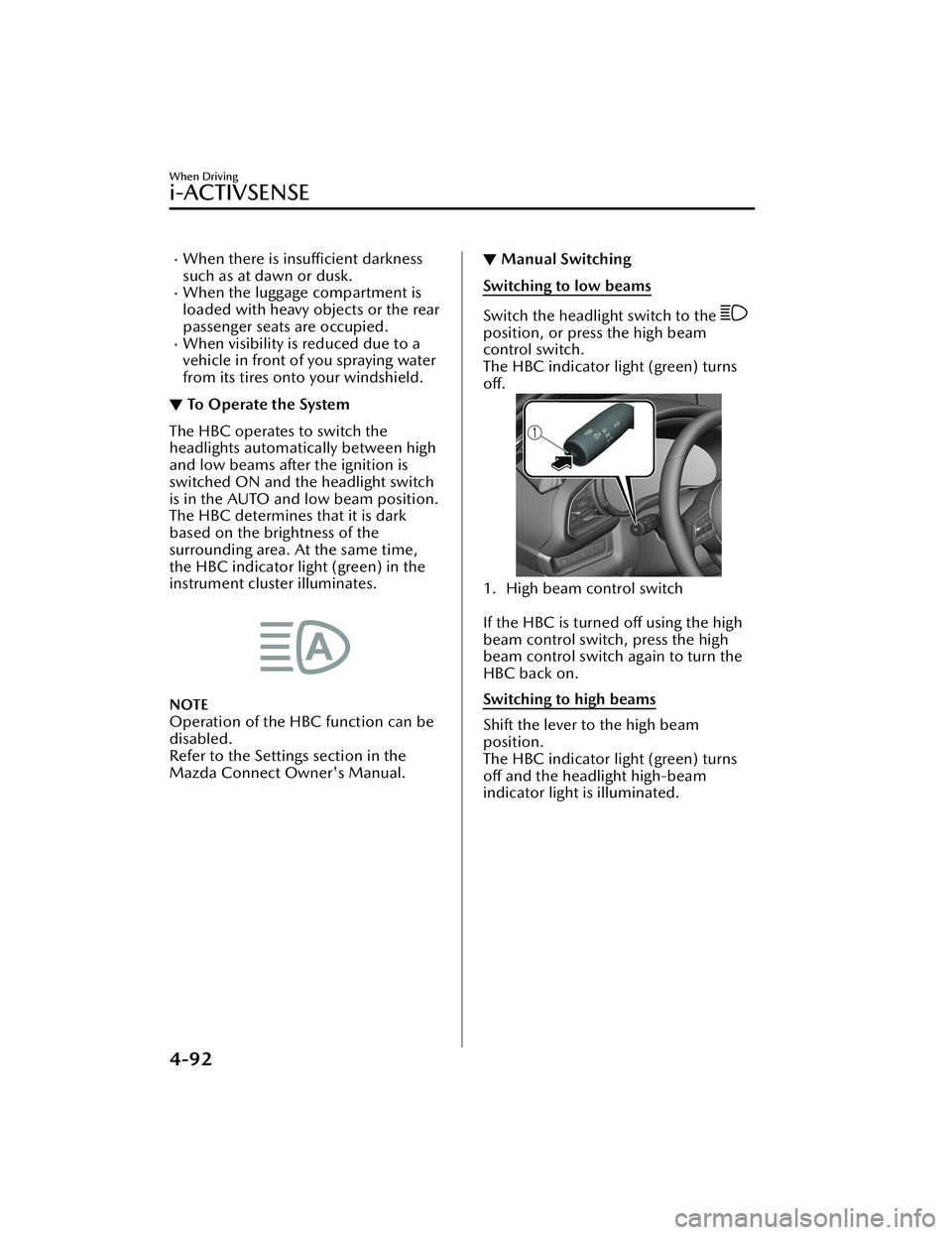
Switching to low beams
Switch the headlight switch to the
position, or press the high beam
control switch.
The HBC indicator light (green) turns
off.
1. High beam control switch
If the HBC is turned off using the high
beam control switch, press the high
beam control switch again to turn the
HBC back on.
Switching to high beams
Shift the lever to the high beam
position.
The HBC indicator light (green) turns
off and the headlight high-beam
indicator light is illuminated.
When Driving
i-ACTIVSENSE
4-92
CX-30_8JP5-EA-20K_Edition1_new
2020-7-22 15:50:09
Page 240 of 594

The surrounding brightness suddenly
changes such as when entering or
exiting a tunnel.
Back-light is reflected off the road
surface.
The road surface is wet and shiny
after rain, or there are puddles on
the road.
The width of a lane is excessively
narrow.
The vehicle is driven on roads with
tight curves.
Heavy luggage is loaded in the
luggage compartment or on the rear
seat causing the vehicle to tilt.
The vehicle is driven through a fork in
the road or a junction.
The shade of a guardrail parallel to a
white (yellow) lane line is cast on the
road.
The illumination of the headlights is
weakened because of dirt or the
optical axis is deviated at night.
The road is excessively uneven.The vehicle is shaken after hitting a
road bump.
A vehicle in front of your vehicle is
running near a white (yellow) lane
line making it less visible.
The windshield is dirty or foggy.Strong light is directed from the front
of the vehicle (such as sunlight, or
headlights (high-beam) of
on-coming vehicles).
The vehicle is driven through an
intersection or a roundabout.
▼When the System Operates
When the ignition is switched ON, the
i-ACTIVSENSE status symbol (warning/
risk avoidance support system) (white)
turns on and the system goes on
standby.
NOTE
If the i-ACTIVSENSE status symbol
(warning/risk avoidance support
system) (white) does not turn on, the
system is canceled using the
i-ACTIVSENSE OFF switch or the
personalization feature.
Operation conditions
When all of the following conditions
are met, the i-ACTIVSENSE status
symbol (warning/risk avoidance
support system) on the
multi-information display changes
from white to green and the system
becomes operational.
The ignition is switched ON.The vehicle speed is about 64 km/h
(40 mph) or faster.
The system detects white (yellow)
lane lines.
NOTE
When the system does not detect a
white (yellow) lane line on one side
only, the system does not operate on
the side that is not being detected.
When Driving
i-ACTIVSENSE
4-94
CX-30_8JP5-EA-20K_Edition1_new
2020-7-22 15:50:09
Page 249 of 594

An object placed on the dashboard is reflected in the windshield and picked up
by the camera.
Heavy luggage is loaded in the luggage compartment or on the rear seat and the
vehicle is tilted.
The tire pressures are not adjusted to the specified pressure.Tires other than standard tires are equipped.The vehicle is driven on the ramp and surrounding area to or from a rest area or
a tollgate on a highway.
When surrounding brightness suddenly changes such as when entering or exiting
a tunnel.
The illumination of the headlights is weak ened because of dirt or the optical axis
is deviated.
The windshield is dirty or foggy.The windshield and camera are fogged (water droplets).Strong light is directed at the front of the vehicle (such as backlight or high-beam
headlights of on-coming vehicles).
The vehicle is making a sharp turn.Strong light reflects off the road.A traffic sign is in a position which makes it difficult to reflect the light from the
vehicle's headlights, such as when the vehi cle is driven at night or in a tunnel.
The vehicle is driven under weather conditions such as rain, fog, or snow.The stored map data for the navigation system is not current.A traffic sign is obscured by mud or snow.A traffic sign is concealed by trees or a vehicle.A traffic sign is partially shaded.A traffic sign is bent or warped.A traffic sign is too low or too high.A traffic sign is too bright or too dark (including electronic traffic signs).A traffic sign is too big or too small.There is an object similar to the traffic sign being read (such as another traffic
sign or other signs resembling it).
The TSR can be set to invisible on the active driving display.
Refer to the Settings section in the Mazda Connect Owner's Manual.
▼Traffic Sign Display Indication
The following traffic signs are displayed
on the active driving display/
instrument cluster.
Speed limit signs
Do not enter signs
Stop signs
NOTE
Speed limit signs
When the vehicle speed is about 1
km/h (0.6 mph) or faster, the speed
limit sign is displayed when any one
of the following co
nditions are met.
When Driving
i-ACTIVSENSE
4-103
CX-30_8JP5-EA-20K_Edition1_new 2020-7-22 15:50:09