mirror MAZDA MODEL CX-5 2017 (in English) User Guide
[x] Cancel search | Manufacturer: MAZDA, Model Year: 2017, Model line: MODEL CX-5, Model: MAZDA MODEL CX-5 2017Pages: 664, PDF Size: 11.73 MB
Page 172 of 664

4–28
When Driving
Instrument Cluster and Display
*Some models.
Active Driving Display *
Dust-proof sheet
Display
Optical
receiver
Windshield Type
Auto Flip-up Type
Combiner
Optical receiver
Mirror
WARNING
Always adjust the display brightness and position with the vehicle stopped:
Adjusting the display brightness and position while driving the vehicle is dangerous as
doing so could distract your attention from the road ahead and lead to an accident.
CX-5_8FN1-EA-16L_Edition1.indb 282016/12/12 10:05:46
Page 208 of 664
4–64
When Driving
Switches and Controls
*Some models.
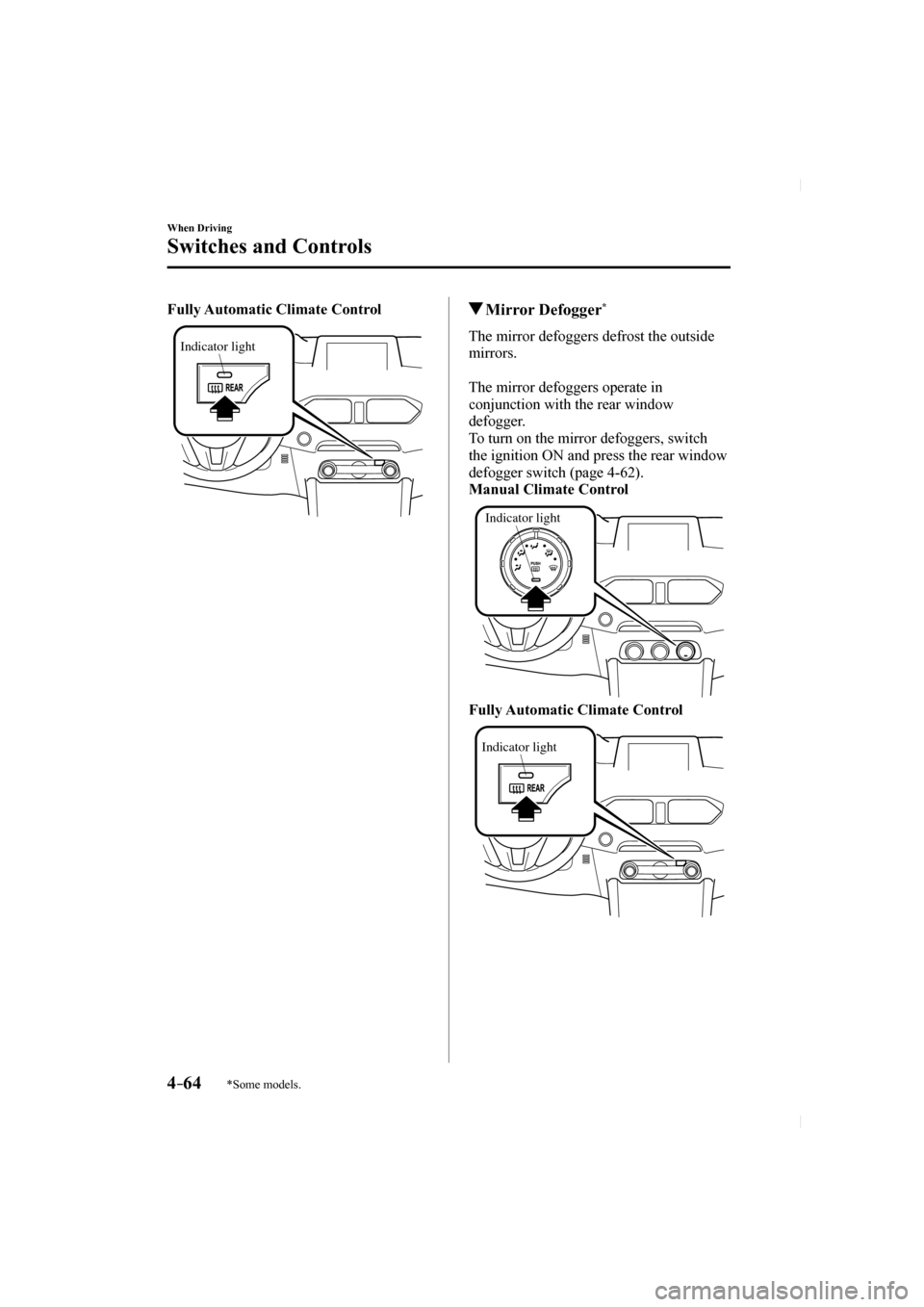
Fully Automatic Climate Control
Indicator light
Mirror Defogger *
The mirror defoggers defrost the outside
mirrors.
The mirror defoggers operate in
conjunction with the rear window
defogger.
To turn on the mirror defoggers, switch
the ignition ON and press the rear window
defogger switch (page 4-62 ).
Manual Climate Control
Indicator light
Fully Automatic Climate Control
Indicator light
CX-5_8FN1-EA-16L_Edition1.indb 642016/12/12 10:05:58
Page 210 of 664

4–66
When Driving
Switches and Controls
*Some models.
HomeLink Wireless
Control System
*
NOTE
HomeLink and HomeLink house icon
are registered trademarks of Gentex
Corporation.
The HomeLink system replaces up to
3 hand-held transmitters with a single
built-in component in the auto-dimming
mirror. Pressing the HomeLink button on
the auto-dimming mirror activates garage
doors, gates and other devices surrounding
your home.
HomeLink button
Indicator light
WARNING
Do not use the HomeLink system with
any garage door opener that lacks the
safety stop and reverse feature: Using the HomeLink system with any
garage door opener that lacks the
safety stop and reverse feature as
required by federal safety standards
is dangerous. (This includes garage
doors manufactured before April 1,
1982.)
Using these garage door openers can
increase the risk of serious injury or
death. For further information, contact
HomeLink at 1-800-355-3515 or www.
homelink.com or an Authorized Mazda
Dealer.
Always check the areas surrounding
garage doors and gates for people
or obstructions before programming
or during operation of the HomeLink
system: Programming or operating the
HomeLink system without verifying
the safety of areas surrounding garage
doors and gates is dangerous and
could result in an unexpected accident
and serious injury if someone were to
be hit.
NOTE
The programming will not be erased even
if the battery is disconnected.
CX-5_8FN1-EA-16L_Edition1.indb 662016/12/12 10:05:59
Page 213 of 664

4–69
When Driving
Switches and Controls
Gate operator/Canadian Programming
Canadian radio-frequency laws require
transmitter signals to “time-out” (or quit)
after several seconds of transmission
— which may not be long enough for
HomeLink to pick up the signal during
programming. Similar to this Canadian
law, some U.S. gate operators are designed
to “time-out” in the same manner.
If you live in Canada or you are having
diffi culties programming a gate operator
by using the “Programming” procedures
(regardless of where you live), replace
“Programming HomeLink” step 3 with
the following:
NOTE
If programming a garage door opener or
gate operator, it is advised to unplug the
device during the “cycling” process to
prevent possible overheating.
Continue to press and hold the HomeLink
button while you press and release
— every two seconds (“cycle”) your
hand-held transmitter until the frequency
signal has successfully been accepted by
HomeLink. (The indicator light will fl ash
slowly and then rapidly.)
Proceed with “Programming” step 4 to
complete.
Operating the HomeLink System
Press the programmed HomeLink button
to operate a programmed device. The
code will continue being transmitted for a
maximum of 20 seconds.
Reprogramming the HomeLink system
To program a device to HomeLink using
a HomeLink button previously trained,
follow these steps:
1. Press and hold the desired HomeLink
button. DO NOT release the button.
2. The indicator light will begin to fl ash
after 20 seconds. Without releasing
the HomeLink button, proceed with
“Programming” - step 1.
Erasing Programmed HomeLink Buttons
To erase the existing programming from
all three operating channels, press and
hold the two outside buttons (
, ) on
the auto-dimming mirror until the
HomeLink indicator light begins to fl ash
after approximately 10 seconds.
Verify that the programming has been
erased when you resell the vehicle.
CX-5_8FN1-EA-16L_Edition1.indb 692016/12/12 10:05:59
Page 237 of 664
 User Guide 4–93
When Driving
i-ACTIVSENSE
Pre-Crash Safety Technology
Pre-crash safety technology is designed to assist the driver in averting\
collisions or reduce
their severity in situa")
4–93
When Driving
i-ACTIVSENSE
Pre-Crash Safety Technology
Pre-crash safety technology is designed to assist the driver in averting\
collisions or reduce
their severity in situations where they cannot be avoided.
Collision damage reduction in low vehicle speed range
Forward driving
Smart City Brake Support (SCBS) ........................................................................\
........... 4-148
Collision damage reduction in medium/high speed range
Smart Brake Support (SBS) ........................................................................\
...................... 4-153
Camera and Sensors
Forward Sensing Camera (FSC)
The Forward Sensing Camera (FSC) detects lane indications and recogniz\
es headlights,
taillights and city lights during nighttime driving. In addition, it als\
o detects the vehicle
ahead, pedestrians, or obstructions. The following systems also use the Forward Sensing
Camera (FSC).
High Beam Control system (HBC) Lane-keep Assist System (LAS) & Lane Departure Warning System (LDWS) Traffi c Sign Recognition System (TSR) Mazda Radar Cruise Control with Stop & Go function (MRCC with Stop & Go\
function) Smart City Brake Support (SCBS) Smart Brake Support (SBS)
The Forward Sensing Camera (FSC) is installed at the top of the windsh\
ield near the
rearview mirror.
Refer to Forward Sensing Camera (FSC) on page 4-156 .
Radar sensor (front)
The radar sensor (front) functions by detecting the radio waves re fl ected off a vehicle ahead
sent from the radar sensor. The following systems also use the radar sensor (front).
Mazda Radar Cruise Control with Stop & Go function (MRCC with Stop & Go\
function) Distance Recognition Support System (DRSS) Smart Brake Support (SBS)
The radar sensor (front) is mounted behind the radiator grille.
Refer to Radar Sensor (Front) on page 4-162 .
CX-5_8FN1-EA-16L_Edition1.indb 932016/12/12 10:06:04
Page 245 of 664

4–101
When Driving
i-ACTIVSENSE
In the following case, the fl ashing of the Blind Spot Monitoring (BSM) warning indicator
light, and the activation of the warning sound and the warning screen indicator display
may not occur or they may be delayed.
A vehicle makes a lane change from a driving lane two lanes over to an adjacent lane. Driving on steep slopes. Crossing the summit of a hill or mountain pass. When there is a difference in the height between your driving lane and the adjacent
lane.
Directly after the Blind Spot Monitoring (BSM) system becomes operable by\
changing
the setting.
If the road width is extremely narrow, vehicles two lanes over may be detected.
The detection area of the radar sensors (rear) is set according to the road width of
expressways.
The Blind Spot Monitoring (BSM) warning indicator light may turn on an\
d the vehicle
detection screen may be displayed in the display in reaction to stationary objects
(guardrails, tunnels, sidewalls, and parked vehicles) on the road or the roadside.
Objects such as guardrails and concrete walls
running alongside the vehicle. Places where the width between guardrails or
walls on each side of the vehicle narrows.
The walls at the entrance and exits of tunnels
and turnouts.
A Blind Spot Monitoring (BSM) warning indicator light may fl ash or the warning beep
may be activated several times when making a turn at a city intersection\
.
Turn off the Blind Spot Monitoring (BSM) while pulling a trailer or whi\
le an accessory
such as a bicycle carrier is installed to the rear of the vehicle. Otherwise, the radar’s
radio waves will be blocked causing the system to not operate normally.
In the following cases, it may be dif fi cult to view the illumination/ fl ashing of the Blind
Spot Monitoring (BSM) warning indicator lights equipped on the door mi\
rrors.
Snow or ice is adhering to the door mirrors. The front door glass is fogged or covered in snow, frost or dirt.
CX-5_8FN1-EA-16L_Edition1.indb 1012016/12/12 10:06:05
Page 246 of 664
 User Guide 4–102
When Driving
i-ACTIVSENSE
If a vehicle with the Blind Spot Monitoring (BSM) system is driven in \
a country other than
the U.S.A., Canada, or Mexico, the system has to")
4–102
When Driving
i-ACTIVSENSE
If a vehicle with the Blind Spot Monitoring (BSM) system is driven in \
a country other than
the U.S.A., Canada, or Mexico, the system has to be turned off by changi\
ng the setting on
the center display.
The system switches to the Rear Cross Traffi c Alert function when the selector lever is
shifted to the reverse (R) position.
Refer to Rear Cross Traffi c Alert (RCTA) on page 4-117 .
Blind Spot Monitoring (BSM) Warning Indicator Light/Display Indicator/
Blind Spot Monitoring (BSM) Warning Beep
The Blind Spot Monitoring (BSM)or Rear Cross Traf fi c Alert (RCTA) system noti fi es the
driver of the presence of vehicles in adjacent lanes or at the rear of t\
he vehicle using the
Blind Spot Monitoring (BSM) warning indicator light, the warning sound\
and the display
indicator (vehicles with multi-information display and active driving d\
isplay) while the
systems are operational.
Blind Spot Monitoring (BSM) warning indicator lights
The Blind Spot Monitoring (BSM) warning indicator lights are equipped \
on the left and
right door mirrors. The warning indicator lights turn on when a vehicle approaching from
the rear in an adjacent lane is detected.
When the ignition is switched ON, the warning indicator light turns on m\
omentarily and
then turns off after a few seconds.
Forward driving (Blind Spot Monitoring (BSM) operation)
The Blind Spot Monitoring (BSM) detects vehicles approaching from the \
rear and turns on
the Blind Spot Monitoring (BSM) warning indicator lights equipped on t\
he door mirrors
according to the conditions. Additionally, while a Blind Spot Monitoring (BSM) warning
indicator light is illuminated, if the turn signal lever is operated to \
signal a turn in the
direction in which the Blind Spot Monitoring (BSM) warning indicator l\
ight is illuminated,
the Blind Spot Monitoring (BSM) warning indicator light fl ashes.
CX-5_8FN1-EA-16L_Edition1.indb 1022016/12/12 10:06:05
Page 262 of 664

4–118
When Driving
i-ACTIVSENSE
Rear Cross Traffi c Alert (RCTA) operation
1. The Rear Cross Traffi c Alert (RCTA) system operates when the selector lever is shifted
to the reverse (R) position.
2. If there is the possibility of a collision with an approaching vehicle, \
the Blind Spot Monitoring (BSM) warning indicator lights fl ashes and the warning beep is activated
simultaneously.
(With rear view monitor)
The Rear Cross Traffi c Alert (RCTA) warning indication in the rearview monitor also
synchronizes with the Blind Spot Monitoring (BSM) warning indicator li\
ght on the door
mirrors.
(With rear view monitor)
WARNING
Always check the surrounding area visually before actually putting the vehicle in
reverse: The system is only designed to assist you in checking for vehicles at the rear when putting
the vehicle in reverse. Due to certain limitations with the operation of this system, the
Blind Spot Monitoring (BSM) warning indicator lights may not fl ash or it might be delayed
even though a vehicle is behind your vehicle. Always make it your responsibility as a
driver to check the rear.
CX-5_8FN1-EA-16L_Edition1.indb 1182016/12/12 10:06:09
Page 264 of 664

4–120
When Driving
i-ACTIVSENSE
Under the following conditions, the radar sensors (rear) cannot detect target objects or it
may be dif fi cult to detect them.
The vehicle speed when reversing is about 15 km/h (9 mph) or faster. The radar sensor (rear) detection area is obstructed by a nearby wall or parked
vehicle. (Reverse the vehicle to a position where the radar sensor detection area is no
longer obstructed.)
Your vehicle
A vehicle is approaching directly from the rear of your vehicle.
Your vehicle
The vehicle is parked on a slant.
Your vehicle
Directly after the Blind Spot Monitoring (BSM) system becomes operable. Radio wave interference from a radar sensor equipped on a nearby parked vehicle. In the following cases, it may be dif fi cult to view the illumination/ fl ashing of the Blind
Spot Monitoring (BSM) warning indicator lights equipped on the door mi\
rrors.
Snow or ice adheres to the door mirrors. The front door glass is fogged or covered in snow, frost or dirt. Turn off the Rear Cross Traffi c Alert (RCTA) system while pulling a trailer or while an
accessory such as a bicycle carrier is installed to the rear of the vehicle. Otherwise,
the radio waves emitted by the radar will be blocked causing the system \
to not operate
normally.
CX-5_8FN1-EA-16L_Edition1.indb 1202016/12/12 10:06:09
Page 300 of 664

4–156
When Driving
i-ACTIVSENSE
*Some models.
Forward Sensing Camera (FSC) *
Your vehicle is equipped with a Forward Sensing Camera (FSC). The Forward Sensing
Camera (FSC) is positioned near the rearview mirror and used by the fo\
llowing systems.
High Beam Control System (HBC) Lane-keep Assist System (LAS) & Lane Departure Warning System (LDWS) Traffi c Sign Recognition System (TSR) Smart City Brake Support (SCBS) Mazda Radar Cruise Control with Stop & Go function (MRCC with Stop & Go\
function) Smart Brake Support (SBS)
Forward Sensing Camera (FSC)
The Forward Sensing Camera (FSC) determines the conditions ahead of th\
e vehicle while
traveling at night and detects traf fi c lanes. The distance in which the Forward Sensing
Camera (FSC) can detect objects varies depending on the surrounding co\
nditions.
WARNING
Do not modify the suspension: If the vehicle height or inclination is changed, the system will not be able to correctly
detect vehicles ahead. This will result in the system not operating normally or mistakenly
operating, which could cause a serious accident.
CAUTION
Do not apply accessories, stickers or fi lm to the windshield near the Forward Sensing Camera (FSC).
If the area in front of the Forward Sensing Camera (FSC) lens is obstructed, it will cause the system to not operate correctly. Consequently, each system may not operate normally
which could lead to an unexpected accident.
Do not disassemble or modify the Forward Sensing Camera (FSC). Disassembly or modifi cation of the Forward Sensing Camera (FSC) will cause a malfunction or mistaken operation. Consequently, each system may not operate normally which could
lead to an unexpected accident.
CX-5_8FN1-EA-16L_Edition1.indb 1562016/12/12 10:06:17