personalization MAZDA MODEL CX-5 2018 (in English) User Guide
[x] Cancel search | Manufacturer: MAZDA, Model Year: 2018, Model line: MODEL CX-5, Model: MAZDA MODEL CX-5 2018Pages: 628, PDF Size: 82.38 MB
Page 182 of 628

Lighting Control
▼Headlights
Turn the headlight switch to tur
n the headlights and other exterior lights on or off.
When the lights are turned on, the lights-on indicator light in the instrument cluster turns on.
NOTE
•If the light switch is left on, the lights will automatically switch off approximately 30
seconds after switching the ignition off.
The time setting can be changed.
Refer to Personalization Features on page 9-9.
•To prevent discharging the battery, do not leave the lights on while th e engine is off unless
safety requires them.
Without auto-light control
Switch Position
Ignition Position ONACC or
OFF ON
ACC or
OFF ON
ACC or
OFF
Headlights Off Off Off Off On
On
*2
Daytime running lightsOn*1OffOn*1Off Off Off
Taillights
Parking lights
License plate lights
Side-marker lights Off Off On
On
*2OnOn*2
*1 The lights are turned on wh ile the vehicle is driven.*2 The lights are turned on for th e specified period by the auto headlight off function.
When Driving
Switches and Controls
4-46
CX-5_8GN5-EA-17J_Edition1 2017-8-18 12:58:27
Page 184 of 628

CAUTION
Do not shade the light sensor by adhering a st icker or a label on the windshield. Otherwise
the light sensor will not operate correctly.
The light sensor also works as a rain sensor for the auto-wiper control. Keep hands and
scrapers clear of the windshield when the wiper lever is in the
position and the ignition
is switched ON as fingers could be pinche d or the wipers and wiper blades could be
damaged when the wipers activate automaticall y. If you are going to clean the windshield,
be sure the wipers are turned off completely wh en it is particularly tempting to leave the
engine running. This is particularly important when clearing ice and snow.
NOTE
•The headlights and other exterior lights may not turn off immediately even if the
surrounding area becomes well-lit because the light sensor determines that it is night time
if the surrounding area is continuously dark for several minutes such as inside long
tunnels, traffic jams inside tunnels, or in indoor parking lots.
In this case, the lights turn off if the light switch is turned to the
position.
•If the headlight switch and the windshield wiper switch are in , and the wipers are
operated at low or high speed by the auto wiper control for several seconds, bad weather
conditions are determined and the headlights may be turned on.
•The sensitivity of the auto-light control may be changed.
Refer to Personalization Features on page 9-9.
When Driving
Switches and Controls
4-48
CX-5_8GN5-EA-17J_Edition1 2017-8-18 12:58:27
Page 185 of 628
▼Headlight High-Low Beam
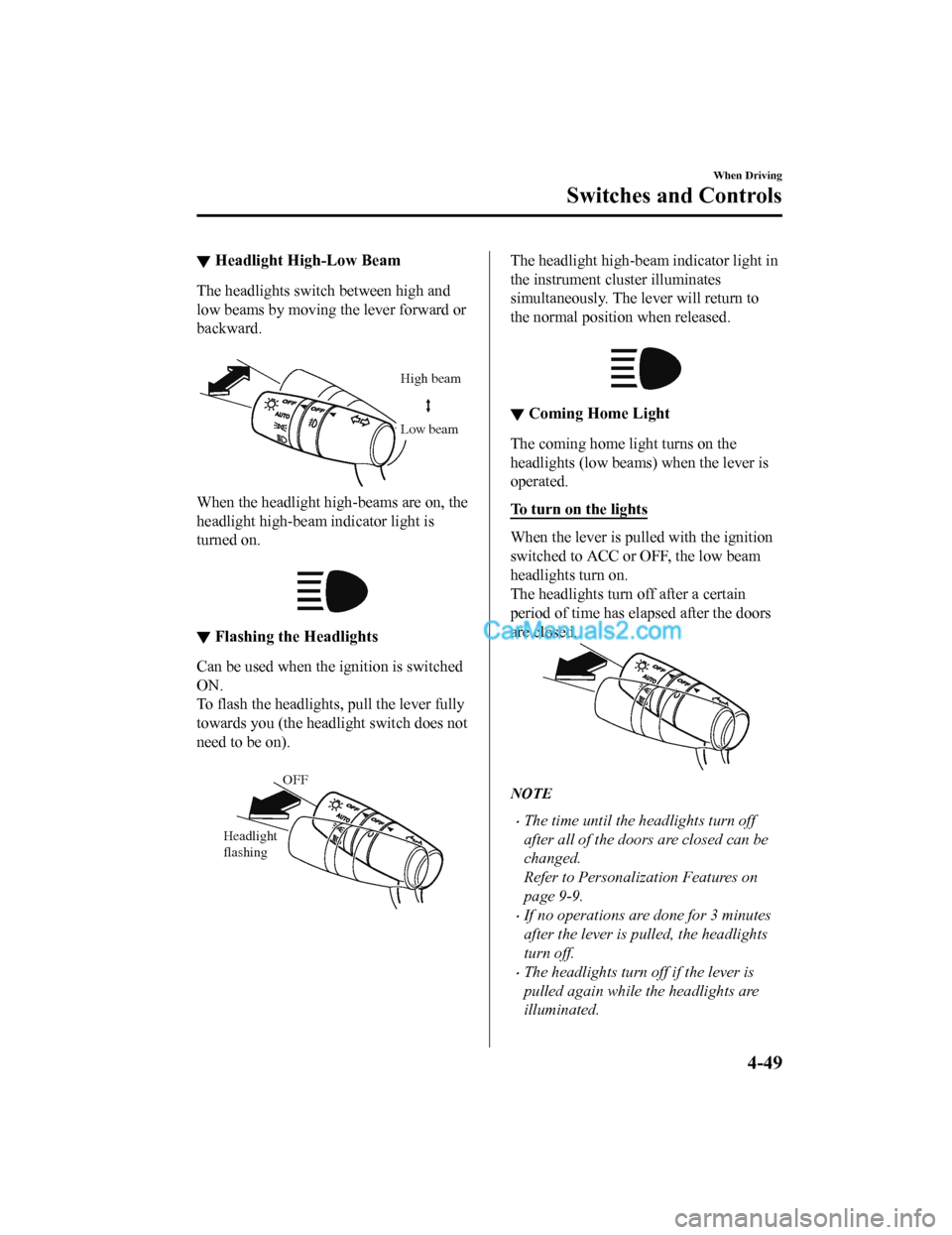
The headlights switch between high and
low beams by moving the lever forward or
backward.
High beam
Low beam
When the headlight high-beams are on, the
headlight high-beam indicator light is
turned on.
▼Flashing the Headlights
Can be used when the ignition is switched
ON.
To flash the headlight
s, pull the lever fully
towards you (th e headlight switch does not
need to be on).
OFF
Headlight
flashing
The headlight high-beam indicator light in
the instrument cluster illuminates
simultaneously. The lever will return to
the normal position when released.
▼ Coming Home Light
The coming home light turns on the
headlights (low beams) when the lever is
operated.
To turn on the lights
When the lever is pulled with the ignition
switched to ACC or OFF, the low beam
headlights turn on.
The headlights turn off after a certain
period of time has elapsed after the doors
are closed.
NOTE
•The time until the headlights turn off
after all of the doors are closed can be
changed.
Refer to Personalization Features on
page 9-9.
•If no operations are done for 3 minutes
after the lever is pulled, the headlights
turn off.
•The headlights turn off if the lever is
pulled again while the headlights are
illuminated.
When Driving
Switches and Controls
4-49
CX-5_8GN5-EA-17J_Edition1
2017-8-18 12:58:27
Page 186 of 628
▼Leaving Home Light
The leaving home light turns on the lights
when the transmitte
r unlock button is
pressed while away from the vehicle.
The following light s turn on when the
leaving home light is operated.
Low beams, Parking lights, Taillights,
License plate lights.
To turn on the lights
When the ignition switch and the headlight
switch are in the following conditions, the
headlights will il luminate when the
transmitter unlock button is pressed and
the vehicle receives the transmitter signal.
The headlights turn off after a certain
period of time has elapsed (30 seconds).
•Ignition switch: off
•Headlight switch: , , or
Unlock button
Lock button
NOTE
•Operation of the leaving home light can
be turned on or off.
Refer to Personalization Features on
page 9-9.
•When the transmitter lock button is
pressed and the vehicle receives the
transmitter signal, the headlights turn
off.
•When the headlight switch is turned to
the
position, the headlights turn off.
▼ Headlight Leveling
The number of passengers and weight of
cargo in the luggage compartment change
the angle of the headlights.
Auto type
The angle of the headlights will be
automatically adjusted when turning on
the headlights.
A system malfunction or operation
conditions are indicated by a warning.
Refer to Warning/Indicator Lights on page
4-30.
Manual type
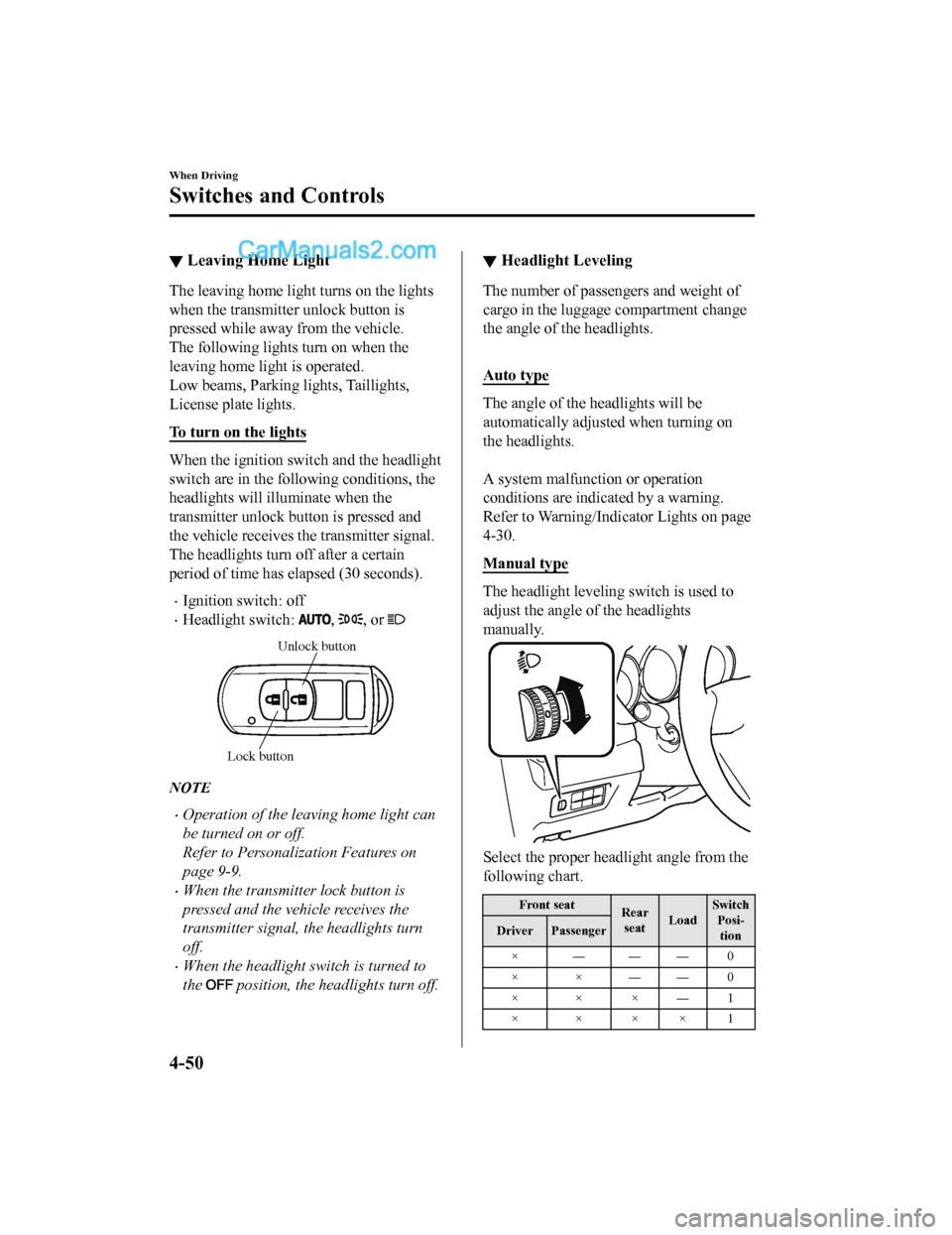
The headlight leveling switch is used to
adjust the angle o
f the headlights
manually.
Select the proper headlight angle from the
following chart.
Front seat Rear
seat LoadSwitch
Posi-tion
Driver Passenger
×―――0
××――0
×××―1
××××1
When Driving
Switches and Controls
4-50
CX-5_8GN5-EA-17J_Edition1 2017-8-18 12:58:27
Page 187 of 628
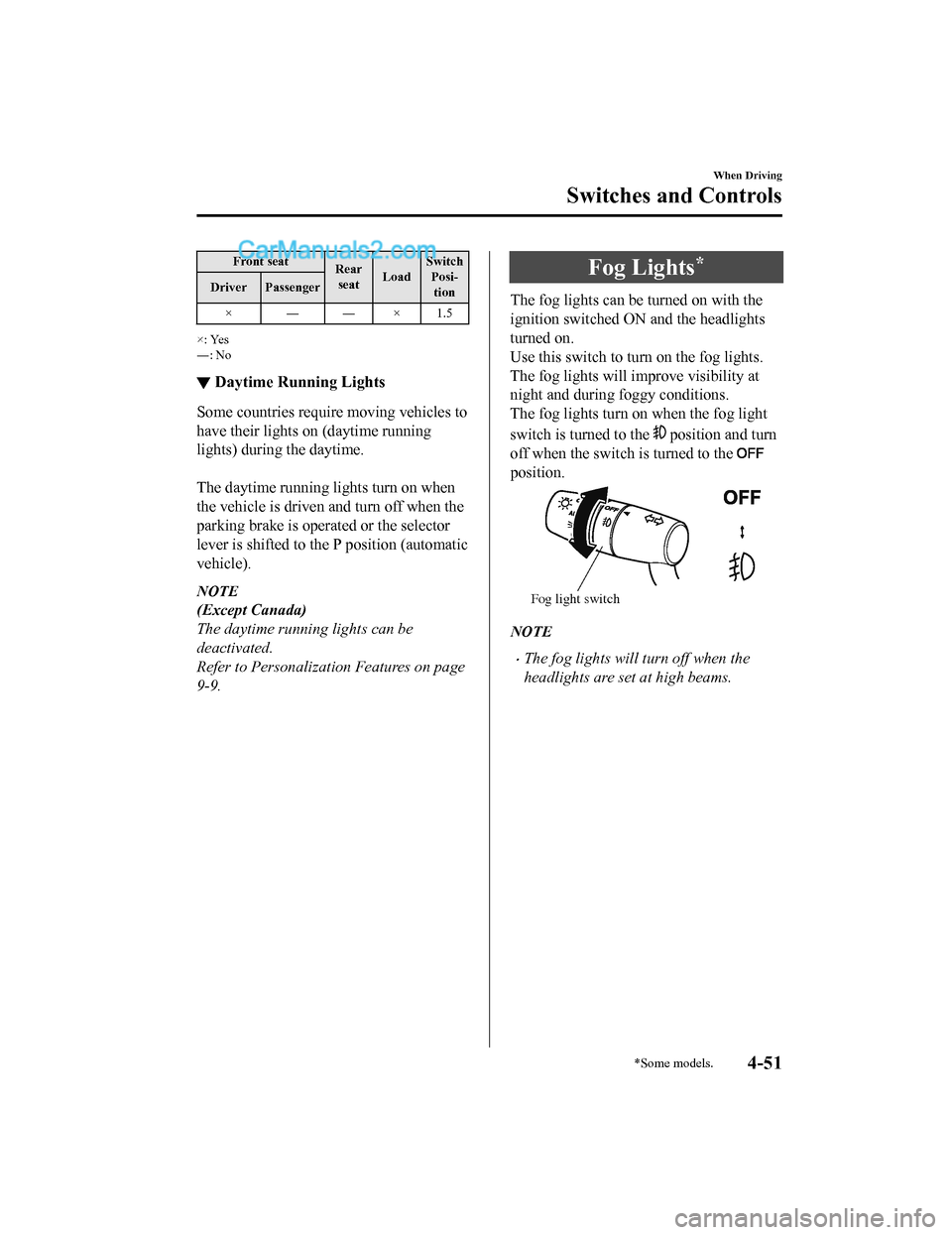
Front seatRear
seat LoadSwitch
Posi-tion
Driver Passenger
×――×1.5
×: Yes
―: No
▼ Daytime Running Lights
Some countries require moving vehicles to
have their lights on (daytime running
lights) during the daytime.
The daytime running lights turn on when
the vehicle is driven and turn off when the
parking brake is operated or the selector
lever is shifted to th
e P position (automatic
vehicle).
NOTE
(Except Canada)
The daytime running lights can be
deactivated.
Refer to Personalization Features on page
9-9.
Fog Lights*
The fog lights can b e turned on with the
ignition switched ON and the headlights
turned on.
Use this switch to turn on the fog lights.
The fog lights will i mprove visibility at
night and during foggy conditions.
The fog lights turn on when the fog light
switch is turned to the
position and turn
off when the switch is turned to the
position.
Fog light switch
NOTE
•The fog lights will turn off when the
headlights are set at high beams.
When Driving
Switches and Controls
*Some models.4-51
CX-5_8GN5-EA-17J_Edition1 2017-8-18 12:58:27
Page 188 of 628
Turn and Lane-ChangeSignals
The ignition must be switched ON to use
the turn and lane -change signals.
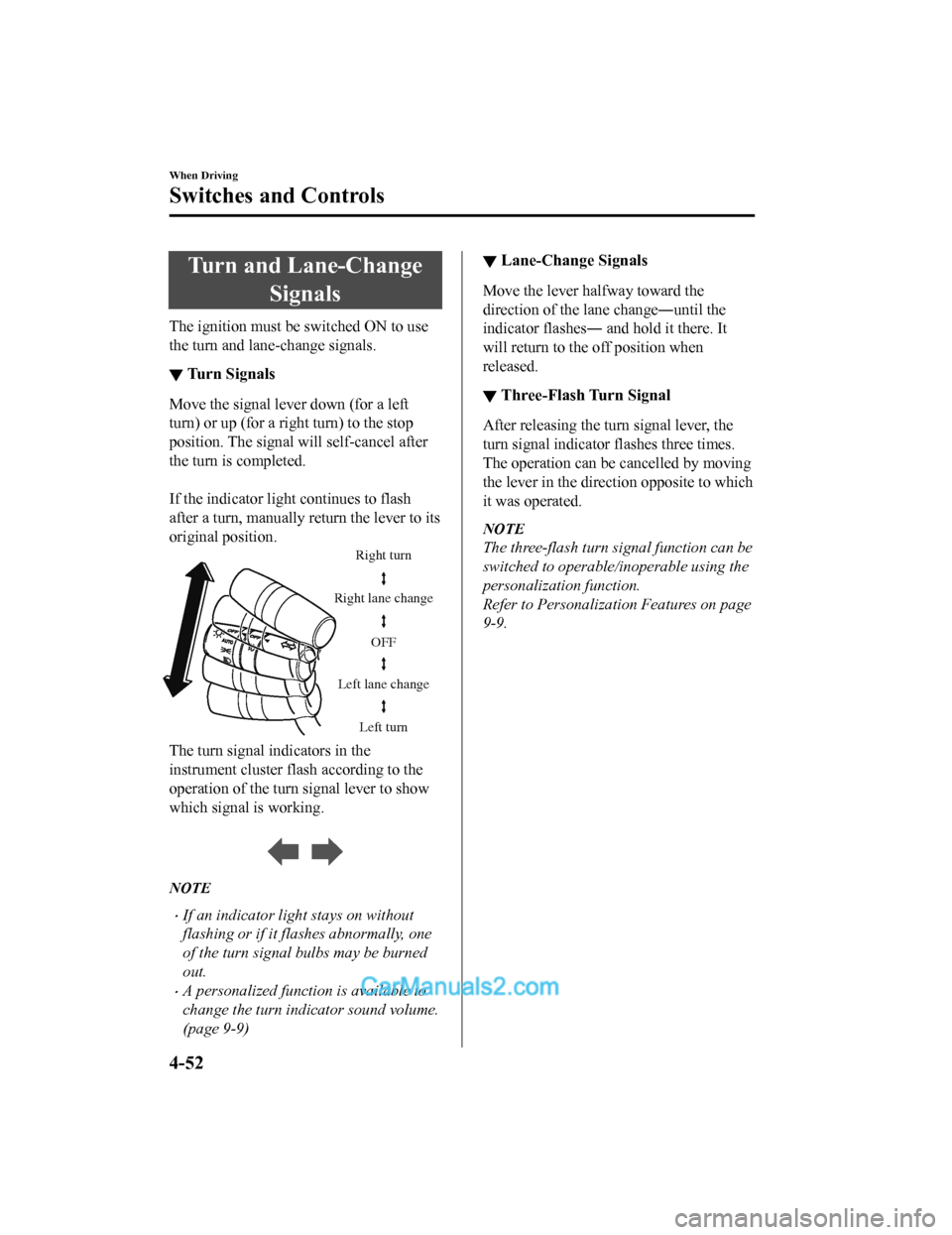
▼Turn Signals
Move the signal lever down (for a left
turn) or up (for a righ
t turn) to the stop
position. The signal will self-cancel after
the turn is completed.
If the indicator light continues to flash
after a turn, manually return the lever to its
original position.
Right turn
Left turn
Right lane change
Left lane change OFF
The turn signal
indicators in the
instrument cluster flash according to the
operation of the turn signal lever to show
which signal is working.
NOTE
•If an indicator light stays on without
flashing or if it flashes abnormally, one
of the turn signal bulbs may be burned
out.
•A personalized function is available to
change the turn indicator sound volume.
(page 9-9)
▼ Lane-Change Signals
Move the lever halfway toward the
direction of the lane change―until the
indicator flashes― and hold it there. It
will return to the off position when
released.
▼Three-Flash Turn Signal
After releasing the turn signal lever, the
turn signal indicator flashes three times.
The operation can be cancelled by moving
the lever in the direct
ion opposite to which
it was operated.
NOTE
The three-flash turn signal function can be
switched to operable/inoperable using the
personalization function.
Refer to Personalization Features on page
9-9.
When Driving
Switches and Controls
4-52
CX-5_8GN5-EA-17J_Edition1 2017-8-18 12:58:27
Page 192 of 628
•If the headlight switch and the
windshield wiper switch are in
,
and the wipers are operated at low or
high speed by the auto wiper control for
several seconds, bad weather conditions
are determined and the headlights may
be turned on.
•The auto-wiper control functions can be
turned off. Refer to Personalization
Features on page 9-9.
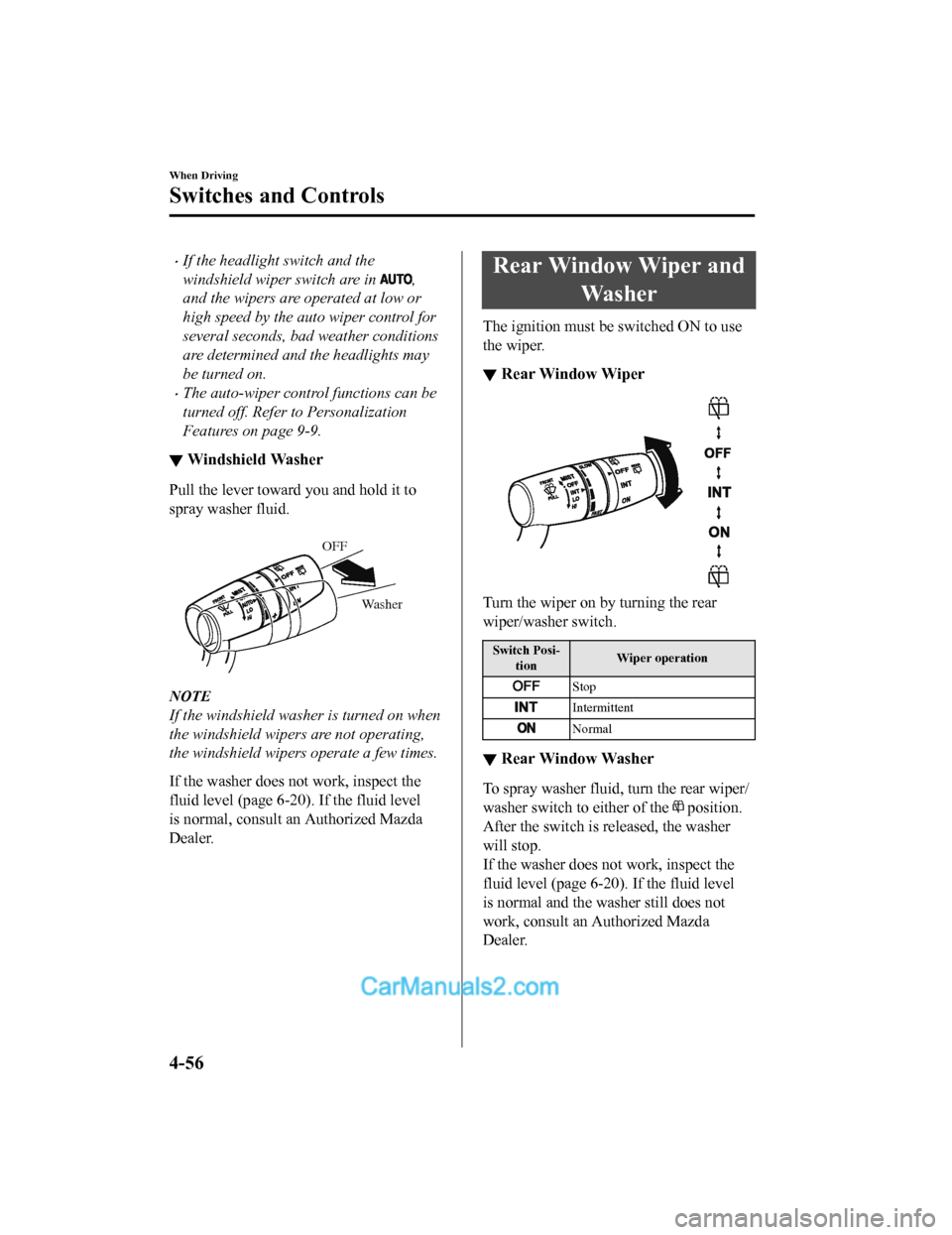
▼ Windshield Washer
Pull the lever toward
you and hold it to
spray washer fluid.
Washer
OFF
NOTE
If the windshield washer is turned on when
the windshield wipers are not operating,
the windshield wipers operate a few times.
If the washer does not work, inspect the
fluid level (page 6-20). If the fluid level
is normal, consult an Authorized Mazda
Dealer.
Rear Window Wiper and
Wa s h e r
The ignition must be switched ON to use
the wiper.
▼Rear Window Wiper
Turn the wiper on by turning the rear
wiper/washer switch.
Switch Posi-
tion Wiper operation
Stop
Intermittent
Normal
▼
Rear Window Washer
To spray washer fluid,
turn the rear wiper/
washer switch to either of the
position.
After the switch is released, the washer
will stop.
If the washer does no t work, inspect the
fluid level (page 6-20). If the fluid level
is normal and the washer still does not
work, consult an Authorized Mazda
Dealer.
When Driving
Switches and Controls
4-56
CX-5_8GN5-EA-17J_Edition1 2017-8-18 12:58:27
Page 193 of 628
Rear Window Defogger
The rear window defogger clears fog from
the rear window.
The ignition must be switched ON to use
the defogger.
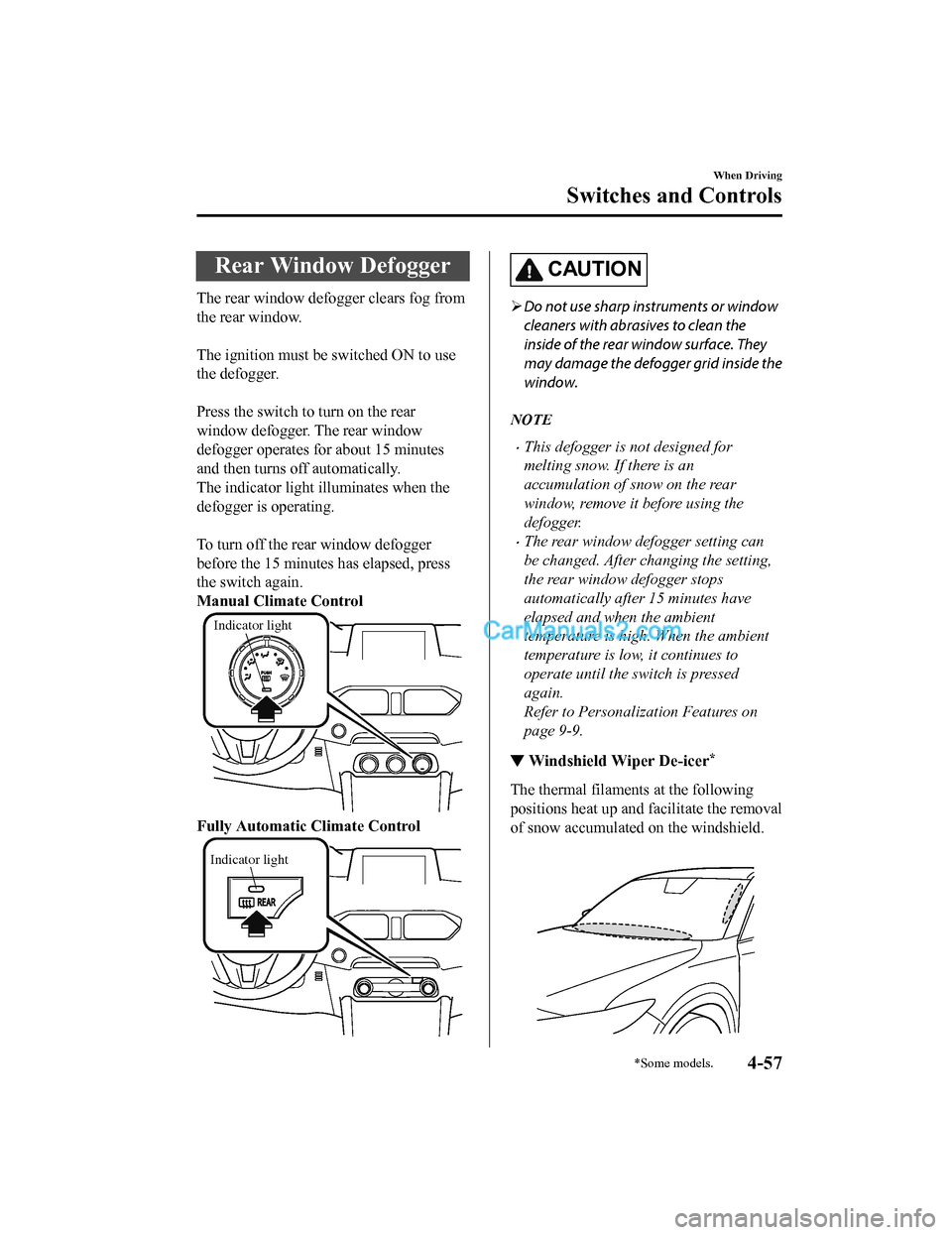
Press the switch to turn on the rear
window defogger. The rear window
defogger operates for about 15 minutes
and then turns off automatically.
The indicator light illuminates when the
defogger is operating.
To turn off the rear window defogger
before the 15 minutes has elapsed, press
the switch again.
Manual Climate Control
Indicator light
Fully Automatic Climate Control
Indicator light
CAUTION
Do not use sharp instruments or window
cleaners with abrasives to clean the
inside of the rear window surface. They
may damage the defogger grid inside the
window.
NOTE
•This defogger is not designed for
melting snow. If there is an
accumulation of snow on the rear
window, remove it before using the
defogger.
•The rear window defogger setting can
be changed. After changing the setting,
the rear window defogger stops
automatically after 15 minutes have
elapsed and when the ambient
temperature is high. When the ambient
temperature is low, it continues to
operate until the switch is pressed
again.
Refer to Personalization Features on
page 9-9.
▼ Windshield Wiper De-icer*
The thermal filaments
at the following
positions heat up and facilitate the removal
of snow accumulated on the windshield.
When Driving
Switches and Controls
*Some models.4-57
CX-5_8GN5-EA-17J_Edition1 2017-8-18 12:58:27
Page 217 of 628

▼Fuel Economy Data Reset and Trip
Meter (TRIP A) Synchronization (Linking)
(Without Multi-information Display)
Because the average fuel economy indication on the instrument c luster display is linked
with the “Average Fuel Economy History” (Current) indication on the center display, when
one is reset the other is also reset.
In addition, switching between reset and no reset of the averag e fuel economy indication on
the instrument cluster display and the “Average Fuel Economy Hi story” (Current) indication
on the center display when rese tting the trip meter (TRIP A) is possible.
Reset operation item Synchronized (linked) and reset information
Trip meter (TRIP A) Average fuel econo-
my on instrument cluster display “Average Fuel
Economy History” (Current) indica-
tion on the center display
Trip meter (TRIP A) X
X/—
*1X/—*1
Average fuel economy o n instrument cluster
display —X X
“Average Fuel Economy History” (Current)
indication on the center display —X X
X: Reset
—: Not reset
*1 Can be personalized.
Refer to Personalization Features on page 9-9.
When Driving
Fuel Economy Monitor
4-81
CX-5_8GN5-EA-17J_Edition1 2017-8-18 12:58:27
Page 225 of 628

Adaptive Front Lighting System (AFS)*
The adaptive front lighting system (AFS) automatically adjusts the headlight beams to the
left or right in conjunction with the operation of the steering wheel after the headlights have
been turned on.
A system malfunction or operation conditions are indicated by a warning.
Refer to Warning/Indicator Lights on page 4-30.
NOTE
The Adaptive Front Lighting System (AFS) func tion can be switched to operable/inoperable
using the personalization function.
Refer to Personalization Features on page 9-9.
When Driving
i-ACTIVSENSE
*Some models.4-89
CX-5_8GN5-EA-17J_Edition1 2017-8-18 12:58:27