air condition MAZDA MODEL CX-5 2018 (in English) Owner's Manual
[x] Cancel search | Manufacturer: MAZDA, Model Year: 2018, Model line: MODEL CX-5, Model: MAZDA MODEL CX-5 2018Pages: 628, PDF Size: 82.38 MB
Page 319 of 628

CAUTION
If the air conditioner is used while driving
up long hills or in heavy traffic, monitor the
high engine coolant temperature warning
indication/warning light to see if it is
illuminated or flashing (page 4-30).
The air conditioner may cause engine
overheating. If the warning light is
illuminated or flashing, turn the air
conditioner off (page 7-18).
NOTE
•When maximum cooling is desired, set
the temperature control dial to the
extreme cold position and set the air
intake selector to the recirculated air
position, then turn the fan control dial
fully clockwise.
•If warmer air is desired at floor level,
set the mode selector dial at the
position and adjust the temperature
control dial to maintain maximum
comfort.
•The air to the floor is warmer than air
to the face (except wh en the temperature
control dial is set at the extreme hot or
cold position).
▼ Ventilation
1. Set the mode sel
ector dial to the
position.
2. Set the air intake selector to the outside air position (indicator light turns off).
3. Set the temperature control dial to the
desired position.
4. Set the fan control dial to the desired speed.
▼Windshield Defrosting and
Defogging
1. Set the mode selector dial to the
position.
2. Set the temperature control dial to the desired position.
3. Set the fan control dial to the desired speed.
4. If dehumidified heating is desired, turn
on the air conditioner.
WA R N I N G
Do not defog the windshield using the
position with the temperature control set
to the cold position:
Using the
position with the temperature
control set to the cold position is
dangerous as it will cause the outside of the
windshield to fog up. Your vision will be
hampered, which could lead to a serious
accident. Set the temperature control to
the hot or warm position when using the
position.
NOTE
•For maximum defrosting, turn on the air
conditioner, set the temperature control
dial to the extreme hot position, and turn
the fan control dial fully clockwise.
•If warm air is desired at the floor, set the
mode selector dial to the
position.
•In the or position, the air
conditioner is automatically turned on
and the outside air position is
automatically selected to defrost the
windshield. In the
or position, the
outside air position cannot be changed
to the recirculated air position.
Interior Features
Climate Control System
5-9
CX-5_8GN5-EA-17J_Edition1 2017-8-18 12:58:27
Page 320 of 628
▼Dehumidifying
Operate the air condi
tioner in cool or cold
weather to help defog the windshield and
side windows.
1. Set the mode selector dial to the
desired position.
2. Set the air intake s elector to the outside
air position (indicator light turns off).
3. Set the temperature control dial to the
desired position.
4. Set the fan control dial to the desired speed.
5. Turn on the air conditioner by pressing the A/C switch.
NOTE
One of the functions of the air conditioner
is dehumidifying the ai r and, to use this
function, the temperature does not have to
be set to cold. Therefore, set the
temperature control dial to the desired
position (hot or cold) and turn on the air
conditioner when you want to dehumidify
the cabin air.
Interior Features
Climate Control System
5-10
CX-5_8GN5-EA-17J_Edition1 2017-8-18 12:58:27
Page 321 of 628
Fully Automatic Type
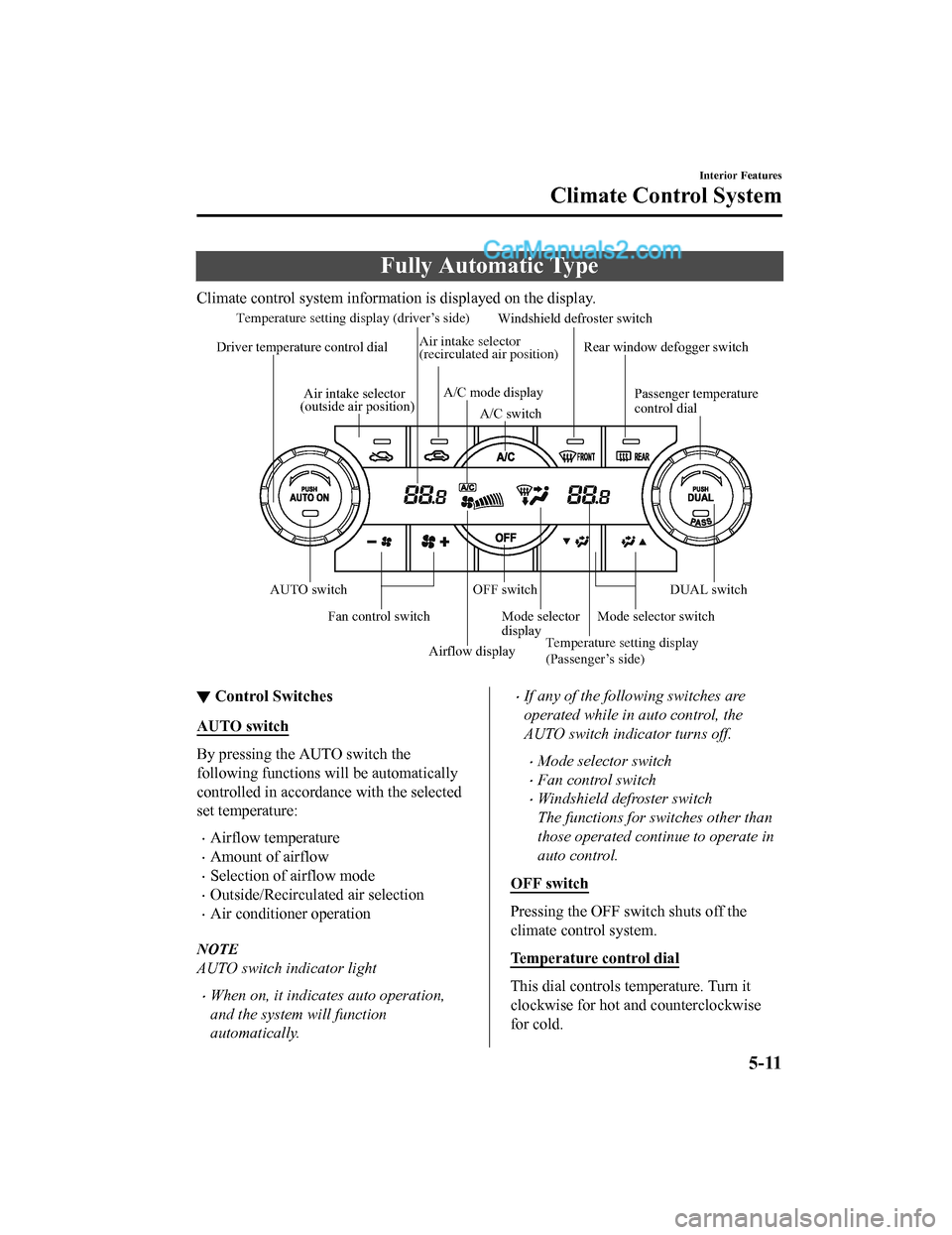
Climate control system information is displayed on the display.
Airflow display
Temperature setting display (driver’s side)
Mode selector
display
A/C mode display
Air intake selector
(outside air position)
Driver temperature control dial
AUTO switch Mode selector switch
Fan control switch OFF switchWindshield defroster switch
Rear window defogger switch
Passenger temperature
control dial
DUAL switch
A/C switch
Temperature setting display
(Passenger’s side)
Air intake selector
(recirculated air position)
▼
Control Switches
AUTO switch
By pressing the AUTO switch the
following functions will be automatically
controlled in accordan
ce with the selected
set temperature:
•Airflow temperature
•Amount of airflow
•Selection of airflow mode
•Outside/Recirculated air selection
•Air conditioner operation
NOTE
AUTO switch indicator light
•When on, it indicates auto operation,
and the system will function
automatically.
•If any of the following switches are
operated while in auto control, the
AUTO switch indicator turns off.
•Mode selector switch
•Fan control switch
•Windshield defroster switch
The functions for switches other than
those operated continue to operate in
auto control.
OFF switch
Pressing the OFF switch shuts off the
climate control system.
Temperature control dial
This dial controls t emperature. Turn it
clockwise for hot and counterclockwise
for cold.
Interior Features
Climate Control System
5-11
CX-5_8GN5-EA-17J_Edition1 2017-8-18 12:58:27
Page 322 of 628
•When the DUAL switch is off:
Turn the driver temperature control dial
to control the temperature throughout
the entire cabin.
•When the DUAL switch is on:
Turn the driver or front passenger
temperature control dial to
independently control the temperature
on each side of the cabin.
NOTE
•The climate control system changes to
the individual operation mode (DUAL
switch indicator light illuminated) by
turning the front passenger temperature
control dial even when the DUAL switch
is off, which allows individual control of
the set temperature for the driver and
front passenger.
•The temperature units for the
temperature setting display can be
changed in conjunction with the
temperature units for the outside
temperature display.
(Type A instrument cluster)
Refer to Outside Temperature Display
on page 4-23.
(Type B instrument cluster)
Refer to Outside Temperature Display
(Without Multi-information Display) on
page 4-16.
Fan control switch
The fan has seven speeds. The selected
speed will be displayed.
Mode selector switch
The desired airflow mode can be selected
(page 5-6).
NOTE
•With the airflow mode set to the
position and the temperature control
dial set at a medium temperature,
heated air is directed to the feet and air
at a comparably lower temperature will
flow through the central, left and right
vents.
•To set the air vent to , press the
windshield defroster switch.
•In the or position, the air
conditioner is automatically turned on
and the outside air position is
automatically selected to defrost the
windshield. In the
or position, the
outside air position cannot be changed
to the recirculated air position.
A/C switch
Pressing the A/C swit ch while the AUTO
switch is turned on w ill turn off the air
conditioner (cooling/dehumidifying
functions).
The on/off of the air conditioner switches
each time the A/C switch is pressed.
NOTE
•The air conditioner operates when the
A/C switch is pressed while the air
conditioner is turned off.
•The air conditioner may not function
when the outside temperature
approaches 0 °C (32 °F).
Air intake selector
Outside or recirculated air positions can be
selected. Press the switch to select outside/
recirculated air positions.
Interior Features
Climate Control System
5-12
CX-5_8GN5-EA-17J_Edition1 2017-8-18 12:58:27
Page 323 of 628

Recirculated air position ()
Outside air is shut off. Use this position
when going through tunnels, driving in
congested traffic (high engine exhaust
areas) or when quick cooling is desired.
Outside air position (
)
Outside air is allowed to enter the cabin.
Use this mode for ventilation or
windshield d efrosting.
WA R N I N G
Do not use the position in cold or rainy
weather:
Using the
position in cold or rainy
weather is dangerous as it will cause the
windows to fog up. Your vision will be
hampered, which could lead to a serious
accident.
DUAL switch
Use the DUAL switch to change the mode
between the individual operation (driver
and passenger) and interconnection
(simultaneous) modes.
Individual operation mode (indicator
light illuminated)
The set temperature can be controlled
individually for the driver and front
passenger.
Interconnection mode (indicator light
turned off)
The set temperature for the driver and
front passenger is controlled
simultaneously.
Windshield defroster switch
Press the switch to defrost the windshield
and front door windows.
Refer to Windshield Defrosting and
Defogging on page 5-14.
Rear window defogger switch
Press the rear window defogger switch to
defrost the rear window.
Refer to Rear Window Defogger on page
4-57.
▼ Operation of Automatic Air
Conditioner
1. Press the AUTO switch. Selection of
the airflow mode, air intake selector
and amount of airflow will be
automatically controlled.
2. Use the temperature control dial to
select a desired temperature.
Press the DUAL switch or turn the
front passenger temperature control
dial to control the set temperature
individually for the driver and front
passenger.
To turn off the system, press the OFF
switch.
NOTE
•Setting the temperature to maximum hot
or cold will not provide the desired
temperature at a faster rate.
•When selecting heat, the system will
restrict airflow until it has warmed to
prevent cold air from blowing out of the
vents.
Interior Features
Climate Control System
5-13
CX-5_8GN5-EA-17J_Edition1 2017-8-18 12:58:27
Page 324 of 628
▼Windshield Defrosting and
Defogging
Press the windshield
defroster switch.
In this position, the outside air position is
automatically selected, and the air
conditioner automatically turns on. The air
conditioner will direct ly dehumidify the
air to the front windshield and side
windows on page 5-6.
Airflow amount wil l be increased.
WA R N I N G
Set the temperature control to the hot or
warm position when defogging (
position):
Using the
position with the temperature
control set to the cold position is
dangerous as it will cause the outside of the
windshield to fog up. Your vision will be
hampered, which could lead to a serious
accident.
NOTE
Use the temperature control dial to
increase the air flow temperature and
defog the windshie ld more quickly.
▼Sunlight/Interior Temperature
Sensor
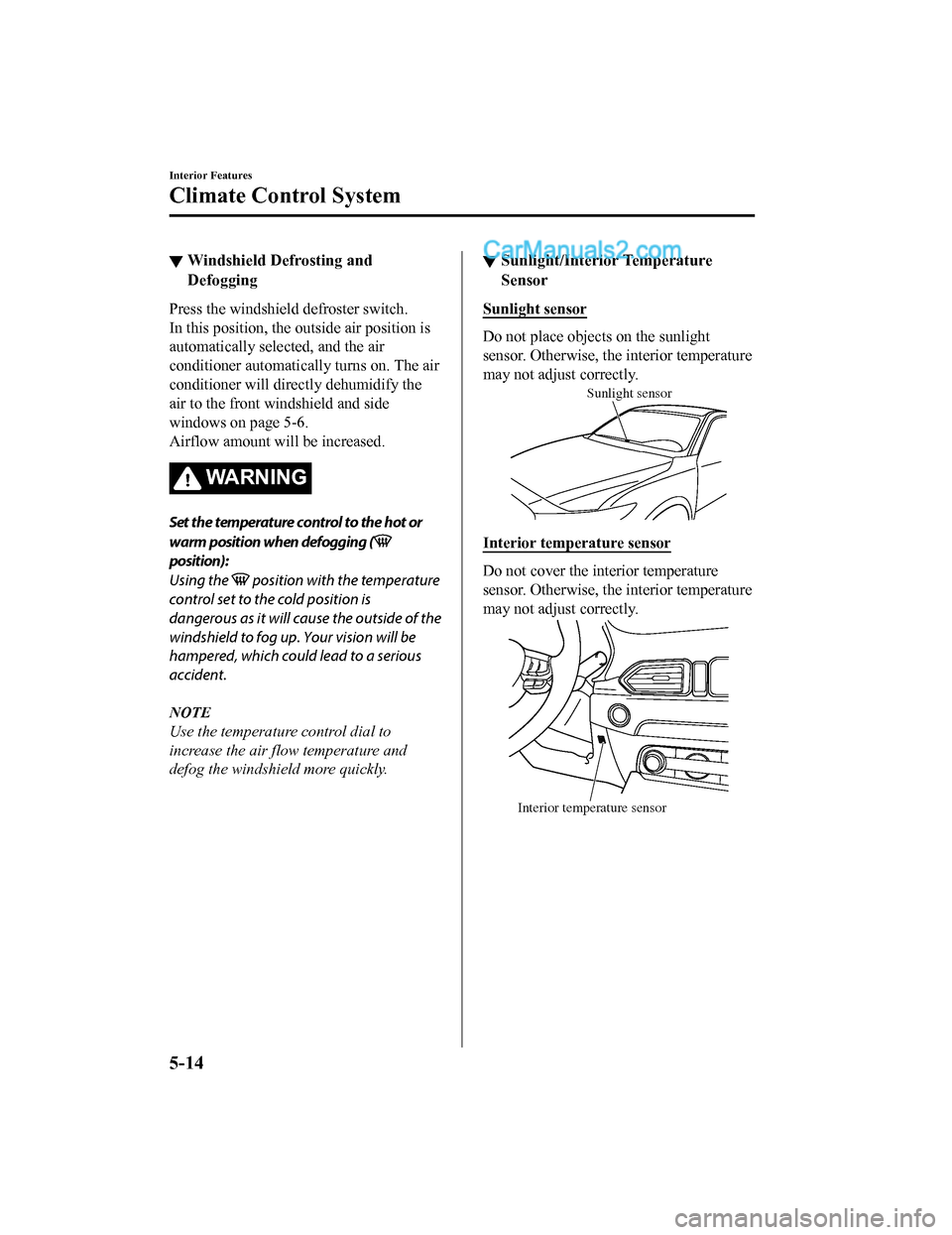
Sunlight sensor
Do not place objects on the sunlight
sensor. Otherwise, the interior temperature
may not adjust correctly.
Sunlight sensor
Interior temperature sensor
Do not cover the interior temperature
sensor. Otherwise, the interior temperature
may not adjust correctly.
Interior temperature sensor
Interior Features
Climate Control System
5-14
CX-5_8GN5-EA-17J_Edition1
2017-8-18 12:58:27
Page 372 of 628
NOTE
•When the OS of the device is updated, the pairing information may be deleted. If this
happens, reprogram the pairing information to the Bluetooth
® unit.
•If you pair your phone which has already been paired to your vehicle more than once in
the past, you need to delete “Mazda” on your mobile device. Then, execute the
Bluetooth
® search on your mobile device once again, and pair to a newly detected
“Mazda”.
•Before you pair your device, make sure that Bluetooth® is “ON”, both on your phone and
on the vehicle.
•If Bluetooth®-enabled devices are used in the following locations or conditions,
connection via Bluetooth
® may not be possible.
•The device is in a location hidden from the unit such as behind or under a seat, or
inside the glove compartment.
•The device contacts or is covered by a metal object or body.
•The device is set to power-saving mode.
•Different Bluetooth®-enabled devices can be used for Bluetooth® Hands-Free and
Bluetooth
® audio. For example, device A can be connected as a Bluetooth® Hands-Free
device and device B can be connected as a Bluetooth
® audio device. However, the
following may occur when they are used at the same time.
•The Bluetooth® connection of the device is disconnected.
•Noise occurs in the Hands-Free audio.
•Hands-Free operates slowly.
Interior Features
Audio Set [Type A (non-touchscreen)]
5-62
CX-5_8GN5-EA-17J_Edition1 2017-8-18 12:58:27
Page 373 of 628
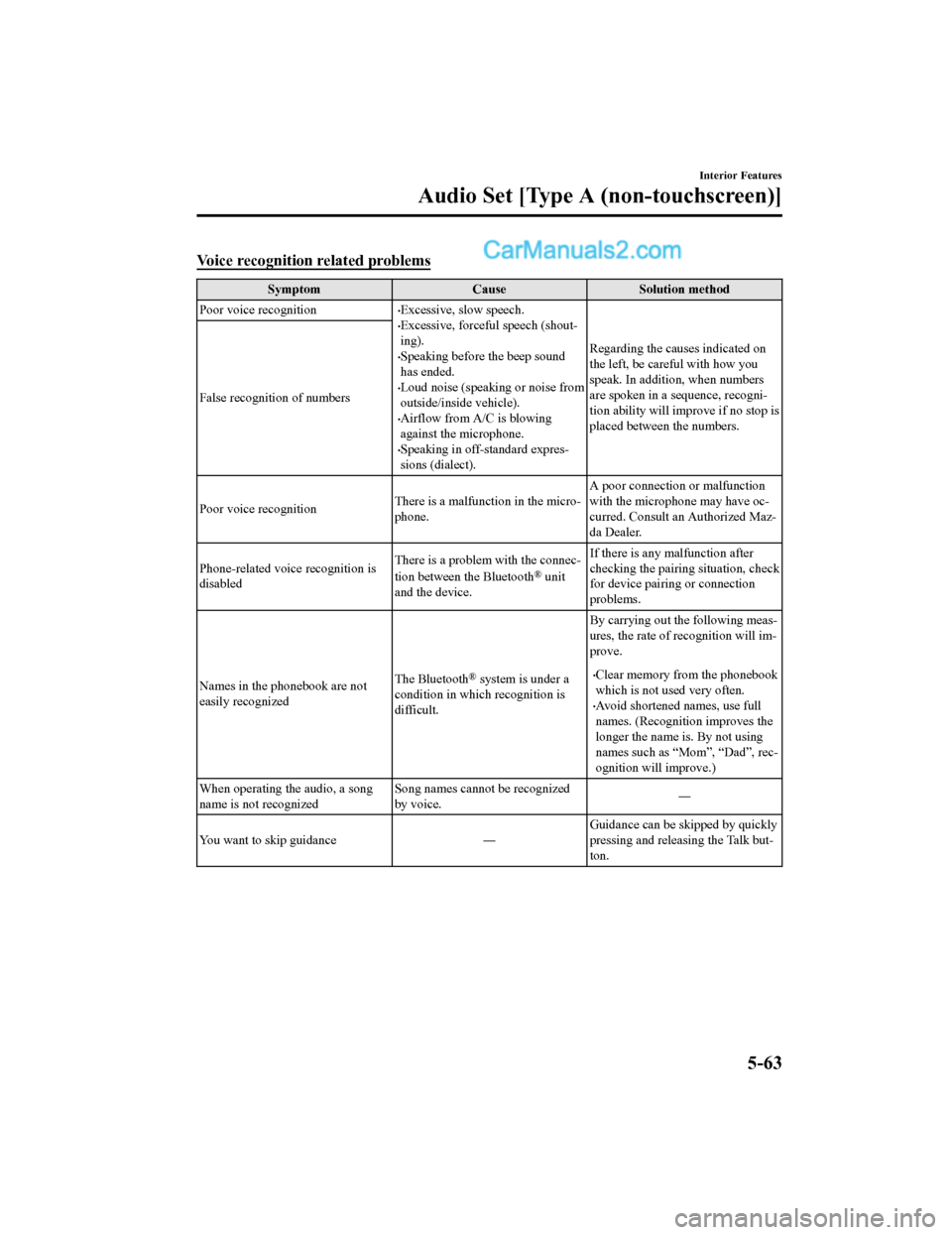
Voice recognition related problems
SymptomCauseSolution method
Poor voice recognition
•Excessive, slow speech.•Excessive, forceful speech (shout-
ing).
•Speaking before the beep sound
has ended.
•Loud noise (speaking or noise from
outside/inside vehicle).
•Airflow from A/C is blowing
against the microphone.
•Speaking in off-standard expres-
sions (dialect). Regarding the causes indicated on
the left, be careful with how you
speak. In addition,
when numbers
are spoken in a sequence, recogni-
tion ability will improve if no stop is
placed between the numbers.
False recognition of numbers
Poor voice recognition
There is a malfunction in the micro-
phone.A poor connection or malfunction
with the microphone may have oc-
curred. Consult an Authorized Maz-
da Dealer.
Phone-related voice recognition is
disabled There is a problem with the connec-
tion between the Bluetooth
® unit
and the device. If there is any malfunction after
checking the pairin
g situation, check
for device pairing or connection
problems.
Names in the phonebook are not
easily recognized The Bluetooth
® system is under a
condition in which recognition is
difficult. By carrying out the following meas-
ures, the rate of recognition will im-
prove.•Clear memory from the phonebook
which is not used very often.
•Avoid shortened names, use full
names. (Recognitio
n improves the
longer the name is. By not using
names such as “Mom”, “Dad”, rec-
ognition will improve.)
When operating the audio, a song
name is not recognized Song names cannot be recognized
by voice.
―
You want to skip guidance ― Guidance can be skipped by quickly
pressing and releasing the Talk but-
ton.
Interior Features
Audio Set [Type A (non-touchscreen)]
5-63
CX-5_8GN5-EA-17J_Edition1
2017-8-18 12:58:27
Page 386 of 628
Multicast channel selection (FM)
If multi-cast channels are available for an
broadcast currently being
received, the multi-cast channel list is
displayed. Select the desired radio station.
NOTE
•If an analog broadcast is received once
and
is received while HD1 is
selected, the audio unit switches to the
station automatically.
•When the icon is illuminated, there
could be a noticeable difference in
sound quality and volume when a
change from digital to analog signals
occurs. If the sound quality and volume
become noticeably diminished or cut off,
select the
icon to turn off
( icon is not illuminated).
•Once an analog broadcast is received
when HD1 is selected from the Favorite
channels, it is switched to
automatically. If the radio reception
conditions are poor, or HD is off,
switching to
broadcasts is not
possible.
•When an HD specialty channel (HD2 to
HD8) is selected from the Favorite
channels, “Signal Lost” is displayed
and no audio is output until
is received. If the radio reception
conditions are poor, “Signal Lost”
continues to be displayed.
•If the icon is not illuminated,
information such as song titles of the
station are received, however,
the audio output is analog.
iTunes Tagging (for Apple devices with
USB use only)
By tagging a song currently being aired,
the song can later be purchased from the
iTunes Store. One hundred tags can be
stored. A maximum of 100 tags (for 100
songs) can be stored for later
downloading.
1. Select the
icon. The tag is stored in
the audio unit.
2. Connect the device via the vehicle's
USB. Any stored tag(s) will be sent
automatically to the connected device.
3. Once at home or after parking the
vehicle safely, log onto the iTunes
Store with your device. Your
previously tagged song(s) can now be
easily purchased.
NOTE
•Both AM and FM can be
used.
•Because iTunes tagging only supports
purchases from the iTunes Store, direct
downloading of music from the vehicle's
audio unit is not possible.
•If the available memory for the
connected device is insufficient, the tag
is not sent.
•If an error occurs while the tag is being
sent, reconnect the device.
Interior Features
Audio Set [Type B (touchscreen)]
5-76
CX-5_8GN5-EA-17J_Edition1 2017-8-18 12:58:27
Page 399 of 628

Bluetooth® Preparation
▼Device pairing
To use Bluetooth® audio and Hands-Free,
the device equipped with Bluetooth
® has
to be paired to the un it using the following
procedure. A maximum of seven devices
including Bluetooth
® audio devices and
hands-free mobile phones can be paired.
NOTE
•The Bluetooth® system may not operate
for 1 or 2 minutes after the ignition is
switched to ACC or ON. However, this
does not indicate a problem. If the
Bluetooth
® system does not connect
automatically after 1 or 2 minutes have
elapsed, make sure that the Bluetooth
®
setting on the device is normal and
attempt to reconn ect the Bluetooth
®
device from the vehicle side.
•If Bluetooth®-enabled devices are used
in the following locations or conditions,
connection via Bluetooth
® may not be
possible.
•The device is in a location hidden
from the center display such as behind
or under a seat, or inside the glove
compartment.
•The device contacts or is covered by a
metal object or body.
•The device is set to power-saving
mode.
Pairing Procedure
1. Select the
icon on the home screen
to display the Settings screen.
2. Select the
tab.
3. Select
.
4. Turn the Bluetooth® setting on.
5. Select
to display the
message and switch to the device
operation.
6. Using your device, perform a search
for the Bluetooth
® device (Peripheral
device).
7. Select “Mazda” from the device list searched by the device.
8. (Device with Bluetooth
® version 2.0)
Input the displayed 4-digit pairing
code into the device.
(Device with Bluetooth
® version 2.1
or higher)
Make sure the disp layed 6-digit code
on the audio is also displayed on the
device, and touch the
.
Connection permission and phonebook
access permission for your mobile
device may be required depending on
the mobile device.
9. If pairing is successful, the functions
of the device connected to Bluetooth
®
are displayed.
10. (Devices compatible with Mazda
E-mail / SMS function)
SMS (Short Message Service)
messages, and E-mail for the device
are downloaded automatically. A
download permission operation for
your device may be required
depending on the device.
NOTE
When Call history and messages are
downloaded automatical ly, each automatic
download setting must be on.
Refer to Communication Settings on page
5-111.
Interior Features
Audio Set [Type B (touchscreen)]
5-89
CX-5_8GN5-EA-17J_Edition1 2017-8-18 12:58:27