Mazda connect MAZDA MODEL CX-50 2023 User Guide
[x] Cancel search | Manufacturer: MAZDA, Model Year: 2023, Model line: MODEL CX-50, Model: MAZDA MODEL CX-50 2023Pages: 583, PDF Size: 85.63 MB
Page 119 of 583

CAUTION
Always use only a genuine Mazda
fuel-filler cap or an approved
equivalent, available at an
Authorized Mazda Dealer. The
wrong cap can result in a serious
malfunction of the fuel and emission
control systems.
(U.S.A. and Canada)
It may also cause the check engine
light in the instrument cluster to
illuminate.
When using an automatic car wash
or a high water pressure car washer,
lock the vehicle. Otherwise, the
fuel-filler lid may open unexpectedly
and could be damaged.
▼ Refueling
Before refueling, close all the doors,
windows, and liftgate, and switch the
ignition OFF.
1. Using the following , unlock the
driver’s door.
Transmitter (page 3-15)Touch sensor (page 3-13)Door-lock switch (page 3-15)Auto lock/unlock function (page
3-17)
NOTE
When unlocking the driver's
door, the fuel lid is also unlocked
at the same time.
When locking the driver's door,
the fuel lid is locked after 90
seconds.
The time until the fuel lid is
locked after locking the driver's
door can be changed.
Refer to the Settings section in
the Mazda Connect Owner's
Manual.
However, when the driver's door
is locked using the following
functions, the fuel lid is also
locked at the same time.
Auto lock/unlock function
(page 3-17)
Auto re-lock function (page
3-5) and (page 3-13)
2. Press the location shown in the illustration and open the fuel lid.
3. To remove the fuel-filler cap, turn itcounterclockwise.
4. Attach the removed cap to the inner side of the fuel-filler lid.
1. Fuel-filler lid
2. Fuel-filler cap
5. Insert the refueling nozzle all the way and begin refueling. Pull out
the refueling nozzle after the
refueling stops automatically.
6. To close the fuel-filler cap, turn it clockwise until a click is heard.
Before Driving
Fuel and Emission
3-30
CX-50_8KB8-EA-22A_Edition2_new 2022-1-6 14:55:18
Page 138 of 583
Rocking the Vehicle
▼Rocking the Vehicle
WARNING
Do not spin the wheels at more than
56 km/h (35 mph), and do not allow
anyone to stand behind a wheel when
pushing the vehicle:
When the vehicle is stuck, spinning the
wheels at high speed is dangerous. The
spinning tire could overheat and
explode. This could cause serious
injuries.
CAUTION
Too much rocking may cause engine
overheating , transmission failure, and
tire damage.
If you must rock the vehicle to free it
from snow, sand or mud, depress the
accelerator slightly and slowly move
the selector lever from D to R position.
Winter Driving
▼Winter Driving
Carry emergency gear, including tire
chains, window scraper,
flares, a small
shovel, jumper cables, and a small bag
of sand or salt.
Ask an Authorized Mazda Dealer to
check the following:
Have the proper ratio of antifreeze in
the radiator.
Refer to Engine Coolant on page
6-19.
Inspect the battery and its cables.
Cold reduces battery capacity.
Use an engine oil appropriate for the
lowest ambient temperatures that
the vehicle will be driven in (page
6-16).
Inspect the ignition system for
damage and loose connections.
Use washer fluid made with
antifreeze ―but do not use engine
coolant antifreeze for washer fluid
(page 6-21).
NOTE
Remove snow before driving. Snow
left on the windshield is dangerous
as it could obstruct vision.
Do not apply excessive force to a
window scraper when removing ice
or frozen snow on the mirror glass
and windshield.
Never use warm or hot water for
removing snow or ice from windows
and mirrors as it could result in the
glass cracking.
Before Driving
Driving Tips
3-49
CX-50_8KB8-EA-22A_Edition2_new 2022-1-6 14:55:18
Page 146 of 583

▼Safety Chains
Safety chains must be used as a precautionary measure should the trailer become
unintentionally unhitched. They should cross under the trailer tongue and attach to
the hitch. Leave enough slack to allow full
turns. Consult literature published by your
trailer or hitch manufacturer for more details.
WARNING
Make sure the safety chain is securely attached to both the trailer and the vehicle
prior to departure:
Towing a trailer without using a safety chain securely attached to both the trailer and
the vehicle is dangerous. If damage occurs to the coupling unit or hitch ball, the
trailer could wander into another lane and cause a collision.
▼ Tra i l e r L i g h t s
Trailer lights must comply with all federal, state, and local regulations. Equip your
trailer as required before towing it day or night.
CAUTION
Do not connect a trailer lighting system dire
ctly to the lighting system of your Mazda.
This may damage your vehicle's electrical system and lighting systems. Have a
recreational vehicle dealer or trailer rental agency connect the system, and inspect
the brake lights and turn signals yourself before each trip.
▼ Tra i l e r B ra ke s
If the total trailer weight exceeds 450 kg (1,000 lb), trailer brakes are required. If
your trailer has brakes, make sure they comply with all federal, state, and local
regulations.
WARNING
Do not connect a hydraulic trailer-brake system to your vehicle's brake system:
Connecting a hydraulic trailer-brake system directly to the vehicle brake system is
dangerous and will result in inadequate braking and possible injury.
Before Driving
Towing
3-57
CX-50_8KB8-EA-22A_Edition2_new
2022-1-6 14:55:18
Page 147 of 583

▼Trailer Towing Tips
Verify that your Mazda maintains a near-normal attitude when a loaded or
unloaded trailer is connected. Do not drive if it has an abnormal front-up or
front-down position. Inspect for incorrec
t tongue load, worn suspension parts,
and trailer overloading.
Make sure the trailer is properly loaded and the cargo is secure to prevent it from
shifting.
Make sure the mirrors conform to all govern ment regulations. If they do not, install
required rear view mirrors appropriate for towing purposes.
The three main causes of vehicle-trailer accidents are driver error, excessive speed,
and improper trailer loading.
Before driving
Have your cooling and braking system checked by an Authorized Mazda Dealer.Before starting out, inspect the operation of all vehicle and trailer lights and all
vehicle-to-trailer connections. Stop and re-inspect all lights and connections after
driving a short distance.
Driving
Your Mazda will handle differently with a trailer in tow, so practice turning,
backing, and stopping in a traffic-free area.
Take time to get accustomed to the extra weight and length.Allow more room between your vehicle and the one in front because braking
distance increases with a trailer. For each 16 km/h (10 mph) of speed, allow at
least one vehicle and trailer length between your Mazda and the vehicle ahead.
Avoid jerky starts or sudden acceleration.Avoid sudden braking. It may cause loss of control and result in jackknifing ,
especially so on wet or slippery roads.
Shift the selector lever to the D position when towing a trailer in hilly terrain or
when heavily loaded.
The D position will allow operating the vehicle without frequent shifting.
Lane changes and turning
Avoid quick lane changes, su dden turns, and tight turns. Slow down before turning
to avoid the need of sudden braking.
A turning trailer will make a tighter arc than the tow vehicle. Compensate with turns
that are larger than normal.
Pa s s i n g
Plan well ahead to pass other vehicles, and provide plenty of room before changing
lanes. Crosswinds from passing vehicles, especially larger ones, and the effects of
rough roads will affect handling.
If swaying occurs, firmly grip the steering wheel and reduce speed immediately, but
gradually.
Before Driving
To w i n g
3-58
CX-50_8KB8-EA-22A_Edition2_new 2022-1-6 14:55:18
Page 165 of 583

(Automatic climate control system)
The cabin temperature is largelydifferent from the set temperature of
the air conditioner.
The brakes are released slightly on a
slope and the vehicle begins to
move.
Two minutes have elapsed since the
idling was stopped.
The battery power is depleted.The hood is opened.The driver's seat belt is unfastened
and the driver's door is opened.
Engine idling is stopped while the
vehicle is stopped
The accelerator pedal is depressed
with the selector lever in the D or
M (not in second gear fixed mode)
position.
The selector lever is shifted to the R
position.
The selector lever is shifted from N
or P position to D or M (not in
second gear fixed mode) position.
The steering wheel is operated
with the selector lever in the D or
M (not in second gear fixed mode)
position.
The selector lever is in the M
position and the second gear fixed
mode is selected.
With the selector lever in the P or
N position, or the D/M range, the
driver's seat belt is unfastened, the
driver's door is opened, or the
hood is opened.
The steering wheel is operated.Engine idling is stopped while
driving
The selector lever is in a position
other than the D position.
The accelerator pedal is depressed.Sport mode is selected.The steering wheel is operated.
The shift lever is shifted to the R
position.
Selector lever is operated while
engine idling is stopped
If the selector lever is shifted from D or
M (not in second gear fixed mode)
position to N or P position while
engine idling is stopped, the engine
does not restart even when the brake
pedal is released. The engine will
restart if the brake pedal is depressed
again or the selector lever is shifted to
the D, M (not in second gear fixed
mode), or R position. (For the
purposes of safety, always keep the
brake pedal depressed when shifting
the selector lever.)
If the selector lever is shifted from the
D or M (not in second gear fixed
mode) to the N or P position, and the
driver's seat belt is unfastened or the
driver's door is opened, the engine
restarts.
Battery terminals have been
disconnected
Engine idling may not stop right after
the battery terminals have been
disconnected. In addition, if the
battery is replaced, the i-stop functions
must be verified. Consult an
Authorized Mazda Dealer.
When Driving
Start/Stop Engine
4-14
CX-50_8KB8-EA-22A_Edition2_new 2022-1-6 14:55:18
Page 167 of 583

WARNING
Do not rely completely on the vehicle
roll prevention function.
The vehicle roll prevention function
is a supplementary function which
operates for a maximum of 2
seconds after releasing the brake
pedal and accelerating the vehicle
from an engine idling stop condition.
Over reliance on the system may
result in an unexpected accident if
the vehicle were to suddenly
accelerate. Before starting to drive
the vehicle, always confirm the safety
of the surroundings and operate the
selector lever, brake pedal, and
accelerator pedal appropriately.
Note that the vehicle may move
suddenly depending on the vehicle's
load or if it is towing something.
Note that the vehicle may move
suddenly after the vehicle roll
prevention function is released while
the vehicle is under the following
conditions:
The selector lever is in the N
position.
If the selector lever is shifted to the
N position and the brake pedal is
released while the i-stop function
is operating, the brake force is
gradually released. To accelerate
the vehicle, release the brake pedal
after the engine restarts and shift
the selector lever to a position
other than the N position.
NOTE
When the vehicle is stopped on a
steep grade, the vehicle roll
prevention function does not
operate because engine idling is not
stopped.
The brake pedal response may
change, sound may occur from the
brakes, or the brake pedal could
vibrate from the operation of the
vehicle roll prevention function.
However, this does not indicate a
malfunction.
▼ i-stop Warning Light (Amber)/
i-stop Indicator Light (Green)
The i-stop system constantly monitors
the driver's operations, the vehicle's
interior and exterior environment, and
the operational status of the vehicle,
and uses the i-stop warning light
(amber) and i-stop indicator light
(green) to inform the driver of various
cautions and warnings.
NOTE
On vehicles equipped with the center
display, the i-stop operation status is
displayed in the fuel efficiency monitor
display.
Refer to the Fuel Efficiency Monitor
section in the Mazda Connect
Owner's Manual.
i-stop warning light (amber)
When the light is turned on
The light turns on when the ignition
is switched ON and turns off when
the engine is started.
If the i-stop warning light (amber)
remains on while the engine is
running , the battery performance
may have decreased. Have your
vehicle inspected by an Authorized
Mazda Dealer.
When Driving
Start/Stop Engine
4-16
CX-50_8KB8-EA-22A_Edition2_new
2022-1-6 14:55:18
Page 172 of 583
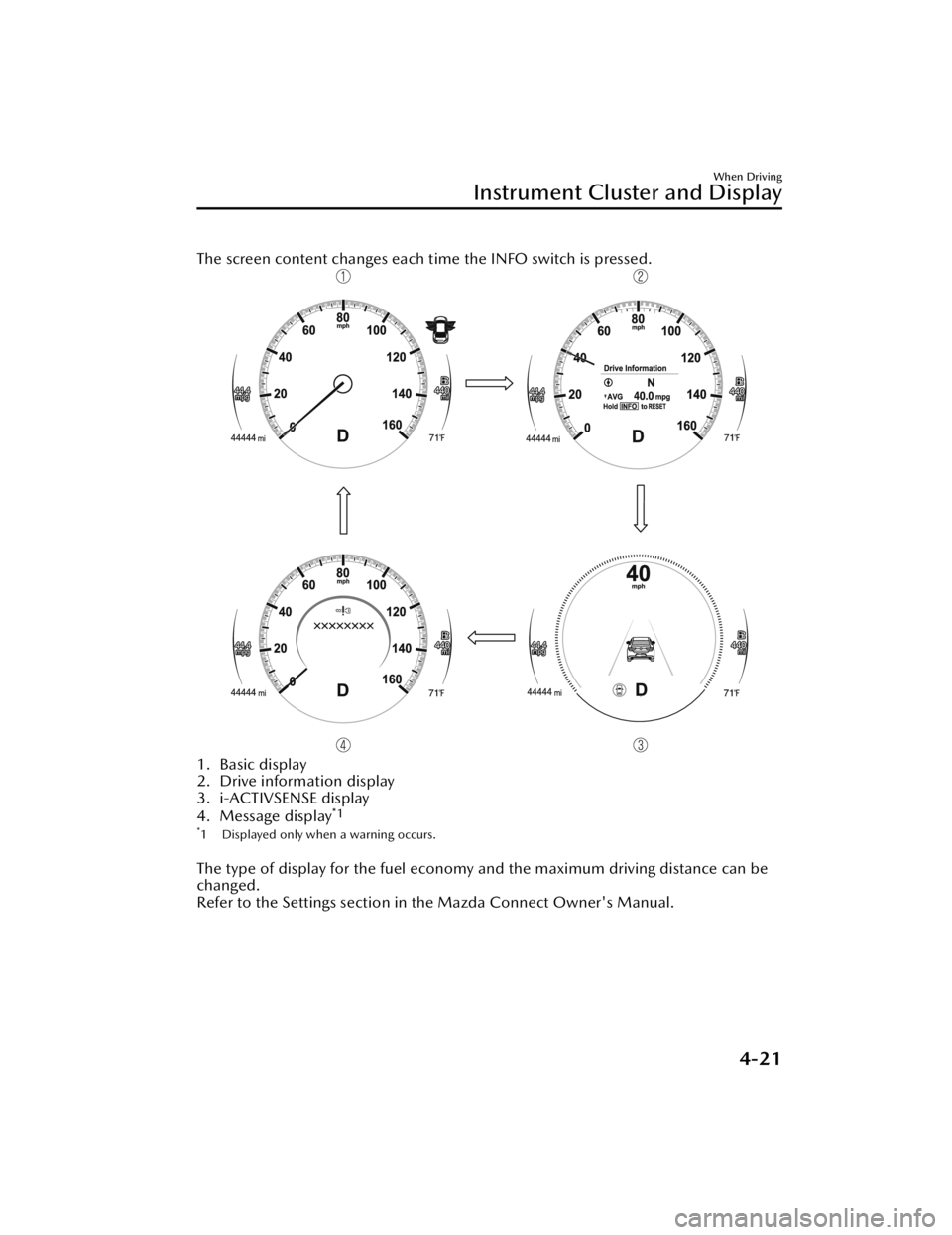
The screen content changes each time the INFO switch is pressed.
1. Basic display
2. Drive information display
3. i-ACTIVSENSE display
4. Message display
*1
*1 Displayed only when a warning occurs.
The type of display for the fuel economy and the maximum driving distance can be
changed.
Refer to the Settings section in the Mazda Connect Owner's Manual.
When Driving
Instrument Cluster and Display
4-21
CX-50_8KB8-EA-22A_Edition2_new2022-1-6 14:55:18
Page 176 of 583

▼Outside Temperature Display
When the ignition is switched ON, the
outside temperature is displayed.
NOTE
Under the following conditions, the
outside temperature display may
differ from the actual outside
temperature depending on the
surroundings and ve
hicle conditions:
Significantly cold or hot
temperatures.
Sudden changes in outside
temperature.
The vehicle is parked.The vehicle is driven at low speeds.
Changing the Temperature Unit of the
Outside Temperature Display
The outside temperature unit can be
switched between Celsius and
Fahrenheit.
Settings can be changed by operating
the center display screen.
Refer to the Settings section in the
Mazda Connect Owner's Manual.
▼ Distance-to-empty
This displays the approximate distance
you can travel on the remaining fuel
based on the fuel economy.
The distance-to-empty will be
calculated and displayed every second.
When the remaining
distance-to-empty is 50 km (30 miles)
or farther, the remaining
distance-to-empty indication
decreases in 10 km (10 mile)
increments, and when the remaining
distance-to-empty is 50 km (30 miles)
or shorter, it decreases in 1 km (1 mile)
increments.
NOTE
Even though the distance-to-empty
display may indicate a
sufficient
amount of remaining driving distance
before refueling is required, refuel as
soon as possible if the fuel level is
very low or the low fuel warning light
illuminates.
The display will not change unless
you add more than approximately 9
L (2.3 US gal, 1.9 Imp gal) of fuel.
The distance-to-empty is the
approximate remaining distance the
vehicle can be driven until all the
graduation marks in the fuel gauge
indicating the remaining fuel supply
disappear.
If there is no past fuel economy
information such as after first
purchasing your vehicle or the
information is deleted when the
battery cables are disconnected, the
actual distance-to empty/range may differ from the amount indicated.
When Driving
Instrument Cluster and Display
4-25
CX-50_8KB8-EA-22A_Edition2_new 2022-1-6 14:55:18
Page 185 of 583
turn on or remains turned on, have the vehicle inspected at an Authorized
Mazda Dealer.
*2 The light turns on continuously when the parking brake is applied.
▼Wrench Indication/Indicator Light
The wrench indication/indicator light
is displayed/turns on under the
following conditions.
When the preset maintenance
period has arrived.
Refer to the Information section in
the Mazda Connect Owner's
Manual.
CAUTION
When the maintenance period
arrives, have your vehicle inspected
by an Authorized Mazda Dealer as
soon as possible. If maintenance is
neglected, a decrease in vehicle
performance may occur which
could cause damage. Have your
vehicle inspected before the
maintenance pe riod arrives.
If the vehicle continues to be
driven after the engine oil
replacement period has passed, it
could cause damage to the engine.
Replace the engine oil before the
maintenance pe riod arrives.
NOTE
The wrench indication/indicator
light may display/turn on earlier than
the preset period depending on
vehicle usage conditions.
Whenever the engine oil is replaced,
a reset of the vehicle engine control
unit is necessary.
Refer to the Information section in
the Mazda Connect Owner's
Manual.
When Driving
Instrument Cluster and Display
4-34
CX-50_8KB8-EA-22A_Edition2_new 2022-1-6 14:55:18
Page 187 of 583

Blind Spot Monitoring (BSM) Operation Conditions and Warnings*
Refer to Blind Spot Monitoring (BSM) on page 4-99.Traffic Sign Recognition System (TSR) traffic signs and Warnings*
Refer to Traffic Sign Recognition System (TSR) on page 4-104.Mazda Radar Cruise Control with Stop & Go function (MRCC with Stop & Go
function) Operation Conditions and Warnings*
Refer to Mazda Radar Cruise Control with Stop & Go function (MRCC with Stop
& Go function) on page 4-117.
Traffic Jam Assist (TJA) Operation Conditions and Warnings*
Refer to Traffic Jam Assist (TJA) on page 4-124.Lane-keep Assist System (LAS) Warnings*
Refer to Lane-keep Assist System (LAS) on page 4-137.Emergency Lane Keeping (ELK) Warnings*
Refer to Emergency Lane Keeping (ELK) on page 4-141.Smart Brake Support (SBS) Operation Conditions and Warnings
Refer to Smart Brake Support (SBS) on page 4-148.
Cruise Control Operation Conditions
Refer to Cruise Control on page 4-198.
Navigation Guidance (vehicles with navigation system)Intersection Name (vehicles with navigation system)Street name (vehicles with navigation system)Lane Guidance (vehicles with navigation system)Speed limit indicator (vehicles with navigation system)Vehicle Speed
The active driving display settin gs can be changed or adjusted.
Refer to the Settings section in the Mazda Connect Owner's Manual.
NOTE
The desired driving position (display position, brightness level, display
information) can be called up after programming the position.
Refer to Driving Position Memory on page 2-10.
The street name may not be displayed depending on the market and region.
When Driving
Instrument Cluster and Display
4-36*Some models.
CX-50_8KB8-EA-22A_Edition2_new 2022-1-6 14:55:18