Mazda connect MAZDA MODEL CX-50 2023 Owner's Manual
[x] Cancel search | Manufacturer: MAZDA, Model Year: 2023, Model line: MODEL CX-50, Model: MAZDA MODEL CX-50 2023Pages: 583, PDF Size: 85.63 MB
Page 200 of 583

Lighting Control
▼Headlights
Turn the headlight switch to turn the headli
ghts and other exterior lights on or off.
When the taillights, parking lights, license plate lights, and the side-marker lights are
turned on, the lights-on indicator ligh t in the instrument cluster turns on.
NOTE
If the light switch is left on, the lights will automatically switch off approximately
30 seconds after switching the ignition off.
The time setting can be changed.
Refer to the Settings section in the Mazda Connect Owner's Manual.
To prevent discharging the battery, do not leave the lights on while the engine is
off unless safety requires them.
Without auto-light control
Ignition Position ACC or OFF ON
Switch Position OFF
OFF
Headlights Off Off
Off*1Off Off On
Daytime running
lights Off Off Off
On
*2On*2*3Off
Taillights
Parking lights
License plate lights
Side-marker lights Off
On
*1On*1Off On On
*1 The lights are turned on for the specified period by the auto headlight off function.
When Driving
Switches and Controls
4-49
CX-50_8KB8-EA-22A_Edition2_new
2022-1-6 14:55:18
Page 202 of 583
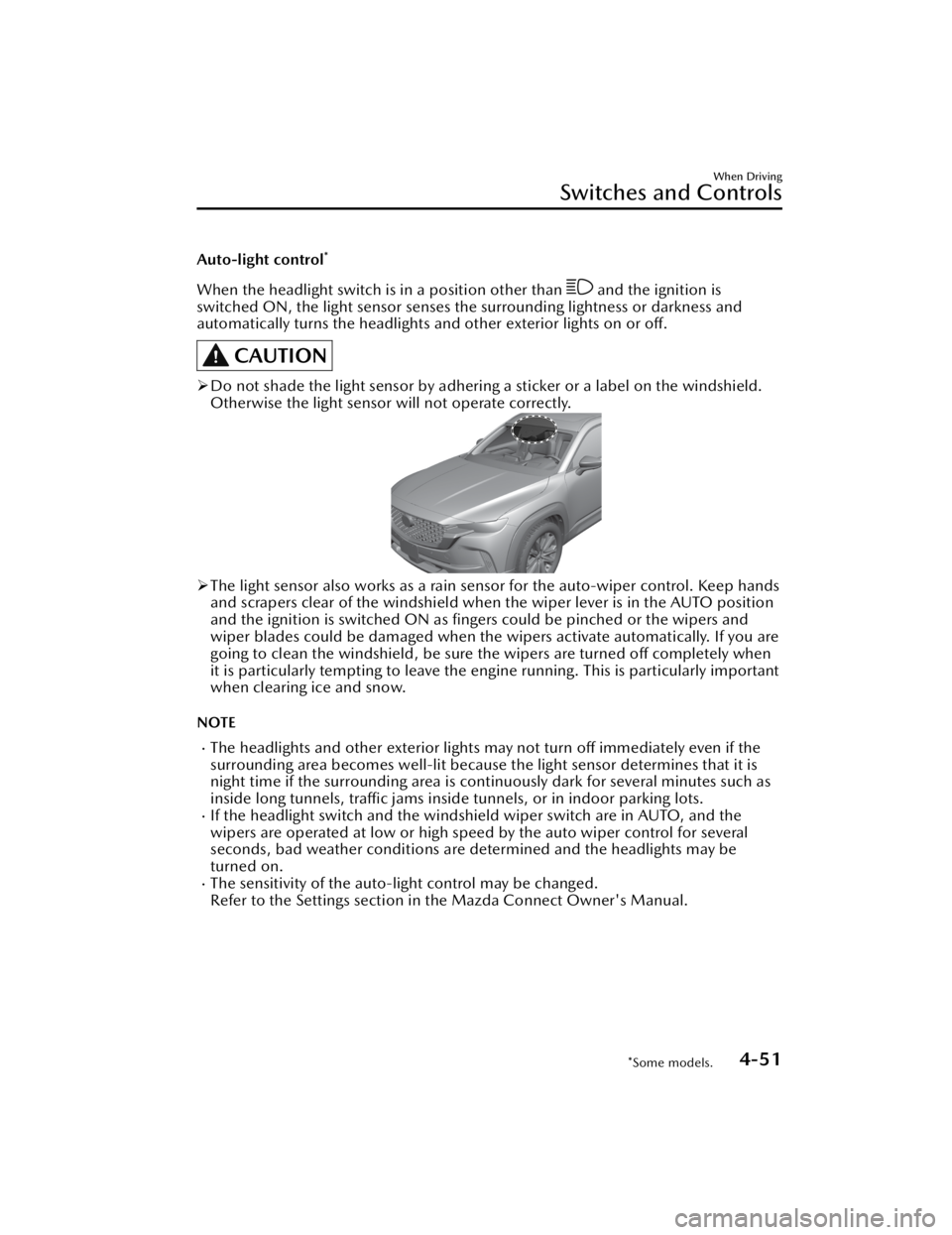
Auto-light control*
When the headlight switch is in a position other than and the ignition is
switched ON, the light sensor senses th e surrounding lightness or darkness and
automatically turns the headlights an d other exterior lights on or off.
CAUTION
Do not shade the light sensor by adhering a sticker or a label on the windshield.
Otherwise the light sensor will not operate correctly.
The light sensor also works as a rain sensor for the auto-wiper control. Keep hands
and scrapers clear of the windshield when the wiper lever is in the AUTO position
and the ignition is switched ON as fingers could be pinched or the wipers and
wiper blades could be damaged when the wipers activate automatically. If you are
going to clean the windshield, be sure the wipers are turned off completely when
it is particularly tempting to leave the engine running. This is particularly important
when clearing ice and snow.
NOTE
The headlights and other exterior lights may not turn off immediately even if the
surrounding area becomes well-lit because the light sensor determines that it is
night time if the surrounding area is cont inuously dark for several minutes such as
inside long tunnels, traffic jams inside tunnels, or in indoor parking lots.
If the headlight switch and the windshield wiper switch are in AUTO, and the
wipers are operated at low or high speed by the auto wiper control for several
seconds, bad weather conditions are determined and the headlights may be
turned on.
The sensitivity of the auto-light control may be changed.
Refer to the Settings section in the Mazda Connect Owner's Manual.
When Driving
Switches and Controls
*Some models.4-51
CX-50_8KB8-EA-22A_Edition2_new 2022-1-6 14:55:18
Page 203 of 583
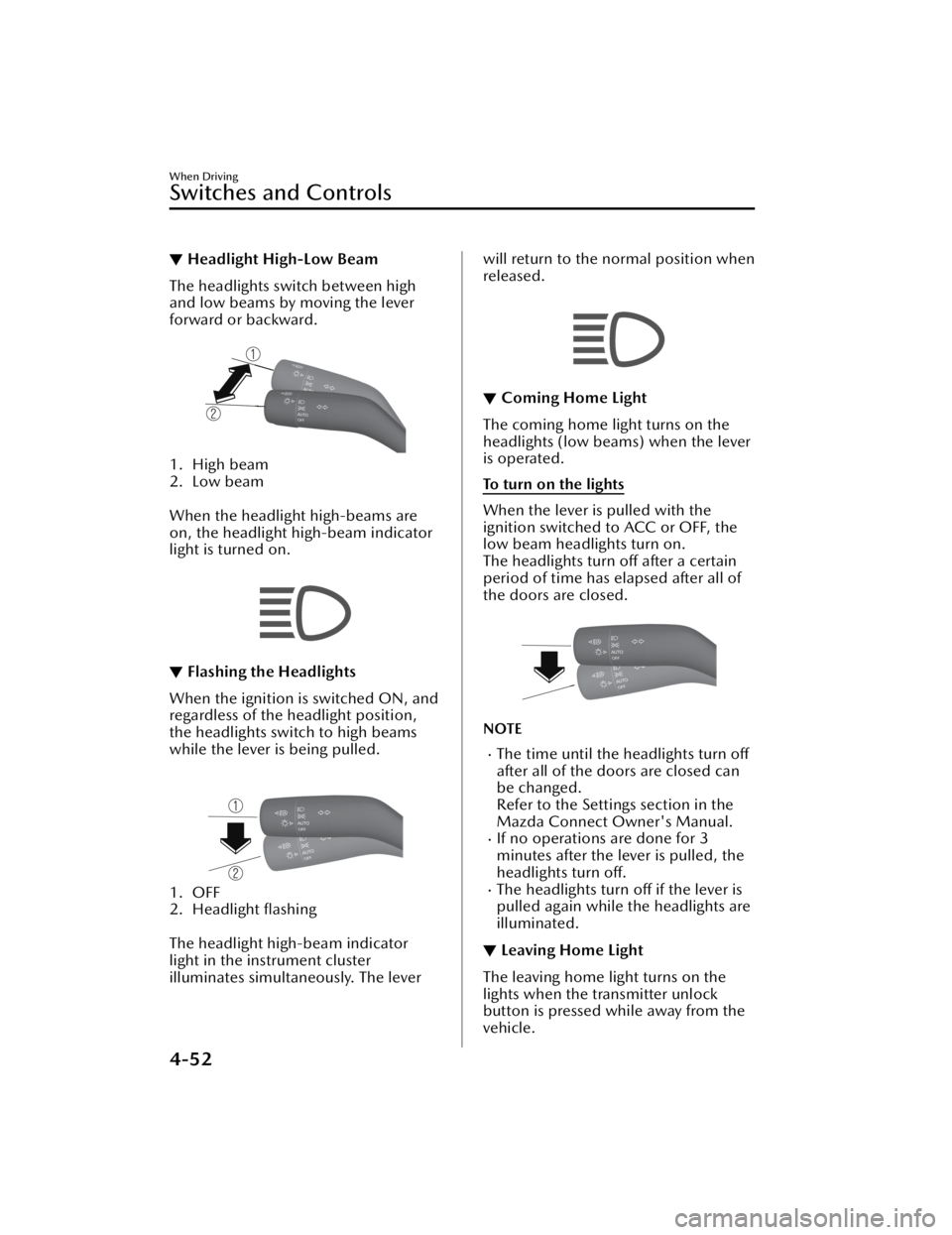
▼Headlight High-Low Beam
The headlights switch between high
and low beams by moving the lever
forward or backward.
1. High beam
2. Low beam
When the headlight high-beams are
on, the headlight high-beam indicator
light is turned on.
▼Flashing the Headlights
When the ignition is switched ON, and
regardless of the headlight position,
the headlights switch to high beams
while the lever is being pulled.
1. OFF
2. Headlight flashing
The headlight high-beam indicator
light in the instrument cluster
illuminates simultaneously. The lever
will return to the normal position when
released.
▼ Coming Home Light
The coming home light turns on the
headlights (low beams) when the lever
is operated.
To turn on the lights
When the lever is pulled with the
ignition switched to ACC or OFF, the
low beam headlights turn on.
The headlights turn off after a certain
period of time has elapsed after all of
the doors are closed.
NOTE
The time until the headlights turn
off
after all of the doors are closed can
be changed.
Refer to the Settings section in the
Mazda Connect Owner's Manual.
If no operations are done for 3
minutes after the lever is pulled, the
headlights turn off.
The headlights turn off if the lever is
pulled again while the headlights are
illuminated.
▼Leaving Home Light
The leaving home light turns on the
lights when the transmitter unlock
button is pressed while away from the
vehicle.
When Driving
Switches and Controls
4-52
CX-50_8KB8-EA-22A_Edition2_new
2022-1-6 14:55:18
Page 204 of 583
The following lights turn on when the
leaving home light is operated.
Low beams, Parking lights, Taillights,
License plate lights.
To turn on the lights
When the ignition switch and the
headlight switch are in the following
conditions, the headlights will
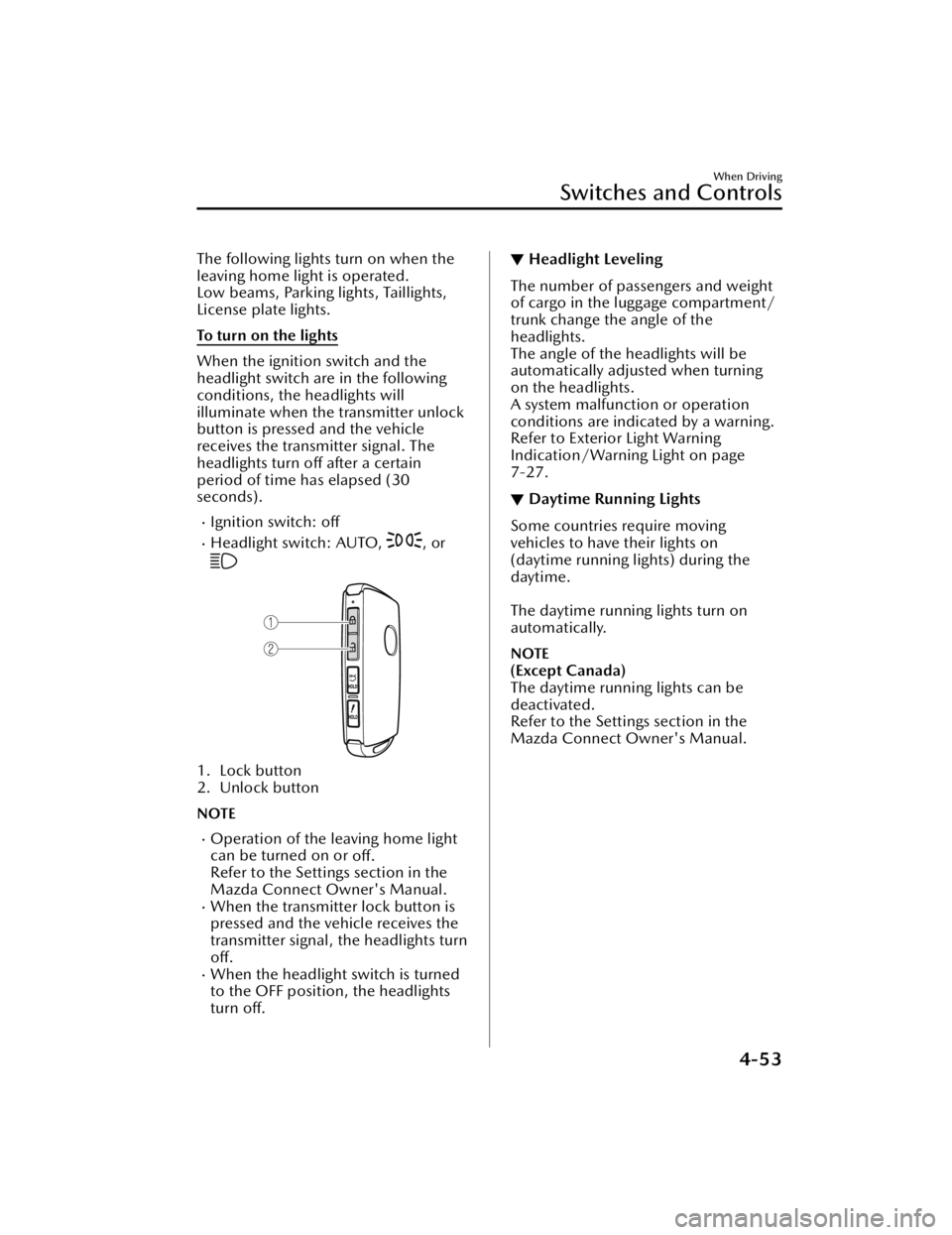
illuminate when the transmitter unlock
button is pressed and the vehicle
receives the transmitter signal. The
headlights turn off after a certain
period of time has elapsed (30
seconds).
Ignition switch: off
Headlight switch: AUTO, , or
1. Lock button
2. Unlock button
NOTE
Operation of the leaving home light
can be turned on or off.
Refer to the Settings section in the
Mazda Connect Owner's Manual.
When the transmitter lock button is
pressed and the vehicle receives the
transmitter signal, the headlights turn
off.
When the headlight switch is turned
to the OFF position, the headlights
turn off.
▼ Headlight Leveling
The number of passengers and weight
of cargo in the luggage compartment/
trunk change the angle of the
headlights.
The angle of the headlights will be
automatically adjusted when turning
on the headlights.
A system malfunction or operation
conditions are indicated by a warning.
Refer to Exterior Light Warning
Indication/Warning Light on page
7-27.
▼Daytime Running Lights
Some countries require moving
vehicles to have their lights on
(daytime running lights) during the
daytime.
The daytime running lights turn on
automatically.
NOTE
(Except Canada)
The daytime running lights can be
deactivated.
Refer to the Settings section in the
Mazda Connect Owner's Manual.
When Driving
Switches and Controls
4-53
CX-50_8KB8-EA-22A_Edition2_new
2022-1-6 14:55:18
Page 205 of 583

Turn and Lane-ChangeSignals
▼Turn and Lane-Change Signals
The ignition must be switched ON to
use the turn and lane-change signals.
▼Tu r n S i g n a l s
Move the signal lever down (for a left
turn) or up (for a right turn) to the stop
position. The signal will self-cancel
after the turn is completed.
If the indicator light continues to flash
after a turn, manually return the lever
to its original position.
1. Right turn
2. Right lane change
3. OFF
4. Left lane change
5. Left turn
The turn signal indicators in the
instrument cluster flash according to
the operation of the turn signal lever to
show which signal is working.
NOTE
There may be a problem with the
turn signal lights if they do not flash
but remain turned on, or they flash
abnormally. Have your vehicle
inspected by an Authorized Mazda
Dealer.
A personalized function is available
to change the turn indicator sound
volume.
Refer to the Settings section in the
Mazda Connect Owner's Manual.
▼ Lane-Change Signals
Move the lever halfway toward the
direction of the lane change
―until the
indicator flashes― and hold it there. It
will return to the off position when
released.
▼ Three-Flash Turn Signal
After releasing the turn signal lever
from the halfway point, the turn signal
indicator
flashes 3 times. The
operation can be canceled by moving
the lever in the direction opposite to
which it was operated.
NOTE
The three-flash turn signal function can
be switched to on/off using the
personalization function.
Refer to the Settings section in the
Mazda Connect Owner's Manual.
When Driving
Switches and Controls
4-54
CX-50_8KB8-EA-22A_Edition2_new 2022-1-6 14:55:18
Page 209 of 583
If the headlight switch and the
windshield wiper switch are in
AUTO, and the wipers are operated
at low or high speed by the auto
wiper control for several seconds,
bad weather conditions are
determined and the headlights may
be turned on.
The auto-wiper control functions can
be turned off.
Refer to the Settings section in the
Mazda Connect Owner's Manual.
▼Windshield Washer
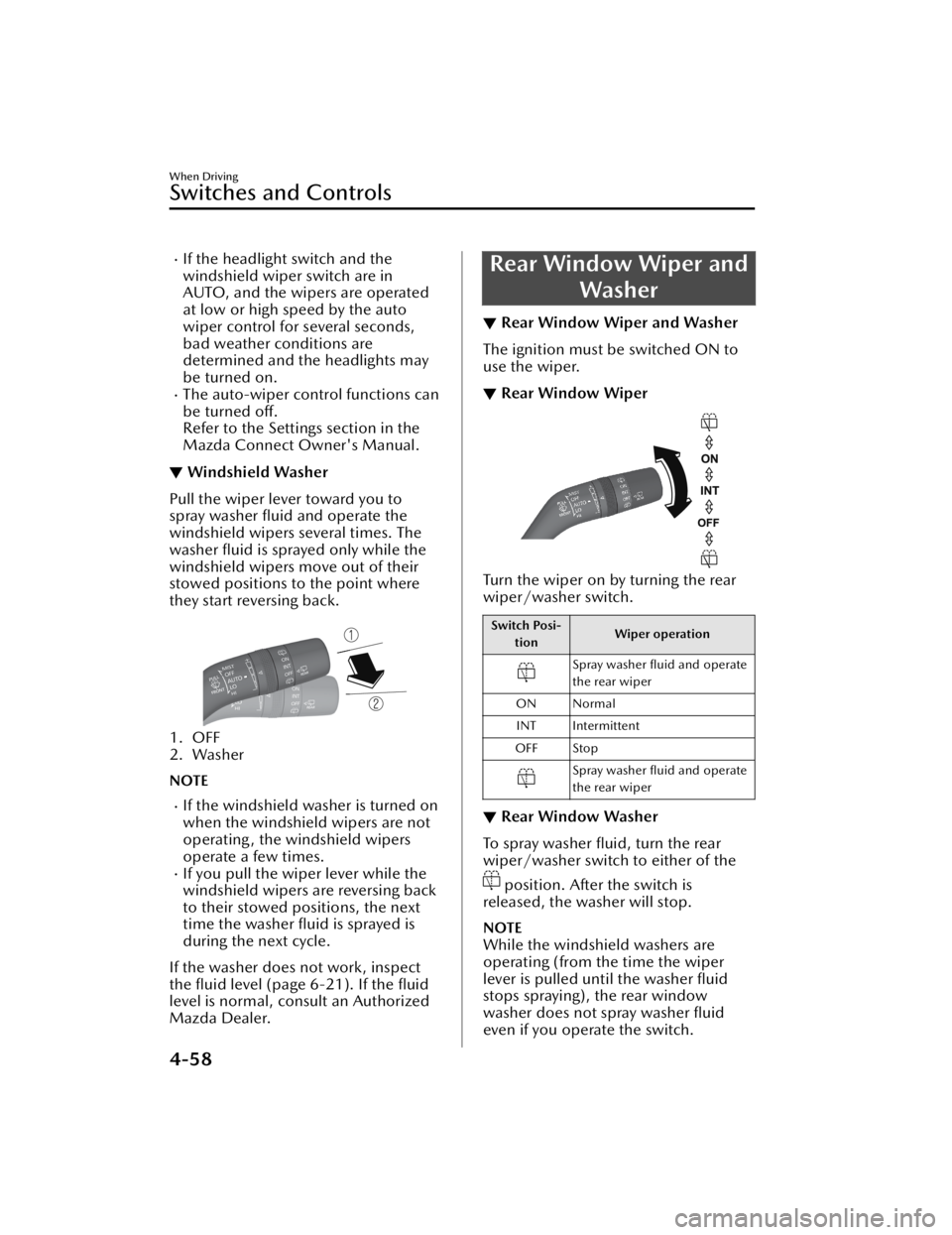
Pull the wiper lever toward you to
spray washer fluid and operate the
windshield wipers several times. The
washer fluid is sprayed only while the
windshield wipers move out of their
stowed positions to the point where
they start reversing back.
1. OFF
2. Washer
NOTE
If the windshield washer is turned on
when the windshield wipers are not
operating, the windshield wipers
operate a few times.
If you pull the wiper lever while the
windshield wipers are reversing back
to their stowed positions, the next
time the washer fluid is sprayed is
during the next cycle.
If the washer does not work, inspect
the fluid level (page 6-21). If the fluid
level is normal, consult an Authorized
Mazda Dealer.
Rear Window Wiper and Washer
▼Rear Window Wiper and Washer
The ignition must be switched ON to
use the wiper.
▼Rear Window Wiper
Turn the wiper on by turning the rear
wiper/washer switch.
Switch Posi-
tion Wiper operation
Spray washer fluid and operate
the rear wiper
ON Normal INT Intermittent
OFF Stop
Spray washer fluid and operate
the rear wiper
▼ Rear Window Washer
To spray washer fluid, turn the rear
wiper/washer switch to either of the
position. After the switch is
released, the washer will stop.
NOTE
While the windshield washers are
operating (from the time the wiper
lever is pulled until the washer fluid
stops spraying), the rear window
washer does not spray washer fluid
even if you operate the switch.
When Driving
Switches and Controls
4-58
CX-50_8KB8-EA-22A_Edition2_new 2022-1-6 14:55:18
Page 211 of 583
NOTE
This defogger is not designed for
melting snow. If there is an
accumulation of snow on the rear
window, remove it before using the
defogger.
The rear window defogger operation
time can be changed from 15
minutes to continuous operation.
When the operation time has been
switched to continuous operation,
by pressing the switch, the rear
window defogger will continue to
operate until the ignition is switched
OFF.
Refer to the Settings section in the
Mazda Connect Owner's Manual.
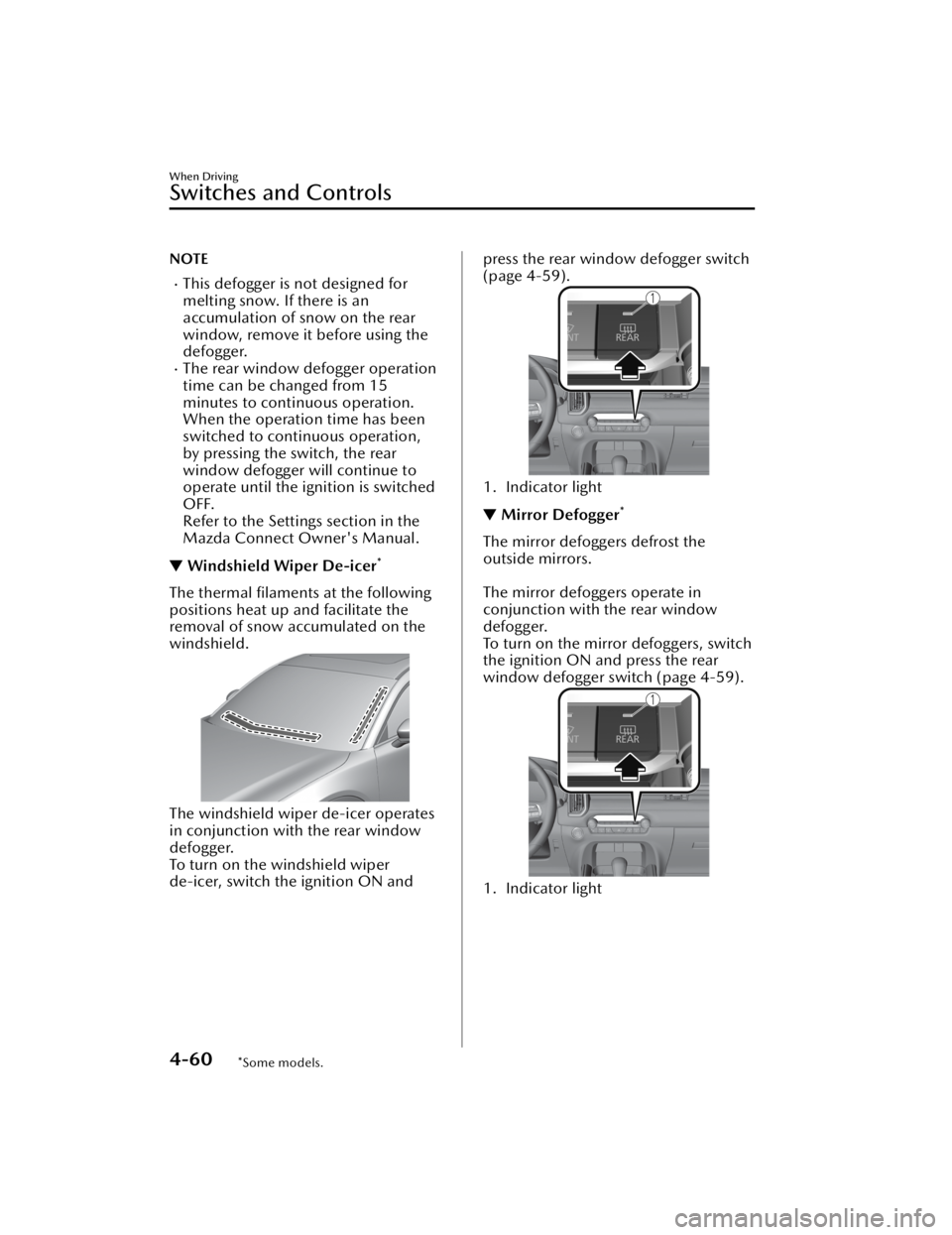
▼Windshield Wiper De-icer*
The thermal filaments at the following
positions heat up and facilitate the
removal of snow accumulated on the
windshield.
The windshield wiper de-icer operates
in conjunction with the rear window
defogger.
To turn on the windshield wiper
de-icer, switch the ignition ON and
press the rear window defogger switch
(page 4-59).
1. Indicator light
▼ Mirror Defogger*
The mirror defoggers defrost the
outside mirrors.
The mirror defoggers operate in
conjunction with the rear window
defogger.
To turn on the mirror defoggers, switch
the ignition ON and press the rear
window defogger switch (page 4-59).
1. Indicator light
When Driving
Switches and Controls
4-60*Some models.
CX-50_8KB8-EA-22A_Edition2_new
2022-1-6 14:55:18
Page 213 of 583
HomeLink WirelessControl System
*
▼ HomeLink Wireless Control
System
NOTE
HomeLink and HomeLink house are
registered trademarks of Gentex
Corporation.
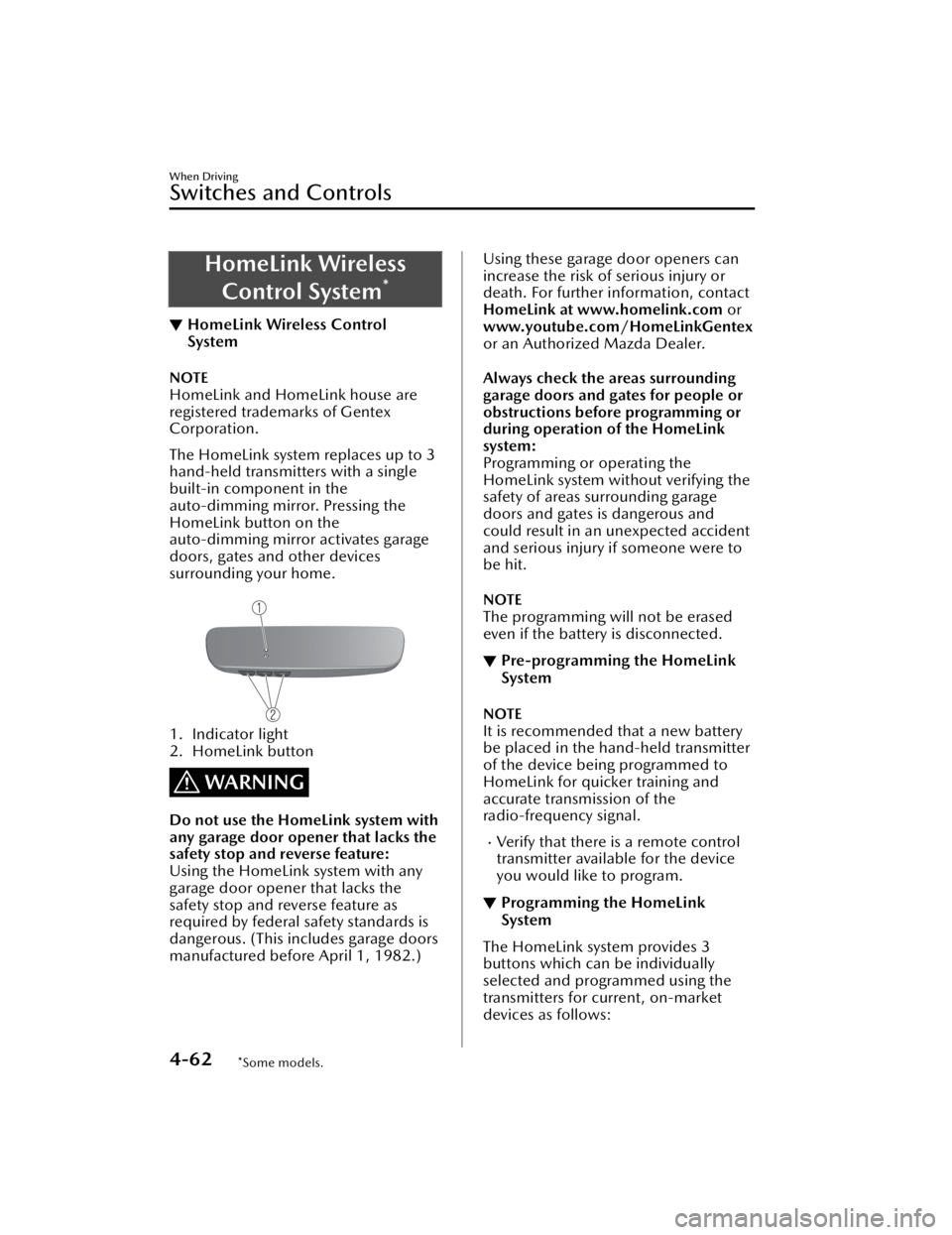
The HomeLink system replaces up to 3
hand-held transmitters with a single
built-in component in the
auto-dimming mirror. Pressing the
HomeLink button on the
auto-dimming mirror activates garage
doors, gates and other devices
surrounding your home.
1. Indicator light
2. HomeLink button
WARNING
Do not use the HomeLink system with
any garage door opener that lacks the
safety stop and reverse feature:
Using the HomeLink system with any
garage door opener that lacks the
safety stop and reverse feature as
required by federal safety standards is
dangerous. (This includes garage doors
manufactured before April 1, 1982.)
Using these garage door openers can
increase the risk of serious injury or
death. For further in
formation, contact
HomeLink at www.homelink.com or
www.youtube.com/HomeLinkGentex
or an Authorized Mazda Dealer.
Always check the areas surrounding
garage doors and gates for people or
obstructions before programming or
during operation of the HomeLink
system:
Programming or operating the
HomeLink system without verifying the
safety of areas surrounding garage
doors and gates is dangerous and
could result in an unexpected accident
and serious injury if someone were to
be hit.
NOTE
The programming will not be erased
even if the battery is disconnected.
▼ Pre-programming the HomeLink
System
NOTE
It is recommended that a new battery
be placed in the hand-held transmitter
of the device being programmed to
HomeLink for quicker training and
accurate transmission of the
radio-frequency signal.
Verify that there is a remote control
transmitter available for the device
you would like to program.
▼Programming the HomeLink
System
The HomeLink system provides 3
buttons which can be individually
selected and programmed using the
transmitters for current, on-market
devices as follows:
When Driving
Switches and Controls
4-62*Some models.
CX-50_8KB8-EA-22A_Edition2_new
2022-1-6 14:55:18
Page 223 of 583

▼Warning Light
The warning light turns on when the
system has a malfunction.
Refer to Brake System Warning
Indication/Warning Light on page
7-20.
▼Brake Pad Wear Indicator
When the disc brake pads become
worn, the built-in wear indicators
contact the disc plates. This causes a
screeching noise to warn that the pads
should be replaced.
When you hear this noise, consult an
Authorized Mazda Dealer as soon as
possible.
WARNING
Do not drive with worn disc pads:
Driving with worn disc pads is
dangerous. The brakes could fail and
cause a serious accident. As soon as
you hear a screeching noise consult an
Authorized Mazda Dealer.
NOTE
In high humidity weather conditions,
brake noises, such as brake squeak or
brake squeal can be heard. It does not
indicate a malfunction.
▼Brake Assist
During emergency braking situations
when it is necessary to depress the
brake pedal with greater force, the
brake assist system provides braking
assistance, thus enhancing braking
performance.
When the brake pedal is depressed
hard or depressed more quickly, the
brakes apply more firmly.
NOTE
When the brake pedal is depressed
hard or depressed more quickly, the
pedal will feel softer but the brakes
will apply more firmly. This is a
normal effect of the brake assist
operation and does not indicate a
malfunction.
When the brake pedal is depressed
hard or depressed more quickly, a
motor/pump operation noise may
be heard. This is a normal effect of
the brake assist and does not
indicate a malfunction.
The brake assist equipment does not
supersede the functionality of the
vehicle's main braking system.
▼
Brake Override System
The brake override system applies the
brake first for safety if the brake pedal
and accelerator pedal are depressed at
the same time.
NOTE
Operation of the brake override system
can be turned on or
off.
Refer to the Settings section in the
Mazda Connect Owner's Manual.
When Driving
Brake
4-72
CX-50_8KB8-EA-22A_Edition2_new 2022-1-6 14:55:18
Page 235 of 583
Vehicle stability is limited even when
Mi-drive is activated.
Always drive the vehicle safely. Do
not drive the vehicle recklessly,
otherwise it may result in an
accident.
CAUTION
Do not use the sport mode when
driving on slippery roads such as wet
or snow-covered roads. It may cause
tire slipping.
Heed the following cautions so that
the system can operate normally.
Always use tires of the specified
size, same manufacturer, brand,
and pattern (tread pattern) for the
front and rear wheels.
Do not use tires with significantly
different wear patterns on the
same vehicle.
Do not use the sport mode when
driving on slippery roads such as wet
or snow-covered roads. It may cause
tire slipping.
Drive carefully when using tire
chains.
Because the diameter of the tires
differs, the system may not operate
normally.
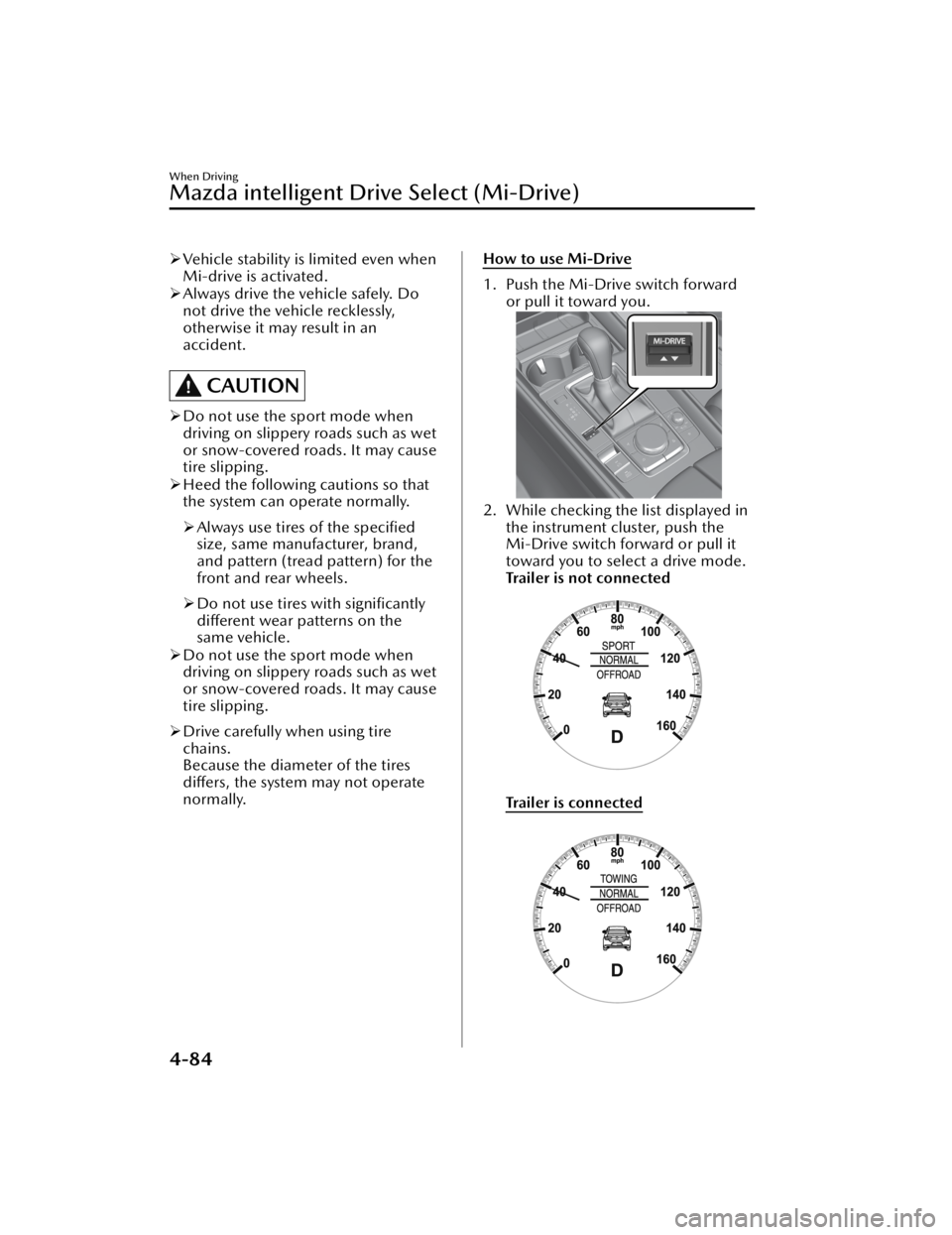
How to use Mi-Drive
1. Push the Mi-Drive switch forward
or pull it toward you.
2. While checking the list displayed inthe instrument cluster, push the
Mi-Drive switch forward or pull it
toward you to select a drive mode.
Trailer is not connected
Tra i l e r i s co n n e c te d
When Driving
Mazda intelligent Drive Select (Mi-Drive)
4-84
CX-50_8KB8-EA-22A_Edition2_new 2022-1-6 14:55:18