Mazda connect MAZDA MODEL CX-50 2023 Workshop Manual
[x] Cancel search | Manufacturer: MAZDA, Model Year: 2023, Model line: MODEL CX-50, Model: MAZDA MODEL CX-50 2023Pages: 583, PDF Size: 85.63 MB
Page 317 of 583
NOTE
When the selector lever is in R position, the displayed screen does not switch to
the top view/front view, top view/front wide view, or the side view.
Display of the top view/front view, top view/front wide view, or the side view
stops even with the display conditions met if any of the following conditions
occurs.
When a switch around the commander knob is pressed.The selector lever is shifted to P position (displayed when the selector lever is in
a position other than P).
(Displayed when vehicle speed is less than 15 km/h (9.3 mph))
4 minutes and 30 seconds have passed.The vehicle speed is about 15 km/h (9.3 mph) or faster.(Displayed when the vehicle speed is about 15 km/h (9.3 mph) or faster)
The vehicle speed is about 15 km/h (9.3 mph) or faster after 8 seconds have
passed since pressing the 360°View Monitor switch.
4 minutes and 22 seconds have passed from the point when the vehicle speed
was less than 15 km/h (9.3 mph) afte r 8 seconds have passed since pressing
the 360°View Monitor switch.
The 360°View Monitor settings can be changed as follows.
Refer to the Settings section in the Mazda Connect Owner's Manual.
Automatic display of the 360°View Monitor when the ultrasonic sensor detects
an obstruction.
Automatic display of the 360°View Monitor when the ignition is switched ON.Screen priority level when the system launches.
Top view/Rear view, Top view/Rear wide view
The top view/rear view, top view/rear wide view displays when all of the following
conditions are met.
The ignition is switched ON.Selector lever is in R position.
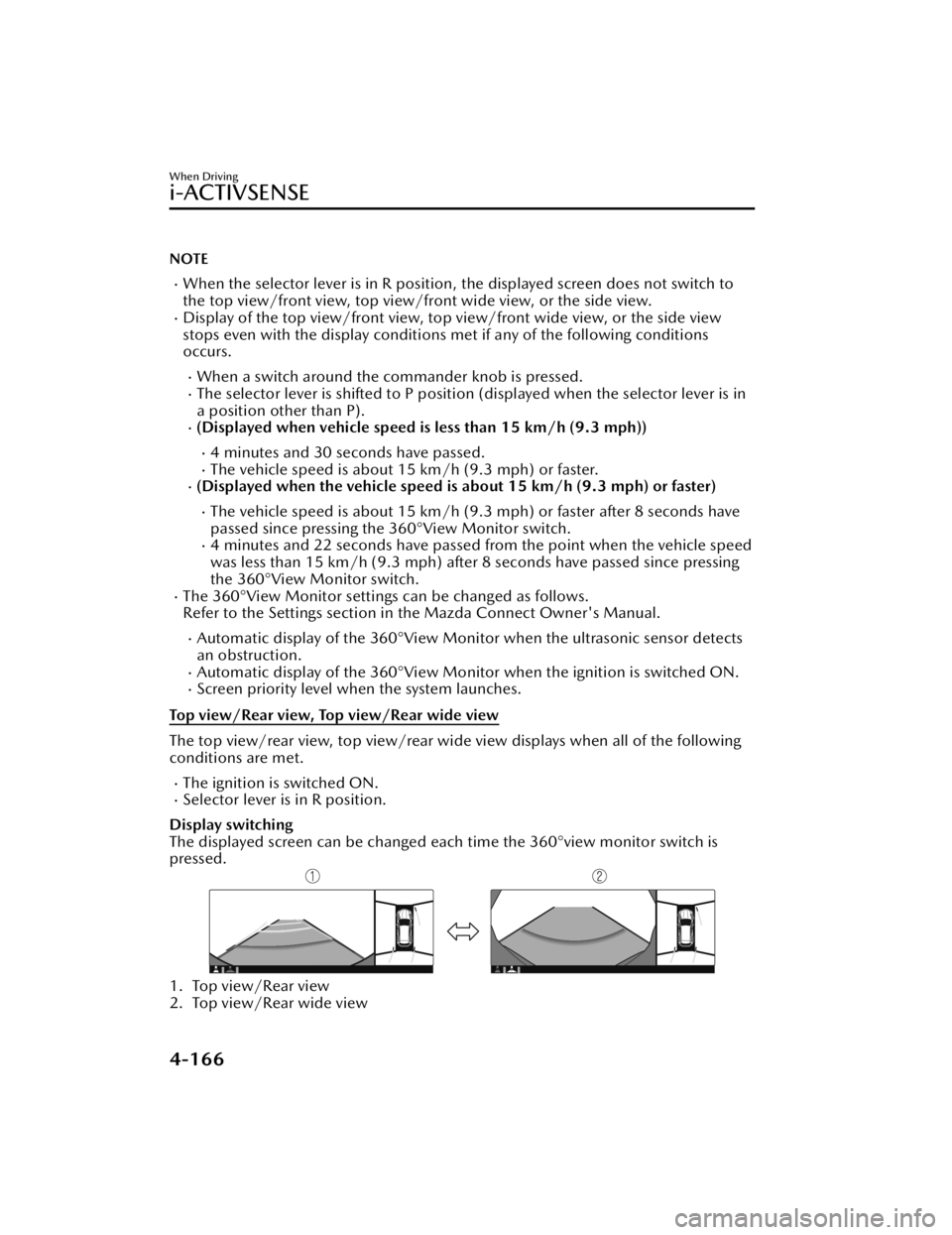
Display switching
The displayed screen can be changed each time the 360°view monitor switch is
pressed.
1. Top view/Rear view
2. Top view/Rear wide view
When Driving
i-ACTIVSENSE
4-166
CX-50_8KB8-EA-22A_Edition2_new 2022-1-6 14:55:18
Page 318 of 583
NOTE
The top view/rear view and top view/rear wide view automatically display
whether or not the 360°View Monitor switch is turned on or off when shifting the
selector lever to R position.
The top view/rear view and top view/rear wide view displays the previously
displayed screen.
The setting can be changed to display the top view/front view when shifting from
reverse to a forward gear without operating the 360°View Monitor switch to check
the front of the vehicle while parallel parking.
Refer to the Settings section in the Mazda Connect Owner's Manual.
Screen operation/icon
WARNING
Always stop the vehicle when adjusting the 360°View Monitor image quality.
Do not adjust the 360°View Monitor image quality while driving. If you adjust the
360°View Monitor image quality (such as brightness, contrast, tone, and color
density) while driving, it could lead to an unexpected accident.
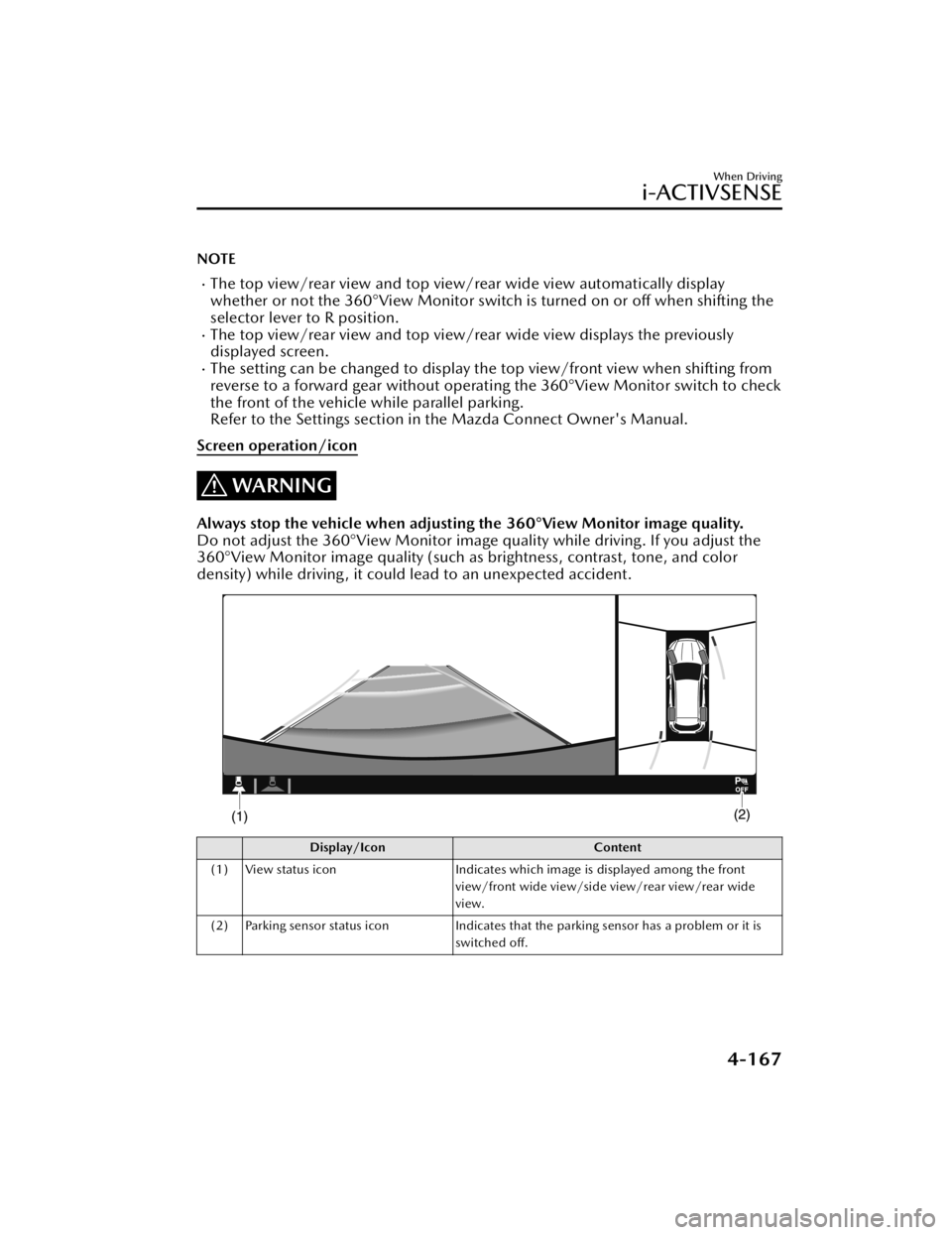
Display/Icon Content
(1) View status icon Indicates which image is displayed among the front
view/front wide view/side view/rear view/rear wide
view.
(2) Parking sensor status icon Indicates that the parking sensor has a problem or it is
switched off.
When Driving
i-ACTIVSENSE
4-167
CX-50_8KB8-EA-22A_Edition2_new 2022-1-6 14:55:18
Page 321 of 583

NOTE
The setting can be changed so that the projected vehicle path lines are not
displayed.
Refer to the Settings section in the Mazda Connect Owner's Manual.
How to use the projected vehicle path line function
1. (Screen display)
2. (Actual condition)
Make sure that there are no obstructions within the projected vehicle path lines.
Drive the vehicle forward while turning the steering wheel so that no obstructions
come within the projected vehicle path lines.
When Driving
i-ACTIVSENSE
4-170
CX-50_8KB8-EA-22A_Edition2_new 2022-1-6 14:55:18
Page 325 of 583

Viewing the screen
Display/IconContent
(1) Projected vehicle path lines (yellow) Indicates the approximate projected path of the vehicle. Moves in conjunction with the steering wheel operation.
The projected vehicle path lines (yellow) indicate the
path the inner side of the vehicle is expected to travel.
(2) Vehicle parallel guide lines (blue) Indicates the approximate vehicle width including the door mirrors.
(3) Vehicle front end guide lines (blue) Indicates the point about 0.25 m (9.84 in) from the front edge of the vehicle (front edge of the bumper).
NOTE
The setting can be changed so that the projected vehicle path lines are not
displayed.
Refer to the Settings section in the Mazda Connect Owner's Manual.
When Driving
i-ACTIVSENSE
4-174
CX-50_8KB8-EA-22A_Edition2_new 2022-1-6 14:55:18
Page 328 of 583

If the position or angle of each camera changes due to tilting of the vehicle, the
image may appear distorted.
Lines on the road may appear distorted at the seams where each of the camera
images merge.
The screen area for each camera may appear bright/dark depending on the
illumination level around any of the cameras.
Viewing the screen
Display/Icon Content
(1) Tire icon Indicates the tire direction. Moves in conjunction with
the steering wheel operation.
(2) Projected vehicle path lines (yellow & red) Indicates the approximate projected path of the vehicle.
Moves in conjunction with the steering wheel operation.
a) Indicates the path where the edge of the rear bumper
is expected to travel.
b) Indicates the path where the outer side of the vehicle
is expected to travel.
(3) Extended vehicle width lines (blue) These guide lines indicate the approximate width of the vehicle.
(4) Projected vehicle path distance guide lines (yellow & red) These guide lines indicate the approximate distance to a
point measured from the rear of the vehicle (from the
end of the bumper).
The red line indicates the point about 0.5 m (19 in)
from the rear end of the bumper.
The yellow lines indicate the points about 1.0 m (39
in) and 2.0 m (78 in) from the rear end of the bumper.
NOTE
The setting can be changed so that the projected vehicle path lines are not
displayed.
Refer to the Settings section in the Mazda Connect Owner's Manual.
When Driving
i-ACTIVSENSE
4-177
CX-50_8KB8-EA-22A_Edition2_new
2022-1-6 14:55:18
Page 350 of 583

Cruise Set Indication (Green)
The indication turns on (green) when a
cruising speed has been set.
▼Activation/Deactivation
WARNING
Always turn off the cruise control
system when it is not in use:
Leaving the cruise control system in an
activation-ready state while the cruise
control is not in use is dangerous as the
cruise control could unexpectedly
activate if the activation button is
accidentally pressed, and result in loss
of vehicle control and an accident.
If the headway control function is
disabled using a Mazda Connect
setting , the system switches to cruise
control.
Activation
To activate the system, press the cruise
switch. The cruise standby indication
(white) turns on.
Deactivation
To deactivate the system, press the
cruise switch again.
The cruise standby indication (white)
turns
off.
▼To Set Speed
1. Activate the cruise control system
by pressing the cruise switch. The
cruise standby indication (white)
turns on.
2. Accelerate to the desired speed,
which must be more than 25 km/h
(16 mph).
3. Adjust the system to the desired vehicle speed using the accelerator
pedal. Press the RES switch up (SET
+) or down (SET-) to start cruise
control. The cruise control
indication (green) in the instrument
cluster turns on at the same time.
Quickly release the switch when the
cruise control indication (green)
turns on.
NOTE
If the RES switch is operated up (SET
+) or down (SET-) while the vehicle
speed is between 25 and 30 km/h
(16 to 19 mph), the set speed is set
to 30 km/h (19 mph).
The cruise control speed setting
cannot be performed under the
following conditions:
Any of the doors is opened.The driver's seat belt is unfastened.The brake pedal is depressed.The parking brake is applied.The selector lever is in the P, N, or
R position.
On a steep grade, the vehicle may
momentarily slow down while
ascending or speed up while
descending.
The cruise control will cancel if the
vehicle speed decreases below 20
km/h (12 mph) when the cruise
control is activated, such as when
climbing a steep grade.
The vehicle speed preset using the
cruise control is displayed in the
instrument cluster and the active
driving display (vehicles with active
driving display).
When Driving
Cruise Control
4-199
CX-50_8KB8-EA-22A_Edition2_new 2022-1-6 14:55:18
Page 353 of 583
Tire Pressure MonitoringSystem (TPMS)
▼Tire Pressure Monitoring System
(TPMS)
The TPMS monitors the air pressure of
each tire and if it decreases below the
specified
value, the system
notifies the
driver by turning on the TPMS warning
light in the instrument cluster and
indicating a message on the
multi-information display.
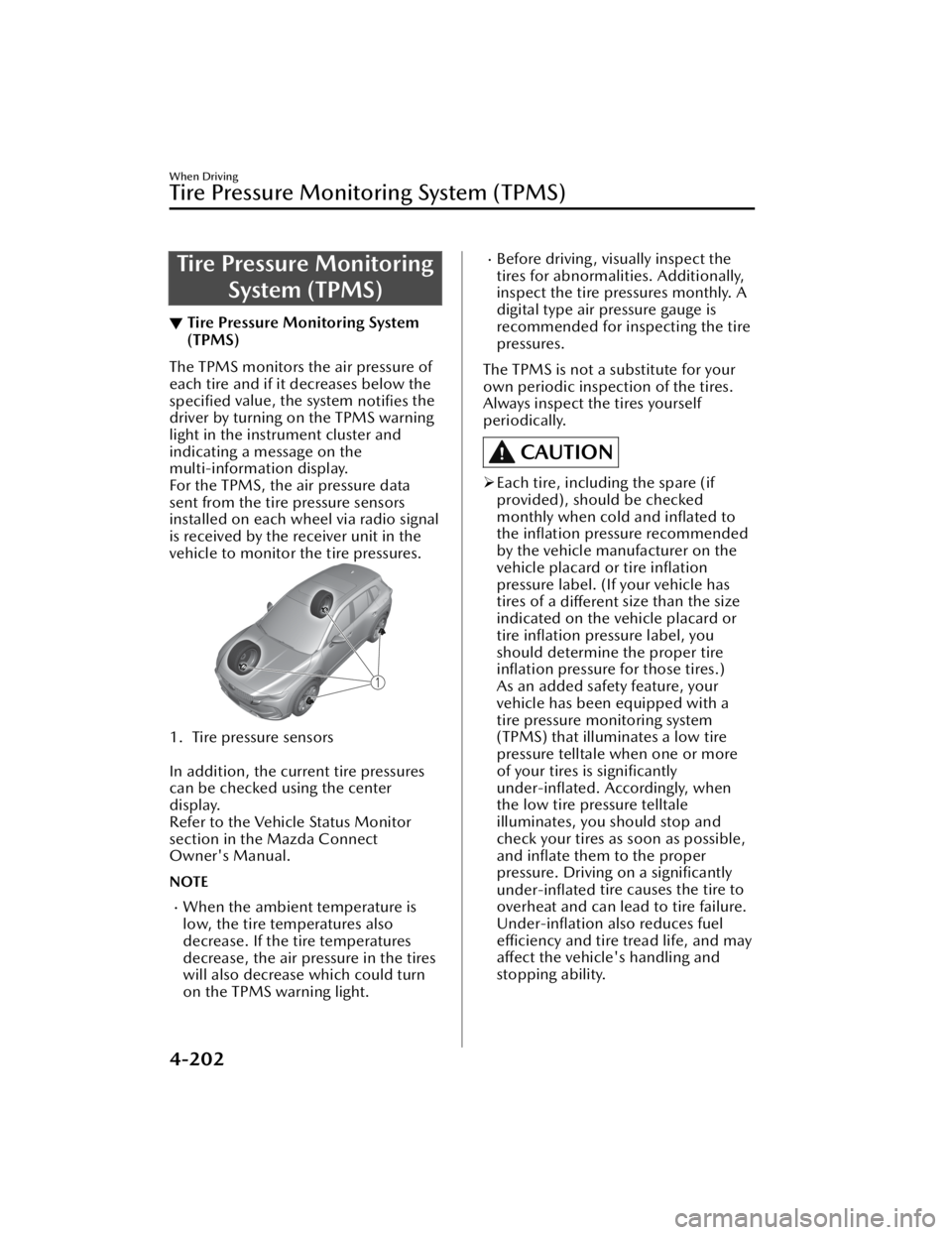
For the TPMS, the air pressure data
sent from the tire pressure sensors
installed on each wheel via radio signal
is received by the receiver unit in the
vehicle to monitor the tire pressures.
1. Tire pressure sensors
In addition, the current tire pressures
can be checked using the center
display.
Refer to the Vehicle Status Monitor
section in the Mazda Connect
Owner's Manual.
NOTE
When the ambient temperature is
low, the tire temperatures also
decrease. If the tire temperatures
decrease, the air pressure in the tires
will also decrease which could turn
on the TPMS warning light.
Before driving, visually inspect the
tires for abnormalities. Additionally,
inspect the tire pressures monthly. A
digital type air pressure gauge is
recommended for inspecting the tire
pressures.
The TPMS is not a substitute for your
own periodic inspection of the tires.
Always inspect the tires yourself
periodically.
CAUTION
Each tire, including the spare (if
provided), should be checked
monthly when cold and
inflated to
the inflation pressure recommended
by the vehicle manufacturer on the
vehicle placard or tire inflation
pressure label. (If your vehicle has
tires of a different size than the size
indicated on the vehicle placard or
tire inflation pressure label, you
should determine the proper tire inflation pressure for those tires.)
As an added safety feature, your
vehicle has been equipped with a
tire pressure monitoring system
(TPMS) that illuminates a low tire
pressure telltale when one or more
of your tires is significantly
under-inflated. Accordingly, when
the low tire pressure telltale
illuminates, you should stop and
check your tires as soon as possible,
and inflate them to the proper
pressure. Driving on a significantly
under-inflated tire causes the tire to
overheat and can lead to tire failure.
Under-inflation also reduces fuel
efficiency and tire tread life, and may
affect the vehicle's handling and
stopping ability.
When Driving
Tire Pressure Monitoring System (TPMS)
4-202
CX-50_8KB8-EA-22A_Edition2_new 2022-1-6 14:55:18
Page 372 of 583

NOTE
The detection indicator can be switched between display and non-display and the
buzzer volume can be changed.
Refer to the Settings section in the Mazda Connect Owner's Manual.
(Vehicles with 360° View Monitor)
When the detection indicator is set to “Display”, even with the 360° view monitor
not displayed, if a front sensor or a front corner sensor detects an obstruction, the
360° view monitor switches automatically to display. When an obstruction is no
longer detected, the display switches to the display before the obstruction was
detected.
However, while the 360° view monitor is displayed, it continues to display no
matter if an obstruction is detected or not.
If an obstruction in the same area excluding the close area is detected
continuously for 6 seconds or longer, on ly the warning beeps stop activating.
(Detection is indicated) If the detection area changes to the close side, the
warning beeps resumes. (If the detection area changes to the far side, the warning
beeps remain off)
System Problem Indication
If any of the problems indicated in the
table occurs, the driver is notified of
the problem depending on the type of
system as shown.
Detection Indicator
Solution
With out
360° view monitor With 360°
view mon- itor
Sys-
tem
mal-
func- tion
The system may
have a mal-
function. Have
the vehicle in-
spected at an
Authorized
Mazda Dealer
as soon as pos-
sible.
The driver is notified of a problem
with the following indications.
Indicator/Beep How to check
A message indi-
cating a system
malfunction or
sensor malfunc-
tion is displayed. There may be a problem
with the system. Have your
vehicle inspected by an Au-
thorized Mazda Dealer as
soon as possible.
A message indi-
cating that the
sensor is dirty is
displayed. Remove any foreign matter
from the sensor area. If the
system does not recover,
have the vehicle inspected
by an Authorized Mazda
Dealer.
A certain ob-
struction detec-
tion indication is
continuously dis-
played. Foreign matter may have
gotten on the sensor area
corresponding to the detec-
tion indicator. If the system
does not recover, have the
vehicle inspected by an Au-
thorized Mazda Dealer.
When Driving
Pa r k i n g S e n s o r Sys te m
4-221
CX-50_8KB8-EA-22A_Edition2_new
2022-1-6 14:55:18
Page 374 of 583

5Interior Features
Use of various features for ride comfort, including air-
conditioning system and audio system.
Climate Control System............. 5-2 Operating Tips....................... 5-2
Vent Operation......................5-3
Manual Type..........................5-6
Fully Automatic Type............ 5-10
Mazda Connect...................... 5-15 What is Mazda Connect ?.....5-15
Mazda Connect Basic
Operations.......................... 5-19
Connected Service (If
applicable).......................... 5-36
Interior Equipment.................. 5-38Sunvisors............................. 5-38
Interior Lights...................... 5-39
Accessory Socket................. 5-41
USB Power Outlet
*............... 5-43
Wireless Charger (Qi)
*.......... 5-43
Cup Holder......................... 5-47
Bottle Holder.......................5-48
Assist Grips......................... 5-48
Rear Coat Hooks................. 5-49
Storage Compartments........ 5-49
*Some models.5-1
CX-50_8KB8-EA-22A_Edition2_new 2022-1-6 14:55:18
Page 388 of 583
What is Mazda Connect ?
▼What is Mazda Connect ?
This manual only indicates a part of the information for Mazda Connect. For details,
check the Web owner's manual at the Mazda site for each country and region.
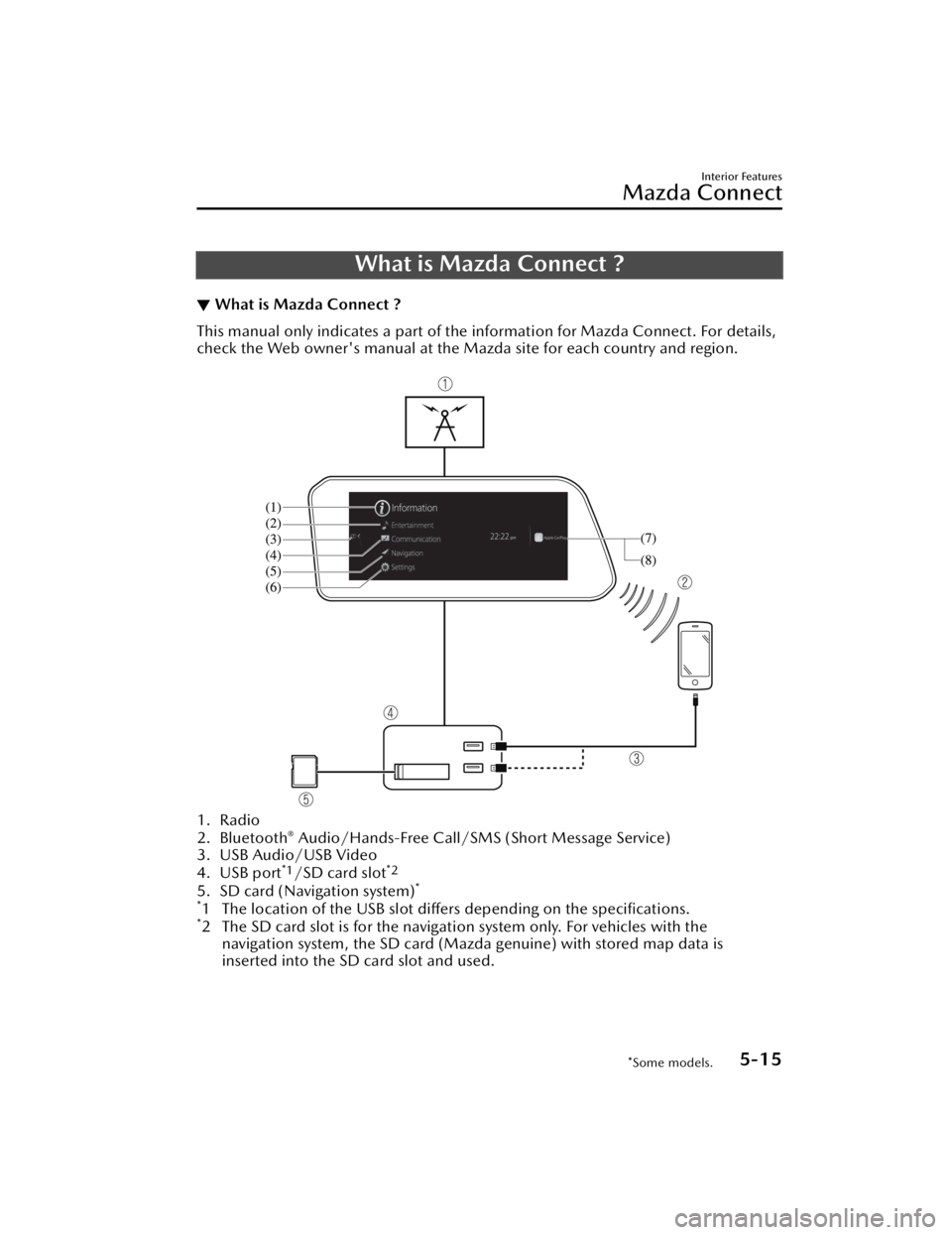
1. Radio
2. Bluetooth® Audio/Hands-Free Call/SMS
(Short Message Service)
3. USB Audio/USB Video
4. USB port
*1/SD card slot*2
5. SD card (Navigation system)*
*
1 The location of the USB slot differs depending on the specifications.*2 The SD card slot is for the navigati on system only. For vehicles with the
navigation system, the SD card (Mazda genuine) with stored map data is
inserted into the SD card slot and used.
Interior Features
Mazda Connect
*Some models.5-15
CX-50_8KB8-EA-22A_Edition2_new 2022-1-6 14:55:18