key battery MAZDA MODEL CX-7 2010 (in English) Owner's Manual
[x] Cancel search | Manufacturer: MAZDA, Model Year: 2010, Model line: MODEL CX-7, Model: MAZDA MODEL CX-7 2010Pages: 510, PDF Size: 8.55 MB
Page 167 of 510
Black plate (167,1)
WARNING
Remove the key only when the vehicle
is parked:
Removing the key from the ignition
switch while the vehicle is moving is
dangerous. Removing the key allows
the steering wheel to lock. You will
lose steering control and a serious
accident could occur. (For vehicles
equipped with the advanced key, the
steering wheel locks when the starter
knob is turned to the LOCK position.)
Before leaving the driver's seat, always
put the key or start knob to LOCK
position, set the parking brake and
make sure the shift lever is in P:
It is important to place the key or
start knob in the LOCK position even
if you are not removing the key from
the ignition or leaving the vehicle.
Leaving the key in other positions
will disable some of the vehicle
security systems and run the battery
down.
Leaving the driver's seat without
putting the ignition switch in LOCK
position, setting the parking brake
and shifting the shift lever to P is
dangerous. Unexpected vehicle
movement could occur. This could
cause an accident.
NOTE
If turning the key is difficult, jiggle the steering
wheel from side to side.
Leaving the key or start knob in any position
but LOCK position also disables some of the
security features and may run the battery
down.
ACC (Accessory)
The steering wheel unlocks and some
electrical accessories will operate.
ON
This is the normal running position after
the engine is started. Some indicator
lights/warning lights should be inspected
before the engine is started (page 5-43).
NOTE
When the ignition switch is turned to the ON
position, the sound of the fuel pump motor
operating near the fuel tank can be heard. This
does not indicate an abnormality.
START
The engine is started in this position. It
will crank until you release the key. It
then returns to the ON position.
qIgnition Key Reminder
If the ignition switch is in the LOCK or
ACC position with the key inserted, a
continuous beep sound will be heard
when the driver's door is opened.
Driving Your Mazda
Starting and Driving
5-3
CX-7_8AS7-EA-09E_Edition2 Page167
Friday, June 5 2009 2:25 PM
Form No.8AS7-EA-09E
Page 170 of 510
Black plate (170,1)
qParking Brake
WARNING
Before leaving the driver's seat, always
put the key or start knob to LOCK
position, set the parking brake and
make sure the shift lever is in P:
It is important to place the key or
start knob in the LOCK position even
if you are not removing the key from
the ignition or leaving the vehicle.
Leaving the key in other positions
will disable some of the vehicle
security systems and run the battery
down.
Leaving the driver's seat without
putting the ignition switch in LOCK
position, setting the parking brake
and shifting the shift lever to P is
dangerous. Unexpected vehicle
movement could occur. This could
cause an accident.
CAUTION
Driving with the parking brake on
will cause excessive wear of the brake
linings or pads.
NOTE
For parking in snow, refer to Winter Driving
(page 4-10) regarding parking brake use.
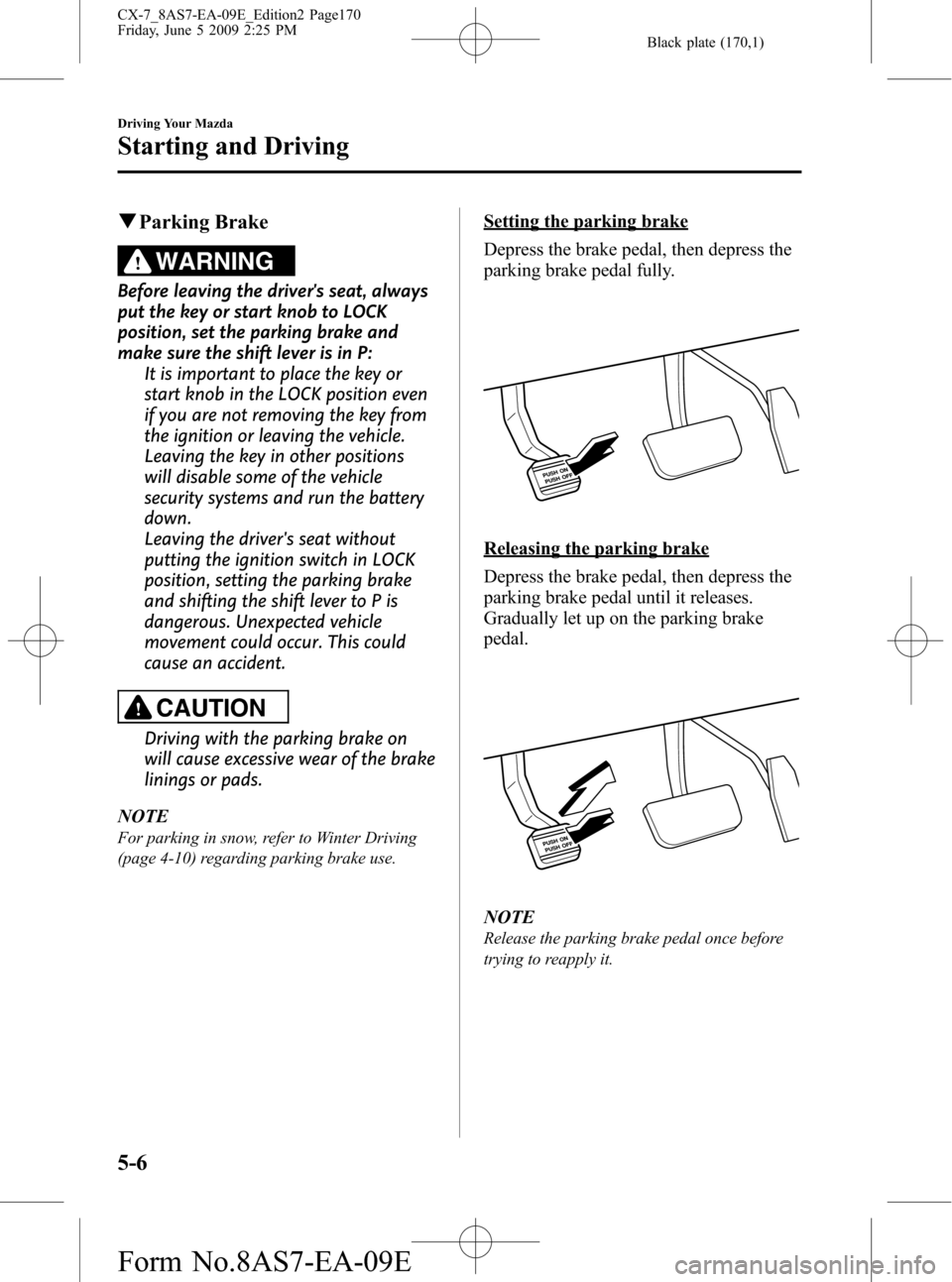
Setting the parking brake
Depress the brake pedal, then depress the
parking brake pedal fully.
Releasing the parking brake
Depress the brake pedal, then depress the
parking brake pedal until it releases.
Gradually let up on the parking brake
pedal.
NOTE
Release the parking brake pedal once before
trying to reapply it.
5-6
Driving Your Mazda
Starting and Driving
CX-7_8AS7-EA-09E_Edition2 Page170
Friday, June 5 2009 2:25 PM
Form No.8AS7-EA-09E
Page 218 of 510

Black plate (218,1)
If the warning light illuminates again even
after the tire pressures are adjusted, there
may be a tire puncture. Replace the
punctured tire with the temporary spare
tire (page 7-6).
NOTE
A tire pressure sensor is not installed to the
temporary spare tire. The warning light will
flash continuously while the temporary spare
tire is being used.
Warning light flashes
When the warning light flashes, there may
be a system malfunction. Consult an
Authorized Mazda Dealer.
qKEY Warning Light (Red)/KEY
Indicator Light (Green) (with
Advanced Key)
This indicator has two colors.
KEY Warning Light (Red)
When illuminated
lWhen the ignition switch is turned to
the ON position, it illuminates
momentarily and then goes out.
lIf any malfunction occurs in the
advanced keyless system, it illuminates
continuously.
WARNING
Do not drive the vehicle with the KEY
warning light illuminated:
If the KEY warning light remains
illuminated, do not continue to drive
using the advanced key system. Park
the vehicle in a safe place and use
the auxiliary key to continue driving
the vehicle. Have the vehicle
inspected at an Authorized Mazda
Dealer as soon as possible.
When flashing
lUnder the following conditions, the
KEY warning light (red) flashes to
inform the driver that the start knob
will not rotate to the ACC position
even if it is pushed in from the LOCK
position.
lThe advanced key battery is dead.lThe advanced key is not within
operational range.
lThe advanced key is placed in areas
where it is difficult for the system to
detect the signal (page 3-7).
lA key from another manufacturer
similar to the advanced key is in the
operational range.
5-54
Driving Your Mazda
Warning/Indicator Lights and Beep Sounds
CX-7_8AS7-EA-09E_Edition2 Page218
Friday, June 5 2009 2:25 PM
Form No.8AS7-EA-09E
Page 219 of 510

Black plate (219,1)
lUnder the following conditions, the
KEY warning light (red) will flash
continuously when the start knob has
not been returned to the LOCK
position to notify the driver that the
advanced key has been removed from
the vehicle. It will stop flashing when
the advanced key is back inside the
vehicle.
lThe start knob has not been returned
to the LOCK position, the driver's
door is open, and the advanced key
is removed from the vehicle.
lThe start knob has not been returned
to the LOCK position and all the
doors are closed after removing the
advanced key from the vehicle.
NOTE
The flashing KEY warning light (red) and the
beep sound operate simultaneously (page
3-22).
KEY Indicator Light (Green)
When illuminated
When the start knob is pushed in from the
LOCK position, the system confirms that
the correct advanced key is inside the
vehicle, the KEY indicator light (green)
illuminates, and the start knob can be
turned to the ACC position (page 3-10).
When flashing
When the advanced key battery power is
low, the KEY indicator light flashes for 30
seconds after the start knob is turned from
the ON position to the ACC or LOCK
position. Replace with a new battery
before the advanced key becomes
unusable (page 3-7).NOTE
The advanced key can be set so that the KEY
indicator light (green) does not flash even if
the battery power is low.
Refer to Setting Change (Function
Customization)(page 3-21).
qSecurity Indicator Light
This indicator light starts flashing every 2
seconds when the ignition switch is turned
from the ON to the ACC position and the
immobilizer system is armed.
The light stops flashing when the ignition
switch is turned to the ON position with
the correct ignition key.
At this time, the immobilizer system is
disarmed and the light illuminates for
about 3 seconds and then turns off.
If the engine does not start with the
correct ignition key, and the security
indicator light keeps illuminating or
flashing, the system may have a
malfunction. Consult an Authorized
Mazda Dealer.
Driving Your Mazda
Warning/Indicator Lights and Beep Sounds
5-55
CX-7_8AS7-EA-09E_Edition2 Page219
Friday, June 5 2009 2:25 PM
Form No.8AS7-EA-09E
Page 338 of 510

Black plate (338,1)
Interior Lights
qIlluminated Entry System
When the illuminated entry system
operates, the overhead light (switch is in
the DOOR position) turns on for:
lAbout 30 seconds after the driver's
door is unlocked and the ignition
switch is in the LOCK position (with
the ignition key removed).
lAbout 15 seconds after all doors are
closed.
(With Advanced key)
About 5 seconds after all doors are
closed when the advanced key is
outside of the vehicle.
lAbout 15 seconds after the ignition
switch is in the LOCK position (with
the ignition key removed) with all
doors closed.
The light also turns off when:
lThe ignition switch is turned to the ON
position and all doors are closed.
lThe driver's door is locked.
NOTE
Battery saver
If any door is left opened, the light turns off
after about 30 minutes to save the battery.
The light turns on again when the ignition
switch is turned to the ON position, or when
any door is opened after all doors have been
closed.
qOverhead Lights
Front
Switch Position Front Overhead Lights
Light off
lLight is on when any door is
open
lLight is on or off when the
illuminated entry system is
on
Rear
Switch Position Rear Overhead Lights
Light off
lLight is on when any door is
open
lLight is on or off when the
illuminated entry system is
on
Light on
6-98
Interior Comfort
Interior Equipment
CX-7_8AS7-EA-09E_Edition2 Page338
Friday, June 5 2009 2:26 PM
Form No.8AS7-EA-09E
Page 351 of 510

Black plate (351,1)
3. Select the item you want to turn off
(TIRE ROTATION or SERVICE DUE)
by pressing the Enter (up/down) switch
up or down, and then press the Enter
(up/down) switch.
4. Select OFF and press the Enter (up/
down) switch.
qWarning Indicator
The following warning indicators are
displayed according to necessity. Warning
indicators are displayed regardless of the
multi-information display operation.
lDOOR OPEN (including the liftgate)lTIGHTEN FUEL CAP (Displayed
when the check fuel cap warning light
illuminates in the instrument cluster.)
lCHECK TIRE PRESSURElRELEASE PARKING BRAKE
lAdvanced Keyless Entry System
related
lKEY BATTERY IS LOWlADVANCED KEY NOT FOUNDlMOVE SHIFT LEVER TO PlSTEERING WHEEL LOCK NOT
RELEASED TURN WHEEL LEFT
AND RIGHT
lDEPRESS BRAKE PEDAL TO
START ENGINE
lDEPRESS CLUTCH PEDAL TO
START ENGINE
lUSE AUXILIARY KEY
NOTE
When more than two warnings occur at the
same time, indicators are switched at each
specified time.
qSettings
The following settings can be changed:lBuzzer volume (Ignition key reminder,
lights-on reminder)
lTurn indicator soundlDistance unitlTemperature unitlDisplay language
The data for the trip computer average
fuel economy and the average vehicle
speed can also be changed.
To change settings
1. Press the INFO switch until the
SETTINGS screen is displayed.
2. Select PREFERENCES by pressing the
Enter (up/down) switch up or down,
and then press the Enter (up/down)
switch.
3. Select the setting item you want to
change by pressing the Enter (up/
down) switch up or down, and then
press the Enter (up/down) switch.
Interior Comfort
Interior Equipment
6-111
CX-7_8AS7-EA-09E_Edition2 Page351
Friday, June 5 2009 2:26 PM
Form No.8AS7-EA-09E
Page 504 of 510

Black plate (504,1)
A
Accessory Socket ............................ 6-122
Add-On Non-Genuine Parts and
Accessories ....................................... 9-20
Advanced Key ..................................... 3-2
Advanced key maintenance ......... 3-5
Advanced key suspend
function ...................................... 3-18
Service ......................................... 3-7
Warning and Beep Sounds ......... 3-19
Air Bag Systems ............................... 2-44
All-Wheel Drive
(AWD) Operation ............................. 5-17
AWD Warning light ................... 5-18
Antenna ............................................. 6-14
Anti-Lock Brake System (ABS) ......... 5-7
Warning light ............................... 5-8
Appearance Care ............................... 8-54
Audio System ................................... 6-14
Audio control switch .................. 6-56
Audio set .................................... 6-25
AUX mode ................................. 6-59
Operating tips for audio
system ........................................ 6-15
Safety certification ..................... 6-62
Automatic Transaxle
Driving tips ................................ 5-16
Fluid ........................................... 8-26
Manual shift mode ..................... 5-12
Shift-lock system ....................... 5-12
Transaxle ranges ......................... 5-11
B
Battery
Emergency starting .................... 7-13
Maintenance ............................... 8-34
Specifications ............................. 10-4
B
Beep Sounds
Ignition key reminder ................. 5-59
Parking brake reminder .............. 5-59
Seat belt warning ........................ 5-59
Tire inflation pressure warning ... 5-59
Before Starting the Engine .................. 4-6
After getting in ............................. 4-6
Before getting in .......................... 4-6
Blind Spot Monitoring
(BSM) System .................................. 5-33
BSM OFF Indicator Light .......... 5-35
BSM OFF Switch ....................... 5-36
Care of Radar Sensors ................ 5-36
Warning Light/Beep ................... 5-35
Bluetooth Audio ............................... 6-63
Bluetooth Hands-Free ....................... 6-72
Basic Bluetooth Hands-Free
Operation ................................... 6-76
Convenient Use of the Hands-Free
System ........................................ 6-81
Hands-Free Setting ..................... 6-88
Mazda Bluetooth Hands-Free
Customer Service ....................... 6-96
Safety Certification .................... 6-96
When Bluetooth Hands-Free Cannot
be Used ...................................... 6-95
Body Lubrication .............................. 8-29
Bottle Holder ................................... 6-120
Brake
Fluid ........................................... 8-24
Brakes
Anti-lock brake system (ABS) ..... 5-7
Brakes assist ................................. 5-9
Foot brake .................................... 5-5
Pad wear indicator ........................ 5-9
Parking brake ............................... 5-6
Warning light ............................... 5-7
Break-In Period ................................... 4-7
11-2
Index
CX-7_8AS7-EA-09E_Edition2 Page504
Friday, June 5 2009 2:27 PM
Form No.8AS7-EA-09E