phone MAZDA MODEL CX-9 2011 (in English) User Guide
[x] Cancel search | Manufacturer: MAZDA, Model Year: 2011, Model line: MODEL CX-9, Model: MAZDA MODEL CX-9 2011Pages: 606, PDF Size: 13.55 MB
Page 345 of 606
Black plate (345,1)
Sound Output
qSound Output from Vehicle Speakers
Vehicles with audio system
Change the audio system to the Rear Entertainment System mode. Sound/Music being
played by the Rear Entertainment System can be heard from the vehicle speakers.
For audio operation, refer to“Audio System”(page 6-17).
Press the AUX button (
) on the audio unit or the mode switch () of the audio
control switches on the steering wheel.“AUX”is displayed on the display and the audio
system changes to Rear Entertainment System sound.
Adjust the volume with the dial on the audio unit.
Vehicles with navigation system
Change the navigation system to the Rear Entertainment System mode. Sound/Music being
played by the Rear Entertainment System can be heard from the vehicle speakers.
For navigation system operation, refer to the separate manual“NAVIGATION SYSTEM”.
Press the SOURCE button (
), select the AUX2 mode.“RSES”is displayed on the
information display and it changes to the Rear Entertainment System sound.
Adjust the volume with the dial on the navigation unit.
qUsing the Headphone Speakers
CAUTION
ØFor safety reasons, the driver should never wear the headphones while driving.
Not being able to hear sound outside of the vehicle could result in a serious
accident.
ØUse the headphones with the volume set at moderate level. Listening at an
excessive volume level for extended periods of time will have an adverse effect on
your hearing ability.
ØIf the headphone arms are spread excessively is could result in damage.
ØDo not apply excessive force to the headphones or get them wet. Also, do not
leave the headphones in a place exposed to direct sunlight or high temperature. It
could cause a malfunction.
Interior Comfort
Rear Entertainment System
6-91
CX-9_8BH2-EA-10H_Edition3 Page345
Wednesday, March 23 2011 9:31 AM
Form No.8BH2-EA-10H
Page 346 of 606

Black plate (346,1)
NOTElTo listen to audio other than from the speakers of the rear entertainment system, it is necessary to
use the wireless headphones that are included. For headphone specification, refer to
“Operation Tips for Headphones”(page 6-81).
lWhen the headphones are not in use, turn them off.lDTS formatted sound cannot be generated through the headphones. Use the vehicle's speakers.lIf there is no sound produced from a signal for 3 minutes or longer after the headphone power is
turned on, or there is no signal reception, the headphone power turns off automatically.
lIf the headphones are continuously used for 4 hours or more after the sound signal is received, the
headphone power turns off automatically.
The acceptable range for signals (infrared rays) from the Rear Entertainment System is as
follows:
Rear Entertainment System
Wireless headphone signal
(infrared rays) transmitter
The signals (infrared rays) can be received in
any location on the rear seats. However, the
rear of the transmitter is out of the acceptable
range.
A wireless headphone can be used in any position on the rear seats, however, the sound
may skip under the following conditions because the acceptable range varies or the signals
are blocked.
lWhen affected by intense light such as direct sunshine.
6-92
Interior Comfort
Rear Entertainment System
CX-9_8BH2-EA-10H_Edition3 Page346
Wednesday, March 23 2011 9:31 AM
Form No.8BH2-EA-10H
Page 347 of 606

Black plate (347,1)
lWhen the wireless headphone receiver does not point to the Rear Entertainment System
transmitter.
lWhen the signal is blocked by an obstruction such as the seat.
Replacing the battery
1. Remove the screw using a coin or equivalent, and remove the cover. Remove the
batteries.
Cover
Screw
2. Insert two AAA-size batteries. Match thepolarity of the batteries with theand
marks in the battery case.
3. Install the cover.
4. Install the screw.
NOTE
Battery life (reference)
Manganese batteries: About 20 hours
Alkaline batteries: About 40 hours
The battery life is indicated as a reference and does not provide any guarantees. The battery life
varies depending on usage conditions (volume, surrounding environment).
Interior Comfort
Rear Entertainment System
6-93
CX-9_8BH2-EA-10H_Edition3 Page347
Wednesday, March 23 2011 9:31 AM
Form No.8BH2-EA-10H
Page 348 of 606

Black plate (348,1)
CAUTION
ØIf the battery power is depleted the headphones will not operate properly. If any of
the following occurs, replace the batteries.
ØThe power indicator does not illuminate even when the power is turned on.
ØNoise is mixed with the sound.
ØThe reception range narrows.
ØPeriodically inspect the batteries for leakage.
ØIf the headphones are not to be used for an extended period, remove the batteries.
ØBe careful not to allow the battery case screw to become loose.
ØInstall the batteries with the (
)/() poles correctly positioned. Battery leakage
could occur if they are not installed correctly.
ØWhen replacing the batteries, be careful not to bend the electrical terminals or get
oil on them.
ØBe careful not to allow dirt to get into the headphones as it could damage them.
The following points regarding the battery must be observed.
If the batteries are not handled properly, it could result in a headphone malfunction.
ØDo not use rechargeable batteries.
ØWhen replacing the batteries, replace both batteries at the same time. Do not use
a new battery and an old battery, or the different types of battery.
6-94
Interior Comfort
Rear Entertainment System
CX-9_8BH2-EA-10H_Edition3 Page348
Wednesday, March 23 2011 9:31 AM
Form No.8BH2-EA-10H
Page 350 of 606
Black plate (350,1)
DVD video, DVD audio,
Video CD, Audio CD and
MP3/WMA CD Playback
(Disc Mode)
DVD video, DVD audio, Video CD,
Audio CD, and MP3/WMA CD can be
played in the Disc mode.
CAUTION
For safe driving, adjust the volume
while driving so that ambient sound
can be heard.
NOTE
lDo not use the Rear Entertainment System
for a long period with the engine off. The
vehicle battery could run down.
lTo listen to the Rear Entertainment System
sound from the vehicle speakers, change the
audio or navigation system sound to the
Rear Entertainment System sound.
Refer to Sound on page 6-91.
lTo listen to audio other than from the
speakers of the rear entertainment system, it
is necessary to use the wireless headphones
that are included. For headphone
specification, refer to
“Operation Tips for Headphones”(page
6-81).
lThe cooling fan of this unit may activate if
the temperature of the unit is high, however,
this does not indicate a malfunction.
qBasic Operation
Power ON/OFF
Turning on the power
The Rear Entertainment System
automatically turns on when any of the
following operations are done with the
ignition switched to ACC or ON.
lThe display is open and a disc is
inserted.
lThe POWER button on the remote
controller is pressed.
Turning off
The Rear Entertainment System turns off
when any of the following operations are
done.
lThe POWER button on the remote
controller is pressed.
lThe ignition is switched off.lThe display is closed.
Playback
The top menu or disc menu may be
displayed on the monitor screen when a
disc is played. From these menus, the disc
functions can be performed.
Refer to Top menu and disc menu on page
6-99.
NOTE
lFor some discs, the top menu or disc menu
may be displayed automatically after
playback.
lRefer to the instruction manual attached to
the disc for the top menu or disc menu.
When no disc is inserted
1. Switch the ignition to ACC or ON.
2. Insert the disc into the disc slot.
After the disc is inserted, the playback
starts.
6-96
Interior Comfort
Rear Entertainment System
CX-9_8BH2-EA-10H_Edition3 Page350
Wednesday, March 23 2011 9:31 AM
Form No.8BH2-EA-10H
Page 364 of 606
Black plate (364,1)
NOTElThe display angle change is not available
for discs other than multi-angle recorded
DVD discs. Refer to the instruction manual
accompanying the disc for details.
lThe screen size and angle can be changed
when On-Screen Mark and Angle Mark is
off.
Mode Priority
The priority of the inserted discs (CD-R/
CD-RW) can be selected.
Audio
Digital Output
Not used with this unit.
Audio DRC
The audio dynamic range can be adjusted
to reduce the difference between the
maximum and minimum audio output.
Audio compression of the DVD video
playback can be selected or deselected
during playback using the following
modes:
Mode Function
NONE Playback with normal volume
LINELower volume is increased to
reduce difference in volume range.
RFUse when it is still difficult to hear
sound while using LINE.
Sound quality is reduced while
using RF.
NOTE
Only sound output from the headphones is
available.
Auxiliary Input (AUX mode)
In AUX mode, AV equipment such as a
video game player or a video camera can
be used by connecting the image and
sound cables to the auxiliary terminals.
NOTE
lBefore operating, read the instruction
manual accompanying the AV equipment to
be used.
lTo listen to the Rear Entertainment System
sound from the vehicle speakers, change the
audio or navigation system sound to the
Rear Entertainment System sound.
Refer to Sound on page 6-91.
To listen to audio other than from the
speakers of the rear entertainment system, it
is necessary to use the wireless headphones
that are included. For headphone
specification, refer to
“Operation Tips for Headphones”(page
6-81).
lThe cooling fan for this unit may activate if
the temperature of the unit is high, however,
this does not indicate a malfunction.
qAuxiliary Terminals and Power
Outlet
The auxiliary terminals and power outlet
are positioned as shown in the figure.
Power outlet
(AC115V)
Auxiliary
terminals
6-110
Interior Comfort
Rear Entertainment System
CX-9_8BH2-EA-10H_Edition3 Page364
Wednesday, March 23 2011 9:32 AM
Form No.8BH2-EA-10H
Page 376 of 606
Black plate (376,1)
Symptoms and Actions
If any malfunction is suspected, verify the following before requesting a repair.
If the problem cannot be solved after performing the procedure, have the system inspected
at an Authorized Mazda Dealer.
Some functions are not available depending on the disc. Read the instruction manual
attached to the disc before operating.
Symptom Cause Action
System
cannot be
turned onThe ignition is switched off. Switch the ignition to ACC or ON.
The remote controller batteries are
weak.Replace the batteries with new ones.
Refer to Remote Controller on page 6-89.
Remote controller batteries poles are
pointed in the wrong direction.Install the batteries in the correct direction.
Refer to Remote Controller on page 6-89.
The vehicle battery is weak. Recharge or replace the vehicle battery.
The cabin temperature
(Rear Entertainment System unit tem-
perature) is high.Retry after the temperature has lowered.
Image
cannot be
displayedThe ignition is switched off. Switch the ignition to ACC or ON.
No disc is inserted. Insert a disc.
An invalid disc is inserted.Insert a disc which can be played by this unit.
Refer to Operating Tips for Discs on page 6-74.
The wrong mode has been selected.Select the correct mode by pressing the SOURCE button.
Refer to Mode on page 6-95.
Disc cannot
be playedNo disc is inserted. Insert a disc.
Disc is inserted upside down. Insert the disc with the label-side up.
Parent lock level is set. Clear or change the parent lock level.
Sound
cannot be
outputThe ignition is switched off. Switch the ignition to ACC or ON.
Volume is too low. Adjust the volume.
The audio unit/navigation system is not
set in the Rear Entertainment System
mode.Set the audio unit/navigation system in the Rear
Entertainment System mode.
Refer to Sound Output on page 6-91.
An invalid disc has been inserted.Insert a disc which can be played by this unit.
Refer to Operating Tips for Discs on page 6-74.
No disc is inserted. Insert a disc.
Disc is inserted upside down. Insert the disc with the label-side up.
Playback has been paused. Cancel the pause.
The playback is in slow, fast-forward, or
reverse mode.Select normal playback.
Refer to Basic operation on page 6-96.
Audio
output from
vehicle
speakers but
not from
headphonesDTS format language is selected and
played back.
(The wireless headphones cannot play-
back DTS format language)Select audio other than DTS format.
6-122
Interior Comfort
Rear Entertainment System
CX-9_8BH2-EA-10H_Edition3 Page376
Wednesday, March 23 2011 9:32 AM
Form No.8BH2-EA-10H
Page 377 of 606
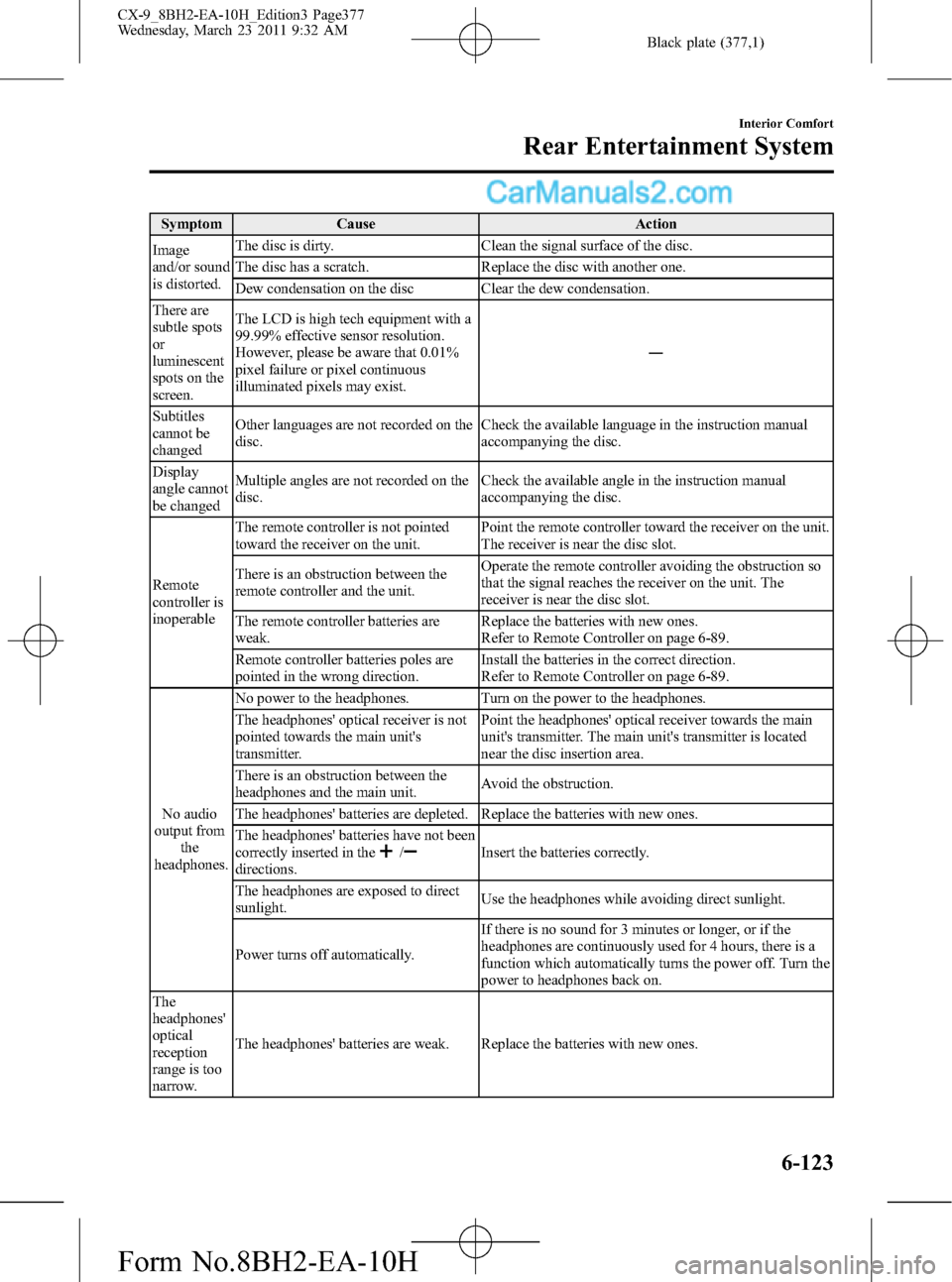
Black plate (377,1)
Symptom Cause Action
Image
and/or sound
is distorted.The disc is dirty. Clean the signal surface of the disc.
The disc has a scratch. Replace the disc with another one.
Dew condensation on the disc Clear the dew condensation.
There are
subtle spots
or
luminescent
spots on the
screen.The LCD is high tech equipment with a
99.99% effective sensor resolution.
However, please be aware that 0.01%
pixel failure or pixel continuous
illuminated pixels may exist.―
Subtitles
cannot be
changedOther languages are not recorded on the
disc.Check the available language in the instruction manual
accompanying the disc.
Display
angle cannot
be changedMultiple angles are not recorded on the
disc.Check the available angle in the instruction manual
accompanying the disc.
Remote
controller is
inoperableThe remote controller is not pointed
toward the receiver on the unit.Point the remote controller toward the receiver on the unit.
The receiver is near the disc slot.
There is an obstruction between the
remote controller and the unit.Operate the remote controller avoiding the obstruction so
that the signal reaches the receiver on the unit. The
receiver is near the disc slot.
The remote controller batteries are
weak.Replace the batteries with new ones.
Refer to Remote Controller on page 6-89.
Remote controller batteries poles are
pointed in the wrong direction.Install the batteries in the correct direction.
Refer to Remote Controller on page 6-89.
No audio
output from
the
headphones.No power to the headphones. Turn on the power to the headphones.
The headphones' optical receiver is not
pointed towards the main unit's
transmitter.Point the headphones' optical receiver towards the main
unit's transmitter. The main unit's transmitter is located
near the disc insertion area.
There is an obstruction between the
headphones and the main unit.Avoid the obstruction.
The headphones' batteries are depleted. Replace the batteries with new ones.
The headphones' batteries have not been
correctly inserted in the
/directions.Insert the batteries correctly.
The headphones are exposed to direct
sunlight.Use the headphones while avoiding direct sunlight.
Power turns off automatically.If there is no sound for 3 minutes or longer, or if the
headphones are continuously used for 4 hours, there is a
function which automatically turns the power off. Turn the
power to headphones back on.
The
headphones'
optical
reception
range is too
narrow.The headphones' batteries are weak. Replace the batteries with new ones.
Interior Comfort
Rear Entertainment System
6-123
CX-9_8BH2-EA-10H_Edition3 Page377
Wednesday, March 23 2011 9:32 AM
Form No.8BH2-EA-10H
Page 378 of 606

Black plate (378,1)
Symptom Cause Action
There is
excessive
noise in the
headphone
audioThe headphones' batteries are weak. Replace the batteries with new ones.
6-124
Interior Comfort
Rear Entertainment System
CX-9_8BH2-EA-10H_Edition3 Page378
Wednesday, March 23 2011 9:32 AM
Form No.8BH2-EA-10H
Page 380 of 606

Black plate (380,1)
ØBecause only specified Bluetooth
audio devices can be used, consult
an Authorized Mazda Dealer when
purchasing or changing devices.
Bluetooth audio devices which
correspond to specified Bluetooth
versions and profiles can be
Bluetooth-connected to the
vehicle's Bluetooth unit. However,
even among these devices are ones
which cannot be Bluetooth-
connected or have limited
functionality. Each device to be
used with the vehicle's Bluetooth
unit needs to be checked
individually for compatibility.
Consult an Authorized Mazda
Dealer concerning device
compatibility.
ØU.S.A.
Phone: 800-430-0153
Web: www.MazdaUSA.com/
bluetooth
ØCanada
Phone: 800-430-0153
Web: www.mazdahandsfree.ca
Applicable Bluetooth specification
Ver. 2.0 or higher
Audio profile
lA2DP (Advanced Audio Distribution
Profile) Ver. 1.0
lAVRCP (Audio/Video Remote Control
Profile) Ver. 1.0/1.3A2DP is a profile which transmits only
audio to the Bluetooth unit. If your
Bluetooth audio device corresponds only
to A2DP, but not AVRCP, you cannot
operate it using the control panel of the
vehicle's audio system. In this case, the
Bluetooth audio device can be operated
by controlling the device itself, the same
as when a portable audio system without
the Bluetooth communication function is
connected to the AUX terminal.
Function A2DPA2DP·AVRCP
Ver. 1.0 Ver. 1.3
Playback No Yes Yes
Pause No Yes Yes
File (Track)
up/downNo Yes Yes
Reverse No No Yes
Fast-forward No No Yes
Text display No No Yes
Yes: Available
No: Not available
NOTE
lThe system may not operate normally
depending on the Bluetooth audio device.
lTo make sure that your Bluetooth audio
device is Ver. 1.0 or 1.3, refer to the
Owner's Manual for the Bluetooth audio
device.
6-126
Interior Comfort
Bluetooth Audio (Type B)
CX-9_8BH2-EA-10H_Edition3 Page380
Wednesday, March 23 2011 9:32 AM
Form No.8BH2-EA-10H