phone MAZDA MODEL CX-9 2014 (in English) User Guide
[x] Cancel search | Manufacturer: MAZDA, Model Year: 2014, Model line: MODEL CX-9, Model: MAZDA MODEL CX-9 2014Pages: 600
Page 336 of 600
Black plate (336,1)
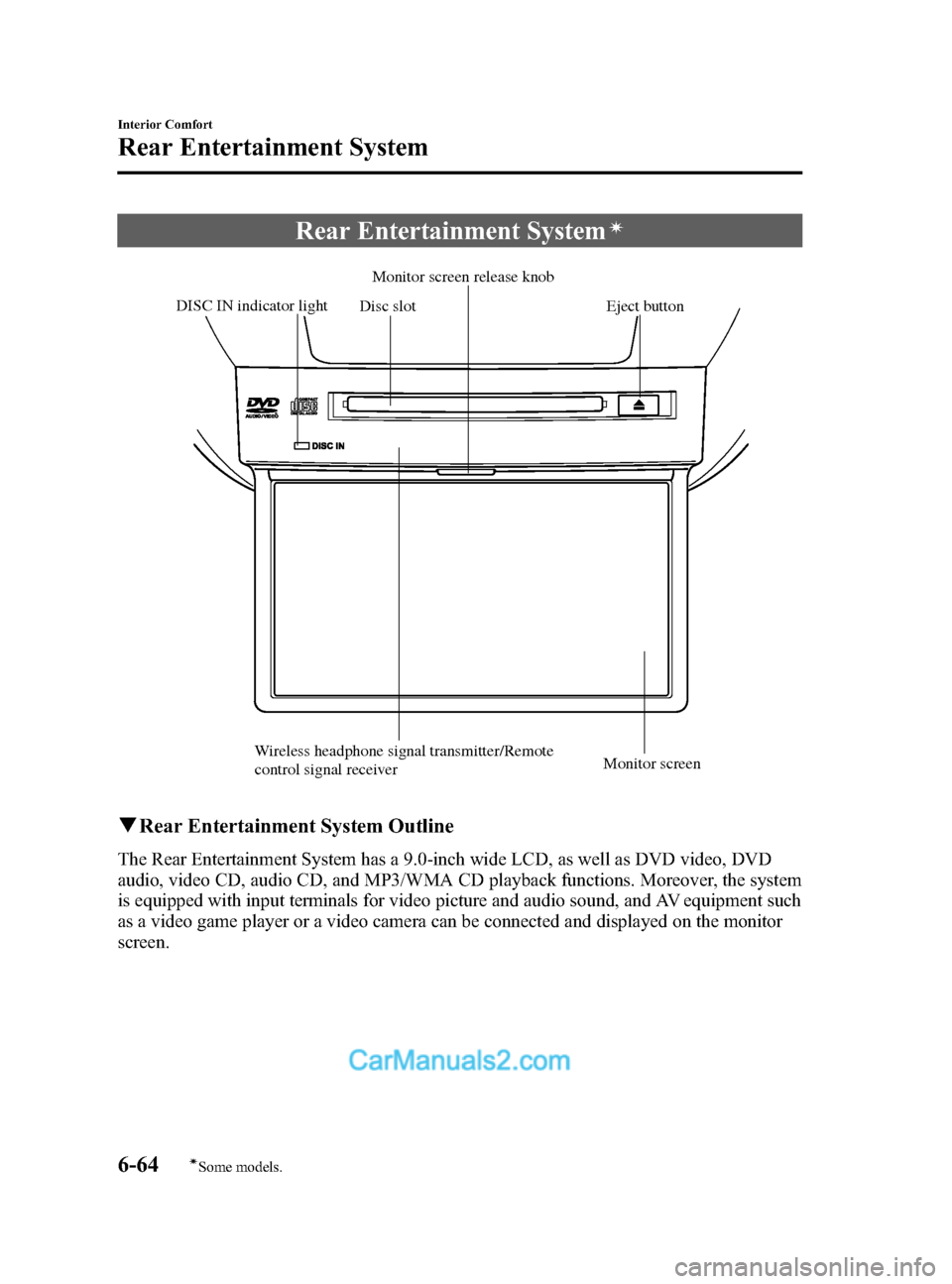
Rear Entertainment Systemí
Disc slotMonitor screen release knob
DISC IN indicator light Eject button
Wireless headphone signal transmitter/Remote
control signal receiver Monitor screen
q
Rear Entertainment System Outline
The Rear Entertainment System has a 9.0-inch wide LCD, as well as DVD video, DVD
audio, video CD, audio CD, and MP3/WMA CD playback functions. Moreover, the system
is equipped with input terminals for video picture and audio sound, and AV equipment such
as a video game player or a video camera can be connected and displayed on the monitor
screen.
6-64
Interior Comfort
íSome models.
Rear Entertainment System
CX-9_8DA3-EA-13G_Edition2 Page336
Monday, September 9 2013 4:8 PM
Form No.8DA3-EA-13G
Page 337 of 600
Black plate (337,1)
qProper Operation of Rear Entertainment System
For safe driving, read the following warnings and cautions before starting operation, and
use the system properly.
WARNING
Ø Do not disassemble or modify this unit.
It may cause an accident, fire, or electrical shock.
Ø Do not use if there is a malfunction condition such as no screen image or sound.
It may cause an accident, fire, or electrical shock. Follow the procedures in
“Symptoms and Actions ”(page 6-114) and if the problem is not resolved, consult
an Authorized Mazda Dealer.
Ø Do not use if some problem has occurred.
If any problem occurs, such as a foreign material penetration, spilled liquid,
smoking from internal burning, or other abnormal smells, stop operation
immediately and consult an Authorized Mazda Dealer. If operation is continued, it
may cause an accident, fire, or electrical shock.
Ø Lower the volume to minimum before turning off the power.
If the volume is set high, loud sound will be produced when turning on the power,
causing auditory problems or an accident.
Ø Adjust the volume while driving so that ambient sound can be heard.
If the volume is too high and ambient sound cannot be heard while driving,
driving operation could be obstructed causing an accident.
Ø Do not leave the remote controller and the headphones unstowed.
If the remote controller and the headphone are not stowed, they could fall under
the brake pedal during a sudden stop or while turning, which could obstruct
driving operation and cause an accident.
CAUTION
ØDo not put foreign material into the disc slot.
It may cause a fire or malfunction.
Ø Do not clean plastic finished parts with solvent such as benzene or thinner.
The parts may deform causing a fire or malfunction.
Interior Comfort
Rear Entertainment System
6-65
CX-9_8DA3-EA-13G_Edition2 Page337
Monday, September 9 2013 4:8 PM
Form No.8DA3-EA-13G
Page 345 of 600

Black plate (345,1)
qOperation Tips for Headphones
To listen to audio other than from the speakers of the Rear Entertainment System, it is
necessary to use the wireless headphones that are included.
Specification
Item Content
Transmission system Infrared light
Modulation system Frequency modulation
Carrier frequency Right channel 2.8 MHz, left channel 2.3 MHz
Interior Comfort
Rear Entertainment System
6-73
CX-9_8DA3-EA-13G_Edition2 Page345
Monday, September 9 2013 4:9 PM
Form No.8DA3-EA-13G
Page 346 of 600
Black plate (346,1)
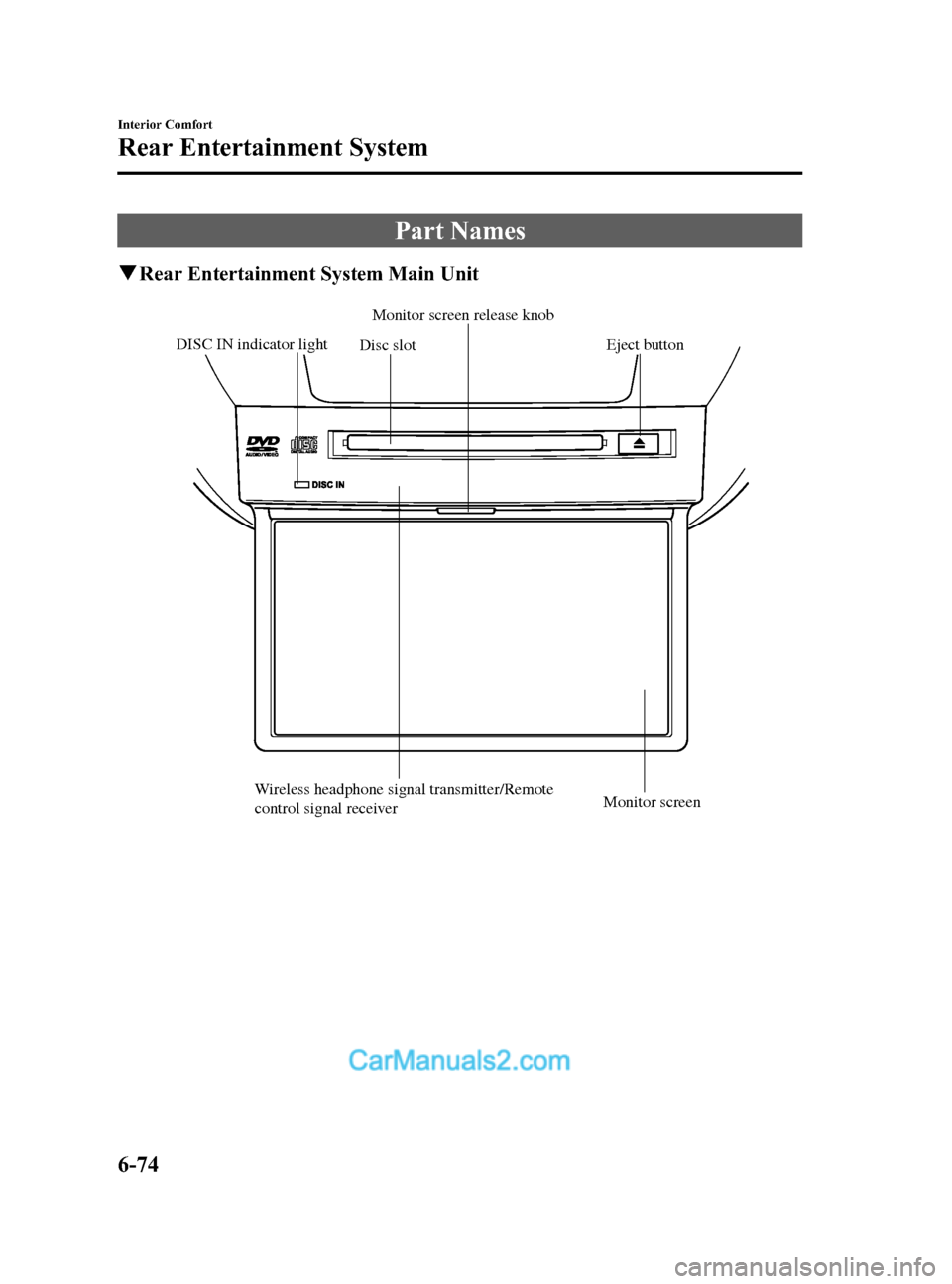
Part Names
qRear Entertainment System Main Unit
Disc slotMonitor screen release knob
DISC IN indicator light Eject button
Wireless headphone signal transmitter/Remote
control signal receiver Monitor screen
6-74
Interior Comfort
Rear Entertainment System
CX-9_8DA3-EA-13G_Edition2 Page346
Monday, September 9 2013 4:9 PM
Form No.8DA3-EA-13G
Page 348 of 600

Black plate (348,1)
qHeadphone
Arm
Volume dial
Infrared receiver
R (right) sidePower button
Power indicator
L (left) side
6-76
Interior Comfort
Rear Entertainment System
CX-9_8DA3-EA-13G_Edition2 Page348
Monday, September 9 2013 4:9 PM
Form No.8DA3-EA-13G
Page 355 of 600
Black plate (355,1)
Sound Output
qSound Output from Vehicle Speakers
Press the audio button () andon-screen tab. “AUX ”is displayed on the audio
display and it changes to the Rear Entertainment System sound.
Sound/Music being played by the Rear Entertainment System can be heard from the
vehicle speakers.
Adjust the volume with the dial on the audio unit.
q Using the Headphone Speakers
CAUTION
Ø For safety reasons, the driver should never wear the headphones while driving.
Not being able to hear sound outside of the vehicle could result in a serious
accident.
Ø Use the headphones with the volume set at moderate level. Listening at an
excessive volume level for extended periods of time will have an adverse effect on
your hearing ability.
Ø If the headphone arms are spread excessively is could result in damage.
Ø Do not apply excessive force to the headphones or get them wet. Also, do not
leave the headphones in a place exposed to direct sunlight or high temperature. It
could cause a malfunction.
NOTE
lTo listen to audio other than from the speakers of the rear entertainment system, it is necessary to
use the wireless headphones that are included. For headphone specification, refer to
“ Operation Tips for Headphones ”(page 6-73).
lWhen the headphones are not in use, turn them off.lIf there is no sound produced from a signal for 3 minutes or longer after the headphone power is
turned on, or there is no signal reception, the headphone power turns off automatically.
lIf the headphones are continuously used for 4 hours or more after the sound signal is received, the
headphone power turns off automatically.
Interior Comfort
Rear Entertainment System
6-83
CX-9_8DA3-EA-13G_Edition2 Page355
Monday, September 9 2013 4:9 PM
Form No.8DA3-EA-13G
Page 356 of 600

Black plate (356,1)
The acceptable range for signals (infrared rays) from the Rear Entertainment System is as
follows:
Rear Entertainment System
Wireless headphone signal
(infrared rays) transmitter
The signals (infrared rays) can be received in
any location on the rear seats. However, the
rear of the transmitter is out of the acceptable
range.
A wireless headphone can be used in any position on the rear seats, however, the sound
may skip under the following conditions because the acceptable range varies or the signals
are blocked.
lWhen affected by intense light such as direct sunshine.lWhen the wireless headphone receiver does not point to the Rear Entertainment System
transmitter.
lWhen the signal is blocked by an obstruction such as the seat.
6-84
Interior Comfort
Rear Entertainment System
CX-9_8DA3-EA-13G_Edition2 Page356
Monday, September 9 2013 4:9 PM
Form No.8DA3-EA-13G
Page 358 of 600

Black plate (358,1)
CAUTION
ØIf the battery power is depleted the headphones will not operate properly. If any of
the following occurs, replace the batteries.
ØThe power indicator does not illuminate even when the power is turned on.
ØNoise is mixed with the sound.
ØThe reception range narrows.
Ø Periodically inspect the batteries for leakage.
Ø If the headphones are not to be used for an extended period, remove the batteries.
Ø Be careful not to allow the battery case screw to become loose.
Ø Install the batteries with the (
)/() poles correctly positioned. Battery leakage
could occur if they are not installed correctly.
Ø When replacing the batteries, be careful not to bend the electrical terminals or get
oil on them.
Ø Be careful not to allow dirt to get into the headphones as it could damage them.
The following points regarding the battery must be observed.
If the batteries are not handled properly, it could result in a headphone malfunction.
Ø Do not use rechargeable batteries.
Ø When replacing the batteries, replace both batteries at the same time. Do not use
a new battery and an old battery, or the different types of battery.
6-86
Interior Comfort
Rear Entertainment System
CX-9_8DA3-EA-13G_Edition2 Page358
Monday, September 9 2013 4:9 PM
Form No.8DA3-EA-13G
Page 360 of 600
Black plate (360,1)
DVD video, DVD audio,
Video CD, Audio CD and
MP3/WMA CD Playback
(Disc Mode)
DVD video, DVD audio, Video CD,
Audio CD, and MP3/WMA CD can be
played in the Disc mode.
CAUTION
For safe driving, adjust the volume
while driving so that ambient sound
can be heard.
NOTE
lDo not use the Rear Entertainment System
for a long period with the engine off. The
vehicle battery could run down.
lTo listen to the Rear Entertainment System
sound from the vehicle speakers, change the
audio sound to the Rear Entertainment
System sound.
Refer to Sound Output from Vehicle
Speakers on page 6-83.
lTo listen to audio other than from the
speakers of the rear entertainment system, it
is necessary to use the wireless headphones
that are included. For headphone
specification, refer to
“ Operation Tips for Headphones ”(page
6-73).
lThe cooling fan of this unit may activate if
the temperature of the unit is high, however,
this does not indicate a malfunction.
q Basic Operation
Power ON/OFF
Turning on the power
The Rear Entertainment System
automatically turns on when any of the
following operations are done with the
ignition switched to ACC or ON.
lThe display is open and a disc is
inserted.
lThe POWER button on the remote
controller is pressed.
Turning off
The Rear Entertainment System turns off
when any of the following operations are
done.
lThe POWER button on the remote
controller is pressed.
lThe ignition is switched off.lThe display is closed.
Playback
The top menu or disc menu may be
displayed on the monitor screen when a
disc is played. From these menus, the disc
functions can be performed.
Refer to Assist Functions (DVD video,
DVD audio, video CD and audio CD) on
page 6-91.
NOTE
lFor some discs, the top menu or disc menu
may be displayed automatically after
playback.
lRefer to the instruction manual attached to
the disc for the top menu or disc menu.
When no disc is inserted
1. Switch the ignition to ACC or ON.
2. Insert the disc into the disc slot. After the disc is inserted, the playback
starts.
6-88
Interior Comfort
Rear Entertainment System
CX-9_8DA3-EA-13G_Edition2 Page360
Monday, September 9 2013 4:9 PM
Form No.8DA3-EA-13G
Page 374 of 600

Black plate (374,1)
NOTElThe display angle change is not available
for discs other than multi-angle recorded
DVD discs. Refer to the instruction manual
accompanying the disc for details.
lThe screen size and angle can be changed
when On-Screen Mark and Angle Mark is
off.
Mode Priority
The priority of the inserted discs (CD-R/
CD-RW) can be selected.
Audio
Digital Output
Not used with this unit.
Audio DRC
The audio dynamic range can be adjusted
to reduce the difference between the
maximum and minimum audio output.
Audio compression of the DVD video
playback can be selected or deselected
during playback using the following
modes:
ModeFunction
NONE Playback with normal volume
LINE Lower volume is increased to
reduce difference in volume range.
RF Use when it is still difficult to hear
sound while using LINE.
Sound quality is reduced while
using RF.
NOTE
Only sound output from the headphones is
available.
Auxiliary Input (AUX mode)
In AUX mode, AV equipment such as a
video game player or a video camera can
be used by connecting the image and
sound cables to the auxiliary terminals.
NOTE
lBefore operating, read the instruction
manual accompanying the AV equipment to
be used.
lTo listen to the Rear Entertainment System
sound from the vehicle speakers, change the
audio sound to the Rear Entertainment
System sound.
Refer to Sound Output from Vehicle
Speakers on page 6-83.
To listen to audio other than from the
speakers of the rear entertainment system, it
is necessary to use the wireless headphones
that are included. For headphone
specification, refer to
“
Operation Tips for Headphones ”(page
6-73).
lThe cooling fan for this unit may activate if
the temperature of the unit is high, however,
this does not indicate a malfunction.
q Auxiliary Terminals and Power
Outlet
The auxiliary terminals and power outlet
are positioned as shown in the figure.
Power outlet
(AC115V)
Auxiliary
terminals
6-102
Interior Comfort
Rear Entertainment System
CX-9_8DA3-EA-13G_Edition2 Page374
Monday, September 9 2013 4:9 PM
Form No.8DA3-EA-13G