phone MAZDA MODEL CX-9 2014 (in English) Owner's Guide
[x] Cancel search | Manufacturer: MAZDA, Model Year: 2014, Model line: MODEL CX-9, Model: MAZDA MODEL CX-9 2014Pages: 600
Page 396 of 600
![MAZDA MODEL CX-9 2014 (in English) Owners Guide Black plate (396,1)
2.Prompt: “Ready ”
3. Say: [Beep] “Phone redial ”
4. A call is made to the most recent call in the Call history (outgoing).
Call back Function
This voice command makes a ca](/img/28/13931/w960_13931-395.png "MAZDA MODEL CX-9 2014 (in English) Owners Guide Black plate (396,1)
2.Prompt: “Ready ”
3. Say: [Beep] “Phone redial ”
4. A call is made to the most recent call in the Call history (outgoing).
Call back Function
This voice command makes a ca")
Black plate (396,1)
2.Prompt: “Ready ”
3. Say: [Beep] “Phone redial ”
4. A call is made to the most recent call in the Call history (outgoing).
Call back Function
This voice command makes a call to the
last person who called you.
1. Press the talk button.
2.Prompt: “Ready ”
3. Say: [Beep] “Phone call back ”
4. A call is made to the most recent call in the Call history (incoming).
Speed Dial Function
A maximum of eight telephone numbers
can be registered. It will take less time to
make a call after registering the telephone
number. In addition, you do not have to
look for the person you want to call in the
phonebook.
Speed Dial registration from
phonebook
1. Touch the
on-screen tab.
2. Touch the
on-screen button.
3. Touch the contact you would like to register to the speed dial.
4. Touch the telephone number you would like to register.
5. Verify that the registered name and telephone number are displayed in the
phonebook, and touch the
on-
screen button.
Making calls using the Speed Dial
1. Touch the
on-screen tab. 2. Touch the contact information you
would like to call.
Changing contact
1. Touch the
on-screen tab.
2. Touch the
on-screen button.
3. Touch the
on-screen button.
4. Touch the contact you would like to register to the speed dial.
5. Touch the telephone number you would like to register.
6. Verify that the registered name and telephone number are displayed in the
phonebook, and touch the
on-
screen button.
Speed Dial contact deleting
1. Touch the
on-screen tab.
2. Touch the
on-screen button for
the contact you would like to delete.
3. Touch the
on-screen button to
display the confirmation screen.
4. Touch the
on-screen button.
Telephone Number Input
NOTE
Practice this while parked until you are
confident you can do it while driving in a non-
taxing road situation. If you are not completely
comfortable, make all calls from a safe
parking position, and only start driving when
you can devote your full attention to driving.
1. Press the talk button.
2. Prompt: “Ready ”
3. Say: [Beep] “Phone dial ”
4. Prompt: “Number, please ”
6-124
Interior Comfort
Bluetooth®
CX-9_8DA3-EA-13G_Edition2 Page396
Monday, September 9 2013 4:9 PM
Form No.8DA3-EA-13G
Page 397 of 600
![MAZDA MODEL CX-9 2014 (in English) Owners Guide Black plate (397,1)
5.Say: [Beep]
“ XXXXXXXXXXX (Ex. “5551234 ”)
(Telephone number) ”
6. Prompt:
“XXXXXXXXXXX. (Ex “5551234 ”)
(Telephone number (first choice)) ”
7. Prompt:
“Press t](/img/28/13931/w960_13931-396.png "MAZDA MODEL CX-9 2014 (in English) Owners Guide Black plate (397,1)
5.Say: [Beep]
“ XXXXXXXXXXX (Ex. “5551234 ”)
(Telephone number) ”
6. Prompt:
“XXXXXXXXXXX. (Ex “5551234 ”)
(Telephone number (first choice)) ”
7. Prompt:
“Press t")
Black plate (397,1)
5.Say: [Beep]
“ XXXXXXXXXXX (Ex. “5551234 ”)
(Telephone number) ”
6. Prompt:
“XXXXXXXXXXX. (Ex “5551234 ”)
(Telephone number (first choice)) ”
7. Prompt:
“Press the pick-up button to dial, or
continue to add numbers. You can also
say ‘Option A ’or ‘Option B ’to replace
the last block of digits with the
displayed alternate, or say ‘Go Back ’to
delete the last block of digits. ”
NOTE
Option A is the second candidate, Option B is
the third, and they may not be presented
depending on the conditions.
8. (Dialing)
Press the pick-up button or say, “Dial ”,
then go to Step 9.
(Adding/inputting telephone
number)
Say, “XXXX ”(desired telephone
number). Then go to Step 5.
(The last recognized telephone
number is replaced by Option A or
B)
Say, “Option A ”or “Option B” . Then
go to Step 6.
(Telephone number correction)
Say, “Go Back ”. The prompt replies,
“ The last entered numbers have been
removed ”. Then go back to Step 4 or
Step 7.
9. The call is made.
Screen operation
1. Input the telephone number using the numerical keypad. 2. Touch the
on-screen button to
make the call.
Numeral or symbol entry
Use the numerical keypad.
Long-press the
on-screen button to
input
.
Touch the
on-screen button to delete
the currently input value.
Emergency calls
A call can be made to the emergency
phone number (911: U.S.A/Canada, 066:
Mexico) using the voice input command.
It may not function properly in some areas
in Mexico.
1. Press the talk button.
2. Prompt: “Ready ”
3. Say: [Beep] “Phone emergency ”
4. Prompt:
“Press the Pick-Up button to dial the
Emergency number.”
5. (Dialing) Press the pick-up button or say “Call. ”
6. Prompt:
“Dialing XXX (911: U.S.A/Canada,
066: Mexico). ”
Automatic 911 (U.S.A./Canada only)
If the vehicle is involved in a moderate to
severe collision, a call is made
automatically to 911 from the connected
device.
1. If the vehicle is involved in a moderate to severe collision, notification of the
call made to 911 is made via audio and
screen display. To cancel the call, press
the
on-screen button or hang-up
button within 10 seconds.
Interior Comfort
Bluetooth®
6-125
CX-9_8DA3-EA-13G_Edition2 Page397
Monday, September 9 2013 4:9 PM
Form No.8DA3-EA-13G
Page 398 of 600

Black plate (398,1)
2. If theon-screen button or hang-
up button is not pressed within 10
seconds, the call is made to 911
automatically.
NOTE
lAutomatic 911 is a secondary function of
the audio entertainment system. Therefore,
the automatic 911 function does not assure
that the call is always made to 911 after an
accident occurs.
lA Hands-free device must be paired and
connected. The 911 operator can verify the
vehicle's position information using the
Hands-free device GPS if equipped.
The 911 operator can verify the vehicle's
position information.
(Switching automatic 911 on and off)
The system can be set to not call 911 if
the vehicle is involved in a moderate to
severe collision.
CAUTION
Though the system can be set to not
call 911, doing so will defeat the
purpose of the system to immediately
contact rescue personnel to assist you
after your accident. For the safety of
the driver and all passengers, Mazda
recommends that the Automatic 911
system remain activated so that a
call will be made to 911 when needed.
1. Touch the
on-screen tab.
2. Touch the
on-screen
button.
3. Touch the
on-screen button or
on-screen button.
4. Touch the
on screen button.
q Receiving an Incoming Call
1. Prompt:
“Incoming call, press the pick-up
button to answer ”
2. To accept the call, press the pick-up button or touch the
on-screen
button.
To reject the call, press the hang-up
button or touch the
on-screen
button.
NOTE
To stop receiving phone calls, turn the Don't
Disturb Me function on.
q Hanging Up a Call
Press the hang-up button or touch the
on-screen button during the call.
qMute
The microphone can be muted during a
call.
Touch the
on-screen button.
Touch the
on-screen button during
mute to cancel the mute.
q Transferring a call from Hands-
Free to a mobile phone
Communication between the Hands-Free
unit and a device (Mobile phone) is
canceled, and the line can be switched to
the device (Mobile phone) as a standard
call.
Touch the
on-screen button.
NOTE
If the ignition is switched off during a Hands-
Free call, the line is transferred to the device
(Mobile phone) automatically.
6-126
Interior Comfort
Bluetooth®
CX-9_8DA3-EA-13G_Edition2 Page398
Monday, September 9 2013 4:9 PM
Form No.8DA3-EA-13G
Page 399 of 600

Black plate (399,1)
qTransferring a call from a device
(mobile phone) to Hands-Free
Communication between devices (mobile
phone) can be switched to Bluetooth®
Hands-Free.
Touch the
on-screen button.
qCall interrupt
A call can be interrupted to receive an
incoming call from a third party.
To switch to a new incoming call.
Touch the
on-screen button or press
the pick-up button on the steering wheel.
NOTE
lAfter receiving a new incoming call, the
previous call is placed on hold.
lTouch theon-screen button or press
the hang-up button on the steering wheel to
refuse a call.
Switching between calls
Touch the
on-screen button or
press the pick-up button on the steering
wheel.
Three-way call function
Touch the
on-screen button.
q DTMF (Dual Tone Multi-
Frequency Signal) Transmission
This function is used when transmitting
DTMF via the Numerical Keypad. The
receiver of a DTMF transmission is
generally a home telephone answering
machine or a company's automated
guidance call center.
1. Touch the
on-screen button
after connecting to a home device or
service to display the tone transmission
screen. 2. Input the number using a numerical
keypad.
NOTE
If the DTMF code has two or more digits or
symbols, each one must be transmitted
individually.
q Receiving and Replying to
Messages (only MAP 1.0)
SMS (Short Message Service) messages,
MMS (Multimedia Messaging Service)
messages, and E-mail received by
connected devices can be downloaded,
displayed, and played (read by the
system).
Additionally, replies can also be made to
calls and messages in the received
messages.
Downloading messages
Up to 15 new messages can be
downloaded and displayed from a
connected device.
1. Touch the
on-screen tab.
2. Touch the
on-screen button.
NOTE
lMessages that have not been read are
downloaded first.
lAttached data is not downloaded.lMessages up to 160-bytes can be
downloaded.
lA message list is created for each device.lIf there are unread messages, the receive
icon is displayed.
lIf the connected device does not correspond
to MAP 1.0, the AT command is used to
download. The downloaded message
indicates that it is already read.
lDownloading using the AT command may
not function depending on the connected
device.
Interior Comfort
Bluetooth®
6-127
CX-9_8DA3-EA-13G_Edition2 Page399
Monday, September 9 2013 4:9 PM
Form No.8DA3-EA-13G
Page 400 of 600
Black plate (400,1)
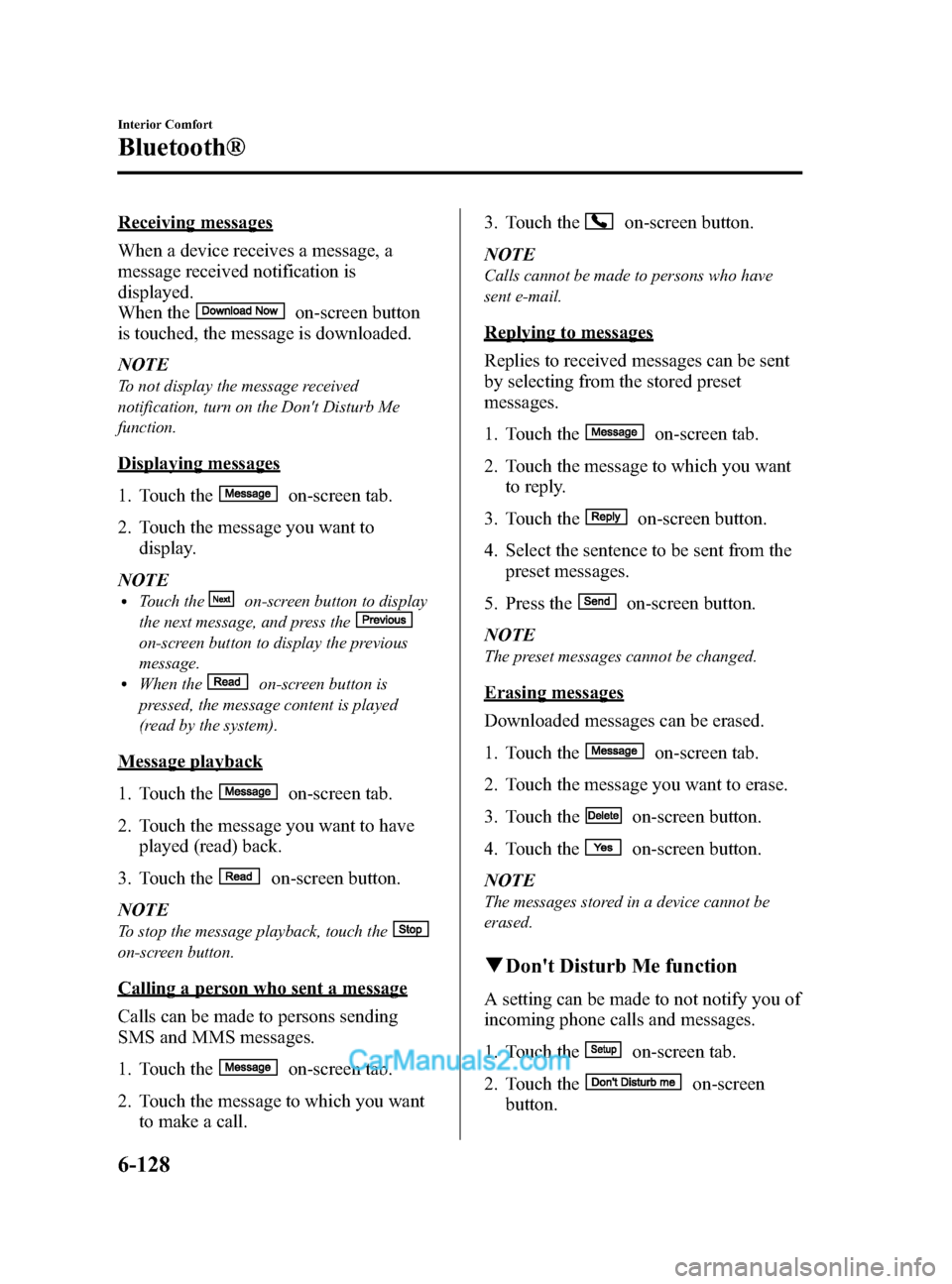
Receiving messages
When a device receives a message, a
message received notification is
displayed.
When the
on-screen button
is touched, the message is downloaded.
NOTE
To not display the message received
notification, turn on the Don't Disturb Me
function.
Displaying messages
1. Touch the
on-screen tab.
2. Touch the message you want to display.
NOTE
lTouch theon-screen button to display
the next message, and press the
on-screen button to display the previous
message.
lWhen theon-screen button is
pressed, the message content is played
(read by the system).
Message playback
1. Touch the
on-screen tab.
2. Touch the message you want to have played (read) back.
3. Touch the
on-screen button.
NOTE
To stop the message playback, touch the
on-screen button.
Calling a person who sent a message
Calls can be made to persons sending
SMS and MMS messages.
1. Touch the
on-screen tab.
2. Touch the message to which you want to make a call. 3. Touch the
on-screen button.
NOTE
Calls cannot be made to persons who have
sent e-mail.
Replying to messages
Replies to received messages can be sent
by selecting from the stored preset
messages.
1. Touch the
on-screen tab.
2. Touch the message to which you want to reply.
3. Touch the
on-screen button.
4. Select the sentence to be sent from the preset messages.
5. Press the
on-screen button.
NOTE
The preset messages cannot be changed.
Erasing messages
Downloaded messages can be erased.
1. Touch the
on-screen tab.
2. Touch the message you want to erase.
3. Touch the
on-screen button.
4. Touch the
on-screen button.
NOTE
The messages stored in a device cannot be
erased.
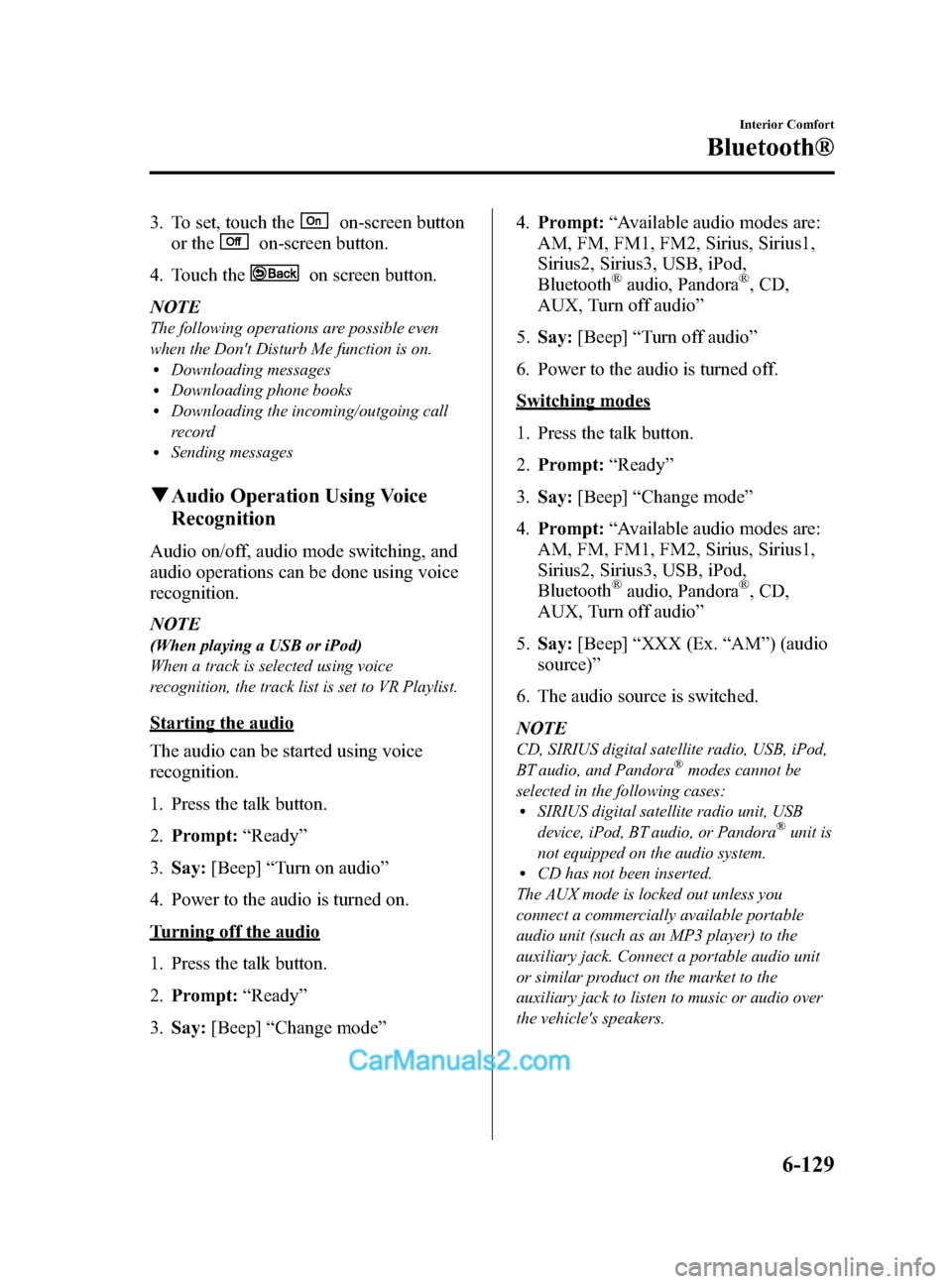
q Don't Disturb Me function
A setting can be made to not notify you of
incoming phone calls and messages.
1. Touch the
on-screen tab.
2. Touch the
on-screen
button.
6-128
Interior Comfort
Bluetooth®
CX-9_8DA3-EA-13G_Edition2 Page400
Monday, September 9 2013 4:9 PM
Form No.8DA3-EA-13G
Page 401 of 600
Black plate (401,1)
3. To set, touch theon-screen button
or the
on-screen button.
4. Touch the
on screen button.
NOTE
The following operations are possible even
when the Don't Disturb Me function is on.
lDownloading messageslDownloading phone bookslDownloading the incoming/outgoing call
record
lSending messages
q Audio Operation Using Voice
Recognition
Audio on/off, audio mode switching, and
audio operations can be done using voice
recognition.
NOTE
(When playing a USB or iPod)
When a track is selected using voice
recognition, the track list is set to VR Playlist.
Starting the audio
The audio can be started using voice
recognition.
1. Press the talk button.
2. Prompt: “Ready ”
3. Say: [Beep] “Turn on audio ”
4. Power to the audio is turned on.
Turning off the audio
1. Press the talk button.
2. Prompt: “Ready ”
3. Say: [Beep] “Change mode ” 4.
Prompt: “Available audio modes are:
AM, FM, FM1, FM2, Sirius, Sirius1,
Sirius2, Sirius3, USB, iPod,
Bluetooth
®audio, Pandora®, CD,
AUX, Turn off audio ”
5. Say: [Beep] “Turn off audio ”
6. Power to the audio is turned off.
Switching modes
1. Press the talk button.
2. Prompt: “Ready ”
3. Say: [Beep] “Change mode ”
4. Prompt: “Available audio modes are:
AM, FM, FM1, FM2, Sirius, Sirius1,
Sirius2, Sirius3, USB, iPod,
Bluetooth
®audio, Pandora®, CD,
AUX, Turn off audio ”
5. Say: [Beep] “XXX (Ex. “AM ”) (audio
source) ”
6. The audio source is switched.
NOTE
CD, SIRIUS digital satellite radio, USB, iPod,
BT audio, and Pandora®modes cannot be
selected in the following cases:
lSIRIUS digital satellite radio unit, USB
device, iPod, BT audio, or Pandora®unit is
not equipped on the audio system.
lCD has not been inserted.
The AUX mode is locked out unless you
connect a commercially available portable
audio unit (such as an MP3 player) to the
auxiliary jack. Connect a portable audio unit
or similar product on the market to the
auxiliary jack to listen to music or audio over
the vehicle's speakers.
Interior Comfort
Bluetooth®
6-129
CX-9_8DA3-EA-13G_Edition2 Page401
Monday, September 9 2013 4:9 PM
Form No.8DA3-EA-13G
Page 413 of 600
Black plate (413,1)
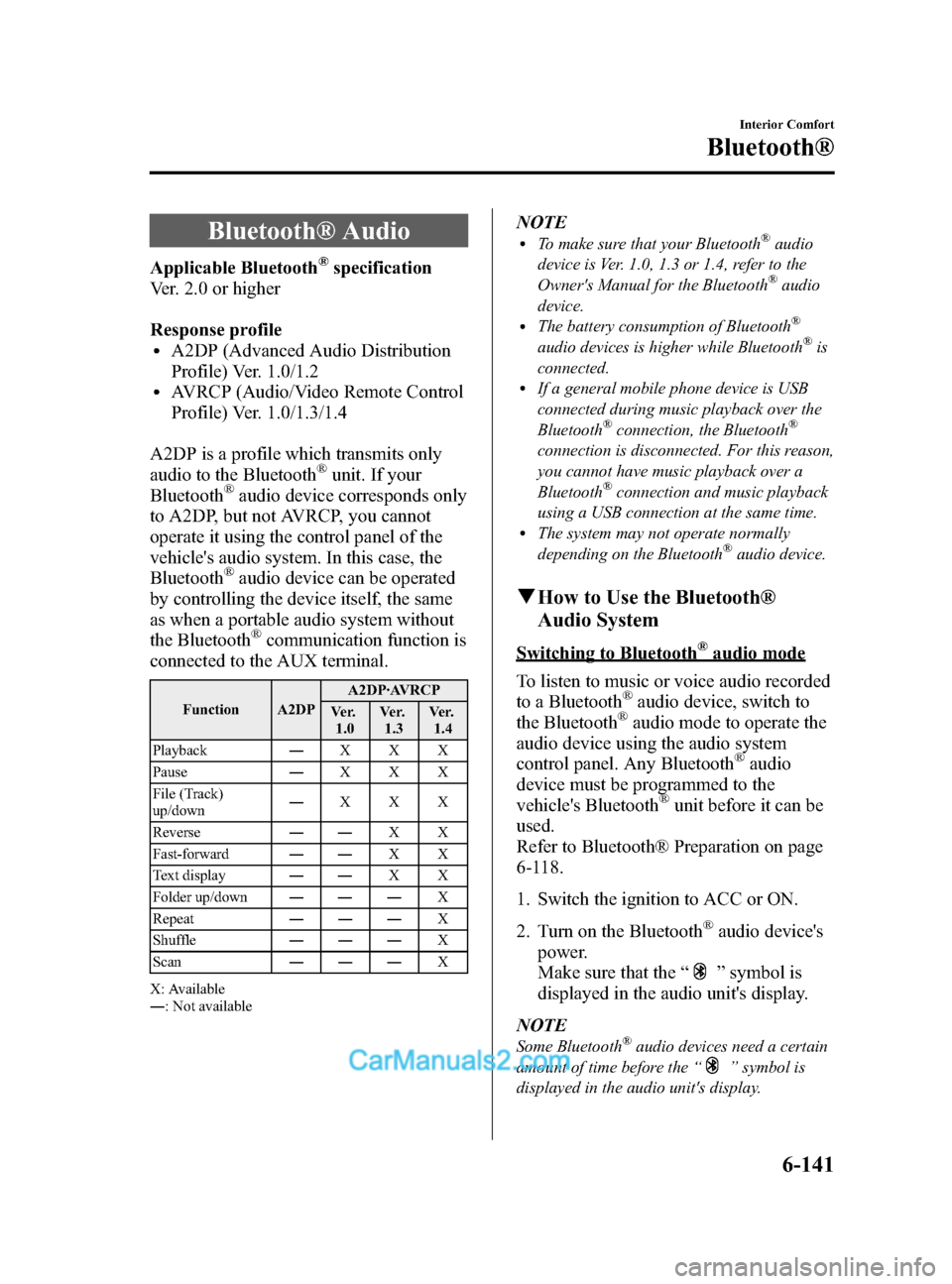
Bluetooth® Audio
Applicable Bluetooth®specification
Ver. 2.0 or higher
Response profile
lA2DP (Advanced Audio Distribution
Profile) Ver. 1.0/1.2
lAVRCP (Audio/Video Remote Control
Profile) Ver. 1.0/1.3/1.4
A2DP is a profile which transmits only
audio to the Bluetooth
®unit. If your
Bluetooth®audio device corresponds only
to A2DP, but not AVRCP, you cannot
operate it using the control panel of the
vehicle's audio system. In this case, the
Bluetooth
®audio device can be operated
by controlling the device itself, the same
as when a portable audio system without
the Bluetooth
®communication function is
connected to the AUX terminal.
Function A2DP A2DP·AVRCP
Ve r. 1.0 Ve r.
1.3 Ve r.
1.4
Playback ―XXX
Pause ―XXX
File (Track)
up/down ―
XXX
Reverse ――XX
Fast-forward ――XX
Text display ――XX
Folder up/down ――― X
Repeat ――― X
Shuffle ――― X
Scan ――― X
X: Available
― : Not available
NOTElTo make sure that your Bluetooth®audio
device is Ver. 1.0, 1.3 or 1.4, refer to the
Owner's Manual for the Bluetooth
®audio
device.
lThe battery consumption of Bluetooth®
audio devices is higher while Bluetooth®is
connected.
lIf a general mobile phone device is USB
connected during music playback over the
Bluetooth
®connection, the Bluetooth®
connection is disconnected. For this reason,
you cannot have music playback over a
Bluetooth
®connection and music playback
using a USB connection at the same time.
lThe system may not operate normally
depending on the Bluetooth®audio device.
q How to Use the Bluetooth®
Audio System
Switching to Bluetooth®audio mode
To listen to music or voice audio recorded
to a Bluetooth
®audio device, switch to
the Bluetooth®audio mode to operate the
audio device using the audio system
control panel. Any Bluetooth
®audio
device must be programmed to the
vehicle's Bluetooth
®unit before it can be
used.
Refer to Bluetooth® Preparation on page
6-118.
1. Switch the ignition to ACC or ON.
2. Turn on the Bluetooth
®audio device's
power.
Make sure that the “
”symbol is
displayed in the audio unit's display.
NOTE
Some Bluetooth®audio devices need a certain
amount of time before the “
”symbol is
displayed in the audio unit's display.
Interior Comfort
Bluetooth®
6-141
CX-9_8DA3-EA-13G_Edition2 Page413
Monday, September 9 2013 4:9 PM
Form No.8DA3-EA-13G
Page 417 of 600
Black plate (417,1)
Troubleshooting
Bluetooth®does not operate under the following conditions. Check whether the following
conditions apply to your Bluetooth®device:lThe device is not being operated correctly.lThe device is not connected to the Bluetooth®unit equipped on the vehicle.lThe device's battery is weak.lA device which interferes with radio wave reception has been placed in the vehicle.lThe ignition switch has been turned off.
If none of the above conditions apply, refer to the following to see if any of the problem
symptoms correspond to your device.
If the problem cannot be resolved, consult an Authorized Mazda Dealer or Mazda
Bluetooth
®Hands-Free Customer Service.
Mazda Bluetooth®Hands-Free Customer Service
If you have any problems with Bluetooth
®, contact with our toll-free customer service
center.
lU.S.A.
Phone: 800-430-0153 (Toll-free)
Web: www.MazdaUSA.com/bluetooth
lCanada
Phone: 800-430-0153 (Toll-free)
Web: www.mazdahandsfree.ca
lMexico
Center of Attention to Client (CAC)
Phone: 01-800-01-MAZDA (Toll-free)
Web: www.mazdamexico.com.mx
Interior Comfort
Bluetooth®
6-145
CX-9_8DA3-EA-13G_Edition2 Page417
Monday, September 9 2013 4:9 PM
Form No.8DA3-EA-13G
Page 419 of 600
Black plate (419,1)
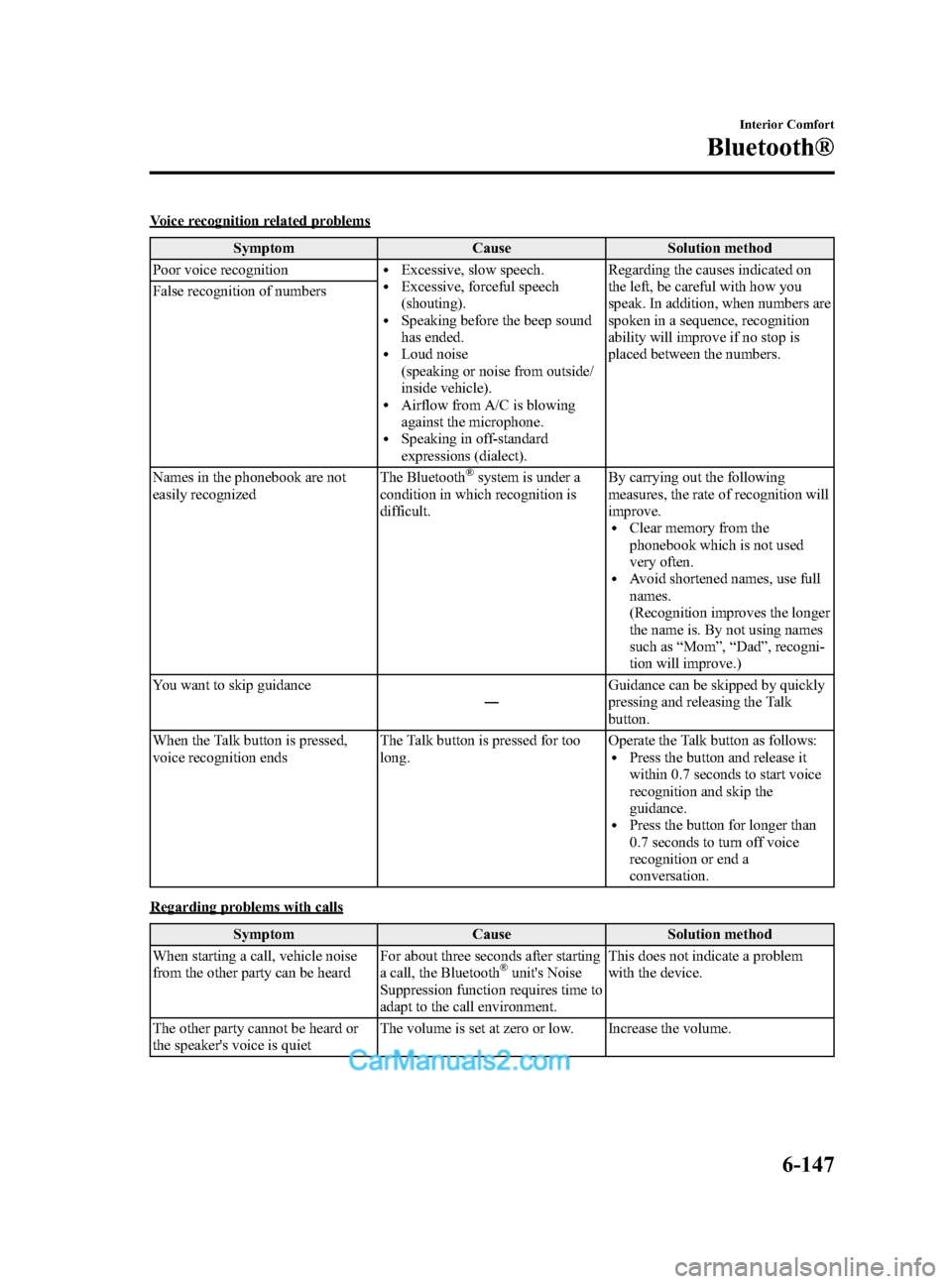
Voice recognition related problemsSymptom Cause Solution method
Poor voice recognition
lExcessive, slow speech.lExcessive, forceful speech
(shouting).
lSpeaking before the beep sound
has ended.
lLoud noise
(speaking or noise from outside/
inside vehicle).
lAirflow from A/C is blowing
against the microphone.
lSpeaking in off-standard
expressions (dialect). Regarding the causes indicated on
the left, be careful with how you
speak. In addition, when numbers are
spoken in a sequence, recognition
ability will improve if no stop is
placed between the numbers.
False recognition of numbers
Names in the phonebook are not
easily recognized
The Bluetooth
®system is under a
condition in which recognition is
difficult. By carrying out the following
measures, the rate of recognition will
improve.
lClear memory from the
phonebook which is not used
very often.
lAvoid shortened names, use full
names.
(Recognition improves the longer
the name is. By not using names
such as
“Mom ”, “Dad ”, recogni-
tion will improve.)
You want to skip guidance ―Guidance can be skipped by quickly
pressing and releasing the Talk
button.
When the Talk button is pressed,
voice recognition ends The Talk button is pressed for too
long. Operate the Talk button as follows:
lPress the button and release it
within 0.7 seconds to start voice
recognition and skip the
guidance.
lPress the button for longer than
0.7 seconds to turn off voice
recognition or end a
conversation.
Regarding problems with calls
Symptom Cause Solution method
When starting a call, vehicle noise
from the other party can be heard For about three seconds after starting
a call, the Bluetooth
®unit's Noise
Suppression function requires time to
adapt to the call environment. This does not indicate a problem
with the device.
The other party cannot be heard or
the speaker's voice is quiet The volume is set at zero or low. Increase the volume.
Interior Comfort
Bluetooth®
6-147
CX-9_8DA3-EA-13G_Edition2 Page419
Monday, September 9 2013 4:9 PM
Form No.8DA3-EA-13G
Page 420 of 600
Black plate (420,1)
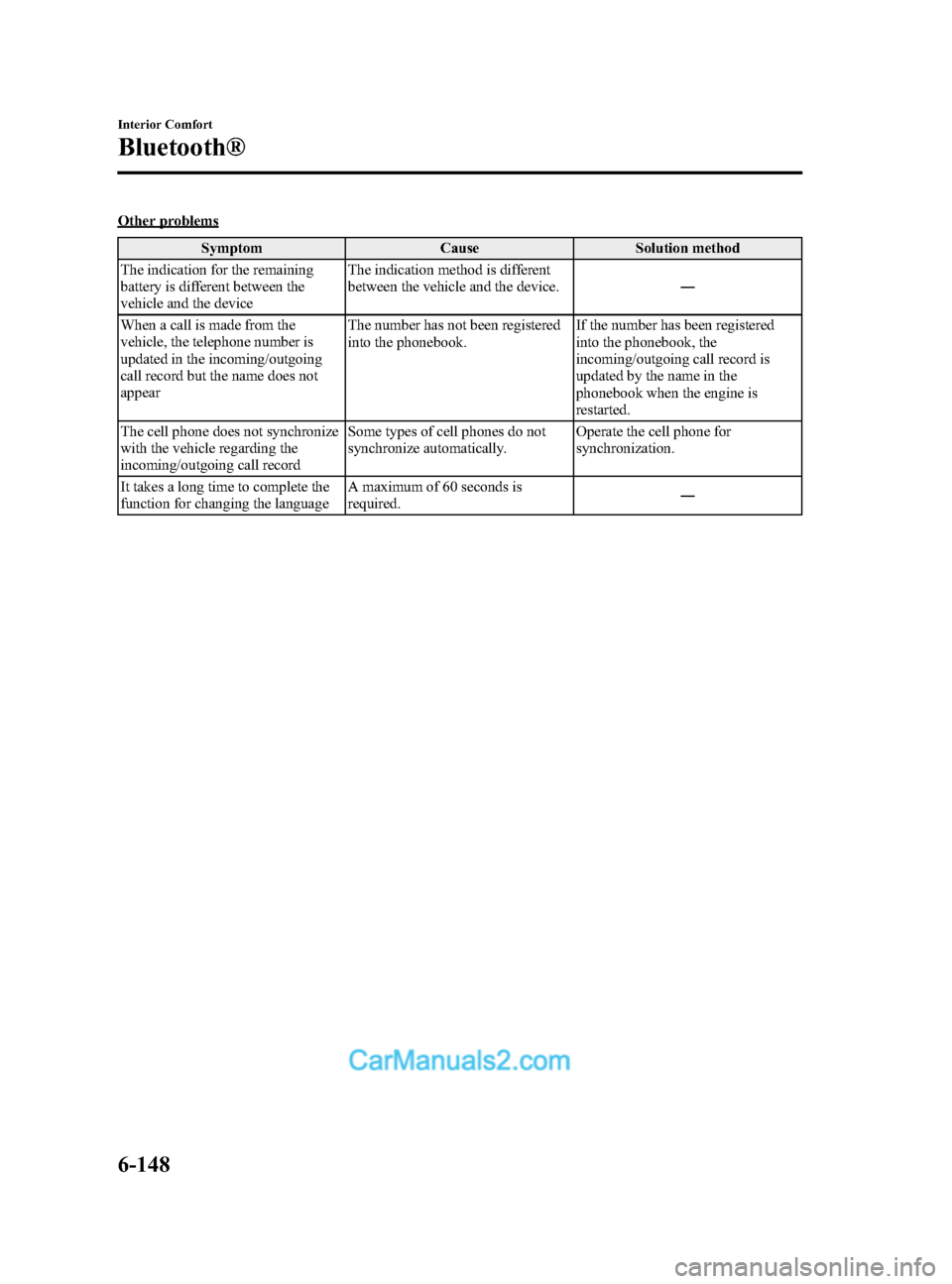
Other problemsSymptom Cause Solution method
The indication for the remaining
battery is different between the
vehicle and the device The indication method is different
between the vehicle and the device.
―
When a call is made from the
vehicle, the telephone number is
updated in the incoming/outgoing
call record but the name does not
appear The number has not been registered
into the phonebook.
If the number has been registered
into the phonebook, the
incoming/outgoing call record is
updated by the name in the
phonebook when the engine is
restarted.
The cell phone does not synchronize
with the vehicle regarding the
incoming/outgoing call record Some types of cell phones do not
synchronize automatically.
Operate the cell phone for
synchronization.
It takes a long time to complete the
function for changing the language A maximum of 60 seconds is
required.
―
6-148
Interior Comfort
Bluetooth®
CX-9_8DA3-EA-13G_Edition2 Page420
Monday, September 9 2013 4:9 PM
Form No.8DA3-EA-13G