power steering MAZDA MODEL CX-9 2014 Owners Manual (in English)
[x] Cancel search | Manufacturer: MAZDA, Model Year: 2014, Model line: MODEL CX-9, Model: MAZDA MODEL CX-9 2014Pages: 600
Page 87 of 600

Black plate (87,1)
3Knowing Your Mazda
Explanation of basic operations and controls; opening/closing and adjustment
of various parts.
Advanced Keyless Entry and Start System ................................ 3-2Advanced Keysí...................................................................... 3-2
Operation Using Advanced Keyless Functions ......................... 3-7
Operation Using Advanced Key Functions ............................. 3-13
Advanced Key Suspend Function ........................................... 3-17
Warning and Beep Sounds ...................................................... 3-18
When Warning Indicator/Beep is Activated ............................ 3-20
Doors and Locks ......................................................................... 3-21 Keys ........................................................................................ 3-21
Keyless Entry System
í.......................................................... 3-22
Door Locks ............................................................................. 3-28
Liftgate .................................................................................... 3-33
Power Windows ...................................................................... 3-40
Fuel-Filler Lid and Cap ........................................................... 3-47
Hood ....................................................................................... 3-49
Moonroof
í............................................................................. 3-50
Security System ........................................................................... 3-53 Immobilizer System (With Advanced Key) ............................ 3-53
Immobilizer System (Without Advanced Key) ....................... 3-57
Theft-Deterrent System
í........................................................ 3-61
Steering Wheel and Mirrors ...................................................... 3-64 Steering Wheel ........................................................................ 3-64
Mirrors .................................................................................... 3-64
3-1íSome models.
CX-9_8DA3-EA-13G_Edition2 Page87
Monday, September 9 2013 4:7 PM
Form No.8DA3-EA-13G
Page 150 of 600

Black plate (150,1)
Steering Wheel
WARNING
Never adjust the steering wheel while
the vehicle is moving:Adjusting the steering wheel while
the vehicle is moving is dangerous.
Moving it can very easily cause the
driver to abruptly turn to the left or
right. This can lead to loss of control
or an accident.
qSteering Wheel Adjustment
To change the angle or length of the
steering wheel:
1. Stop the vehicle, pull down the lock
release lever under the steering
column.
Lock release lever
2. Tilt the steering wheel and/or adjust thesteering column length to the desired
positions, push the lever up to lock the
column.
3. Push the wheel up and down to be certain it's locked before driving.
Mirrors
qOutside Mirrors
Check the mirror angles before driving.
Mirror type
Flat type (driver's side)
Flat surface mirror.
Convex type (front passenger side)
The mirror has single curvature on its
surface.
WARNING
Be sure to look over your shoulder
before changing lanes:
Changing lanes without taking into
account the actual distance of the
vehicle in the convex mirror is
dangerous. You could have a serious
accident. What you see in the convex
mirror is closer than it appears.
Power mirror
The ignition must be switched to ACC or
ON.
To adjust:
1. Press the left or right side of the
selector switch to choose the left or
right side mirror.
3-64
Knowing Your Mazda
Steering Wheel and Mirrors
CX-9_8DA3-EA-13G_Edition2 Page150
Monday, September 9 2013 4:7 PM
Form No.8DA3-EA-13G
Page 151 of 600

Black plate (151,1)
2. Depress the mirror switch in theappropriate direction.
Outside mirror Selector switch
Mirror switch
After adjusting the mirror, lock the control
by placing the selector switch in the
center position.
NOTE
(With seat position memory function)
The on-road outside mirror position can be
programmed in conjunction with the seat
position memory function.
Refer to Seat Position Memory on page 2-6.
Power mirrors with reverse tilt down
functioní
When the ignition is switched ON and the
selector lever is shifted to the R position,
the outside mirrors tilt downward to
facilitate the view of the lower area on
each side of the vehicle.
1. Switch the left/right power door mirror selector switch to the left or right side.
2. Shift the selector lever to the R position while depressing the brake pedal. The
outside mirrors tilt downward
automatically. NOTE
If the left/right power outside mirror selector
switch is in the center position, or the selector
lever is shifted to a position other than the R
position, the outside mirrors return to their on-
road position automatically. The door mirrors
return to their on-road position automatically
even when the ignition is switched from ON to
off.
Folding the mirror
Fold the outside mirror rearward until it is
flush with the vehicle.
WARNING
Always return the outside mirrors to
the driving position before you start
driving:
Driving with the outside mirrors
folded in is dangerous. Your rear view
will be restricted, and you could have
an accident.
Knowing Your Mazda
Steering Wheel and Mirrors
3-65íSome models.
CX-9_8DA3-EA-13G_Edition2 Page151
Monday, September 9 2013 4:7 PM
Form No.8DA3-EA-13G
Page 160 of 600

Black plate (160,1)
Break-In Period
No special break-in is necessary, but a few
precautions in the first 1,000 km (600
miles) may add to the performance,
economy, and life of your Mazda.
lDo not race the engine.lDo not maintain one constant speed,
either slow or fast, for a long period of
time.
lDo not drive constantly at full-throttle
or high engine rpm for extended
periods of time.
lAvoid unnecessary hard stops.lAvoid full-throttle starts.lDo not tow a trailer.
Money-Saving Suggestions
How you operate your Mazda determines
how far it will travel on a tank of fuel. Use
these suggestions to help save money on
fuel and repairs.
lAvoid long warm-ups. Once the engine
runs smoothly, begin driving.
lAvoid fast starts.lKeep the engine tuned. Follow the
maintenance schedule (page 8-4) and
have an Authorized Mazda Dealer
perform inspections and servicing.
lUse the air conditioner only when
necessary.
lSlow down on rough roads.lKeep the tires properly inflated.lDo not carry unnecessary weight.lDo not rest your foot on the brake
pedal while driving.
lKeep the wheels in correct alignment.lKeep windows closed at high speeds.lSlow down when driving in crosswinds
and headwinds.
WARNING
Never stop the engine when going
down a hill:Stopping the engine when going
down a hill is dangerous. This causes
the loss of power steering and power
brake control, and may cause
damage to the drivetrain. Any loss of
steering or braking control could
cause an accident.
4-6
Before Driving Your Mazda
Driving Tips
CX-9_8DA3-EA-13G_Edition2 Page160
Monday, September 9 2013 4:7 PM
Form No.8DA3-EA-13G
Page 174 of 600

Black plate (174,1)
Ascending a hill
Shift into a lower gear to reduce the possibility of overloading or overheating the engine, or
both.
Descending a hill
Shift into a lower gear and use engine compression as a braking effect.
WARNING
Always use lower gears to reduce speed:Holding the brake pedal down too long or too frequently is dangerous as it could
cause the brakes to overheat and lose power, resulting in loss of control and a
serious accident. Use lower gears to help reduce speed. Pull off the road and allow
brakes to cool down whenever braking performance feels reduced.
Overheated engine
The extra weight of the trailer may strain the engine on hot days and on long or steep
upgrades.
If the temperature gauge indicates overheating, turn off the air conditioner, drive safely to
the side of the road, park off the right-of-way and wait for engine to cool. Refer to
Overheating (page 7-16).
Parking
Always make sure the tires of the trailer and the tow vehicle are blocked while parked.
Apply the parking brake firmly and put the transaxle in P.
Avoid parking on an incline, but if you must, follow these instructions:
1. Depress and hold down the brake pedal.
2. Have a helper put wheel blocks against the downhill side of all vehicle and trailer tires.
3. Then release the brake pedal slowly until the blocks bear the load.
lIf the grade is downhill, turn the steering wheel so that the front of the front tires face
the curb.
lIf it is uphill, face the rear of the front tires against the curb.
4. Firmly apply the parking brake.
5. Shift the transaxle into P, and stop the engine.
To restart after parking on an incline:
1. With the transaxle in P, start the engine. (Be sure to depress and hold the brake pedal.)
2. Shift into gear.
4-20
Before Driving Your Mazda
Towing
CX-9_8DA3-EA-13G_Edition2 Page174
Monday, September 9 2013 4:7 PM
Form No.8DA3-EA-13G
Page 177 of 600
Black plate (177,1)
5Driving Your Mazda
Explanation of instruments and controls.
Starting and Driving ..................................................................... 5-2Ignition Switch .......................................................................... 5-2
Starting the Engine .................................................................... 5-4
Turning the Engine Off ............................................................. 5-5
Brake System ............................................................................ 5-5
Automatic Transaxle Controls ................................................. 5-11
Power Steering ........................................................................ 5-18
All-Wheel Drive (AWD) Operation
í..................................... 5-18
Cruise Control ......................................................................... 5-21
Traction Control System (TCS) .............................................. 5-24
Dynamic Stability Control (DSC)/Roll Stability Control
(RSC) ...................................................................................... 5-27
Tire Pressure Monitoring System
í......................................... 5-29
Blind Spot Monitoring (BSM) Systemí................................. 5-35
Parking Sensor System ........................................................... 5-46
Instrument Cluster and Indicators ............................................ 5-52 Meters and Gauges .................................................................. 5-52
Warning/Indicator Lights and Beep Sounds ............................ 5-56 Warning/Indicator Lights ........................................................ 5-56
Beep Sounds ........................................................................... 5-70
Switches and Controls ................................................................ 5-72 Lighting Control ..................................................................... 5-72
Turn and Lane-Change Signals ............................................... 5-78
Fog Lights
í............................................................................ 5-79
Windshield Wipers and Washer .............................................. 5-80
Rear Window Wiper and Washer ............................................ 5-84
Rear Window Defroster ........................................................... 5-85
Horn ........................................................................................ 5-86
Hazard Warning Flasher .......................................................... 5-87
HomeLink Wireless Control System
í.................................... 5-88
5-1íSome models.
CX-9_8DA3-EA-13G_Edition2 Page177
Monday, September 9 2013 4:7 PM
Form No.8DA3-EA-13G
Page 193 of 600

Black plate (193,1)
Recommendations for shifting
Upshifting
For normal acceleration and cruising, we
recommend these shift points.
GearVehicle speed
M1 to M2 24 km/h (15 mph)
M2 to M3 40 km/h (25 mph)
M3 to M4 65 km/h (40 mph)
M4 to M5 73 km/h (45 mph)
M5 to M6 80 km/h (50 mph)
Downshifting
When you must slow down in heavy
traffic or on a steep upgrade, downshift
before the engine starts to overwork. This
gives better acceleration when you need
more speed.
On a steep downgrade , downshifting
helps maintain safe speed and prolongs
brake life.
q Driving Tips
WARNING
Do not allow the vehicle to move in
reverse on an up-slope while the
selector lever is in a forward gear
position, or move forward on a down-
slope while the selector lever is in the
reverse position.
Otherwise, the engine will stop,
causing the loss of the power brake
and power steering functions, and
make it difficult to control the vehicle
which could result in an accident.
Passing
For extra power when passing another
vehicle or climbing steep grades, depress
the accelerator fully. The transaxle will
shift to a lower gear, depending on vehicle
speed.
Climbing steep grades from a stop
To climb a steep grade from a stopped
position:
1. Depress the brake pedal.
2. Shift to D or M1, depending on theload weight and grade steepness.
3. Release the brake pedal while gradually accelerating.
Descending steep grades
When descending a steep grade, shift to
lower gears, depending on load weight
and grade steepness. Descend slowly,
using the brakes only occasionally to
prevent them from overheating.
Driving Your Mazda
Starting and Driving
5-17
CX-9_8DA3-EA-13G_Edition2 Page193
Monday, September 9 2013 4:7 PM
Form No.8DA3-EA-13G
Page 194 of 600

Black plate (194,1)
Power Steering
Power steering is only operable when the
engine is running. If the engine is off or if
the power steering system is inoperable,
you can still steer, but it requires more
physical effort.
If the steering feels stiffer than usual
during normal driving, consult an
Authorized Mazda Dealer.
CAUTION
Never hold the steering wheel to the
extreme left or right for more than 5
seconds with the engine running.
This could damage the power
steering system.
All-Wheel Drive (AWD)
Operation
í
AWD provides excellent driveability on
snow-covered and ice-packed roads, sand
and mud, as well as on steep slopes and
other slippery surfaces.
5-18
Driving Your Mazda
íSome models.
Starting and Driving
CX-9_8DA3-EA-13G_Edition2 Page194
Monday, September 9 2013 4:7 PM
Form No.8DA3-EA-13G
Page 322 of 600
Black plate (322,1)
qSetup
You can customize settings in the setup
display as follows:
Display
Refer to Power/Volume/Display/Sound
Controls on page 6-30.
Sound
Refer to Power/Volume/Display/Sound
Controls on page 6-30.
Language
1. Press the setup button (
).
2. Touch the
on-screen tab to
display the language setting screen.
3. Touch the desired language from the list.
4. Touch the
on-screen button.
NOTE
Only the available languages are displayed.
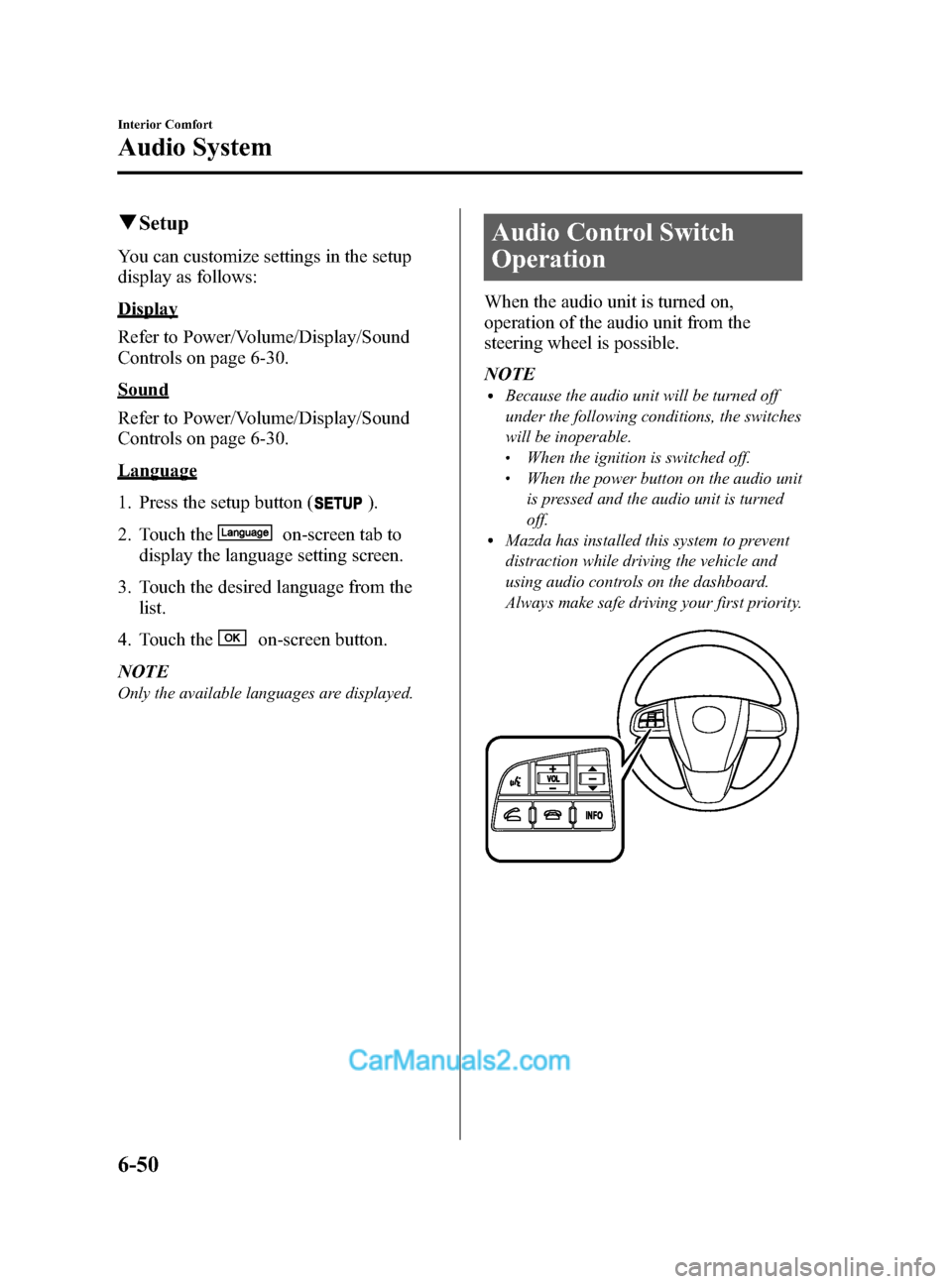
Audio Control Switch
Operation
When the audio unit is turned on,
operation of the audio unit from the
steering wheel is possible.
NOTE
lBecause the audio unit will be turned off
under the following conditions, the switches
will be inoperable.
lWhen the ignition is switched off.lWhen the power button on the audio unit
is pressed and the audio unit is turned
off.
lMazda has installed this system to prevent
distraction while driving the vehicle and
using audio controls on the dashboard.
Always make safe driving your first priority.
6-50
Interior Comfort
Audio System
CX-9_8DA3-EA-13G_Edition2 Page322
Monday, September 9 2013 4:8 PM
Form No.8DA3-EA-13G
Page 389 of 600

Black plate (389,1)
qComponent Parts
Talk button, Pick-up button and Hang-up button
Microphone
Talk button
Hang-up button Pick-up button
Audio unit
Microphone
Audio unit
The audio unit is used for volume adjustment and touch panel operation. Bluetooth
®
information is displayed in the display. The screen is switched by touching the tab for each
function to be used.
Do not press the panel strongly or press it with a sharp-pointed object.
Microphone (Hands-Free)
The microphone is used for speaking voice commands or exchanging conversation.
Talk button, Pick-Up button and Hang-Up button (Hands-Free)
The basic functions of Bluetooth
®Hands-Free can be used for such things as making calls
or hanging up using the talk button, pick-up button and hang-up button on the steering
wheel.
NOTE
The talk button, pick-up button, and hang-up button are operable with the audio unit turned off.
Volume adjustment
The power/volume dial of the audio unit is used to adjust the volume. Turn the dial to the
right to increase volume, to the left to decrease it.
The volume can also be adjusted using the volume button on the steering wheel.
Interior Comfort
Bluetooth®
6-117
CX-9_8DA3-EA-13G_Edition2 Page389
Monday, September 9 2013 4:9 PM
Form No.8DA3-EA-13G