change time MAZDA MODEL CX-9 2018 (in English) User Guide
[x] Cancel search | Manufacturer: MAZDA, Model Year: 2018, Model line: MODEL CX-9, Model: MAZDA MODEL CX-9 2018Pages: 640
Page 109 of 640

Functionnumber Function*1
1The auto door-lock function is disa-
bled.
2 All the doors and the liftgate lock au-
tomatically when the vehicle speed is
about 20 km/h (12 mph) or more.
3 (Factory Setting) All the doors and the liftgate lock au-
tomatically when the vehicle speed is
about 20 km/h (12 mph) or more. All
the doors and the liftgate unlock
when the ignition is switched from
ON to Off.
4 When the ignition is switched ON
and the selector lever is shifted from
park (P) to any other gear position, all
the doors and the liftgate lock auto-
matically.
5 When the ignition is switched ON
and the selector lever is shifted from
park (P) to any other gear position, all
the doors and the liftgate lock auto-
matically.
When the selector lever is shifted to
park (P) while the ignition is switched
ON, all the doors and the liftgate un-
lock automatically.
6 All the doors and the liftgate lock au-
tomatically when the vehicle speed is
about 20 km/h (12 mph) or more.
When the selector lever is shifted to
park (P) while the ignition is switched
ON, all the doors and the liftgate un-
lock automatically.
*1 Other settings for the auto door lock function are
available at an Authorized Mazda Dealer. For
details consult an Aut horized Mazda Dealer.
Refer to Personalization Features on page 9-11.
Settings can be changed using the
following procedure.
1. Safely park the vehicle. All doors and
the liftgate must remain closed.
2. Switch the ignition ON.
3. Press and hold the lock side of the
driver's door-lock switch within 20
seconds of switching the ignition ON,
and make sure a beep sound is heard
about eight seconds afterwards.
4. Refer to the auto lock/unlock function
setting table, determine the function
number for the desi red setting. Press
the unlock side of the driver's
door-lock switch the same number of
times as the selected function number
(Ex. If you select function 2, press the
unlock side of the switch only 2 times).
Before Driving
Doors and Locks
3-19
CX-9_8GC3-EA-17G_Edition1 2017-5-29 10:13:38
Page 110 of 640

5. Three seconds after the functionsetting has been changed, a beep sound
will beep in the amount of the selected
function number. (Ex. Function
number 3 = 3 beep sounds)
Press unlock side of
lock switch once
Press 2 times
Press 3 times
Current Function Number
Function Number 1
Function Number 2
Press 4 times
Function Number 3
Press 5 times
Function Number 4
Press 7 times
Function Number 5
Press 6 times
Function Number 6
Cancel setting Cancel setting
Function set (The
number of beeps
heard is the same as
the selected function
number)
Press lock side of
lock switch
Wait for 3 second
NOTE
•The doors and the liftgate cannot be
locked or unlocked while the setting
function is being performed.
•The procedure can be cancelled by
pressing the lock side of the driver's
door-lock switch.
▼ Locking, Unlocking with Door-Lock
Knob
Operation from inside
To lock any door from the inside, press the
door-lock knob.
To unlock, pull it outward.
This does not operate the other door locks.
Lock
Unlock
Unlocked: Red indicator
Operation from outside
To lock any door with the door-lock knob
from the outside, press the door-lock knob
to the lock position and close the door
(holding the door handle in the open
position is not required).
This does not operate the other door locks.
Door-lock knob
Before Driving
Doors and Locks
3-20
CX-9_8GC3-EA-17G_Edition1
2017-5-29 10:13:38
Page 117 of 640

NOTE
If the power liftgate switch/power liftgate
close switch is pressed or the electric
liftgate opener is operated while the
liftgate is opening/closing electrically, the
beep sound is heard and the liftgate stops.
Then, it reverses when any of the switches
are pressed again.
Changing the power liftgate fully open
position
The power liftgate fully-open position can
be changed according to the height of a
garage.
When changing the position
1. Stop the liftgate at the desired position.
2. Press the power liftgate close switch for about three seconds.
A beep sound is activated two times to
indicate that the position change has
been completed.
NOTE
Set the desired fully-open position of the
liftgate at the position where it is open
more than halfway. The position where it
is less than halfway open cannot be set.
To reset
1. Open the liftgate.
2. Press the power liftgate close switchfor about seven seconds.
A beep sound is activated three times
to indicated that the reset has been
completed.
NOTE
After about 3 seconds have elapsed since
the switch was pressed, a beep sound is
activated 2 times to indicate that the
liftgate fully-open position has changed.
Continuously press the switch for about 7
seconds to complete the reset.
Jam-safe equipment
While the power liftgate is opening/
closing electrically and the system detects
a person or an object in the liftgate's path,
the liftgate will move in the reverse
direction automatically and stops.
WA R N I N G
Always check the area around the power
liftgate before opening/closing it:
Not checking for occupants and objects
around the power liftgate before opening/
closing it is dangerous. The jam-safe
equipment is designed to prevent jamming
in the event an obstruction is in the
liftgate's path. The system may not detect
certain objects obstructing the liftgate
depending on the way they are positioned
and their shape. However, if the jam-safe
function detects an obstruction and moves
the liftgate in the reverse direction, an
occupant in the liftgate's path could be
seriously injured.
Before Driving
Doors and Locks
3-27
CX-9_8GC3-EA-17G_Edition1 2017-5-29 10:13:38
Page 151 of 640

Driving
•Your Mazda will handle differently with a trailer in tow, so practice turning, backing, and
stopping in a traffic-free area.
•Take time to get accustomed to the extra weight and length.
•Allow more room between your vehicle and the one in front becau se braking distance
increases with a trailer. For eac h 16 km/h (10 mph) of speed, a llow at least one vehicle
and trailer length between your Mazda and the vehicle ahead.
•Avoid jerky starts or sudden acceleration.
•Avoid sudden braking. It may cau se loss of control and result in jackknifing, especially so
on wet or slippery roads.
•Shift the selector lever to the D position when towing a traile r in hilly terrain or when
heavily loaded.
The D position will allow opera ting the vehicle without frequen t shifting.
Lane changes and turning
Avoid quick lane changes, sudden turns, and tight turns. Slow d own before turning to avoid
the need of sudden braking.
A turning trailer will make a tigh ter arc than the tow vehicle. Compensate with turns that are
larger than normal.
Passing
Plan well ahead to pass other vehicles, and provide plenty of r oom before changing lanes.
Crosswinds from passing vehicles, especially larger ones, and t he effects of rough roads will
affect handling.
If swaying occurs, fir mly grip the steering wheel and reduce speed immediately, but
gradually.
Steer straight ahead. If no extreme correction of steering or b raking is made, the
combination of less speed and firm steering will result in stab ility.
Backing up
Backing a vehicle with a trailer requires practice and patience . Back slowly, and have a
helper outside at the rear of th e trailer to reduce the risk of an accident.
To turn the trailer, place your hand at the bottom of the steering wheel and turn it in the
direction you want the trailer to go. Make only slight movements to prevent sharp or
prolonged turning.
Ascending a hill
Shift into a lower gear to reduce the possibility of overloadin g or overheating the engine, or
both.
Before Driving
To w i n g
3-61
CX-9_8GC3-EA-17G_Edition1 2017-5-29 10:13:38
Page 171 of 640
•When the position lights are turned on,
the position lights indicator light in the
instrument cluster turns on.
Refer to Headlights on page 4-49.
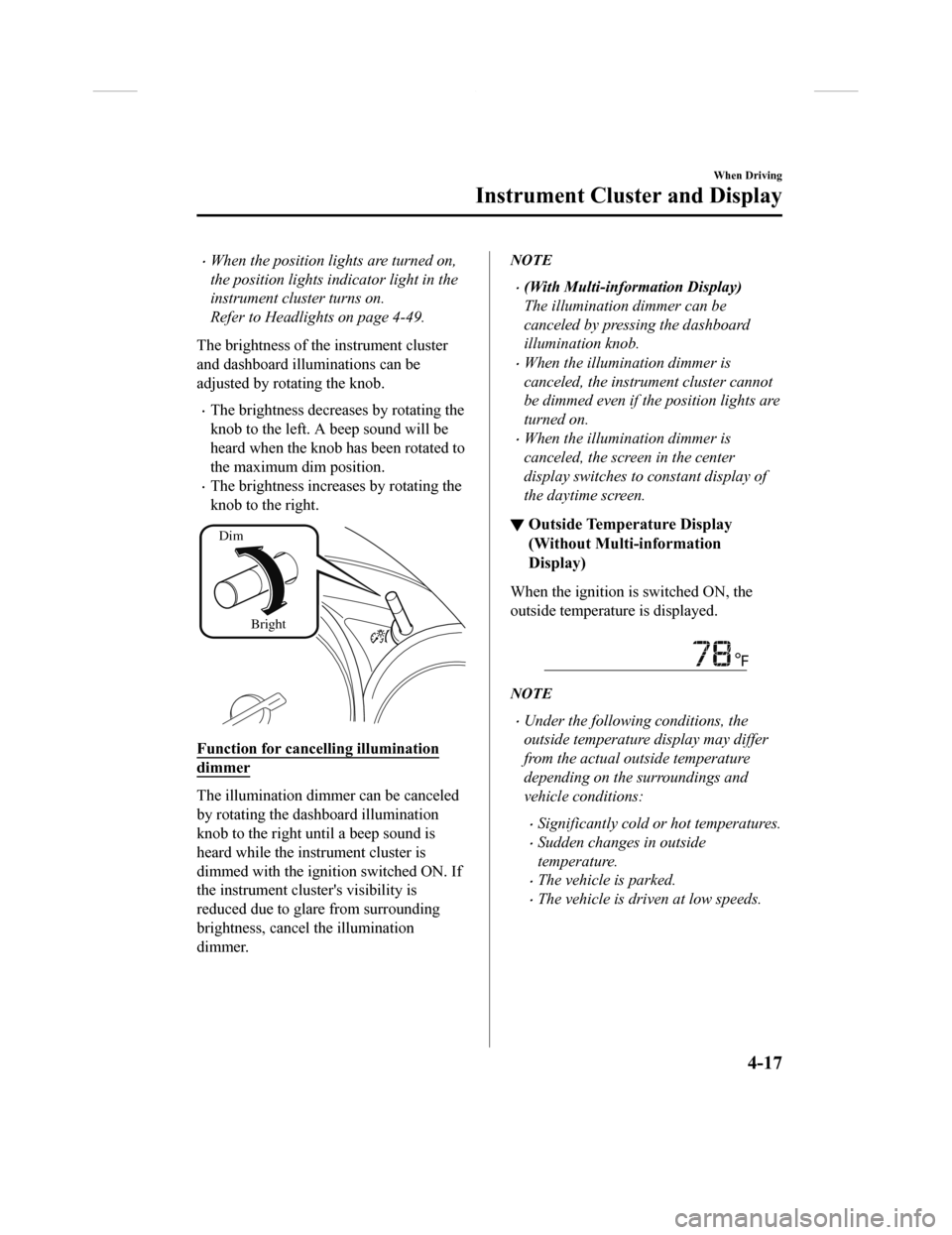
The brightness of the instrument cluster
and dashboard illuminations can be
adjusted by rotating the knob.
•The brightness decreases by rotating the
knob to the left. A beep sound will be
heard when the knob has been rotated to
the maximum dim position.
•The brightness increases by rotating the
knob to the right.
Dim
Bright
Function for cancelling illumination
dimmer
The illumination dimmer can be canceled
by rotating the dashboard illumination
knob to the right until a beep sound is
heard while the instrument cluster is
dimmed with the ignition switched ON. If
the instrument cluster's visibility is
reduced due to glare from surrounding
brightness, cancel the illumination
dimmer.
NOTE
•(With Multi-inform ation Display)
The illumination dimmer can be
canceled by pressing the dashboard
illumination knob.
•When the illumination dimmer is
canceled, the instrument cluster cannot
be dimmed even if the position lights are
turned on.
•When the illumination dimmer is
canceled, the screen in the center
display switches to constant display of
the daytime screen.
▼ Outside Tempera
ture Display
(Without Multi-information
Display)
When the ignition is switched ON, the
outside temperature is displayed.
NOTE
•Under the following conditions, the
outside temperature display may differ
from the actual outside temperature
depending on the surroundings and
vehicle conditions:
•Significantly cold or hot temperatures.
•Sudden changes in outside
temperature.
•The vehicle is parked.
•The vehicle is driven at low speeds.
When Driving
Instrument Cluster and Display
4-17
CX-9_8GC3-EA-17G_Edition1 2017-5-29 10:13:38
Page 175 of 640

The screen content changes each time the INFO switch is pressed.
Press the INFO switch Press the INFO switch
Press the INFO switch Press the INFO switch
Press the INFO switch Press the INFO switch
Current Fuel Economy,
Trip Meter A, Average
Fuel Economy, Outside
Temperature,
Odometer,
Distance-to-empty,
Fuel Gauge
Current Fuel Economy,
Trip Meter B, Average
Fuel Economy, Outside
Temperature,
Odometer,
Distance-to-empty,
Fuel Gauge
Engine Coolant
Temperature Gauge,
Maintenance Monitor,
Outside Temperature,
Odometer,
Distance-to-empty,
Fuel Gauge i-ACTIVSENSE
display, Outside
Temperature,
Odometer,
Distance-to-empty,
Fuel GaugeCompass, Outside
Temperature,
Odometer,
Distance-to-empty,
Fuel Gauge Warning message,
Outside Temperature,
Odometer,
Distance-to-empty,
Fuel Gauge
*1
*2
*1:Displayed only when a warning occurs.
*2:Displayed only while vehicle is being driven.
When Driving
Instrument Cluster and Display
4-21
CX-9_8GC3-EA-17G_Edition1 2017-5-29 10:13:38
Page 177 of 640
CAUTION
If the high engine coolant temperature
warning light (red) turns on, there is a
possibility of overheating. Park the vehicle
in a safe place immediately and take
appropriate measures. If the vehicle
continues to be driven, it could cause
damage to the engine.
Refer to Overheating on page 7-25.
NOTE
•The temperature unit (Centigrade/
Fahrenheit) of the engine coolant gauge
display changes in conjunction with the
temperature unit of the outside
temperature display.
Refer to Personalization Features on
page 9-11.
•During normal driving, the engine
coolant temperature stabilizes at 100 °C
(210 °F) or less, and the gauge indicates
a range lower than 100 °C (210 °F).
•If the engine load increases and the
engine coolant temperature exceeds
100 °C (210 °F), the gauge indicates the
engine coolant temperature.
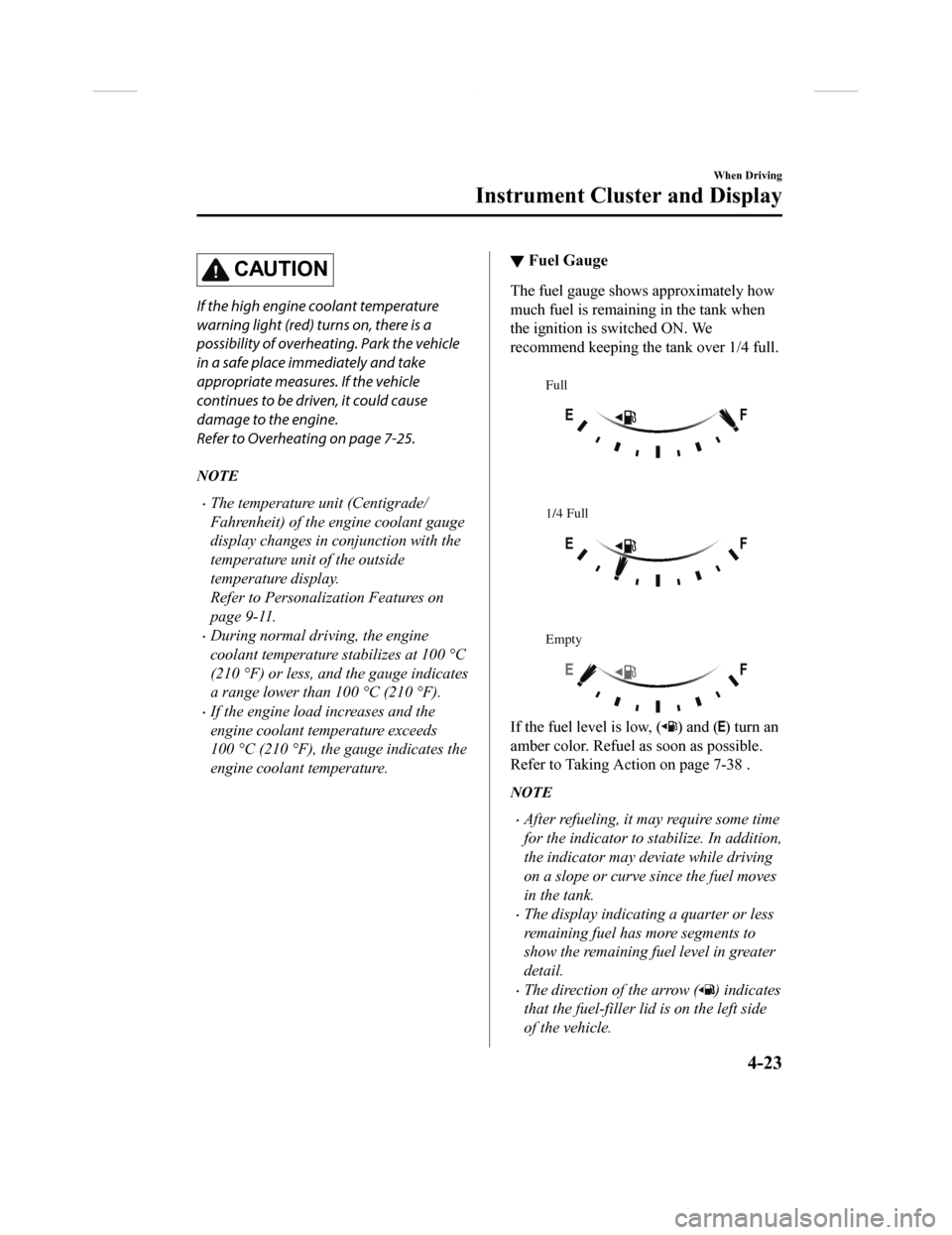
▼ Fuel Gauge
The fuel gauge shows approximately how
much fuel is remaining in the tank when
the ignition is switched ON. We
recommend keeping the tank over 1/4 full.
Full
1/4 Full
Empty
If the fuel level is low, () and () turn an
amber color. Refuel as soon as possible.
Refer to Taking Action on page 7-38 .
NOTE
•After refueling, it may require some time
for the indicator to stabilize. In addition,
the indicator may deviate while driving
on a slope or curve since the fuel moves
in the tank.
•The display indicating a quarter or less
remaining fuel has more segments to
show the remaining fuel level in greater
detail.
•The direction of the arrow () indicates
that the fuel-filler lid is on the left side
of the vehicle.
When Driving
Instrument Cluster and Display
4-23
CX-9_8GC3-EA-17G_Edition1 2017-5-29 10:13:38
Page 179 of 640
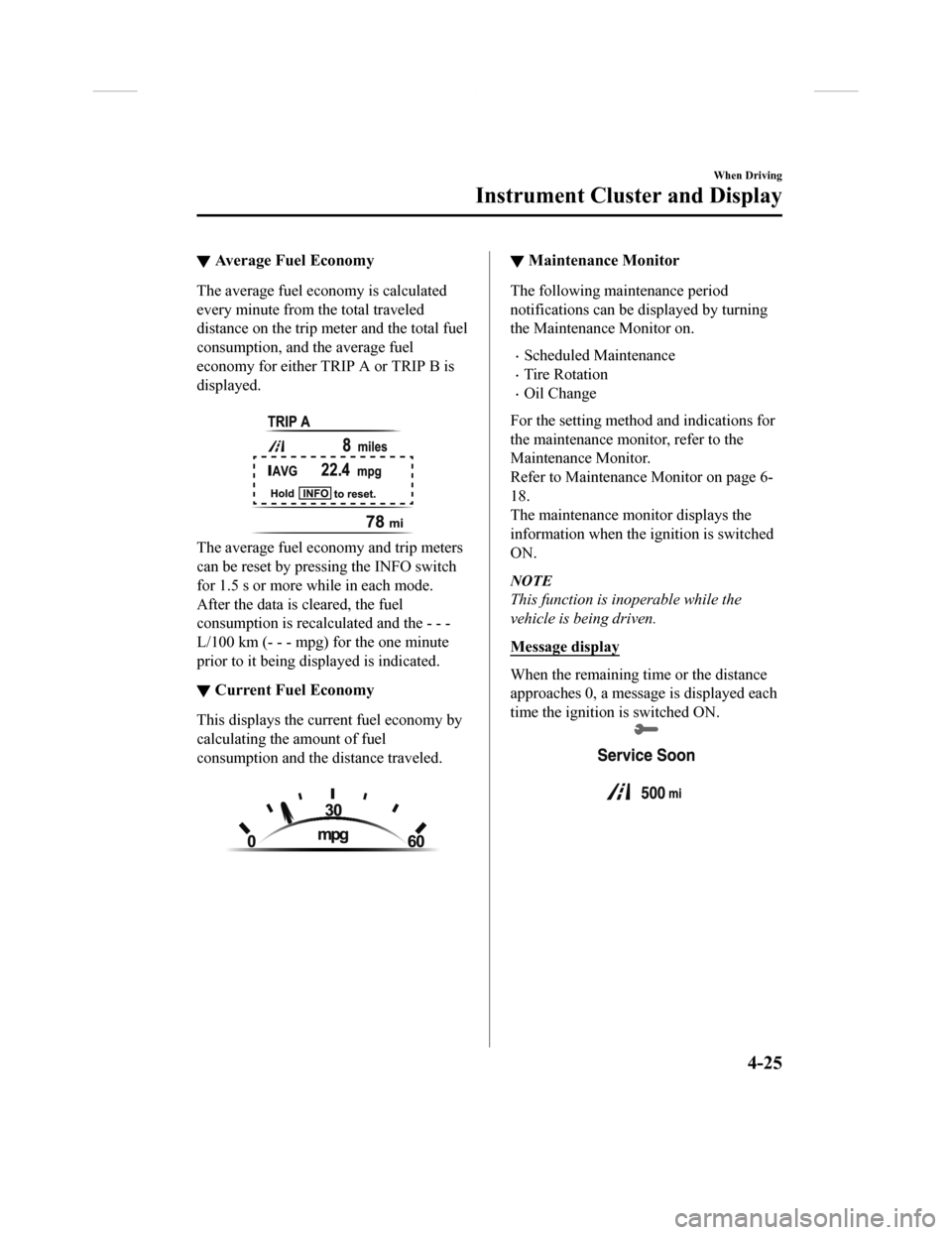
▼Average Fuel Economy
The average fuel economy is calculated
every minute from the total traveled
distance on the trip me
ter and the total fuel
consumption, and the average fuel
economy for either TRIP A or TRIP B is
displayed.
The average fuel economy and trip meters
can be reset by pressing the INFO switch
for 1.5 s or more while in each mode.
After the data is cleared, the fuel
consumption is recalcu lated and the - - -
L/100 km (- - - mpg) for the one minute
prior to it being displayed is indicated.
▼ Current Fuel Economy
This displays the curr
ent fuel economy by
calculating the amount of fuel
consumption and the distance traveled.
▼ Maintenance Monitor
The following maintenance period
notifications can be displayed by turning
the Maintenance Monitor on.
•Scheduled Maintenance
•Tire Rotation
•Oil Change
For the setting method and indications for
the maintenance monitor, refer to the
Maintenance Monitor.
Refer to Maintenance Monitor on page 6-
18.
The maintenance monitor displays the
information when the ignition is switched
ON.
NOTE
This function is inoperable while the
vehicle is being driven.
Message display
When the remaining time or the distance
approaches 0, a message is displayed each
time the ignition is switched ON.
When Driving
Instrument Cluster and Display
4-25
CX-9_8GC3-EA-17G_Edition1 2017-5-29 10:13:38
Page 203 of 640

Lighting Control
▼Headlights
Turn the headlight switch to turn
the headlights and other exterior lights on or off.
When the lights are turned on, the lights-on indicator light in the instrument cluster turns on.
NOTE
•If the light switch is left on, the lights will automatically switch off approximately 30
seconds after switching the ignition off.
The time setting can be changed.
Refer to Personalization Features on page 9-11.
•To prevent discharging the battery, do not leave the lights on while the engine is off unless
safety requires them.
Without auto-light control
Switch Position
Ignition Position ONACC or
OFF ONACC or
OFF ONACC or
OFF
Headlights Off Off Off Off On
On
*2
Daytime running lights
On*1OffOn*1Off Off Off
Taillights
Parking lights
License plate lights
Side-marker lights Off Off On
On
*2OnOn*2
*1 The lights are turned on wh ile the vehicle is driven.*2 The lights are turned on for the specified period by the auto headlight off function.
When Driving
Switches and Controls
4-49
CX-9_8GC3-EA-17G_Edition1 2017-5-29 10:13:38
Page 205 of 640

CAUTION
Do not shade the light sensor by adhering a st icker or a label on the windshield. Otherwise
the light sensor will not operate correctly.
The light sensor also works as a rain sensor for the auto-wiper control. Keep hands and
scrapers clear of the windshield when the wiper lever is in the
position and the ignition
is switched ON as fingers could be pinche d or the wipers and wiper blades could be
damaged when the wipers activa te automatically. If you are going to clean the windshield,
be sure the wipers are turned off completely when it is partic
ularly tempting to leave the
engine running. This is particularly important when clearing ice and snow.
NOTE
•The headlights and other exterior lights may not turn off immediately even if the
surrounding area becomes well-lit because the light sensor determines that it is night time
if the surrounding area is continuously dark for several minute s such as inside long
tunnels, traffic jams inside tunn els, or in indoor parking lots.
In this case, the lights turn off if the light switch is turned to the
position.
•If the headlight switch and the windshield wiper switch are in , and the wipers are
operated at low or high speed by the auto wi per control for several seconds, bad weather
conditions are determined and the headlights may be turned on.
•The sensitivity of the auto-light control may be changed.
Refer to Personalization Features on page 9-11.
When Driving
Switches and Controls
4-51
CX-9_8GC3-EA-17G_Edition1 2017-5-29 10:13:38