roof MAZDA MODEL CX-9 2022 Owner's Manual
[x] Cancel search | Manufacturer: MAZDA, Model Year: 2022, Model line: MODEL CX-9, Model: MAZDA MODEL CX-9 2022Pages: 715, PDF Size: 81.06 MB
Page 468 of 715

Say, “Cancel”.
Operate the commander switch or the center display (only when vehicle is stopped).
Skipping Voice Guidance (for faster operation)
Press and release the talk button.
Troubleshooting for Voice Recognition
If you do not understand an opera tion method while in the voice recognition mode, say
“Tutorial” or “Help”.
Commands useable anytime during voice recognition
“Go Back” and “Cancel” are commands which can be used at anytim e during voice
recognition.
Returning to previous operation
To return to the previous operation, say, “Go Back” while in vo ice recognition mode.
Cancel
To put the Bluetooth
® Hands-Free system in standby mode, say, “Cancel” while in voic e
recognition mode.
To prevent a deterioration in the voice recognition rate and vo ice quality, the following
points should be observed:
The voice recognition cannot be performed while voice guidance or the beep sound is
operating. Wait until the voice guidance or the beep sound is f inished before saying a
command.
Phone related commands are available only when a phone is conne cted via Bluetooth®.
Make sure a phone is connected via Bluetooth
® before you operate phone related voice
commands.
Music play commands, such as Play Artist and Play Album can be used only in USB
audio mode.
Do not speak too slowly or loudly (no loud voice).
Speak clearly, without pausing between words or numbers.
Dialects or different wording other than hands-free prompts can not be recognized by
voice recognition. Speak in the wording specified by the voice commands.
It is not necessary to face the microphone or be close to it. Speak the voice commands
while maintaining a safe driving position.
Close the windows and/or the moonroof to reduce loud noises fro m outside the vehicle, or
turn down the airflow of the clim ate control system while Bluetooth
® Hands-Free is being
used.
Interior Features
Mazda Connect [Mazda Connect (Type A)]
5-23
CX-9_8KH5-EA-21K_Edition2_old 2021-9-16 14:11:22
Page 489 of 715

It is not necessary to face the microphone or be near it. Speak the voice commands while
maintaining a safe driving position.
Close the windows and the moonroof* to reduce loud noises from outside the vehicle and
to prevent the airflow of the air-conditioning system from bein g a disturbance when using
Bluetooth
® Hands-Free.
Make sure that the air flow from the air conditioner is not blowing on the microphone.
If the voice recognition is poor with the guidance volume set to high, set the Barge-In to
OFF.
Examples of available voice commands
The specified name and number are put into the {}.
Common
Back
Help (You can listen to help guidance at each screen.)
{Line Number} (You can select the line number on the screen.)
Next Page
Previous Page
Cancel
Menu
All
Navigation
Entertainment
Communication
Setting
Voice Recognition Settings
Display Off
Music
Play Artist (You can also use “Play Artist {Artist name}”.)
Play Album (You can also use “Play Album {Album Name}”.)
Play Playlist (You can also use “ Play Playlist {Playlist Name}”.)
Play Song (You can also use “Play Song {Song Name}”.)
Play Audiobook (You can also use “Play Audiobook {Audiobook Nam e}”.)
Play Podcast (You can also use “Play Podcast {Podcast Name}”.)
Radio
Tune to {Frequency} AM
Tune to {Frequency} FM
Tune to {Frequency} HD {Sub Channel}
Interior Features
Mazda Connect [Mazda Connect (Type B)]
5-44*Some models.
CX-9_8KH5-EA-21K_Edition2_old 2021-9-16 14:11:22
Page 571 of 715
DESCRIPTIONFUSE
RATING PROTECTED COMPONENT
54 ROOM 25 A For protection of various circuits
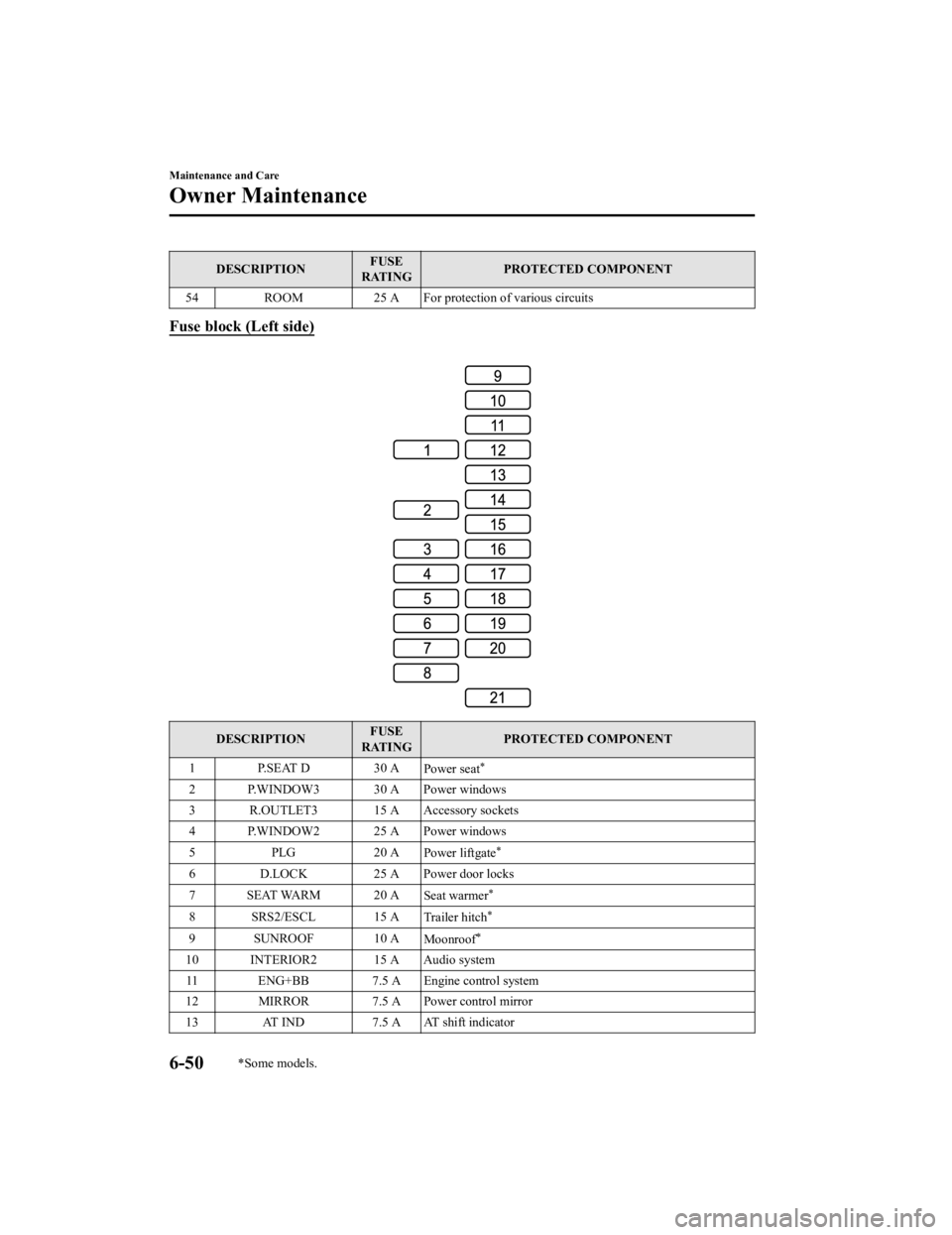
Fuse block (Left side)
DESCRIPTION FUSE
RATING PROTECTED COMPONENT
1 P.SEAT D 30 A Power seat
*
2 P.WINDOW3 30 A Power windows
3 R.OUTLET3 15 A Accessory sockets
4 P.WINDOW2 25 A Power windows
5PLG 2 0 A
Power liftgate
*
6 D.LOCK 25 A Power door locks
7 SEAT WARM 20 A Seat warmer
*
8SRS2/ESCL 15 ATrailer hitch*
9 SUNROOF 10 AMoonroof*
10 INTERIOR2 15 A Audio system
11 ENG+BB 7.5 A Engine control system
12 MIRROR 7.5 A Power control mirror
13 AT IND 7.5 A AT shift indicator
Maintenance and Care
Owner Maintenance
6-50*Some models.
CX-9_8KH5-EA-21K_Edition2_old 2021-9-16 14:11:22
Page 575 of 715

Do not spray water in the engine
compartment. Otherwise, it could result
in engine-starting problems or damage
to electrical parts.
When washing and waxing the vehicle,
be careful not to apply excessive force to
any single area of the vehicle roof.
Otherwise, you could dent the vehicle.
(Vehicles with hands-free liftgate)
When washing the vehicle, turn
off the
hands-free liftgate using the Mazda
Connect or do not bring the transmitter
into the area around the liftgate.
Otherwise, the liftgate could open
unexpectedly resulting in an accident.
Refer to Power Liftgate on page 3-20.
To help protect the finish from rust and
deterioration, wash your Mazda
thoroughly and frequently, at least once a
month, with lukewarm or cold water.
If the vehicle is washed improperly, the
paint surface could be scratched. Here are
some examples of how scratching could
occur.
Scratches occur on the paint surface when:
The vehicle is washed without first
rinsing off dirt and other foreign matter.
The vehicle is washed with a rough, dry,
or dirty cloth.
The vehicle is washed at a car wash that
uses brushes that ar e dirty or too stiff.
Cleansers or wax containing abrasives
are used.
NOTE
Mazda is not responsible for scratches
caused by automatic car washes or
improper washing.
Scratches are more noticeable on
vehicles with darker paint finishes.
To minimize scratche s on the vehicle's
paint finish:
Rinse off any dirt or other foreign matter
using lukewarm or cold water before
washing.
Use plenty of lukewarm or cold water
and a soft cloth when washing the
vehicle. Do not use a nylon cloth.
Rub gently when washing or drying the
vehicle.
Take your vehicle only to a car wash
that keeps its brush es well maintained.
Do not use abrasive cleansers or wax
that contain abrasives.
CAUTION
Do not use steel wool, abrasive cleaners,
or strong detergents containing highly
alkaline or caustic agents on
chrome-plated or anodized aluminum
parts. This may damage the protective
coating; also, cleaners and detergents
may discolor or deteriorate the paint.
Pay special attention to removing salt, dirt,
mud, and other foreign material from the
underside of the fenders, and make sure
the drain holes in the lower edges of the
doors and rocker panels are clean.
Insects, tar, tree sap, bird droppings,
industrial fallout, and similar deposits can
damage the finish if not removed
immediately. When prompt washing with
Maintenance and Care
Appearance Care
6-54
CX-9_8KH5-EA-21K_Edition2_old 2021-9-16 14:11:22
Page 581 of 715

1. Wipe the soiled area with a soft clothsoaked in a mild detergent (approx.
5 %) diluted with water.
2. Wipe off the remaining detergent using a cloth soaked in clean water and
wrung out well.
NOTE
Be particularly careful when cleaning
shiny surface panels and metallic parts
such as plating as they can be scratched
easily.
▼Active Driving Display
Maintenance*
The dust-proof sheet has a coating. When
cleaning, do not use a hard or
rough-surface cloth, or cleaning detergent.
In addition, if a chemical solvent gets on
the active driving display, wipe it off
immediately. The dust-proof sheet could
be damaged and the surface coating could
be scratched. Use a fine, soft cloth such as
those used for cleaning eyeglasses.
NOTE
Use of compressed air when cleaning the
dust-proof sheet is recommended.
▼Cleaning the Window Interiors
If the windows become covered with an
oily, greasy, or waxy film, clean them with
glass cleaner. Follow the directions on the
container.
CAUTION
Do not scrape or scratch the inside of the
window glass. It could damage the
thermal filaments and the antenna lines.
When washing the inside of the window
glass, use a soft cloth dampened in
lukewarm water, gently wiping the
thermal filaments and the antenna lines.
Use of glass cleaning products could
damage the thermal filaments and the
antenna lines.
▼ Cleaning the Floor Mats
Rubber floor mats should be cleaned with
mild soap and water only.
WA R N I N G
Do not use rubber cleaners, such as tire
cleaner or tire shine, when cleaning rubber
floor
mats:
Cleaning the rubber floor mats with rubber
cleaning products makes the floor mats
slippery.
This may cause an accident when
depressing the accelerator or brake pedal
or when getting in or out of the vehicle.
After removing the floor mats for
cleaning, always reinstall them securely
(page 3-49).
Maintenance and Care
Appearance Care
6-60*Some models.
CX-9_8KH5-EA-21K_Edition2_old 2021-9-16 14:11:22
Page 665 of 715

Original Equipment (OE): Describes components originally equipped on the vehicle.
Vehicle Load Limit: The maximum value of the combination weight of occupants and
cargo.
Bead Area of the Tire: Area of the tire next to the rim.
Sidewall Area of the Tire: Area between the bead area and the tread.
Tread Area of the Tire: Area on the perimeter of the tire that contacts the road when it's
mounted on the vehicle.
Seating capacity means the total allowable number of vehicle occupants. Seating capacity
is described on the tire label.
Production options weight is the combination weight of installed regular production
options weighing over 2.3 kilogram s in excess of the standard items which they replace, and
not previously considered in the curb weight or accessory weigh t, including heavy duty
brakes, ride levelers, roof rack, heavy duty battery, and speci al trim.
Rim is the metal support (wheel) fo r a tire or a tire and tube assembly upon which the tire
beads are seated.
Customer Information and Reporting Safety Defects
Tire Information (U.S.A.)
8-32
CX-9_8KH5-EA-21K_Edition2_old 2021-9-16 14:11:22
Page 708 of 715

Index
Appendix..................................... 5-45
Appendix (Mazda Connect (Type
A))................................................5-25
Appendix (Mazda Connect (Type
B))................................................ 5-45
Connected Service....................... 5-53
Mazda Connect Basic
Operations....................................5-37
Mazda Connect Basic Operations
(Mazda Connect (Type A))..........5-17
Mazda Connect Basic Operations
(Mazda Connect (Type B)).......... 5-37
Mazda Connect (Mazda Connect
(Type A))..................................... 5-14
Mazda Radar Cruise Control with Stop &
Go function (MRCC with Stop & Go
function).......................................... 4-131 Close proximity warning........... 4-135
Cruise control function.............. 4-143
Display indication......................4-133
Setting the system..................... 4-136
Stop hold control....................... 4-142
Message Indicated in Multi-information
Display.............................................. 7-43
Message Indicated on Display.......... 7-41
Meters................................................ 4-11
Mirrors Outside mirrors..... ....................... 3-32
Rearview mirror.......................... 3-34
Mirror Defogger......... ....................... 4-70
Moonroof...........................................3-40
Multi-information Display (Type
A).......................................................4-13
Multi-information Display (Type
B)....................................................... 4-30
O
Off-Road Traction Assist
Off-Road Traction Assist indicator
light.............................................. 4-95
Off-Road Traction Assist
switch........................................... 4-96
Outside Mirrors......... ........................ 3-32
Overhead Console............................. 5-69
Overhead Lights................................ 5-56
Overheating....................................... 7-23
Overloading....................................... 3-52
Owner Maintenance
Closing the hood...... ................... 6-17
Engine compartment overview.... 6-19
Key battery replacemen t..............6-32
Opening the hood........................ 6-17
Owner maintenance
precautions................................... 6-15
P
Parking Sensor System (Mazda Connect
(Type A))......................................... 4-260 Sensor detection range.............. 4-262
Parking Sensor System (Mazda Connect
(Type B))......................................... 4-270
Power Liftgate................................... 3-20
Power Liftgate Warning Beep........... 7-47
Power Steering................................ 4-101
Power Steering Warning Buzzer....... 7-48
Power Windows............. ................... 3-37
R
Radar Sensors (Rear)...................... 4-231
Radar Sensor (Front).......................4-228
Rearview Mirror........ ........................3-34
Rear Coat Hooks....... ........................ 5-74
Rear Cross Traffic Alert (RCTA).... 4-127
Rear Door Child Safet y Locks.......... 3-18
Rear View Monitor
Picture quality adjus tment......... 4-250
Rear View Monitor (Mazda Connect
(Type A))......................................... 4-244
Displayable range on the
screen......................................... 4-246
10-7
CX-9_8KH5-EA-21K_Edition2_old 2021-9-16 14:11:22