battery MAZDA MODEL MX-30 EV 2022 User Guide
[x] Cancel search | Manufacturer: MAZDA, Model Year: 2022, Model line: MODEL MX-30 EV, Model: MAZDA MODEL MX-30 EV 2022Pages: 547, PDF Size: 79.35 MB
Page 102 of 547
conditions, both the battery and
ambient temperature will affect the
required charging time and, in certain
situations, this may lead to a signi ficant
increase in the charging time.
Normal charging
Normal Charging can be performed at
home using either a household power
source such as a wall outlet or wall
box, or similar method (alternating
current). Additionally, charging can be
performed at a public charging facility
using a charger other than a quick
charger (direct current).
When charging is started after the
remaining high voltage battery power
warning indication/warning light turns
on, the time it takes to fully charge the
high voltage battery at a public AC
charging facility is about 5 hours. Using
a household power source for charging
will increase the charging time to fully
charge the high voltage battery.
For normal charging , the charging
timer function can be used to charge
automatically from start to finish.
For details on how to use the charging
timer function, refer to Charging
Settings on page 3-21.
Quick charging
When charging is started at a quick
charging station (DC with 50 kW or
higher) the high voltage battery can be
charged from a 20% to 80% battery
charge level in about 36 minutes. The
exact charging time depends on
various conditions at the time of
charging , such as the type of charger,
battery condition, ch arging patterns, as
well as the battery temperature and
ambient temperature. In cold weather
conditions, both the battery and
ambient temperature will aff ect the
required charging time and, in certainsituations, this may lead to a significant
increase in the charging time.
WARNING
Always heed the following when
using a quick charger:
Otherwise, it could lead to an
accident.
Do not use a charge cable which
exceeds 30 m (98 ft).
This vehicle is compatible with quick
chargers with charge cables of 30 m
(98 ft) or shorter and which do not
charge other devices or vehicles at
the same time.
How to perform normal charging
1. Shift the selector lever to the P position.
2. Switch the power switch OFF.
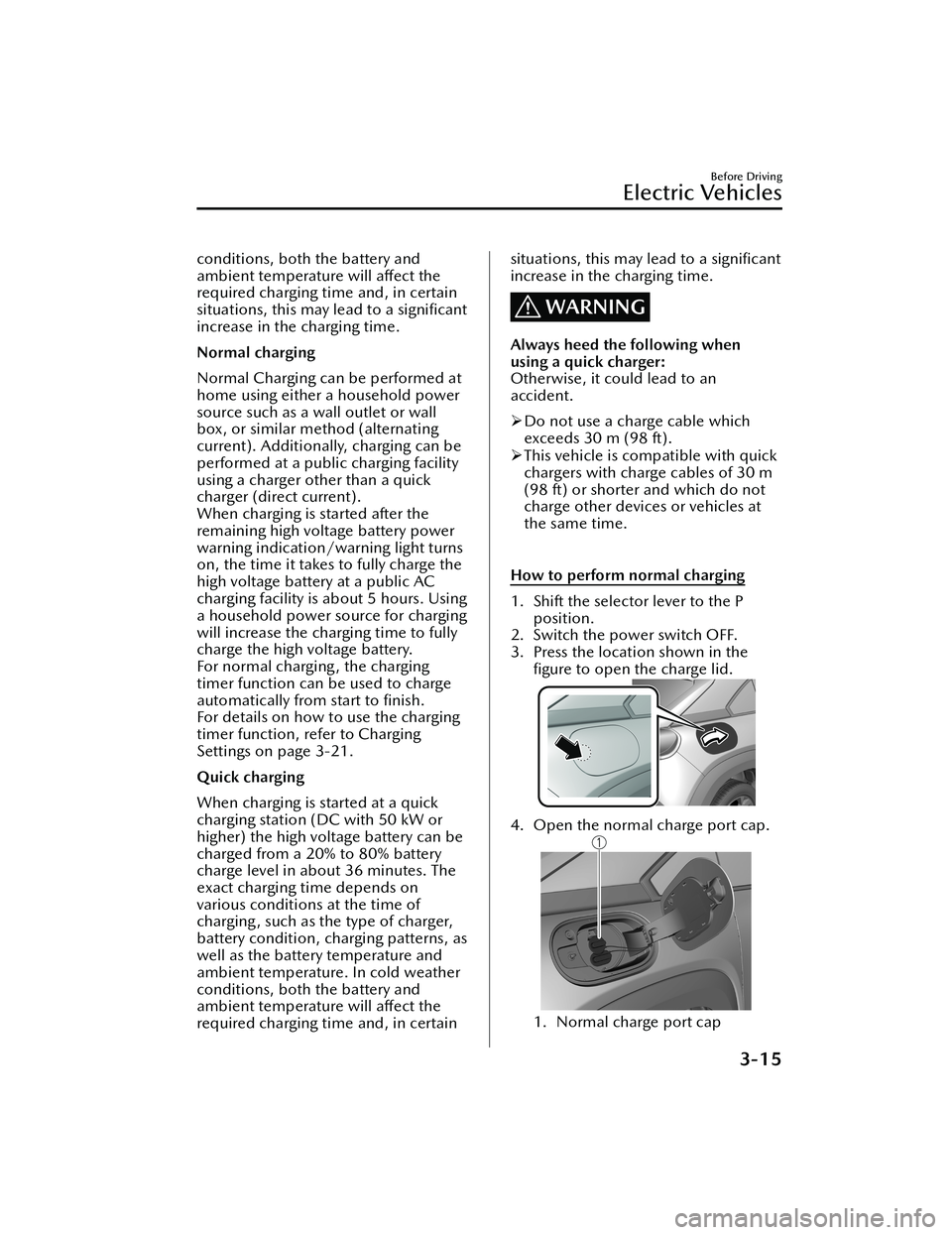
3. Press the location shown in the figure to open the charge lid.
4. Open the normal charge port cap.
1. Normal charge port cap
Before Driving
Electric Vehicles
3-15
MX -30_8JD4-EA -21G_Edition2_new 2021-5-18 14:38:07
Page 106 of 547

Powe r s wi tc h O F F
1. High voltage battery indication
2. Charging completion time
Powe r s wi tc h O N
1. High voltage battery indication
2. Charging completion time
IndicationContent
— Preparing to Charge Displays while the charging timer is being canceled
and when the charging connector is connected.
— Charging Scheduled Displays while in charging timer mode and when the
charging connector is connected.
Charging
Displays during charging.
Charging Complete Displays when charging is completed.
Charging Error. Shift Selector Lev-
er Not in ParkDisplays when charging is started with the selector
lever in a position other than P.
Charging Interrupted. See Own-
er's Manual for Details Displays when charging is interrupted.
Charging Error. Have the Vehicle
Inspected Displays when charging is not possible due to a
charging system problem.
NOTE
When charging is started, the charging st
atus screen is displayed for a while. The
charging status screen turns off after a certain period of time passes or the doors or
liftgate is locked.
The screen is displayed again when the doors or liftgate is unlocked.
Before Driving
Electric Vehicles
3-19
MX -30_8JD4-EA -21G_Edition2_new 2021-5-18 14:38:07
Page 107 of 547
▼Convenient Functions
Timer Charging
Timer charging is a function which
charges the battery automatically
according to a preset time.
You can charge the battery using this
function during time periods when
electricity rates are low. In addition,
the maximum charge limit can be set
and changed.
For the setting method, refer to
Charging Settings on page 3-21.
Canceling the Charging Timer
You can cancel the charging timer
setting temporarily to start charging the
battery immediately.
For the setting method, refer to
Charging Settings on page 3-21.
Climate Control Timer
The climate control timer is a function
which operates the cooling or heating
system automatically according to a
preset time.
The power consumption of the air
conditioner after starting to drive the
vehicle is reduced by operating the air
conditioner and providing a
comfortable temperature in the cabin
before driving.
For the setting method, refer to Turning
On the Climate Control System Using
the Timer (Climate Control Timer) on
page 5-12.
Charge Connector Lock
The charge connector lock is a function
which locks the charging connector
connected to the vehicle so that it
cannot be pulled out.
You can also select the lock conditions
for the charging connector according
to locations and situations.
For the setting method, refer to
Charging Settings on page 3-21.
Locked When Connected
The charging connector is locked at
the same time the charging
connector is connected. The
charging connector is unlocked for 1
minute after the driver’s door is
unlocked.
Select Locked When Connected
when charging in the following
locations/situations.
Outdoor parking lotCharging using your charging cable
at a charging facility
Locked When Charging
The charging connector is locked
only while charging. The charging
connector is unlocked when the
charging is
finished. In addition, the
charging connector is unlocked for 1
minute after the driver’s door is
unlocked, even while charging.
Select Locked When Charging when
leaving the vehicle while charging at
a public charging station where
people are waiting to charge their
vehicles.
O ff
The charging connector is not
locked.
Select O ff when charging in the
following locations/situations.
Indoor parking lot with a shutter
Before Driving
Electric Vehicles
3-20
MX -30_8JD4-EA -21G_Edition2_new 2021-5-18 14:38:07
Page 108 of 547
Use of the charge connector lock is
prohibited at a public charging
station.
Functions using a Smartphone
You can check the remaining high
voltage battery power, operate the
charging , and operate the air
conditioner remotely by using a
Smartphone.
Please refer to local Mazda website for
more Connected Service information.
▼ Charging Settings
How to set up the charging
1. Select Settings from the home
screen on Mazda Connect.
2. Select EV Settings from the setting
screen.
3. Select the setting item you want to change from the displayed content.
Charge When Connected
Cancels charging schedule to allow im-
mediate charging.
Available setting changes
Enable, Disable
NOTE
The charging timer can also be
canceled on the screen displayed on
the center display when the power
switch is switched OFF.
When the charging is completed
using the Charge When Connected
setting , the charging timer schedule
is restored.
Charging Schedule
Selects desired vehicle charging days
and times.
Function Available setting changes
1 ----
Enable, Disa-ble
*1Edit, Delete*2
2 ----
3 ----
4 ----
5 ----
6 ----
7 ----
*1 If a list selected using the cursor has beenset, the item can be Enable or Disable.
*2 Settings can be Edit/Delete by sliding a listselected using the cursor to the right.
NOTE
The charging timer does not work
immediately after the lead-acid
battery is removed or installed, or
when no GPS signal has been
received. When charging without
receiving GPS, quick charging begins.
When GPS signals are received, the
charging timer becomes operational.
Before Driving
Electric Vehicles
3-21
MX-30_8JD4-EA -21G_Edition2_new 2021-5-18 14:38:07
Page 109 of 547

Immediately after switching to
daylight savings, charging may occur
at the charging timer time set before
the switch to daylight savings until
the power switch is switched ON.
Edit
Function Available setting
changes
Start Time
Select the desired charging
start time. Time
(10-minute inter- vals)
End Time
Select the desired charging
end time. Time
(10-minute inter- vals)
Repeat
Select the day(s) of the
week to repeat. Monday
― Sun-
day
Charge Limit
Select the desired charge
limit method. According to Bat-
tery Charge Level, According to Esti- mated Range
Battery Charge Level
*1
Select the desired maxi-
mum charge level. 100%
― 10%
(10 levels)
Estimated Range
*2
Select the desired estimat-
ed range. In 10 km incre-
ments
*1 Can be changed when According to Battery
Charge Level is selected for Charge Limit.
Use when you want to charge only the
amount of charging you need. This helps you
save power and prevent high voltage battery
deterioration.
*2 Can be changed when According toEstimated Range is selected for Charge
Limit.
Use when you want to charge according to
your planned driving distance.
The distance-to-full discharge changes
depending on the driving conditions and
surrounding environment. Check the actual
remaining distance-to-full discharge.
If you change the distance unit after setting
the Estimated Range, the Estimated Range
will be calculated in the unit after the
change. (If you change the units to miles
after setting the estimated range to 100 km,
the charge distance will be for 60 miles.)
NOTE
A charging day is set using Repeat
If 1 repeat day is set, charging is
repeated every week on the set day
of the week.
Depending on the set days of the
week, the Repeat indication is
displayed as Weekdays, Weekends,
and Daily. Otherwise, it is displayed
as Custom.
Setting example
Function Available setting
changes
Start Time 21 : 00
End Time 6 : 00
Repeat Friday
Charge Limit According to Bat-
tery Charge Level
Battery Charge Level 80 %
In this case, charging is done every
week from Friday at 21 : 00 hours to
Saturday at 6:00 hours. However, if
the Battery Charge Level reaches
80%, the charging is stopped even if
it is before the End Time.
No day is set using Repeat
If no Repeat day is designated,
charging is done only 1 time at the
set hours.
Before Driving
Electric Vehicles
3-22
MX -30_8JD4-EA -21G_Edition2_new 2021-5-18 14:38:07
Page 110 of 547

Setting example (if settings below are
made at 13 : 00 hours)
FunctionAvailable setting
changes
Start Time 12 : 00
End Time 18 : 00
Repeat Once
Charge Limit According to Esti-
mated Range
Estimated Range 50 km
In this case, when the charge
connector is connected, charging
starts immediately for charging to
18 : 00 hours on the same day.
However, if a charging amount
allowing a 50 km trip is reached, the
charging is stopped even if it is
before the end time.
Setting example (if settings below are
made at 13 : 00 hours)
Function Available setting
changes
Start Time 1 : 00
End Time 8 : 00
Repeat Once
Charge Limit According to Bat-
tery Charge Level
Battery Charge Level 100 %
In this case, charging is done from
the next day at 1 : 00 hours to 8 : 00
hours. However, if the Battery
Charge Level reaches 100% is
reached, the charging is stopped
even if it is before the End Time.
Charge Limit for AC Charging
Sets the charge limit when using an AC
charger.
Available setting changes
100% ― 10% (10 levels)
NOTE
For normal charge, set the maximum
charge limit of the high voltage battery.
Set the Battery Charge Level of the
charging timer for each charging timer
setting.
Charge Limit for DC Fast Charging
Sets the charge limit when using a DC
Fast charger.
Available setting changes
100% ― 10% (10 levels)
Charge Connector Lock
Con figures when the charge connector
is locked.
Available setting changes
Locked When Charging
Unlocks connector when charging is complete
or vehicle is unlocked.
Locked When Connected
Unlocks connector only when vehicle is un-
locked.
Before Driving
Electric Vehicles
3-23
MX -30_8JD4-EA -21G_Edition2_new 2021-5-18 14:38:07
Page 111 of 547

Available setting changes
Off
Charge connector remains unlocked at all
times.
High Voltage Battery Heater
Con figures the high voltage battery
heater operation.
Available setting changes
Automatic, O ff
Before Driving
Electric Vehicles
3-24
MX-30_8JD4-EA -21G_Edition2_new 2021-5-18 14:38:07
Page 112 of 547

Keys
▼Keys
WARNING
Do not leave the key in your vehicle
with children and keep them in a
place where your children will not
fi
nd or play with them:
Leaving children in a vehicle with the
key is dangerous. This could result in
someone being badly injured or even
killed. Children may find these keys to
be an interesting toy to play with and
could cause the power windows or
other controls to operate, or even
make the vehicle move.
CAUTION
Because the key (transmitter) uses
low-intensity radio waves, it may not
function correctly under the
following conditions:
The key (transmitter) is carried with
communication devices such as
cellular phones.
The key (transmitter) contacts or is
covered by a metal object.
The key (transmitter) is near
electronic devices such as personal
computers.
Non-Mazda genuine electronic
equipment is installed in the
vehicle.
There is equipment which
discharges radio waves near the
vehicle.
The key (transmitter) may consume
battery power excessively if it
receives high-intensity radio waves.
Do not place the key (transmitter)
near electronic devices such as
televisions or personal computers.
To avoid damage to the key
(transmitter), DO NOT :
Drop the key (transmitter).
Get the key (transmitter) wet.
Disassemble the key (transmitter).
Expose the key (transmitter) to
high temperatures on places such
as the dashboard, under direct
sunlight.
Expose the key (transmitter) to any
kind of magnetic field.
Place heavy objects on the key
(transmitter).
Put the key (transmitter) in an
ultrasonic cleaner.
Put any magnetized objects close
to the key (transmitter).
NOTE
The driver must carry the key
(transmitter) to ensure the system
functions properly.
Tra n s m i t te r
Before Driving
Keys
3-25
MX -30_8JD4-EA -21G_Edition2_new 2021-5-18 14:38:07
Page 114 of 547
Keyless Entry System
▼Keyless Entry System
This system uses the key buttons to
remotely lock and unlock the doors,
liftgate, and charge lid.
The system can start the EV system
without having to take the key out of
your purse or pocket.
It can also help you signal for attention
or help.
System malfunctions or warnings are
indicated by the following warning
lights or beeps.
Check the displayed message for more
information and, if necessary, have the
vehicle inspected at an Authorized
Mazda Dealer, according to the
indication.
KEY Warning Indication/Warning
Light (Red)
Refer to KEY Warning Indication/
Warning Light (Red) on page 7-28.
Power switch Not Switched O
ff
(STOP) Warning Beep
Refer to Power switch Not Switched
O ff (STOP) Warning Beep on page
7-37.
Key Removed from Vehicle Warning
Beep
Refer to Key Removed from Vehicle
Warning Beep on page 7-37.
If you have a problem with the key,
consult an Authorized Mazda Dealer.
If your key is lost or stolen, consult an
Authorized Mazda Dealer as soon as
possible for a replacement and to
make the lost or stolen key inoperative.
CAUTION
Radio equipment like this is governed
by laws in the United States.
Changes or modi fications not expressly
approved by the party responsible for
compliance could void the user's
authority to operate the equipment.
NOTE
The keyless entry system operation
may vary due to local conditions.
The keyless entry system is fully
operational when the power switch
is switched o ff. The system does not
operate if the power switch is
switched to any position other than
o ff.
If the key does not operate when
pressing a button or the operational
range becomes too small, the battery
may be weak. To install a new
battery, refer to Key Battery
Replacement (page 6-21).
Battery life is about 1 year. Replace
the battery with a new one if the
messages are displayed in the
instrument cluster. Replacing the
battery about once a year is
recommended because the KEY
warning indication may not display
depending on the rate of battery
depletion.
Additional keys can be obtained at
an Authorized Mazda Dealer. Up to
6 keys can be used with the keyless
functions per vehicle. Bring all keys
to an Authorized Mazda Dealer
when additional keys are required.
Before Driving
Keys
3-27
MX -30_8JD4-EA -21G_Edition2_new 2021-5-18 14:38:07
Page 116 of 547

NOTE
The system can be set to unlock all
the doors, liftgate, and charge lid
when pressing the unlock button
once.
Refer to the Settings section in the
Mazda Connect Owner's Manual.
(Auto re-lock function)
After unlocking with the key, all the
doors, liftgate, and charge lid will
automatically lock if any of the
following operations are not
performed within about 60 seconds.
The time required for the doors to
lock automatically can be changed.
Refer to the Settings section in the
Mazda Connect Owner's Manual.
A door or the liftgate is opened.The power switch is switched to
any position other than off.
Panic button
If you witness from a distance
someone attempting to break into or
damage your vehicle, press and hold
the panic button to activate the
vehicle's alarm. Call emergency
services if necessary.
NOTE
The panic button will work whether
any door or the liftgate is open or
closed.
(Turning on the alarm)
Pressing the panic button for 1 second
or more will trigger the alarm for about
2 minutes and 30 seconds, and the
following will occur:
The horn sounds intermittently.
The hazard warning lights flash.
(Turning off the alarm)
The alarm stops by pressing any button
on the key.
Po we r s av i n g f u nc t io n
By turning on the transmitter power
saving function, the advanced keyless
entry
*1 system functions turn off and
the battery power consumption of the
transmitter is restricted.
The remote control function is
operational by operating the
transmitter switch even while the
power saving function is turned on.
However, the operation indicator light
of the transmitter does not turn on/
fl ash.
Turning on the power saving function
After you have turned on the power
saving function according to the
following procedure, the hazard
warning lights and sound operate
*1
one time.
1. Press the lock button on the transmitter 4 times within 3
seconds to turn on the operation
indicator light.
2. Press the lock button continuously for 1.5 seconds or longer while the
operation indicator light turns on
(for 5 seconds).
3. Press any of the buttons on the transmitter to make sure that the
operation indicator light does not
turn on/fl ash.
Tu r n i n g o ff the power saving function
After you have turned off the power
saving function according to the
following procedure, the hazard
warning lights and sound operate
*1
one time.
Before Driving
Keys
3-29
MX -30_8JD4-EA -21G_Edition2_new 2021-5-18 14:38:07