battery MAZDA MODEL MX-30 EV 2022 Owner's Manual
[x] Cancel search | Manufacturer: MAZDA, Model Year: 2022, Model line: MODEL MX-30 EV, Model: MAZDA MODEL MX-30 EV 2022Pages: 547, PDF Size: 79.35 MB
Page 118 of 547

Advanced Keyless EntrySystem
*
▼Advanced Keyless Entry System
WARNING
Radio waves from the key may a
ffect
medical devices such as pacemakers:
Before using the key near people who
use medical devices, ask the medical
device manufacturer or your physician
if radio waves from the key will aff ect
the device.
The advanced keyless function allows
you to lock/unlock the door, liftgate,
and charge lid, or open the liftgate
while carrying the key.
System malfunctions or warnings are
indicated by the following warning
beeps.
Touch Sensor Inoperable Warning
Beep
Refer to Touch Sensor Inoperable
Warning Beep (With the advanced
keyless function) on page 7-38.
Liftgate Door-lock Switch Inoperable
Warning Beep
Refer to Liftgate Door-lock Switch
Inoperable Warning Beep (With the
advanced keyless function) on page
7-38.
Key Left-in-luggage Compartment
Warning Beep
Refer to Key Left-in-luggage
Compartment Warning Beep (With
the advanced keyless function) on
page 7-38.
Key Left-in-vehicle Warning Beep
Refer to Key Left-in-vehicle Warning
Beep (With the advanced keyless
function) on page 7-38.
NOTE
The advanced keyless entry system
functions can be deactivated to
prevent any possible adverse eff ect on
a user wearing a pacemaker or other
medical device. If the system is
deactivated, you will be unable to start
the EV system by carrying the key.
Consult an Authorized Mazda Dealer
for details. If the advanced keyless
entry system has been deactivated, you
can start the EV system by following
the procedure indicated when the key
battery goes dead.
Refer to Starting the EV System When
the Key Battery is Dead on page 4-6.
Before Driving
Advanced Keyless Entry System
*Some models.3-31
MX -30_8JD4-EA -21G_Edition2_new 2021-5-18 14:38:07
Page 119 of 547

Operational Range
▼Operational Range
The system operates only when the
driver is in the vehicle or within
operational range while the key is
being carried.
NOTE
When the battery power is low, or in
places where there are high-intensity
radio waves or noise, the operational
range may become narrower or the
system may not operate. For
determining battery replacement,
Refer to Keyless Entry System on page
3-27.
▼Locking/Unlocking Using Touch
Sensor
1. Exterior antenna
2. 80 cm (31 in)
3. Operational range
NOTE
The system may not operate if you
are too close to the windows or door
handles.
If the key is left in the following areas
and you leave the vehicle, the doors
may be locked depending on the
radio wave conditions even if the key
is left in the vehicle.
Around the dashboardIn the storage compartments such
as the glove compartment or the
center console
Next to a communication device
such as a mobile phone
▼
Locking Using Door-Lock Switch/
Unlocking Using Electric Liftgate
Opener
1. Exterior antenna
2. 80 cm (31 in)
3. Operational range
Before Driving
Advanced Keyless Entry System
3-32
MX
-30_8JD4-EA -21G_Edition2_new 2021-5-18 14:38:07
Page 121 of 547

In the storage compartments such
as the glove compartment or the
center console
Next to a communication device
such as a mobile phone
When the power switch is switched
to ACC or ON, the vehicle lock-out
prevention feature prevents you from
locking yourself out of the vehicle.
All doors, charge lid, and liftgate will
automatically unlock if they are
locked using the power door locks
with any door or the liftgate open.
The vehicle lock-out prevention
feature does not operate while the
power switch is switched off.
When all doors, charge lid, and
liftgate are locked using the power
door lock with any door or the
liftgate open, the closed doors,
charge lid, and liftgate are locked.
After that, when all doors and the
liftgate are closed, all doors and the
liftgate are locked. However, if the
key is inside the vehicle, all doors,
charge lid, and liftgate are
automatically unlocked.
(With the advanced keyless
function)
The beep sound is heard for about
10 seconds to notify the driver that
the key has been left in the vehicle.
(Without the advanced keyless
function)
The horn sound is heard twice to
notify the driver that the key has
been left in the vehicle.
(Door unlock (control) system with
collision detection)
This system automatically unlocks the
doors, charge lid, and liftgate in the
event the vehicle is involved in an
accident to allow passengers to get
out of the vehicle immediately and
prevent being trapped inside. While
the power switch is switched ON
and in the event the vehicle receives
an impact strong enough to in flate
the air bags, all the doors, charge lid,
and liftgate are automatically
unlocked after about 6 seconds have
elapsed from the time of the
accident.
The doors, charge lid, and liftgate
may not unlock depending on how
an impact is applied, the force of the
impact, and other conditions of the
accident.
If door-related systems or the battery
is malfunctioning, the doors, charge
lid, and liftgate may not unlock
depending on your vehicle type.
▼ Unlocking with Auxiliary Key
Only the driver's door can be unlocked
using the auxiliary key.
Refer to Keys on page 3-25.
Insert the auxiliary key while the
driver's door handle is pulled and turn
the key to the unlock side. Turn the
auxiliary key back to its original
position before removing it.
Before Driving
Doors and Locks
3-34
MX
-30_8JD4-EA -21G_Edition2_new 2021-5-18 14:38:07
Page 129 of 547
A locked liftgate can also be opened
while the key is being carried.
When opening the liftgate with the
doors and the liftgate locked, it may
require a few seconds for the liftgate
latch to release after the electric
liftgate opener is pressed.
The liftgate can be closed when the
doors are locked with the key left in
the vehicle. However, to prevent
locking the key in the vehicle, the
liftgate can be opened by pressing
the electric liftgate opener. If the
liftgate cannot be opened despite
doing this procedure, first push the
liftgate completely closed, then press
the electric liftgate opener to fully
open the liftgate.
When the liftgate latch is released by
pressing the electric liftgate opener,
the liftgate raises slightly. If the
liftgate is not operated for a certain
period of time, the liftgate cannot be
raised.
To o p e n
Press the electric liftgate opener
again.
To c l o s e
To close the liftgate from its slightly
raised position, open it first by
pressing the electric liftgate opener,
then close it after waiting at least 1
second.
If the vehicle battery is dead or there
is a malfunction in the electrical
system and the liftgate cannot be
unlocked, the liftgate can be opened
by performing the emergency
procedure.
Refer to When Liftgate Cannot be
Opened on page 7-42.
Closing the liftgate
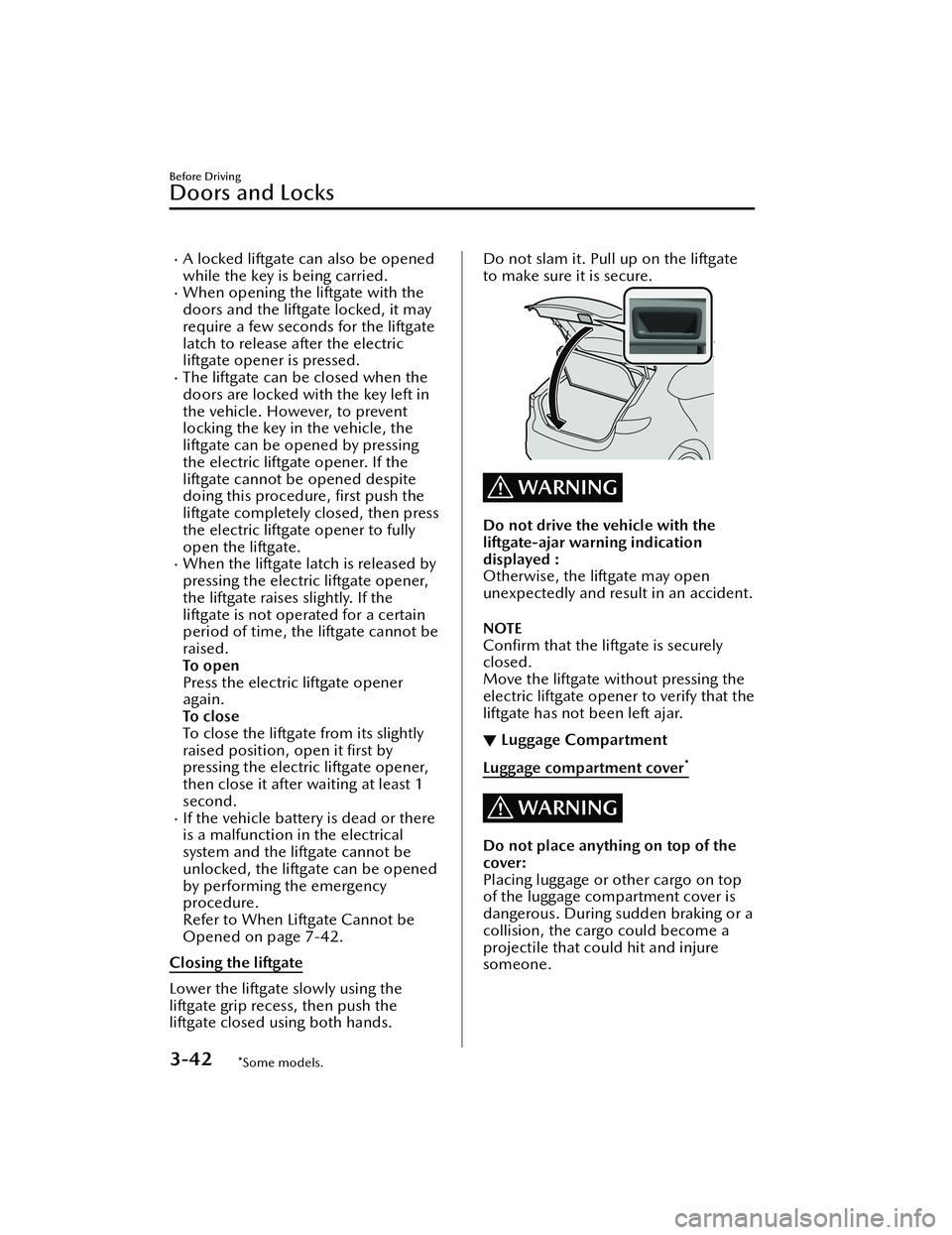
Lower the liftgate slowly using the
liftgate grip recess, then push the
liftgate closed using both hands.
Do not slam it. Pull up on the liftgate
to make sure it is secure.
WARNING
Do not drive the vehicle with the
liftgate-ajar warning indication
displayed :
Otherwise, the liftgate may open
unexpectedly and result in an accident.
NOTE
Con firm that the liftgate is securely
closed.
Move the liftgate without pressing the
electric liftgate opener to verify that the
liftgate has not been left ajar.
▼ Luggage Compartment
Luggage compartment cover*
WARNING
Do not place anything on top of the
cover:
Placing luggage or other cargo on top
of the luggage compartment cover is
dangerous. During sudden braking or a
collision, the cargo could become a
projectile that could hit and injure
someone.
Before Driving
Doors and Locks
3-42*Some models.
MX
-30_8JD4-EA -21G_Edition2_new 2021-5-18 14:38:07
Page 133 of 547

Automatic folding function
When the power switch is switched to
OFF, the outside mirrors automatically
fold in and out when the doors are
locked and unlocked.
Also, when the power switch is
switched ON or the EV system is
started, the outside mirrors fold out
automatically.
NOTE
The outside mirrors may not fold in
and out automatically under cold
weather conditions.
If the outside mirrors do not fold in
and out automatically, remove any
ice or snow, and then press the
outside mirror folding switch to fold
the outside mirrors in or out.
The automatic folding function can
be turned on or off.
Refer to the Settings section in the
Mazda Connect Owner's Manual.
In the following cases, the outside
mirrors do not fold out
automatically. Press the outside
mirror folding switch to fold out the
outside mirrors.
Pressing the outside mirror folding
switch to fold in the outside
mirrors.
*1
Disconnecting the battery
terminals after the outside mirrors
fold in automatically.
*1 When the automatic folding function is
changed from off to on after folding in the
outside mirrors, the outside mirrors fold out
automatically.
EV system-o ff outside mirror
operation
The outside mirrors can be operated
for about 40 seconds after the power
switch is switched from ON to o
ff.
Driver's side auto-dimming outside
mirror*
The movement of the auto-dimming
outside mirror is interlocked with the
auto-dimming rearview mirror in the
interior to automatically reduce glare
from rear on-coming vehicles.
Refer to Rearview Mirror on page
3-46.
NOTE
The front passenger-side outside
mirror does not have the
auto-dimming feature.
▼ Rearview Mirror
WARNING
Do not stack cargo or objects higher
than the seatbacks:
Cargo stacked higher than the
seatbacks is dangerous. It can block
your view in the rearview mirror, which
might cause you to hit another car
when changing lanes.
Rearview mirror adjustment
Before driving , adjust the rearview
mirror to center on the scene through
the rear window.
Before Driving
Mirrors
3-46*Some models.
MX
-30_8JD4-EA -21G_Edition2_new 2021-5-18 14:38:07
Page 145 of 547
Winter Driving
▼Winter Driving
Carry emergency gear, including tire
chains, window scraper,
flares, a small
shovel, jumper cables, and a small bag
of sand or salt.
Ask an Authorized Mazda Dealer to
check the following:
Have the proper ratio of antifreeze in
the radiator.
Refer to Coolant on page 6-11.
Inspect the lead-acid battery and its
cables. Cold reduces battery
capacity.
Inspect the EV system for damage
and loose connections.
Use washer fluid made with
antifreeze ―but do not use coolant
antifreeze for washer fluid (page
6-13).
NOTE
Remove snow before driving. Snow
left on the windshield is dangerous
as it could obstruct vision.
Do not apply excessive force to a
window scraper when removing ice
or frozen snow on the mirror glass
and windshield.
Never use warm or hot water for
removing snow or ice from windows
and mirrors as it could result in the
glass cracking.
Drive slowly. Braking performance
can be adversely a ffected if snow or
ice adheres to the brake
components. If this situation occurs,
drive the vehicle slowly, releasing the
accelerator pedal and lightly applying
the brakes several times until the
brake performance returns to
normal.
▼ Snow Tires
Use snow tires on all 4 wheels
Do not go faster than 120 km/h (75
mph) while driving with snow tires.
In
flate snow tires 30 kPa (0.3 kgf/cm
2,
4.3 psi) more than recommended on
the tire pressure label (rear door on the
driver's side), but never more than the
maximum cold-tire pressure shown on
the tires.
The vehicle is originally equipped with
all season radials designed to be used
all year around. In some extreme
climates you may find it necessary to
replace them with snow tires during
the winter months to further improve
traction on snow and ice covered
roads.
WARNING
Use only the same size and type tires
(snow, radial, or non-radial) on all 4
wheels:
Using tires di fferent in size or type is
dangerous. Your vehicle's handling
could be greatly aff ected and result in
an accident.
CAUTION
Check local regulations before using
studded tires.
NOTE
The tire pressure monitoring system
may not function correctly when using
tires with steel wire reinforcement in
the sidewalls (page 4-181).
▼ Tire Chains
Check local regulations before using
tire chains.
Before Driving
Driving Tips
3-58
MX
-30_8JD4-EA -21G_Edition2_new 2021-5-18 14:38:07
Page 154 of 547

Starting the EV System
▼Before Starting the EV System
1. Make sure that the parking brake is
applied.
2. Make sure that the selector lever is
in the P position.
NOTE
The EV system cannot be started
when the selector lever is in a
position other than P.
Shift the selector lever to the P
position.
3. Assume the correct driving posture
to make sure that the accelerator
pedal and the brake pedal can be
firmly depressed with the right foot.
Check the pedal positions to make
sure that one cannot be depressed
for the other by mistake.
▼ Starting the EV System
WARNING
Radio waves from the key may a
ffect
medical devices such as pacemakers:
Before using the key near people who
use medical devices, ask the medical
device manufacturer or your physician
if radio waves from the key will aff ect
the device.
NOTE
The EV system can be started
regardless of the power switch
position (OFF, ACC, ON).
The key must be carried by the
driver.
If this function is disabled, the EV
system cannot be started even if the
key is carried. Consult an Authorized
Mazda Dealer for details.
If the function to start the EV system
only by carrying the key is disabled,
the EV system can be started using
the procedure for starting the EV
system when the key battery is dead.
When the charge connector is
connected to the charge port or
during charging, the EV system
cannot be started.
The vehicle can be driven while the
READY indication is displayed in the
instrument cluster.
1. Make sure you are carrying the key.
2. Continue to depress the brake pedal firmly.
3. Make sure that the KEY indicator
light in the instrument cluster and
power switch indicator light (green)
turn on.
When the power switch indicator
light (green) is flashing, the key
battery might be depleted.
Refer to Starting the EV System
When the Key Battery is Dead on
page 4-6.
1. Indicator light
2. Power switch
4. Press the power switch with the power switch indicator light (green)
turned on.
When Driving
Starting and Stopping the EV System
4-5
MX -30_8JD4-EA -21G_Edition2_new 2021-5-18 14:38:07
Page 155 of 547

CAUTION
If there is a problem with the power
switch, the power switch indicator
light (amber) flashes. In this case,
the EV system could be started,
however, consult an Authorized
Mazda Dealer as soon as possible.
NOTE
Under the following conditions,
the KEY warning light (red) flashes
in the instrument cluster or the
KEY warning indication is
displayed on the
multi-information display and the
EV system will not start:
The key battery is dead.The key is out of operational
range.
The key is placed in areas where
it is di fficult for the system to
detect the signal.
A key from another
manufacturer similar to the key
is in the operational range.
If the power switch indicator light
(amber) flashes, the EV system
may no longer be able to start
using the usual starting method.
Depress the brake pedal
completely and continue to press
the power switch until the EV
system is started completely. After
the EV system has started, the
power switch indicator light
(green) turns o ff and the power
switch is switched ON.
If you attempt to start the EV
system while the selector lever is
in a position other than P, a
message is displayed on the
multi-information display to urge
you to shift the selector lever to
the P position.
Shift the selector lever to the P
position and then start the EV
system.
The function to start the EV
system only by carrying the key
can be disabled, preventing
people using a heart pacemaker
or other medical device from
being negatively a ffected.
5. Make sure that the READY indication is displayed in the
instrument cluster.
▼Starting the EV System When the
Key Battery is Dead
CAUTION
Key operation
Do not allow the fo
llowing conditions.
Otherwise, the vehicle will not receive
the signal from the key correctly and
the EV system may not start.
Metal parts of other keys or metal
objects touch the key.
When Driving
Starting and Stopping the EV System
4-6
MX -30_8JD4-EA -21G_Edition2_new 2021-5-18 14:38:07
Page 156 of 547

Spare keys or keys for other vehicles
equipped with an immobilizer
system touch or come near the key.
Devices for electronic purchases, or
security passage touch or come near
the key.
If the EV system cannot be started
because of a dead key battery, the EV
system can be started using the
following procedure:
1. Continue to depress the brake pedal firmly.
2. Make sure that the KEY indicator light in the instrument cluster and
power switch indicator light (green)
flashes.
3. Align the center area of the emblem on the transmitter with the
center area of the power switch
while the power switch indicator
light (green) flashes.
1. Indicator light
2. Power switch
3. Transmitter
4. Emblem
4. After the power switch indicator light (green) changes to full
illumination, press the power
switch.
NOTE
The EV system cannot start unless
the brake pedal is completely
depressed.
If there is a problem with starting
the EV system, the power switch
indicator light (amber) flashes. In
this case, the EV system could be
started, however, have the vehicle
inspected by an Authorized
Mazda Dealer as soon as
possible.
If the power switch indicator light
(green) does not turn on, perform
the operation from the beginning.
If it still does not turn on, have
the vehicle inspected by an
Authorized Mazda Dealer.
To change the power switch
position, release the brake pedal
after the power switch indicator
light (green) turns on, then press
the power switch.
The power switch is switched in
the order of OFF, ACC, and ON
each time it is pressed. Once the
power switch is switched OFF,
the power switch position can no
longer be changed. Therefore, to
start the EV system, perform the
operation from the beginning.
5. Make sure that the READY indication is displayed in the
instrument cluster.
When Driving
Starting and Stopping the EV System
4-7
MX -30_8JD4-EA -21G_Edition2_new 2021-5-18 14:38:07
Page 157 of 547
Stopping the EV System
▼When Stopping the EV System
1. Shift the selector lever to the P
position.
2. Press the power switch. The READY
indication is not displayed in the
instrument cluster and the EV
system stops, and then the power
switch is switched OFF.
WARNING
Other than for an emergency
situation, do not attempt to stop the
EV system while driving the vehicle:
If the EV system is stopped while
driving the vehicle, loss of brake power
and power steering functions could
occur, making it di fficult to control the
vehicle which could result in an
accident.
CAUTION
Before leaving the vehicle, make sure
that the power switch is switched OFF
(READY indication is not displayed).
NOTE
Key battery
If the system detects that the key's
remaining battery power is low when
the power switch is switched from
ON to ACC or OFF, the KEY indicator
light (green) flashes in the instrument
cluster or the KEY warning indication
is displayed on the multi-information
display.
Refer to Starting the EV System When
the Key Battery is Dead on page 4-6.
Selector lever position
Because the AUTO P (parking lock)
function operates, the power
switch can be switched OFF even
with the selector lever in a position
other than P, however, for reasons
of safety, shift the selector lever to
the P position and then switch the
power switch OFF.
If you switch the power switch OFF
with the selector lever in a position
other than P, a warning sound and
a display indication notify you that
the selector lever position and the
shift position do not match.
Power switch position
If you leave or try to leave the vehicle
without switching the power switch
OFF, the KEY warning light (red) fl ashing , a display indication, and a
warning sound notify you that the
power switch is not switched OFF.
▼ Emergency EV System Stop
Pressing the power switch continuously
or pressing it quickly any number of
times even if the vehicle is not
stopped, will stop the EV system. The
power switch switches to ACC.
When Driving
Starting and Stopping the EV System
4-8
MX
-30_8JD4-EA -21G_Edition2_new 2021-5-18 14:38:07