battery MAZDA MODEL MX-30 EV 2022 Workshop Manual
[x] Cancel search | Manufacturer: MAZDA, Model Year: 2022, Model line: MODEL MX-30 EV, Model: MAZDA MODEL MX-30 EV 2022Pages: 547, PDF Size: 79.35 MB
Page 295 of 547

Consult an Authorized Mazda Dealer
for repair, painting , or replacement
of the front/rear camera, front
bumper, liftgate and door mirrors.
Heed the following cautions to
assure that the 360°View Monitor
operates normally.
Do not modify the vehicle
suspensions or lower/raise the
vehicle body, or both.
Always use tires of the
specified
type and size for the front and rear
wheels. Consult an Authorized
Mazda Dealer for tire replacement.
When the display is cold, images
may leave trails or the screen might
be darker than usual, making it
di fficult to check the vehicle
surroundings. Always confirm the
safety at the front and around the
vehicle visually when driving.
The method for parking/stopping
the vehicle using the 360°View
Monitor
differs depending on the
road circumstances/conditions and
the vehicle conditions. When and
how much you turn the steering
wheel will differ depending on the
situation, therefore always check the
vehicle surroundings directly with
your eyes while using the system.
Also, before using the system, always
make sure that the vehicle can be
parked/stopped in the parking/
stopping space.
NOTE
If there are water droplets, snow, or
mud on the camera lens, wipe it off
using a soft cloth. If the camera lens
is especially dirty, wash it o ff with
mild detergent.
If the camera lens is touched or there
is any dirt on it, it could a ffect the
screen image. Wipe the lens using a
soft cloth.
If the area where the camera is
installed, such as the front bumper,
liftgate or door mirrors, has been
damaged in a vehicle accident, the
camera (position, installation angle)
may have shifted. Always consult an
Authorized Mazda Dealer to have
the vehicle inspected.
If the camera is subjected to
excessive changes in temperature
such as by pouring hot water on the
camera during cold weather, the
360°View Monitor may not operate
normally.
If the vehicle is driven during cold
temperatures and the camera
temperature decreases, the top view
and the side view may become
u n c l ea r. H o we ve r, t h i s d o e s n o t
indicate a problem. If the vehicle is
stopped for a while and the camera
temperature increases, the top view
and the side view will return to the
normal condition.
If the lead-acid battery voltage is
low, the screen might be temporarily diffi cult to view, however, this does
not indicate a problem.
The 360°View Monitor has
limitations. Objects under the
bumper or near both ends of the
bumper cannot be displayed.
Obstructions above the upper image
range of the camera are not
displayed.
Under the following conditions, the
screen might be di fficult to view,
however this does not indicate a
problem.
The temperature near the lens is
high/low.
When Driving
i-ACTIVSENSE
4-146
MX -30_8JD4-EA -21G_Edition2_new 2021-5-18 14:38:07
Page 330 of 547

Please note that the TPMS is not a
substitute for proper tire
maintenance, and it is the driver's
responsibility to maintain correct tire
pressure, even if under-inflation has
not reached the level to trigger
illumination of the TPMS low tire
pressure telltale.
Your vehicle has also been equipped
with a TPMS malfunction indicator to
indicate when the system is not
operating properly.
The TPMS malfunction indicator is
combined with the low tire pressure
telltale. When the system detects a
malfunction, the telltale will flash for
approximately one minute and then
remain continuously illuminated.
This sequence will continue upon
subsequent vehicle start-ups as long
as the malfunction exists. When the
malfunction indicator is illuminated,
the system may not be able to detect
or signal low tire pressure as
intended. TPMS malfunctions may
occur for a variety of reasons,
including the installation of
replacement or alternate tires or
wheels on the vehicle that prevent
the TPMS from functioning properly.
Always check the TPMS malfunction
telltale after replacing one or more
tires or wheels on your vehicle to
ensure that the replacement or
alternate tires and wheels allow the
TPMS to continue to function
properly.
To avoid false readings, the system
samples for a little while before
indicating a problem. As a result it
will not instantaneously register a
rapid tire de flation or blow out.▼ If there is a problem with the Tire
Pressure Monitoring System
(TPMS)
If the TPMS warning light
flashes, there
may be a problem with the system.
Consult an Authorized Mazda Dealer
to have the system inspected.
Refer to Tire Pressure Monitoring
System (TPMS) Warning Indication/
Warning Light (Flashing) on page
7-27.
In the following cases, the system
cannot recognize the tire pressures
correctly and the TPMS warning light
may flash.
There is equipment or a device
nearby emitting radio signals the
same as a tire pressure sensor.
A metallic object such as a
non-genuine electronic device is
installed near the center of the
dashboard (obstructs the radio
signals from the tire pressure sensors
to the receiver).
A device such as one of the following
is used in the cabin.
Electronic devices such as a
computer.
Converter devices such as a
DC -AC converter.
There is a large accumulation of
snow or ice around the vehicle tires.
The battery in a tire pressure sensor
is dead.
A wheel not equipped with a tire
pressure sensor is used.
Tires employing steel in the sidewall
of the tire are installed.
Tire chains are used.
▼ When a tire pressure decreases
If the TPMS warning light turns on, a
tire pressure may be low. Inspect the
tire pressures and adjust them to the
correct in
flation pressure.
When Driving
Tire Pressure Monitoring System (TPMS)
4-181
MX -30_8JD4-EA -21G_Edition2_new 2021-5-18 14:38:07
Page 366 of 547

The high voltage battery or the
lead-acid battery charge is low
The doors/liftgate are open
The power switch is switched to a
position other than OFF
There is a problem with the vehicle
If the operation conditions are not
met 30 minutes before the departure
time set by the climate control timer,
the climate control timer will not
operate.
If any of the follo wing conditions is
met, the climate control system will
not operate e ffectively and the cabin
temperature may not reach the set
temperature:
Your power consumption is high
Extremely high or low
temperatures
The climate control system stops at
the departure time. The cabin
temperature may not reach the set
temperature if you get in the vehicle
earlier or later than the set departure
time.
If you operate the cabin
preconditioning while charging the
vehicle, it could take more time to
charge the high voltage battery.
During the cabin preconditioning
operation, the cooling fan, the
compressor, and the cabin fans
operate, but this does not indicate a
problem.
The climate control system functions
you can use di ffer depending on the
power switch position.
Function Power switch position
OFF ACC ON
(EV
sys-
tem
o ff ) ON
(EV
sys-
tem
on)
Air circulation — — X X
Function Power switch position
OFF ACC ON
(EV
sys-
tem o ff ) ON
(EV
sys-
tem on)
Cooling/heating — — X
*1X
Climate Control
Timer X ———
Remote climate
control X ———
X
: Available
—: Not available
*1 The cooling/heating function can be used only while charging.
NOTE
The recommended set temperature
is 22 °C (72 °F). If you set an
extremely high or low temperature,
power consumption will increase
and the charging time will take
longer.
If you operate the cabin
preconditioning while the charging
connector is connected, you can
reduce the electric power
consumption of the high voltage
battery. Cabin preconditioning can
be operated even without
connecting the charging connector,
however, the electrical power of the
high voltage battery will decrease.
If quick charge is started during cabin
preconditioning , the cabin
preconditioning is stopped.
While the cabin preconditioning is
operating , the indicator light for the
climate control power switch turns
on.
Interior Features
Climate Control System
5-11
MX -30_8JD4-EA -21G_Edition2_new 2021-5-18 14:38:07
Page 367 of 547
The cabin preconditioning operates
for 30 minutes. If you set the
departure time using the Climate
Control Timer, set it 30 minutes or
later from the current time and if you
want to make several settings, space
them out at intervals of 30 minutes
or longer.
Enabling the defroster setting will aid
you in defrosting and removing ice or
snow from the window glass. The
defroster performance changes
according to the set temperature.
The Climate Control Timer does not
work immediately after the lead-acid
battery is removed or installed, or
when no GPS signal has been
received. When GPS signals are
received, the Climate Control Timer
becomes operational.
▼Turning On the Climate Control
System Using the Timer (Climate
Control Timer)
By setting the departure time using
Mazda Connect, the climate control
system operates and adjusts the cabin
temperature by the departure time.
The departure time, day, set
temperature, and defroster operation/
non-operation can be personalized,
and 7 types of patterns can be
programmed in advance. You can
check the cabin temperature and the
setting status using your Smartphone
while the Climate Control Timer is
operating.
To operate the Climate Control Timer,
switch the power switch OFF.
NOTE
The Climate Control Timer does not
operate while the remote climate
control is operating.
The Climate Control Timer can be
stopped by a Smartphone remote
operation.
When programming days for the
Climate Control Timer, you do not
have to set it every time because the
programming continues into the
following weeks.
How to set the Climate Control Timer
NOTE
Place a check in the check box for the
function you want to enable (
) or
uncheck it to disable (
) the
function.
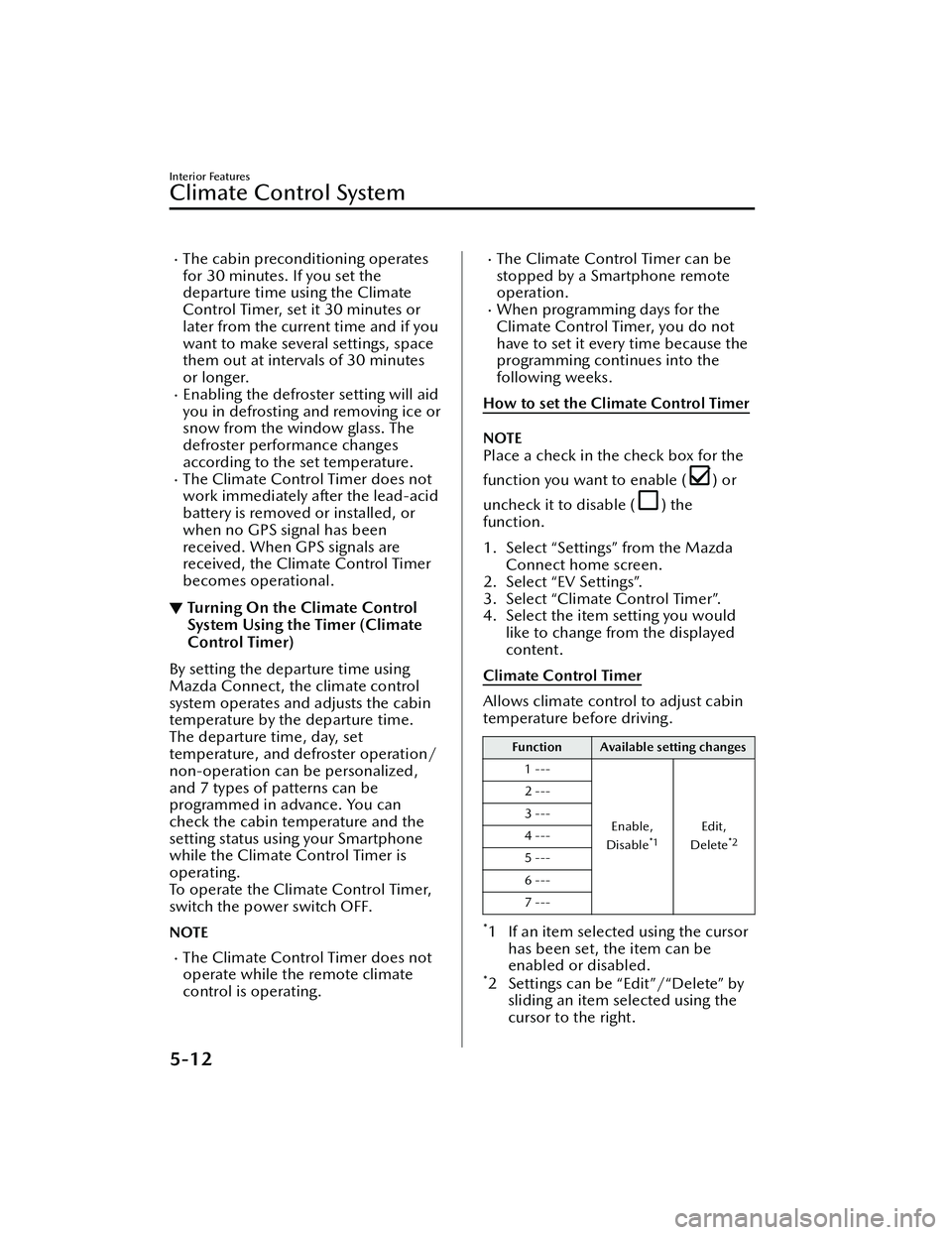
1. Select “Settings” from the Mazda Connect home screen.
2. Select “EV Settings”.
3. Select “Climate Control Timer”.
4. Select the item setting you would like to change from the displayed
content.
Climate Control Timer
Allows climate control to adjust cabin
temperature before driving.
Function Available setting changes
1 ---
Enable,
Disable
*1Edit,
Delete*2
2 ---
3 ---
4 ---
5 ---
6 ---
7 ---
*1 If an item selected using the cursor has been set, the item can be
enabled or disabled.
*2 Settings can be “Edit”/“Delete” bysliding an item selected using the
cursor to the right.
Interior Features
Climate Control System
5-12
MX -30_8JD4-EA -21G_Edition2_new 2021-5-18 14:38:07
Page 370 of 547
No. MenuExplanation
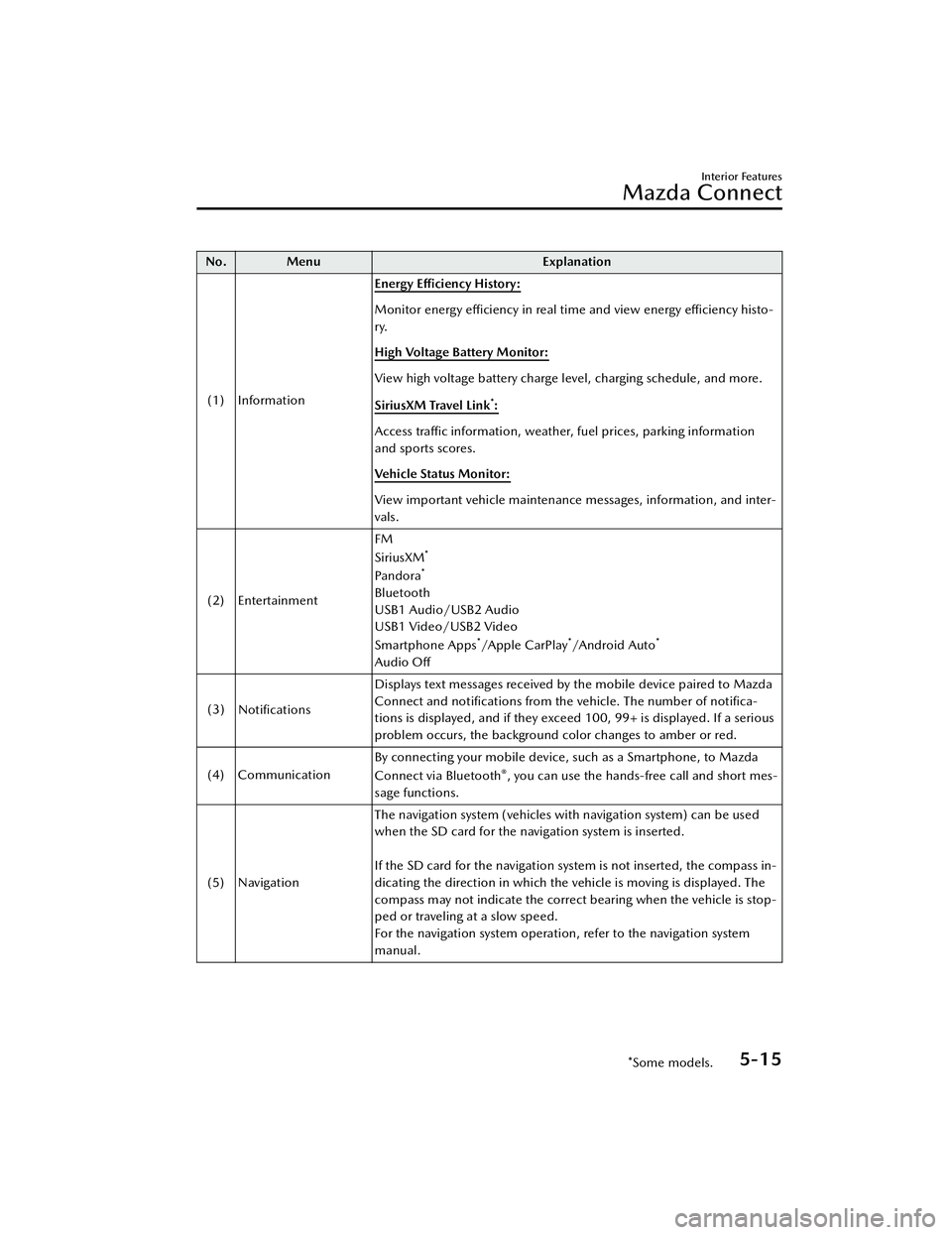
(1) Information Energy E
fficiency History:
Monitor energy
effi ciency in real time and view energy
effi ciency histo-
ry.
High Voltage Battery Monitor:
View high voltage battery charge level, charging schedule, and more.
SiriusXM Travel Link
*:
Access traffic information, weather, fuel prices, parking information
and sports scores.
Vehicle Status Monitor:
View important vehicle maintenance messages, information, and inter-
vals.
(2) Entertainment FM
SiriusXM
*
Pandora*
Bluetooth
USB1 Audio/USB2 Audio
USB1 Video/USB2 Video
Smartphone Apps
*/Apple CarPlay*/A n d ro i d A u to*
Audio O
ff
(3) Notifications Displays text messages received by the mobile device paired to Mazda
Connect and noti
fications from the vehicle. The number of noti fica-
tions is displayed, and if they exceed 100, 99+ is displayed. If a serious
problem occurs, the background color changes to amber or red.
(4) Communication By connecting your mobile device, such as a Smartphone, to Mazda
Connect via Bluetooth
®, you can use the hands-free call and short mes-
sage functions.
(5) Navigation The navigation system (vehicles with navigation system) can be used
when the SD card for the navigation system is inserted.
If the SD card for the navigation system is not inserted, the compass in-
dicating the direction in which the ve
hicle is moving is displayed. The
compass may not indicate the correct bearing when the vehicle is stop-
ped or traveling at a slow speed.
For the navigation system operation, refer to the navigation system
manual.
Interior Features
Mazda Connect
*Some models.5-15
MX -30_8JD4-EA -21G_Edition2_new 2021-5-18 14:38:07
Page 372 of 547
Do not adjust a mobile device or a similar product while driving the vehicle:
Adjusting a mobile device or a similar product while driving the vehicle is dangerous
as it could distract your attention from the vehicle operation which could lead to a
serious accident. Always adjust a mobile device or a similar product while the
vehicle is stopped.
CAUTION
For the purposes of safe driving , adjust the audio volume to a level that allows you
to hear sounds outside of the vehicle incl uding car horns and particularly emergency
vehicle sirens.
NOTE
Do not use Mazda Connect for a long time with the EV system stopped.
Otherwise, the lead-acid battery power could be depleted.
If a mobile phone or CB radio is used in or near the vehicle, it could cause noise to
occur from the audio system. However, this does not indicate a problem.
Interior Features
Mazda Connect
5-17
MX -30_8JD4-EA -21G_Edition2_new 2021-5-18 14:38:07
Page 391 of 547

Sunvisors
▼Sunvisors
Lower the sunvisor to block sunlight
from the front.
To block sunlight from the side, lower
and unhook the sunvisor, and then
swing it to the side.
▼Side Extension Sunvisors
The visor extender extends the
sunvisor's range of sun shading.
To use, pull it out.
CAUTION
When moving the sunvisor, retract the
visor extender to its original position.
Otherwise, the visor extender could hit
the rearview mirror.
▼Va n i t y M i r ro rs
The vanity mirror is on the backside of
the sunvisor.
If your vehicle is equipped with a
vanity mirror light, it will illuminate
when you open the cover.
The vanity mirror will only illuminate in
the tilt range shown in the figure.
1. Vanity mirror light
2. On
3.
Off
NOTE
If a vanity mirror light is left on with the
power switch switched OFF, the light is
turned o ff automatically to prevent the
lead-acid battery from being
discharged.
The vanity mirror light can be turned
on again by doing any of the following
operations:
Opening/closing any door.Unlocking any door.Switching the power switch to ACC
or ON.
Switching an overhead light/front
map light on.
Interior Features
Interior Equipment
5-36
MX -30_8JD4-EA -21G_Edition2_new 2021-5-18 14:38:07
Page 392 of 547
Interior Lights
▼Interior Lights
NOTE
Do not leave the lights on for long
periods while the EV system is
stopped. Otherwise the lead-acid
battery power could be depleted.
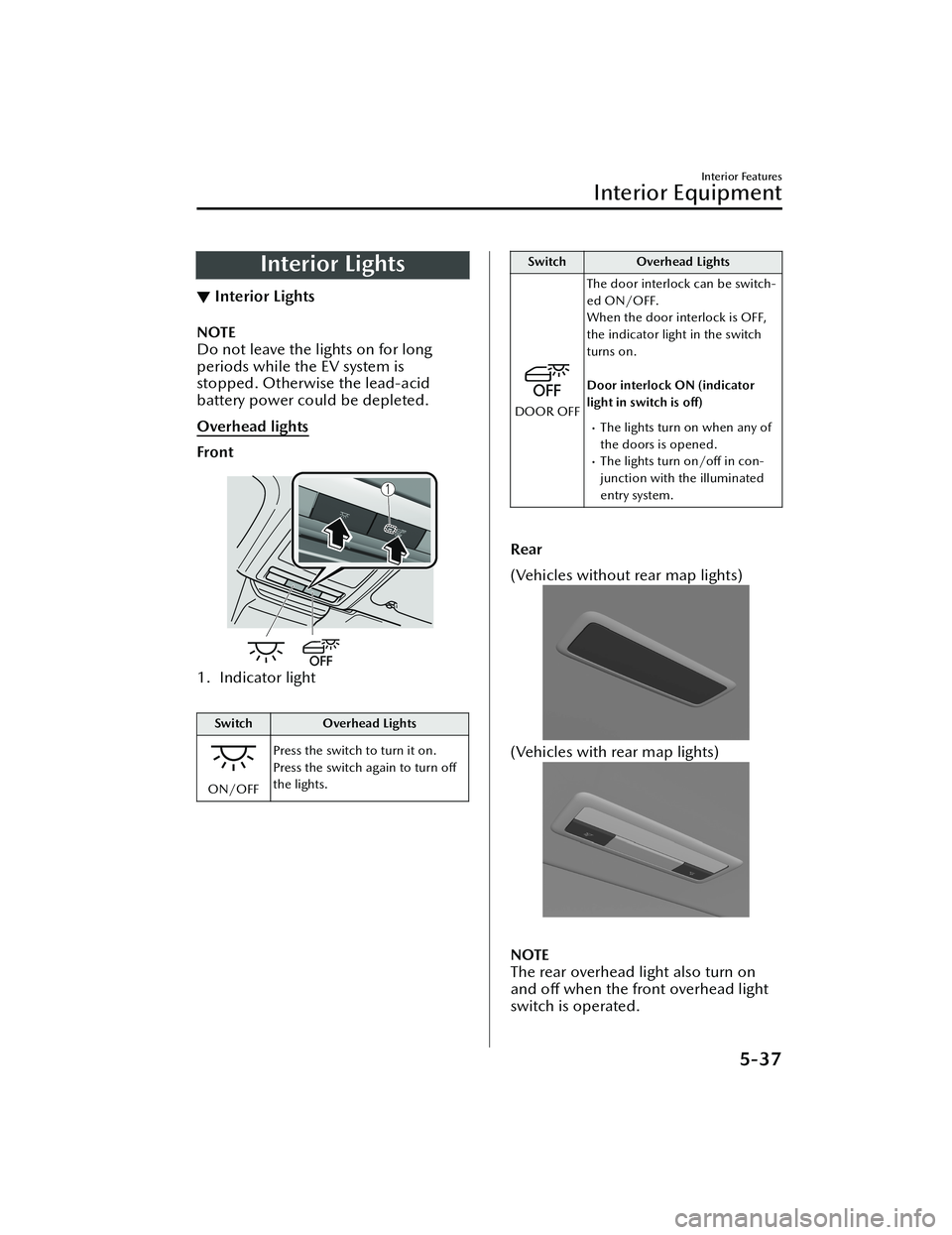
Overhead lights
Front
1. Indicator light
Switch
Overhead Lights
ON/OFFPress the switch to turn it on.
Press the switch again to turn o
ff
the lights.
Switch Overhead Lights
DOOR OFFThe door interlock can be switch-
ed ON/OFF.
When the door interlock is OFF,
the indicator light in the switch
turns on.
Door interlock ON (indicator
light in switch is o
ff)The lights turn on when any of
the doors is opened.
The lights turn on/o ff in con-
junction with the illuminated
entry system.
Rear
(Vehicles without rear map lights)
(Vehicles with rear map lights)
NOTE
The rear overhead light also turn on
and off when the front overhead light
switch is operated.
Interior Features
Interior Equipment
5-37
MX -30_8JD4-EA -21G_Edition2_new 2021-5-18 14:38:07
Page 393 of 547
Map lights
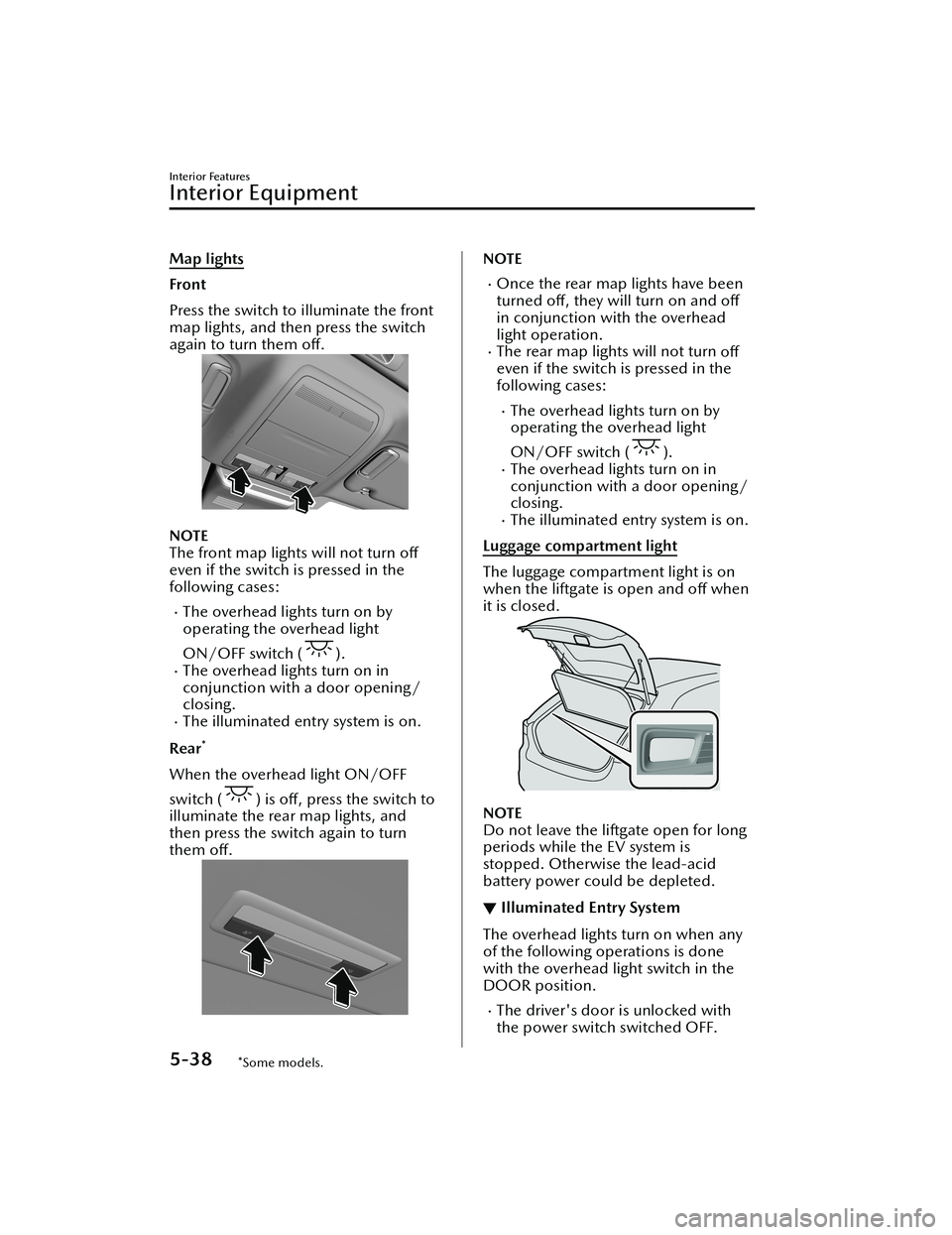
Front
Press the switch to illuminate the front
map lights, and then press the switch
again to turn them off.
NOTE
The front map lights will not turn o ff
even if the switch is pressed in the
following cases:
The overhead lights turn on by
operating the overhead light
ON/OFF switch (
).The overhead lights turn on in
conjunction with a door opening/
closing.
The illuminated entry system is on.
Rear
*
When the overhead light ON/OFF
switch (
) is o ff, press the switch to
illuminate the rear map lights, and
then press the switch again to turn
them o ff.
NOTE
Once the rear map lights have been
turned o ff, they will turn on and o ff
in conjunction with the overhead
light operation.
The rear map lights will not turn off
even if the switch is pressed in the
following cases:
The overhead lights turn on by
operating the overhead light
ON/OFF switch (
).The overhead lights turn on in
conjunction with a door opening/
closing.
The illuminated entry system is on.
Luggage compartment light
The luggage compartment light is on
when the liftgate is open and off when
it is closed.
NOTE
Do not leave the liftgate open for long
periods while the EV system is
stopped. Otherwise the lead-acid
battery power could be depleted.
▼ Illuminated Entry System
The overhead lights turn on when any
of the following operations is done
with the overhead light switch in the
DOOR position.
The driver's door is unlocked with
the power switch switched OFF.
Interior Features
Interior Equipment
5-38*Some models.
MX
-30_8JD4-EA -21G_Edition2_new 2021-5-18 14:38:07
Page 394 of 547
The power switch is switched OFF
with all doors closed.
NOTE
The illumination time differs
depending on the operation.
The vehicle is equipped with a
battery saver. If an interior light is left
on with the power switch switched
OFF, the light turns o ff automatically
after a certain period of time has
passed to prevent lead-acid battery
depletion.
The operation of the illuminated
entry system can be changed.
Refer to the Settings section in the
Mazda Connect Owner's Manual.
The illuminated entry system does
not operate in conjunction with the
overhead lights when the overhead
lights are turned on using the
overhead light ON/OFF switch.
Accessory Sockets
▼ Accessory Sockets
Only use genuine Mazda accessories
or the equivalent requiring no greater
than 120 W (DC 12 V, 10 A).
The power switch must be switched to
ACC or ON.
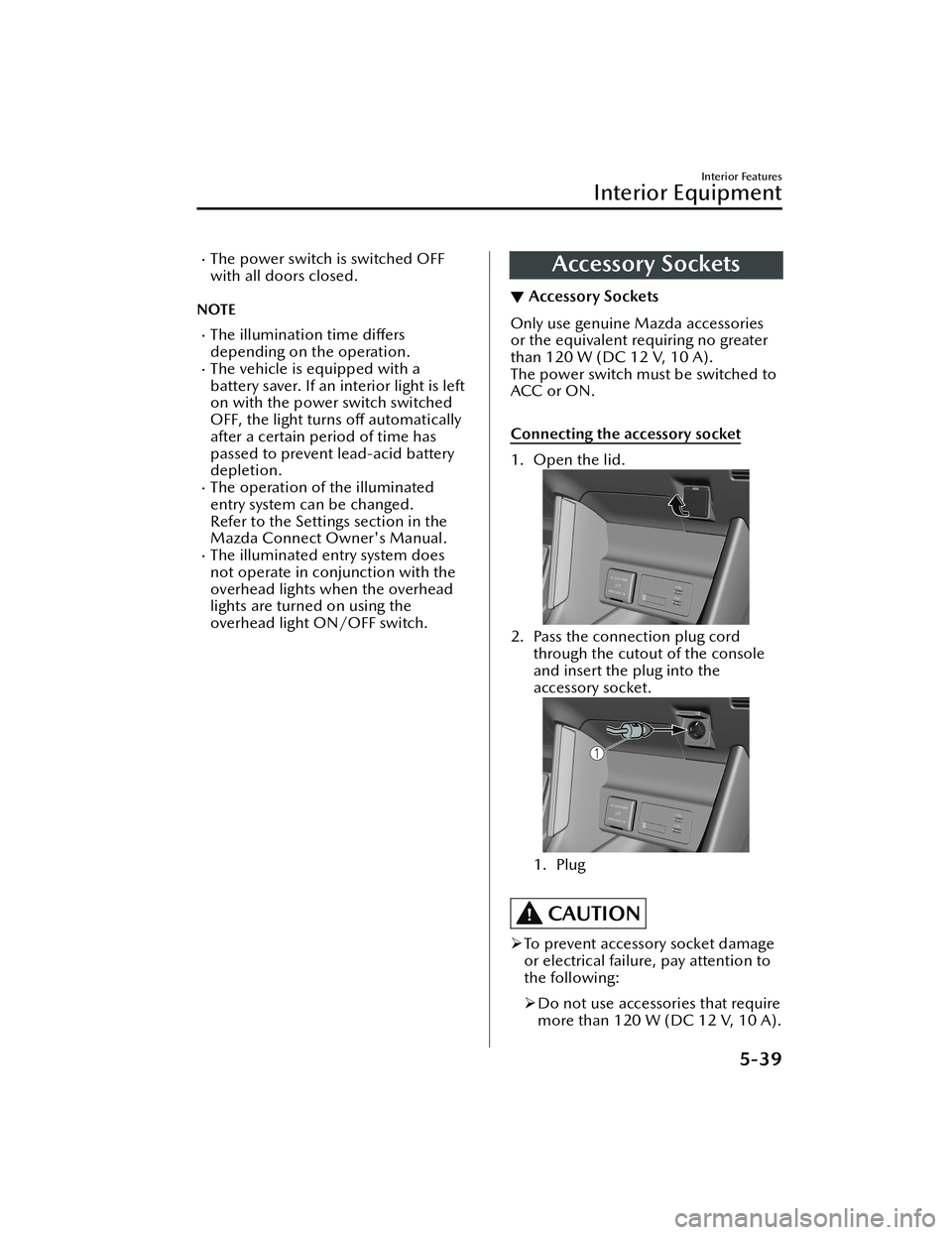
Connecting the accessory socket
1. Open the lid.
2. Pass the connection plug cord
through the cutout of the console
and insert the plug into the
accessory socket.
1. Plug
CAUTION
To prevent accessory socket damage
or electrical failure, pay attention to
the following:
Do not use accessories that require
more than 120 W (DC 12 V, 10 A).
Interior Features
Interior Equipment
5-39
MX -30_8JD4-EA -21G_Edition2_new 2021-5-18 14:38:07