lock MAZDA MODEL MX-30 EV 2022 Owner's Guide
[x] Cancel search | Manufacturer: MAZDA, Model Year: 2022, Model line: MODEL MX-30 EV, Model: MAZDA MODEL MX-30 EV 2022Pages: 547, PDF Size: 79.35 MB
Page 108 of 547
Use of the charge connector lock is
prohibited at a public charging
station.
Functions using a Smartphone
You can check the remaining high
voltage battery power, operate the
charging , and operate the air
conditioner remotely by using a
Smartphone.
Please refer to local Mazda website for
more Connected Service information.
▼ Charging Settings
How to set up the charging
1. Select Settings from the home
screen on Mazda Connect.
2. Select EV Settings from the setting
screen.
3. Select the setting item you want to change from the displayed content.
Charge When Connected
Cancels charging schedule to allow im-
mediate charging.
Available setting changes
Enable, Disable
NOTE
The charging timer can also be
canceled on the screen displayed on
the center display when the power
switch is switched OFF.
When the charging is completed
using the Charge When Connected
setting , the charging timer schedule
is restored.
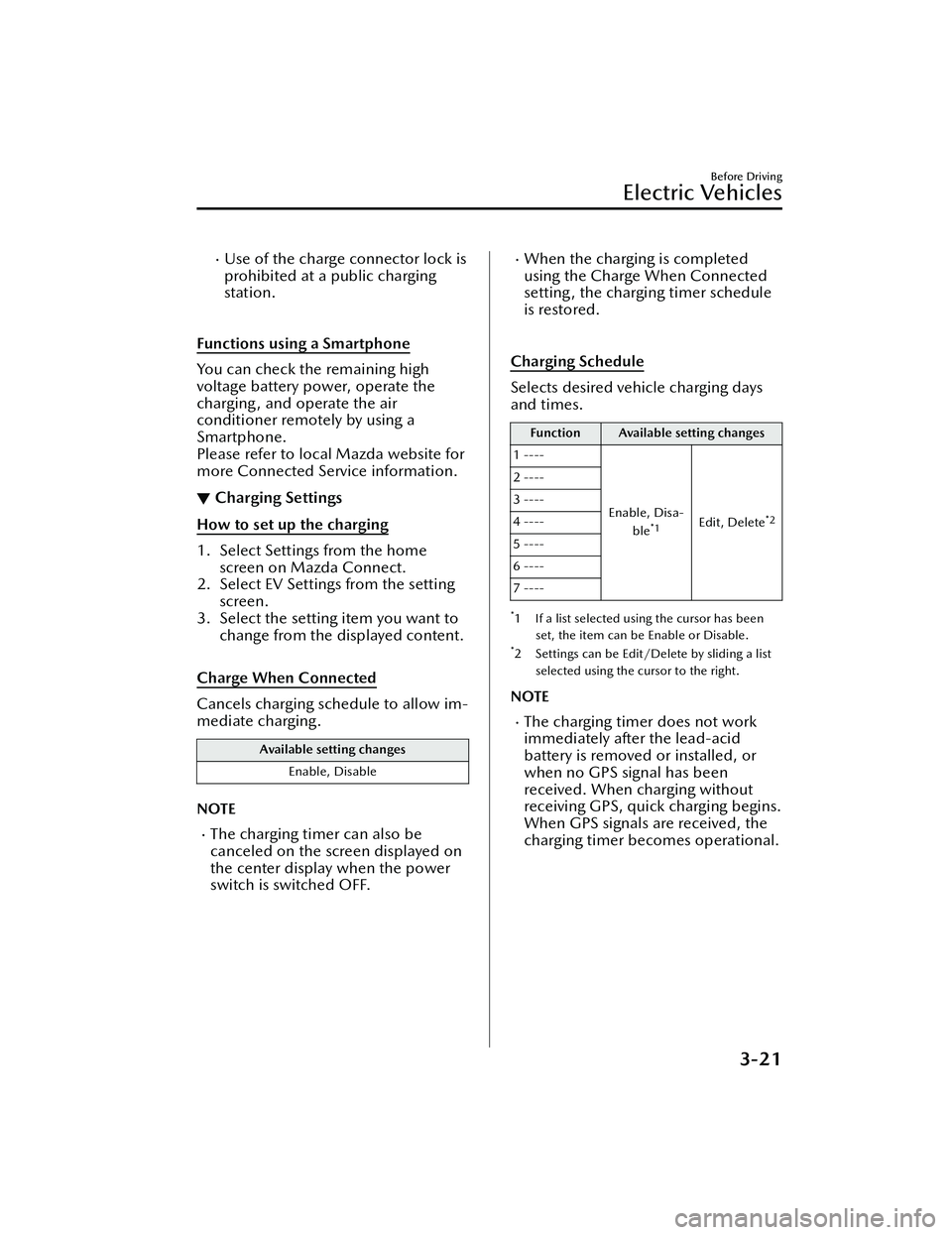
Charging Schedule
Selects desired vehicle charging days
and times.
Function Available setting changes
1 ----
Enable, Disa-ble
*1Edit, Delete*2
2 ----
3 ----
4 ----
5 ----
6 ----
7 ----
*1 If a list selected using the cursor has beenset, the item can be Enable or Disable.
*2 Settings can be Edit/Delete by sliding a listselected using the cursor to the right.
NOTE
The charging timer does not work
immediately after the lead-acid
battery is removed or installed, or
when no GPS signal has been
received. When charging without
receiving GPS, quick charging begins.
When GPS signals are received, the
charging timer becomes operational.
Before Driving
Electric Vehicles
3-21
MX-30_8JD4-EA -21G_Edition2_new 2021-5-18 14:38:07
Page 110 of 547

Setting example (if settings below are
made at 13 : 00 hours)
FunctionAvailable setting
changes
Start Time 12 : 00
End Time 18 : 00
Repeat Once
Charge Limit According to Esti-
mated Range
Estimated Range 50 km
In this case, when the charge
connector is connected, charging
starts immediately for charging to
18 : 00 hours on the same day.
However, if a charging amount
allowing a 50 km trip is reached, the
charging is stopped even if it is
before the end time.
Setting example (if settings below are
made at 13 : 00 hours)
Function Available setting
changes
Start Time 1 : 00
End Time 8 : 00
Repeat Once
Charge Limit According to Bat-
tery Charge Level
Battery Charge Level 100 %
In this case, charging is done from
the next day at 1 : 00 hours to 8 : 00
hours. However, if the Battery
Charge Level reaches 100% is
reached, the charging is stopped
even if it is before the End Time.
Charge Limit for AC Charging
Sets the charge limit when using an AC
charger.
Available setting changes
100% ― 10% (10 levels)
NOTE
For normal charge, set the maximum
charge limit of the high voltage battery.
Set the Battery Charge Level of the
charging timer for each charging timer
setting.
Charge Limit for DC Fast Charging
Sets the charge limit when using a DC
Fast charger.
Available setting changes
100% ― 10% (10 levels)
Charge Connector Lock
Con figures when the charge connector
is locked.
Available setting changes
Locked When Charging
Unlocks connector when charging is complete
or vehicle is unlocked.
Locked When Connected
Unlocks connector only when vehicle is un-
locked.
Before Driving
Electric Vehicles
3-23
MX -30_8JD4-EA -21G_Edition2_new 2021-5-18 14:38:07
Page 111 of 547

Available setting changes
Off
Charge connector remains unlocked at all
times.
High Voltage Battery Heater
Con figures the high voltage battery
heater operation.
Available setting changes
Automatic, O ff
Before Driving
Electric Vehicles
3-24
MX-30_8JD4-EA -21G_Edition2_new 2021-5-18 14:38:07
Page 114 of 547
Keyless Entry System
▼Keyless Entry System
This system uses the key buttons to
remotely lock and unlock the doors,
liftgate, and charge lid.
The system can start the EV system
without having to take the key out of
your purse or pocket.
It can also help you signal for attention
or help.
System malfunctions or warnings are
indicated by the following warning
lights or beeps.
Check the displayed message for more
information and, if necessary, have the
vehicle inspected at an Authorized
Mazda Dealer, according to the
indication.
KEY Warning Indication/Warning
Light (Red)
Refer to KEY Warning Indication/
Warning Light (Red) on page 7-28.
Power switch Not Switched O
ff
(STOP) Warning Beep
Refer to Power switch Not Switched
O ff (STOP) Warning Beep on page
7-37.
Key Removed from Vehicle Warning
Beep
Refer to Key Removed from Vehicle
Warning Beep on page 7-37.
If you have a problem with the key,
consult an Authorized Mazda Dealer.
If your key is lost or stolen, consult an
Authorized Mazda Dealer as soon as
possible for a replacement and to
make the lost or stolen key inoperative.
CAUTION
Radio equipment like this is governed
by laws in the United States.
Changes or modi fications not expressly
approved by the party responsible for
compliance could void the user's
authority to operate the equipment.
NOTE
The keyless entry system operation
may vary due to local conditions.
The keyless entry system is fully
operational when the power switch
is switched o ff. The system does not
operate if the power switch is
switched to any position other than
o ff.
If the key does not operate when
pressing a button or the operational
range becomes too small, the battery
may be weak. To install a new
battery, refer to Key Battery
Replacement (page 6-21).
Battery life is about 1 year. Replace
the battery with a new one if the
messages are displayed in the
instrument cluster. Replacing the
battery about once a year is
recommended because the KEY
warning indication may not display
depending on the rate of battery
depletion.
Additional keys can be obtained at
an Authorized Mazda Dealer. Up to
6 keys can be used with the keyless
functions per vehicle. Bring all keys
to an Authorized Mazda Dealer
when additional keys are required.
Before Driving
Keys
3-27
MX -30_8JD4-EA -21G_Edition2_new 2021-5-18 14:38:07
Page 115 of 547

▼Tra n s m i t te r
1. Operation indicator light
2. Lock button (
)
3. Unlock button (
)
4. Panic button (
)
NOTE
The headlights turn on/o ff by
operating the transmitter. Refer to
Leaving Home Light on page 4-37.
(With the advanced keyless
function)
A beep sound can be heard for con firmation when the doors,
liftgate, and charge lid are locked/
unlocked using the key. If you prefer,
the beep sound can be turned o ff.
The volume of the beep sound can
also be changed.
Refer to the Settings section in the
Mazda Connect Owner's Manual.
The operation indicator light flashes
when the buttons are pressed.
Lock button
To lock the doors, liftgate, and charge
lid, press the lock button and the
hazard warning lights will fl ash once.
(With the advanced keyless function)
A beep sound will be heard once.
To c o nfirm that all the doors, liftgate,
and charge lid have been locked, press
the lock button again within 5
seconds. If they are closed and locked,
the horn will sound.
NOTE
When any door or the liftgate is open
and the lock button is pressed, the
closed doors can be locked. After
that, any other open door or the
liftgate can be locked by closing
them.
Con firm that all the doors, liftgate,
and charge lid are locked visually or
audibly by use of the double click.
Make sure all the doors, liftgate, and
charge lid are locked after pressing
the button.
Unlock button
To unlock the driver's door and the
charge lid, press the unlock button and
the hazard warning lights will flash
twice.
(With the advanced keyless function)
A beep sound will be heard twice.
To unlock the other doors and liftgate,
press the unlock button again within 5
seconds and two more beep sounds
will be heard.
Before Driving
Keys
3-28
MX -30_8JD4-EA -21G_Edition2_new 2021-5-18 14:38:07
Page 116 of 547

NOTE
The system can be set to unlock all
the doors, liftgate, and charge lid
when pressing the unlock button
once.
Refer to the Settings section in the
Mazda Connect Owner's Manual.
(Auto re-lock function)
After unlocking with the key, all the
doors, liftgate, and charge lid will
automatically lock if any of the
following operations are not
performed within about 60 seconds.
The time required for the doors to
lock automatically can be changed.
Refer to the Settings section in the
Mazda Connect Owner's Manual.
A door or the liftgate is opened.The power switch is switched to
any position other than off.
Panic button
If you witness from a distance
someone attempting to break into or
damage your vehicle, press and hold
the panic button to activate the
vehicle's alarm. Call emergency
services if necessary.
NOTE
The panic button will work whether
any door or the liftgate is open or
closed.
(Turning on the alarm)
Pressing the panic button for 1 second
or more will trigger the alarm for about
2 minutes and 30 seconds, and the
following will occur:
The horn sounds intermittently.
The hazard warning lights flash.
(Turning off the alarm)
The alarm stops by pressing any button
on the key.
Po we r s av i n g f u nc t io n
By turning on the transmitter power
saving function, the advanced keyless
entry
*1 system functions turn off and
the battery power consumption of the
transmitter is restricted.
The remote control function is
operational by operating the
transmitter switch even while the
power saving function is turned on.
However, the operation indicator light
of the transmitter does not turn on/
fl ash.
Turning on the power saving function
After you have turned on the power
saving function according to the
following procedure, the hazard
warning lights and sound operate
*1
one time.
1. Press the lock button on the transmitter 4 times within 3
seconds to turn on the operation
indicator light.
2. Press the lock button continuously for 1.5 seconds or longer while the
operation indicator light turns on
(for 5 seconds).
3. Press any of the buttons on the transmitter to make sure that the
operation indicator light does not
turn on/fl ash.
Tu r n i n g o ff the power saving function
After you have turned off the power
saving function according to the
following procedure, the hazard
warning lights and sound operate
*1
one time.
Before Driving
Keys
3-29
MX -30_8JD4-EA -21G_Edition2_new 2021-5-18 14:38:07
Page 117 of 547

1. Press any of the buttons on thetransmitter to make sure that the
operation indicator light does not
turn on/ flash.
2. Press the lock button on the transmitter 4 times within 3
seconds to turn on the operation
indicator light.
3. Press the lock button continuously for 1.5 seconds or longer while the
operation indicator light turns on
(for 5 seconds).
*1 With the advanced keyless function
▼Operational Range
The system operates only when the
driver is in the vehicle or within
operational range while the key is
being carried.
Starting the EV system
NOTE
Starting the EV system may be
possible even if the key is outside of
the vehicle and extremely close to a
door and window, however, always
start the EV system from the driver's
seat.
If the vehicle is started and the key is
not in the vehicle, the vehicle will not
restart after it is shut o
ff and the
power switch is switched off.
The luggage compartment is out of
the assured operational range,
however, if the key (transmitter) is
operable the EV system will start.
With the advanced keyless function
1. Interior antenna
2. Operational range
Without the advanced keyless
function
1. Interior antenna
2. Operational range
NOTE
The EV system may not start if the key
is placed in the following areas:
Around the dashboardIn the storage compartments such as
the glove compartment or the center
console
▼ Key Suspend Function
If a key is left in the vehicle, the
functions of the key left in the vehicle
are temporarily suspended to prevent
theft of the vehicle.
To restore the functions, press the
unlock button on the
functions-suspended key in the
vehicle.
Before Driving
Keys
3-30
MX
-30_8JD4-EA -21G_Edition2_new 2021-5-18 14:38:07
Page 118 of 547

Advanced Keyless EntrySystem
*
▼Advanced Keyless Entry System
WARNING
Radio waves from the key may a
ffect
medical devices such as pacemakers:
Before using the key near people who
use medical devices, ask the medical
device manufacturer or your physician
if radio waves from the key will aff ect
the device.
The advanced keyless function allows
you to lock/unlock the door, liftgate,
and charge lid, or open the liftgate
while carrying the key.
System malfunctions or warnings are
indicated by the following warning
beeps.
Touch Sensor Inoperable Warning
Beep
Refer to Touch Sensor Inoperable
Warning Beep (With the advanced
keyless function) on page 7-38.
Liftgate Door-lock Switch Inoperable
Warning Beep
Refer to Liftgate Door-lock Switch
Inoperable Warning Beep (With the
advanced keyless function) on page
7-38.
Key Left-in-luggage Compartment
Warning Beep
Refer to Key Left-in-luggage
Compartment Warning Beep (With
the advanced keyless function) on
page 7-38.
Key Left-in-vehicle Warning Beep
Refer to Key Left-in-vehicle Warning
Beep (With the advanced keyless
function) on page 7-38.
NOTE
The advanced keyless entry system
functions can be deactivated to
prevent any possible adverse eff ect on
a user wearing a pacemaker or other
medical device. If the system is
deactivated, you will be unable to start
the EV system by carrying the key.
Consult an Authorized Mazda Dealer
for details. If the advanced keyless
entry system has been deactivated, you
can start the EV system by following
the procedure indicated when the key
battery goes dead.
Refer to Starting the EV System When
the Key Battery is Dead on page 4-6.
Before Driving
Advanced Keyless Entry System
*Some models.3-31
MX -30_8JD4-EA -21G_Edition2_new 2021-5-18 14:38:07
Page 119 of 547

Operational Range
▼Operational Range
The system operates only when the
driver is in the vehicle or within
operational range while the key is
being carried.
NOTE
When the battery power is low, or in
places where there are high-intensity
radio waves or noise, the operational
range may become narrower or the
system may not operate. For
determining battery replacement,
Refer to Keyless Entry System on page
3-27.
▼Locking/Unlocking Using Touch
Sensor
1. Exterior antenna
2. 80 cm (31 in)
3. Operational range
NOTE
The system may not operate if you
are too close to the windows or door
handles.
If the key is left in the following areas
and you leave the vehicle, the doors
may be locked depending on the
radio wave conditions even if the key
is left in the vehicle.
Around the dashboardIn the storage compartments such
as the glove compartment or the
center console
Next to a communication device
such as a mobile phone
▼
Locking Using Door-Lock Switch/
Unlocking Using Electric Liftgate
Opener
1. Exterior antenna
2. 80 cm (31 in)
3. Operational range
Before Driving
Advanced Keyless Entry System
3-32
MX
-30_8JD4-EA -21G_Edition2_new 2021-5-18 14:38:07
Page 120 of 547
Door Locks
▼Door Locks
WARNING
Always take all children and pets with
you or leave a responsible person
with them:
Leaving a child or a pet unattended in
a parked vehicle is dangerous. In hot
weather, temperatures inside a vehicle
can become high enough to cause
brain damage or even death.
Do not leave the key in your vehicle
with children and keep them in a
place where your children will not
fi
nd or play with them:
Leaving children in a vehicle with the
key is dangerous. This could result in
someone being badly injured or even
killed.
Keep all doors locked when driving:
Unlocked doors in a moving vehicle
are dangerous. Passengers can fall out
if a door is accidentally opened and
can more easily be thrown out in an
accident.
Always close all the windows and
moonroof, lock the doors, charge lid,
and liftgate and take the key with you
when leaving your vehicle
unattended:
Leaving your vehicle unlocked is
dangerous as children could lock
themselves in a hot vehicle, which
could result in death. Also, a vehicle
left unlocked becomes an easy target
for thieves and intruders.
After closing the doors and the
liftgate, always verify that they are
securely closed:
Doors and the liftgate not securely
closed are dangerous, if the vehicle is
driven with a door and the liftgate not
securely closed, the door and the
liftgate could open unexpectedly
resulting in an accident.
Always con firm the safety around the
vehicle before opening a door and the
liftgate:
Suddenly opening a door and the
liftgate is dangerous. A passing vehicle
or a pedestrian could be hit and cause
an accident.
CAUTION
Always con firm the conditions
around the vehicle before opening/
closing the doors and the liftgate and
use caution during strong winds or
when parked on an incline. Not
being aware of the conditions
around the vehicle is dangerous
because fingers could get caught in
the door and the liftgate or a passing
pedestrian could be hit, resulting in
an unexpected accident or injury.
NOTE
Always stop the EV system and lock
the doors. In addition, to prevent
theft of valuables, do not leave them
inside the cabin.
If the key is left in the following areas
and you leave the vehicle, the doors
may be locked depending on the
radio wave conditions even if the key
is left in the vehicle.
Around the dashboard
Before Driving
Doors and Locks
3-33
MX -30_8JD4-EA -21G_Edition2_new 2021-5-18 14:38:07