lock MAZDA MODEL MX-30 EV 2022 Owner's Manual
[x] Cancel search | Manufacturer: MAZDA, Model Year: 2022, Model line: MODEL MX-30 EV, Model: MAZDA MODEL MX-30 EV 2022Pages: 547, PDF Size: 79.35 MB
Page 63 of 547

Always remove the head restraint and
install child-restraint system (except
when installing a backless booster
seat):
Installing a child-restraint system
without removing the head restraint is
dangerous. The child-restraint system
cannot be installed correctly which
may result in death or injury to the
child in a collision.
Always install the head restraint and
adjust it to the appropriate position
after removing the child-restraint
system:
Driving with the head restraint
removed is dangerous as impact to the
occupant's head cannot be prevented
during emergency braking or in a
collision, which could result in a
serious accident, injury or death.
Refer to Head Restraints on page 2-18.
Front Passenger's Seat Child-Restraint
System Installation
1. Make sure the power switch isswitched off .
2. Slide the seat as far back as
possible.
3. Remove the head restraint.However, when installing a backless
booster seat, always install the
vehicle head restraint to the seat
where the backless booster seat is
installed.
4. Place the child-restraint system onthe seat without putting your
weight on the seat and fasten the
seat belt. See the manufacturer's
instructions on the child-restraint
system for belt routing instructions.
5. To get the retractor into the automatic locking mode, pull the
shoulder belt portion of the seat
belt until the entire length of the
belt is out of the retractor.
6. Push the child-restraint system firmly into the vehicle seat. Be sure
the belt retracts as snugly as
possible. A clicking noise from the
retractor will be heard during
retraction if the system is in
automatic locking mode. If the belt
does not lock the seat down tight,
repeat the previous step and also
this one.
NOTE
Inspect this function before each
use of the child-restraint system.
You should not be able to pull the
shoulder belt out of the retractor
while the system is in the
automatic locking mode. When
you remove the child-restraint
system, be sure the belt fully
retracts to return the system to
emergency locking mode before
occupants use the seat belts.
Follow the child-restraint system
manufacturer's instructions
carefully.
Depending on the type of
child-restraint system, it may not
employ seat belts which are in
automatic locking mode.
7. Seat your child safely in the child-restraint system and secure
the child according to the
instructions from the child-restraint
system manufacturer.
Essential Safety Equipment
Child Restraint
2-46
MX -30_8JD4-EA -21G_Edition2_new 2021-5-18 14:38:07
Page 66 of 547

Refer to Adjusting the Front
Passenger's Seat on page 2-12.
2. Make sure the seatback is securely latched by pushing it back until it is
fully locked.
3. Remove the cover of the child-restraint system's LATCH
lower anchors to verify the
locations of the LATCH lower
anchors.
1. Lower anchor
NOTE
The LATCH lower anchors
marking on the cover indicates
the position of the LATCH lower
anchors for the attachment of a
child-restraint system.
Store the removed cover so that it
does not get lost.
4. Remove the head restraint. However, when installing a backless
booster seat, always install the
vehicle head restraint to the seat
where the backless booster seat is
installed.
Refer to Head Restraints on page
2-18.
5. Secure the child-restraint system using BOTH LATCH lower anchors,
following the child-restraint system
manufacturer's instruction. Pull on
the child-restraint to be sure both
anchors are engaged.
6. If your child-restraint system cameequipped with a tether, that means
it is very important to properly
secure the tether for child safety.
Please carefully follow the
child-restraint system
manufacturer's instructions when
installing tethers.
WARNING
Use the tether and tether anchor only
for a child-restraint system:
Using the tether or tether anchor to
secure anything but a child-restraint
system is dangerous. This could
weaken or damage the tether or tether
anchor and result in injury.
Always remove the head restraint and
install child-restraint system (except
when installing a backless booster
seat):
Installing a child-restraint system
without removing the head restraint is
dangerous. The child-restraint system
cannot be installed correctly which
may result in death or injury to the
child in a collision.
1. Tether strap
2. Anchor bracket
3. Forward
Essential Safety Equipment
Child Restraint
2-49
MX -30_8JD4-EA -21G_Edition2_new 2021-5-18 14:38:07
Page 71 of 547

Sit in the center of the seat and wear
seat belts properly:
Sitting too close to the side air bag
modules or placing hands on them, or
sleeping up against the door or
hanging out the windows is extremely
dangerous. The side and curtain air
bags inflate with great force and speed
directly expanding along the door on
the side the car is hit. Serious injury
could occur if someone is sitting too
close to the door or leaning against a
window, or if rear seat occupants grab
the sides of the front seatbacks. Give
the side and curtain air bags room to
work by sitting in the center of the seat
while the vehicle is moving with seat
belts worn properly.
Do not attach objects on or around
the area where air bags deploy:
Attaching objects to the air bags or
placing something in the area where
the air bags deploy is dangerous. In an
accident, an object could interfere with
air bag in flation and injure the
occupants. Furthermore, the bag could
be damaged causing gases to release.
Always keep the deployment area of
the air bag modules free of any
obstructions.
For example, you should not do any of
the following as it may interfere with
air bag deployment.
Do not put a covering on or lean
anything against areas such as the
dashboard and lower portion of the
instrument panel that blocks the
passenger front air bag and knee air
bags.
Do not use seat covers on the front
seats and rear seats equipped with
in-seat side air bags.
Do not hang any backpacks, bags or
pouches that cover the sides of the
seats that block the side air bags.Do not place any objects on the
assist grips. Only hang clothes
directly on the coat hooks.
Do not touch the components of the
supplemental restraint system after
the air bags have in flated:
Touching the components of the
supplemental restraint system after the
air bags have in flated is dangerous.
Immediately after inflation, they are
very hot. You could get burned.
Never install any front-end equipment
to your vehicle:
Installation of front-end equipment,
such as frontal protection bar
(kangaroo bar, bull bar, push bar, or
other similar devices), snowplow, or
winches, is dangerous. The air bag
crash sensor system could be a ffected.
This could cause air bags to inflate
unexpectedly, or it could prevent the
air bags from inflating during an
accident. Front occupants could be
seriously injured.
Do not modify the suspension:
Modifying the vehicle suspension is
dangerous. If the vehicle's height or
the suspension is modi fied, the vehicle
will be unable to accurately detect a
collision or roll-over accident resulting
in incorrect or unexpected air bag
deployment and the possibility of
serious injuries.
To prevent false detection by the air
bag sensor system, heed the
following:
Do not use tires or wheels other than
those
specified for your Mazda:
Essential Safety Equipment
SRS Air Bags
2-54
MX
-30_8JD4-EA -21G_Edition2_new 2021-5-18 14:38:07
Page 88 of 547
3Before Driving
Use of various features, including keys, doors, mirrors and
windows.
Electric Vehicles........................ 3-2 Electric Vehicles..................... 3-2
Charging............................. 3-10
Keys...................................... 3-25 Keys.................................... 3-25
Keyless Entry System.............3-27
Advanced Keyless Entry
System...................................3-31 Advanced Keyless Entry
System
*............................... 3-31
Operational Range...............3-32
Doors and Locks..................... 3-33 Door Locks.......................... 3-33
Liftgate................................ 3-41
Mirrors.................................. 3-44 Mirrors................................3-44
Windows............................... 3-49Power Windows...................3-49
Moonroof
*.......................... 3-51
Security System.......................3-54 Modi fication and Add-
On Equipment..................... 3-54
Immobilizer System..............3-54
Driving Tips............................ 3-56 Break-In Period.................... 3-56
Hazardous Driving............... 3-56
Floor Mat............................ 3-57
Rocking the Vehicle..............3-57
Winter Driving..................... 3-58
Overloading........................ 3-59
Driving on Uneven Road.......3-60
Towing.................................. 3-61 Trailer Towing...................... 3-61
Recreational Towing............. 3-61
*Some models.3-1
MX-30_8JD4-EA -21G_Edition2_new 2021-5-18 14:38:07
Page 100 of 547
Charge connector
The charge connector is used for
connecting to the normal charge port.
When the charge connector is
connected to the normal charge port,
a vehicle system locks the charge
connector.
When the charge connector is locked
by the vehicle system, it unlocks when
the driver’s door is unlocked.
If the charge connector locked by the
vehicle system is not unlocked even
though the driver’s door is unlocked,
consult an Authorized Mazda Dealer.
The conditions for locking the system
on the vehicle side can be changed.
For the procedure to change the
conditions, refer to Charging Settings
on page 3-21.
Control box
The control box indicates the charge
status by turning on/flashing the
indicator light.
For the indicator light illumination/
fl ash pattern, refer to the instruction
manual accompanying the charge
cable.
Charge plug
The charge plug is the part for
connecting to the power supply.
Charge port
The charge port refers to the area
where the charge connector is
connected.
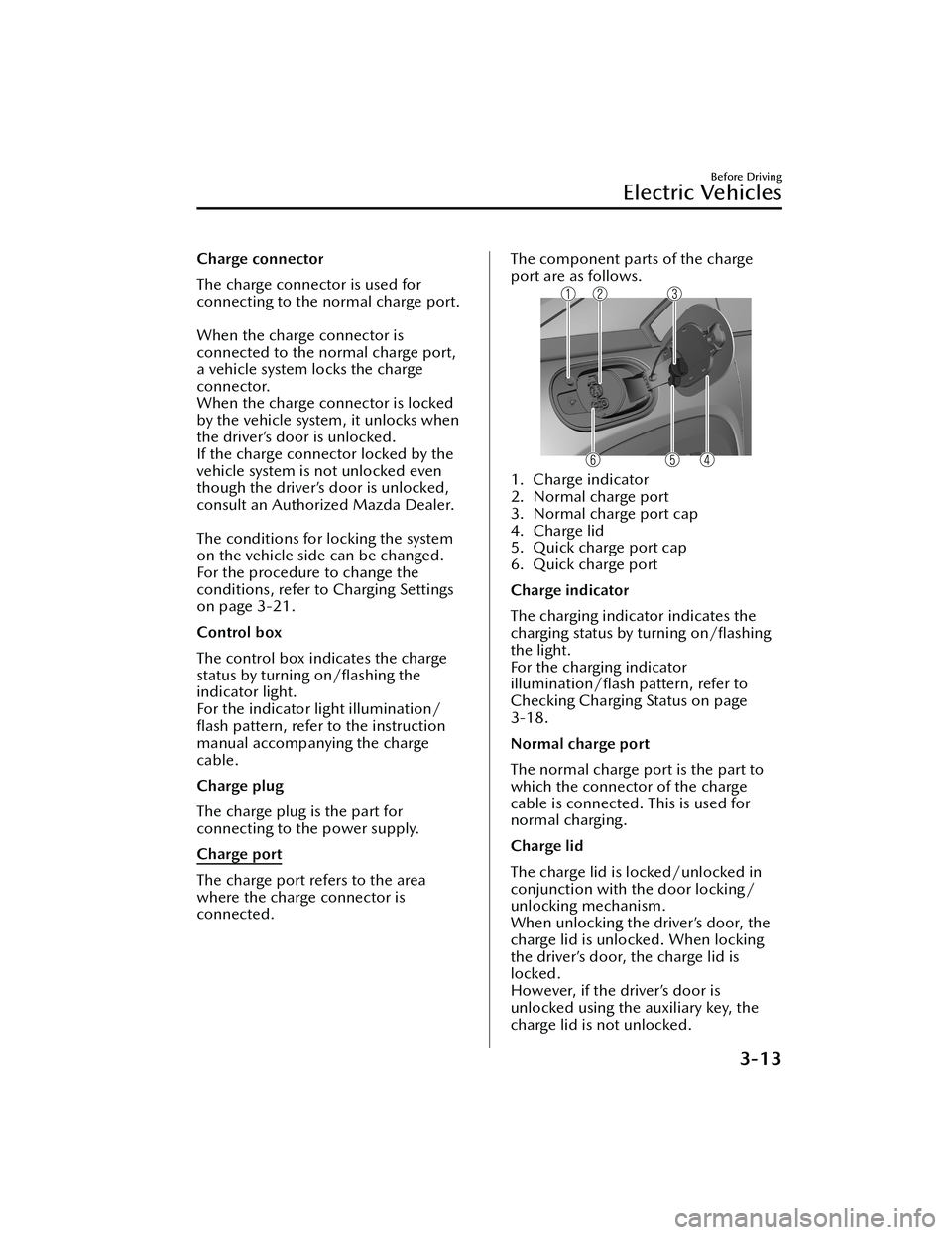
The component parts of the charge
port are as follows.
1. Charge indicator
2. Normal charge port
3. Normal charge port cap
4. Charge lid
5. Quick charge port cap
6. Quick charge port
Charge indicator
The charging indicator indicates the
charging status by turning on/flashing
the light.
For the charging indicator
illumination/ flash pattern, refer to
Checking Charging Status on page
3-18.
Normal charge port
The normal charge port is the part to
which the connector of the charge
cable is connected. This is used for
normal charging.
Charge lid
The charge lid is locked/unlocked in
conjunction with the door locking/
unlocking mechanism.
When unlocking the driver’s door, the
charge lid is unlocked. When locking
the driver’s door, the charge lid is
locked.
However, if the driver’s door is
unlocked using the auxiliary key, the
charge lid is not unlocked.
Before Driving
Electric Vehicles
3-13
MX -30_8JD4-EA -21G_Edition2_new 2021-5-18 14:38:07
Page 101 of 547
NOTE
When the driver's door is locked using
any of the following functions, the
charge lid is also locked at the same
time.
Vehicle speed sensing auto door lock
function
Auto re-lock function
Quick charge port
The quick charge port is the part to
which the connector of the quick
charger is connected. This is used for
quick charging.
Battery heater
The battery heater is designed to
maintain the appropriate high voltage
battery temperature.
Because the driving performance and
the charging performance decrease if
the high voltage battery temperature
decreases, decreases in their
performance are reduced by
maintaining the appropriate high
voltage battery temperature using the
battery heater.
When the high voltage battery
temperature decreases signi ficantly
while parking or charging , the battery
heater operates. When the
temperature increases to the speci fied
value, the heater turns o ff.
However, when the high voltage
battery level is low, the battery heater
does not operate.
NOTE
Because the electrical power of the
high voltage battery is used by the
battery heater, we recommend that
the charge connector is left
connected to the vehicle when
parked in a location where charging
is available.
If the vehicle is not used for a long
period of time, we recommend that
the battery heater is turned o ff using
[Settings] in Mazda Connect.
When the battery heater operates,
the charging time could take longer.
Battery cooling
If the high voltage battery temperature
reaches 40 ℃ (104 ℉) or higher after
driving the vehicle, it is possible to cool
the high voltage battery while the
vehicle is parked for maintaining a long
high voltage battery life.
If the Excessive Battery Temperature
noti fication is displayed on the center
display after completing a trip, select
Start to operate the battery cooling.
NOTE
Because the electrical power of the
high voltage battery is used by the
battery cooling , we recommend that
the charge connector is connected to
the vehicle while the battery cooling is
operating , when parked in a location
where charging is available.
▼ Charging
Charging type
There are two methods of charging the
high voltage battery, normal charging
and quick charging.
We recommend that you use normal
charging as the preferred charging
method as this will help to keep the
high voltage battery in optimal
condition and maintain a long battery
life.
The exact charging time depends on
various conditions at the time of
charging , such as the type of charger,
battery condition, ch
arging patterns, as
well as the battery temperature and
ambient temperature. In cold weather
Before Driving
Electric Vehicles
3-14
MX -30_8JD4-EA -21G_Edition2_new 2021-5-18 14:38:07
Page 103 of 547

5. Connect the charge plug to theoutlet.
6. Connect the charge connector to the normal charge port. Charging
starts after connection is
completed.
Make sure to lock all the doors
before leaving the vehicle while
charging.
NOTE
When the charging timer is set,
charging does not start even if the
charge connector is connected.
When you prefer to start charging
immediately, use the charging
timer cancellation function.
1. Normal charge port
7. When charging is finished, remove
the charge connector.
8. Close the normal charge port cap.
9. Close the charge lid.
10.Remove the charge plug from the power supply.
Make sure to lock all the doors before
leaving the vehicle.
How to perform quick charging
1. Shift the selector lever to the P
position.
2. Switch the power switch OFF.
3. Press the location shown in the figure to open the charge lid.
4. Open the quick charge port capand normal charge port cap.
1. Quick charge port cap
2. Normal charge port cap
5. Connect the charge connector of the quick charger to the quick
charge port.
1. Quick charge port
6. Operate the quick charger to start charging.
Before Driving
Electric Vehicles
3-16
MX -30_8JD4-EA -21G_Edition2_new 2021-5-18 14:38:07
Page 104 of 547
CAUTION
When operating a quick charger,
always use the charger according to
its instructions. If the quick charger
is operated incorrectly, the quick
charger or vehicle could be
damaged.
Make sure to lock all the doors
before leaving the vehicle while
charging.
7. When charging is finished, remove
the charge connector.
8. Close the quick charge port cap.
9. Close the charge lid.
Make sure to lock all the doors before
leaving the vehicle.
Before Driving
Electric Vehicles
3-17
MX -30_8JD4-EA -21G_Edition2_new 2021-5-18 14:38:07
Page 106 of 547

Powe r s wi tc h O F F
1. High voltage battery indication
2. Charging completion time
Powe r s wi tc h O N
1. High voltage battery indication
2. Charging completion time
IndicationContent
— Preparing to Charge Displays while the charging timer is being canceled
and when the charging connector is connected.
— Charging Scheduled Displays while in charging timer mode and when the
charging connector is connected.
Charging
Displays during charging.
Charging Complete Displays when charging is completed.
Charging Error. Shift Selector Lev-
er Not in ParkDisplays when charging is started with the selector
lever in a position other than P.
Charging Interrupted. See Own-
er's Manual for Details Displays when charging is interrupted.
Charging Error. Have the Vehicle
Inspected Displays when charging is not possible due to a
charging system problem.
NOTE
When charging is started, the charging st
atus screen is displayed for a while. The
charging status screen turns off after a certain period of time passes or the doors or
liftgate is locked.
The screen is displayed again when the doors or liftgate is unlocked.
Before Driving
Electric Vehicles
3-19
MX -30_8JD4-EA -21G_Edition2_new 2021-5-18 14:38:07
Page 107 of 547
▼Convenient Functions
Timer Charging
Timer charging is a function which
charges the battery automatically
according to a preset time.
You can charge the battery using this
function during time periods when
electricity rates are low. In addition,
the maximum charge limit can be set
and changed.
For the setting method, refer to
Charging Settings on page 3-21.
Canceling the Charging Timer
You can cancel the charging timer
setting temporarily to start charging the
battery immediately.
For the setting method, refer to
Charging Settings on page 3-21.
Climate Control Timer
The climate control timer is a function
which operates the cooling or heating
system automatically according to a
preset time.
The power consumption of the air
conditioner after starting to drive the
vehicle is reduced by operating the air
conditioner and providing a
comfortable temperature in the cabin
before driving.
For the setting method, refer to Turning
On the Climate Control System Using
the Timer (Climate Control Timer) on
page 5-12.
Charge Connector Lock
The charge connector lock is a function
which locks the charging connector
connected to the vehicle so that it
cannot be pulled out.
You can also select the lock conditions
for the charging connector according
to locations and situations.
For the setting method, refer to
Charging Settings on page 3-21.
Locked When Connected
The charging connector is locked at
the same time the charging
connector is connected. The
charging connector is unlocked for 1
minute after the driver’s door is
unlocked.
Select Locked When Connected
when charging in the following
locations/situations.
Outdoor parking lotCharging using your charging cable
at a charging facility
Locked When Charging
The charging connector is locked
only while charging. The charging
connector is unlocked when the
charging is
finished. In addition, the
charging connector is unlocked for 1
minute after the driver’s door is
unlocked, even while charging.
Select Locked When Charging when
leaving the vehicle while charging at
a public charging station where
people are waiting to charge their
vehicles.
O ff
The charging connector is not
locked.
Select O ff when charging in the
following locations/situations.
Indoor parking lot with a shutter
Before Driving
Electric Vehicles
3-20
MX -30_8JD4-EA -21G_Edition2_new 2021-5-18 14:38:07