lock MAZDA MODEL MX-30 EV 2022 Workshop Manual
[x] Cancel search | Manufacturer: MAZDA, Model Year: 2022, Model line: MODEL MX-30 EV, Model: MAZDA MODEL MX-30 EV 2022Pages: 547, PDF Size: 79.35 MB
Page 132 of 547

2. Press the select switch for theoutside mirror to be tilted
downward to turn on the indicator
light of the select switch.
3. Shift the selector lever to the R position to tilt the outer mirror on
the side where the select button
was pressed downward.
NOTE
When any of the following condition is
met, the outer mirrors return to their
normal positions.
The power switch is switched to a
position other than ON.
The selector lever is shifted to a
position other than R.
The select switch is pressed again.
Folding outside mirror
WARNING
Always return the outside mirrors to
the driving position before you start
driving:
Driving with the outside mirrors folded
in is dangerous. Your rear view will be
restricted, and you could have an
accident.
Manual folding outside mirror
Fold the outside mirror rearward until
it is flush with the vehicle.
Power folding outside mirror
WARNING
Do not touch a power folding outside
mirror while it is moving:
Touching the power folding outside
mirror when it is moving is dangerous.
Your hand could be pinched and
injured or the mirror could be
damaged.
Use the switch to set the mirror to the
on-road position:
Setting the power folding outside
mirror to the on-road position by hand
is dangerous. The mirror will not lock
in position and will prevent e ffective
rearview visibility.
Only operate the power folding
outside mirror with the vehicle safely
parked:
Operating the power folding outside
mirror while the vehicle is moving is
dangerous. Wind blast on the mirror
will cause them to collapse and you
will be unable to return it to the
on-road position, preventing rearview
visibility.
The power switch must be switched to
ACC or ON position.
To fold the mirrors, press the outside
mirror folding switch.
To return the mirrors to their on-road
positions, press the switch again.
Before Driving
Mirrors
3-45
MX -30_8JD4-EA -21G_Edition2_new 2021-5-18 14:38:07
Page 133 of 547

Automatic folding function
When the power switch is switched to
OFF, the outside mirrors automatically
fold in and out when the doors are
locked and unlocked.
Also, when the power switch is
switched ON or the EV system is
started, the outside mirrors fold out
automatically.
NOTE
The outside mirrors may not fold in
and out automatically under cold
weather conditions.
If the outside mirrors do not fold in
and out automatically, remove any
ice or snow, and then press the
outside mirror folding switch to fold
the outside mirrors in or out.
The automatic folding function can
be turned on or off.
Refer to the Settings section in the
Mazda Connect Owner's Manual.
In the following cases, the outside
mirrors do not fold out
automatically. Press the outside
mirror folding switch to fold out the
outside mirrors.
Pressing the outside mirror folding
switch to fold in the outside
mirrors.
*1
Disconnecting the battery
terminals after the outside mirrors
fold in automatically.
*1 When the automatic folding function is
changed from off to on after folding in the
outside mirrors, the outside mirrors fold out
automatically.
EV system-o ff outside mirror
operation
The outside mirrors can be operated
for about 40 seconds after the power
switch is switched from ON to o
ff.
Driver's side auto-dimming outside
mirror*
The movement of the auto-dimming
outside mirror is interlocked with the
auto-dimming rearview mirror in the
interior to automatically reduce glare
from rear on-coming vehicles.
Refer to Rearview Mirror on page
3-46.
NOTE
The front passenger-side outside
mirror does not have the
auto-dimming feature.
▼ Rearview Mirror
WARNING
Do not stack cargo or objects higher
than the seatbacks:
Cargo stacked higher than the
seatbacks is dangerous. It can block
your view in the rearview mirror, which
might cause you to hit another car
when changing lanes.
Rearview mirror adjustment
Before driving , adjust the rearview
mirror to center on the scene through
the rear window.
Before Driving
Mirrors
3-46*Some models.
MX
-30_8JD4-EA -21G_Edition2_new 2021-5-18 14:38:07
Page 136 of 547
Powe r Wi n d ow s
▼Po we r Wi n d o w s
The windows can be opened/closed
by operating the power window
switches.
WARNING
Make sure the opening is clear before
closing a window:
Closing a power window is dangerous.
A person's hands, head, or even neck
could be caught by the window and
result in serious injury or even death.
This warning applies especially to
children.
Never allow children to play with
power window switches:
Power window switches that are not
locked with the power window lock
switch would allow children to operate
power windows unintentionally, which
could result in serious injury if a child's
hands, head or neck becomes caught
by the window.
Make sure nothing blocks the window
just before it reaches the fully closed
position or while fully holding up the
power window switch:
Blocking the power window just before
it reaches the fully closed position or
while fully holding up the power
window switch is dangerous.
In this case, the jam-safe function may
not prevent the window from closing
all the way. If
fingers are caught,
serious injuries could occur.
Do not let a child put a hand or head
out of the window while driving the
vehicle:
If the person's hand or head hits
something outside the vehicle, or
sudden braking is applied, it could
result in serious injury or death.
▼ Opening/Closing Windows
The window opens while the switch is
pressed and it closes while the switch
is pulled up with the power switch
switched ON.
The front passenger's window can be
opened/closed when the power
window lock switch on the driver's
door is in the unlocked position. Keep
this switch in the locked position while
children are in the vehicle.
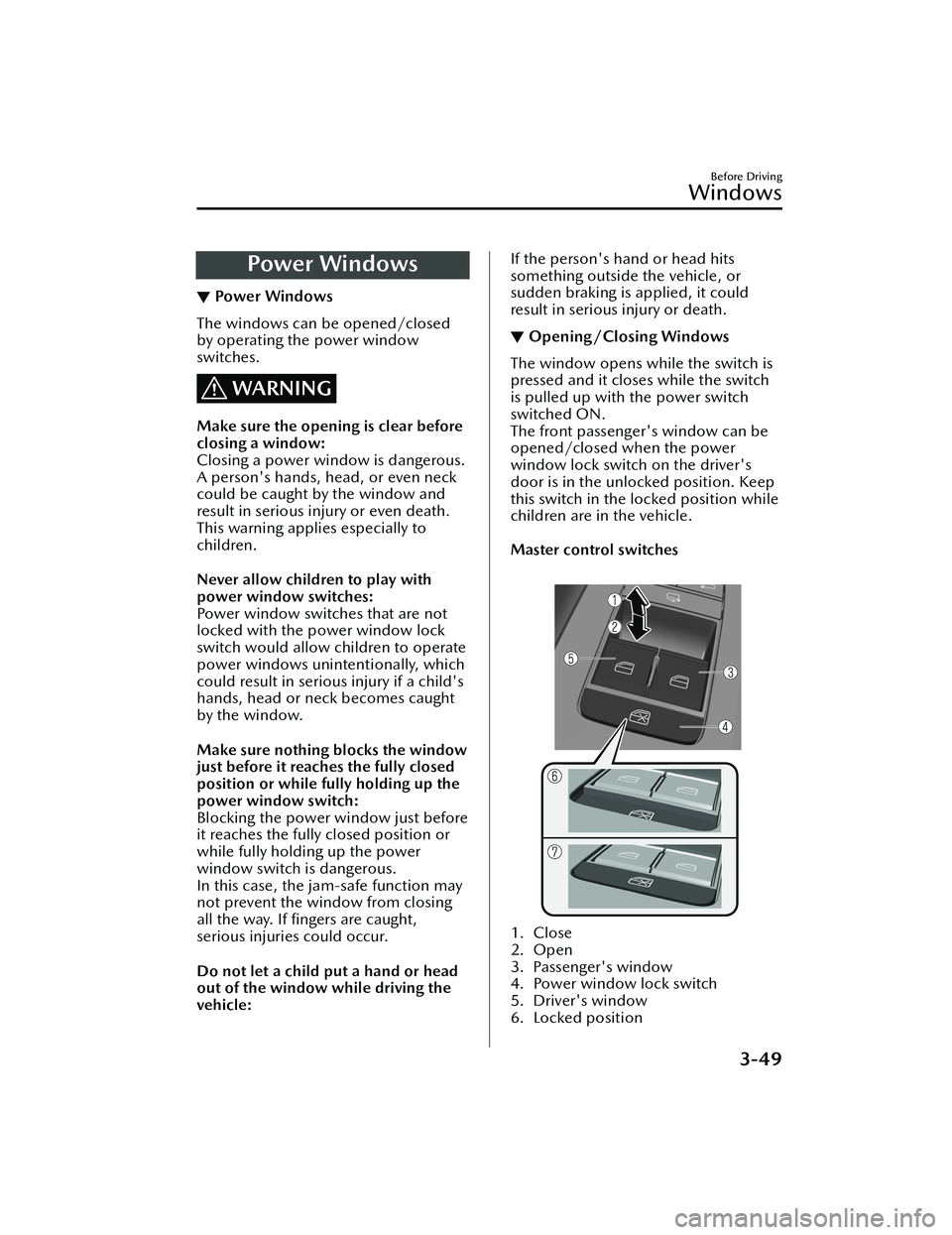
Master control switches
1. Close
2. Open
3. Passenger's window
4. Power window lock switch
5. Driver's window
6. Locked position
Before Driving
Windows
3-49
MX
-30_8JD4-EA -21G_Edition2_new 2021-5-18 14:38:07
Page 137 of 547

7. Unlocked position
Passenger's window switch
1. Close
2. Open
NOTE
A power window may no longer
open/close if you continue to press
the switch for a long time. If the
power window does not open/
close, wait for a while and then
operate the switch again.
The passenger windows may be
opened or closed using the master
control switches on the driver's door.
The power window can be operated
for about 40 seconds after the power
switch is switched from ON to ACC
or off with all doors closed. If any
door is opened, the power window
will stop operating.
▼ Auto-opening/Closing
To fully open the window
automatically, press the switch
completely down, then release. The
window will fully open automatically.
To fully close the window
automatically, pull the switch
completely up, then release. The
window will fully close automatically.
To stop the window partway, pull or
press the switch in the opposite
direction and then release it.
NOTE
Power window system initialization
procedure
If you operate the switch any number
of times with the power window not
fully closed, the window may no longer
fully open/close automatically.
The power window auto function will
only resume on a power window that
has been reset.
1. Switch the power switch ON.
2. Make sure that the power window
lock switch located on the driver's
door is not depressed.
3. Press the switch and fully open the window.
4. Pull up the switch to fully close the window and continue holding the
switch for about 2 seconds after the
window fully closed.
5. Make sure that the power windows operate correctly using the door
switches.
▼Jam-safe Window
When the window is closing and a
foreign object is detected between the
window and the window frame, the
window stops closing and
automatically opens partway.
NOTE
The jam-safe function may operate
under the following conditions:
A strong impact is detected while
the window is closing.
The window is closing in very low
temperatures.
(A window cannot be closed)
If the jam-safe function has operated
and the window cannot be closed,
check around the window frame for
a foreign object.
Before Driving
Windows
3-50
MX
-30_8JD4-EA -21G_Edition2_new 2021-5-18 14:38:07
Page 138 of 547
If there is no foreign object around
the window frame, forcibly close a
window using the following
procedure.
1. After switching the power switchOFF, wait for 45 seconds or
longer.
2. Switch the power switch ON.
3. Operate the switch in the direction to close the window
until the jam-safe function
operates and the window stops.
Repeat this operation a total of 5
times.
4. Continue pulling up the switch to fully close the window.Moonroof*
▼Moonroof
The moonroof can be opened or
closed when operating the overhead
tilt/slide switch at the front seats.
WARNING
Do not let passengers stand up or
extend part of the body through the
open moonroof while the vehicle is
moving:
Extending the head, arms, or other
parts of the body through the
moonroof is dangerous. The head or
arms could hit something while the
vehicle is moving. This could cause
serious injury or death.
Never allow children to play with the
tilt/slide switch:
The tilt/slide switch would allow
children to operate the moonroof
unintentionally, which could result in
serious injury if a child's hands, head
or neck becomes caught by the
moonroof.
Make sure the opening is clear before
closing the moonroof:
A closing moonroof is dangerous. The
hands, head, or even neck of a person,
especially a child, could be caught in it
as it closes, causing serious injury or
even death.
Make sure nothing blocks the
moonroof just before it reaches the
fully closed position:
Blocking the moonroof just before it
reaches the closed position is
dangerous.
Before Driving
Windows
*Some models.3-51
MX
-30_8JD4-EA -21G_Edition2_new 2021-5-18 14:38:07
Page 140 of 547

2. Close (Tilt down)
Slide Operation
To fully open automatically,
momentarily press the tilt/slide switch
in the backward direction.
To fully close automatically,
momentarily press the tilt/slide switch
in the forward direction.
To stop sliding partway, press the tilt/
slide switch.
When the moonroof is already tilted
open and you want to slide it open,
first close the moonroof and then do a
slide operation.
1. Open
2. Close
NOTE
If the moonroof does not operate
normally, do the following procedure:
1. Switch the power switch ON.
2. Press the tilt switch, to partially tilt open the rear of the moonroof.
3. Repeat Step 2. The rear of the moonroof tilts open to the fully
open position, then closes a little.
If the reset procedure is performed
while the moonroof is in the slide
position (partially open) it will close
before the rear tilt opens.
▼ Jam-safe Moonroof
If a person's hands, head or an object
blocks the moonroof while it is closing ,
the moonroof will stop and move in
the open direction.
NOTE
The jam-safe function may operate
under the following conditions:
A strong impact is detected while
the moonroof is closing
automatically.
The moonroof is closing
automatically during very low
temperatures.
In the event the jam-safe function
activates and the moonroof cannot
be closed automatically, press the
tilt/slide switch and the moonroof
will close.
The jam-safe moonroof function
does not operate until the system has
been reset.
▼Sunshade
The sunshade can be opened and
closed by hand.
The sunshade opens at the same time
as the moonroof slides open, but it
must be closed by hand.
1. Sunshade
Before Driving
Windows
3-53
MX
-30_8JD4-EA -21G_Edition2_new 2021-5-18 14:38:07
Page 143 of 547

Break-In Period
▼Break-In Period
No special break-in is necessary, but if
unnecessary hard stops are avoided in
the
first 1,000 km (600 miles), it may
add to the performance, economy,
and life of the vehicle.
Hazardous Driving
▼ Hazardous Driving
WARNING
Be careful when applying sudden
regenerative braking on slippery
surfaces:
The sudden change in tire speed could
cause the tires to skid. This could lead
to loss of vehicle control and an
accident.
When driving on ice or in water, snow,
mud, sand, or similar hazards:
Be cautious and allow extra distance
for braking.
Avoid sudden braking and sudden
maneuvering.
Do not pump the brakes. Continue
to press down on the brake pedal.
Refer to Antilock Brake System (ABS)
on page 4-63.
For more traction in starting on
slippery surfaces such as ice or
packed snow, use sand, rock salt,
chains, carpeting,
or other nonslip
material under the front wheels.
NOTE
Use snow chains only on the front
wheels.
Before Driving
Driving Tips
3-56
MX -30_8JD4-EA -21G_Edition2_new 2021-5-18 14:38:07
Page 146 of 547

CAUTION
Chains may
aff ect handling.
Do not go faster than 50 km/h (30
mph) or the chain manufacturer's
recommended limit, whichever is
lower.
Drive carefully and avoid bumps,
holes, and sharp turns.
Avoid locked-wheel braking.
Do not use chains on a temporary
spare tire; it may result in damage to
the vehicle and to the tire. Your
vehicle is not equipped with a
factory installed temporary spare tire.
Do not use chains on roads that are
free of snow or ice. The tires and
chains could be damaged.
Chains may scratch or chip
aluminum wheels.
NOTE
The tire pressure monitoring system
may not function correctly when
using tire chains.
Install the chains on the front tires only.
Do not use chains on the rear tires.
Please consult an Authorized Mazda
Dealer.
Installing the chains
1. Secure the chains on the front tires as tightly as possible.
Always follow the chain
manufacturer's instructions.
2. Retighten the chains after driving 1/2 ―1 km (1/4 ―1/2 mile).
Overloading
▼Overloading
WARNING
Be careful not to overload your
vehicle:
The gross axle weight rating (GAWR)
and the gross vehicle weight rating
(GVWR) of the vehicle are on the
Motor Vehicle Safety Standard Label
on the driver's door frame. Exceeding
these ratings can cause an accident or
vehicle damage. You can estimate the
weight of the load by weighing the
items (or people) before putting them
in the vehicle.
Before Driving
Driving Tips
3-59
MX
-30_8JD4-EA -21G_Edition2_new 2021-5-18 14:38:07
Page 150 of 547
4When Driving
Information concerning safer driving and stopping.
Starting and Stopping the EV
System.....................................4-4 Power Switch Position............ 4-4
Starting the EV System............ 4-5
Stopping the EV System.......... 4-8
Instrument Cluster and
Display.................................... 4-9 Instrument Cluster and
Display................................. 4-9
Instrument Cluster................. 4-9
Active Driving Display.......... 4-24
Selector Lever Position
Functions............................... 4-26 Selector Lever Position
Functions............................ 4-26
Selector Lever Operation...... 4-28
Shift-Lock System................. 4-32
Driving Tips......................... 4-32
Switches and Controls............. 4-35 Lighting Control................... 4-35
Turn and Lane-Change
Signals................................ 4-39
Windshield Wipers and
Washer............................... 4-40
Rear Window Wiper and
Washer............................... 4-44
Rear Window Defogger........ 4-45
Horn................................... 4-46
Hazard Warning Flasher....... 4-47
HomeLink Wireless Control
System
*............................... 4-47
Brake.....................................4-52Brake System....................... 4-52
AUTOHOLD........................ 4-57
Emergency Stop Signal
System................................ 4-61
Hill Launch Assist (HLA)........4-61
ABS/TCS/DSC....................... 4-63 Antilock Brake System
(ABS).................................. 4-63
Tra c t i o n C o n t r o l Sy s t e m
(TCS).................................. 4-64
Dynamic Stability Control
(DSC)................................. 4-66
Power Steering....................... 4-67 Power Steering.....................4-67
i-ACTIVSENSE......................... 4-68 i-ACTIVSENSE......................4-68
Forward Sensing Camera
(FSC)
*................................. 4-71
Front Radar Sensor
*.............. 4-75
Front Side Radar Sensor
*.......4-77
Rear Side Radar Sensor
*....... 4-79
Rear Ultrasonic Sensor
*........ 4-80
Front Camera/Side Cameras/
Rear Camera
*...................... 4-81
Driver Monitoring Camera
*..........
.......................................... 4-81
Adaptive Front Lighting System
(AFS)
*................................. 4-82
High Beam Control System
(HBC)
*................................ 4-83
*Some models.4-1
MX -30_8JD4-EA -21G_Edition2_new 2021-5-18 14:38:07
Page 157 of 547
Stopping the EV System
▼When Stopping the EV System
1. Shift the selector lever to the P
position.
2. Press the power switch. The READY
indication is not displayed in the
instrument cluster and the EV
system stops, and then the power
switch is switched OFF.
WARNING
Other than for an emergency
situation, do not attempt to stop the
EV system while driving the vehicle:
If the EV system is stopped while
driving the vehicle, loss of brake power
and power steering functions could
occur, making it di fficult to control the
vehicle which could result in an
accident.
CAUTION
Before leaving the vehicle, make sure
that the power switch is switched OFF
(READY indication is not displayed).
NOTE
Key battery
If the system detects that the key's
remaining battery power is low when
the power switch is switched from
ON to ACC or OFF, the KEY indicator
light (green) flashes in the instrument
cluster or the KEY warning indication
is displayed on the multi-information
display.
Refer to Starting the EV System When
the Key Battery is Dead on page 4-6.
Selector lever position
Because the AUTO P (parking lock)
function operates, the power
switch can be switched OFF even
with the selector lever in a position
other than P, however, for reasons
of safety, shift the selector lever to
the P position and then switch the
power switch OFF.
If you switch the power switch OFF
with the selector lever in a position
other than P, a warning sound and
a display indication notify you that
the selector lever position and the
shift position do not match.
Power switch position
If you leave or try to leave the vehicle
without switching the power switch
OFF, the KEY warning light (red) fl ashing , a display indication, and a
warning sound notify you that the
power switch is not switched OFF.
▼ Emergency EV System Stop
Pressing the power switch continuously
or pressing it quickly any number of
times even if the vehicle is not
stopped, will stop the EV system. The
power switch switches to ACC.
When Driving
Starting and Stopping the EV System
4-8
MX
-30_8JD4-EA -21G_Edition2_new 2021-5-18 14:38:07