instrument MAZDA MODEL MX-30 EV 2022 Repair Manual
[x] Cancel search | Manufacturer: MAZDA, Model Year: 2022, Model line: MODEL MX-30 EV, Model: MAZDA MODEL MX-30 EV 2022Pages: 547, PDF Size: 79.35 MB
Page 395 of 547

Do not use accessories that are not
genuine Mazda accessories or the
equivalent.
Close the cover when the
accessory socket is not in use to
prevent foreign objects and liquids
from getting into the accessory
socket.
Correctly insert the plug into the
accessory socket.
Do not insert the cigarette lighter
into the accessory socket.
Noise may occur on the audio
playback depending on the device
connected to the accessory socket.
Depending on the device connected
to the accessory socket, the vehicle's
electrical system may be aff ected,
which could cause the warning light
to illuminate. Disconnect the
connected device and make sure
that the problem is resolved. If the
problem is resolved, disconnect the
device from the socket and switch
the power switch o ff. If the problem
is not resolved, consult an
Authorized Mazda Dealer.
NOTE
To prevent the lead-acid battery from
depleting, do not use the socket for
long periods with the EV system
stopped.
AC Power Outlet*
▼ AC Power Outlet
The AC power outlet can be used as a
socket for accessories when the power
switch is switched to ACC or ON.
Only use AC 120 V/60 Hz accessories
that have a maximum power
consumption of 150 W or below.
WARNING
Never use medical instruments with
the power outlet:
Otherwise, the operation of the
medical device might be
aff ected.
Heed the following cautions when
using the AC power supply to prevent
electrical shock, smoking, or
combustion.
Be careful with the AC power outlet
and plug during and after use.
Because an electrical appliance
could operate at the moment it is
plugged in, check the safety before
plugging it in.
Do not plug accessories into the
power outlet or unplug them with
wet hands.
Be careful not to allow liquid to
penetrate the AC power outlet.
Do not put anything other than plugs
into the AC power outlet.
Do not disassemble the AC power
outlet.
Do not use the AC power outlet if it
is damaged. If part replacement or
repair is required, consult an
Authorized Mazda Dealer.
Interior Features
Interior Equipment
5-40*Some models.
MX -30_8JD4-EA -21G_Edition2_new 2021-5-18 14:38:07
Page 405 of 547
Scheduled Maintenance
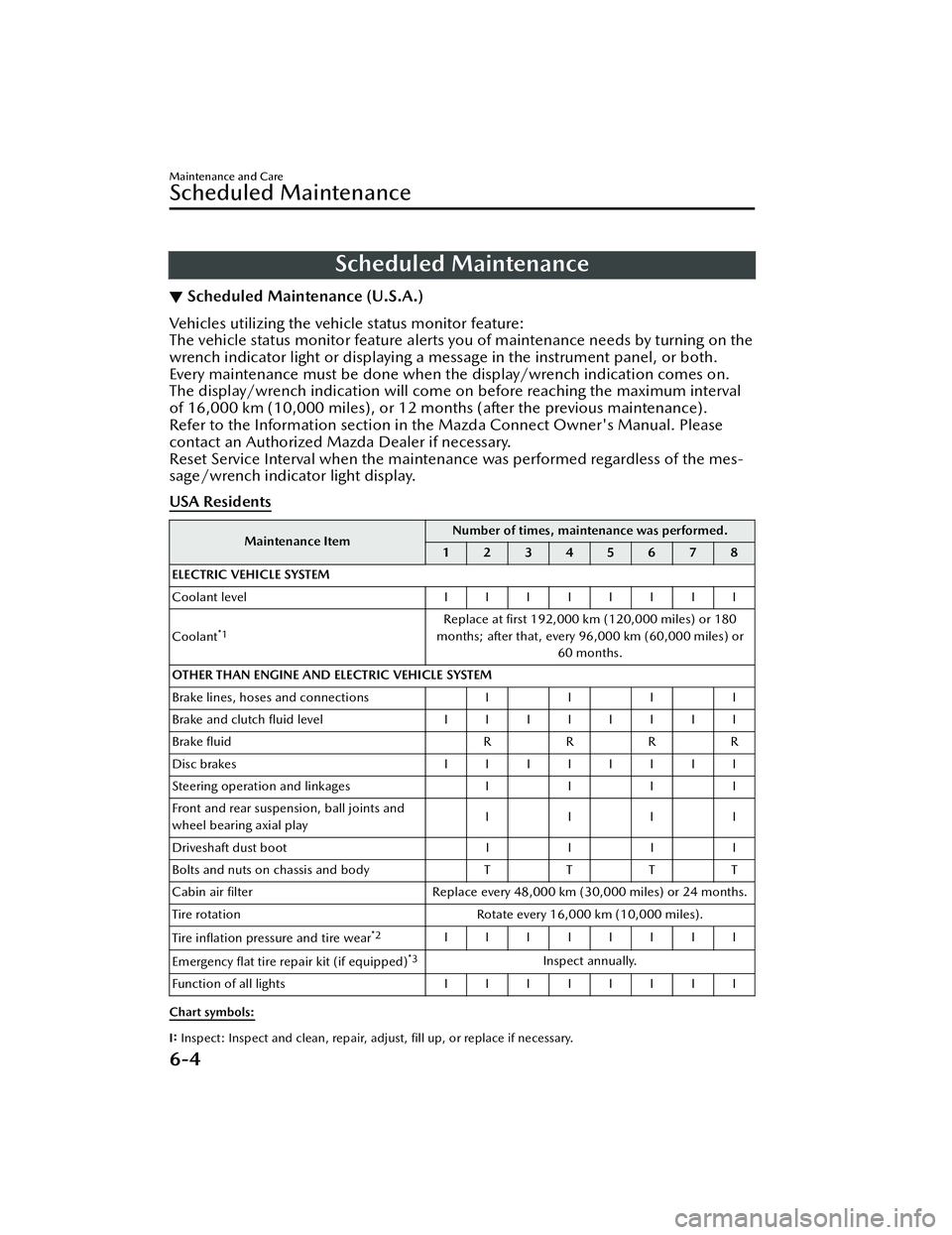
▼Scheduled Maintenance (U.S.A.)
Vehicles utilizing the vehicle status monitor feature:
The vehicle status monitor feature alerts you of maintenance needs by turning on the
wrench indicator light or displaying a message in the instrument panel, or both.
Every maintenance must be done when the display/wrench indication comes on.
The display/wrench indication will come
on before reaching the maximum interval
of 16,000 km (10,000 miles), or 12 mont hs (after the previous maintenance).
Refer to the Information section in the Mazda Connect Owner's Manual. Please
contact an Authorized Mazda Dealer if necessary.
Reset Service Interval when the maintenance was performed regardless of the mes-
sage/wrench indicator light display.
USA Residents
Maintenance Item Number of times, maintenance was performed.
12345678
ELECTRIC VEHICLE SYSTEM
Coolant level IIIIIIII
Coolant
*1Replace at first 192,000 km (120,000 miles) or 180
months; after that, every 96,000 km (60,000 miles) or 60 months.
OTHER THAN ENGINE AND ELECTRIC VEHICLE SYSTEM
Brake lines, hoses and connections I I I I
Brake and clutch fl uid level IIIIIIII
Brake fluid RRR R
Disc brakes IIIIIIII
Steering operation and linkages III I
Front and rear suspension, ball joints and
wheel bearing axial play IIII
Driveshaft dust boot III I
Bolts and nuts on chassis and body TT TT
Cabin air filter Replace every 48,000 km (30,000 miles) or 24 months.
Tire rotation Rotate every 16,000 km (10,000 miles).
Tire in flation pressure and tire wear
*2IIIIIIII
Emergency flat tire repair kit (if equipped)
*3Inspect annually.
Function of all lights IIIIIIII
Chart symbols:
I: Inspect: Inspect and clean, repair, adjust, fill up, or replace if necessary.
Maintenance and Care
Scheduled Maintenance
6-4
MX -30_8JD4-EA -21G_Edition2_new 2021-5-18 14:38:07
Page 406 of 547
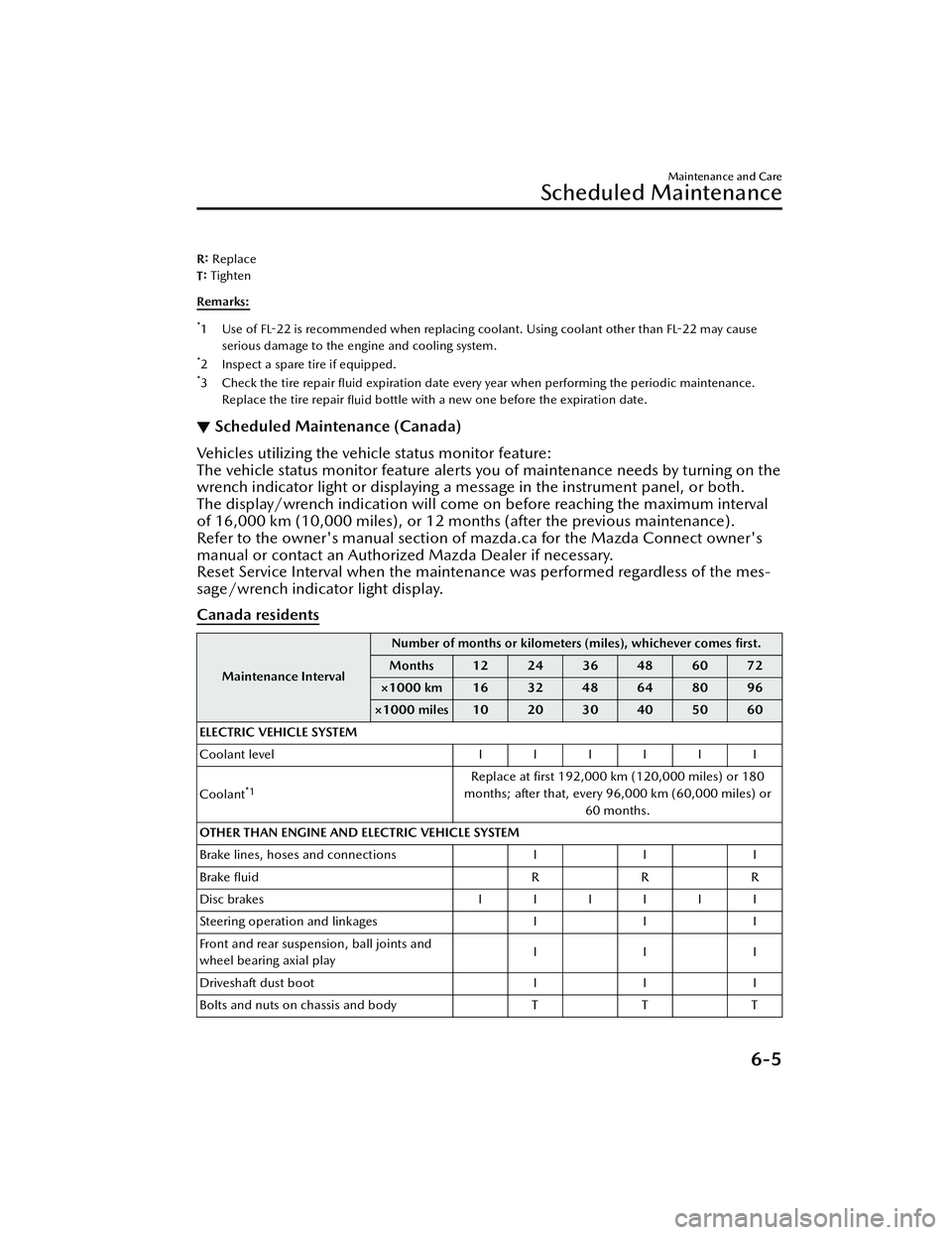
R: Replace
T: Tighten
Remarks:
*1Use of FL-22 is recommended when replacing coolant. Using coolant other than
FL-22 may cause
serious damage to the engine and cooling system.
*2 Inspect a spare tire if equipped.*3Check the tire repair fl uid expiration date every year when performing the periodic maintenance.
Replace the tire repair fluid bottle with a new one before the expiration date.
▼Scheduled Maintenance (Canada)
Vehicles utilizing the vehicle status monitor feature:
The vehicle status monitor feature alerts you of maintenance needs by turning on the
wrench indicator light or displaying a message in the instrument panel, or both.
The display/wrench indication will come on before reaching the maximum interval
of 16,000 km (10,000 miles), or 12 mont
hs (after the previous maintenance).
Refer to the owner's manual section of mazda.ca for the Mazda Connect owner's
manual or contact an Authorized Mazda Dealer if necessary.
Reset Service Interval when the maintena nce was performed regardless of the mes-
sage/wrench indicator light display.
Canada residents
Maintenance Interval Number of months or kilomete
rs (miles), whichever comes first.
Months 12 24 36 48 60 72
×1000 km 16 32 48 64 80 96
×1000 miles 10 20 30 40 50 60
ELECTRIC VEHICLE SYSTEM
Coolant level IIIIII
Coolant
*1Replace at first 192,000 km (120,000 miles) or 180
months; after that, every 96,000 km (60,000 miles) or 60 months.
OTHER THAN ENGINE AND ELECTRIC VEHICLE SYSTEM
Brake lines, hoses and connections I I I
Brake fluid RRR
Disc brakes IIIIII
Steering operation and linkages I I I
Front and rear suspension, ball joints and
wheel bearing axial play III
Driveshaft dust boot I I I
Bolts and nuts on chassis and body T T T
Maintenance and Care
Scheduled Maintenance
6-5
MX -30_8JD4-EA -21G_Edition2_new 2021-5-18 14:38:07
Page 432 of 547

No.FUSE RAT
-
ING PROTECTED COMPONENT
F41 ――
F42 20 A Windshield wiper
F43 ――
F44 30 A Accessory sockets
F45 10 A BEV control system
F46 15 A Audio
F47 15 A For protection of various circuits
F48 7.5 A Air bag
F49 15 A Instrument cluster
F50 15 A Room light
F51 25 A Audio
F52 10 A
Moonroof
*
F53 15 A BEV control system
F54 10 A i-ACTIVSENSE
F55 ――
F56 ――
Maintenance and Care
Owner Maintenance
*Some models.6-31
MX-30_8JD4-EA -21G_Edition2_new 2021-5-18 14:38:07
Page 442 of 547

2. Wipe off the remaining detergent
using a cloth soaked in clean water
and wrung out well.
Synthetic leather
1. Remove dust and sand using a vacuum cleaner.
2. Wipe the soiled area with a soft cloth soaked in a mild detergent
(approx. 5%) diluted with water.
3. Wipe off the remaining detergent
using a cloth soaked in clean water
and wrung out well.
▼ Leather Upholstery Maintenance*
1. Remove dust and sand using a
vacuum cleaner.
2. Wipe off the soiled area with a soft
cloth and a suitable, special cleaner
or a soft cloth soaked in a mild
detergent (about 5%) diluted with
water.
3. Wipe off the remaining detergent
using a cloth soaked in clean water
and wrung out well.
4. Remove moisture with a dry, soft cloth and allow the leather to
further dry in a well-ventilated,
shaded area. If the leather gets wet
such as from rain, remove the
moisture and dry it as soon as
possible.
NOTE
Because genuine leather is a natural
material, its surface is not uniform
and it may have natural scars,
scratches, and wrinkles.
To maintain the quality for as long as
possible, periodical maintenance,
about twice a year, is recommended.
If the leather upholstery comes into
contact with any of the following,
clean it immediately.
Leaving it uncleaned could cause
premature wear, mold, or stains.
Sand or dirtGrease or oil, such as hand creamAlcohol, such as in cosmetic or
hair dressing items
If the leather upholstery gets wet,
promptly remove moisture with a dry
cloth. Remaining moisture on the
surface may cause deterioration such
as hardening and shrinkage.
Exposure to direct sunlight for long
periods may cause deterioration and
shrinkage. When parking the car
under direct sunlight for long
periods, shade the interior using
sunshades.
Do not leave vinyl products on the
leather upholstery for long periods.
They may a ffect the leather quality
and coloring. If the cabin
temperature becomes hot, the vinyl
may deteriorate and adhere to the
genuine leather.
▼ Plastic Part Maintenance
CAUTION
Do not use polishing agents.
Depending on the product ingredients,
they could cause discoloration, stains,
cracks or peeling of the coating.
▼
Instrument Panel Top (Soft pad)
Maintenance
Extremely soft materi
al is used for the
soft pad surface. If the soft pad surface
is rubbed harshly with a dry cloth, it
could result in the surface being
damaged and leaving white scratch
marks.
1. Wipe the soiled area with a soft cloth soaked in a mild detergent
(approx. 5%) diluted with water.
2. Wipe o ff the remaining detergent
using a cloth soaked in clean water
and wrung out well.
Maintenance and Care
Appearance Care
*Some models.6-41
MX -30_8JD4-EA -21G_Edition2_new 2021-5-18 14:38:07
Page 447 of 547

Parking in an Emergency
▼Parking in an Emergency
The hazard warning lights should
always be used when you stop on or
near a roadway in an emergency.
The hazard warning lights warn other
drivers that your vehicle is a
traffic
hazard and that they must take
extreme caution when near it.
Depress the hazard warning flasher
and all the turn signals will flash. The
hazard warning indicator lights in the
instrument cluster flash simultaneously.
NOTE
The turn signals do not work when
the hazard warning lights are on.
Check local regulations about the
use of hazard warning lights while
the vehicle is being towed to verify
that it is not in violation of the law.
If Trouble Arises
Parking in an Emergency
7-2
MX
-30_8JD4-EA -21G_Edition2_new 2021-5-18 14:38:07
Page 456 of 547

What to do when
charging is not possible
▼ What to do when charging is not
possible
If trouble arises while charging such as
not being able to charge the high
voltage battery, refer to the following
table. If the problem cannot be solved
even after checking the following table,
there may be a problem with the
vehicle or charger. Contact an
Authorized Mazda Dealer.
Charging is not possible.
Cause
Action
The selector
lever is in a
position
other than P. Shift the selector lever to the P
position.
The high
voltage bat-
tery is al-
ready fully
charged. Charging is not performed when
the high voltage battery is al-
ready fully charged.
The high
voltage bat-
tery temper-
ature is ex-
tremely high
or low. Check the high voltage battery
temperature gauge in the instru-
ment cluster. If the high voltage
battery temperature gauge is in
the red or blue range, charging
may not be possible.
The
Lead-acid
battery is
depleted. If the instrument cluster does not
turn on even if the power switch
is switched ON, the Lead-acid
battery may be depleted. Charge
or replace the Lead-acid battery.
Normal charging is not possible.
Cause
Action
The outlet
has no pow-
er. Check if a ground-fault circuit in-
terrupter has operated or if a
power outage occurred. If the
power source has a timer func-
tion, electrical power may not be
supplied to the outlet until the
time set to supply power.
The charge
plug is not
properly
plugged into
the outlet. Check if the charge plug is prop-
erly plugged into the outlet.
The charge
connector is
not properly
connected. Check if the charge connector is
properly connected.
Charging
timer is set. Cancel the charging timer using
EV Settings in Mazda Connect,
or the charging timer cancella-
tion function.
Troubleshooting for functions using a
Smartphone or computer
If you are having trouble with the
remote function service, such as when
the remote function does not work,
refer to the Connected Service owner’s
manual.
If Trouble Arises
Troubleshooting for Charging
7-11
MX
-30_8JD4-EA -21G_Edition2_new 2021-5-18 14:38:07
Page 466 of 547

If a Warning Light TurnsOn or Flashes
▼If a Warning Light Turns On or
Flashes
If any warning light turns on/
flashes,
take appropriate action for each light.
There is no problem if the light turns
o ff, however if the light does not turn
o ff or turns
on/flashes again, consult
an Authorized Mazda Dealer.
WARNING
If the warning light/indicator light
turns on or flashes, park the vehicle in
a safe place immediately and take
appropriate measures.
Continuing to drive the vehicle while
ignoring the illumination/ flashing of
the warning light/indicator light is
dangerous because a problem may
occur to a vehicle system, or it could
lead to an accident.
The details for some warnings can be
viewed on the center display or
multi-information display in the
instrument cluster.
Center display
1. Select “Information” on the home
screen.
2. Select “Vehicle Status Monitor”.
3. Select the applicable warning to view the warning details.
Multi-information display
1. Press the INFO switch on the steering switch to display the
warning indication screen.
Refer to Multi-information Display
on page 4-11.
▼Brake System Warning Indication/
Warning Light
This warning has the following
functions:
Warning light inspection
For an operation check, make sure that
the light turns on when the power
switch is switched on and turns o
ff a
few seconds later, or when the EV
system is started.
When the light turns on
If the brake system warning light
remains illuminated the brake fluid
may be low or there could be a
problem with the brake system. Park
the vehicle in a safe place immediately
and contact an Authorized Mazda
Dealer.
Refer to Inspecting Brake Fluid Level on
page 6-12.
WARNING
Do not drive with the brake system
warning light illuminated. Contact an
Authorized Mazda Dealer to have the
brakes inspected as soon as possible:
Driving with the brake system warning
light illuminated is dangerous. It
indicates that your brakes may not
work at all or that they could
completely fail at any time. If this light
remains illuminated, after checking
that the parking brake is fully released,
have the brakes inspected
immediately.
If Trouble Arises
Warning/Indicator Lights and Warning Sounds
7-21
MX -30_8JD4-EA -21G_Edition2_new 2021-5-18 14:38:07
Page 484 of 547
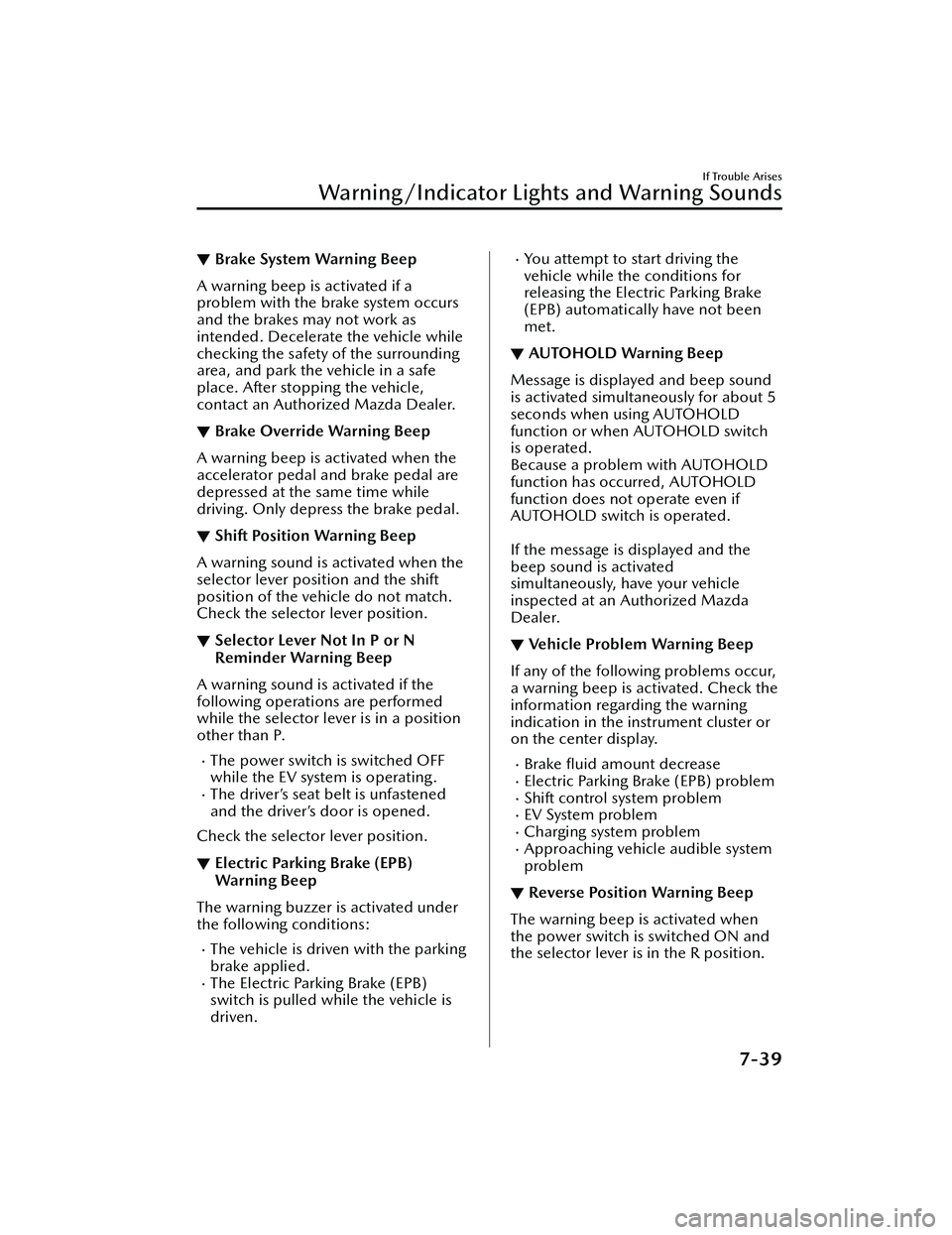
▼Brake System Warning Beep
A warning beep is activated if a
problem with the brake system occurs
and the brakes may not work as
intended. Decelerate the vehicle while
checking the safety of the surrounding
area, and park the vehicle in a safe
place. After stopping the vehicle,
contact an Authorized Mazda Dealer.
▼Brake Override Warning Beep
A warning beep is activated when the
accelerator pedal and brake pedal are
depressed at the same time while
driving. Only depress the brake pedal.
▼Shift Position Warning Beep
A warning sound is activated when the
selector lever position and the shift
position of the vehicle do not match.
Check the selector lever position.
▼Selector Lever Not In P or N
Reminder Warning Beep
A warning sound is activated if the
following operations are performed
while the selector lever is in a position
other than P.
The power switch is switched OFF
while the EV system is operating.
The driver’s seat belt is unfastened
and the driver’s door is opened.
Check the selector lever position.
▼ Electric Parking Brake (EPB)
War n in g Be ep
The warning buzzer is activated under
the following conditions:
The vehicle is driven with the parking
brake applied.
The Electric Parking Brake (EPB)
switch is pulled while the vehicle is
driven.
You attempt to start driving the
vehicle while the conditions for
releasing the Electric Parking Brake
(EPB) automatically have not been
met.
▼
AUTOHOLD Warning Beep
Message is displayed and beep sound
is activated simultaneously for about 5
seconds when using AUTOHOLD
function or when AUTOHOLD switch
is operated.
Because a problem with AUTOHOLD
function has occurred, AUTOHOLD
function does not operate even if
AUTOHOLD switch is operated.
If the message is displayed and the
beep sound is activated
simultaneously, have your vehicle
inspected at an Authorized Mazda
Dealer.
▼Vehicle Problem Warning Beep
If any of the following problems occur,
a warning beep is activated. Check the
information regarding the warning
indication in the instrument cluster or
on the center display.
Brake
fluid amount decreaseElectric Parking Brake (EPB) problemShift control system problemEV System problemCharging system problemApproaching vehicle audible system
problem
▼Reverse Position Warning Beep
The warning beep is activated when
the power switch is switched ON and
the selector lever is in the R position.
If Trouble Arises
Warning/Indicator Lights and Warning Sounds
7-39
MX
-30_8JD4-EA -21G_Edition2_new 2021-5-18 14:38:07
Page 485 of 547

▼Blind Spot Monitoring (BSM)
System Warning Beep*
The Blind Spot Monitoring (BSM)
warning beep operates when the turn
signal lever is operated to the side
where the Blind Spot Monitoring
(BSM) warning light is illuminated.
▼Front Cross Tra
ffic Alert (FCTA)
Warning Beep*
The Front Cross Tra ffic Alert (FCTA)
warning beep is activated if there is a
possibility of collision with a vehicle
approaching from the front on the left
and right sides of the vehicle.
▼ Rear Cross
Traffic Alert (RCTA)
Warning Beep*
The Rear Cross Tra ffic Alert (RCTA)
warning beep is activated if there is a
possibility of collision with a vehicle
approaching from the rear on the left
and right sides of the vehicle.
▼ Lane/Road Departure Warning
Beep*
The warning beep is activated when
the system determines that the vehicle
may depart from the lane or the road.
Check whether the vehicle has not
deviated from the driving lane/road.
▼Mazda Radar Cruise Control with
Stop & Go function (MRCC with
Stop & Go function) System
Warnings
*
The Mazda Radar Cruise Control with
Stop & Go function (MRCC with Stop
& Go function) system warnings notify
the driver of system malfunctions and
cautions on use when required.
Check based on the beep sound.
Warning beep type Noti
fication content
The beep sounds 1
time while the Mazda
Radar Cruise Control
with Stop & Go func-
tion (MRCC with Stop
& Go function) is op-
erating. If a malfunction occurs
in the system, make
sure that the Mazda
Radar Cruise Control
with Stop & Go func-
tion (MRCC with Stop
& Go function) has
been canceled.
The beep sounds in-
termittently while the
Mazda Radar Cruise
Control with Stop &
Go function (MRCC
with Stop & Go func-
tion) is operating. The distance between
your vehicle and the
vehicle ahead is too
close. Check the safety
of the surrounding
area and reduce vehi-
cle speed.
▼
Excessive Speed Warning*
If the vehicle speed exceeds the speed
limit sign displayed in
the active driving
display/instrument cluster, the area
around the speed limit sign flashes in
amber and the warning sound is
activated at the same time. If the
vehicle speed continues to exceed the
displayed speed limit sign, the
indication stops flashing and remains
on.
▼ Collision warning*
If there is a possibility of a collision
with a vehicle ahead, a warning sound
is activated at the same time as the
warning indications are displayed in
the instrument cluster or active driving
display.
▼Door-ajar Warning Beep
A warning beep is activated if the
vehicle is driven with any door or
liftgate ajar. Drive the vehicle after
closing the doors and liftgate.
If Trouble Arises
Warning/Indicator Lights and Warning Sounds
7-40*Some models.
MX
-30_8JD4-EA -21G_Edition2_new 2021-5-18 14:38:07