reset MAZDA MODEL MX-5 2020 (in English) User Guide
[x] Cancel search | Manufacturer: MAZDA, Model Year: 2020, Model line: MODEL MX-5, Model: MAZDA MODEL MX-5 2020Pages: 564, PDF Size: 7.28 MB
Page 150 of 564

The distance-to-empty is the
approximate remaining distance the
vehicle can be driven until all the
graduation marks in the fuel gauge
indicating the remaining fuel supply
disappear.
If there is no past fuel economy
information such as after first
purchasing your vehicle or the
information is deleted when the battery
cables are disconnected, the actual
distance-to empty/range may differ from
the amount indicated.
▼Average Fuel Economy
The average fuel economy is calculated
every minute from the total traveled
distance on the trip meter and the total fuel
consumption, and the average fuel
economy for either TRIP A or TRIP B is
displayed.
The average fuel economy and trip meters
can be reset by pressing the INFO switch
for 1.5 seconds or more while in each
mode. After the data is cleared, the fuel
consumption is recalculated and the - - -
L/100 km (- - - mpg) for the 1 minute prior
to it being displa yed is indicated.
▼Current Fuel Economy
This displays the current fuel economy by
calculating the amount of fuel
consumption and the distance traveled.
Current fuel economy will be calculated
and displayed every two seconds.
When you've slowed to about 5 km/h (3
mph), - - - L/100 km (- - - mpg) will be
displayed.
▼Maintenance Monitor
The following maintenance period
notifications can be displayed by turning
the Maintenance Monitor on.
Scheduled Maintenance
Tire Rotation
Oil Change
For the setting method and indications for
the maintenance monitor, refer to the
Maintenance Monitor.
Refer to Maintenance Monitor on page
6-15.
The maintenance mo nitor displays the
information when the i gnition is switched
ON.
NOTE
This function is inoperable while the
vehicle is being driven.
When Driving
Instrument Cluster and Display
4-24
MX-5_8JA4-EA-19K_Edition2 _old 2019-8-29 16:18:06
Page 151 of 564

Message display
When the remaining days to the
maintenance period is 15 days or less, or
the remaining distance is 1,000 km (600
miles) or shorter, a message is indicated
when the ignition is switched ON.
NOTE
If any of the INFO switch is pressed
while a message is displayed, it will no
longer be displayed the next time the
ignition is switched ON.
After the vehicle is serviced and the
remaining time/distance is reset, the
message for the next maintenance
period will be displayed when the
remaining distance or time to the next
maintenance period approaches 0
(displays when engine is started).
If there are multiple messages, they are
displayed according to their order.
If OFF is set for Messages, messages
are not displayed.
▼Traffic Sign Recognition System
(TSR) Display
*
Displays the traffic sign.
Refer to Traffic Sign Recognition System
(TSR) on page 4-92.
▼Lane Departure Warning System
(LDWS) Display
*
Displays the system status.
Refer to Lane Departu re Warning on page
4-86.
▼Cruise Control Set Vehicle Speed
Display
The vehicle speed preset using the cruise
control is displayed.
Refer to Cruise Control on page 4-111.
When Driving
Instrument Cluster and Display
*Some models.4-25
MX-5_8JA4-EA-19K_Edition2 _old 2019-8-29 16:18:06
Page 157 of 564

SignalIndicator Lights Page
(White)
*Cruise Main Indication 4-112
(Green)
*Cruise Set Indication/Indicator Light4-112
*1 The light turns on when the ignition is switched on for an ope
ration check, and turns off
a few seconds later or when the engine is started. If the light does not turn on or remains
turned on, have the vehicle inspected at an Authorized Mazda Dealer.
▼Wrench Indication/Indicator Light*
Type A instrument cluster
Perform maintenance in accordance with
the message.
Type B instrument cluster
When the ignition is switched ON, the
wrench indicator light is illuminated and
then turns off after a few seconds.
The wrench indicator light turns on when
the preset maintenance period arrives.
Verify the content and perform
maintenance.
Refer to Maintenan ce Monitor on page
6-15.
▼Low Engine Coolant Temperature
Indicator Light (Blue)
The light illuminates continuously when
the engine coolant temperature is low and
turns off after the engine is warm.
If the low engine coolant temperature
indicator light remains illuminated after
the engine has been sufficiently warmed
up, the temperature sensor could have a
malfunction. Consult an Authorized
Mazda Dealer.
When Driving
Instrument Cluster and Display
*Some models.4-31
MX-5_8JA4-EA-19K_Edition2 _old 2019-8-29 16:18:06
Page 195 of 564

Fuel Economy Monitor
The Fuel Consumption information is displayed by operating each icon in the display.
In addition, after completing a t rip, the total energy efficiency to date is displayed in the
ending display when the ending display is turned on.
1. Select the
icon on the home screen to display the Applications screen.
2. Select the “Fuel Economy Monitor”.
3. Select the
icon at the bottom left of the screen to display the menu in t he lower part
of the screen.
4. Select the icon in the menu and perform the operation. Each icon operates as follows:
Indication on display Control status
Hides the menu display.
Displays the Applications screen.
Resets the fuel economy data.
Displays the following setting screen.
Ending display on/off switching(Without Multi-information Display)
On/off switching for function which synchronizes
(links) reset of fuel economy data with trip meter
(TRIP A)
NOTE
The fuel economy monitor screen after the ignition is switched from ON to OFF is changed
to the original fuel economy monitor screen wh en the ignition is switched ON the next time.
When Driving
Fuel Economy Monitor
4-69
MX-5_8JA4-EA-19K_Edition2_old 2019-8-29 16:18:06
Page 196 of 564
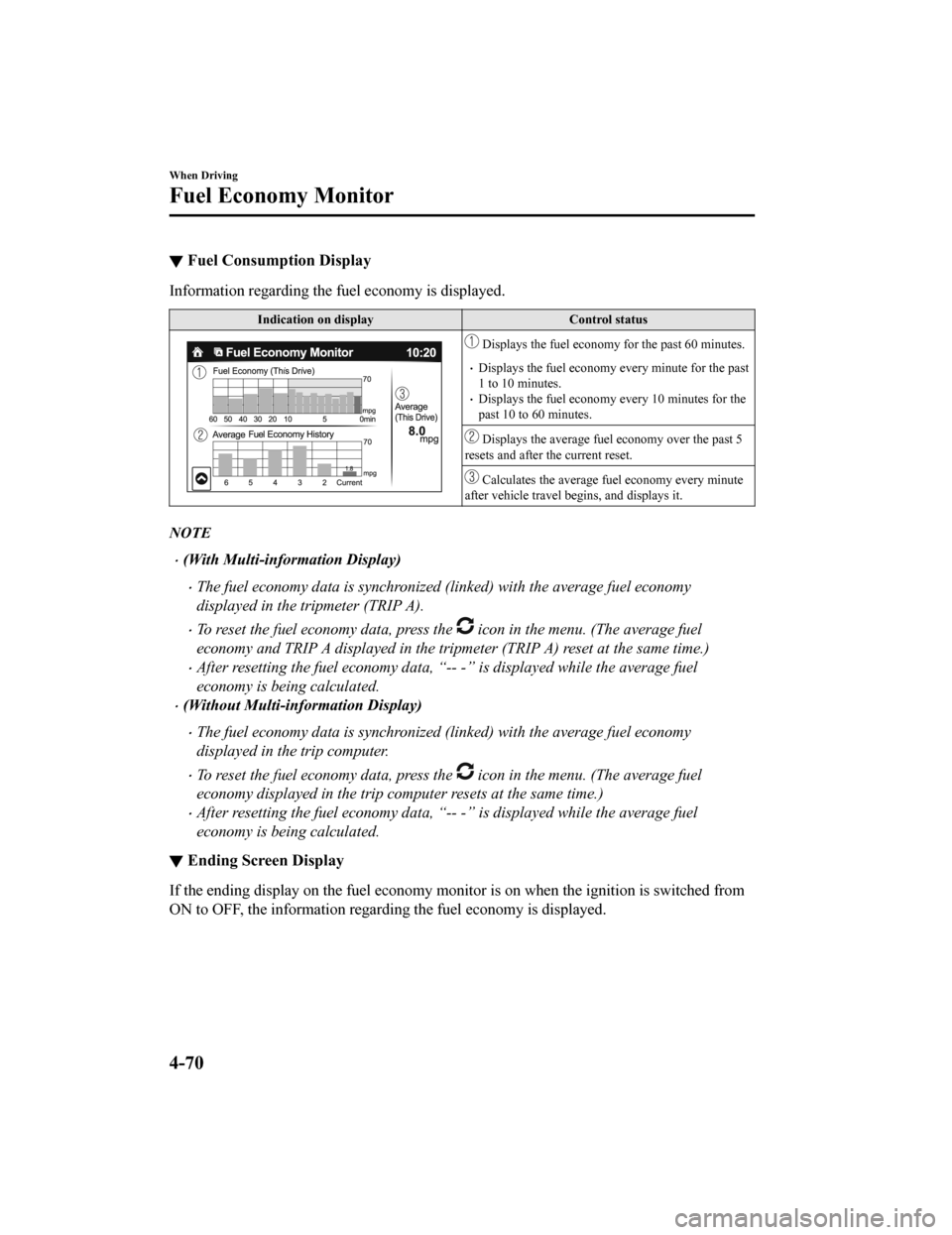
▼Fuel Consumption Display
Information regarding the fuel economy is displayed.
Indication on displayControl status
Displays the fuel economy for the past 60 minutes.
Displays the fuel economy every minute for the past
1 to 10 minutes.
Displays the fuel economy every 10 minutes for the
past 10 to 60 minutes.
Displays the average fuel economy over the past 5
resets and after the current reset.
Calculates the average fuel economy every minute
after vehicle travel begins, and displays it.
NOTE
(With Multi-information Display)
The fuel economy data is synchronized (linked) with the average fuel economy
displayed in the tripmeter (TRIP A).
To reset the fuel economy data, press the icon in the menu. (The average fuel
economy and TRIP A displayed in the tripmeter (TRIP A) reset at the same time.)
After resetting the fuel economy data, “- - -” is displayed while the average fuel
economy is being calculated.
(Without Multi-information Display)
The fuel economy data is synchronized (linked) with the average fuel economy
displayed in the trip computer.
To reset the fuel economy data, press the icon in the menu. (The average fuel
economy displayed in the trip comp uter resets at the same time.)
After resetting the fuel economy data, “- - -” is displayed while the average fuel
economy is being calculated.
▼Ending Screen Display
If the ending display on the fuel economy monitor is on when th e ignition is switched from
ON to OFF, the informa tion regarding the fuel economy is displayed.
When Driving
Fuel Economy Monitor
4-70
MX-5_8JA4-EA-19K_Edition2 _old 2019-8-29 16:18:06
Page 197 of 564

▼Fuel Economy Data Reset and Trip Meter (TRIP A) Synchronization (Linking)
(Without Multi-information Display)
Because the average fuel economy indication on the instrument c luster display is linked
with the “Average Fuel Economy History” (Current) indication on the center display, when
one is reset the other is also reset.
In addition, switching between reset and no reset of the averag e fuel economy indication on
the instrument cluster display and the “Average Fuel Economy Hi story” (Current) indication
on the center display when rese tting the trip meter (TRIP A) is possible.
Reset operation item Synchronized (linked) and reset information
Trip meter (TRIP A) Average fuel econo‐
my on instrument cluster display “Average Fuel
Economy History” (Current) indica‐
tion on the center display
Trip meter (TRIP A) X
X/—
*1X/—*1
Average fuel economy o n instrument cluster
display —X X
“Average Fuel Economy History” (Current)
indication on the center display —X X
X: Reset
—: Not reset
*1 Can be personalized.
Refer to Personalization Features on page 9-9.
When Driving
Fuel Economy Monitor
4-71
MX-5_8JA4-EA-19K_Edition2 _old 2019-8-29 16:18:06
Page 239 of 564

Release the SET/ or RESUME/
switch at the desired speed, otherwise
the speed will continue increasing while
the RESUME/
switch is pressed and
held, and continue decreasing while the
SET/
switch is pressed and held
(except when the accelerator pedal is
depressed).
On a steep grade, the vehicle may
momentarily slow down while ascending
or speed up while descending.
The cruise control will cancel if the
vehicle speed decreases below 21 km/h
(13 mph) when the cruise control is
activated, such as when climbing a steep
grade.
The cruise control may cancel at about
15 km/h (9 mph) below the preset speed,
such as when climbing a long, steep
grade.
The vehicle speed preset using the cruise
control is displayed in the instrument
cluster.
Type A Instrument Cluster
Type B Instrument Cluster
▼To Increase Cruising Speed
Follow either of these procedures.
To increase speed using cruise control
switch
Press the RESUME/ switch and hold it.
Your vehicle will accelerate. Release the
switch at the desired speed.
Press the RESUME/
switch and release
it immediately to adjust the preset speed.
Multiple operations will increase the
preset speed according to the number of
times it is operated.
Increasing speed with a single
RESUME/
switch operation
Instrument cluster display for vehicle
speed indicated in km/h: 1 km/h (0.6 mph)
Instrument cluster display for vehicle
speed indicated in mph: 1 mph (1.6 km/h)
To increase speed using accelerator
pedal
Depress the accelerator pedal to accelerate
to the desired speed. Press the SET/
switch and release it immediately.
NOTE
Accelerate if you want to speed up
temporarily when the cruise control is on.
Greater speed will not interfere with or
change the set speed. Take your foot off
the accelerator to return to the set speed.
When Driving
Cruise Control
4-113
MX-5_8JA4-EA-19K_Edition2 _old 2019-8-29 16:18:06
Page 240 of 564

▼To Decrease Cruising Speed
Press the SET/ switch and hold it. The
vehicle will gradually slow.
Release the switch at the desired speed.
Press the SET/
switch and release it
immediately to adjust the preset speed.
Multiple operations will decrease the
preset speed according to the number of
times it is operated.
Decreasing speed with a single SET/
switch operation
Instrument cluster display for vehicle
speed indicated in km/h: 1 km/h (0.6 mph)
Instrument cluster display for vehicle
speed indicated in mph: 1 mph (1.6 km/h)
▼To Resume Cruising Speed at More
Than 25 km/h (16 mph)
If the cruise contro l system temporarily
canceled (such as by applying the brake
pedal) and the system is still activated, the
most recent set speed will automatically
resume when the RESUME/
switch is
pressed.
If vehicle speed is below 25 km/h (16
mph), increase the vehicle speed up to 25
km/h (16 mph) or more and press the
RESUME/
switch.
▼To Temporarily Cancel
To temporarily cancel the system, use one
of these methods:
Slightly depress the brake pedal.
(Manual transmission)
Depress the clutch pedal.
Press the OFF/CANCEL switch.
If the RESUME/
switch is pressed when
the vehicle speed is 25 km/h (16 mph) or
higher, the system reverts to the previously
set speed.
NOTE
If any of the following conditions occur,
the cruise control system is temporarily
canceled.
The parking brake is applied.
(Automatic transmission)
The selector lever is in the P, N, or R
position.
(Manual transmission)
The shift lever is in the neutral
position.
When the cruise control system is
temporarily canceled by even one of the
applicable cancel conditions, the speed
cannot be re-set.
(Automatic transmission)
The cruise control cannot be cancelled
while driving in manual mode (selector
lever shifted from D to M position).
Therefore, engine braking will not be
applied even if the transmission is
shifted down to a lower gear. If
deceleration is required, lower the set
speed or depress the brake pedal.
When Driving
Cruise Control
4 -11 4
MX-5_8JA4-EA-19K_Edition2 _old 2019-8-29 16:18:06
Page 253 of 564

▼Picture Quality Adjustment
WARNING
Always adjust the picture quality of the rear view monitor while the vehicle is stopped:
Do not adjust the picture quality of the rear view monitor while driving the vehicle. Adjusting
the picture quality of the rear view monitor such as brightness, contrast, color, and tint while
driving the vehicle is dangerous as it could dist ract your attention from the vehicle operation
which could lead to an accident.
Picture quality adjustment must be done while the shift lever/s elector lever is in reverse (R).
There are four settings which ca n be adjusted including, brightness, contrast, tint, and color.
When adjusting, pay sufficient attention to the vehicle surroun dings.
1. Select the
icon on the screen to display the tabs.
2. Select the desired tab item.
3. Adjust the brightness, contrast, tint, and color using the slider. If you need to reset, press the reset button.
4. Select the
icon on the screen to close the tab.
When Driving
Rear View Monitor
4-127
MX-5_8JA4-EA-19K_Edition2 _old 2019-8-29 16:18:06
Page 278 of 564
Contrast adjustment
Adjust the center display contrast using
the slider.
Display setting reset
All of the screen setting values can be
reset to their initial settings.
1. Select
.
2. Select
.
▼Audio sound adjustment
Select the icon on the home screen to
display the Settings screen.
Select the
tab to select the item you
would like to change.
Indication Setting value
Bass
(Low pitch sound)
Side: Low pitch en‐
hancement
Side: Low pitch re‐
duction
Treble
(Treble sound)
Side: Treble enhance‐
ment
Side: Treble reduction
Fade
(Front/Rear volume bal‐
ance) Front: Front speaker vol‐
ume enhancement
Rear: Rear speaker vol‐
ume enhancement
Balance
(Left/right volume bal‐
ance) Right: Right speaker
volume enhancement
Left: Left speaker vol‐
ume enhancement
Guidance Volume
(Volume adjustment dur‐
ing route guidance on
navigation screen) Left: Low volume
Right: High volume
ALC
*1
(Automatic volume ad‐
justment) Off―Adjustment at sev‐
en levels
Bose AudioPilot
*2
(Noise compensation
technology) On/Off
Beep
(Audio operation sound) On/Off
*1 Standard audio*2 Bose sound system
ALC (Automatic volume adjustment)
The automatic level control (ALC) is a
feature that automatically adjusts audio
volume according to the vehicle speed.
The volume increases in accordance with
the increase in vehicle speed, and
decreases as vehicle speed decreases.
Bose AudioPilot (N
oise compensation
technology)
When driving, background noise can
interfere with enjoying music.
AudioPilot
*3 noise compensation
technology continuously adjusts the music
to compensate for background noise and
vehicle speed.
It reacts only to sustained noise sources
and not intermittent ones, such as speed
bumps.
An enhanced DSP algorithm allows faster
and more effective compensation for
unusual situations, such as driving on a
very rough road or at high speeds.
In addition, a system is equipped which
switches the audio to the optimum
acoustics corresponding to the opening
and closing of the soft top/roof.
The acoustic switching function is linked
to the operation of the top lock lever/
retractable hardtop switch and audio
playback is muted for about 1 second
while switching.
*3 AudioPilot is a registered trademark of
Bose Corporation.
Interior Features
Audio Set
5-24
MX-5_8JA4-EA-19K_Edition2 _old 2019-8-29 16:18:06