soft MAZDA MODEL MX-5 MIATA 2006 Owners Manual
[x] Cancel search | Manufacturer: MAZDA, Model Year: 2006, Model line: MODEL MX-5 MIATA, Model: MAZDA MODEL MX-5 MIATA 2006Pages: 378, PDF Size: 4.01 MB
Page 107 of 378

Black plate (107,1)
WARNING
Windshield's Edges:
Not being careful of the windshield's
edges when getting into or out of the
vehicle is dangerous. The windshield's
edges could scratch and cause
injuries.
Be careful of the windshield's edges
when getting into or out of the vehicle.
CAUTION
lBe careful not to strike the body with
any of the protruding hardtop
latches.
lUse extreme care when carrying the
hardtop to prevent scratching or
other damage to it.
NOTE
Points to remember when storing the
detachable hardtop.
lDo not place the hardtop on a hard
surface, such as concrete or asphalt.
Place it on a cushioning material,
such as an old blanket.
lBe sure the top and side latches are
locked.
lDo not lean the hardtop against a
wall or stand it in an unstable way.
lStore the hardtop in a dry clean area,
and cover it with a soft material,
such as an old blanket.
qInstalling the Detachable Hardtop
CAUTION
Do not attempt to install the hardtop
with the convertible top also up.
Lower the convertible top before
installing the hardtop, otherwise
damage will occur to the convertible
top.
NOTE
lBe sure to place the convertible top
latches in the locked position.
lMake sure the convertible top is
completely lowered before installing
the hardtop. Also confirm that the
rear window defroster coupler is
disconnected.
1. Park the vehicle on a level surface and firmly set the parking brake.
2. Lower the side windows, then turn off the ignition.
3. Remove the antenna if it is installed. Refer to Antenna on page 6-10.
4. Remove the seat belts from the belt guides.
Belt guide
Knowing Your Mazda
Doors and Locks
3-49
MX-5_8U35-EA-05F_Edition4 Page107
Thursday, October 6 2005 11:3 AM
Form No.8U35-EA-05F
Page 207 of 378
Black plate (207,1)
qOperating Tips for CD Player/In-
Dash CD Changer
Condensation phenomenon
Immediately after turning on the heater
when the vehicle is cold, the CD or
optical components (prism and lens) in the
CD player/In-dash CD changer may
become clouded with condensation. At
this time, the CD will eject immediately
when placed in the unit. A clouded CD
can be corrected simply by wiping it with
a soft cloth. Clouded optical components
will clear naturally in about an hour. Wait
for normal operation to return before
attempting to use the unit.
Handling the CD player/In-dash CD
changer
The following precautions should be
observed.
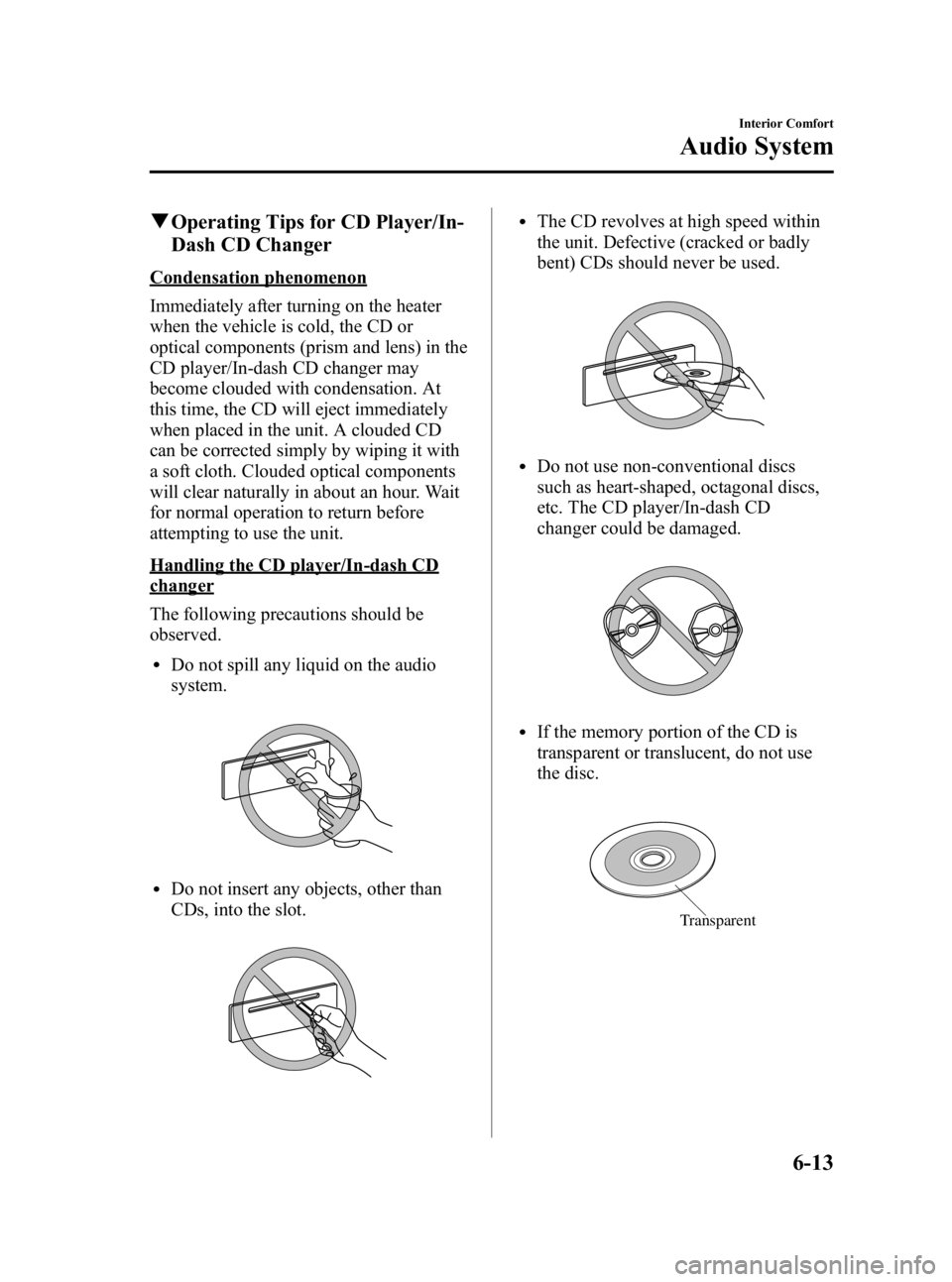
lDo not spill any liquid on the audio
system.
lDo not insert any objects, other than
CDs, into the slot.
lThe CD revolves at high speed within
the unit. Defective (cracked or badly
bent) CDs should never be used.
lDo not use non-conventional discs
such as heart-shaped, octagonal discs,
etc. The CD player/In-dash CD
changer could be damaged.
lIf the memory portion of the CD is
transparent or translucent, do not use
the disc.
Transparent
Interior Comfort
Audio System
6-13
MX-5_8U35-EA-05F_Edition4 Page207
Thursday, October 6 2005 11:4 AM
Form No.8U35-EA-05F
Page 208 of 378
Black plate (208,1)
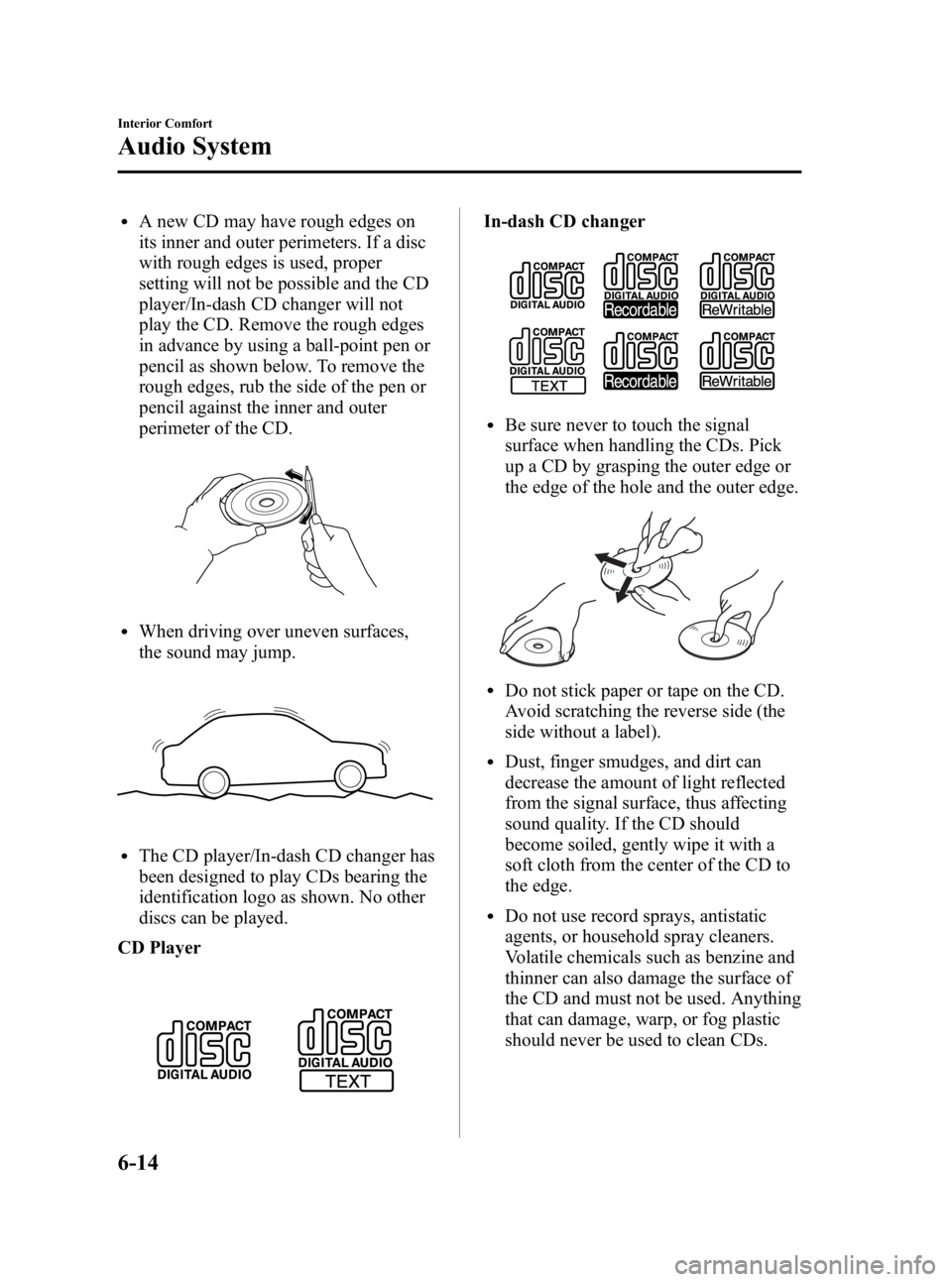
lA new CD may have rough edges on
its inner and outer perimeters. If a disc
with rough edges is used, proper
setting will not be possible and the CD
player/In-dash CD changer will not
play the CD. Remove the rough edges
in advance by using a ball-point pen or
pencil as shown below. To remove the
rough edges, rub the side of the pen or
pencil against the inner and outer
perimeter of the CD.
lWhen driving over uneven surfaces,
the sound may jump.
lThe CD player/In-dash CD changer has
been designed to play CDs bearing the
identification logo as shown. No other
discs can be played.
CD Player
In-dash CD changer
lBe sure never to touch the signal
surface when handling the CDs. Pick
up a CD by grasping the outer edge or
the edge of the hole and the outer edge.
lDo not stick paper or tape on the CD.
Avoid scratching the reverse side (the
side without a label).
lDust, finger smudges, and dirt can
decrease the amount of light reflected
from the signal surface, thus affecting
sound quality. If the CD should
become soiled, gently wipe it with a
soft cloth from the center of the CD to
the edge.
lDo not use record sprays, antistatic
agents, or household spray cleaners.
Volatile chemicals such as benzine and
thinner can also damage the surface of
the CD and must not be used. Anything
that can damage, warp, or fog plastic
should never be used to clean CDs.
6-14
Interior Comfort
Audio System
MX-5_8U35-EA-05F_Edition4 Page208
Thursday, October 6 2005 11:4 AM
Form No.8U35-EA-05F
Page 209 of 378

Black plate (209,1)
lCD TEXT textual information cannot
be displayed by audio units other than
the In-dash CD changer. (Only
playback is possible.)
lThe following player can play MP3
files recorded in CD-ROM, CD-R, and
CD-RW.
· In-dash CD changer
lThe CD player/In-dash CD changer
ejects the CD if the CD is inserted
upside down. Also dirty and/or
defective CDs may be ejected.
lAn 8 cm (3 in) CD can be played in the
CD player.
The In-dash CD changer is specially
made for 12 cm (5 in) CDs.
An 8 cm (3 in) CD can be played in the
In-dash CD changer if an 8 cm (3 in)
CD adapter is used.
If an 8 cm (3 in) CD adapter is not
used, the In-dash CD changer may be
damaged. Always use a CD adapter.
lDo not insert cleaning discs in the CD
player/In-dash CD changer.
lDo not insert any disc with a peel-off
or seal on it.
Handling the In-dash CD changer
lThis unit may not be able to play
certain CD-R/CD-RWs made using a
computer or music CD recorder due to
disc characteristics, scratches,
smudges, dirt, etc., or due to dust or
condensation on the lens inside the
unit.
lStoring CDs in the vehicle exposed to
direct sunlight or high temperature may
damage the CD-R/CD-RWs, and make
them unplayable.
lCD-R/CD-RW exceeding 700 MB
cannot be played.
lThis unit may not be able to play
certain discs made using a computer
due to the application (writing
software) setting used. (For details,
consult the store where the application
was purchased.)
lIt is possible that certain text data, such
as titles, recorded on a CD-R/CD-RW
may not be displayed when musical
data (CD-DA) is playing.
lThe period from when a CD-RW is
inserted to when it begins playing is
longer than a normal CD or CD-R.
lCompletely read the instruction manual
and cautions for CD-R/CD-RWs.
qOperating tips for MP3
NOTE
Supply of this product only conveys a
license for private, non-commercial use
and does not convey a license nor imply
any right to use this product in any
commercial (i.e. revenue-generating)
real time broadcasting (terrestrial,
satellite, cable and/or any other media),
broadcasting/streaming via the Internet,
intranets and/or other networks or in
other electronic content distribution
systems, such as pay-audio or audio-on-
demand applications. An independent
license for such use is required. For
details, please visit http://
www.mp3licensing.com.
Interior Comfort
Audio System
6-15
MX-5_8U35-EA-05F_Edition4 Page209
Thursday, October 6 2005 11:4 AM
Form No.8U35-EA-05F
Page 212 of 378

Black plate (212,1)
Multi-session
A session is the complete amount of data
recorded from the beginning to the end of
a single period of CD-ROM, CD-R/CD-
RW data recording. Multi-session refers to
the existence of data from two or more
sessions on a single disc.
Sampling
Refers to the process of encoding analog
audio data at regular intervals and
converting it to digital data. The sampling
rate refers to the number of times a
sample is taken in one second and is
expressed in Hz units. Increasing the
sampling rate improves the sound quality
but also increases the data size.
Bit rate
Refers to the volume of data per second,
expressed in bps (bits per second).
Generally, the larger the number of the
transfer bit rate when compressing an
MP3 file, the more information regarding
musical reproduction it carries, and
therefore the better the sound quality.
Packet writing
A general term for the method, similar to
that used for floppy discs or hard drives,
of recording the required file in a single
increment on a CD-R and similar.
ID3 Tag
ID3 tag is a method for storing
information related to the music in an
MP3 file. Information such as track, artist
and album name can be stored. This
content can be freely edited using ID3
editing function software.VBR
Abbreviation for Variable Bit Rate. While
CBR (Constant Bit Rate) is generally
used, VBR varies the bit rate for audio
compression according to compression
conditions and this allows for
compression with preference given to
sound quality.
6-18
Interior Comfort
Audio System
MX-5_8U35-EA-05F_Edition4 Page212
Thursday, October 6 2005 11:4 AM
Form No.8U35-EA-05F
Page 228 of 378

Black plate (228,1)
MP3 CD
Disc tray number
File name (ID3 Tag)
Folder name (ID3 Tag)
Album name (ID3 Tag)
Song name (ID3 Tag)
Artist name (ID3 Tag)
Folder number/Track
number
Disc number/File
number/Elapsed
time display
NOTE
(MP3 CD)
l“
NO TITLE ”will be displayed when
the display is switched for a file
without a file, track or other name
input.
lThis unit can only read English
(including numerals) one-byte
characters. If any other character is
included, “NO TITLE ”will be
displayed. Depending on the CD
writing software used, proper display
may not be possible.
Display scroll
Only 12 characters can be displayed at
one time. To display the rest of the
characters of a long title, turn the display
feed dial (
) to the right. Hidden
titles can be scrolled into the display one
character at a time.
NOTE
The displayable number of characters is
limited. If the number of characters,
including the file extension (.mp3),
exceeds 32 characters, it may not be
fully displayed.
Message display
If “CHECK CD ”is displayed, it means
that there is some CD malfunction. Check
for damage, dirt, or smudges on the CD,
and then properly reinsert. If the message
appears again, take the unit to an
Authorized Mazda Dealer for service.
6-34
Interior Comfort
Audio System
MX-5_8U35-EA-05F_Edition4 Page228
Thursday, October 6 2005 11:4 AM
Form No.8U35-EA-05F
Page 266 of 378

Black plate (266,1)
Tiedown Hooks
CAUTION
Don't use the tiedown hooks under the
front and rear for towing.
They are designed ONLY for tying
down the vehicle when it's being
transported. Using them for towing will
damage the bumper.
qTiedown Hooks
1. Remove the tiedown eyelet, lug
wrench, and jack lever from the trunk
(page 7-5).
2. Wrap the jack lever with a soft cloth to prevent damage to the bumper and
open the cap located on the front and
rear bumper.
Front
Rear
CAUTION
The cap cannot be completely removed.
Do not use excessive force as it may
damage the cap or scratch the painted
bumper surface.
3. Securely install the tiedown eyelet using the lug wrench.
Lug wrench
Front
7-28
In Case of an Emergency
Emergency Towing
MX-5_8U35-EA-05F_Edition4 Page266
Thursday, October 6 2005 11:5 AM
Form No.8U35-EA-05F
Page 287 of 378

Black plate (287,1)
CAUTION
Radiator coolant will damage paint.
Rinse it off quickly if spilled.
If the coolant reservoir is empty or new
coolant is required frequently, consult an
Authorized Mazda Dealer.
q Changing Coolant
Change coolant according to Scheduled
Maintenance (page 8-3).
CAUTION
lUse only soft (demineralized) water
in the coolant mixture. Water that
contains minerals will cut down on
the coolant's effectiveness.
lDon't add only water. Always add a
proper coolant mixture.
lThe engine has aluminum parts and
must be protected by an ethylene-
glycol-based coolant to prevent
corrosion and freezing.
lDO NOT USE coolants Containing
Alcohol, methanol, Borate or
Silicate.
These coolants could damage the
cooling system.
lDO NOT MIX alcohol or methanol
with the coolant. This could damage
the cooling system.
lDon't use a solution that contains
more than 60% antifreeze.
This would reduce effectiveness.
NOTE
If the “FL22 ”mark is shown on or near
the cooling system cap, use FL22 type
engine coolant. If engine coolant other
than FL22 type is used, the engine
coolant must be replaced earlier than
the specified replacement interval
indicated in the scheduled maintenance
(page 8-3).
Except FL22 type
For mixture percentage:
Protection Volume
Antifreeze solution Deminera-
lized water
Above _
16°C (3°F) 35% 65%
Above _
26°C ( _
15°F) 45% 55%
Above _
40°C ( _
40°F) 55% 45%
FL22 type
FL22 type engine coolant concentration is
factory adjusted. Use the product as it is
without diluting it.
Maintenance and Care
Owner Maintenance
8-19
MX-5_8U35-EA-05F_Edition4 Page287
Thursday, October 6 2005 11:5 AM
Form No.8U35-EA-05F
Page 310 of 378

Black plate (310,1)
qReplacing Interior Light Bulbs
Overhead light
1. Wrap a flathead screwdriver with a soft
cloth to prevent damage to the trim and
gently insert it in the overhead light as
shown in the figure, and then remove
the cover.
2. Disconnect the bulb by pulling it out.
3. Install the new bulb in the reverse order of removal.
Trunk light
1. Wrap a flathead screwdriver with a softcloth to prevent damage to the trim and
gently insert it in the luggage
compartment light as shown in the
figure, and then remove the luggage
compartment light unit.
2. Disconnect the bulb by pulling it out.
3. Install the new bulb in the reverse order of removal.
8-42
Maintenance and Care
Owner Maintenance
MX-5_8U35-EA-05F_Edition4 Page310
Thursday, October 6 2005 11:6 AM
Form No.8U35-EA-05F
Page 316 of 378

Black plate (316,1)
How to Minimize
Environmental Paint Damage
The paintwork on your Mazda represents
the latest technical developments in
composition and methods of application.
Environmental hazards, however, can
harm the paint's protective properties, if
proper care is not taken.
Here are some examples of possible
damage, with tips on how to prevent
them.
qEtching Caused by Acid Rain or
Industrial Fallout
Occurrence
Industrial pollutants and vehicle emissions
drift into the air and mix with rain or dew
to form acids. These acids can settle on a
vehicle's finish. As the water evaporates,
the acid becomes concentrated and can
damage the finish.
And the longer the acid remains on the
surface, the greater the chance is for
damage.
Prevention
It is necessary to wash and wax your
vehicle to preserve its finish according to
the instructions in this section. These
steps should be taken immediately after
you suspect that acid rain has settled on
your vehicle's finish.
qDamage Caused by Bird
Dropping, Insects, or Tree Sap
Occurrence
Bird droppings contain acids. If these
aren't removed they can eat away the clear
and color base coat of the vehicle's
paintwork.
When insects stick to the paint surface
and decompose, corrosive compounds
form. These can erode the clear and color
base coat of the vehicle's paintwork if
they are not removed.
Tree sap will harden and adhere
permanently to the paint finish. If you
scratch the sap off while it is hard, some
vehicle paint could come off with it.
Prevention
It is necessary to have your Mazda
washed and waxed to preserve its finish
according to the instructions in this
section. This should be done as soon as
possible.
Bird droppings can be removed with a
soft sponge and water. If you are traveling
and these are not available, a moistened
tissue may also take care of the problem.
The cleaned area should be waxed
according to the instructions in this
section.
Insects and tree sap are best removed with
a soft sponge and water or a commercially
available chemical cleaner.
Another method is to cover the affected
area with dampened newspaper for one to
two hours. After removing the newspaper,
rinse off the loosened debris with water.
8-48
Maintenance and Care
Appearance Care
MX-5_8U35-EA-05F_Edition4 Page316
Thursday, October 6 2005 11:6 AM
Form No.8U35-EA-05F