Diff MAZDA MODEL MX-5 MIATA 2019 Owner's Manual
[x] Cancel search | Manufacturer: MAZDA, Model Year: 2019, Model line: MODEL MX-5 MIATA, Model: MAZDA MODEL MX-5 MIATA 2019Pages: 553, PDF Size: 59 MB
Page 205 of 553

▼LDWS Warning
If the system determines that there is the
possibility of a lane
departure, the LDWS
warning beep activates and the LDWS
warning light flashes. Operate the steering
wheel appropriately and steer the vehicle
to the center of the lane.
For vehicles equipped with the
multi-information display, the color of the
lane line in the direction which the system
determined that the vehicle may be
deviating from its lane changes from white
to amber and the vehicle lane line flashes.
Indication on display
NOTE
If the LDWS warning sound is set to
rumble
*1, the sound will be heard from
the vehicle speaker on the side which the
system determined the vehicle may be
deviating from its lane.
It may be difficult to hear the LDWS
warning beep depending on the
surrounding conditions such as outside
noise.
The volume of the LDWS warning sound
can be changed.
Refer to Personalization Features on
page 9-9.
The type of warning sound (rumble*1/
beep) on the LDWS can be changed.
Refer to Personalization Features on
page 9-9.
*1 A rumble strip is a series of grooves in the road pavement surface positioned
at specific intervals, and when the
vehicle passes over it a vibration and
rumble sound is produced which alerts
the driver that the vehicle is departing
from the lane.
The rumble sound is a reproduction of
the sound which occurs when a vehicle
passes over a rumble strip.
Rumble
Groove
When Driving
i-ACTIVSENSE
4-85
MX-5_8GV5-EA-18E_Edition3 2018-7-17 15:48:16
Page 207 of 553

The BSM switch is pressed and the BSM OFF indicator light in the instrument cluster is
turned off.
The vehicle speed is about 10 km/h (6.3 mph) or faster.
The BSM will not operate under the following circumstances.
The vehicle speed falls below about 10 km/h (6.3 mph) even though the BSM OFF
indicator light is turned off.
The shift lever (manual transmission)/selector lever (automatic transmission) is shifted
to reverse (R) and the vehicle is reversing.
In the following cases, the BSM OFF indicator light turns on and operation of the system
is stopped. If the BSM OFF indicator light re mains illuminated, have the vehicle inspected
at an Authorized Mazda Dealer as soon as possible.
Some problem with the system including the BSM warning lights is detected.
A large deviation in the installation position of a radar sensor (rear) on the vehicle has
occurred.
There is a large accumulation of snow or ice on the rear bumper near a radar sensor
(rear). Remove any snow, ice or mud on the rear bumper.
Driving on snow-covered roads for long periods.
The temperature near the radar sensors (rear) becomes extremely hot due to driving for
long periods on slopes during the summer.
The battery voltage has decreased.
Under the following conditions, the radar sensors (rear) cannot detect target objects or it
may be difficult to detect them.
A vehicle is in the detection area at the rear in an adjacent driving lane but it does not
approach. The BSM determines the condition based on radar detection data.
A vehicle is traveling alongside your vehicle at nearly the same speed for an extended
period of time.
Vehicles approaching in the opposite direction.
A vehicle in an adjacent driving lane is attempting to pass your vehicle.
A vehicle is in an adjacent lane on a road with extremely wide driving lanes. The
detection area of the radar sensors (rear) is set at the road width of expressways.
In the following cases, the activation of the BSM warning lights and the warning beep
may not occur or they may be delayed.
A vehicle makes a lane change from a driving lane two lanes over to an adjacent lane.
Driving on steep slopes.
Crossing the summit of a hill or mountain pass.
The turning radius is small (making a sharp turn, turning at intersections).
When there is a difference in the height between your driving lane and the adjacent
lane.
Directly after the BSM system becomes operable by changing the setting.
When Driving
i-ACTIVSENSE
4-87
MX-5_8GV5-EA-18E_Edition3 2018-7-17 15:48:16
Page 208 of 553

If the road width is extremely narrow, vehicles two lanes over may be detected. The
detection area of the radar sensors (rear) is set according to the road width of
expressways.
The BSM warning lights may turn on in reaction to stationary objects on the road or the
roadside such as guardrails, tunnels, sidewalls, and parked vehicles.
Objects such as guardrails and concrete walls
running alongside the vehicle.Places where the width between guardrails or
walls on each side of the vehicle narrows.
The walls at the entrance and exits of tunnels,
turnouts.
A BSM warning light may flash or the warnin
g beep may be activated several times when
making a turn at a city intersection.
Turn off the BSM while pulling a trailer or while an accessory such as a bicycle carrier is
installed to the rear of the vehicle. Otherwis e, the radar’s radio waves will be blocked
causing the system to not operate normally.
In the following cases, it may be difficult to view the illumination/flashing of the BSM
warning lights equipped on the door mirrors.
Snow or ice is adhering to the door mirrors.
The door glass is fogged or covered in snow, frost or dirt.
The system switches to the Rear Cross Traffic Alert (RCTA) function when the shift lever
(manual transmission) or the selector lever ( automatic transmission) is shifted to the
reverse (R) position.
Refer to Rear Cross Traffic Alert (RCTA) on page 4-97.
▼ Blind Spot Monitoring (BSM) Warni
ng Lights/Blind Spot Monitoring (BSM)
Warning Beep
The BSM or Rear Cross Traffic Al ert (RCTA) system notifies the driver of the presence of
vehicles in adjacent lanes to the rear of your vehicle using th e BSM warning lights and the
warning beep while the s ystems are operational.
When Driving
i-ACTIVSENSE
4-88
MX-5_8GV5-EA-18E_Edition3 2018-7-17 15:48:16
Page 209 of 553

BSM warning lights
The BSM warning lights are equipped on the left and right door mirrors. The warning lights
turn on when a vehicle approaching from the rear in an adjacent lane is detected.
When the ignition is switched ON, the malfunction warning light turns on momentarily and
then turns off after a few seconds.
Forward driving (BSM system operation)
The BSM system detects vehicles approaching from the rear and t urns on the BSM warning
lights equipped on the door mirro rs according to the conditions. Additionally, while a BSM
warning light is illum inated, if the turn signal lever is operated to signal a turn in the
direction in which the BSM warning light is illuminated, the BS M warning light flashes.
Reverse driving (Rear Cross Traf fic Alert (RCTA) system operation)
The Rear Cross Traffic Alert (RCTA) system detects vehicles app roaching from the left and
right of your vehicle and flashes the BSM warning lights.
Function for cancelling illumination dimmer
If the BSM warning lights turn on when the parking lights are t urned on, the brightness of
the BSM warning lights is dimmed.
If the BSM warning lights are difficult to see due to glare fro m surrounding brightness when
traveling on snow-covered roads or under foggy conditions, pres s the dimmer cancellation
button to cancel the dimmer and increase the brightness of BSM warning lights when they
turn on.
Refer to Dashboard Illumination on page 4-15.
BSM warning beep
The BSM warning beep is activated simultaneously with the flash ing of a BSM warning
light.
When Driving
i-ACTIVSENSE
4-89
MX-5_8GV5-EA-18E_Edition3 2018-7-17 15:48:16
Page 212 of 553
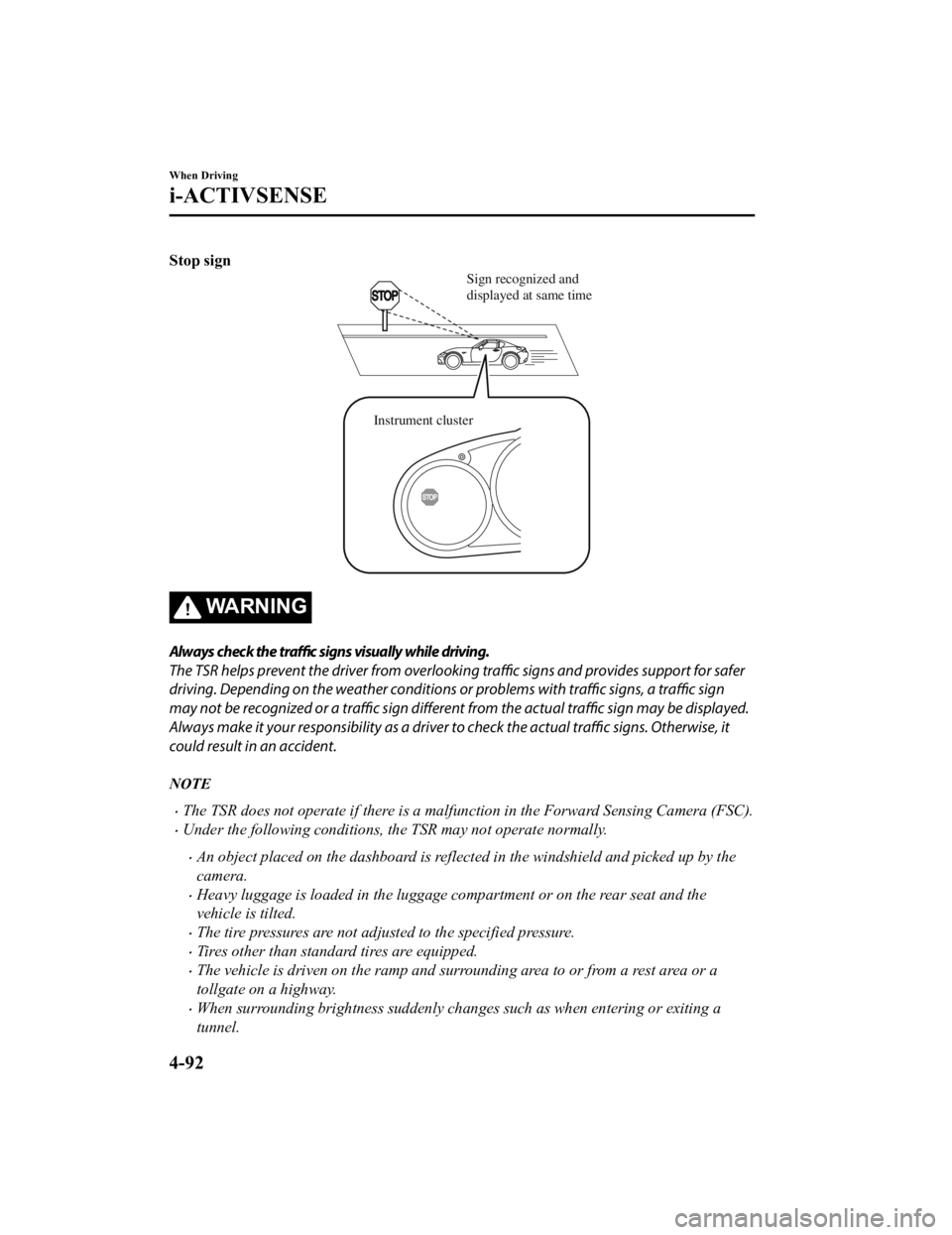
Stop sign
Sign recognized and
displayed at same time
Instrument cluster
WA R N I N G
Always check the traffic signs visually while driving.
The TSR helps prevent the driver from overlookin g traffic signs and provides support for safer
driving. Depending on the weather conditions or problems with traffic signs, a traffic sign
may not be recognized or a traffic sign different from the actual traffic sign may be displayed.
Always make it your responsibility as a driver to check the actual traffic signs. Otherwise, it
could result in an accident.
NOTE
The TSR does not operate if there is a malfunction in the Forward Sensing Camera (FSC).
Under the following conditions, the TSR may not operate normally.
An object placed on the dashboard is reflected in the windshield and picked up by the
camera.
Heavy luggage is loaded in the luggage compartment or on the rear seat and the
vehicle is tilted.
The tire pressures are not adjusted to the specified pressure.
Tires other than standard tires are equipped.
The vehicle is driven on the ramp and surrounding area to or from a rest area or a
tollgate on a highway.
When surrounding brightness suddenly changes such as when entering or exiting a
tunnel.
When Driving
i-ACTIVSENSE
4-92
MX-5_8GV5-EA-18E_Edition3 2018-7-17 15:48:16
Page 213 of 553
The illumination of the headlights is weakened because of dirt or the optical axis is
deviated.
The windshield is dirty or foggy.
The windshield and camera are fogged (water droplets).
Strong light is directed at the front of the vehicle (such as backlight or high-beam
headlights of on-coming vehicles).
The vehicle is making a sharp turn.
Strong light reflects off the road.
A traffic sign is in a position which makes it difficult to reflect the light from the
vehicle's headlights, such as when the vehicle is driven at night or in a tunnel.
The vehicle is driven under weather conditions such as rain, fog, or snow.
The stored map data for the navigation system is not current.
A traffic sign is obscured by mud or snow.
A traffic sign is concealed by trees or a vehicle.
A traffic sign is partially shaded.
A traffic sign is bent or warped.
A traffic sign is too low or too high.
A traffic sign is too bright or too dark (including electronic traffic signs).
A traffic sign is too big or too small.
There is an object similar to the traffic sign being read (such as another traffic sign or
other signs resembling it).
The TSR can be set to inoperable.
Refer to Personalization Features on page 9-9.
▼Traffic Sign Display Indication
The following traffic signs are d
isplayed on the multi-information display.
Speed limit signs
Do not enter signs
Stop signs
NOTE
Speed limit signs
When the vehicle speed is about 1 km/h (0.6 mph) or faster, the speed limit sign is
displayed when any one of the following conditions are met.
When Driving
i-ACTIVSENSE
4-93
MX-5_8GV5-EA-18E_Edition3 2018-7-17 15:48:16
Page 214 of 553

The Forward Sensing Camera (FSC) recognizes a speed limit sign as a sign targeted for
your vehicle and the vehicle passes it.
The speed limit sign stored in the navigation system is read (if the Forward Sensing
Camera (FSC) does not recognize a speed limit sign).
In the following cases, display of the speed limit sign stops.
The Forward Sensing Camera (FSC) recognizes the speed limit sign and the vehicle is
driven for a certain distance after passing the sign.
Each sensor determines that the vehicle has changed direction of travel.
The Forward Sensing Camera (FSC) recognizes a new speed limit sign which differs
from the previous one (displays the new speed limit sign).
The speed limit sign stored in the navigatio n system is not read within a certain period
of time (if the Forward Sensing Camera (FSC) does not recognize a speed limit sign,
the speed limit sign stored in th e navigation system is displayed).
The vehicle speed exceeds the displayed speed limit sign by 30 km/h (19 mph) or more
after a certain period of time has elapse d since the speed limit sign was displayed.
(Except when there is information for the speed limit sign in the navigation system)
Do not enter signs
A do not enter sign is displayed when all of the following conditions are met.
The vehicle speed is about 60 km/h (37 mph) or slower.
The Forward Sensing Camera (FSC) recognizes a do not enter sign as a sign targeted
for your vehicle and the vehicle passes it.
When the Forward Sensing Camera (FSC) recognizes the do not enter sign and a certain
period of time has elapsed since the vehicle passed the sign, display of the do not enter
sign stops.
Stop sign
A stop sign is displayed when all of the following conditions are met:
The vehicle speed is about 30 km/h (19 mph) or slower.
The Forward Sensing Camera (FSC) recognizes a stop sign as a sign targeted for your
vehicle.
When a certain period of time has elapsed since the stop sign was displayed, display of
the stop sign stops.
When Driving
i-ACTIVSENSE
4-94
MX-5_8GV5-EA-18E_Edition3 2018-7-17 15:48:16
Page 215 of 553

▼Excessive Speed Warning
If the vehicle speed exceeds the speed limit sign displayed in
the multi-information display,
the area around the speed limit s ign flashes 3 times in amber and the warning sound is
activated 3 times at the same time. If the vehicle speed contin ues to exceed the displayed
speed limit sign, the indication stops flashing and remains on. Check the surrounding
conditions and adjust the vehicle speed to the legal speed usin g the appropriate operation
such as depressing the brake pedal.
Instrument cluster Instrument cluster While 60 mph is displayed
50 mph is displayed
Vehicle driven at speed of 55 mph
The excessive speed warning is in
itially set to inoperable. If you want to activate the
excessive speed warning, change the setting in the personalizat ion features. In addition, the
warning pattern and the warning activation timing differ depending on the setting contents.
Refer to Personalization Features on page 9-9.
Warning pattern
Off: The excessive speed warning is not activated.
Visual: The area around the speed limit sign displayed in the d isplay flashes 3 times in
amber, and if the vehicle speed continues to exceed the display ed speed limit sign, the
indication stops flashing and remains on.
Audio & Visual: The area around t he speed limit sign displayed in the display flashes 3
times in amber and the warning sound is activated 3 times at th e same time. If the vehicle
speed continues to exceed the displayed speed limit sign, the i ndication stops flashing and
remains on.
When Driving
i-ACTIVSENSE
4-95
MX-5_8GV5-EA-18E_Edition3 2018-7-17 15:48:16
Page 219 of 553

The battery voltage has decreased.
Under the following conditions, the radar sensors (rear) cannot detect target objects or it
may be difficult to detect them.
The vehicle speed when reversing is about 10 km/h (6 mph) or faster.
The radar sensor (rear) detection area is obstructed by a nearby wall or parked vehicle.
(Reverse the vehicle to a position where the radar sensor detection area is no longer
obstructed.)
Your vehicle
A vehicle is approaching directly from the rear of your vehicle.
Your vehicle
The vehicle is parked on a slant.
Your vehicle
Directly after the Blind Spot Monitoring (BSM) system becomes operable using the
personalization feature.
Radio wave interference from a radar sensor equipped on a nearby parked vehicle.
In the following cases, it may be difficult to view the illumination/flashing of the Blind
Spot Monitoring (BSM) warning indicator lights equipped on the door mirrors.
Snow or ice adheres to the door mirrors.
The door glass is fogged or covered in snow, frost or dirt.
Turn off the RCTA system while pulling a trailer or while an accessory such as a bicycle
carrier is installed to the rear of the vehic le. Otherwise, the radio waves emitted by the
radar will be blocked causing the system to not operate normally.
When Driving
i-ACTIVSENSE
4-99
MX-5_8GV5-EA-18E_Edition3 2018-7-17 15:48:16
Page 224 of 553

Heed the following cautions to assure the correct operation of the Forward Sensing Camera
(FSC).
Be careful not to scratch the Forward Sensing Camera (FSC) lens or allow it to get dirty.
Do not remove the Forward Sensing Camera (FSC) cover.
Do not place objects on the dashboard which reflect light.
Always keep the windshield glass around the camera clean by removing dirt or fogging.
Use the windshield defroster to remove fogging on the windshield.
Consult an Authorized Mazda Dealer regardi ng cleaning the interior side of the
windshield around the Forw ard Sensing Camera (FSC).
Consult an Authorized Mazda Dealer before performing repairs around the Forward
Sensing Camera (FSC).
The Forward Sensing Camera (FSC) is installe d to the windshield. Consult an Authorized
Mazda Dealer for windshield repair and replacement.
When cleaning the wind shield, do not allow glass cleaners or similar cleaning fluids to
get on the Forward Sensing Camera (FSC) le ns. In addition, do not touch the Forward
Sensing Camera (FSC) lens.
When performing repairs around the rearv iew mirror, consult an Authorized Mazda
Dealer.
Consult an Authorized Mazda Dealer regarding cleaning of the camera lens.
Do not hit or apply strong force to the Forward Sensing Camera (FSC) or the area around
it. If the Forward Sensing Camera (FSC) is severely hit or if there are cracks or damage
caused by flying gravel or debris in the area around it, stop using the following systems
and consult an Authorized Mazda Dealer.
High Beam Control System (HBC)
Lane Departure Warning System (LDWS)
Traffic Sign Recognition System (TSR)
Smart City Brake Support (SCBS)
The direction in which the Forward Sensing Camera (FSC) is pointed has been finely
adjusted. Do not change the installation posi tion of the Forward Sensing Camera (FSC) or
remove it. Otherwise, it could result in damage or malfunction.
Always use tires for all wheels that are of the specified size, and the same manufacturer,
brand, and tread pattern. In addition, do no t use tires with significantly different wear
patterns on the same vehicle as the system may not operate normally.
The Forward Sensing Camera (FSC) includes a function for detecting a soiled windshield
and informing the driver, however, depending on the conditions, it may not detect plastic
shopping bags, ice or snow on the windshield. In such cases, the system cannot accurately
determine a vehicle ahead and may not be able to operate normally. Always drive carefully
and pay attention to the road ahead.
When Driving
i-ACTIVSENSE
4-104
MX-5_8GV5-EA-18E_Edition3 2018-7-17 15:48:16