Diff MAZDA MODEL MX-5 MIATA 2019 Owner's Guide
[x] Cancel search | Manufacturer: MAZDA, Model Year: 2019, Model line: MODEL MX-5 MIATA, Model: MAZDA MODEL MX-5 MIATA 2019Pages: 553, PDF Size: 59 MB
Page 225 of 553

NOTE
In the following cases, the Forward Sensing Camera (FSC) cannot detect target objects
correctly, and each system may be unable to operate normally.
The height of the vehicle ahead is low.
You drive your vehicle at the same speed as the vehicle ahead.
Headlights are not turned on during the night or when going through a tunnel.
In the following cases, the Forward Sensing Camera (FSC) may not be able to detect
target objects correctly.
Under bad weather condition, such as rain, fog and snow.
The window washer is being used or the windshield wipers are not used when it's
raining.
Ice, fog, snow, frost, rainfall, dirt, or foreign matter such as a plastic bag is stuck on the
windshield.
Trucks with low loading platforms and vehicl es with an extremely low or high profile.
When driving next to walls with no patterning (including fences and longitudinally
striped walls).
The taillights of the vehicle ahead are turned off.
A vehicle is outside the illumi nation range of the headlights.
The vehicle is making a sharp turn, or ascending or descending a steep slope.
Entering or exiting a tunnel.
Heavy luggage is loaded causing the vehicle to tilt.
Strong light is shone at the front of the vehicle (back light or high-beam light from
on-coming vehicles).
There are many light emitters on the vehicle ahead.
When the vehicle ahead is not equipped with taillights or the taillights are turned off at
nighttime.
Elongated luggage or cargo is loaded onto installed roof rails and covers the Forward
Sensing Camera (FSC).
Exhaust gas from the vehicle in front, sand, snow, and water vapor rising from
manholes and grating, and water splashed into the air.
When towing a malfunctioning vehicle.
The vehicle is driven with tires having significantly different wear.
The vehicle is driven on down slopes or bumpy roads.
There are water puddles on the road.
The surroundings are dark such as during the night, early evening, or early morning, or
in a tunnel or indoor parking lot.
The illumination brightness of the headlights is reduced or the headlight illumination is
weakened due to dirt or a deviated optical axis.
The target object enters the blind spot of the Forward Sensing Camera (FSC).
A person or object bursts onto the road from the shoulder or cuts right in front of you.
When Driving
i-ACTIVSENSE
4-105
MX-5_8GV5-EA-18E_Edition3 2018-7-17 15:48:16
Page 227 of 553
Radar Sensors (Rear)*
Your vehicle is equipped with radar sensors (rear). The following systems also use the radar
sensors (rear).
Blind Spot Monitoring (BSM)
Rear Cross Traffic Alert (RCTA)
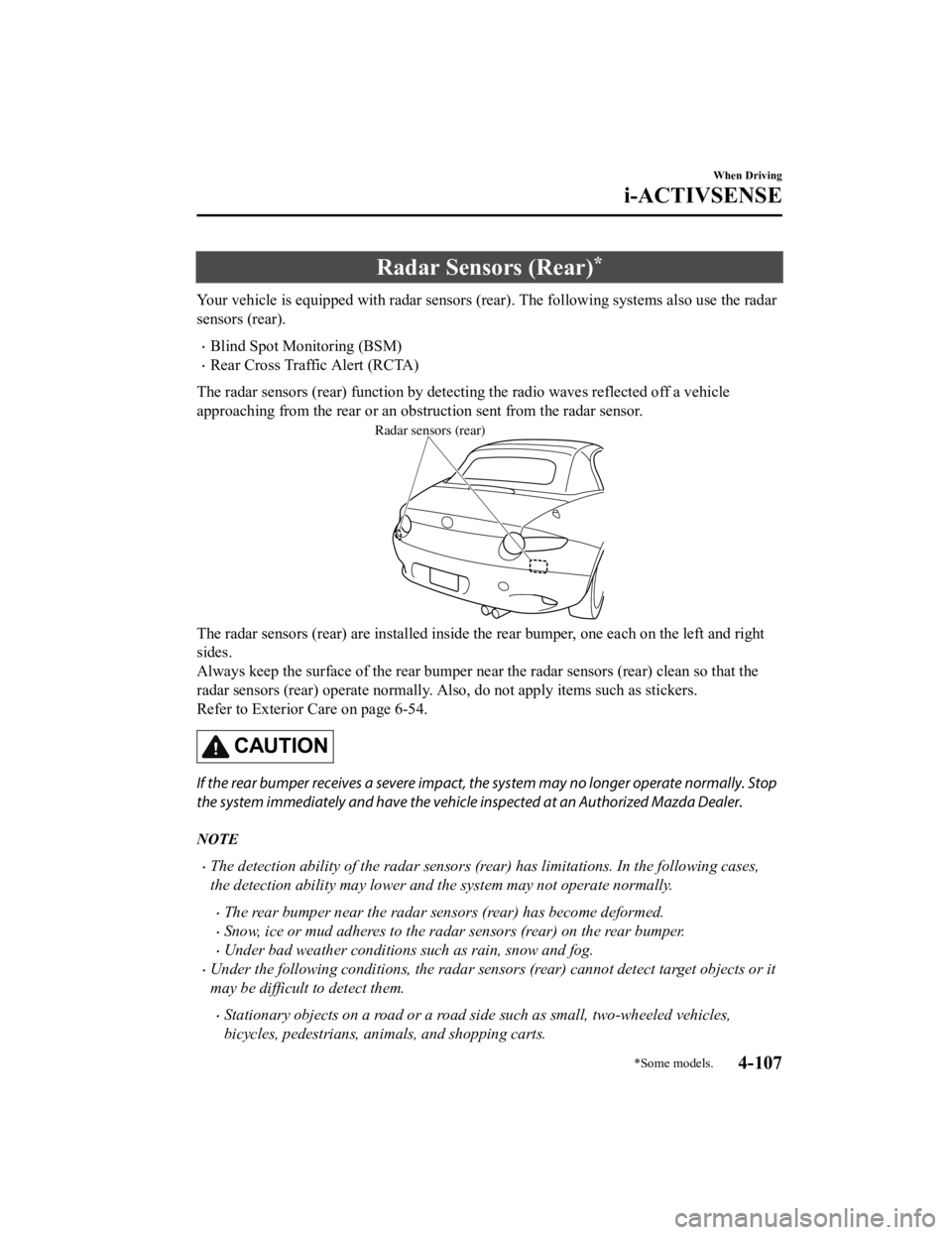
The radar sensors (rear) function by detecting the radio waves reflected off a vehicle
approaching from the rear or an obstruction sent from the radar sensor.
Radar sensors (rear)
The radar sensors (rear) are installed inside the rear bumper, one each on the left and right
sides.
Always keep the surface of the rear bumper near the radar senso rs (rear) clean so that the
radar sensors (rear) operate normally. Also, do not apply items such as stickers.
Refer to Exterior Care on page 6-54.
CAUTION
If the rear bumper receives a severe impact, the system may no longer operate normally. Stop
the system immediately and have the vehicle inspected at an Authorized Mazda Dealer.
NOTE
The detection ability of the radar sensors (rear) has limitations. In the following cases,
the detection ability may lower and the system may not operate normally.
The rear bumper near the radar sensors (rear) has become deformed.
Snow, ice or mud adheres to the radar sensors (rear) on the rear bumper.
Under bad weather conditions such as rain, snow and fog.
Under the following conditions, the radar sensors (rear) cannot detect target objects or it
may be difficult to detect them.
Stationary objects on a road or a road side such as small, two-wheeled vehicles,
bicycles, pedestrians, animals, and shopping carts.
When Driving
i-ACTIVSENSE
*Some models.4-107
MX-5_8GV5-EA-18E_Edition3 2018-7-17 15:48:16
Page 234 of 553
Tire Pressure Monitoring System
The Tire Pressure Monitoring System (TPMS) monitors the pressure for each tire.
If tire pressure is to o low in one or more tires, the system will inform the driver via the
warning light in the instrument cluster and by the warning beep sound.
Refer to Contact Authorized Mazda Dealer and Have Vehicle Inspected on page 7-36.
Refer to Taking Action on page 7-40.
Refer to Tire Inflation Pressu re Warning Beep on page 7-51.
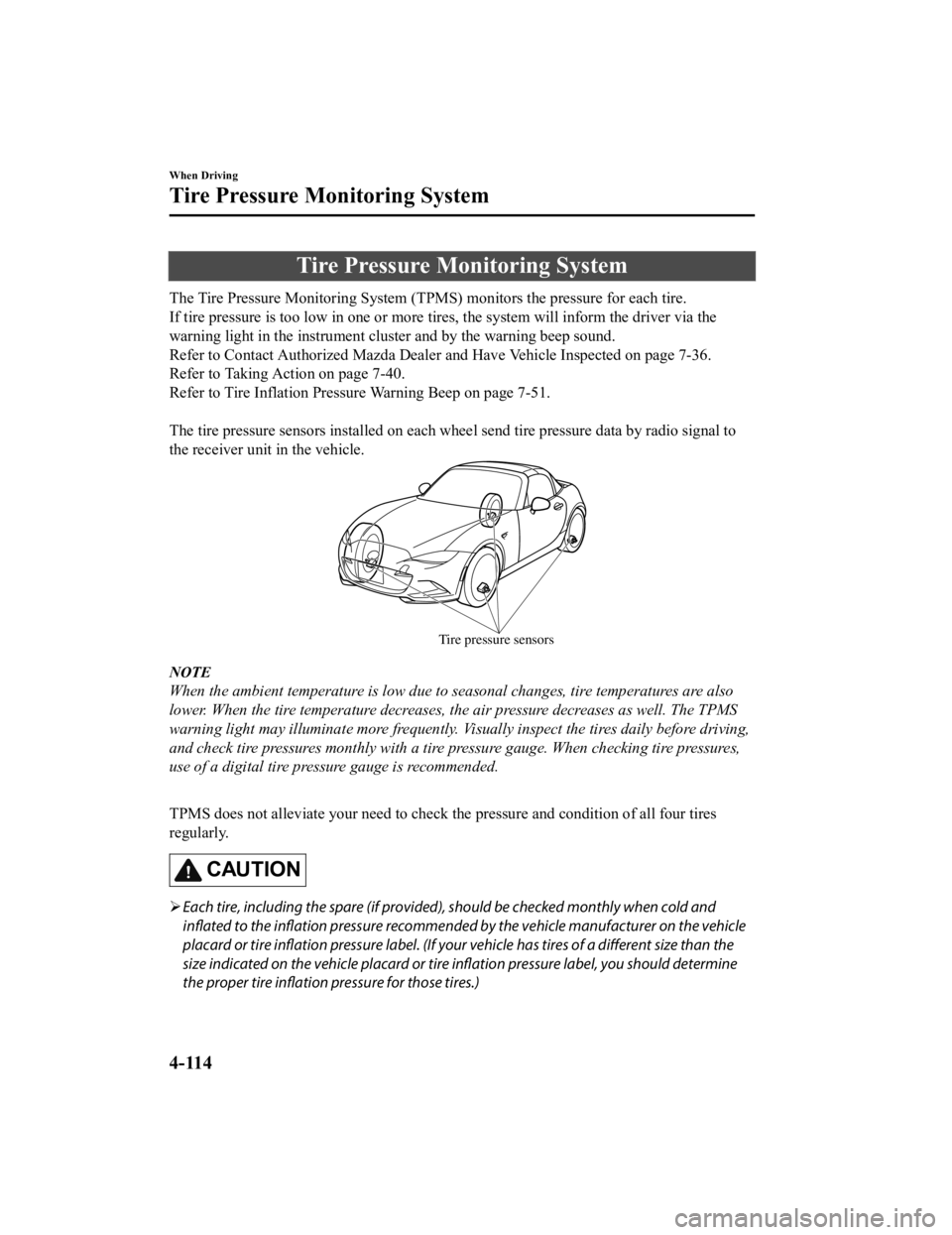
The tire pressure sensors installed on each wheel send tire pre ssure data by radio signal to
the receiver unit in the vehicle.
Tire pressure sensors
NOTE
When the ambient temperature is low due to seasonal changes, tire temperatures are also
lower. When the tire temperature decreases, the air pressure decreases as well. The TPMS
warning light may illumina te more frequently. Visually inspect the tires daily before driving,
and check tire pressures monthly with a tire pressure gauge. When checking tire pressures,
use of a digital tire pressure gauge is recommended.
TPMS does not alleviate your need to check the pressure and con dition of all four tires
regularly.
CAUTION
Each tire, including the spare (if provided), should be checked monthly when cold and
inflated to the inflation pressure recommended by the vehicle manufacturer on the vehicle
placard or tire inflation pressure label. (If your vehicle has tires of a different size than the
size indicated on the vehicle placard or tire in flation pressure label, you should determine
the proper tire inflation pressure for those tires.)
When Driving
Tire Pressure Monitoring System
4-114
MX-5_8GV5-EA-18E_Edition3 2018-7-17 15:48:16
Page 238 of 553
Rear View Monitor*
The rear view monitor provides visual images of the rear of the vehicle when reversing.
WA R N I N G
Always drive carefully
confirming the safety of the rear and the surrounding conditions by
looking directly with your eyes:
Reversing the vehicle by only looking at the screen is dangerous as it may cause an accident
or a collision with an object. The rear view monitor is only a visual assist device when
reversing the vehicle. The images on the screen may be different from the actual conditions.
CAUTION
Do not use the rear view monitor under the following conditions: Using the rear view
monitor under the following conditions is dang erous and could result in injury or vehicle
damage or both.
Icy or snow-covered roads.
Tire chains or a temporary spare tire is installed.
The vehicle is on a road incline.
When the display is cold, images may course across the monitor or the screen and may be
dimmer than usual, which could cause difficul ty in confirming the surrounding conditions
of the vehicle. Always drive carefully confirming the safety of the rear and the surrounding
conditions by looking directly with your eyes.
Do not apply excessive force to the camera. The camera position and angle may deviate.
Do not disassemble, modify, or remove it as it may no longer be waterproof.
The camera cover is made of plastic. Do not apply degreasing agents, organic solvents,
wax, or glass coating agents to the camera co ver. If any are spilled on the cover, wipe off
with a soft cloth immediately.
Do not rub the camera cover forcefully with an abrasive or hard brush. The camera cover or
lens may be scratched which might affect the images.
NOTE
If water, snow, or mud is stuck on the camera lens, wipe it off using a soft cloth. If it
cannot be wiped off, use a mild detergent.
If the camera temperature changes rapidly (Hot to cold, cold to hot), the rear view
monitor may not ope rate correctly.
When replacing the tires, consult an Author ized Mazda Dealer. Replacing the tires could
result in deviation of the guide lines which appear on the display.
When Driving
Rear View Monitor
4-118*Some models.
MX-5_8GV5-EA-18E_Edition3 2018-7-17 15:48:16
Page 239 of 553

If the vehicle's front, side, or rear has been involved in a collision, the alignment of the
rear view parking camera (location, installation angle) may have deviated. Always
consult an Authorized Mazda Dealer to have the vehicle inspected.
If “No Video Signal Available” is indicated in the display, there could be a problem with
the camera. Have your vehicle inspected at an Authorized Mazda Dealer.
The screen tone may differ from the actual tone for a while after the camera image is
displayed, however, this does not indicate a problem.
▼ Rear View Parking Camera Location
Rear view parking camera
▼Switching to the Rear View Monitor Display
Shift the shift lever/selector l
ever to R with the ignition swi tched ON to switch the display
to the rear view monitor display.
NOTE
When the shift lever/selector lever is shifted from R to another shift lever/selector lever
position, the screen return s to the previous display.
When Driving
Rear View Monitor
4-119
MX-5_8GV5-EA-18E_Edition3 2018-7-17 15:48:16
Page 240 of 553

▼Displayable Range on the Screen
The images on the screen may be different from the actual condi
tions.
(Screen display)
Bumper
(Actual view) Object
NOTE
The displayable range varies depending on the vehicle and road conditions.
The displayable range is limited. Objects under the bumper or around the bumper ends
cannot be displayed.
The distance appearing in the displayed image is different from the actual distance
because the rear view parking camera is equipped with a specific lens.
Some optionally installed vehicle accessories may be picked up by the camera. Do not
install any optional part s that can interfere with the camera view, such as illuminating
parts or parts made of reflective material.
It may be difficult to see the display under the following conditions, however, it does not
indicate a malfunction.
In darkened areas.
When the temperature around the lens is high/low.
When the camera is wet such as on a rainy day or during periods of high humidity.
When foreign material such as mud is stuck around the camera.
When the camera lens reflects sunlight or headlight beams.
Image display may be delayed if the temperature around the camera is low.
When Driving
Rear View Monitor
4-120
MX-5_8GV5-EA-18E_Edition3 2018-7-17 15:48:16
Page 243 of 553

NOTE
If the parking space has division lines, straighten the wheels when the vehicle width
guide lines are parallel to them.
Because there may be a difference between the displayed image, such as indicated
below, and the actual conditions when parking, always verify the safety at the rear of
the vehicle and the surrounding area directly with your eyes.
In the image of the parking space (or garage) displayed on the screen, the back end
and distance guide lines may appear aligned in the monitor, but they may not
actually be aligned on the ground.
When parking in a space with a division li ne on only one side of the parking space,
the division line and the vehicle width guide line appear aligned in the monitor, but
they may not actually be aligned on the ground.
▼ Variance Between Actual Road Con
ditions and Displayed Image
Some variance occurs between the actual road and the displayed road. Such variance in
distance perspective could lead to an accident. Note the follow ing conditions that may cause
a variance in distance perspective.
When the vehicle is tilted due to the weight of passengers and load
When the vehicle rear is lowered, the object displayed on the s creen appears farther than the
actual distance.
Variance Object
When Driving
Rear View Monitor
4-123
MX-5_8GV5-EA-18E_Edition3
2018-7-17 15:48:16
Page 244 of 553

When there is a steep grade behind the vehicle
When there is a steep upgrade (downgrade) behind the vehicle, the object displayed on the
screen appears farther (downgrade: closer) than the actual dist ance.
Appears
farther than
actual
distanceAppears
closer than
actual
distance
Object at actual
position
Object at actual position
Object on screen
A: Distance between the vehicle and object displayed on the screen.
B: Actual distance between the vehicle and object. Object on screen
A
AB
B
Three-dimensional object on vehicle rear
Because the distance guide lines are displayed based on a flat surface, the distance to the
three-dimensional object displayed on the screen is different from the actual distance.
A
A
C B
CB
(Actual distance) B>C=A
Sensed distance on screen A>B>C (Screen display)
(Actual condition)
▼Picture Quality Adjustment
WA R N I N G
Always adjust the picture quality of the rear view monitor while the vehicle is stopped:
Do not adjust the picture quality of the rear vi
ew monitor while driving the vehicle. Adjusting
the picture quality of the rear view monitor such as brightness, contrast, color, and tint while
driving the vehicle is dangerous as it could di stract your attention from the vehicle operation
which could lead to an accident.
When Driving
Rear View Monitor
4-124
MX-5_8GV5-EA-18E_Edition3 2018-7-17 15:48:16
Page 264 of 553
Basic Operation Method
NOTE
The explanation of functions described in this manual may differ from the actual
operation, and the shapes of screens and buttons and the letters and characters displayed
may also differ from the actual appearance.
Additionally, depending on future software updates, the content may successively change
without notice.
For additional information regarding Mazda Connect, please refer to the following
Website.
http://infotainment.mazdahandsfree.com/
Audio Set has 3 different human interfaces.
Commander switch
Touch panel
Voice recognition with steering switch and microphone
Refer to Voice Recognition on page 5-73.
▼ Commander switch operation
NOTE
For safety reasons, some operations are disabled while the vehicle is being driven.
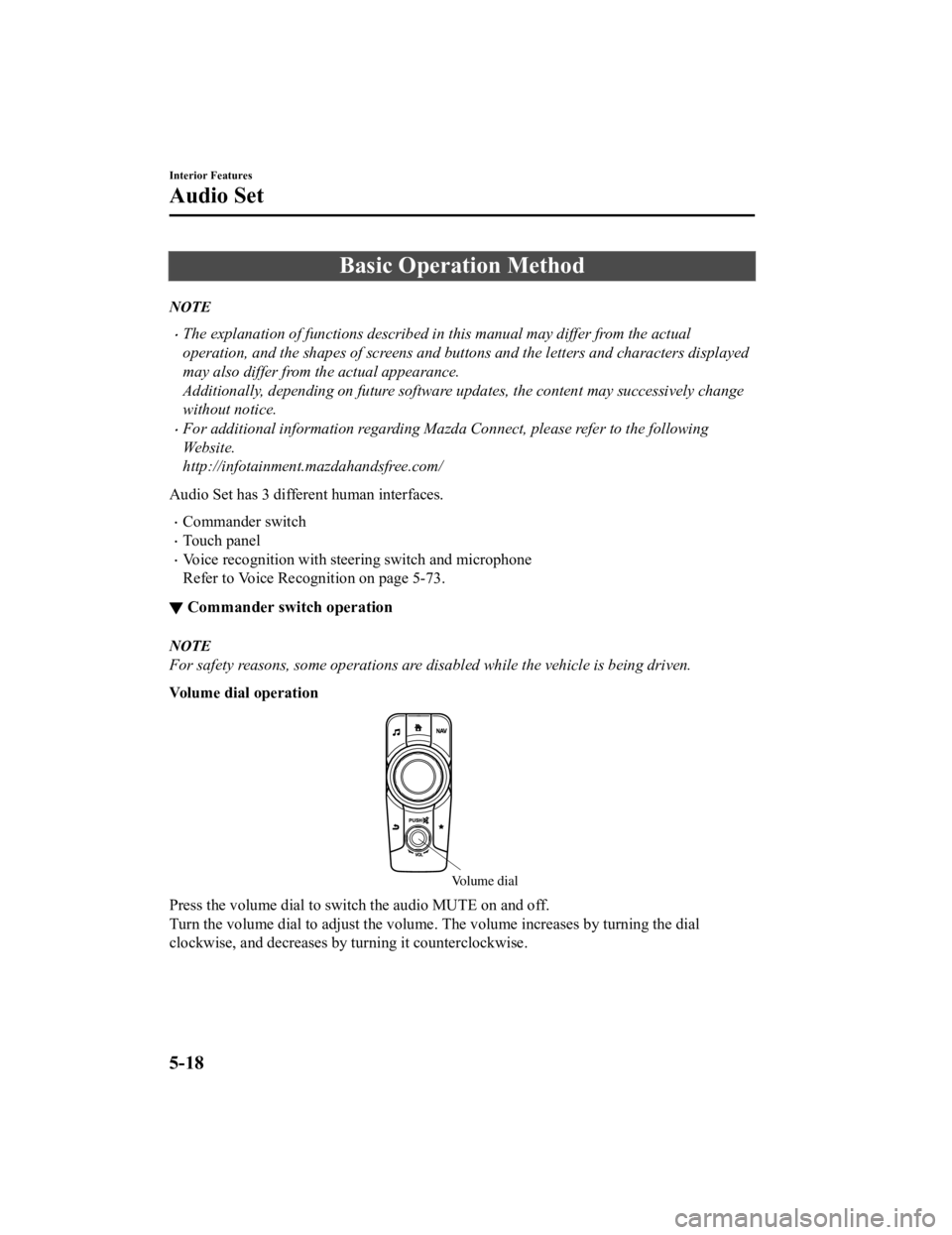
Volume dial operation
Volume dial
Press the volume dia
l to switch the audio MUTE on and off.
Turn the volume dial to adjust the volume. The volume increases by turning the dial
clockwise, and decreases by turning it counterclockwise.
Interior Features
Audio Set
5-18
MX-5_8GV5-EA-18E_Edition3 2018-7-17 15:48:16
Page 268 of 553
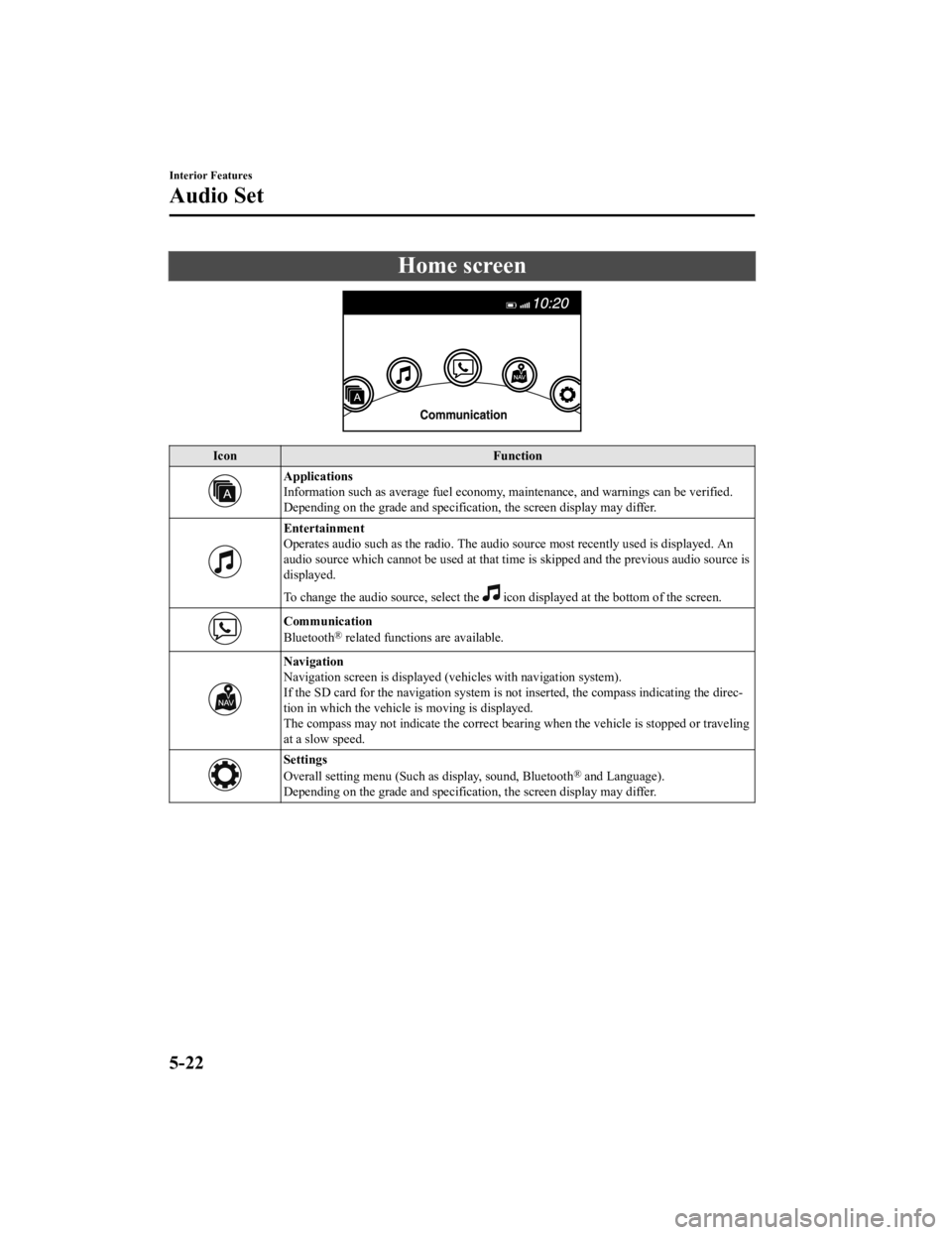
Home screen
IconFunction
Applications
Information such as average fuel economy, maintenance, and warn ings can be verified.
Depending on the grade and specification, the screen display ma y differ.
Entertainment
Operates audio such as the radio. The audio source most recently used is displayed. An
audio source which cannot be used at that time is skipped and t he previous audio source is
displayed.
To change the audio source, select the
icon displayed at the bottom of the screen.
Communication
Bluetooth® related functions are available.
Navigation
Navigation screen is displayed (v ehicles with navigation system).
If the SD card for the navigation system is not inserted, the c ompass indicating the direc‐
tion in which the vehicle is moving is displayed.
The compass may not indicate th e correct bearing when the vehicle is stopped or traveling
at a slow speed.
Settings
Overall setting menu (Such as display, sound, Bluetooth® and Language).
Depending on the grade and specification, the screen display ma y differ.
Interior Features
Audio Set
5-22
MX-5_8GV5-EA-18E_Edition3 2018-7-17 15:48:16