Port MAZDA MODEL MX-5 MIATA 2021 Owner's Manual
[x] Cancel search | Manufacturer: MAZDA, Model Year: 2021, Model line: MODEL MX-5 MIATA, Model: MAZDA MODEL MX-5 MIATA 2021Pages: 499, PDF Size: 6.83 MB
Page 175 of 499

CAUTION
Do not shade the light sensor by adhering a st icker or a label on the windshield. Otherwise
the light sensor will not operate correctly.
The light sensor also works as a rain sensor for the auto-wiper control. Keep hands and
scrapers clear of the windshield when the wiper lever is in the AUTO position and the
ignition is switched ON as fingers could be pinched or the wipers and wiper blades could be
damaged when the wipers activate automaticall y. If you are going to clean the windshield,
be sure the wipers are turned off completely wh en it is particularly tempting to leave the
engine running. This is particularly important when clearing ice and snow.
NOTE
The headlights, other exterior lights and dashboard illumination may not turn off
immediately even if the surrounding area becomes well-lit because the light sensor
determines that it is night time if the surrounding area is continuously dark for several
minutes such as inside long tunnels, traffic jams inside tunnels, or in indoor parking lots.
In this case, the lights turn off if the li ght switch is turned to the OFF position.
If the headlight switch and the windshield wiper switch are in AUTO, and the wipers are
operated at low or high speed by the auto wiper control for several seconds, bad weather
conditions are determined and the headlights may be turned on.
The sensitivity of the auto-light control may be changed.
Refer to the Mazda Connect Owner's Manual.
When Driving
Switches and Controls
4-48
MX-5_8JS9-EA-20K_Edition1_old 2020-8-28 13:50:01
Page 197 of 499

Drive Selection*
Drive selection is a system to switch the vehicle's drive mode. When the sport mode is
selected, the vehicle's response against accelerator operation is enhanced. This provides
additional quick acceleration which may be needed to safely mak e maneuvers such as lane
changes, merging onto freeways, or passing other vehicles.
CAUTION
Do not use the sport mode when driving on slip pery roads such as wet or snow-covered roads.
It may cause tire slipping.
NOTE
When sport mode is selected, driving at higher engine speeds may increase fuel
consumption. Mazda recommends that you cancel sport mode for normal driving.
Drive mode cannot be switched in the following conditions:
ABS/TCS/DSC is operating
Cruise control is operating.
Steering wheel is being operated abruptly
▼ Drive Selection Switch
Press the drive sele
ction switch forward
(“
”) to select the sport mode.
Pull the drive selection switch back
(“
”) to cancel the sport mode.
NOTE
In the following cases, the drive
selection is canceled.
The ignition is switched OFF.
Cruise control is set.
Depending on the driving conditions
when sport mode is selected, the vehicle
may perform shift-down or slightly
accelerate.
When Driving
Drive Selection
4-70*Some models.
MX-5_8JS9-EA-20K_Edition1_old 2020-8-28 13:50:01
Page 198 of 499
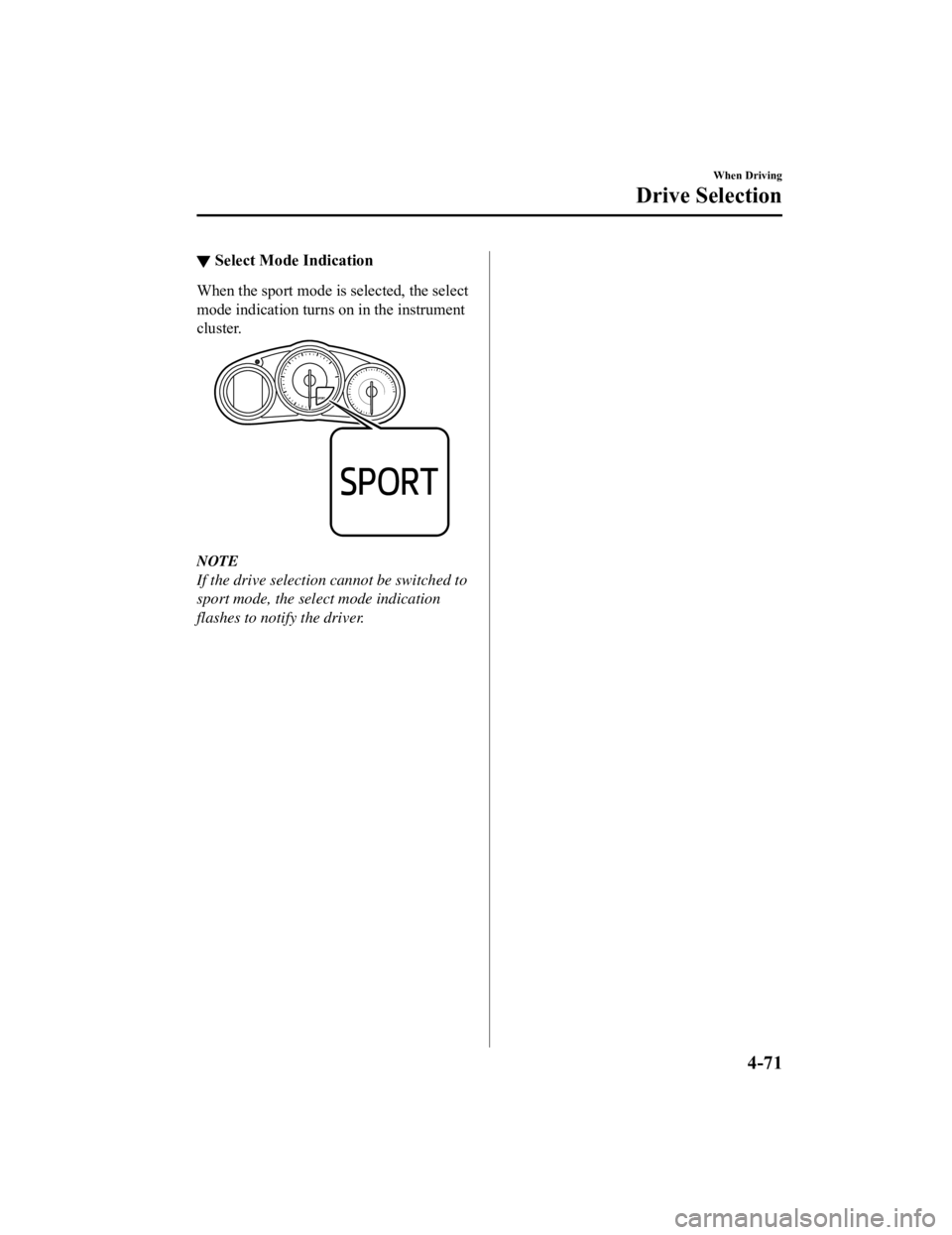
▼Select Mode Indication
When the sport mode i
s selected, the select
mode indication turns on in the instrument
cluster.
NOTE
If the drive selection cannot be switched to
sport mode, the select mode indication
flashes to noti fy the driver.
When Driving
Drive Selection
4-71
MX-5_8JS9-EA-20K_Edition1_old 2020-8-28 13:50:01
Page 200 of 499

i-ACTIVSENSE*
i-ACTIVSENSE is a collective term covering a series of advanced safety and driver support
systems which make use of a Forward Sensing Camera (FSC) and ra dar sensors. These
systems consist of active safety and pre-crash safety systems.
These systems are designed to assist the driver in safer drivin g by reducing the load on the
driver and helping to avert collisions or reduce their severity . However, because each system
has its limitations, always drive carefully and do not rely sol ely on the systems.
▼Active Safety Technology
Active Safety Technology supports safer driving by helping the
driver to recognize potential
hazards and avert accidents.
Driver awareness support systems
Nighttime visibility
Adaptive Front Lighting System (AFS)..................................................................... page 4-75
High Beam Control System (HBC)............................................................................ page 4-76
Left/right side and rear side detection
Lane Departure War ning System (LDWS)........................... ......................................page 4-79
Blind Spot Monitoring (BSM).................................... ............................................... page 4-85
Road sign recognition
Traffic Sign Recognition System (TSR).......................... .......................................... page 4-90
Rear obstruction detection wh en leaving a parking space
Rear Cross Traffic Alert (RCTA)................................ ............................................... page 4-96
▼Pre-Crash Safety Technology
Pre-crash safety technology is de
signed to assist the driver in averting collisions or reduce
their severity in situations where they cannot be avoided.
Collision damage reduction in low vehicle speed range
Forward driving
Smart City Brake Support (SCBS)............................................................................. page 4-99
When Driving
i-ACTIVSENSE
*Some models.4-73
MX-5_8JS9-EA-20K_Edition1_old 2020-8-28 13:50:01
Page 201 of 499

▼Camera and Sensors
Forward sensing camera (FSC)
The Forward Sensing Camera (FSC) determines the conditions ahea
d of the vehicle while
traveling at night and detects traffic lanes. The following systems also use the Forward
Sensing Camera (FSC).
High Beam Control system (HBC)
Lane Departure Warning System (LDWS)
Traffic Sign Recognition System (TSR)
Smart City Brake Support (SCBS)
The Forward Sensing Camera (FSC) is installed at the top of the windshield near the
rearview mirror.
Refer to Forward Sensing Camera (FSC) on page 4-103.
Radar sensors (rear)
The radar sensors (rear) function by detecting the radio waves reflected off a vehicle
approaching from the rear or an obstruction sent from the radar sensors. The following
systems also use the radar sensors (rear).
Blind Spot Monitoring (BSM)
Rear Cross Traffic Alert (RCTA)
The radar sensors (rear) are inst alled inside the rear bumper, one each on the left and right
sides.
Refer to Radar S ensors (Rear) on page 4-107.
When Driving
i-ACTIVSENSE
4-74
MX-5_8JS9-EA-20K_Edition1_old 2020-8-28 13:50:01
Page 217 of 499
Traffic Sign Recognition System (TSR)*
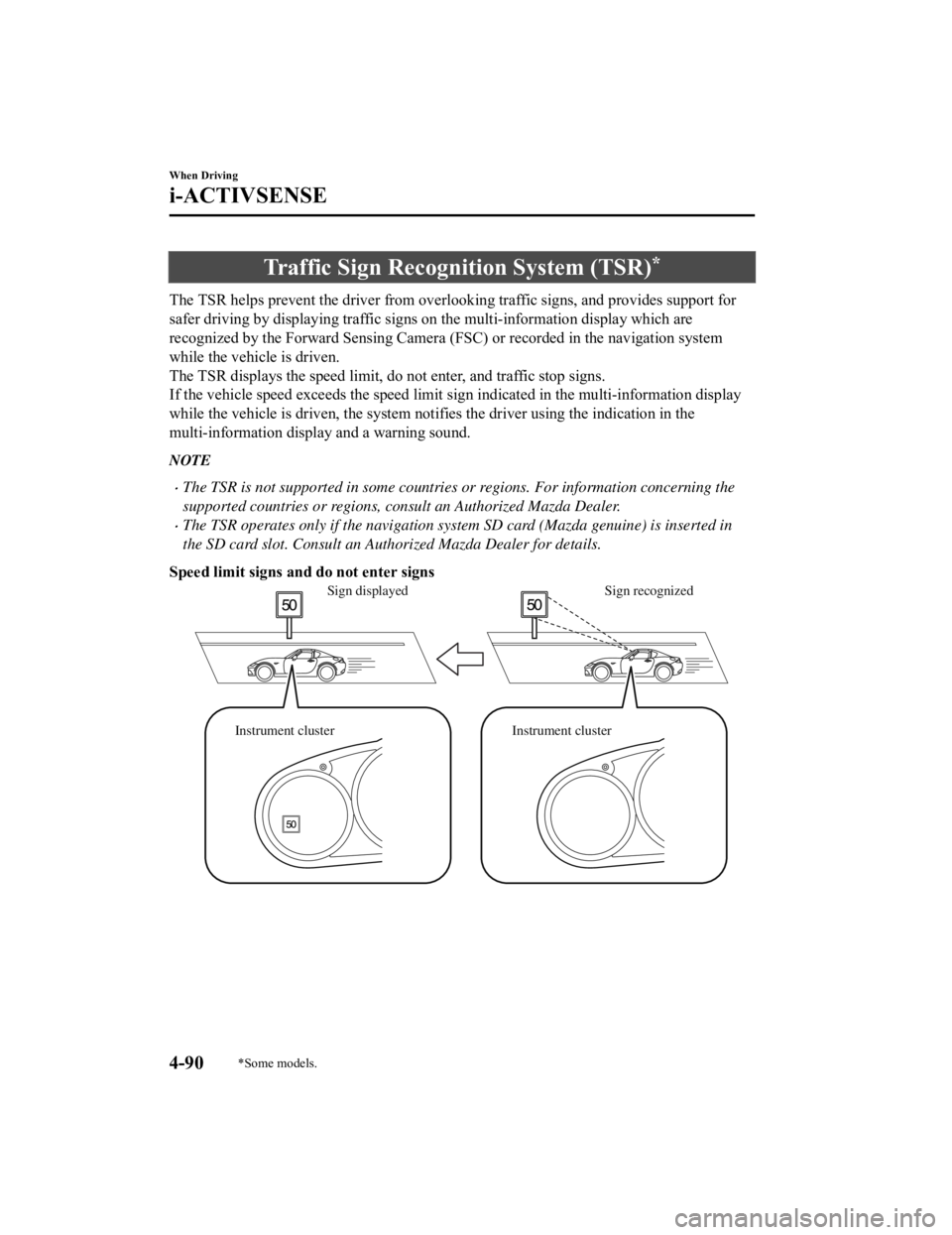
The TSR helps prevent the driver from overlooking traffic signs , and provides support for
safer driving by displaying traff ic signs on the multi-information display which are
recognized by the Forward Sensi ng Camera (FSC) or recorded in the navigation system
while the vehicle is driven.
The TSR displays the speed limit , do not enter, and traffic stop signs.
If the vehicle speed exceeds the speed limit sign indicated in the multi-information display
while the vehicle is driven, the system notifies the driver usi ng the indication in the
multi-information display and a warning sound.
NOTE
The TSR is not supported in some countries or regions. For information concerning the
supported countries or regions, consult an Authorized Mazda Dealer.
The TSR operates only if the navigation system SD card (Mazda genuine) is inserted in
the SD card slot. Consult an Authorized Mazda Dealer for details.
Speed limit signs and do not enter signs
Sign recognized
Sign displayed
Instrument cluster Instrument cluster
When Driving
i-ACTIVSENSE
4-90*Some models.
MX-5_8JS9-EA-20K_Edition1_old 2020-8-28 13:50:01
Page 218 of 499

Stop sign
Sign recognized and
displayed at same time
Instrument cluster
WARNING
Always check the traffic signs visually while driving.
The TSR helps prevent the driver from overlookin g traffic signs and provides support for safer
driving. Depending on the weather conditions or problems with traffic signs, a traffic sign
may not be recognized or a traffic sign different from the actual traffic sign may be displayed.
Always make it your responsibility as a driver to check the actual traffic signs. Otherwise, it
could result in an accident.
NOTE
The TSR does not operate if there is a malf unction in the Forward Sensing Camera (FSC).
Under the following conditions, the TSR may not operate normally.
An object placed on the dashboard is reflected in the windshield and picked up by the
camera.
Heavy luggage is loaded in the luggage compartment or on the rear seat and the
vehicle is tilted.
The tire pressures are not adjusted to the specified pressure.
Tires other than standard tires are equipped.
The vehicle is driven on the ramp and surrounding area to or from a rest area or a
tollgate on a highway.
When surrounding brightness suddenly changes such as when entering or exiting a
tunnel.
When Driving
i-ACTIVSENSE
4-91
MX-5_8JS9-EA-20K_Edition1_old 2020-8-28 13:50:01
Page 226 of 499

Smart City Brake Support (SCBS)*
The SCBS system alerts the driver of a possible collision using an indication in the display
and a warning sound when the Forward Sensing Camera (FSC) detec ts a vehicle ahead and
determines that a collision with a vehicle ahead is unavoidable while the vehicle is being
driven at a vehicle speed of about 4 to 80 km/h (2 to 50 mph). In addition, the system
reduces damage in the event of a collision by operating the bra ke control (Smart City Brake
Support (SCBS) brake) when the system determines that a collisi on is unavoidable while the
vehicle is being driven at a vehicle speed of about 4 to 30 km/ h (2 to 18 mph). It may also
be possible to avoid a collision if the relative s peed between your vehicle and the vehicle in
front of you is less than about 20 km/h (12 mph). In addition, when the driver depresses the
brake pedal while the system is in the operation range at about 4 to 30 km/h (2 to 18 mph),
the brakes are applied firmly and quickly to assist. (Brake Ass ist (Smart City Brake Support
(SCBS) brake assist))
Forward Sensing
Camera (FSC)
WARNING
Do not rely completely on the SCBS system:
The SCBS system is only designed to reduce da mage in the event of a collision. Over reliance
on the system leading to the accelerator pe dal or brake pedal being mistakenly operated
could result in an accident.
The SCBS is a system which operates in respon se to a vehicle ahead. The system may not be
able to detect or react to 2- wheeled vehicles or pedestrians.
When Driving
i-ACTIVSENSE
*Some models.4-99
MX-5_8JS9-EA-20K_Edition1_old 2020-8-28 13:50:01
Page 227 of 499

CAUTION
In the following cases, turn the system off to prevent a mis-operation:
The vehicle is being towed or when towing another vehicle.
The vehicle is on a chassis roller.
When driving on rough roads such as in areas of dense grass or off-road.
Refer to Stopping the Smart City Brake Support (SCBS) system Operation on page 4-102 on
how to turn off the SCBS system.
NOTE
The SCBS system will operate under the following conditions.
The engine is running.
The Smart City Brake Support (SCBS) system warning indication/warning light (amber)
does not illuminate.
(Rear-end coll ision warning)
The vehicle speed is about 4 to 80 km/h (2 to 50 mph).
(Brake control (Smart City Brake Support (SCBS) brake))
The vehicle speed is about 4 to 30 km/h (2 to 18 mph).
The SCBS system is not turned off.
Under the following conditions, the SCBS system may not operate normally:
The SCBS system will not operate if the driver is deliberately performing driving
operations (accelerator pedal and steering wheel).
If there is the possibility of pa rtial contact with a vehicle ahead.
The vehicle is driven on a slippery road surface such as wet roads or icy or snow-bound
roads.
The braking performance is adversely affected due to cold temperatures or wet brakes.
The vehicle is driven at the same speed as the vehicle ahead.
The accelerator pedal is depressed.
The brake pedal is depressed.
The steering wheel is being operated.
The selector lever is being operated.
In the following cases, the Forward Sensing Camera (FSC) determines that there is a
vehicle ahead and the SCBS may operate.
Objects on the road at the entrance to a curve.
Vehicles passing in the opposite lane while making a curve.
Metal objects, bumps, or protruding objects on the road.
When passing through a toll gate.
When passing through low gates, narrow gates, car washing machines, or tunnels.
When Driving
i-ACTIVSENSE
4-100
MX-5_8JS9-EA-20K_Edition1_old 2020-8-28 13:50:01
Page 228 of 499

If you suddenly come close to a vehicle ahead.
2-wheeled vehicles, pedestrians, animals or standing trees.
Vehicle is driven with some of the tires having significant wear.
(Manual transmission)
If the vehicle is stopped by the Smart City Brake Support (SCBS) operation and the clutch
pedal is not depressed, the engine stops.
▼Smart City Brake Support (SCBS)
Indicator Light (Red)*
If the Smart City Bra
ke Support (SCBS) is
operating, the indicator light (red) flashes.
▼ Collision Warning*
If there is the possibili
ty of a collision with
a vehicle ahead, the beep sounds
continuously and a warning is indicated in
the multi-inform ation display.
NOTE
The operation distance and volume of the
collision warning can be changed. Refer
to the Settings se ction in the Mazda
Connect Owner's Manual.
▼ Automatic Brake Operation
Display*
The automatic brake operation display is
indicated on the multi-information display
after the SCBS is operated.
NOTE
The collision warning beep sounds
intermittently while the SCBS brake or
brake assist (SCBS brake assist) is
operating.
If the vehicle is stopped by the SCBS
operation and the brake pedal is not
depressed, the warning beep sounds 1
time after about 2 seconds and the SCBS
brake is automatically released.
When Driving
i-ACTIVSENSE
*Some models.4-101
MX-5_8JS9-EA-20K_Edition1_old
2020-8-28 13:50:01