Port MAZDA MODEL MX-5 MIATA 2021 Owner's Guide
[x] Cancel search | Manufacturer: MAZDA, Model Year: 2021, Model line: MODEL MX-5 MIATA, Model: MAZDA MODEL MX-5 MIATA 2021Pages: 499, PDF Size: 6.83 MB
Page 229 of 499

▼Stopping the Smart City Brake
Support (SCBS) System Operation
The SCBS system can be temporarily
deactivated.
Refer to the Settings section in the Mazda
Connect Owner's Manual.
When the SCBS system is turned off, the
Smart City Brake Support (SCBS) OFF
indicator light turns on.
When the engine is restarted, the system
becomes operational.
When Driving
i-ACTIVSENSE
4-102
MX-5_8JS9-EA-20K_Edition1_old
2020-8-28 13:50:01
Page 230 of 499

Forward Sensing Camera (FSC)*
Your vehicle is equipped with a Forward Sensing Camera (FSC). The Forward Sensing
Camera (FSC) is positioned near t he rearview mirror and used by the following systems.
High Beam Control System (HBC)
Lane Departure Warning System (LDWS)
Traffic Sign Recognition System (TSR)
Smart City Brake Support (SCBS)
Forward Sensing Camera (FSC)
The Forward Sensing Camera (FSC) determines the conditions ahead of the vehicle while
traveling at night and detects traffic lanes. The distance in w hich the Forward Sensing
Camera (FSC) can detect objects varies depending on the surroun ding conditions.
WARNING
Do not modify the suspension:
If the vehicle height or inclination is changed, the system will not be able to correctly detect
vehicles ahead. This will result in the system not operating normally or mistakenly operating,
which could cause a serious accident.
CAUTION
Do not apply accessories, stickers or film to the windshield near the Forward Sensing
Camera (FSC).
If the area in front of the Forward Sensing Came ra (FSC) lens is obstructed, it will cause the
system to not operate correctly. Consequently, each system may not operate normally
which could lead to an unexpected accident.
Do not disassemble or modify th e Forward Sensing Camera (FSC).
Disassembly or modification of the Forward Sensing Camera (FSC) will cause a malfunction
or mistaken operation. Consequently, each sy stem may not operate normally which could
lead to an unexpected accident.
When Driving
i-ACTIVSENSE
*Some models.4-103
MX-5_8JS9-EA-20K_Edition1_old 2020-8-28 13:50:01
Page 231 of 499

Heed the following cautions to assure the correct operation of the Forward Sensing Camera
(FSC).
Be careful not to scratch the Forward Sensing Camera (FSC) lens or allow it to get dirty.
Do not remove the Forward Sensing Camera (FSC) cover.
Do not place objects on the dashboard which reflect light.
Always keep the windshield glass around the camera clean by removing dirt or fogging.
Use the windshield defroster to remove fogging on the windshield.
Consult an Authorized Mazda Dealer regardi ng cleaning the interior side of the
windshield around the Forw ard Sensing Camera (FSC).
Consult an Authorized Mazda Dealer before performing repairs around the Forward
Sensing Camera (FSC).
The Forward Sensing Camera (FSC) is installe d to the windshield. Consult an Authorized
Mazda Dealer for windshield repair and replacement.
When cleaning the wind shield, do not allow glass cleaners or similar cleaning fluids to
get on the Forward Sensing Camera (FSC) le ns. In addition, do not touch the Forward
Sensing Camera (FSC) lens.
When performing repairs around the rearv iew mirror, consult an Authorized Mazda
Dealer.
Consult an Authorized Mazda Dealer regarding cleaning of the camera lens.
Do not hit or apply strong force to the Forward Sensing Camera (FSC) or the area around
it. If the Forward Sensing Camera (FSC) is severely hit or if there are cracks or damage
caused by flying gravel or debris in the area around it, stop using the following systems
and consult an Authorized Mazda Dealer.
High Beam Control System (HBC)
Lane Departure Warning System (LDWS)
Traffic Sign Recognition System (TSR)
Smart City Brake Support (SCBS)
The direction in which the Forward Sensing Camera (FSC) is pointed has been finely
adjusted. Do not change the installation posi tion of the Forward Sensing Camera (FSC) or
remove it. Otherwise, it could result in damage or malfunction.
Always use tires for all wheels that are of the specified size, and the same manufacturer,
brand, and tread pattern. In addition, do no t use tires with significantly different wear
patterns on the same vehicle as the system may not operate normally.
The Forward Sensing Camera (FSC) includes a function for detecting a soiled windshield
and informing the driver, however, depending on the conditions, it may not detect plastic
shopping bags, ice or snow on the windshield. In such cases, the system cannot accurately
determine a vehicle ahead and may not be able to operate normally. Always drive carefully
and pay attention to the road ahead.
When Driving
i-ACTIVSENSE
4-104
MX-5_8JS9-EA-20K_Edition1_old 2020-8-28 13:50:01
Page 233 of 499

You change lanes and approach a vehicle ahead.
When driving extremely close to the target object.
Tire chains or a temporary spare tire is installed.
The vehicle ahead has a special shape. For example, a vehicle towing a trailer house or
a boat, or a vehicle carrier carrying a vehicle with its front pointed rearward.
If the Forward Sensing Camera (FSC) cannot operate normally due to backlight or fog,
the system functions related to the Forward Sensing Camera (FSC) are temporarily
stopped and the following warning lights turn on. However, this does not indicate a
malfunction.
High Beam Control System (HBC) warning light (amber)
Lane Departure Warning System (LDW S) warning indication/warning light
Smart City Brake Support (SCBS) warn ing indication/warning light (amber)
If the Forward Sensing Camera (FSC) cannot operate normally due to high temperatures,
the system functions related to the Forward Sensing Camera (FSC) are temporarily
stopped and the following warn ing lights turn on. However, this does not indicate a
malfunction. Cool down the area around the Forward Sensing Camera (FSC) such as by
turning on the air conditioner.
High Beam Control System (HBC) warning light (amber)
Lane Departure Warning System (LDW S) warning indication/warning light
Smart City Brake Support (SCBS) warn ing indication/warning light (amber)
If the Forward Sensing Camera (FSC) detects that the windshield is dirty or foggy, the
system functions related to the Forward Sensing Camera (FSC) are temporarily stopped
and the following warning lights turn on. Ho wever, this does not indicate a problem.
Remove the dirt from the windshield or press the defroster switch and defog the
windshield.
High Beam Control System (HBC) warning light (amber)
Lane Departure Warning System (LDW S) warning indication/warning light
Smart City Brake Support (SCBS) warn ing indication/warning light (amber)
If there are recognizable cracks or damage caused by flying gravel or debris on the
windshield, always have the windshield replaced. Consult an Authorized Mazda Dealer
for replacement.
When Driving
i-ACTIVSENSE
4-106
MX-5_8JS9-EA-20K_Edition1_old 2020-8-28 13:50:01
Page 235 of 499

Vehicle shapes which do not reflect radar waves well such as empty trailers with a low
vehicle height and sports cars.
Vehicles are shipped with the direction of the radar sensors (rear) adjusted for each
vehicle to a loaded vehicle condition so that the radar sensors (rear) detect approaching
vehicles correctly. If the direction of the radar sensors (rear) has deviated for some
reason, have the vehicle inspected at an Authorized Mazda Dealer.
For repairs or replacement of the radar sensors (rear), or bumper repairs, paintwork, and
replacement near the radar sensors, consult an Authorized Mazda Dealer.
Turn off the system while pulling a trailer or while an accessory such as a bicycle carrier
is installed to the rear of the vehicle. Otherwise, the radio waves emitted by the radar will
be blocked causing the system to not operate normally.
The radar sensors are regulated by the relevant radio wave laws of the country in which
the vehicle is driven. If the vehicle is driven abroad, authorization from the country in
which the vehicle is driven may be required.
When Driving
i-ACTIVSENSE
4-108
MX-5_8JS9-EA-20K_Edition1_old 2020-8-28 13:50:01
Page 267 of 499
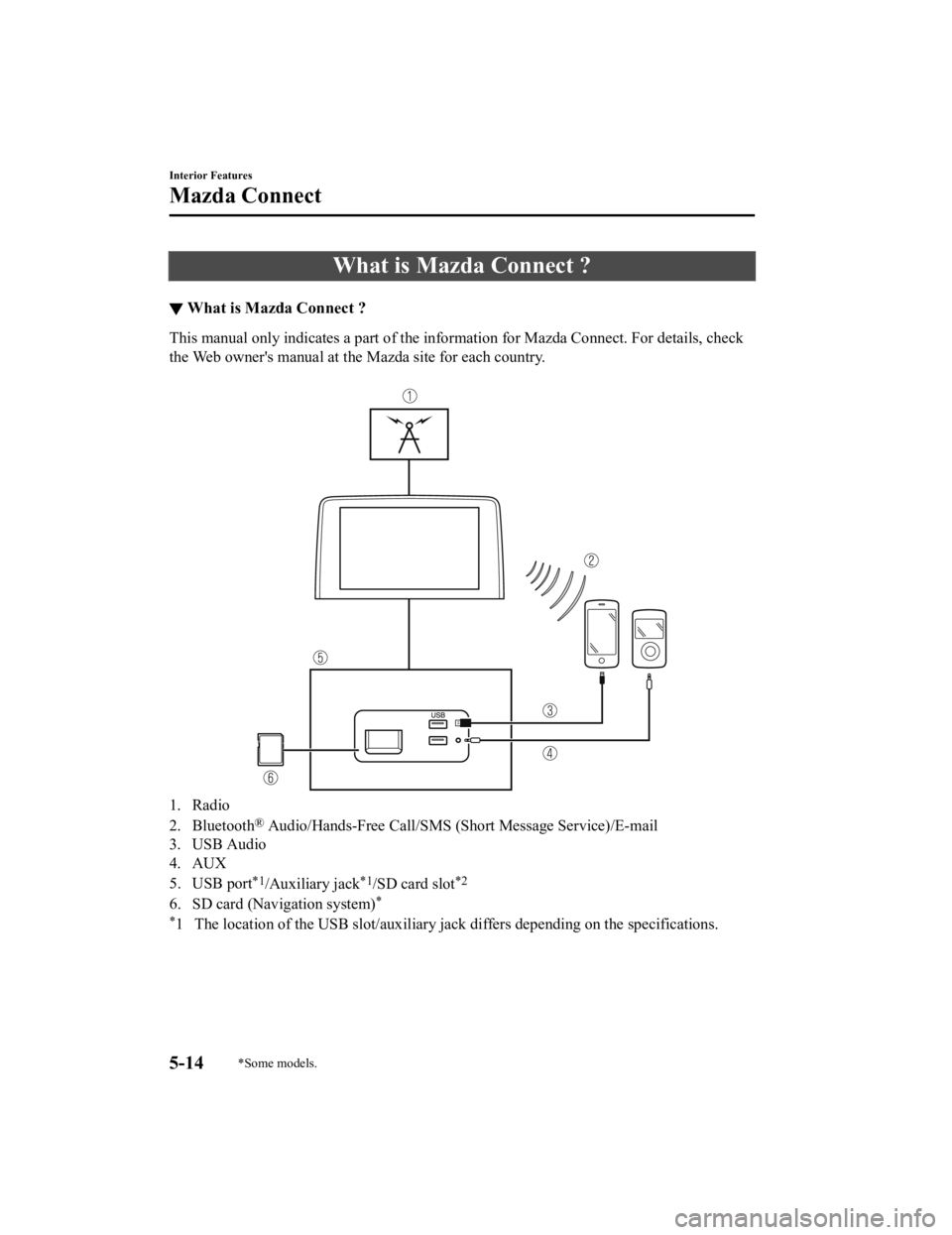
What is Mazda Connect ?
▼What is Mazda Connect ?
This manual only indicates a part of the information for Mazda Connect. For details, check
the Web owner's manual at the Mazda site for each country.
1. Radio
2. Bluetooth
® Audio/Hands-Free Call/SMS (Short Message Service)/E-mail
3. USB Audio
4. AUX
5. USB port
*1/Auxiliary jack*1/SD card slot*2
6. SD card (Navigation system)*
*
1 The location of the USB slot/auxiliary jack differs depending on the specifications.
Interior Features
Mazda Connect
5-14*Some models.
MX-5_8JS9-EA-20K_Edition1_old 2020-8-28 13:50:01
Page 281 of 499
SiriusXM® Satellite Radio*
SiriusXM® All Access Subscription
Hopefully, you're already loving SiriusXM in your new Mazda. But don't stop there — you
can also listen on the app and online. All Access is the very b est subscription package –
with the most channels and the mo st flexibility. With All Access, you get every channel
available on satellite radio, plus you can listen on the app an d online — so you can enjoy
SiriusXM wherever you are. Here's what's included:
-Over 150 satellite channels to enjoy in your car, coast-to-coast, 24/7.
-All kinds of commercial-free music, plus every major sport, wo rld-class news and the
biggest names in talk & entertainment.
-All of our premium programming, including Howard Stern, every NFL, MLB
®, and NBA
game, NHL
® games, every NASCAR® race, 24/7 talk channels dedicated to the biggest
leagues, and much more.
All SiriusXM services require a subscription, sold separately or as a package by SiriusXM
Radio Inc. (or, in Canada, SiriusXM Canada Inc.), after any tri al subscription which may be
included with your vehicle purchase or lease. To subscribe afte r your trial subscription, call
1-877-447-0011 (U.S.A.) or 1-877-438-9677 (Canada).
CAUTION
It is prohibited to copy, decompile, disassemble, reverse engineer, hack, manipulate, or
otherwise make available any technology or software incorporated in receivers compatible
with the SiriusXM satellite radio service or that support the SiriusXM website, the online
service or any of its content. Furthermore, the AMBE
® voice compression software included in
this product is protected by intellectual prop erty rights including patent rights, copyrights,
and trade secrets of Digital Voice Systems, Inc. The SiriusXM Service may include
traffic,
weather and other content and emergency alert information and data. Such information and
data is not for “safety for life”, but is me rely supplemental and advisory in nature and,
therefore, cannot be relied upon as safety critic al. Neither SiriusXM nor Mazda is responsible
for any errors in accuracies in the SiriusXM da ta services or its use in applications. The
SiriusXM content is subject to change without notice.
Interior Features
Mazda Connect
5-28*Some models.
MX-5_8JS9-EA-20K_Edition1_old 2020-8-28 13:50:01
Page 314 of 499

Hood
WARNING
Always check that the hood is closed and
securely locked:
A hood that is not closed and securely
locked is dangerous as it could fly open
while the vehicle is moving and block the
driver's vision which could result in a
serious accident.
▼Opening the Hood
1. With the vehicle parked, pull the
release handle to unlock the hood.
Release handle
2. Insert your hand into the hoodopening, slide the latch lever to the
right, and lift up the hood.
Lever
3. Grasp the support rod in the paddedarea and secure it in the support rod
hole indicated by the arrow to hold the
hood open.
Pad
Support rod
Clip
Maintenance and Care
Owner Maintenance
6-17
MX-5_8JS9-EA-20K_Edition1_old 2020-8-28 13:50:01
Page 315 of 499

▼Closing the Hood
1. Check under the hood area to make
certain all filler caps are in place and
all loose items (e.g. tools, oil
containers, etc.) have been removed.
2. Lift the hood, grasp the padded area on the support rod, and secure the support
rod in the clip. Verify that the support
rod is secured in the clip before closing
the hood.
Clip
P
ad
3. Lower the hood slowly to a height of
about 20 cm (7.9 in) above its closed
position and then let it drop.
CAUTION
When closing the hood, do not push it
excessively such as by applying your
weight. Otherwise, the hood could be
deformed.
Maintenance and Care
Owner Maintenance
6-18
MX-5_8JS9-EA-20K_Edition1_old 2020-8-28 13:50:01
Page 318 of 499

Except U.S.A., Canada, and Puerto Rico
Use SAE 5W-30 engine oil.
Oil container labels provide important
information.
A chief contribution this type of oil makes
to fuel economy is reducing the amount of
fuel necessary to overcome engine
friction.
For maintenance service, Mazda
recommends Mazda Genuine Parts.
(ILSAC)
(Mexico)
Use SAE 5W-30 engine oil. If SAE 5W-30
engine oil is not available, use SAE 5W-20
engine oil.
The quality designation SM, or ILSAC
must be on the label.
80
60
40
20
0
–40 –20
30
100
40
20
10
0
–10
–20
–30
–40
▼ Inspecting Engine Oil Level
1. Be sure the vehicle is on a level
surface.
2. Warm up the engine to normal operating temperature.
3. Turn it off and wait at least 5 minutes for the oil to return to the oil pan.
4. Pull out the dipstick, wipe it clean, and reinsert it fully.
MIN
MAX
OK
5. Pull it out again and examine the level. The level is normal if it is between the
MIN and MAX marks.
If it is near or below MIN, add enough
oil to bring the level to MAX.
CAUTION
Do not overfill the engine oil. This may
cause engine damage.
6. Make sure the O-ring on the dipstick is
positioned properly before reinserting
the dipstick.
7. Reinsert the dipstick fully.
Maintenance and Care
Owner Maintenance
6-21
MX-5_8JS9-EA-20K_Edition1_old 2020-8-28 13:50:01