high MAZDA MODEL MX-5 MIATA PRHT 2014 Service Manual
[x] Cancel search | Manufacturer: MAZDA, Model Year: 2014, Model line: MODEL MX-5 MIATA PRHT, Model: MAZDA MODEL MX-5 MIATA PRHT 2014Pages: 452, PDF Size: 5.35 MB
Page 271 of 452
Black plate (271,1)
qChanging the Source
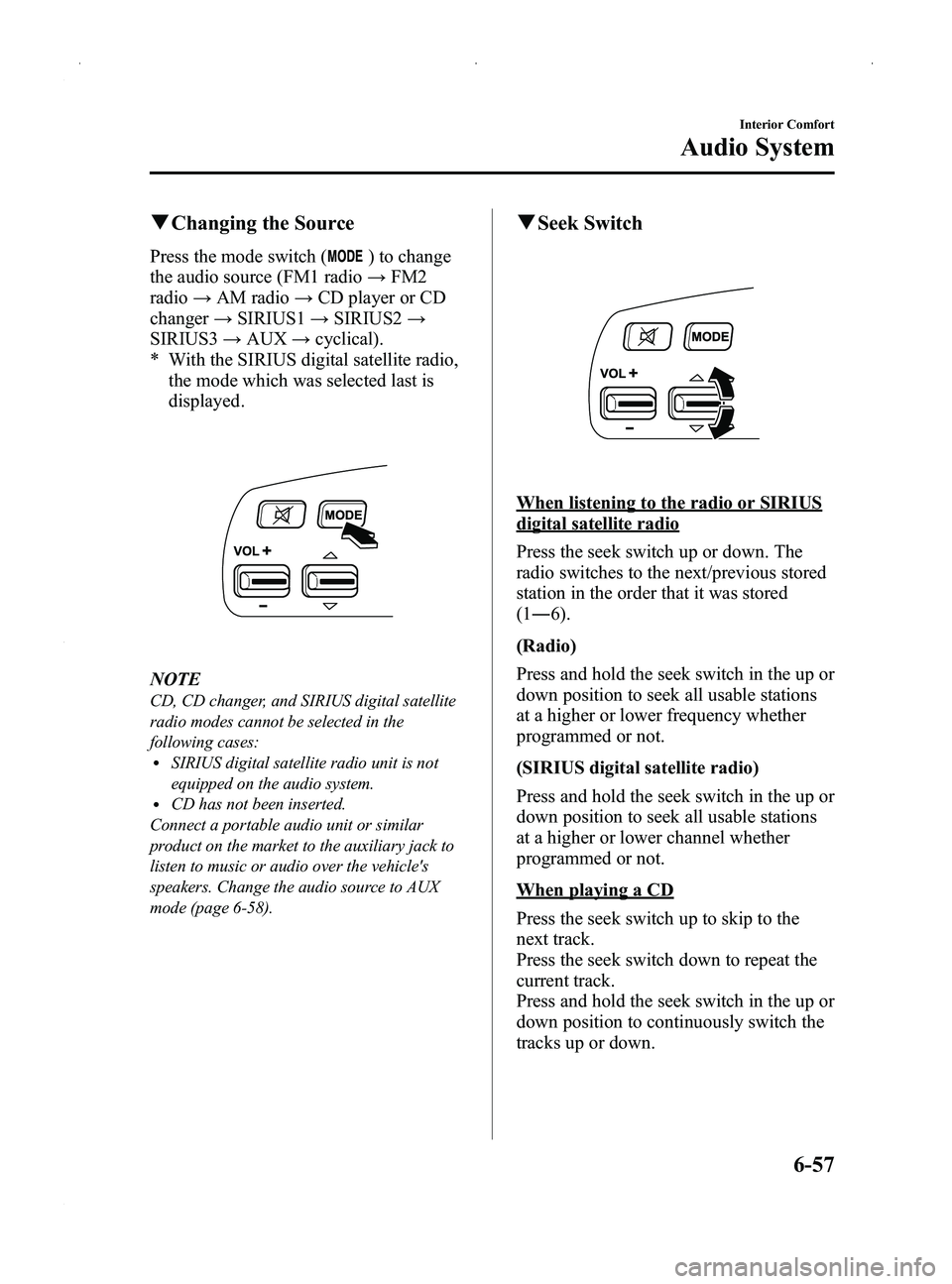
Press the mode switch () to change
the audio source (FM1 radio →FM2
radio →AM radio →CD player or CD
changer →SIRIUS1 →SIRIUS2 →
SIRIUS3 →AUX →cyclical).
* With the SIRIUS digital satellite radio, the mode which was selected last is
displayed.
NOTE
CD, CD changer, and SIRIUS digital satellite
radio modes cannot be selected in the
following cases:
lSIRIUS digital satellite radio unit is not
equipped on the audio system.
lCD has not been inserted.
Connect a portable audio unit or similar
product on the market to the auxiliary jack to
listen to music or audio over the vehicle's
speakers. Change the audio source to AUX
mode (page 6-58).
q Seek Switch
When listening to the radio or SIRIUS
digital satellite radio
Press the seek switch up or down. The
radio switches to the next/previous stored
station in the order that it was stored
(1― 6).
(Radio)
Press and hold the seek switch in the up or
down position to seek all usable stations
at a higher or lower frequency whether
programmed or not.
(SIRIUS digital satellite radio)
Press and hold the seek switch in the up or
down position to seek all usable stations
at a higher or lower channel whether
programmed or not.
When playing a CD
Press the seek switch up to skip to the
next track.
Press the seek switch down to repeat the
current track.
Press and hold the seek switch in the up or
down position to continuously switch the
tracks up or down.
Interior Comfort
Audio System
6-57
MX-5_8DG6-EA-13F_Edition3 Page271
Monday, December 16 2013 2:11 PM
Form No.8DG6-EA-13F
Page 276 of 452

Black plate (276,1)
Bluetooth® Hands-Freeí
qWhat is Bluetooth® Hands-Free?
Bluetooth®Hands-Free Outline
By connecting a Bluetooth
®equipped
mobile telephone to the hands-free unit
equipped on the vehicle, making and
receiving calls are possible using the
voice recognition/hands-free switch
located on the steering wheel, and saying
the voice commands.
WARNING
Perform phonebook registration related
operations while the vehicle is parked: Performing phonebook registration
while driving the vehicle could be a
distraction to your driving and result
in an unexpected accident. In
addition, a mistake in performing the
phonebook operation could result in
the loss of important data.
Bluetooth®equipped mobile telephone
A Bluetooth
®equipped mobile telephone
communicates with the hands-free unit
equipped on the vehicle using radio
transmission (Bluetooth
®).
For example, if the mobile telephone is
placed in a coat pocket, the phone calls
can be made through your mobile service
without taking out and handling the
mobile telephone.
CAUTION
The types of mobile phones which
can be connected to the hands-free
unit are limited. Therefore, before
purchasing or changing your mobile
phone model, consult Mazda
Bluetooth
®Hands-Free Customer
Service or visit www.MazdaUSA.com/
bluetooth for a complete list of
compatible phones.
Mobile phones which can be
connected to the hands-free system
need to be compliant with
Bluetooth
®specifications and the
appropriate profile. However, even
among these Bluetooth
®phones are
some which will not connect with
your Mazda or will have limited
function. Therefore, consult Mazda
Bluetooth
®Hands-Free Customer
Service for information regarding
mobile phone compatibility:
Ø U.S.A.
Phone: 800-430-0153
Web: www.MazdaUSA.com/
bluetooth
Ø Canada
Phone: 800-430-0153
Web: www.mazdahandsfree.ca
Applicable Bluetooth
®specification
Ver. 1.1 or higher
Response profile
lHFP (Hands Free Profile) Ver. 1.0lDUN (Dial-up Networking Profile)
Ver. 1.1
6-62
Interior Comfort
íSome models.
Bluetooth® Hands-Free
MX-5_8DG6-EA-13F_Edition3 Page276
Monday, December 16 2013 2:11 PM
Form No.8DG6-EA-13F
Page 281 of 452
![MAZDA MODEL MX-5 MIATA PRHT 2014 Service Manual Black plate (281,1)
9.Say: [Beep] “XXXX ”(Speak an
arbitrary 4-digit pairing code. This can
be any combination of 4 numbers.)
NOTE
lSome devices accept only a particular
pairing code (Usually, “](/img/28/41002/w960_41002-280.png "MAZDA MODEL MX-5 MIATA PRHT 2014 Service Manual Black plate (281,1)
9.Say: [Beep] “XXXX ”(Speak an
arbitrary 4-digit pairing code. This can
be any combination of 4 numbers.)
NOTE
lSome devices accept only a particular
pairing code (Usually, “")
Black plate (281,1)
9.Say: [Beep] “XXXX ”(Speak an
arbitrary 4-digit pairing code. This can
be any combination of 4 numbers.)
NOTE
lSome devices accept only a particular
pairing code (Usually, “0000 ”or “1234 ”).
If pairing cannot be completed, refer to the
owner's manual of your mobile device, and
try those numbers if necessary.
lRecord the code as it will be used to
program your phone in Step 16.
10. Prompt: “Pairing code XXXX (4-
digit number). Is this correct? ”
11. Say: [Beep] “Ye s ”or “No ”
12. If “Ye s ”, go to Step 13.
If “No” , the procedure returns to Step
8.
13. Prompt: “Start pairing procedure on
phone. See phone's manual for
instructions. ”
14. Using the mobile telephone, perform a search for the Bluetooth
®device
(Peripheral device).
NOTE
For the operation of the mobile telephone,
refer to its instruction manual.
15. Select “Mazda ”from the device list
searched by the mobile phone.
16. Input the 4-digit pairing code set in Step 9 to the mobile telephone.
17. Prompt: “Please say the name of the
phone after the beep. ”
18. Say: [Beep] “XXXX - - - ”(Speak a
“ phone tag ”, an arbitrary name for the
phone.)
Example: “Stan's phone. ” NOTE
Speak a programmed
“phone tag ”within 10
seconds.
If more than two mobile telephones are to be
programmed, they cannot be programmed with
the same or similar “phone tag ”.
19. Prompt: “Adding XXXXXX - - -
(Ex. “Stan's phone ”) (Phone tag). Is
this correct? ”
20. Say: [Beep] “Ye s ”
21. Prompt: “Assign a priority for this
phone between 1 and 7, where 1 is
the phone used most often.”
22. Say: [Beep] “1 ” (Speak a number of
the desired priority from 1 to 7.)
NOTE
lNormally, “1” is to be input (Highest
priority).
lIf more than two mobile telephones are
registered, input the priority order from 1 to
7.
23. Prompt: “XXXXXX - - - (Ex.
“ Stan's phone ”) (Phone tag) set to
priority X (Priority number). Is this
correct? ”
24. Say: [Beep] “Ye s ”
25. Prompt: “Pairing complete ”
After a mobile telephone is registered, the
system automatically identifies the phone.
By pressing the voice recognition/hands-
free switch again, or by pressing the voice
recognition/hands-free switch first after
switching the ignition from OFF to ACC,
the system reads out a voice guidance,
“ XXXXXX - - - (Ex. “Stan's phone ”)
(Phone tag) is connected ”. If two or more
telephones are registered, the one with the
highest priority is selected.
Interior Comfort
Bluetooth® Hands-Free
6-67
MX-5_8DG6-EA-13F_Edition3 Page281
Monday, December 16 2013 2:11 PM
Form No.8DG6-EA-13F
Page 297 of 452

Black plate (297,1)
Storage Compartments
WARNING
Keep storage boxes closed when
driving:Driving with the storage boxes open
is dangerous. To reduce the
possibility of injury in an accident or
a sudden stop, keep the storage
boxes closed when driving.
Do not put articles in storage spaces
with no lid: Putting articles in storage spaces
with no lid is dangerous as they
could be thrown around the cabin if
the vehicle is suddenly accelerated
and cause injury depending on how
the article is stored.
CAUTION
Do not leave lighters or eyeglasses in
the storage boxes while parked under
the sun. A lighter could explode or
the plastic material in eyeglasses
could deform and crack from high
temperature.
qGlove Compartment
To open the glove compartment, pull the
latch toward you.
Insert the key (auxiliary key
*) and turn it
clockwise to lock, counterclockwise to
unlock.
* Advanced key equipped vehicle
Lock
Unlock
To close the glove compartment, firmly
press in the center of the glove
compartment lid.
q Seat Side Box
To open, pull the release catch.
Insert the key and turn it clockwise to
lock, counterclockwise to unlock.
Lock
Unlock
Interior Comfort
Interior Equipment
6-83
MX-5_8DG6-EA-13F_Edition3 Page297
Monday, December 16 2013 2:11 PM
Form No.8DG6-EA-13F
Page 303 of 452
Black plate (303,1)
Flat Tireí
Either run-flat tires or conventional tires
are equipped on your Mazda depending
on the specification, therefore the
procedure for repairing a flat tire differs
depending on the type of tire. Before
driving, make sure which type of tire is
equipped on your Mazda. If you cannot
identify your tire type, consult an
Authorized Mazda Dealer.
qHow to identify your tire type
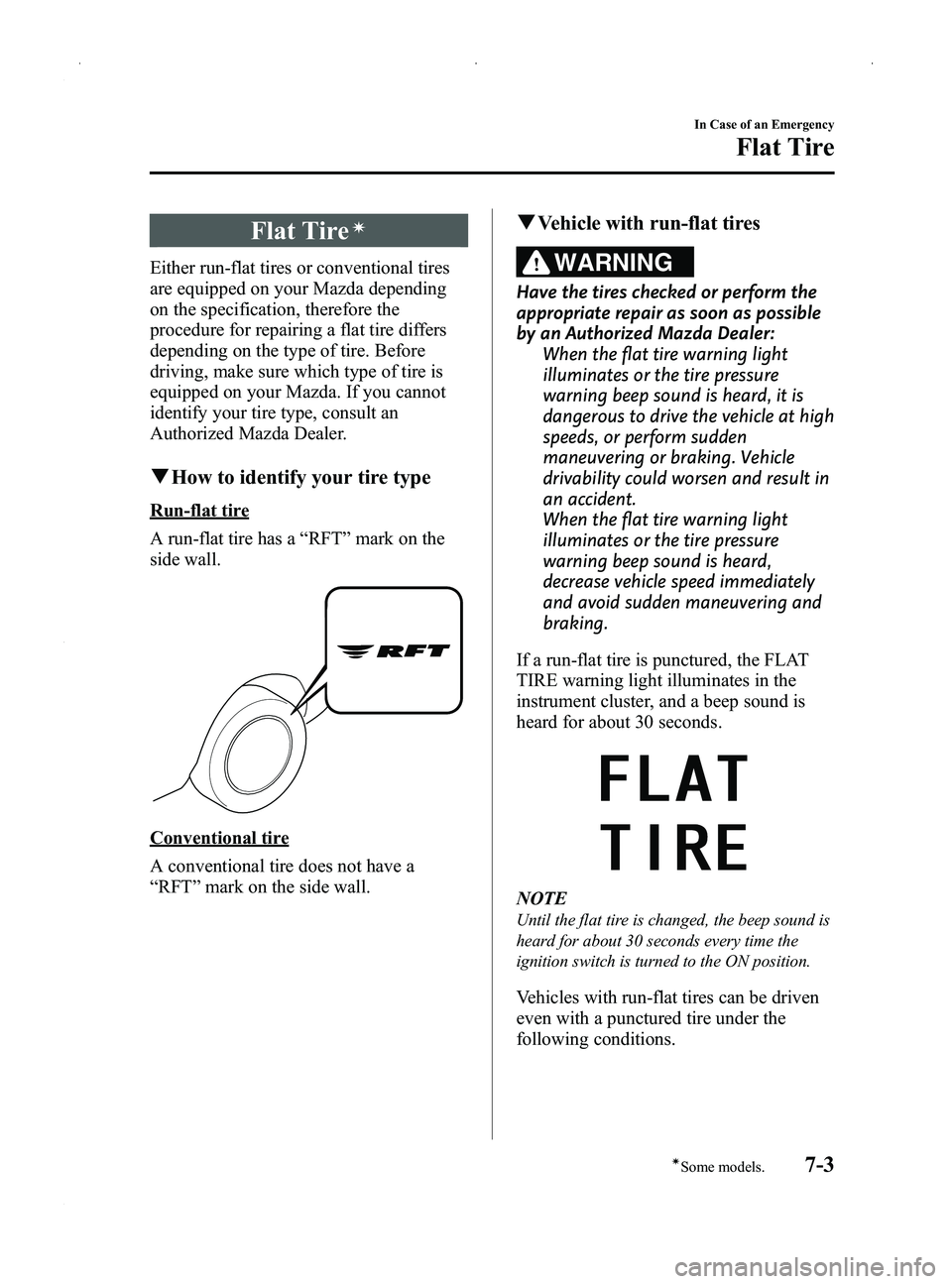
Run-flat tire
A run-flat tire has a “RFT ”mark on the
side wall.
Conventional tire
A conventional tire does not have a
“ RFT ”mark on the side wall.
q Vehicle with run-flat tires
WARNING
Have the tires checked or perform the
appropriate repair as soon as possible
by an Authorized Mazda Dealer:
When the flat tire warning light
illuminates or the tire pressure
warning beep sound is heard, it is
dangerous to drive the vehicle at high
speeds, or perform sudden
maneuvering or braking. Vehicle
drivability could worsen and result in
an accident.
When the flat tire warning light
illuminates or the tire pressure
warning beep sound is heard,
decrease vehicle speed immediately
and avoid sudden maneuvering and
braking.
If a run-flat tire is punctured, the FLAT
TIRE warning light illuminates in the
instrument cluster, and a beep sound is
heard for about 30 seconds.
NOTE
Until the flat tire is changed, the beep sound is
heard for about 30 seconds every time the
ignition switch is turned to the ON position.
Vehicles with run-flat tires can be driven
even with a punctured tire under the
following conditions.
In Case of an Emergency
Flat Tire
7-3íSome models.
MX-5_8DG6-EA-13F_Edition3 Page303
Monday, December 16 2013 2:11 PM
Form No.8DG6-EA-13F
Page 312 of 452
Black plate (312,1)
18. Install the tire valve cap.
19. Put the emergency flat tire repair kitin the trunk and continue driving.
CAUTION
ØDrive carefully to an Authorized
Mazda Dealer and keep the
vehicle speed below 80 km/h (50
mph).
Ø If the vehicle is driven 80 km/h (50
mph) or higher, the vehicle might
begin to vibrate.
NOTE
(With Tire Pressure Monitoring System)
If the tire is not properly inflated, the tire
pressure monitoring system warning light will
illuminate (page 5-32).
20. After driving the vehicle for 10 minutes or 5 km (3 miles), check the
tire pressure with the tire pressure
gauge equipped with the compressor.
If the tire pressure has fallen below
the correct tire pressure, inflate the
tire to the correct pressure again
following the steps from number 15.
CAUTION
ØIf the tire inflation pressure falls
below 130 kPa (1.3 kgf/cm2or bar,
18.9 psi), repair cannot be done
with the repair kit. Park the
vehicle on a level surface off the
right-of-way and contact an
Authorized Mazda Dealer.
Ø If the tire inflation pressure
continues to remain low after
repeating steps 14 to 21, park the
vehicle on a level surface off the
right-of-way and contact an
Authorized Mazda Dealer. NOTE
When checking the tire inflation pressure with
the tire pressure gauge on the compressor unit,
make sure the compressor switch is turned off.
21. The emergency flat tire repair is
completed if the tire air pressure does
not decrease. Drive the vehicle
carefully to the nearest Authorized
Mazda Dealer promptly and have the
tire replaced. Mazda recommends that
the tire be replaced with a new one. If
the tire is to be repaired and reused,
consult an Authorized Mazda Dealer.
CAUTION
ØFor a tire which has undergone an
emergency flat tire repair using
the emergency flat tire repair kit,
Mazda recommends that the tire
be replaced with a new one as
soon as possible. If the tire is to be
repaired and reused, consult an
Authorized Mazda Dealer.
Ø The wheel can be reused after any
sealant adhering to it is wiped off
and carefully inspected. However,
replace the tire valve with a new
one.
qInspecting the IMS Emergency
Flat Tire Repair Kit
Inspect the emergency tire repair kit at
regular intervals.
lCheck the tire sealant period of
effective use.
lCheck the operation of the tire
compressor.
7-12
In Case of an Emergency
Flat Tire
MX-5_8DG6-EA-13F_Edition3 Page312
Monday, December 16 2013 2:11 PM
Form No.8DG6-EA-13F
Page 316 of 452
Black plate (316,1)
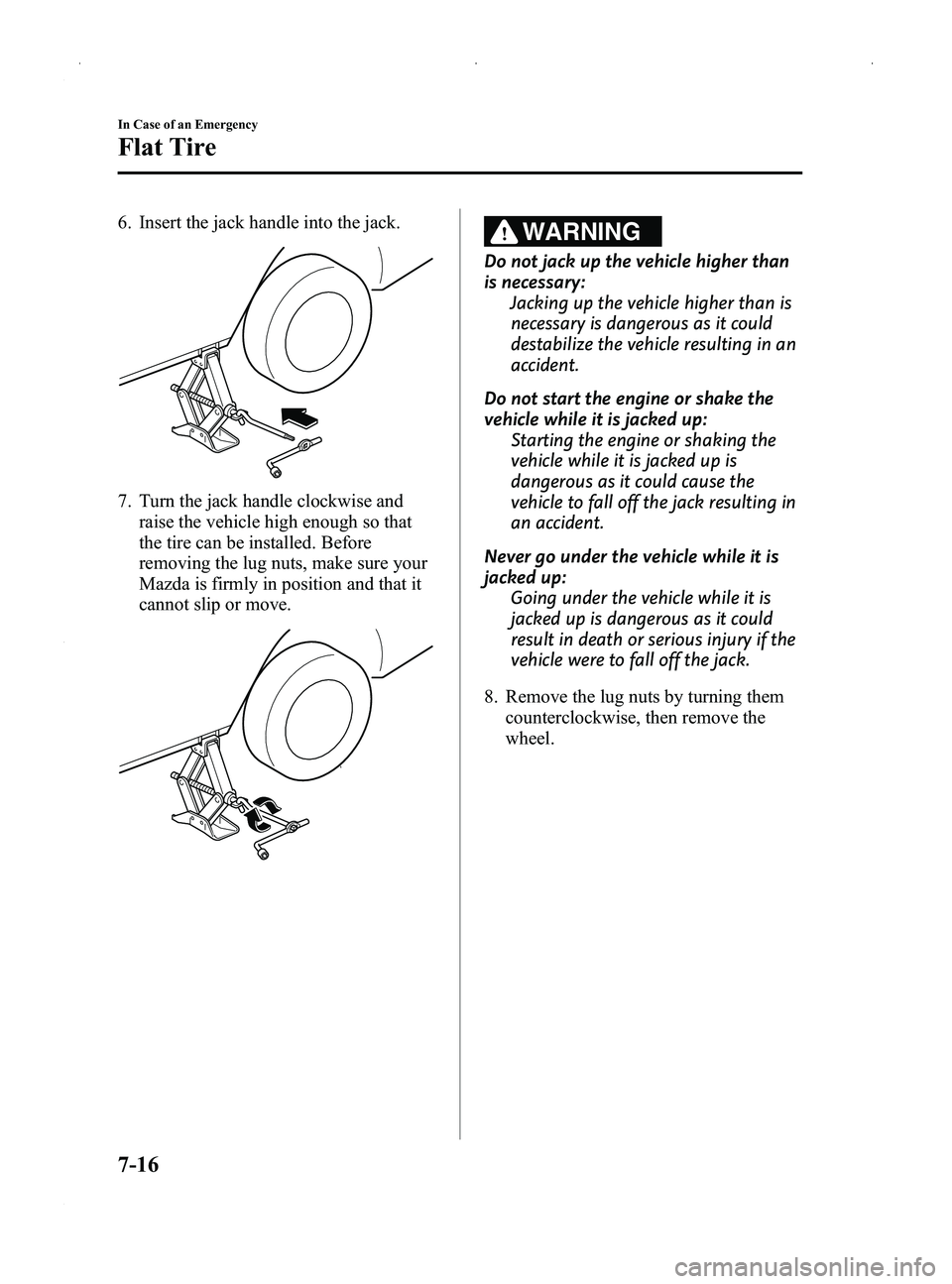
6. Insert the jack handle into the jack.
7. Turn the jack handle clockwise andraise the vehicle high enough so that
the tire can be installed. Before
removing the lug nuts, make sure your
Mazda is firmly in position and that it
cannot slip or move.
WARNING
Do not jack up the vehicle higher than
is necessary:
Jacking up the vehicle higher than is
necessary is dangerous as it could
destabilize the vehicle resulting in an
accident.
Do not start the engine or shake the
vehicle while it is jacked up: Starting the engine or shaking the
vehicle while it is jacked up is
dangerous as it could cause the
vehicle to fall off the jack resulting in
an accident.
Never go under the vehicle while it is
jacked up: Going under the vehicle while it is
jacked up is dangerous as it could
result in death or serious injury if the
vehicle were to fall off the jack.
8. Remove the lug nuts by turning them counterclockwise, then remove the
wheel.
7-16
In Case of an Emergency
Flat Tire
MX-5_8DG6-EA-13F_Edition3 Page316
Monday, December 16 2013 2:11 PM
Form No.8DG6-EA-13F
Page 320 of 452

Black plate (320,1)
Overheating
If the temperature gauge indicates
overheating, the vehicle loses power, or
you hear a loud knocking or pinging
noise, the engine is probably too hot.
WARNING
Switch the ignition to off and
make sure the fan is not running before
attempting to work near the cooling
fan: Working near the cooling fan when it
is running is dangerous. The fan
could continue running indefinitely
even if the engine has stopped and
the engine compartment temperature
is high. You could be hit by the fan
and seriously injured.
Do not remove the cooling
system cap when the engine and
radiator are hot: When the engine and radiator are
hot, scalding coolant and steam may
shoot out under pressure and cause
serious injury.
Open the hood ONLY after steam is no
longer escaping from the engine: Steam from an overheated engine is
dangerous. The escaping steam could
seriously burn you.
If the temperature gauge indicates
overheating:
1. Drive safely to the side of the road and park off the right-of-way. 2. Put a vehicle with an automatic
transmission in park (P), a manual
transmission in neutral.
3. Apply the parking brake.
4. Turn off the air conditioner.
5. Check whether coolant or steam is escaping from under the hood or from
the engine compartment.
If steam is coming from the engine
compartment:
Do not go near the front of the vehicle.
Stop the engine.
Wait until the steam dissipates, then
open the hood and start the engine.
If neither coolant nor steam is
escaping:
Open the hood and idle the engine until
it cools.
CAUTION
If the cooling fan does not operate
while the engine is running, the
engine temperature will increase.
Stop the engine and call an
Authorized Mazda Dealer.
6. Make sure the cooling fan is operating, then turn off the engine after the
temperature has decreased.
7. When cool, check the coolant reservoir level.
If it's low, look for coolant leaks from
the radiator and hoses.
7-20
In Case of an Emergency
Overheating
MX-5_8DG6-EA-13F_Edition3 Page320
Monday, December 16 2013 2:11 PM
Form No.8DG6-EA-13F
Page 348 of 452

Black plate (348,1)
WARNING
Do not perform maintenance work if you lack sufficient knowledge and experience or
the proper tools and equipment to do the work. Have maintenance work done by a
qualified technician:Performing maintenance work on a vehicle is dangerous if not done properly. You
can be seriously injured while performing some maintenance procedures.
If you must run the engine while working under the hood, make certain that you
remove all jewelry (especially rings, bracelets, watches, and necklaces) and all
neckties, scarves, and similar loose clothing before getting near the engine or cooling
fan which may turn on unexpectedly: Working under the hood with the engine running is dangerous. It becomes even
more dangerous when you wear jewelry or loose clothing.
Either can become entangled in moving parts and result in injury.
Switch the ignition to off and make sure the fan is not running before attempting to
work near the cooling fan: Working near the cooling fan when it is running is dangerous. The fan could
continue running indefinitely even if the engine has stopped and the engine
compartment temperature is high. You could be hit by the fan and seriously injured.
Do not leave items in the engine compartment: After you have finished checking or doing servicing in the engine compartment, do
not forget and leave items such as tools or rags in the engine compartment.
Tools or other items left in the engine compartment could cause engine damage or a
fire leading to an unexpected accident.
8-18
Maintenance and Care
Owner Maintenance
MX-5_8DG6-EA-13F_Edition3 Page348
Monday, December 16 2013 2:12 PM
Form No.8DG6-EA-13F
Page 352 of 452

Black plate (352,1)
Engine Coolant
qInspecting Coolant Level
WARNING
Do not use a match or live flame in the
engine compartment. DO NOT ADD
COOLANT WHEN THE ENGINE IS HOT:
A hot engine is dangerous. If the
engine has been running, parts of the
engine compartment can become
very hot. You could be burned.
Carefully inspect the engine coolant
in the coolant reservoir, but do not
open it.
Switch the ignition to off and
make sure the fan is not running before
attempting to work near the cooling
fan: Working near the cooling fan when it
is running is dangerous. The fan
could continue running indefinitely
even if the engine has stopped and
the engine compartment temperature
is high. You could be hit by the fan
and seriously injured.
Do not remove the cooling
system cap when the engine and
radiator are hot: When the engine and radiator are
hot, scalding coolant and steam may
shoot out under pressure and cause
serious injury.
NOTE
Changing the coolant should be done by an
Authorized Mazda Dealer.
Inspect the antifreeze protection and
coolant level in the coolant reservoir at
least once a year ―at the beginning of the
winter season ―and before traveling
where temperatures may drop below
freezing.
Inspect the condition and connections of
all cooling system and heater hoses.
Replace any that are swollen or
deteriorated.
The coolant should be at full in the
radiator and between the F and L marks
on the coolant reservoir when the engine
is cool.
If it is at or near L, add enough coolant to
the coolant reservoir to provide freezing
and corrosion protection and to bring the
level to F.
Securely tighten the coolant reservoir tank
cap after adding coolant.
8-22
Maintenance and Care
Owner Maintenance
MX-5_8DG6-EA-13F_Edition3 Page352
Monday, December 16 2013 2:12 PM
Form No.8DG6-EA-13F