high MAZDA MODEL MX-5 MIATA PRHT 2014 Owner's Guide
[x] Cancel search | Manufacturer: MAZDA, Model Year: 2014, Model line: MODEL MX-5 MIATA PRHT, Model: MAZDA MODEL MX-5 MIATA PRHT 2014Pages: 452, PDF Size: 5.35 MB
Page 203 of 452
Black plate (203,1)
Windshield Wipers and
Washer
The ignition must be switched ON.
WARNING
Use only windshield washer fluid or
plain water in the reservoir:Using radiator antifreeze as washer
fluid is dangerous. If sprayed on the
windshield, it will dirty the
windshield, affect your visibility, and
could result in an accident.
Only use windshield washer fluid
mixed with anti-freeze protection in
freezing weather conditions: Using windshield washer fluid
without anti-freeze protection in
freezing weather conditions is
dangerous as it could freeze on the
windshield and block your vision
which could cause an accident.
In addition, make sure the
windshield is sufficiently warmed
using the defroster before spraying
the washer fluid. NOTE
Because heavy ice and snow can jam the wiper
blades, the wiper motor is protected from
motor breakdown, overheating and possible
fire by a circuit breaker. This mechanism will
automatically stop operation of the blades, but
only for about 5 minutes.
If this happens, turn off the wiper switch and
park off the right-of-way, and remove the snow
and ice.
After 5 minutes, turn on the switch and the
blades should operate normally. If they do not
resume functioning, consult an Authorized
Mazda Dealer as soon as possible. Drive to
the side of the road and park off the right-of-
way. Wait until the weather clears before trying
to drive with the wipers inoperative.
q
Windshield Wipers
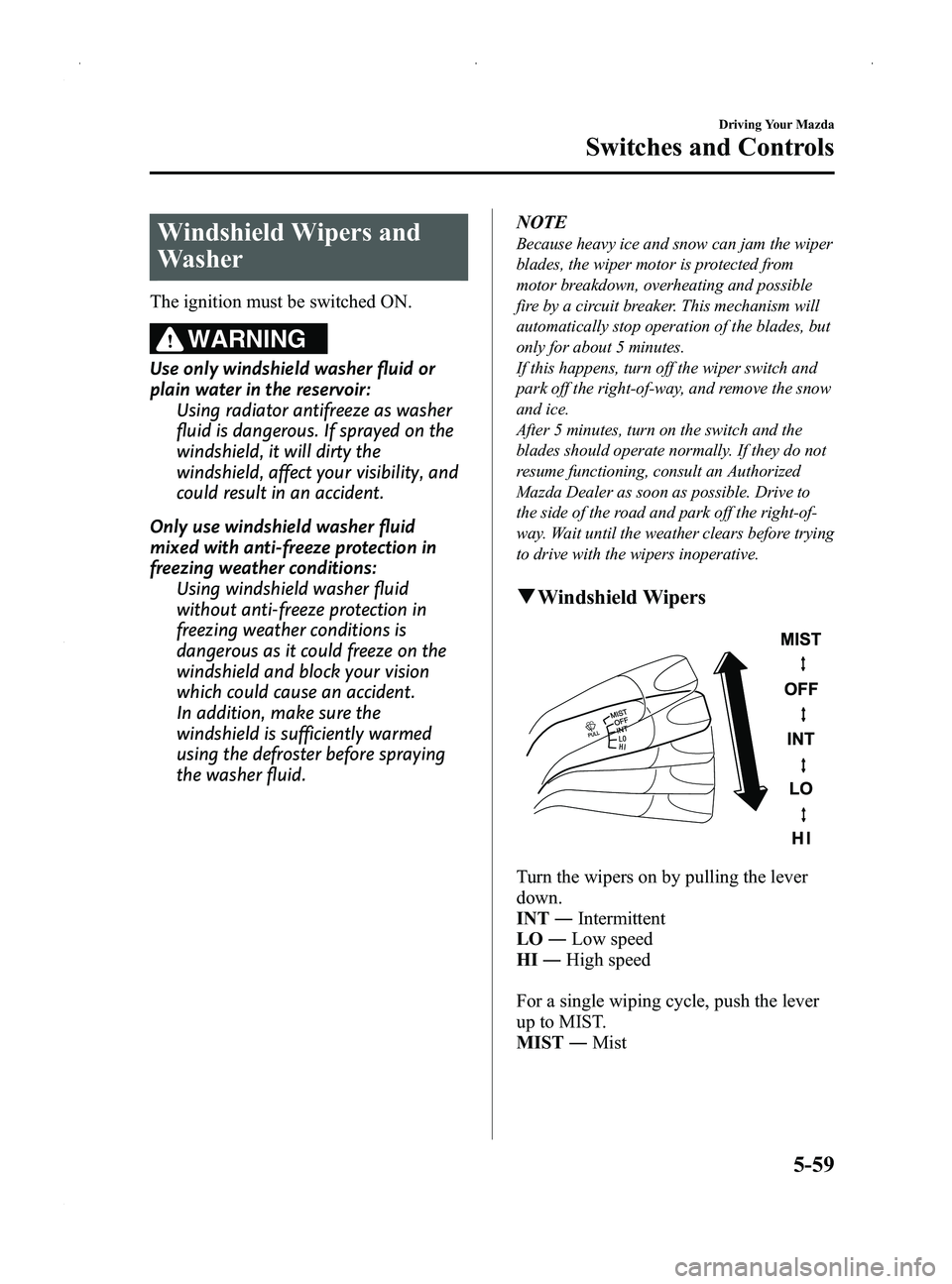
Turn the wipers on by pulling the lever
down.
INT ―Intermittent
LO ―Low speed
HI ―High speed
For a single wiping cycle, push the lever
up to MIST.
MIST ―Mist
Driving Your Mazda
Switches and Controls
5-59
MX-5_8DG6-EA-13F_Edition3 Page203
Monday, December 16 2013 2:11 PM
Form No.8DG6-EA-13F
Page 226 of 452
Black plate (226,1)
With the fan control dial ON, press the
A/C switch to select the air conditioning
(cooling/dehumidifying functions) on or
off.
NOTE
The air conditioner may not function when the
outside temperature approaches 0 °C(32 °F).
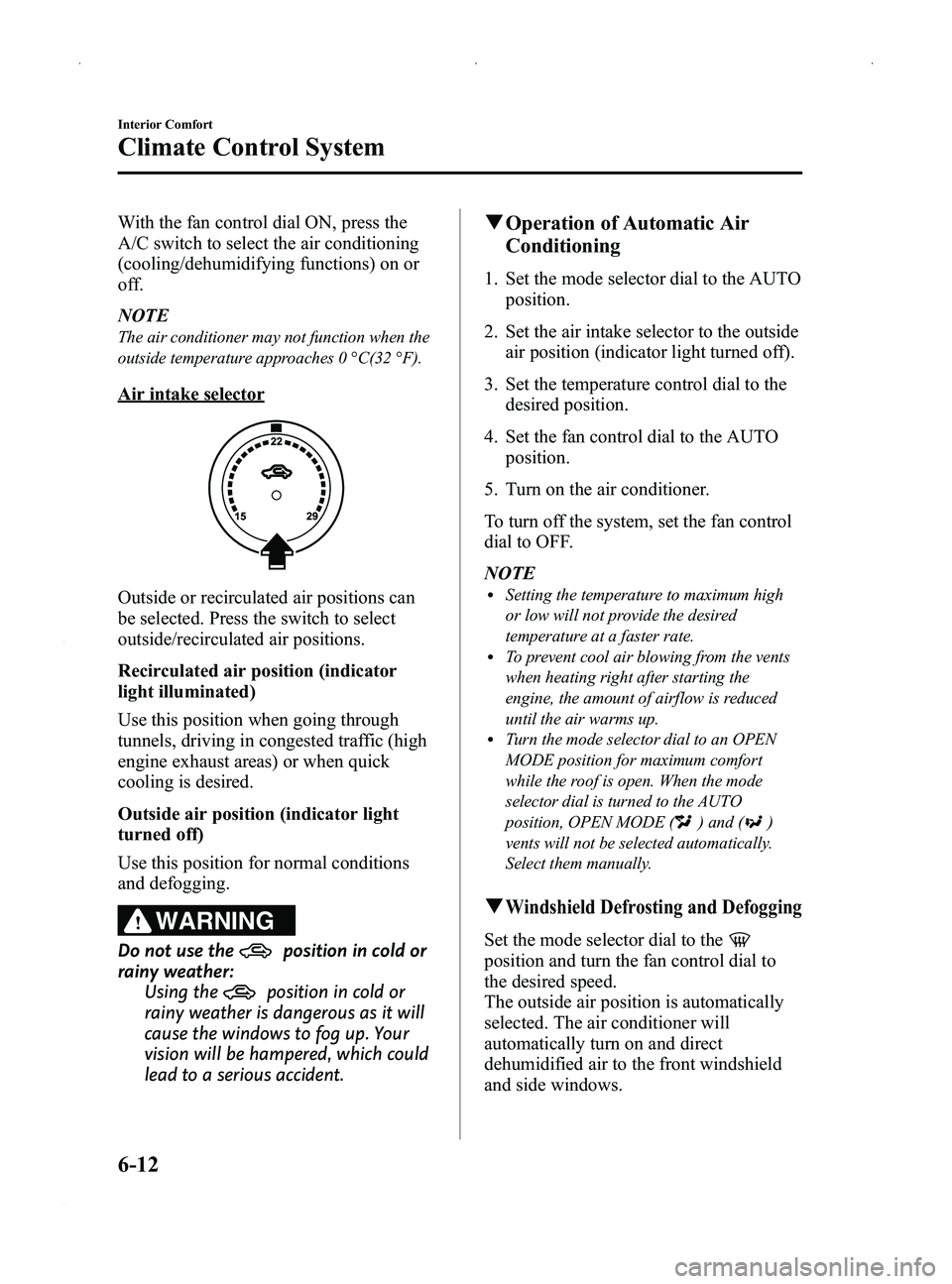
Air intake selector
Outside or recirculated air positions can
be selected. Press the switch to select
outside/recirculated air positions.
Recirculated air position (indicator
light illuminated)
Use this position when going through
tunnels, driving in congested traffic (high
engine exhaust areas) or when quick
cooling is desired.
Outside air position (indicator light
turned off)
Use this position for normal conditions
and defogging.
WARNING
Do not use theposition in cold or
rainy weather:
Using the
position in cold or
rainy weather is dangerous as it will
cause the windows to fog up. Your
vision will be hampered, which could
lead to a serious accident.
q Operation of Automatic Air
Conditioning
1. Set the mode selector dial to the AUTO
position.
2. Set the air intake selector to the outside air position (indicator light turned off).
3. Set the temperature control dial to the desired position.
4. Set the fan control dial to the AUTO position.
5. Turn on the air conditioner.
To turn off the system, set the fan control
dial to OFF.
NOTE
lSetting the temperature to maximum high
or low will not provide the desired
temperature at a faster rate.
lTo prevent cool air blowing from the vents
when heating right after starting the
engine, the amount of airflow is reduced
until the air warms up.
lTurn the mode selector dial to an OPEN
MODE position for maximum comfort
while the roof is open. When the mode
selector dial is turned to the AUTO
position, OPEN MODE (
) and ()
vents will not be selected automatically.
Select them manually.
qWindshield Defrosting and Defogging
Set the mode selector dial to the
position and turn the fan control dial to
the desired speed.
The outside air position is automatically
selected. The air conditioner will
automatically turn on and direct
dehumidified air to the front windshield
and side windows.
6-12
Interior Comfort
Climate Control System
MX-5_8DG6-EA-13F_Edition3 Page226
Monday, December 16 2013 2:11 PM
Form No.8DG6-EA-13F
Page 230 of 452
Black plate (230,1)
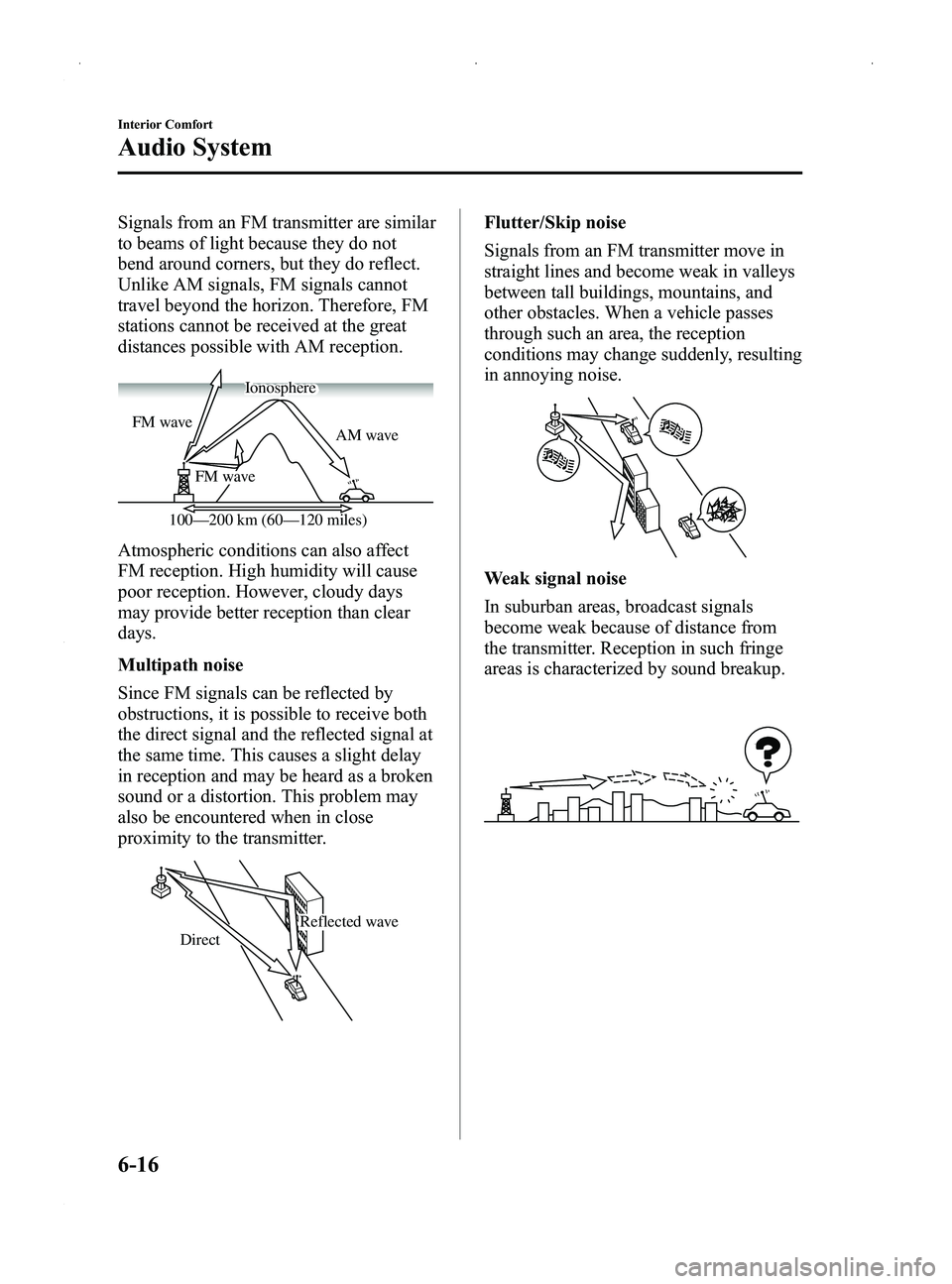
Signals from an FM transmitter are similar
to beams of light because they do not
bend around corners, but they do reflect.
Unlike AM signals, FM signals cannot
travel beyond the horizon. Therefore, FM
stations cannot be received at the great
distances possible with AM reception.
AM wave
FM wave
FM wave
100—200 km (60—120 miles) Ionosphere
Atmospheric conditions can also affect
FM reception. High humidity will cause
poor reception. However, cloudy days
may provide better reception than clear
days.
Multipath noise
Since FM signals can be reflected by
obstructions, it is possible to receive both
the direct signal and the reflected signal at
the same time. This causes a slight delay
in reception and may be heard as a broken
sound or a distortion. This problem may
also be encountered when in close
proximity to the transmitter.
Reflected wave
Direct
Flutter/Skip noise
Signals from an FM transmitter move in
straight lines and become weak in valleys
between tall buildings, mountains, and
other obstacles. When a vehicle passes
through such an area, the reception
conditions may change suddenly, resulting
in annoying noise.
Weak signal noise
In suburban areas, broadcast signals
become weak because of distance from
the transmitter. Reception in such fringe
areas is characterized by sound breakup.
6-16
Interior Comfort
Audio System
MX-5_8DG6-EA-13F_Edition3 Page230
Monday, December 16 2013 2:11 PM
Form No.8DG6-EA-13F
Page 232 of 452
Black plate (232,1)
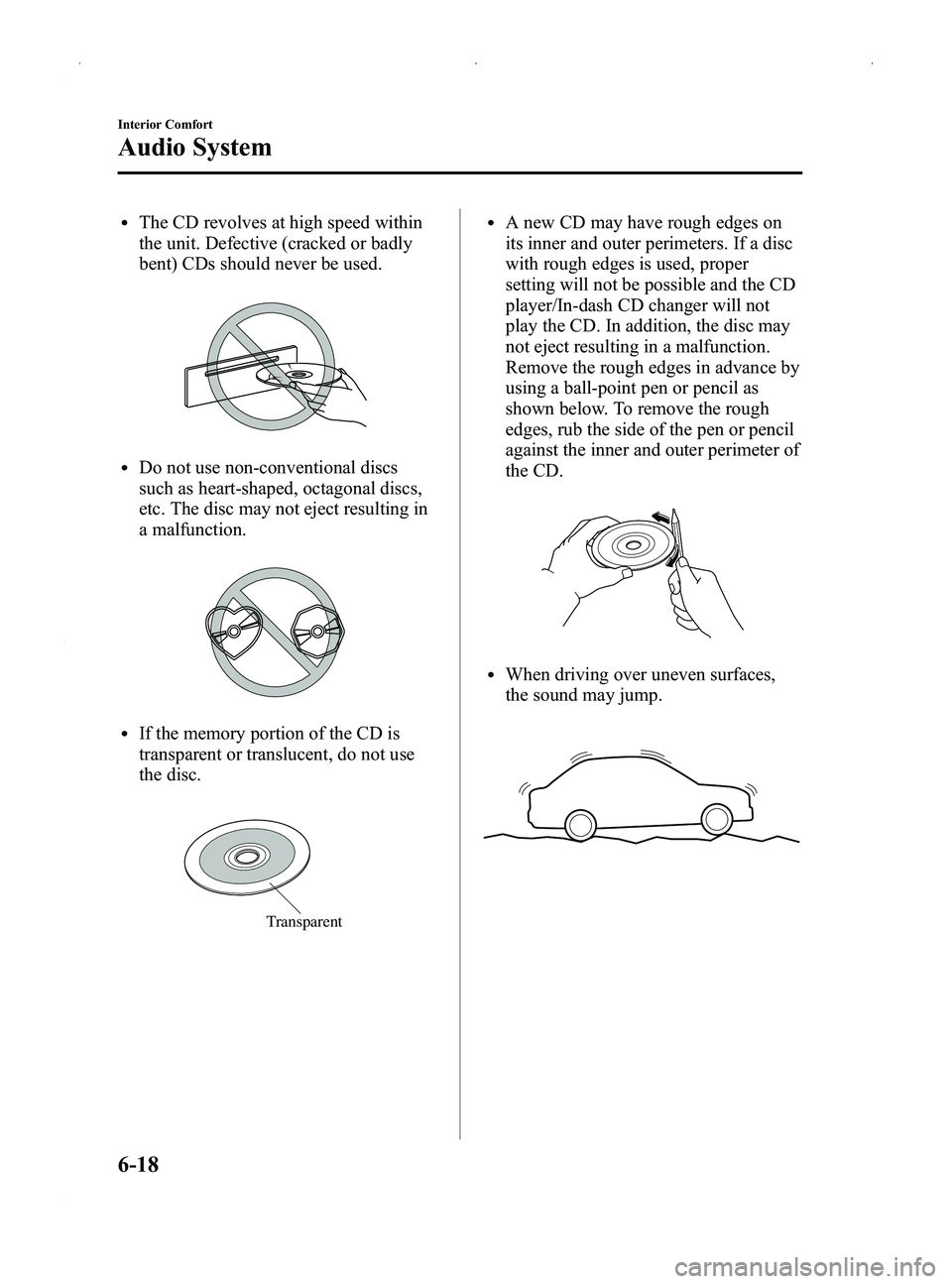
lThe CD revolves at high speed within
the unit. Defective (cracked or badly
bent) CDs should never be used.
lDo not use non-conventional discs
such as heart-shaped, octagonal discs,
etc. The disc may not eject resulting in
a malfunction.
lIf the memory portion of the CD is
transparent or translucent, do not use
the disc.
Transparent
lA new CD may have rough edges on
its inner and outer perimeters. If a disc
with rough edges is used, proper
setting will not be possible and the CD
player/In-dash CD changer will not
play the CD. In addition, the disc may
not eject resulting in a malfunction.
Remove the rough edges in advance by
using a ball-point pen or pencil as
shown below. To remove the rough
edges, rub the side of the pen or pencil
against the inner and outer perimeter of
the CD.
lWhen driving over uneven surfaces,
the sound may jump.
6-18
Interior Comfort
Audio System
MX-5_8DG6-EA-13F_Edition3 Page232
Monday, December 16 2013 2:11 PM
Form No.8DG6-EA-13F
Page 233 of 452
Black plate (233,1)
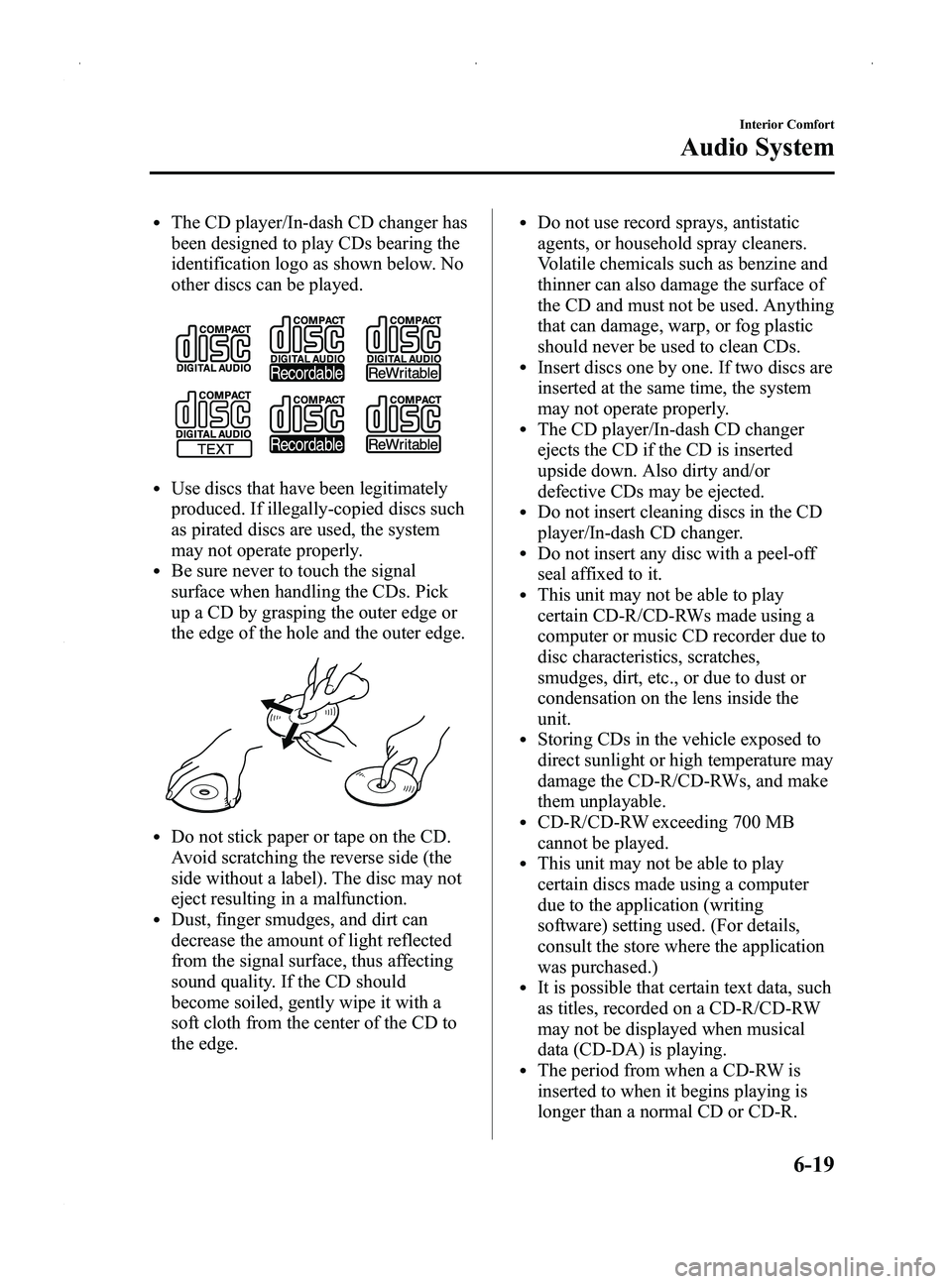
lThe CD player/In-dash CD changer has
been designed to play CDs bearing the
identification logo as shown below. No
other discs can be played.
lUse discs that have been legitimately
produced. If illegally-copied discs such
as pirated discs are used, the system
may not operate properly.
lBe sure never to touch the signal
surface when handling the CDs. Pick
up a CD by grasping the outer edge or
the edge of the hole and the outer edge.
lDo not stick paper or tape on the CD.
Avoid scratching the reverse side (the
side without a label). The disc may not
eject resulting in a malfunction.
lDust, finger smudges, and dirt can
decrease the amount of light reflected
from the signal surface, thus affecting
sound quality. If the CD should
become soiled, gently wipe it with a
soft cloth from the center of the CD to
the edge.
lDo not use record sprays, antistatic
agents, or household spray cleaners.
Volatile chemicals such as benzine and
thinner can also damage the surface of
the CD and must not be used. Anything
that can damage, warp, or fog plastic
should never be used to clean CDs.
lInsert discs one by one. If two discs are
inserted at the same time, the system
may not operate properly.
lThe CD player/In-dash CD changer
ejects the CD if the CD is inserted
upside down. Also dirty and/or
defective CDs may be ejected.
lDo not insert cleaning discs in the CD
player/In-dash CD changer.
lDo not insert any disc with a peel-off
seal affixed to it.
lThis unit may not be able to play
certain CD-R/CD-RWs made using a
computer or music CD recorder due to
disc characteristics, scratches,
smudges, dirt, etc., or due to dust or
condensation on the lens inside the
unit.
lStoring CDs in the vehicle exposed to
direct sunlight or high temperature may
damage the CD-R/CD-RWs, and make
them unplayable.
lCD-R/CD-RW exceeding 700 MB
cannot be played.
lThis unit may not be able to play
certain discs made using a computer
due to the application (writing
software) setting used. (For details,
consult the store where the application
was purchased.)
lIt is possible that certain text data, such
as titles, recorded on a CD-R/CD-RW
may not be displayed when musical
data (CD-DA) is playing.
lThe period from when a CD-RW is
inserted to when it begins playing is
longer than a normal CD or CD-R.
Interior Comfort
Audio System
6-19
MX-5_8DG6-EA-13F_Edition3 Page233
Monday, December 16 2013 2:11 PM
Form No.8DG6-EA-13F
Page 236 of 452
Black plate (236,1)
lThis unit can only display English
(including numerals) one-byte
characters. Use only English (including
numerals) one-byte characters when
inputting ID3 tags. Two-byte characters
and some special symbols cannot be
displayed.
Specialized glossary
MP3
Abbreviation for“MPEG Audio Layer 3 ”.
A technical standard for audio
compression as decided by an ISO
(International Organization for
Standardization) MPEG working group.
Use of MP3 allows for audio data to be
compressed to approximately a tenth of
the source data size.
ISO 9660
An international standard for logical
formatting of CD-ROM files and folders.
It is divided into three separate levels
based on differences in file naming
procedures, data configuration and other
characteristics.
Multi-session
A session is the complete amount of data
recorded from the beginning to the end of
a single period of CD-ROM, CD-R/CD-
RW data recording. Multi-session refers to
the existence of data from two or more
sessions on a single disc.
Sampling
Refers to the process of encoding analog
audio data at regular intervals and
converting it to digital data. The sampling
rate refers to the number of times a
sample is taken in one second and is
expressed in Hz units. Increasing the
sampling rate improves the sound quality
but also increases the data size. Bit rate
Refers to the volume of data per second,
expressed in bps (bits per second).
Generally, the larger the number of the
transfer bit rate when compressing an
MP3 file, the more information regarding
musical reproduction it carries, and
therefore the better the sound quality.
Packet writing
A general term for the method, similar to
that used for floppy discs or hard drives,
of recording the required file in a single
increment on a CD-R and similar.
ID3 Tag
ID3 tag is a method for storing
information related to the music in an
MP3 file. Information such as track, artist
and album name can be stored. This
content can be freely edited using ID3
editing function software.
VBR
Abbreviation for Variable Bit Rate. While
CBR (Constant Bit Rate) is generally
used, VBR varies the bit rate for audio
compression according to compression
conditions and this allows for
compression with preference given to
sound quality.
q
Operating Tips for WMA
WMA is short for Windows Media Audio
and is the audio compression format used
by Microsoft.
Audio data can be created and stored at a
higher compression ratio than MP3.
* Microsoft and Windows Media are
registered trademarks of Microsoft
Corporation U.S. in the United States
and other countries.
6-22
Interior Comfort
Audio System
MX-5_8DG6-EA-13F_Edition3 Page236
Monday, December 16 2013 2:11 PM
Form No.8DG6-EA-13F
Page 246 of 452
Black plate (246,1)
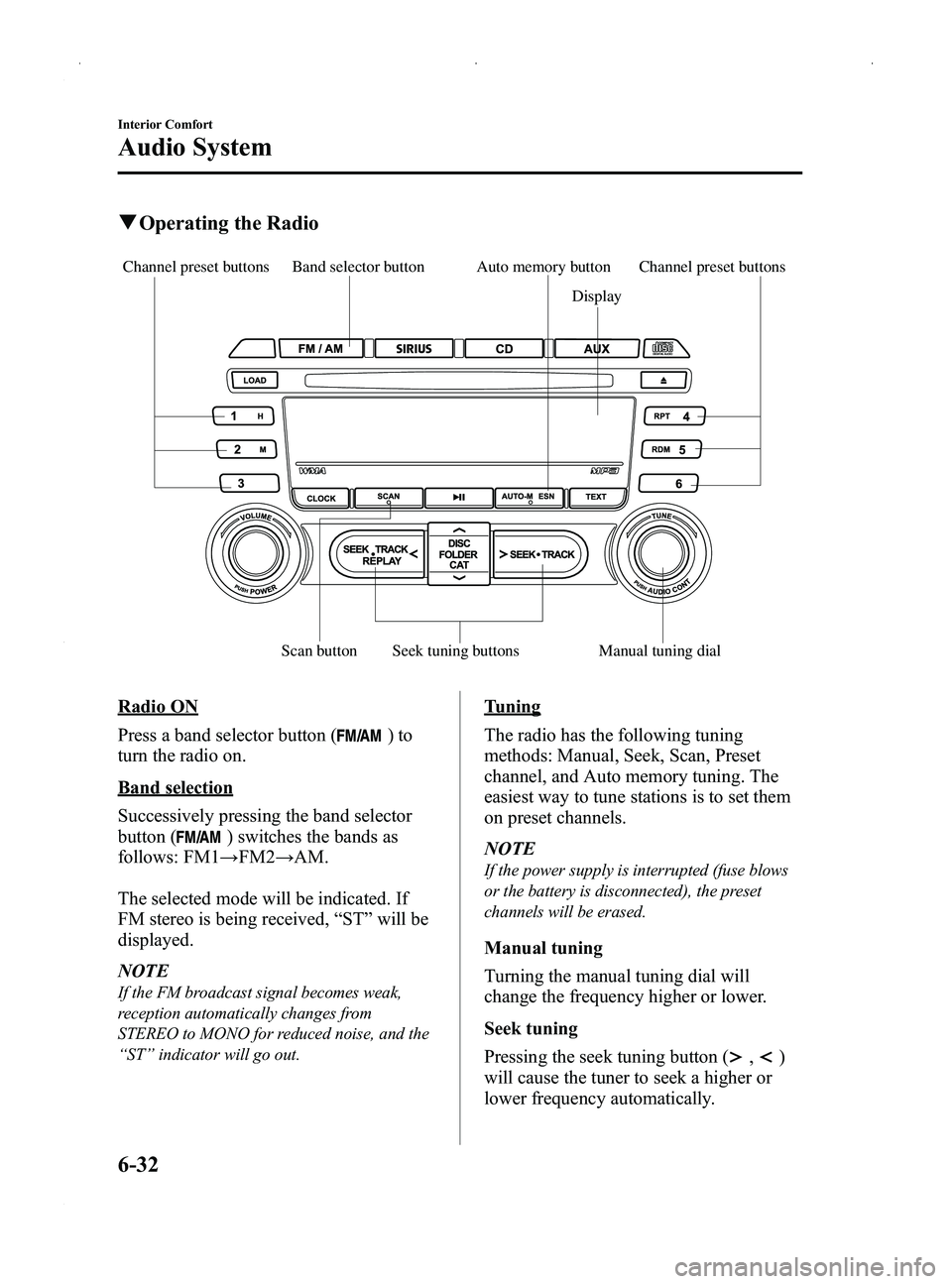
qOperating the Radio
Band selector button
Seek tuning buttons
Scan button Display
Auto memory button Channel preset buttons
Channel preset buttons
Manual tuning dial
Radio ON
Press a band selector button (
)to
turn the radio on.
Band selection
Successively pressing the band selector
button (
) switches the bands as
follows: FM1 →FM2 →AM.
The selected mode will be indicated. If
FM stereo is being received, “ST ”will be
displayed.
NOTE
If the FM broadcast signal becomes weak,
reception automatically changes from
STEREO to MONO for reduced noise, and the
“ ST ”indicator will go out.
Tuning
The radio has the following tuning
methods: Manual, Seek, Scan, Preset
channel, and Auto memory tuning. The
easiest way to tune stations is to set them
on preset channels.
NOTE
If the power supply is interrupted (fuse blows
or the battery is disconnected), the preset
channels will be erased.
Manual tuning
Turning the manual tuning dial will
change the frequency higher or lower.
Seek tuning
Pressing the seek tuning button (
,)
will cause the tuner to seek a higher or
lower frequency automatically.
6-32
Interior Comfort
Audio System
MX-5_8DG6-EA-13F_Edition3 Page246
Monday, December 16 2013 2:11 PM
Form No.8DG6-EA-13F
Page 252 of 452

Black plate (252,1)
(Programming with“text ”display (e.g.
channel name))
1. Select the desired channel to be programmed. At this point, the
following is displayed:
[SR
(bank number)(selected text
(e.g. channel name))]
2. Keep pressing the channel preset button for 1.5 seconds or more.
The programming process is complete
after the text (e.g. channel name)
flashes. Then, [SR
(bank number)]
is displayed and you will hear beep
sound at the same time.
3. [SR
(bank number)CH
(preset number)(channel number)]
are displayed.
4. Three seconds later, it returns to normal display. [SR
(bank number)(text
(e.g. channel name))]
NOTE
Six stations can be stored in each bank, SR1,
SR2, and SR3 for convenient access to your
favorite stations.
Preset channel call-up
Press and release the channel preset
button,
[SR
(bank number)CH(preset
number)
(channel number)] appears.
When the preset button is pressed during
text mode, its channel number is
displayed first for three second and then
its text is displayed.
NOTE
In the initial setting, all channels are preset to
184.
Category change
Press the category button (
or)
and select the desired category.
lPress the category button ():
Category up
lPress the category button ():
Category down
Every time the category button (
)is
pressed, the category is changed over in
the order shown below.
At this time, the lowest (smallest-number)
channel within the category indicated is
received.
When the highest (or lowest) category is
reached, the category is changed over in
the order shown below.
Highest category →All categories →
Lowest category
NOTE
While all categories are selected, all channels
covering a category can be accessed
(Category off condition).
Channel selection within a category
If you are in a selected category and the
channel number is displayed, turning the
manual tuning dial moves the channel
number up/down in that category.
lTurn the manual tuning dial clockwise:
Channel Up
lTurn the manual tuning dial
counterclockwise: Channel Down
NOTE
The channel number needs to be indicated in
the display to use manual tuning dial for this
function.
6-38
Interior Comfort
Audio System
MX-5_8DG6-EA-13F_Edition3 Page252
Monday, December 16 2013 2:11 PM
Form No.8DG6-EA-13F
Page 261 of 452
Black plate (261,1)
Fast-forward/Reverse
Press and hold the fast-forward button
(
) to advance through a track at high
speed.
Press and hold the reverse button (
)to
reverse through a track at high speed.
Track search
Press the track up button (
) once to skip
forward to the beginning of the next track.
Press the track down button (
) once to
skip back to the beginning of the current
track.
Folder search (during MP3/WMA CD
playback)
To change to the previous folder, press the
folder down button (
), or press the
folder up button (
) to advance to the
next folder.
Music scan
During music CD playback
This function scans the titles on a CD and
plays 10 seconds of each song to aid you
in finding a song you want to listen to.
During MP3/WMA CD playback
This function scans the titles in a folder
currently being played and plays 10
seconds of each song to aid you in finding
a song you want to listen to.
Press the scan button (
) during
playback to start the scan play operation
(the track number will flash).
Press the scan button (
) again to
cancel scan playback.
NOTE
If the unit is left in scan, normal playback will
resume where scan was selected.
Repeat playback
During music CD playback
1. Press the repeat button (
) during
playback to play the current track
repeatedly. “RPT ”is displayed.
2. Press the button again to cancel the repeat playback.
During MP3/WMA CD playback
(Track repeat)
1. Press the repeat button (
) during
playback to play the current track
repeatedly. After “TRACK RPT ”is
displayed, “RPT ”is displayed.
2. To cancel the repeat playback, press the button again after 3 seconds.
(Folder repeat)
1. Press the repeat button (
) during
playback, and then press the button
again within 3 seconds to play the
tracks in the current folder repeatedly.
After “FOLDER RPT ”is displayed,
“ F-RPT ”is displayed.
2. Press the button again to cancel the repeat playback.
Random playback
Tracks are randomly selected and played.
During music CD playback
1. Press the random button (
) during
playback to play the tracks on the CD
randomly. “RDM ”is displayed.
2. Press the button again to cancel the random playback.
Interior Comfort
Audio System
6-47
MX-5_8DG6-EA-13F_Edition3 Page261
Monday, December 16 2013 2:11 PM
Form No.8DG6-EA-13F
Page 265 of 452
Black plate (265,1)
2. Press the channel preset button for thedesired tray number while “WAIT ”is
displayed.
3. When “IN ”is displayed, insert the CD.
NOTE
The CD cannot be inserted to the desired tray
number if the number is already occupied.
Multiple insertion
1. Press and hold the load button (
)
for about 2 seconds until a beep sound
is heard.
2. When “IN ”is displayed, insert the CD.
3. When “IN ”is displayed again, insert
the next CD.
NOTE
The first-inserted CD will be played
automatically when:
lNo other CD is inserted within 15 seconds
after “IN ”is displayed.
lThe CD trays are full.
Ejecting the CD
Normal ejection
1. Press the CD eject button (
). The
disc number and “DISC OUT ”will be
displayed.
2. Pull out the CD.
NOTE
When the CD is ejected during play, the next
CD will be played automatically.
Ejecting CDs from desired tray number
1. Press and hold the CD eject button (
)
for about 2 seconds until a beep sound
is heard.
The “DISC OUT ”display flashes. 2. Press the channel preset button for the
desired CD number for less than 5
seconds after the beep sound is heard.
3. Pull out the CD.
Multiple ejection
1. Press and hold the CD eject button (
)
for about 2 seconds until a beep sound
is heard.
The “DISC OUT ”display flashes.
2. Pull out the CD, then the next CD will be ejected.
NOTE
lCDs will be ejected starting with the one
with the lowest number.
lAll CDs in the tray will be ejected
continuously.
lCDs can be ejected when the ignition is
switched off. Press and hold the CD eject
button (
) for about 2 seconds and all
CDs will eject.
Playback
Press the CD play button (
) to start
play when a CD is in the unit.
If a CD is not in the unit when the CD
play button (
) is pressed, “NO DISC ”
will flash on and off.
Pause
To stop playback, press the Play/Pause
button (
).
Press the button again to resume
playback.
Fast-forward/Reverse
Press and hold the fast-forward button
(
) to advance through a track at high
speed.
Press and hold the reverse button (
)to
reverse through a track at high speed.
Interior Comfort
Audio System
6-51
MX-5_8DG6-EA-13F_Edition3 Page265
Monday, December 16 2013 2:11 PM
Form No.8DG6-EA-13F