stop MAZDA MODEL MX-5 MIATA PRHT 2015 Workshop Manual
[x] Cancel search | Manufacturer: MAZDA, Model Year: 2015, Model line: MODEL MX-5 MIATA PRHT, Model: MAZDA MODEL MX-5 MIATA PRHT 2015Pages: 448, PDF Size: 4.7 MB
Page 271 of 448

Black plate (271,1)
WARNING
Do not adjust the portable audio unit
or a similar product while driving the
vehicle:Adjusting the portable audio unit or
a similar product while driving the
vehicle is dangerous as it could
distract your attention from the
vehicle operation which could lead to
a serious accident. Always adjust the
portable audio unit or a similar
product while the vehicle is stopped.
Do not allow the connection plug cord
to get tangled with the parking brake
or the shift lever: Allowing the plug cord to become
tangled with the parking brake or
the shift lever is dangerous as it
could interfere with driving, resulting
in an accident.
CAUTION
Depending on the portable audio
device, noise may occur when the
device is connected to the vehicle
accessory socket. (If noise occurs, do
not use the accessory socket.) NOTE
lThis mode may not be usable depending on
the portable audio device to be connected.
lBefore using the auxiliary jack, read the
manufacturer's instructions for the product
being connected.
lUse a commercially-available, non-
impedance (3.5
) stereo mini plug for
connecting the portable audio unit to the
auxiliary jack. Before using the auxiliary
jack, read the manufacturer's instructions
for connecting a portable audio unit to the
auxiliary jack.
lTo prevent discharging of the battery, do
not use the auxiliary input for long periods
with the engine off or idling.
lNoise may occur depending on the product
connected to the auxiliary jack.
lWith regard to connecting a portable audio
or similar device to a power source, use the
battery for the device, not the accessory
socket.
lInsert the plug to the auxiliary jack
securely.
lInsert or remove the plug with the plug
perpendicular to the auxiliary jack hole.
lInsert or remove the plug by holding its
base.
To listen to a portable audio unit
1. Switch the ignition to ACC or ON.
2. Insert the connection plug into the auxiliary jack.
3. Press the power/volume dial to turn the audio system on.
Interior Comfort
Audio System
6-59
MX-5_8EN7-EA-14E_Edition3 Page271
Friday, September 5 2014 3:20 PM
Form No.8EN7-EA-14E
Page 283 of 448
![MAZDA MODEL MX-5 MIATA PRHT 2015 Workshop Manual Black plate (283,1)
qMute
The microphone can be muted during a
call.
1. Press the voice recognition/hands-free
switch with a short press.
2. Say: [Beep] “Mute ”
3. Prompt: “Microphone muted ”](/img/28/40997/w960_40997-282.png "MAZDA MODEL MX-5 MIATA PRHT 2015 Workshop Manual Black plate (283,1)
qMute
The microphone can be muted during a
call.
1. Press the voice recognition/hands-free
switch with a short press.
2. Say: [Beep] “Mute ”
3. Prompt: “Microphone muted ”")
Black plate (283,1)
qMute
The microphone can be muted during a
call.
1. Press the voice recognition/hands-free
switch with a short press.
2. Say: [Beep] “Mute ”
3. Prompt: “Microphone muted ”
Canceling mute
1. Press the voice recognition/hands-free
switch with a short press.
2. Say: [Beep] “Mute off ”
3. Prompt: “Microphone unmuted ”
qTransferring a call
Transferring a call from Hands-Free to
a mobile phone
Communication between the hands-free
unit and a mobile phone is canceled, and
the line can be switched to a standard call
using a mobile phone.
1. Press the voice recognition/hands-free
switch with a short press.
2. Say: [Beep] “Transfer call ”
3. Prompt: “Transferred call to phone ”
Transferring a call from a mobile
phone to Hands-Free
Communication between mobile phones
can be switched to the Bluetooth
®Hands-
Free system.
1. Press the voice recognition/hands-free switch with a short press.
2. Say: [Beep] “Transfer call ”
3. Prompt: “Transferred call to Hands
Free system ”
Call waiting
A call can be interrupted to receive an
incoming call from a third party.
Call interrupt
A call can be switched to a new incoming
call.
Press the voice recognition/hands-free
switch with a short press.
NOTE
lTo refuse an incoming call, press the voice
recognition/hands-free switch with a long
press.
lAfter receiving a new incoming call, the
previous call is placed on hold.
Switching calls
Switching back to the previous call can
also be done.
Press the voice recognition/hands-free
switch with a short press.
Ending the current call
Press the voice recognition/hands-free
switch during the call with a long press.
qVoice guidance interrupt operation
Voice guidance can be stopped by
pressing the voice recognition/hands-free
switch with a short press while it is being
heard. A new voice input command can
then be spoken by the user.
· Press the voice recognition/hands-free
switch with a short press.
q Phonebook Settings
Editing phone book
The data registered to the Bluetooth
®
Hands-Free phone book can be edited.
Interior Comfort
Bluetooth® Hands-Free
6-71
MX-5_8EN7-EA-14E_Edition3 Page283
Friday, September 5 2014 3:20 PM
Form No.8EN7-EA-14E
Page 289 of 448
![MAZDA MODEL MX-5 MIATA PRHT 2015 Workshop Manual Black plate (289,1)
4.Say: [Beep] “Passcode ”
5. Prompt: “Passcode is enabled. Would
you like to disable it? ”
6. Say: [Beep] “Ye s ”
7. Prompt: “Passcode is disabled,
returning to main](/img/28/40997/w960_40997-288.png "MAZDA MODEL MX-5 MIATA PRHT 2015 Workshop Manual Black plate (289,1)
4.Say: [Beep] “Passcode ”
5. Prompt: “Passcode is enabled. Would
you like to disable it? ”
6. Say: [Beep] “Ye s ”
7. Prompt: “Passcode is disabled,
returning to main")
Black plate (289,1)
4.Say: [Beep] “Passcode ”
5. Prompt: “Passcode is enabled. Would
you like to disable it? ”
6. Say: [Beep] “Ye s ”
7. Prompt: “Passcode is disabled,
returning to main menu. ”
Confirmation Prompts
The confirmation prompt confirms the
command content to the user before
advancing to the operation requested by
the user. When this function is turned on,
the system reads out the voice input
command previously received and
confirms whether the command is correct
before advancing to the command
execution.
When the confirmation prompt function is
turned on:
(Ex.“Calling John's phone. Is this
correct? ”)
When the confirmation prompt function is
turned off:
(Ex. “Calling John's phone. ”)
NOTE
If the confirmation prompt function is turned
off when making an emergency call, the system
reads out and confirms the command before
executing it.
1. Press the voice recognition/hands-free switch with a short press.
2. Say: [Beep] “Setup ”
3. Prompt: “Select one of the following:
pairing options, confirmation prompts,
select phone, language, or passcode...,
or say “cancel ”to return to main
menu. ”
4. Say: [Beep] “Confirmation prompts” 5.
Prompt: “Confirmation prompts are
on/off. Would you like to turn
confirmation prompts off/on? ”
6. Say: [Beep] “Ye s ”
7. Prompt: “Confirmation prompts are
off/on, returning to main menu. ”
qVoice recognition learning
function (Speaker enrollment)
The voice recognition learning function
enables voice recognition appropriate to
the characteristics of the user's voice.
If the recognition of the voice input
commands to the system is not adequate,
this function can largely improve the
system's voice recognition of the user. If
your voice can be recognized sufficiently
without using this function, you may not
realize the added benefit of the function.
To register your voice, the voice input
command list must be read out. Read out
the list when the vehicle is parked.
Perform the registration in as quiet a place
as possible (page 6-64).
The registration must be performed
completely. The required time is a few
minutes. The user needs to be seated in
the driver's seat with the voice input
command list for voice recognition
learning open to the page indicated below.
1. Press the voice recognition/hands-free
switch with a short press.
2. Say: [Beep] “Voice training ”
3. Prompt: “This operation must be
performed in a quiet environment while
the vehicle is stopped. See the owner's
manual for the list of required training
phrases. Press and release the phone
button when you are ready to begin.
Press and hold the phone button to
cancel at any time. ”
Interior Comfort
Bluetooth® Hands-Free
6-77
MX-5_8EN7-EA-14E_Edition3 Page289
Friday, September 5 2014 3:20 PM
Form No.8EN7-EA-14E
Page 294 of 448

Black plate (294,1)
Cup Holder
WARNING
Never use a cup holder to hold hot
liquids while the vehicle is moving:Using a cup holder to hold hot liquids
while the vehicle is moving is
dangerous. If the contents spill, you
could be scalded.
Do not put anything other than cups or
drink cans in cup holders: Putting objects other than cups or
drink cans in a cup holder is
dangerous.
During sudden braking or
maneuvering, occupants could be hit
and injured, or objects could be
thrown around the vehicle, causing
interference with the driver and the
possibility of an accident. Only use a
cup holder for cups or drink cans.
CAUTION
To reduce the possibility of injury in
an accident or a sudden stop, keep
cup holders closed when not in use.
To open the cup holder lid, press the
switch rearward and slide the lid open.
Switch
Multi-Pocket
Multi-pockets are on the inside of the
doors.
Multi-pocket
CAUTION
Do not use the multi-pockets for
containers without caps. The
contents may spill when the door is
opened or closed.
6-82
Interior Comfort
Interior Equipment
MX-5_8EN7-EA-14E_Edition3 Page294
Friday, September 5 2014 3:20 PM
Form No.8EN7-EA-14E
Page 295 of 448

Black plate (295,1)
Storage Compartments
WARNING
Keep storage boxes closed when
driving:Driving with the storage boxes open
is dangerous. To reduce the
possibility of injury in an accident or
a sudden stop, keep the storage
boxes closed when driving.
Do not put articles in storage spaces
with no lid: Putting articles in storage spaces
with no lid is dangerous as they
could be thrown around the cabin if
the vehicle is suddenly accelerated
and cause injury depending on how
the article is stored.
CAUTION
Do not leave lighters or eyeglasses in
the storage boxes while parked under
the sun. A lighter could explode or
the plastic material in eyeglasses
could deform and crack from high
temperature.
qGlove Compartment
To open the glove compartment, pull the
latch toward you.
Insert the key (auxiliary key
*) and turn it
clockwise to lock, counterclockwise to
unlock.
* Advanced key equipped vehicle
Lock
Unlock
To close the glove compartment, firmly
press in the center of the glove
compartment lid.
q Seat Side Box
To open, pull the release catch.
Insert the key and turn it clockwise to
lock, counterclockwise to unlock.
Lock
Unlock
Interior Comfort
Interior Equipment
6-83
MX-5_8EN7-EA-14E_Edition3 Page295
Friday, September 5 2014 3:20 PM
Form No.8EN7-EA-14E
Page 300 of 448

Black plate (300,1)
Parking in an Emergency
The hazard warning lights should always
be used when you stop on or near a
roadway in an emergency.
The hazard warning lights warn other
drivers that your vehicle is a traffic hazard
and that they must take extreme caution
when near it.
Depress the hazard warning flasher and all
the turn signals will flash.
NOTE
lThe turn signals do not work when the
hazard warning lights are on.
lCheck local regulations about the use of
hazard warning lights while the vehicle is
being towed to verify that it is not in
violation of the law.
7-2
In Case of an Emergency
Parking in an Emergency
MX-5_8EN7-EA-14E_Edition3 Page300
Friday, September 5 2014 3:20 PM
Form No.8EN7-EA-14E
Page 316 of 448
Black plate (316,1)
Overheating
If the temperature gauge indicates
overheating, the vehicle loses power, or
you hear a loud knocking or pinging
noise, the engine is probably too hot.
WARNING
Switch the ignition to off and
make sure the fan is not running before
attempting to work near the cooling
fan: Working near the cooling fan when it
is running is dangerous. The fan
could continue running indefinitely
even if the engine has stopped and
the engine compartment temperature
is high. You could be hit by the fan
and seriously injured.
Do not remove the cooling
system cap when the engine and
radiator are hot: When the engine and radiator are
hot, scalding coolant and steam may
shoot out under pressure and cause
serious injury.
Open the hood ONLY after steam is no
longer escaping from the engine: Steam from an overheated engine is
dangerous. The escaping steam could
seriously burn you.
If the temperature gauge indicates
overheating:
1. Drive safely to the side of the road and park off the right-of-way. 2. Put a vehicle with an automatic
transmission in park (P), a manual
transmission in neutral.
3. Apply the parking brake.
4. Turn off the air conditioner.
5. Check whether coolant or steam is escaping from under the hood or from
the engine compartment.
If steam is coming from the engine
compartment:
Do not go near the front of the vehicle.
Stop the engine.
Wait until the steam dissipates, then
open the hood and start the engine.
If neither coolant nor steam is
escaping:
Open the hood and idle the engine until
it cools.
CAUTION
If the cooling fan does not operate
while the engine is running, the
engine temperature will increase.
Stop the engine and call an
Authorized Mazda Dealer.
6. Make sure the cooling fan is operating, then turn off the engine after the
temperature has decreased.
7. When cool, check the coolant reservoir level.
If it's low, look for coolant leaks from
the radiator and hoses.
7-18
In Case of an Emergency
Overheating
MX-5_8EN7-EA-14E_Edition3 Page316
Friday, September 5 2014 3:20 PM
Form No.8EN7-EA-14E
Page 317 of 448
Black plate (317,1)
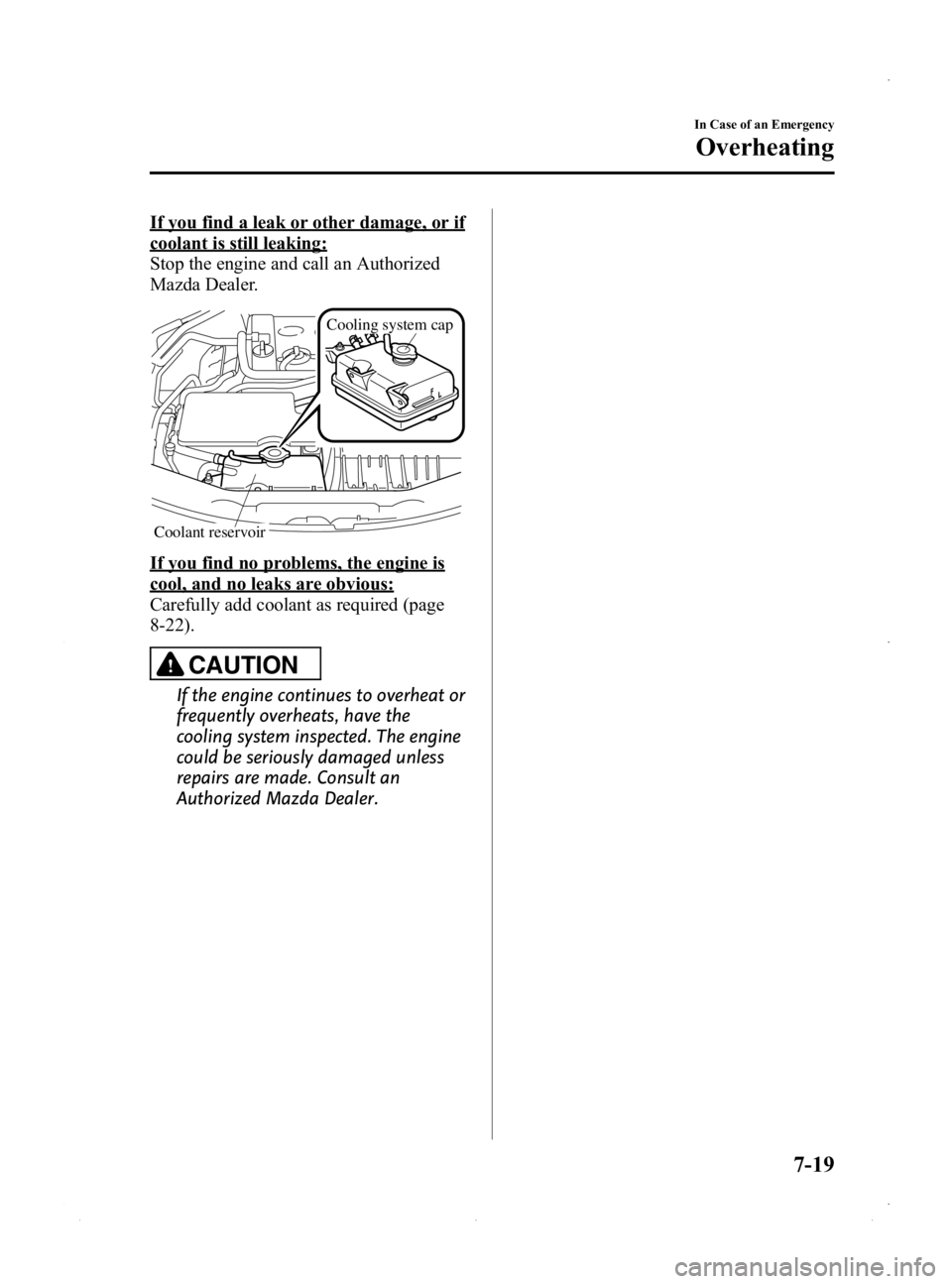
If you find a leak or other damage, or if
coolant is still leaking:
Stop the engine and call an Authorized
Mazda Dealer.
Cooling system cap
Coolant reservoir
If you find no problems, the engine is
cool, and no leaks are obvious:
Carefully add coolant as required (page
8-22).
CAUTION
If the engine continues to overheat or
frequently overheats, have the
cooling system inspected. The engine
could be seriously damaged unless
repairs are made. Consult an
Authorized Mazda Dealer.
In Case of an Emergency
Overheating
7-19
MX-5_8EN7-EA-14E_Edition3 Page317
Friday, September 5 2014 3:20 PM
Form No.8EN7-EA-14E
Page 344 of 448

Black plate (344,1)
WARNING
Do not perform maintenance work if you lack sufficient knowledge and experience or
the proper tools and equipment to do the work. Have maintenance work done by a
qualified technician:Performing maintenance work on a vehicle is dangerous if not done properly. You
can be seriously injured while performing some maintenance procedures.
If you must run the engine while working under the hood, make certain that you
remove all jewelry (especially rings, bracelets, watches, and necklaces) and all
neckties, scarves, and similar loose clothing before getting near the engine or cooling
fan which may turn on unexpectedly: Working under the hood with the engine running is dangerous. It becomes even
more dangerous when you wear jewelry or loose clothing.
Either can become entangled in moving parts and result in injury.
Switch the ignition to off and make sure the fan is not running before attempting to
work near the cooling fan: Working near the cooling fan when it is running is dangerous. The fan could
continue running indefinitely even if the engine has stopped and the engine
compartment temperature is high. You could be hit by the fan and seriously injured.
Do not leave items in the engine compartment: After you have finished checking or doing servicing in the engine compartment, do
not forget and leave items such as tools or rags in the engine compartment.
Tools or other items left in the engine compartment could cause engine damage or a
fire leading to an unexpected accident.
8-18
Maintenance and Care
Owner Maintenance
MX-5_8EN7-EA-14E_Edition3 Page344
Friday, September 5 2014 3:20 PM
Form No.8EN7-EA-14E
Page 348 of 448

Black plate (348,1)
Engine Coolant
qInspecting Coolant Level
WARNING
Do not use a match or live flame in the
engine compartment. DO NOT ADD
COOLANT WHEN THE ENGINE IS HOT:
A hot engine is dangerous. If the
engine has been running, parts of the
engine compartment can become
very hot. You could be burned.
Carefully inspect the engine coolant
in the coolant reservoir, but do not
open it.
Switch the ignition to off and
make sure the fan is not running before
attempting to work near the cooling
fan: Working near the cooling fan when it
is running is dangerous. The fan
could continue running indefinitely
even if the engine has stopped and
the engine compartment temperature
is high. You could be hit by the fan
and seriously injured.
Do not remove the cooling
system cap when the engine and
radiator are hot: When the engine and radiator are
hot, scalding coolant and steam may
shoot out under pressure and cause
serious injury.
NOTE
Changing the coolant should be done by an
Authorized Mazda Dealer.
Inspect the antifreeze protection and
coolant level in the coolant reservoir at
least once a year ―at the beginning of the
winter season ―and before traveling
where temperatures may drop below
freezing.
Inspect the condition and connections of
all cooling system and heater hoses.
Replace any that are swollen or
deteriorated.
The coolant should be at full in the
radiator and between the F and L marks
on the coolant reservoir when the engine
is cool.
If it is at or near L, add enough coolant to
the coolant reservoir to provide freezing
and corrosion protection and to bring the
level to F.
Securely tighten the coolant reservoir tank
cap after adding coolant.
CAUTION
Ø Radiator coolant will damage
paint.
Rinse it off quickly if spilled.
8-22
Maintenance and Care
Owner Maintenance
MX-5_8EN7-EA-14E_Edition3 Page348
Friday, September 5 2014 3:20 PM
Form No.8EN7-EA-14E