sensor MAZDA MX-5 1994 Workshop Manual
[x] Cancel search | Manufacturer: MAZDA, Model Year: 1994, Model line: MX-5, Model: MAZDA MX-5 1994Pages: 1708, PDF Size: 82.34 MB
Page 1003 of 1708

SRS AIR BAG SYSTEM SYSTEM DIAGRAM PASSENGER-SIDE S-SENSOR AIR BAG MODULE I IG1 B+ HORN RELAY CLOCK SPRING BACK-UP BATTERY I AIR BAG SYSTEM WARNING LIGHT SENSOR -7 System Operation During collision When either of the D-sensors and the S-sensor are activated (closed) simultaneously by shock of a colli- sion, the circuit to the inflator is completed. The inflator creates nitrogen gas and the air bag is deployed. The air bag vents the nitrogen gas from the vent hole on the back side of the bag to reduce shock to the driver and to allow easier exit from the vehicle. During normal condition and malfunction The diagnostic module constantly monitors the components and wiring of the air bag system for malfunc- tion, open circuits, and short circuits. .J If a malfunction is detected, the diagnostic module illuminates or flashes the warning light. In the case of a short circuit in the sensors or sensor harnesses, the diagnostic module activates the warning light and shuts down the system to prevent accidental deployment of the air bag. Gartner Banana
Page 1008 of 1708

SRS AIR BAG SYSTEM T Service Code Table (With passenger-side air bag) Possible cause Flowchart No. Poor connection of diagnostic module priority connector Open circuit or poor connection of power source circuit code Output signal (Air bag system warning light) Remains ON Damaged D-sensor (D-sensor ON) 2 Poor installation of S-sensor Damaged S-sensor (S-sensor ON) 12 5 22 OFF OFF Open connection in S-sensor feed circuit S-sensor diagnosis circuit open High resistance or open circuit in driver- 8 32 OFF side air bag module circuit High resistance or open circuit in pas- senger-side air bag module circuit Low resistance in driver-side air bag module circuit I 11 1 35 ION- OFF b Low resistance in passenger-side air bag module circuit Open circuit between diagnostic module 10 and D-sensor - Poor installation of right D-sensor 113 144 ION- OFF 34 OFF Poor installation of center D-sensor 14 I 15 1 46 ION- OFF Poor installation of left D-sensor 45 System-down fuse burnt OFF 1 17 1 52 ( ON ml flk OFF Damaged back-up battery Damaged diagnostic module I 18 I 53 IoNm[~ OFF Poor connection of all D-sensor 19 I I I w Note If two or more troubles exist in the air bag system, the warning light indicates the cause of the trouble with the highest priority. T-163 99 Flashes quickly and continuously Gartner Banana
Page 1010 of 1708

SRS AIR BAG SYSTEM T Possible cause Defective diagnostic module Defective S-sensor Defective wiring harness Step 1 Carry out "Before Servicing" procedure under GENER- AL PROCEDURES, page T-160. Service Code 12 Flowchart No.2 Step 2 Check the EGI IJN fuse. Symptom I Fuse I Action I Step 3 1. Disconnect the diagnostic module connector. 2. Connect the negative battery cable. 3. Measure the voltage at terminal 1 L (WIG) of the diagnos- tic module connector. OK Burnt B+: Battery positive voltage Voltage Action I Go to Step 3 Go to Step 4 Step 4 1. Disconnect the diagnostic module connector. 2. Check for continuity between terminal 1L (WIG) of the diagnostic module connector and ground. B+ Other Replace diagnostic module Repair wiring harness (EGI INJ fuse - Diagnostic module) I NO I GO to Step 5 I Continuity Yes Step 5 Check for continuity between terminal 1H (GIB) of the diagnostic module connector and ground. Continuity I Action Action Repair wiring harness (EGI INJ fuse - Diag- nostic module) and replace the fuse Yes ( Go to Step 6 No Replace diagnostic module (Refer to page T-208) Gartner Banana
Page 1011 of 1708

SRS AIR BAG SYSTEM Step 6 1. Disconnect the S-sensor connector. 2. Check for continuity between terminal 1 H (GIB) of the diagnostic module connector and ground. I No I Replace wiring harness I Continuity Yes Action Replace S-sensor (Refer to page T-213) Gartner Banana
Page 1012 of 1708
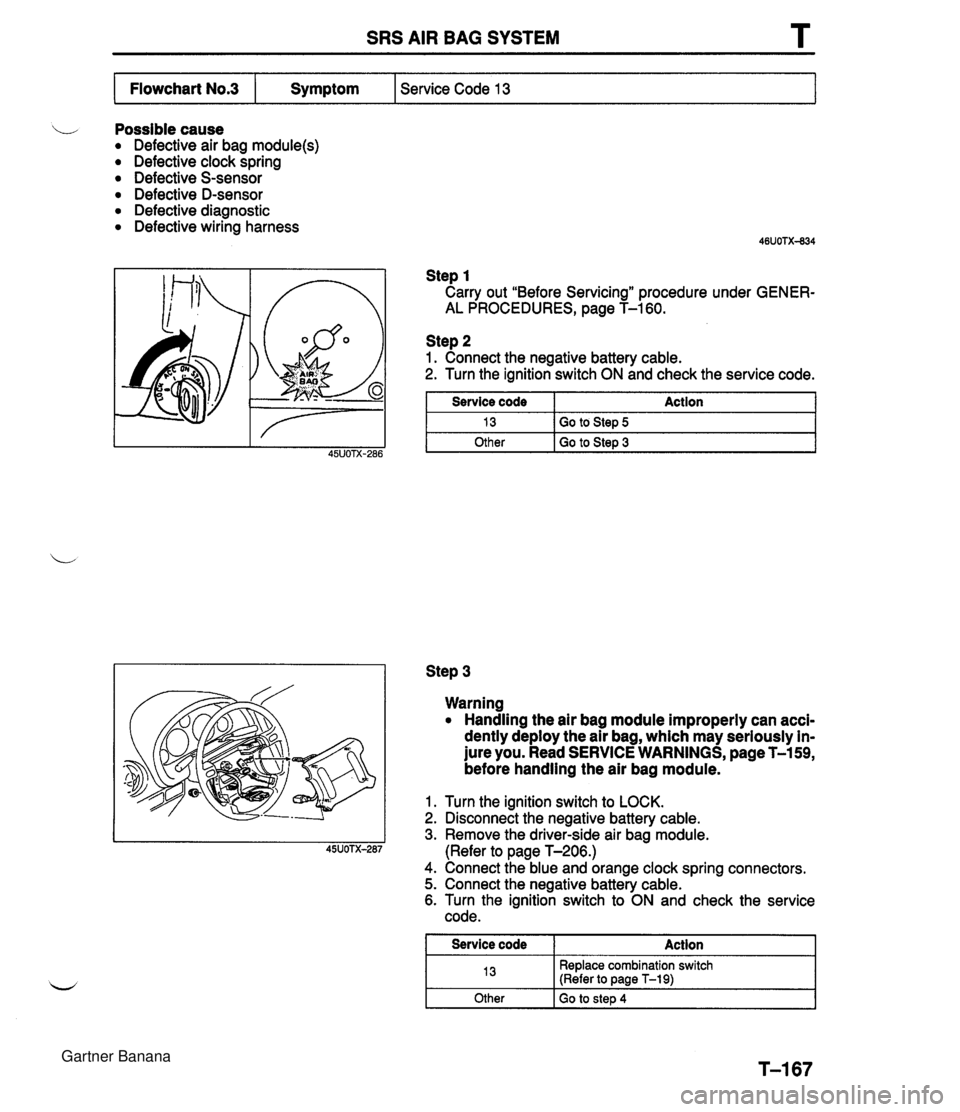
SRS AIR BAG SYSTEM L Possible cause Defective air bag module(s) Defective clock spring Defective S-sensor Defective D-sensor Defective diagnostic Defective wiring harness Step 1 Carry out "Before Servicing" procedure under GENER- AL PROCEDURES, page T-160. Service Code 13 Flowchart No.3 Step 2 1. Connect the negative battery cable. 2. Turn the ignition switch ON and check the service code. Symptom Step 3 Service code 13 Other Warning Handling the air bag module improperly can acci- dently deploy the air bag, which may seriously in- jure you. Read SERVICE WARNINGS, page T-159, before handling the air bag module. Action Go to Step 5 Go to Step 3 1. Turn the ignition switch to LOCK. 2. Disconnect the negative battery cable. 3. Remove the driver-side air bag module. (Refer to page T-206.) 4. Connect the blue and orange clock spring connectors. 5. Connect the negative battery cable. 6. Turn the ignition switch to ON and check the service code. I Service code I Action 1 13 Other Replace combination switch (Refer to page T-19) Go to step 4 Gartner Banana
Page 1014 of 1708

SRS AIR BAG SYSTEM Step 8 1. Disconnect the orange and blue S-sensor connectors. 2. Check for continuity between terminal C of the S-sensor and ground. Continuity Action 1 Yes No Step 10 1. Disconnect the suspect sensor connector. 2. Measure the resistance between terminal A of the sen- sor and ground. Replace S-sensor (Refer to page T-213) Replace wiring harness Step 9 Measure the resistance between terminal 1 C (BRIG), 1 A (BRIR), and 2L (BRIB) of the diagnostic module connec- tor and ground. Resistance k&2 Other Other I Replace sensor I Action Replace diagnostic module (Refer to page T-208) Suspect sensor: Terminal 1 C -+ right D-sensor Terminal 1 A -+ Center D-sensor Terminal 2L -+ left D-sensor Go to Step 10 Measure 1.18 kn Action Replace wiring harness Gartner Banana
Page 1015 of 1708

T SRS AIR BAG SYSTEM Possible cause i/ Defective S-sensor Defective wiring harness Defective diagnostic module Step 1 Carry out "Before Servicing" procedure under GENER- AL PROCEDURES, page T-160. Service Code 21 Flowchart No.4 Step 2 1. Disconnect the diagnostic module connector. 2. Check for continuity between terminal 1 E (RIB) of the Symptom connector and ground. Step 3 1. -Disconnect the orange and blue S-sensor connector. 2. Check for continuity between terminal A of the S-sensor and ground. I Continuity I Action Continuity Yes No Action Replace diagnostic module (Refer to page T-208) Go to Step 3 Yes No Replace wiring harness Replace S-sensor (Refer to page T-213) Gartner Banana
Page 1016 of 1708

SRS AIR BAG SYSTEM T Flowchart N0.5 I Symptom I Service Code 22 Possible cause Defective wiring harness Defective S-sensor Defective diagnostic module Step 1 Carry out "Before Servicing" procedure under GENER- AL PROCEDURES, page T-160. Step 2 1. Disconnect the diagnostic module connector. 2. Check for continuity between terminal 1 H (GIB) and 2D (GMI) of the diagnostic module connector. Continuity Yes Step 3 1. Disconnect the orange and blue S-sensor connectors. 2. Check for continuity between terminal B and D of the S- sensor. Continuity I Action I Action Go to Step 3 I No Replace diagnostic module (Refer to page T-208) Yes No Replace S-sensor (Refer to page T-213) Replace wiring harness Gartner Banana
Page 1017 of 1708

T SRS AIR BAG SYSTEM Possible cause Defective wiring harness Defective S-sensor Defective diagnostic module Step 1 Carry out "Before Servicing" procedure under GENER- AL PROCEDURES, page T-160. Service Code 23 Flowchart No.6 Step 2 1. Disconnect the diagnostic module connector. 2. Check for continuity between terminal 1 H (GIB) and 2C (G) of the diagnostic module connector. Symptom I No Go to Step 3 Continuity Yes Step 3 1. Disconnect orange and blue S-sensor connectors. 2. Check for continuity between terminal B and E of the S- sensor. Action Replace diagnostic module (Refer to pane T-208) No I Replace S-sensor (Refer to page T-213) I Continuity Yes Action Replace wiring harness Gartner Banana
Page 1025 of 1708

T SRS AIR BAG SYSTEM m~No.12Iy~m~torn I Service Code 41 Possible cause Poor connection of D-sensor connector Defective D-sensor Defective wiring harness Defective diagnostic module Step 3 1. Disconnect the suspect sensor connector. 2. Measure the resistance between terminal A of the sen- sor and ground. Measure I Action I Step 1 Carry out "Before Servicing" procedure under GENER- AL PROCEDURES, page T-160. Step 2 1. Disconnect the diagnostic module connector. 2. Measure the resistance between terminals 1C (BWG), 1 A (BWR), and 2L (BWB) of the diagnostic module con- nector and ground. 45UoTX-311 1.18kn Other - Resistance All , .18 kSL Other Replace wiring harness Replace sensor Action Replace diagnostic module (Refer to page T-208) Suspect sensor: Terminal 1 C -+ right D-sensor Terminal 1 A --+ Center D-sensor Terminal 2L -+ left D-sensor Go to Step 3 Gartner Banana