turn signal MAZDA MX5 MIATA 2017 Owner's Manual
[x] Cancel search | Manufacturer: MAZDA, Model Year: 2017, Model line: MX5 MIATA, Model: MAZDA MX5 MIATA 2017Pages: 568, PDF Size: 16.58 MB
Page 250 of 568
5 –28 Interior Features
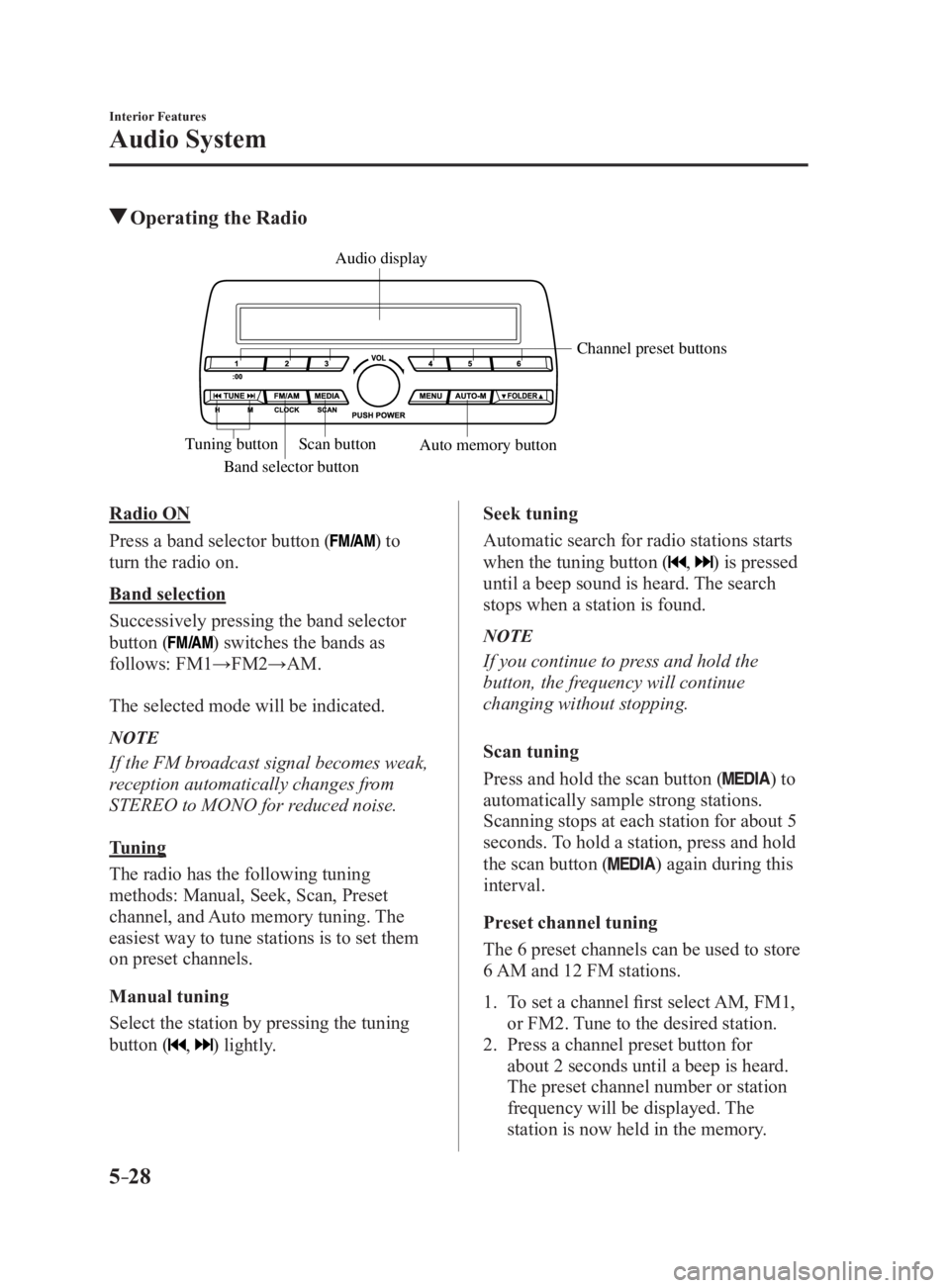
Audio System Operating the Radio
Band selector button Channel preset buttons
Scan button
Auto memory buttonTuning button Audio display
Radio ON
Press a band selector button (
) to
turn the radio on.
Band selection
Successively pressing the band selector
button (
) switches the bands as
follows: FM1→FM2→AM.
The selected mode will be indicated.
NOTE
If the FM broadcast signal becomes weak,
reception automatically changes from
STEREO to MONO for reduced noise.
Tuning
The radio has the following tuning
methods: Manual, Seek, Scan, Preset
channel, and Auto memory tuning. The
easiest way to tune stations is to set them
on preset channels.
Manual tuning
Select the station by pressing the tuning
button (
, ) lightly. Seek tuning
Automatic search for radio stations starts
when the tuning button (
, ) is pressed
until a beep sound is heard. The search
stops when a station is found.
NOTE
If you continue to press and hold the
button, the frequency will continue
changing without stopping.
Scan tuning
Press and hold the scan button (
) to
automatically sample strong stations.
Scanning stops at each station for about 5
seconds. To hold a station, press and hold
the scan button (
) again during this
interval.
Preset channel tuning
The 6 preset channels can be used to store
6 AM and 12 FM stations.
1. To set a channel first select AM, FM1,
or FM2. Tune to the desired station.
2. Press a channel preset button for
about 2 seconds until a beep is heard.
The preset channel number or station
frequency will be displayed. The
station is now held in the memory.
MX-5_8FR4-EA-16J_Edition1.indb 28 2016/08/11 20:29:12
Page 267 of 568

5 –45 Interior Features
Audio SystemMulticast channel selection (FM)
If multi-cast channels are available for an
broadcast currently being
received, the multi-cast channel list is
displayed. Select the desired radio station. NOTE
If an analog broadcast is received once
and is received while HD1 is
selected, the audio unit switches to the
station automatically.
When the icon is illuminated, there
could be a noticeable difference in
sound quality and volume when a
change from digital to analog signals
occurs. If the sound quality and volume
become noticeably diminished or cut
off, select the
icon to turn off
( icon is not illuminated).
Once an analog broadcast is received
when HD1 is selected from the Favorite
channels, it is switched to
automatically. If the radio reception
conditions are poor, or HD is off,
switching to
broadcasts is
not possible.
When an HD specialty channel (HD2 to
HD8) is selected from the Favorite
channels, “Signal Lost” is displayed
and no audio is output until
is received. If the radio reception
conditions are poor, “Signal Lost”
continues to be displayed.
If the icon is not illuminated,
information such as song titles of the
station are received,
however, the audio output is analog. iTunes Tagging (for Apple devices with
USB use only)
By tagging a song currently being aired,
the song can later be purchased from
the iTunes Store. One hundred tags
can be stored. A maximum of 100 tags
(for 100 songs) can be stored for later
downloading.
1. Select the icon. The tag is stored in
the audio unit.
2. Connect the device via the vehicle's
USB. Any stored tag(s) will be sent
automatically to the connected device.
3. Once at home or after parking the
vehicle safely, log onto the iTunes
Store with your device. Your previously
tagged song(s) can now be easily
purchased.
NOTE
Both AM and FM can be
used.
Because iTunes tagging only supports
purchases from the iTunes Store, direct
downloading of music from the vehicle's
audio unit is not possible.
If the available memory for the
connected device is insufficient, the tag
is not sent.
If an error occurs while the tag is being
sent, reconnect the device.
MX-5_8FR4-EA-16J_Edition1.indb 45 2016/08/11 20:29:16
Page 407 of 568

6 –45 Maintenance and Care
Owner Maintenance
Light Bulbs Overhead light
Side turn signal lights
High-mount brake lightTrunk lightFront side-marker lights
Front turn signal lights
Headlights (low beam)P arking lights
Headlights (High beam)
Daytime running lights
License plate lights
Brake lights
TaillightsRear side-marker lights
Reverse lights
Rear turn signal lights
MX-5_8FR4-EA-16J_Edition1.indb 45 2016/08/11 20:29:47
Page 409 of 568

6 –47 Maintenance and Care
Owner Maintenance5. Disconnect the bulb from the socket.
6. Install the new bulb in the reverse order
of the removal procedure.
Front side-marker lights
1. Make sure the ignition is switched off,
and the headlight switch is off.
2. If you are changing the right bulb, start
the engine, turn the steering wheel
all the way to the right, and turn off
engine. If you are changing the left
bulb, turn the steering wheel to the left.
3. Pull the center of each plastic retainer
and remove the retainers, and then
partially peel back the mudguard.
Rem ova l
Installation
4. Turn the socket and bulb assembly
counterclockwise and remove it. 5. Disconnect the bulb from the socket.
6. Install the new bulb in the reverse order
of the removal procedure.
Front turn signal lights
1. Make sure the ignition is switched off,
and the headlight switch is off.
2. If you are changing the right bulb, start
the engine, turn the steering wheel
all the way to the right, and turn off
engine. If you are changing the left
bulb, turn the steering wheel to the left.
3. Pull the center of each plastic retainer
and remove the retainers, and then
partially peel back the mudguard.
Rem ova l
Installation
MX-5_8FR4-EA-16J_Edition1.indb 47 2016/08/11 20:29:48
Page 410 of 568

6 –48 Maintenance and Care
Owner Maintenance 4. Disconnect the connector from the unit
by pressing the tab on the connector
with your finger and pulling the
connector rearward.
5. Turn the socket and bulb assembly
counterclockwise and remove it.
6. Disconnect the bulb from the socket.
7. Install the new bulb in the reverse order
of the removal procedure.
Side turn signal lights
1. Make sure the ignition is switched off,
and the headlight switch is off.
2. If you are changing the right bulb, start
the engine, turn the steering wheel
all the way to the right, and turn off
engine. If you are changing the left
bulb, turn the steering wheel to the left. 3. Pull the center of each plastic retainer
and remove the retainers, and then
partially peel back the mudguard.
Rem ova l
Installation
4. Remove the unit by pressing the tab on
the unit with your finger and pulling the
unit forward.
5. Detach the electrical connector from
the unit by pulling it to the rear.
6. Install the new side turn signal unit
in the reverse order of the removal
procedure.
MX-5_8FR4-EA-16J_Edition1.indb 48 2016/08/11 20:29:48
Page 411 of 568

6 –49 Maintenance and Care
Owner MaintenanceRear turn signal lights
1. Make sure the ignition is switched off,
and the headlight switch is off.
2. Pull the center of each plastic retainer
and remove the retainers and the trunk
end trim.
Rem ova l
Installation
3. Disconnect the connector from the unit
by pressing the tab on the connector
with your finger and pulling the
connector downward.
4. Pull the center of each plastic retainer
and remove the retainers, and then
partially peel back the trunk side trim.
Rem ova l
Installation
MX-5_8FR4-EA-16J_Edition1.indb 49 2016/08/11 20:29:48
Page 419 of 568

6 –57 Maintenance and Care
Owner Maintenance
*Some models.DESCRIPTION FUSE
RATING PROTECTED COMPONENT
18 A/C MAG 7.5 A Air conditioner
19 AT PUMP
H/L HI 20 A Transmission control system *
20 AT 15 A Transmission control system *
21 D LOCK 25 A Power door locks
22 H/L RH 20 A Headlight (RH)
23
ENG
B2 7.5 A Engine control system
24 TAIL 20 A Taillights, License plate lights, Parking lights
25 DRL 15 A —
26 ROOM 25 A Overhead light
27 FOG 15 A —
28 H/CLEAN 20 A —
29 STOP 10 A Brake lights
30 HORN 15 A Horn
31 H/L LH 20 A Headlight (LH)
32 ABS/DSC S 30 A ABS, Dynamic stability control system
33 HAZARD 15 A Hazard warning flashers, Turn signal lights
34 FUEL PUMP 15 A Fuel system
35
ENG B3 5 A —
36 WIPER 20 A Windshield wipers
37
CABIN
B 50 A For protection of various circuits
38 — — —
39 — — —
40 ABS/DSC M 50 A ABS, Dynamic stability control system
41 EVVT
A/R PUMP 20 A Engine control system
42 EVPS 30 A Brake control system
43 FAN1 30 A Cooling fan
44 FAN2 40 A —
45 ENG.MAIN 40 A Engine control system
46 EPS 60 A Power steering system
47 DEFOG 30 A Rear window defogger
48 IG2 30 A For protection of various circuits
49 INJECTOR 30 A Engine control system
50 HEATER 40 A Air conditioner
51 — — —
52 — — —
MX-5_8FR4-EA-16J_Edition1.indb 57 2016/08/11 20:29:50
Page 436 of 568
7 –2 If Trouble Arises
Parking in an Emergency
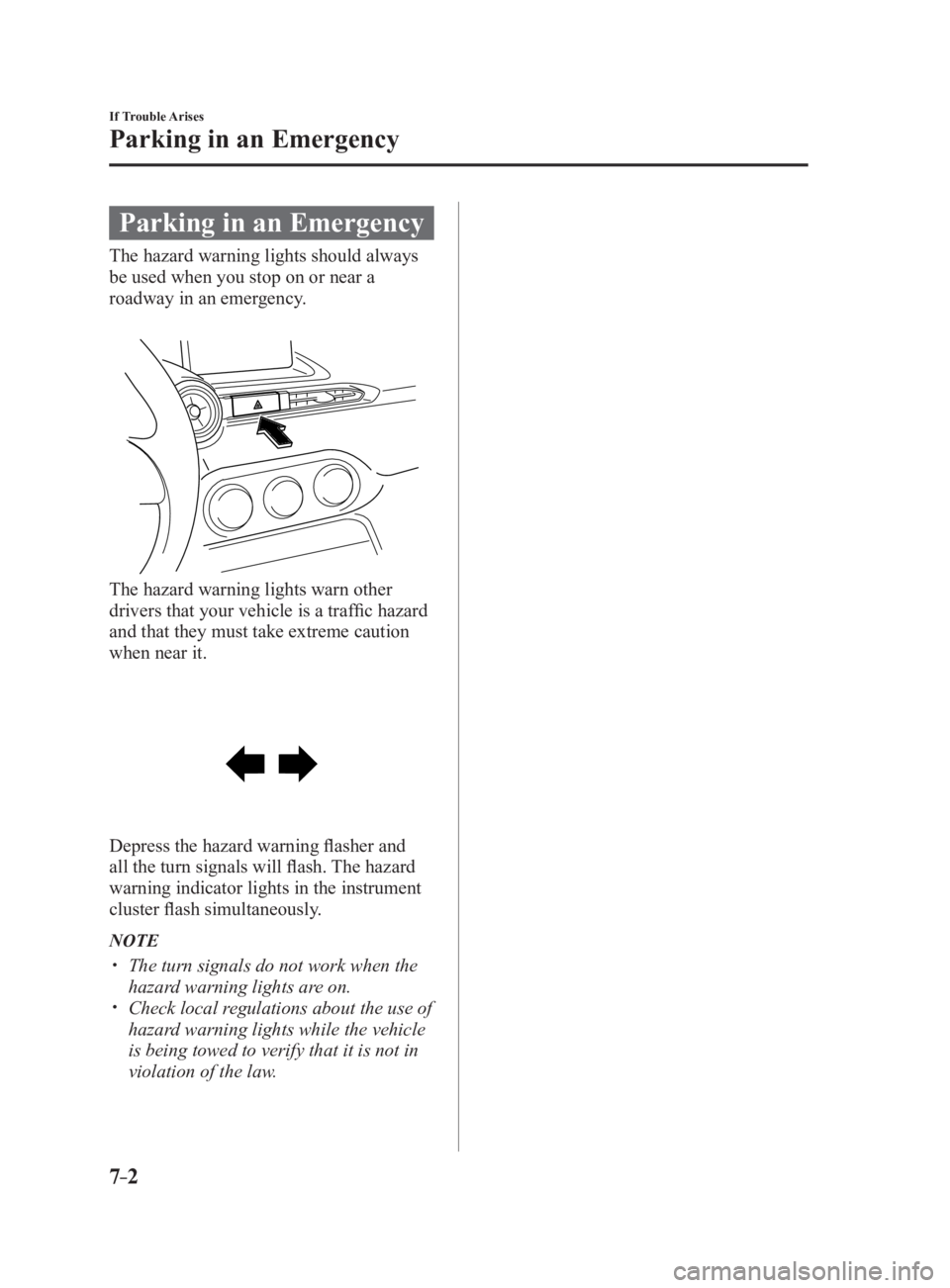
Parking in an Emergency The hazard warning lights should always
be used when you stop on or near a
roadway in an emergency.
The hazard warning lights warn other
drivers that your vehicle is a traffic hazard
and that they must take extreme caution
when near it.
Depress the hazard warning flasher and
all the turn signals will flash. The hazard
warning indicator lights in the instrument
cluster flash simultaneously.
NOTE
The turn signals do not work when the
hazard warning lights are on.
Check local regulations about the use of
hazard warning lights while the vehicle
is being towed to verify that it is not in
violation of the law.
MX-5_8FR4-EA-16J_Edition1.indb 2 2016/08/11 20:29:55
Page 467 of 568

7 –33 If Trouble Arises
Warning/Indicator Lights and Warning Sounds
If a Warning Light Turns On or FlashesIf any warning light turns on/flashes, take appropriate action f or each light. There is no
problem if the light turns off, however if the light does not turn off or turns on/flashes again,
consult an Authorized Mazda Dealer.
(Vehicles with type B audio)
The warning contents can be verified on the center display.
1. If the warning light is turned on, select icon on the home screen to display the
application screen.
2. Select “Vehicle Status Monitor”.
3. Select “Warning Guidance” to display the current warnings.
4. Select the applicable warning to view the warning details.
Stop Vehicle in Safe Place ImmediatelyIf any of the following warning lights turns on, the system may have a malfunction. Stop the
vehicle in a safe place immediately and contact an Authorized Mazda Dealer. Signal Warning
Brake System Warning
Light This warning has the following functions:
Parking brake warning/Warning light inspection
The light illuminates when the parking brake is applied with the ignition switched to
START or ON. It turns off when the parking brake is fully released.
Low brake fluid level warning
If the brake warning light remains illuminated even though the parking brake is
released, the brake fluid may be low or there could be a problem with the brake system.
Park the vehicle in a safe place immediately and contact an Authorized Mazda Dealer.
WARNING Do not drive with the brake system warning light illuminated. Contact an
Authorized Mazda Dealer to have the brakes inspected as soon as possible:
Driving with the brake system warning light illuminated is dangerous. It indicates
that your brakes may not work at all or that they could completely fail at any
time. If this light remains illuminated, after checking that the parking brake is fully
released, have the brakes inspected immediately.
CAUTION In addition, the effectiveness of the braking may diminish so you may need to
depress the brake pedal more strongly than normal to stop the vehicle.
MX-5_8FR4-EA-16J_Edition1.indb 33 2016/08/11 20:30:02
Page 468 of 568

7 –34 If Trouble Arises
Warning/Indicator Lights and Warning Sounds Signal Warning
Electronic Brake Force
Distribution System
Warning If the electronic brake force distribution control unit determines that some components
are operating incorrectly, the control unit may illuminate the brake system warning
light and the ABS warning light simultaneously. The problem is likely to be the
electronic brake force distribution system.
WARNING Do not drive with both the ABS warning light and brake warning light illuminated.
Have the vehicle towed to an Authorized Mazda Dealer to have the brakes
inspected as soon as possible:
Driving when the brake system warning light and ABS warning light are
illuminated simultaneously is dangerous.
When both lights are illuminated, the rear wheels could lock more quickly in an
emergency stop than under normal circumstances.
Charging System
Warning Indication/
Warning Light If the warning light illuminates while driving, it indicates a malfunction of the
alternator or of the charging system.
Drive to the side of the road and park off the right-of-way. Consult an Authorized
Mazda Dealer.
CAUTION Do not continue driving when the charging system warning light is illuminated
because the engine could stop unexpectedly.
Engine Oil Warning
Light This warning light indicates low engine oil pressure.
CAUTION Do not run the engine if the oil pressure is low. Otherwise, it could result in extensive
engine damage.
If the light illuminates or the warning indication is displayed while driving:
1.Drive to the side of the road and park off the right-of-way on level ground.
2.Turn off the engine and wait 5 minutes for the oil to drain back into the oil pan.
3.Inspect the engine oil level 6-28 . If it's low, add the appropriate amount of engine
oil while being careful not to overfill.
CAUTION Do not run the engine if the oil level is low. Otherwise, it could result in extensive
engine damage.
4.Start the engine and check the warning light.
If the light remains illuminated even though the oil level is normal or after adding oil,
stop the engine immediately and have your vehicle towed to an Authorized Mazda
Dealer.
MX-5_8FR4-EA-16J_Edition1.indb 34 2016/08/11 20:30:02