ECO mode MAZDA MX5 MIATA 2017 Owner's Guide
[x] Cancel search | Manufacturer: MAZDA, Model Year: 2017, Model line: MX5 MIATA, Model: MAZDA MX5 MIATA 2017Pages: 568, PDF Size: 16.58 MB
Page 255 of 568
5 –33 Interior Features
Audio SystemNOTE
The information viewable in the display
is only CD information (such as artist
name, song title) which has been
recorded to the CD.
This unit cannot display some
characters. Characters which cannot be
displayed are indicated by an asterisk
(
).
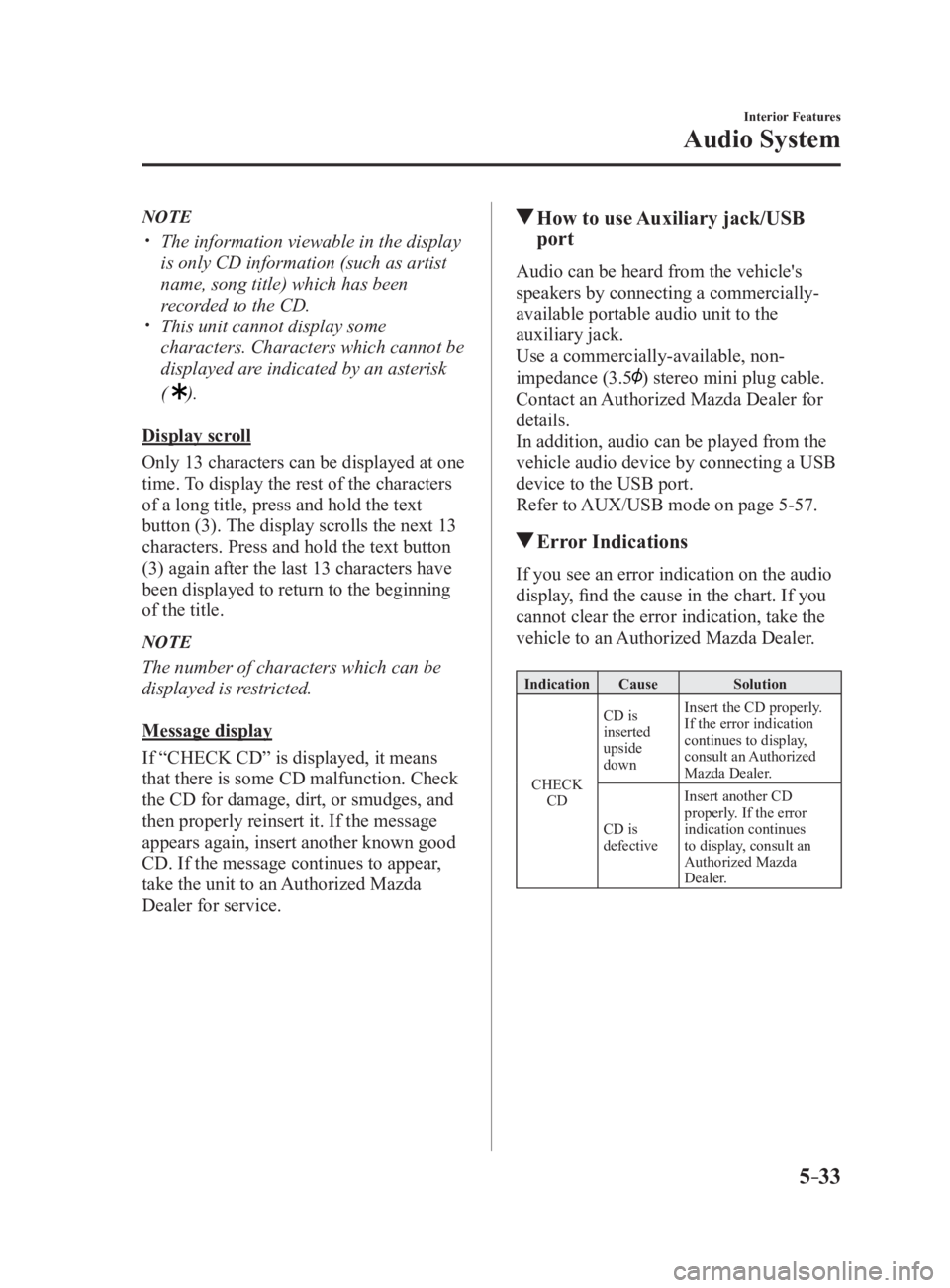
Display scroll
Only 13 characters can be displayed at one
time. To display the rest of the characters
of a long title, press and hold the text
button (3). The display scrolls the next 13
characters. Press and hold the text button
(3) again after the last 13 characters have
been displayed to return to the beginning
of the title.
NOTE
The number of characters which can be
displayed is restricted.
Message display
If “CHECK CD” is displayed, it means
that there is some CD malfunction. Check
the CD for damage, dirt, or smudges, and
then properly reinsert it. If the message
appears again, insert another known good
CD. If the message continues to appear,
take the unit to an Authorized Mazda
Dealer for service. How to use Auxiliary jack/USB
port Audio can be heard from the vehicle's
speakers by connecting a commercially-
available portable audio unit to the
auxiliary jack.
Use a commercially-available, non-
impedance (3.5
) stereo mini plug cable.
Contact an Authorized Mazda Dealer for
details.
In addition, audio can be played from the
vehicle audio device by connecting a USB
device to the USB port.
Refer to AUX/USB mode on page 5-57 .
Error Indications If you see an error indication on the audio
display, find the cause in the chart. If you
cannot clear the error indication, take the
vehicle to an Authorized Mazda Dealer. Indication Cause Solution
CHECK
CD CD is
inserted
upside
down Insert the CD properly.
If the error indication
continues to display,
consult an Authorized
Mazda Dealer.
CD is
defective Insert another CD
properly. If the error
indication continues
to display, consult an
Authorized Mazda
Dealer.
MX-5_8FR4-EA-16J_Edition1.indb 33 2016/08/11 20:29:13
Page 274 of 568

5 –52 Interior Features
Audio System Icon Function
If selected within a few seconds of a song which has started to play, the previous song is
selected.
If more than a few seconds have elapsed after a song has begun to play, the song currently
being played is replayed from the beginning.
Long-press to fast reverse. It stops when you remove your hand from the icon or the
commander knob.
Plays a CD. When selected again, playback is temporarily stopped.
Advances to the beginning of the next song.
Long-press to fast forward. It stops when you remove your hand from the icon or the
commander knob.
Displays sound settings to adjust audio quality level.
Refer to Volume/Display/Sound Controls on page 5-40 .
Example of use (When searching for
a song from the top level of an MP3/
WMA/AAC CD)
1. Select the icon to display the
folder/file list at the top level.
2. When the folder is selected, folders/file
lists in the folder are displayed.
3. Select the desired song. NOTE
Select to move to a folder one level
higher.
The appearance of the repeat and
shuffle icons changes depending on the
type of operation in which the function
is used.
How to use Auxiliary jack/USB
port Audio can be heard from the vehicle's
speakers by connecting a commercially-
available portable audio unit to the
auxiliary jack.
Use a commercially-available, non-
impedance (3.5
) stereo mini plug cable.
In addition, audio can be played from the
vehicle audio device by connecting a USB
device to the USB port.
Refer to AUX/USB mode on page 5-57 .
MX-5_8FR4-EA-16J_Edition1.indb 52 2016/08/11 20:29:17
Page 281 of 568

5 –59 Interior Features
Audio System
WARNING Do not allow the connection plug cord
to get tangled with the parking brake or
the shift lever (manual transmission)/
selector lever (automatic transmission):
Allowing the plug cord to become
tangled with the parking brake or the
shift lever (manual transmission)/
selector lever (automatic transmission)
is dangerous as it could interfere with
driving, resulting in an accident.
CAUTION Do not place objects or apply force to
the auxiliary jack/USB port with the
plug connected.
NOTE
Insert the plug into the auxiliary jack/
USB port securely.
Insert or pull out the plug with the plug
perpendicular to the auxiliary jack/USB
port hole.
Insert or remove the plug by holding its
base. How to use AUX mode (Type A) 1. Switch the ignition to ACC or ON.
2. Press the power/volume dial to turn the
audio system on.
3. Press the media button ( ) of the
audio unit to change to the AUX mode.
NOTE
When the device is not connected to the
auxiliary jack, the mode does not switch
to the AUX mode.
Adjust the audio volume using the
portable audio device or audio unit.
Audio adjustments other than audio
volume can only be done using the
portable audio device.
If the connection plug is pulled out from
the auxiliary jack while in AUX mode,
noise may occur.
MX-5_8FR4-EA-16J_Edition1.indb 59 2016/08/11 20:29:19
Page 282 of 568

5 –60 Interior Features
Audio System How to use USB mode (Type A)
Media/Scan button
Folder down buttonFolder up buttonPlay/Pause buttonRandom button
Repeat button Audio display
Text button
Track down/Reverse button
Track up/Fast-forward button Type Playable data
USB mode MP3/WMA/AAC file
This unit does not support a USB 3.0
device. In addition, other devices may not
be supported depending on the model or
OS version.
Playback
1. Switch the ignition to ACC or ON.
2. Press the power/volume dial to turn the
audio system on.
3. Press the media button ( ) to
switch to the USB mode and start
playback.
NOTE
Some devices such as smart phones
may require a setting change to allow
operation using a USB connection.
When the USB device is not connected,
the mode does not switch to USB mode.
When there is no playable data in the
USB device, “NO CONTENTS”is
flashed.
Playback of the USB device is in the
order of the folder numbers. Folders
which have no MP3/WMA/AAC files are
skipped.
Do not remove the USB device while
in the USB mode. The data may be
damaged.
Pause
To stop playback, press the play/pause
button (4).
Press the button again to resume playback.
Fast-forward/Reverse
Press and hold the fast-forward button (
)
to advance through a track at high speed.
Press and hold the reverse button (
) to
reverse through a track at high speed.
Track search
Press the track up button ( ) once to skip
forward to the beginning of the next track.
Press the track down button (
) within a
few seconds after playback begins to track
down to the beginning of the previous
track.
Press the track down button (
) after a
few seconds have elapsed to start playback
from the beginning of the current track.
MX-5_8FR4-EA-16J_Edition1.indb 60 2016/08/11 20:29:19
Page 286 of 568

5 –64 Interior Features
Audio System How to use iPod mode (Type A)
Media/Scan button List down buttonList up buttonPlay/Pause button
Random button
Repeat button Audio display
Text button
Track down/Reverse button
Track up/Fast-forward button Category down button
Category up button
An iPod may not be compatible depending
on the model or OS version. In this case,
an error message is displayed.
NOTE
The iPod functions on the iPod cannot
be operated while it is connected to the
unit because the unit controls the iPod
functions.
Playback
1. Switch the ignition to ACC or ON.
2. Press the power/volume dial to turn the
audio system on.
3. Press the media button ( ) to
switch to the iPod mode and start
playback.
NOTE
When an iPod is not connected, the
mode does not switch to the iPod mode.
When there is no playable data in the
iPod, “NO CONTENTS” is flashed.
Do not remove the iPod while in the
iPod mode. Otherwise, the data could
be damaged. Pause
To stop playback, press the play/pause
button (4).
Press the button again to resume playback.
Fast-forward/Reverse
Press and hold the fast-forward button (
)
to advance through a track at high speed.
Press and hold the reverse button (
) to
reverse through a track at high speed.
Track search
Press the track up button (
) once to skip
forward to the beginning of the next track.
Press the track down button (
) within a
few seconds (depends on iPod software
version) after playback begins to track
down to the beginning of the previous
track.
Press the track down button (
) after a
few seconds (depends on iPod software
version) have elapsed to start playback
from the beginning of the current track.
Category search
Press the category down button (5) to
select the previous category and press the
category up button (6) to select the next
category.
MX-5_8FR4-EA-16J_Edition1.indb 64 2016/08/11 20:29:19
Page 290 of 568
5 –68 Interior Features
Audio System Playback
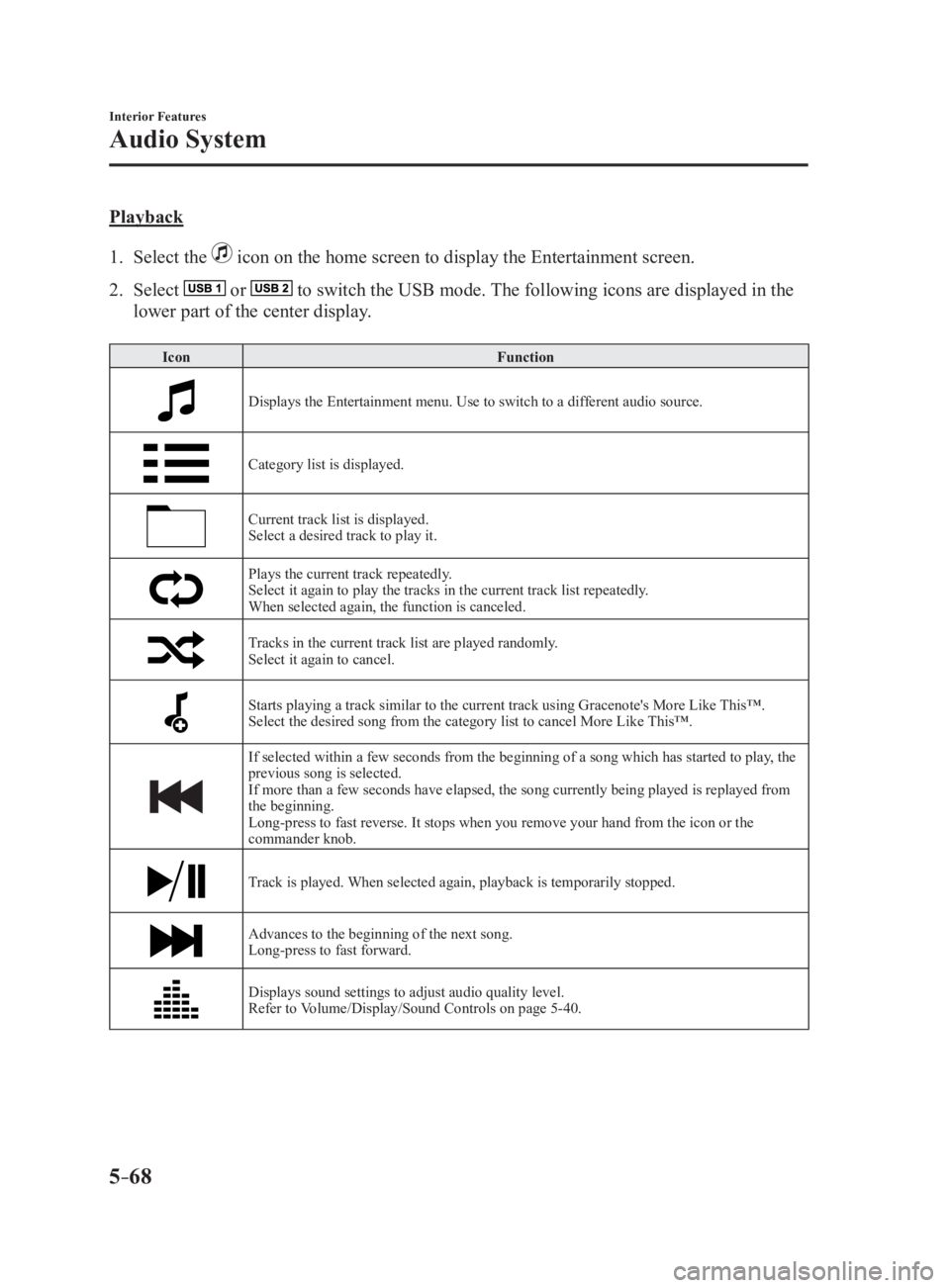
1. Select the icon on the home screen to display the Entertainment screen.
2. Select or to switch the USB mode. The following icons are displayed in the
lower part of the center display. Icon Function
Displays the Entertainment menu. Use to switch to a different audio source.
Category list is displayed.
Current track list is displayed.
Select a desired track to play it.
Plays the current track repeatedly.
Select it again to play the tracks in the current track list repeatedly.
When selected again, the function is canceled.
Tracks in the current track list are played randomly.
Select it again to cancel.
Starts playing a track similar to the current track using Grace note's More Like This™.
Select the desired song from the category list to cancel More L ike This™.
If selected within a few seconds from the beginning of a song which has started to play, the
previous song is selected.
If more than a few seconds have elapsed, the song currently being played is replayed from
the beginning.
Long-press to fast reverse. It stops when you remove your hand from the icon or the
commander knob.
Track is played. When selected again, playback is temporarily stopped.
Advances to the beginning of the next song.
Long-press to fast forward.
Displays sound settings to adjust audio quality level.
Refer to Volume/Display/Sound Controls on page 5-40 .
MX-5_8FR4-EA-16J_Edition1.indb 68 2016/08/11 20:29:20
Page 305 of 568

5 –83 Interior Features
Bluetooth ®
NOTE
Some Bluetooth ®
audio devices need a
certain amount of time before the
symbol is displayed.
If the pairing failed, “Err” flashes for
three seconds.
Pairing cannot be performed while
the vehicle is moving. If you attempt
to perform pairing while the vehicle is
moving, “PAIR DISABLE” is displayed.
If seven Bluetooth ®
audio devices have
already been paired to the vehicle,
pairing cannot be performed and
“MEMORY FULL” is displayed. Delete
one paired device to pair another one.
Pairing a Bluetooth ®
audio device which
does not have a four-digit PIN code
1. Using the audio control dial, select
the pairing mode “PAIR DEVICE”
in the “BT SETUP” mode. (Refer to
“Bluetooth ®
audio set up” for details.)
2. Press the audio control dial to
determine the mode. After “ENTER
PIN” is displayed on the audio display
for three seconds, “PIN 0000” is
displayed and the PIN code can be
input.
3. Press the audio control dial while “PIN
0000” is displayed. “PAIRING” flashes
on the audio display.
4. Operate the Bluetooth ®
audio device
and set it to the pairing mode while
“PAIRING” is flashing.
5. As the Bluetooth ®
audio device
requires a PIN code, input “0000”.
6. When the pairing is completed, and
“PAIR SUCCESS” are displayed after
about 10-30 seconds, after which
“PAIR SUCCESS” continues to be
displayed for three seconds, and then
the unit returns to the normal display. NOTE
If pairing cannot be completed, try
“1234” instead. Refer to the owner's
manual of your mobile device for the
right PIN code.
Some Bluetooth ®
audio devices need a
certain amount of time before the
symbol is displayed.
If the pairing failed, “Err” flashes for
three seconds.
Pairing cannot be performed while
the vehicle is moving. If you attempt
to perform pairing while the vehicle is
moving, “PAIR DISABLE” is displayed.
If seven Bluetooth ®
audio devices have
already been paired to the vehicle,
pairing cannot be performed and
“MEMORY FULL” is displayed. Delete
one paired device to pair another one.
Device selection
If several devices have been paired, the
Bluetooth ®
unit links the device last
paired. If you would like to link a different
paired device, it is necessary to change the
link. The order of device priority after the
link has been changed is maintained even
when the ignition is switched off.
1. Using the audio control dial, select the
link change mode “LINK CHANGE”
in the “BT SETUP” mode. (Refer to
“Bluetooth ®
audio device set-up” for
details.)
2. Press the audio control dial to
determine the mode.
3. The name of the currently linked
Bluetooth ®
audio device is displayed.
If no Bluetooth ®
audio device is
currently linked, the name of the first
device among the paired devices is
displayed.
MX-5_8FR4-EA-16J_Edition1.indb 83 2016/08/11 20:29:23
Page 306 of 568

5 –84 Interior Features
Bluetooth ®
4. Turn the audio control dial to select the
name of the device you would like to
link.
Device name 1
Device name 2
Device name 3
Device name 4
Device name 5
Device name 6
Device name 7
5. Press the audio control dial to select the
device you would like to link. The
symbol disappears, and “PAIRING”
flashes in the audio display.
NOTE
When “GO BACK” is selected and the
audio control dial is pressed, the display
returns to “LINK CHANGE”.
6. If the link to the desired device is
successful, the symbol is displayed
again, together with “LINK
CHANGED”. “LINK CHANGED” is
displayed for three seconds, then it
returns to the normal display. NOTE
Some Bluetooth ®
audio devices need a
certain amount of time before the
symbol is displayed.
If a hands-free type mobile phone has
been the most recently paired device,
the Bluetooth ®
unit links this device.
If you would like to use a Bluetooth ®
audio type device which has been
previously paired to the Bluetooth ®
unit,
the link must be changed to this device.
If an error occurs while trying to link
a device, “Err” flashes in the audio
display for three seconds, and the
display returns to “LINK CHANGE”.
If this occurs, check the pairing status
of the Bluetooth ®
audio device and the
location of the device in the vehicle (not
in the trunk or a metal-type box), and
then try the link operation again.
Device selection can also be done using
voice recognition.
How to confirm the device currently
linked
Switch to the link-change mode. (Refer to
“Changing the link to a Bluetooth ®
audio
device”)
The device name displayed first is the
device which is currently linked.
Deleting a device
1. Using the audio control dial, select the
pairing delete mode “PAIR DELETE”
in the “BT SETUP”mode. (Refer to
“Bluetooth ®
audio device set-up” for
details.)
2. Press the audio control dial to
determine the mode.
3. The name of the first device among the
paired devices is displayed.
MX-5_8FR4-EA-16J_Edition1.indb 84 2016/08/11 20:29:23
Page 307 of 568

5 –85 Interior Features
Bluetooth ®
4. Rotate the audio control dial and select
the name of the paired device you
would like to delete.
Device name 1
Device name 2
Device name 3
Device name 4
Device name 5
Device name 6
Device name 7
NOTE
Only the names of paired devices can be
displayed. If only one device is paired,
only the name for this device is displayed.
5. If a selection other than “GO BACK”
is made and the audio control dial is
pressed, “SURE ? NO” is displayed.
6. Rotate the audio control dial clockwise
and switch the display to “SURE ?
YES”.
NOTE
The display changes as follows depending
on whether the audio control dial is
rotated clockwise or counterclockwise.
-Clockwise: “SURE ? YES” displayed
-Counterclockwise: “SURE ? NO”
displayed 7. Press the audio control dial to delete
the selected device.NOTE
Select “GO BACK” and press the audio
control dial to return to the “PAIR
DELETE” display.
8. “PAIR DELETED” is displayed for
three seconds after the deletion is
completed, and then it returns to the
normal display.
NOTE
If an error occurs while trying to delete
the paired device, “Err” flashes in the
display for three seconds and the display
returns to “LINK DELETE”.
Bluetooth ®
audio device information
display
1. Using the audio control dial, select the
pair device information display mode
“DEVICE INFO” in the “BT SETUP”
mode. (Refer to “Bluetooth ®
audio
device set-up” for details.)
2. Press the audio control dial to
determine the mode.
3. The name of the Bluetooth ®
unit device
is displayed.
4. Rotate the audio control dial to select
the information for the Bluetooth ®
unit
which you would like to view.
Device name
BT address
MX-5_8FR4-EA-16J_Edition1.indb 85 2016/08/11 20:29:23
Page 309 of 568

5 –87 Interior Features
Bluetooth ®
Voice Recognition (Type A)In this section, the basic operation of the
voice recognition is explained.
Activating Voice Recognition
To Activate the Main Menu: Press the
pick-up button or talk button with a short
press.
Ending Voice Recognition
Use one of the following methods:
Press and hold the talk-button.
Press the hang-up button.
Skipping Voice Guidance (for faster
operation)
Press and release the talk-button.
NOTE
The Bluetooth ®
Hands-Free system
is operable several seconds after the
ignition is switched to ACC or ON
(requires less than 15 seconds).
When operating the audio unit or the
A/C while using Bluetooth ®
Hands-
Free, the beep sounds or voice guidance
(audio unit)/cannot be heard.
Tutorial
The tutorial explains how to use
Bluetooth ®
Hands-Free.
To activate the tutorial, do the following:
1. Press the pick-up button or talk button
with a short press.
2. Say: [Beep] “Tutorial”
3. Follow the prompts to receive the
appropriate voice guidance instructions. Commands useable anytime during
voice recognition
“Help” or “Go Back” are commands
which can be used at anytime during voice
recognition.
Help function use
The help function informs the user of all
the available voice commands under the
current conditions.
1. Say: [Beep] “Help”
2. Follow the prompts to receive the
appropriate voice guidance instructions.
Returning to previous operation
This command is for returning to the
previous operation while in the voice
recognition mode.
Say: [Beep] “Go Back”
To prevent a deterioration in the voice
recognition rate and voice quality, the
following points should be observed:
The voice recognition cannot be
performed while voice guidance or
the beep sound is operating. Wait
until the voice guidance or the beep
sound is finished before saying your
commands.
Dialects or different wording other
than hands-free prompts cannot be
recognized by voice recognition. Speak
in the wording specified by the voice
commands.
It is not necessary to face the
microphone or approach it. Speak the
voice commands while maintaining a
safe driving position.
Do not speak too slow or too loud.
Speak clearly, without pausing between
words or numbers.
MX-5_8FR4-EA-16J_Edition1.indb 87 2016/08/11 20:29:24