change time MAZDA MX5 MIATA 2017 Owner's Guide
[x] Cancel search | Manufacturer: MAZDA, Model Year: 2017, Model line: MX5 MIATA, Model: MAZDA MX5 MIATA 2017Pages: 568, PDF Size: 16.58 MB
Page 262 of 568

5 –40 Interior Features
Audio System Volume/Display/Sound Controls
Volume dialCommander switc hA udio control switch
Volume switch
Volume adjustment
Turn the commander switch volume dial.
The volume switch on the steering switch
can also be pressed.
Display setting
Select the
icon on the home screen to
display the Settings screen.
Select the
tab to select the item you
would like to change.
Display OFF/Clock
The center display can be turned off.
Select
to turn the display off.
When is
selected the center display turns off and
the clock is displayed.
The center display can be turned back on
as follows:
Touch the center display.
Operate the commander switch. Daytime/nighttime (System) screen
setting
The daytime or nighttime screen can be
selected.
: Switches screen automatically
according to headlight illumination
condition *1
: Daytime screen setting
: Nighttime screen setting
*1 The display is constantly on daytime
screen when the illumination dimmer is
cancelled.
Brightness adjustment
Adjust the center display brightness using
the slider.
Contrast adjustment
Adjust the center display contrast using
the slider.
Display setting reset
All of the screen setting values can be
reset to their initial settings.
1. Select .
2. Select .
MX-5_8FR4-EA-16J_Edition1.indb 40 2016/08/11 20:29:14
Page 264 of 568

5 –42 Interior Features
Audio System Operating the RadioRadio ON
Select the icon on the home screen to display the Entertainment screen. When selecting
the desired radio, the following icons are indicated in the lower part of the center display.
AM/FM Radio Icon Function
Displays the Entertainment menu. Use to switch to a different audio source.
Displays the station list.
Select to display the frequencies of up to ten radio stations on the auto
memory preset list.
Select the desired frequency.
Displays the Favorites list. Long-press to store radio station currently being aired.
Switches the on and off. Displays the multi-cast channel list of the
.
You can search for receivable radio stations.
Scanning stops at each station for about five seconds.
Select again to continue receiving the radio station.
You can change the radio frequency manually.
Rotate the commander knob, slide the screen, or touch the radio frequency.
Press or to change the radio frequency one step at a time.
When or is long-pressed, the radio frequency changes continually. It stops when you
remove your hand from the icon or the commander knob.
Launches the iTunes Tagging function (for Apple devices with USB use only). Can be used
when the is on.
Automatic radio station selection.
When long-pressed, the radio frequency changes continually. It stops when you remove
your hand from the icon or the commander knob.
Displays sound settings to adjust audio quality level.
Refer to Volume/Display/Sound Controls on page 5-40 .
MX-5_8FR4-EA-16J_Edition1.indb 42 2016/08/11 20:29:15
Page 266 of 568

5 –44 Interior Features
Audio System NOTE
To change the desired genre, select the
icon.
Ex.)
89.3 is currently being received. With
Rock selected as the Genre, the radio
stations broadcasting Rock are at the
following frequencies.
98.3 *1
, 98.7, 104.3 *1
, 107.1
*1 Radio stations with good reception
The frequency changes as follows each
time
is pressed.
89.3→98.3→104.3→98.3
NOTE
Only one Genre can be selected.
It may not be possible to receive any
station even if the Genre Seek function
is used.
If a program in the selected genre is not
broadcast to a region, reception is not
possible even if the Genre Seek function
is used.
The Genre Seek function searches for
genre code (program type) which FM
analog broadcasts transmit.
specialty programs (HD2-HD8) cannot
be searched because they are not FM
analog broadcasts.
If radio stations which are selected by
scanning using the Genre Seek function
are
broadcasting stations,
they are changed from analog
broadcasts to
broadcasts
after a few seconds if the reception
conditions are good. The genre is
displayed after the switch, however, the
genre for FM analog broadcasts may
differ. HD Radio
What is HD Radio™ Technology and
how does it work?
HD Radio™ Technology is the digital
evolution of analog AM/FM radio. Your
radio product has a special receiver which
allows it to receive digital broadcasts
(where available) in addition to the analog
broadcasts it already receives. Digital
broadcasts have better sound quality than
analog broadcasts as digital broadcasts
provide free, crystal clear audio. For more
information, and a guide to available radio
stations and programming, please visit
www.hdradio.com.
Benefits of HD Radio™ Technology
(Information)
The song title, artist name, album name
and genre will appear on the screen when
available by the radio station.
(Multicast)
On the FM radio frequency most digital
stations have “multiple” or supplemental
programs on each FM station.
Listening to HD Radio™ Technology
If
icon turns on by selecting a radio
station which is an broadcasting
station, the analog broadcast is switched to
an
broadcast automatically after
a few seconds and then received.
If the
broadcast is stopped and
changed to an analog broadcast, press
down to turn off .
MX-5_8FR4-EA-16J_Edition1.indb 44 2016/08/11 20:29:15
Page 275 of 568

5 –53 Interior Features
Audio System SettingsNOTE
Depending on the grade and specification, the screen display may differ.
Select the icon on the home screen to display the Settings screen.
Switch the tab and select the setting item you want to change.
You can customize settings in the setup display as follows: Ta b Item Function
Display Refer to Volume/Display/Sound Controls on page 5-40 .
Safety Blind Spot Monitoring Volume
Other Refer to Personalization Features on page
9-9 .
Sound Refer to Volume/Display/Sound Controls on page 5-40 .
Clock Adjust Time Displays the currently set time is displayed.
Press to advance the hour/minute, and select
to move the hour/minute back.
AM/PM can only be selected with the 12-hour
clock display.
GPS Sync Synchronizes with GPS when turned on.
When turned off, the time can be changed from
“Adjust Time”.
Time Format Changes the display between 12 and 24-hour
clock time.
Time Zone Select When it's not synchronized with GPS, select
the region you want to specify.
Daylight Savings Time Turns the daylight saving time setting on/off.
When ON, the time advances 1 hour. When
OFF, it returns to normal time.
Vehicle Rain Sensing Wiper
Door Locks
Other Refer to Personalization Features on page
9-9 .
Devices Bluetooth ®
Refer to Bluetooth ®
Preparation (Type B) on
page 5-91 .
MX-5_8FR4-EA-16J_Edition1.indb 53 2016/08/11 20:29:17
Page 283 of 568

5 –61 Interior Features
Audio SystemFolder search
To change to the previous folder, press the
folder down button (
), or press the folder
up button (
) to advance to the next
folder.
Music scan
This function scans the titles in a folder
currently being played and plays ten
seconds of each song to aid you in finding
a song you want to listen to.
Press and hold the scan button (
)
during playback to start the scan play
operation (the track number will flash).
Press and hold the scan button (
)
again to cancel scan playback.
NOTE
If the unit is left in scan, normal playback
will resume where scan was selected.
Repeat playback
Track repeat
1. Press the repeat button (1) during
playback to play the current track
repeatedly. “TRACK RPT” is displayed
(
is displayed next to RPT at the
bottom of the display area).
2. To cancel the repeat playback, press the
button again after 3 seconds.
Folder repeat
1. Press the repeat button (1) during
playback, and then press the button
again within 3 seconds to play the
tracks in the current folder repeatedly.
“FOLDER RPT” is displayed (
is
displayed next to RPT at the bottom of
the display area).
2. Press the button again to cancel the
repeat playback. Random playback
Tracks are randomly selected and played.
Folder random
1. Press the random button (2) during
playback to play the tracks in the folder
randomly. “FOLDER RDM” is
displayed (
is displayed next to RDM
at the bottom of the display area).
2. To cancel the random playback, press
the button again after 3 seconds.
All random
1. Press the random button (2) during
playback, and then press the button
again within 3 seconds to play the
tracks in the USB device randomly.
“ALL RDM” is displayed (
is
displayed next to RDM at the bottom of
the display area).
2. Press the button again to cancel the
random playback.
Switching the display
The information displayed on the audio
display changes as follows each time the
text button (3) is pressed during playback. Button Information displayed
on audio display
File number/Elapsed
time
Folder number/File
number
File name
Folder name
Album name
Song name
Artist name
MX-5_8FR4-EA-16J_Edition1.indb 61 2016/08/11 20:29:19
Page 287 of 568
5 –65 Interior Features
Audio SystemNOTE
The types of categories include Playlist,
Artist, Album, Song, Podcast, Genre,
Composer, and Audio book.
List search
Press the list down button (
) to select the
previous list and press the list up button
(
) to select the next list.
NOTE
When the selected category is Song or
Audio book, there is no list.
Music scan
This function scans the titles in a list
currently being played and plays 10
seconds of each song to aid you in finding
a song you want to listen to.
Press and hold the scan button (
)
during playback to start the scan play
operation (the track number will flash).
Press and hold the scan button (
)
again to cancel scan playback.
NOTE
If the unit is left in scan, normal playback
will resume where scan was selected.
Repeat playback
1. Press the repeat button (1) during
playback to play the current track
repeatedly. “TRACK RPT” is displayed
(
is displayed next to RPT at the
bottom of the display area).
2. Press the button again to cancel the
repeat playback. Random playback
Tracks are randomly selected and played.
Song random
1. Press the random button (2) during
playback to play the tracks in the list
randomly. “SONG RDM” is displayed
(
is displayed next to RDM at the
bottom of the display area).
2. To cancel the random playback, press
the button again after 3 seconds.
Album random
1. Press the random button (2) during
playback, and then press the button
again within 3 seconds to play the
tracks in the iPod randomly. “ALBUM
RDM” is displayed (
is displayed
next to RDM at the bottom of the
display area).
2. Press the button again to cancel the
random playback.
NOTE
The track number being played randomly
is in the order of the iPod shuffle table.
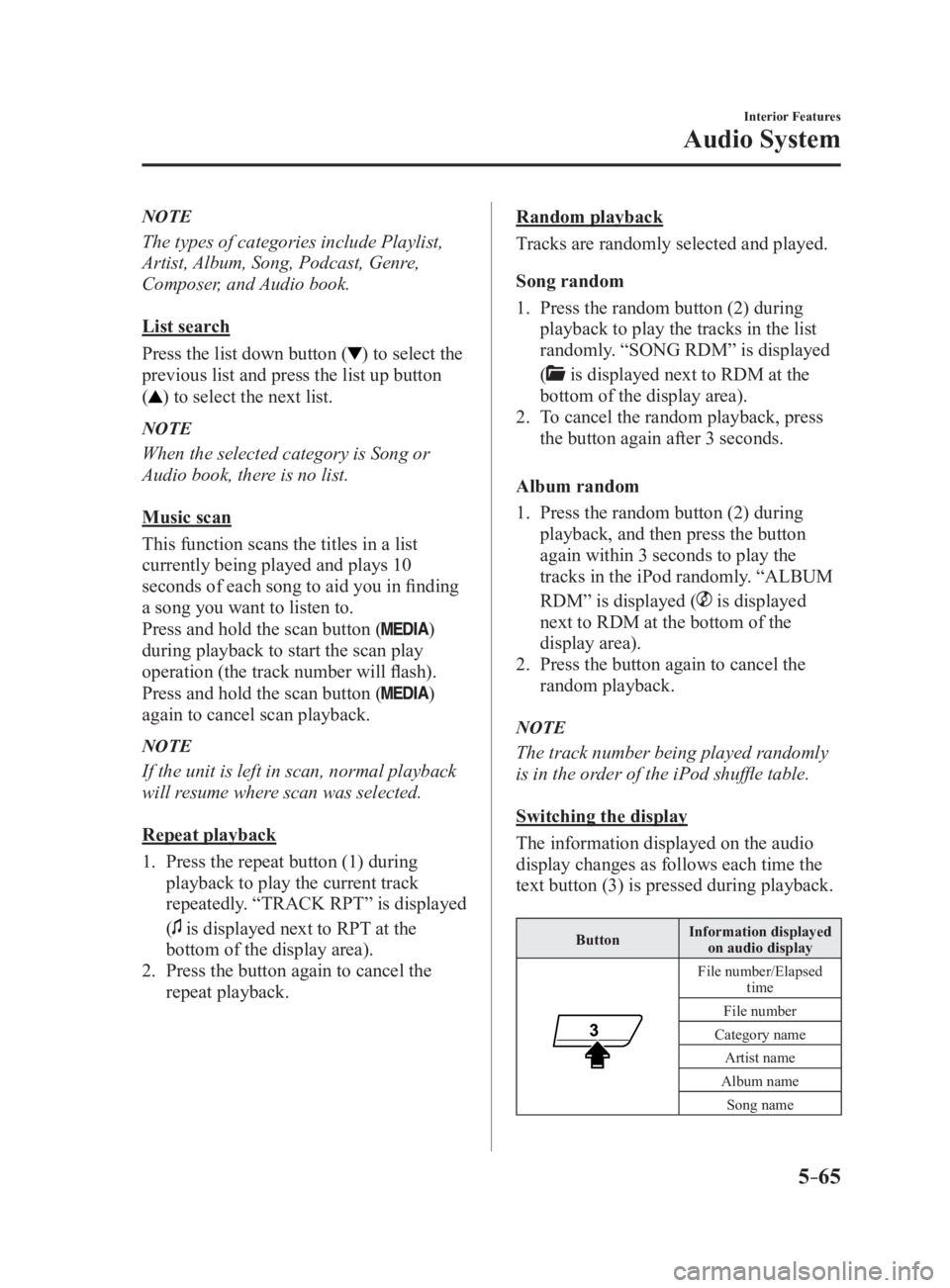
Switching the display
The information displayed on the audio
display changes as follows each time the
text button (3) is pressed during playback. Button Information displayed
on audio display
File number/Elapsed
time
File number
Category name
Artist name
Album name
Song name
MX-5_8FR4-EA-16J_Edition1.indb 65 2016/08/11 20:29:20
Page 291 of 568
5 –69 Interior Features
Audio SystemNOTE
If a file name in the USB memory is too long, it could cause ope ration problems such as
not being able to playback the song.
(Recommended: Within 80 characters)
To move to the desired location on the track, move the slider indicating the playback time.
The appearance of the repeat and shuffle icons changes depending on the type of
operation in which the function is used.
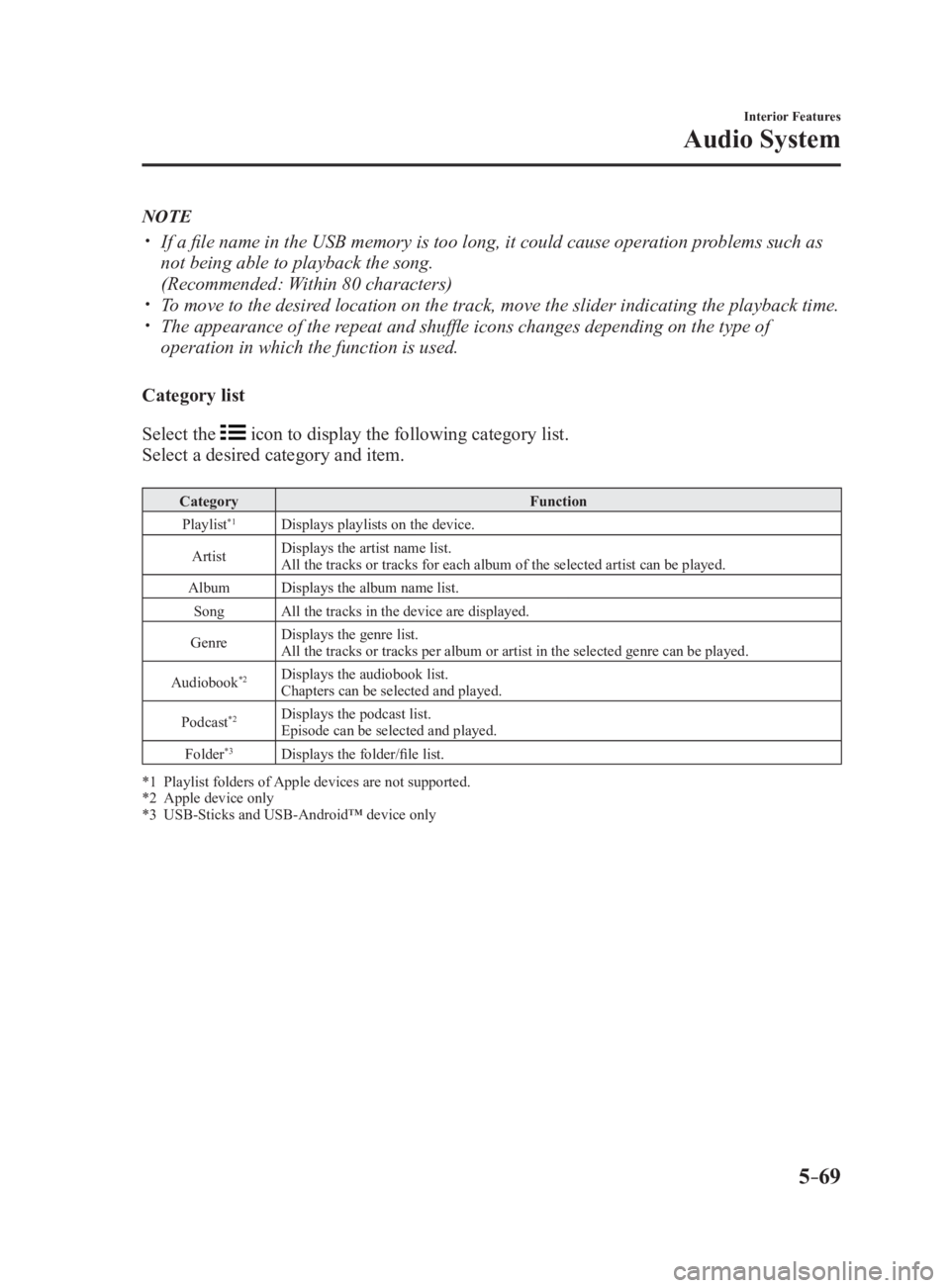
Category list
Select the icon to display the following category list.
Select a desired category and item. Category Function
Playlist *1
Displays playlists on the device.
Artist Displays the artist name list.
All the tracks or tracks for each album of the selected artist can be played.
Album Displays the album name list.
Song All the tracks in the device are displayed.
Genre Displays the genre list.
All the tracks or tracks per album or artist in the selected genre can be played.
Audiobook *2
Displays the audiobook list.
Chapters can be selected and played.
Podcast *2
Displays the podcast list.
Episode can be selected and played.
Folder *3
Displays the folder/file list.
*1 Playlist folders of Apple devices are not supported.
*2 Apple device only
*3 USB-Sticks and USB-Android™ device only
MX-5_8FR4-EA-16J_Edition1.indb 69 2016/08/11 20:29:20
Page 294 of 568

5 –72 Interior Features
Audio System You agree that your non-exclusive license to use the Gracenote Data, the Gracenote
Software, and Gracenote Servers will terminate if you violate t hese restrictions. If your
license terminates, you agree to cease any and all use of the G racenote Data, the Gracenote
Software, and Gracenote Servers. Gracenote reserves all rights in Gracenote Data, the
Gracenote Software, and the Gracenote Servers, including all ow nership rights. Under no
circumstances will Gracenote become liable for any payment to y ou for any information
that you provide. You agree that Gracenote, Inc. may enforce its rights under this Agreement
against you directly in its own name.
The Gracenote service uses a unique identifier to track queries for statistical purposes. The
purpose of a randomly assigned numeric identifier is to allow th e Gracenote service to count
queries without knowing anything about who you are. For more in formation, see the web
page for the Gracenote Privacy Policy for the Gracenote service .
The Gracenote Software and each item of Gracenote Data are lice nsed to you “AS IS.”
Gracenote makes no representations or warranties, express or im plied, regarding the
accuracy of any Gracenote Data from in the Gracenote Servers. G racenote reserves the right
to delete data from the Gracenote Servers or to change data cat egories for any cause that
Gracenote deems sufficient. No warranty is made that the Graceno te Software or Gracenote
Servers are error-free or that functioning of Gracenote Software or Gracenote Servers will
be uninterrupted. Gracenote is not obligated to provide you wit h new enhanced or additional
data types or categories that Gracenote may provide in the futu re and is free to discontinue
its services at any time.
GRACENOTE DISCLAIMS ALL WARRANTIES EXPRESS OR IMPLIED,
INCLUDING, BUT NOT LIMITED TO, IMPLIED WARRANTIES OF
MERCHANTABILITY, FITNESS FOR A PARTICULAR PURPOSE, TITLE, AND
NON-INFRINGEMENT. GRACENOTE DOES NOT WARRANT THE RESULTS THAT
WILL BE OBTAINED BY YOUR USE OF THE GRACENOTE SOFTWARE OR ANY
GRACENOTE SERVER. IN NO CASE WILL GRACENOTE BE LIABLE FOR ANY
CONSEQUENTIAL OR INCIDENTAL DAMAGES OR FOR ANY LOST PROFITS OR
LOST REVENUES.
© 2000 to present. Gracenote, Inc.
MX-5_8FR4-EA-16J_Edition1.indb 72 2016/08/11 20:29:21
Page 303 of 568
![MAZDA MX5 MIATA 2017 Owners Guide 5 –81 Interior Features
Bluetooth ®
12. Say: [Beep] “Yes”
13. Prompt: “New name saved.”
Bluetooth ®
Audio Preparation
Bluetooth ®
audio device set-up
Bluetooth ®
audio pairing,](/img/28/59019/w960_59019-302.png "MAZDA MX5 MIATA 2017 Owners Guide 5 –81 Interior Features
Bluetooth ®
12. Say: [Beep] “Yes”
13. Prompt: “New name saved.”
Bluetooth ®
Audio Preparation
Bluetooth ®
audio device set-up
Bluetooth ®
audio pairing,")
5 –81 Interior Features
Bluetooth ®
12. Say: [Beep] “Yes”
13. Prompt: “New name saved.”
Bluetooth ®
Audio Preparation
Bluetooth ®
audio device set-up
Bluetooth ®
audio pairing, changes,
deletions, and display of paired device
information can be performed.
1. The mode changes as follows each time
the menu button ( ) is pressed.
Select “BT SETUP”.
*
*
* Depending on the mode selected, the
indication changes. 2. Turn the audio control dial and select a
desired mode.
Display Mode Function
PAIR
DEVICE Pairing mode Bluetooth ®
audio
device pairing
LINK
CHANGE Link change
mode Changing link to
Bluetooth ®
audio
device
PAIR
DELETE Pairing
deletion
mode Deleting link to
Bluetooth ®
audio
device
DEVICE
INFO Device
information
display mode Displaying vehicle's
Bluetooth ®
unit
information
3. Press the audio control dial to
determine the mode.
MX-5_8FR4-EA-16J_Edition1.indb 81 2016/08/11 20:29:23
Page 305 of 568

5 –83 Interior Features
Bluetooth ®
NOTE
Some Bluetooth ®
audio devices need a
certain amount of time before the
symbol is displayed.
If the pairing failed, “Err” flashes for
three seconds.
Pairing cannot be performed while
the vehicle is moving. If you attempt
to perform pairing while the vehicle is
moving, “PAIR DISABLE” is displayed.
If seven Bluetooth ®
audio devices have
already been paired to the vehicle,
pairing cannot be performed and
“MEMORY FULL” is displayed. Delete
one paired device to pair another one.
Pairing a Bluetooth ®
audio device which
does not have a four-digit PIN code
1. Using the audio control dial, select
the pairing mode “PAIR DEVICE”
in the “BT SETUP” mode. (Refer to
“Bluetooth ®
audio set up” for details.)
2. Press the audio control dial to
determine the mode. After “ENTER
PIN” is displayed on the audio display
for three seconds, “PIN 0000” is
displayed and the PIN code can be
input.
3. Press the audio control dial while “PIN
0000” is displayed. “PAIRING” flashes
on the audio display.
4. Operate the Bluetooth ®
audio device
and set it to the pairing mode while
“PAIRING” is flashing.
5. As the Bluetooth ®
audio device
requires a PIN code, input “0000”.
6. When the pairing is completed, and
“PAIR SUCCESS” are displayed after
about 10-30 seconds, after which
“PAIR SUCCESS” continues to be
displayed for three seconds, and then
the unit returns to the normal display. NOTE
If pairing cannot be completed, try
“1234” instead. Refer to the owner's
manual of your mobile device for the
right PIN code.
Some Bluetooth ®
audio devices need a
certain amount of time before the
symbol is displayed.
If the pairing failed, “Err” flashes for
three seconds.
Pairing cannot be performed while
the vehicle is moving. If you attempt
to perform pairing while the vehicle is
moving, “PAIR DISABLE” is displayed.
If seven Bluetooth ®
audio devices have
already been paired to the vehicle,
pairing cannot be performed and
“MEMORY FULL” is displayed. Delete
one paired device to pair another one.
Device selection
If several devices have been paired, the
Bluetooth ®
unit links the device last
paired. If you would like to link a different
paired device, it is necessary to change the
link. The order of device priority after the
link has been changed is maintained even
when the ignition is switched off.
1. Using the audio control dial, select the
link change mode “LINK CHANGE”
in the “BT SETUP” mode. (Refer to
“Bluetooth ®
audio device set-up” for
details.)
2. Press the audio control dial to
determine the mode.
3. The name of the currently linked
Bluetooth ®
audio device is displayed.
If no Bluetooth ®
audio device is
currently linked, the name of the first
device among the paired devices is
displayed.
MX-5_8FR4-EA-16J_Edition1.indb 83 2016/08/11 20:29:23