fog light MERCEDES-BENZ A CLASS 2012 User Guide
[x] Cancel search | Manufacturer: MERCEDES-BENZ, Model Year: 2012, Model line: A CLASS, Model: MERCEDES-BENZ A CLASS 2012Pages: 356, PDF Size: 4.96 MB
Page 115 of 356
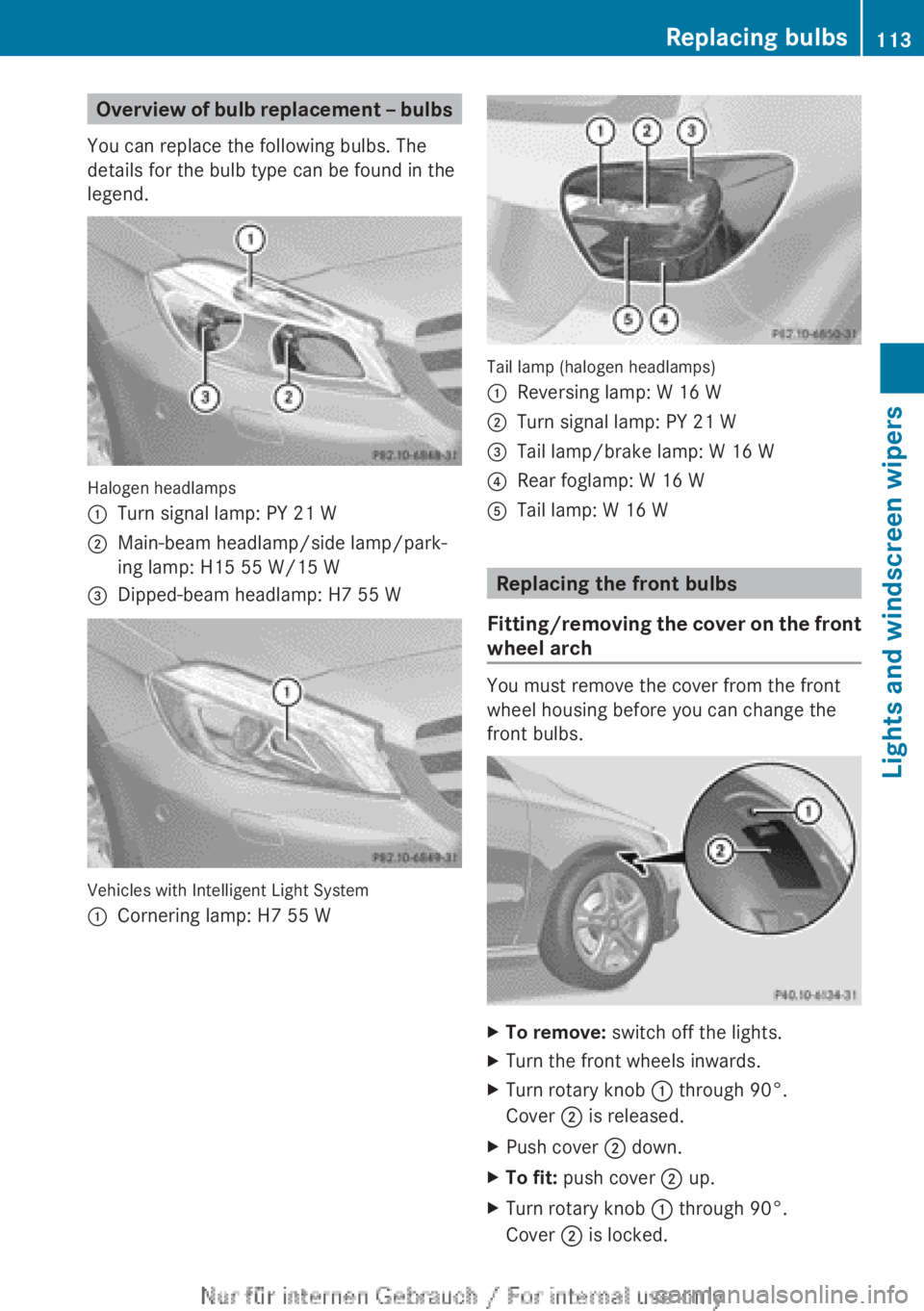
Overview of bulb replacement – bulbs
You can replace the following bulbs. The
details for the bulb type can be found in the
legend. Halogen headlamps
:
Turn signal lamp: PY 21 W
; Main-beam headlamp/side lamp/park-
ing lamp: H15 55 W/15 W
= Dipped-beam headlamp: H7 55 W Vehicles with Intelligent Light System
:
Cornering lamp: H7 55 W Tail lamp (halogen headlamps)
:
Reversing lamp: W 16 W
; Turn signal lamp: PY 21 W
= Tail lamp/brake lamp: W 16 W
? Rear foglamp: W 16 W
A Tail lamp: W 16 W Replacing the front bulbs
Fitting/removing the cover on the front
wheel arch You must remove the cover from the front
wheel housing before you can change the
front bulbs.
X
To remove: switch off the lights.
X Turn the front wheels inwards.
X Turn rotary knob : through 90°.
Cover ; is released.
X Push cover ; down.
X To fit: push cover ; up.
X Turn rotary knob : through 90°.
Cover ; is locked. Replacing bulbs
113
Lights and windscreen wipers Z
Page 118 of 356
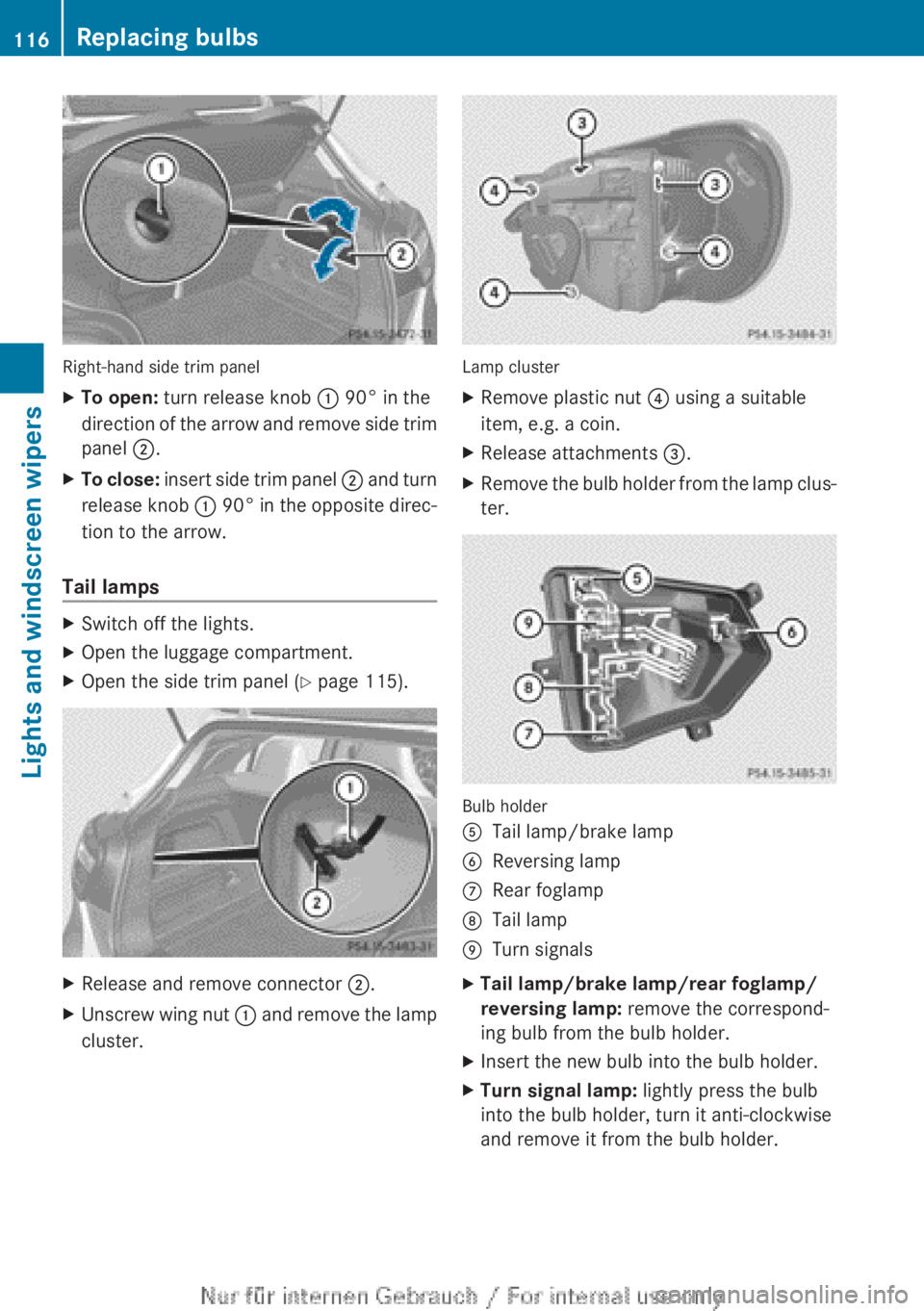
Right-hand side trim panel
X
To open: turn release knob : 90° in the
direction
of the arrow and remove side trim
panel ;.
X To close:
insert side trim panel ; and turn
release knob : 90° in the opposite direc-
tion to the arrow.
Tail lamps X
Switch off the lights.
X Open the luggage compartment.
X Open the side trim panel ( Y page 115).X
Release and remove connector ;.
X Unscrew wing nut :
and remove the lamp
cluster. Lamp cluster
X
Remove plastic nut ? using a suitable
item, e.g. a coin.
X Release attachments =.
X Remove the bulb holder from the lamp clus-
ter. Bulb holder
A
Tail lamp/brake lamp
B Reversing lamp
C Rear foglamp
D Tail lamp
E Turn signals
X Tail lamp/brake lamp/rear foglamp/
reversing lamp: remove the correspond-
ing bulb from the bulb holder.
X Insert the new bulb into the bulb holder.
X Turn signal lamp: lightly press the bulb
into the bulb holder, turn it anti-clockwise
and remove it from the bulb holder. 116
Replacing bulbs
Lights and windscreen wipers
Page 193 of 356
Reversing camera
Important safety notes The reversing camera is only an aid. It is not
a substitute for your attention to the imme-
diate
surroundings. The responsibility for safe
manoeuvring and parking remains with you.
Make sure that there are no persons, animals
or objects in range while manoeuvring and
parking.
Under the following circumstances, the
reversing camera will not function, or will
function in a limited manner:
R if the tailgate is open
R in heavy rain, snow or fog
R at night or in very dark places
R if the camera is exposed to very bright light
R if the area is lit by fluorescent light or LED
lighting (the display may flicker)
R if there is a sudden change in temperature,
e.g. when driving into a heated garage in
winter
R if the camera lens is dirty or obstructed
R if the rear of your vehicle is damaged. In
this event, have the camera position and
setting checked at a qualified specialist
workshop.
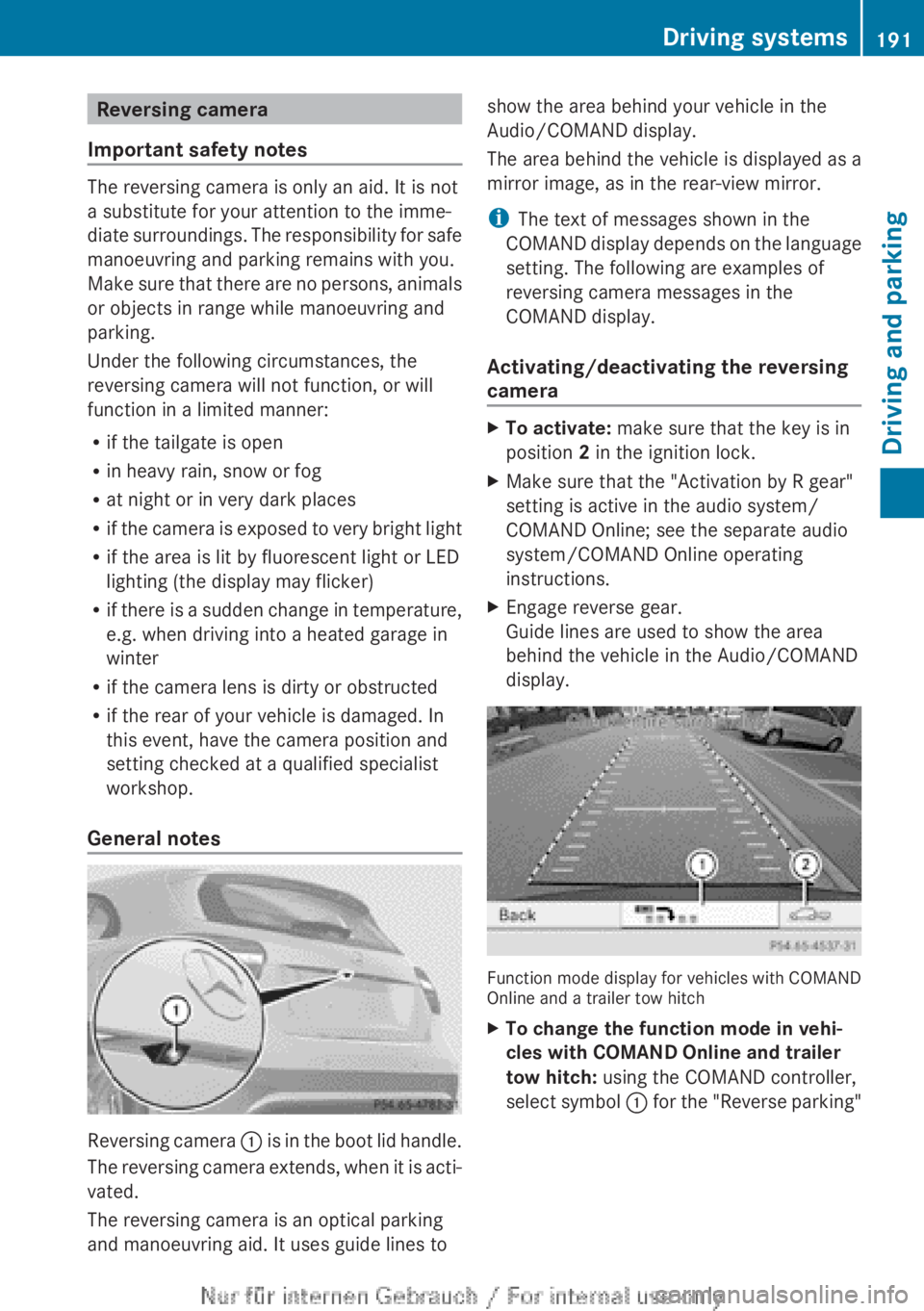
General notes Reversing camera
:
is in the boot lid handle.
The reversing camera extends, when it is acti-
vated.
The reversing camera is an optical parking
and manoeuvring aid. It uses guide lines to show the area behind your vehicle in the
Audio/COMAND display.
The area behind the vehicle is displayed as a
mirror image, as in the rear-view mirror.
i
The text of messages shown in the
COMAND
display depends on the language
setting. The following are examples of
reversing camera messages in the
COMAND display.
Activating/deactivating the reversing
camera X
To activate: make sure that the key is in
position 2 in the ignition lock.
X Make sure that the "Activation by R gear"
setting is active in the audio system/
COMAND Online; see the separate audio
system/COMAND Online operating
instructions.
X Engage reverse gear.
Guide lines are used to show the area
behind the vehicle in the Audio/COMAND
display. Function mode display for vehicles with COMAND
Online and a trailer tow hitch
X
To change the function mode in vehi-
cles with COMAND Online and trailer
tow hitch: using the COMAND controller,
select
symbol : for the "Reverse parking" Driving systems
191
Driving and parking Z
Page 223 of 356
![MERCEDES-BENZ A CLASS 2012 User Guide X
Press the : or 9 button to select the
Permanent display: function.
You will see the selected setting: outside
temperature or Dig. speedo [mph].
X Press the a button to save the setting.
i The sp](/img/4/59021/w960_59021-222.png "MERCEDES-BENZ A CLASS 2012 User Guide X
Press the : or 9 button to select the
Permanent display: function.
You will see the selected setting: outside
temperature or Dig. speedo [mph].
X Press the a button to save the setting.
i The sp")
X
Press the : or 9 button to select the
Permanent display: function.
You will see the selected setting: outside
temperature or Dig. speedo [mph].
X Press the a button to save the setting.
i The speed is displayed in mph.
Lights Switching the daytime driving lights on/
off
The
Daytime driving lights function can
only be switched on with the engine turned
off.
X Press the =
or ; button on the steer-
ing wheel to select the Settings menu.
X Press the :
or 9 button to select the
Lights submenu.
X Press a to confirm.
X Press the :
or 9 button to select the
Daytime driving lights function.
If the Daytime driving lights function
has been switched on, the cone of light and
the W symbol in the multifunction dis-
play are shown in orange.
X Press the a button to save the setting.
Further information on daytime driving lights
(Y page 105).
Switching the Intelligent Light System
on/off
X Press the =
or ; button on the steer-
ing wheel to select the Settings menu.
X Press the :
or 9 button to select the
Lights submenu.
X Press a to confirm.
X Press the :
or 9 button to select the
Intell. Light System function.
If the Intell. Light Sys. function has
been switched on, the cone of light and the
L symbol in the multifunction display
are shown in orange.
X Press the a button to save the setting. If you activate the Intell. Light System
function,
you activate the following functions:
R motorway mode
R active light function
R cornering light function
R extended range foglamps
If you set the dipped-beam headlamps for
driving on the right/left, the multifunction
display shows the Intell. Light System:
system inoperative Inactive for
left-side traffic or Intell. Light
System: System inoperative Inactive
for right-side traffic display message
instead of the Intell. Light Sys. function
in the Lights submenu ( Y page 221).
Further information on the Intelligent Light
System (Y page 108).
Setting the dipped-beam headlamps for
driving on the left/right
X Press the =
or ; button on the steer-
ing wheel to select the Settings menu.
X Press the :
or 9 button to select the
Lights submenu.
X Press a to confirm.
X Press : or 9 to select the Dipped
beams Setting for: function.
You will see the selected setting: Right-
side traffic or Left-side traffic.
X Press the a button to save the setting.
If you change the setting, conversion does
not take place until the next time the vehi-
cle is stationary.
This function is only available on vehicles with
the Intelligent Light System.
You can use this function to switch between
symmetrical and asymmetrical dipped beam
(Y page 104).
If you set the dipped-beam headlamps for
driving on the right/left, then motorway
mode and the extended range foglamps are
unavailable.
You can also have the dipped-beam head-
lamps set for driving on the right/left at a Menus and submenus
221
On-board computer and displays Z
Page 224 of 356
qualified specialist workshop, e.g. a
Mercedes-Benz Service Centre.
Switching Adaptive Highbeam Assist on/
off
This
function is only available on vehicles with
the Intelligent Light System.
X Press the =
or ; button on the steer-
ing wheel to select the Settings menu.
X Press the :
or 9 button to select the
Lights submenu.
X Press a to confirm.
X Press the :
or 9 button to select the
Adapt. main beam function.
If the Adapt. main beam function has
been switched on, the cone of light and the
_ symbol in the multifunction display
are shown in orange.
X Press the a button to save the setting.
For further information about Adaptive High-
beam Assist, see ( Y page 110).
Setting the brightness of the ambient
lighting
X Press the =
or ; button on the steer-
ing wheel to select the Settings menu.
X Press the :
or 9 button to select the
Lights submenu.
X Press a to confirm.
X Press the :
or 9 button to select the
Amb. light +/- function.
You will see the selected setting.
X Press a to confirm.
X Press the :
or 9 button to adjust the
brightness to any level from Off toLevel
5 (bright).
X Press the a or %
button to save the
setting.
Activating/deactivating the surround
lighting and exterior lighting delayed
switch-off
If you have activated the Surround light‐
ing function and the light switch is set to Ã, the following functions are activated
when it is dark:
R
surround lighting: the exterior lighting
remains lit for 40 seconds after unlocking
with the key. If you start the engine, the
surround lighting is switched off and auto-
matic headlamp mode is activated
(Y page 105).
R exterior lighting delayed switch-off: the
exterior lighting remains lit for
60
seconds after the engine is switched off.
If you close all the doors and the tailgate,
the exterior lighting goes off after
15 seconds.
X Press the =
or ; button on the steer-
ing wheel to select the Settings menu.
X Press the :
or 9 button to select the
Lights submenu.
X Press a to confirm.
X Press the :
or 9 button to select the
Surround lighting function.
When the Surround lighting function is
activated, the light cone and the area
around the vehicle are displayed in orange
in the multifunction display.
X Press the a button to save the setting.
Deactivating delayed switch-off of the exte-
rior lighting temporarily:
X Before leaving the vehicle, turn the key to
position 0 in the ignition lock.
X Turn the key to position 2 in the ignition
lock.
The exterior lighting delayed switch-off is
deactivated.
Delayed switch-off of the exterior lighting is
reactivated the next time you start the
engine.
i Depending on your vehicle's equipment,
when the surround lighting and delayed
switch-off exterior lighting are on, the fol-
lowing light up:
R side lamps
R foglamps222
Menus and submenus
On-board computer and displays
Page 243 of 356
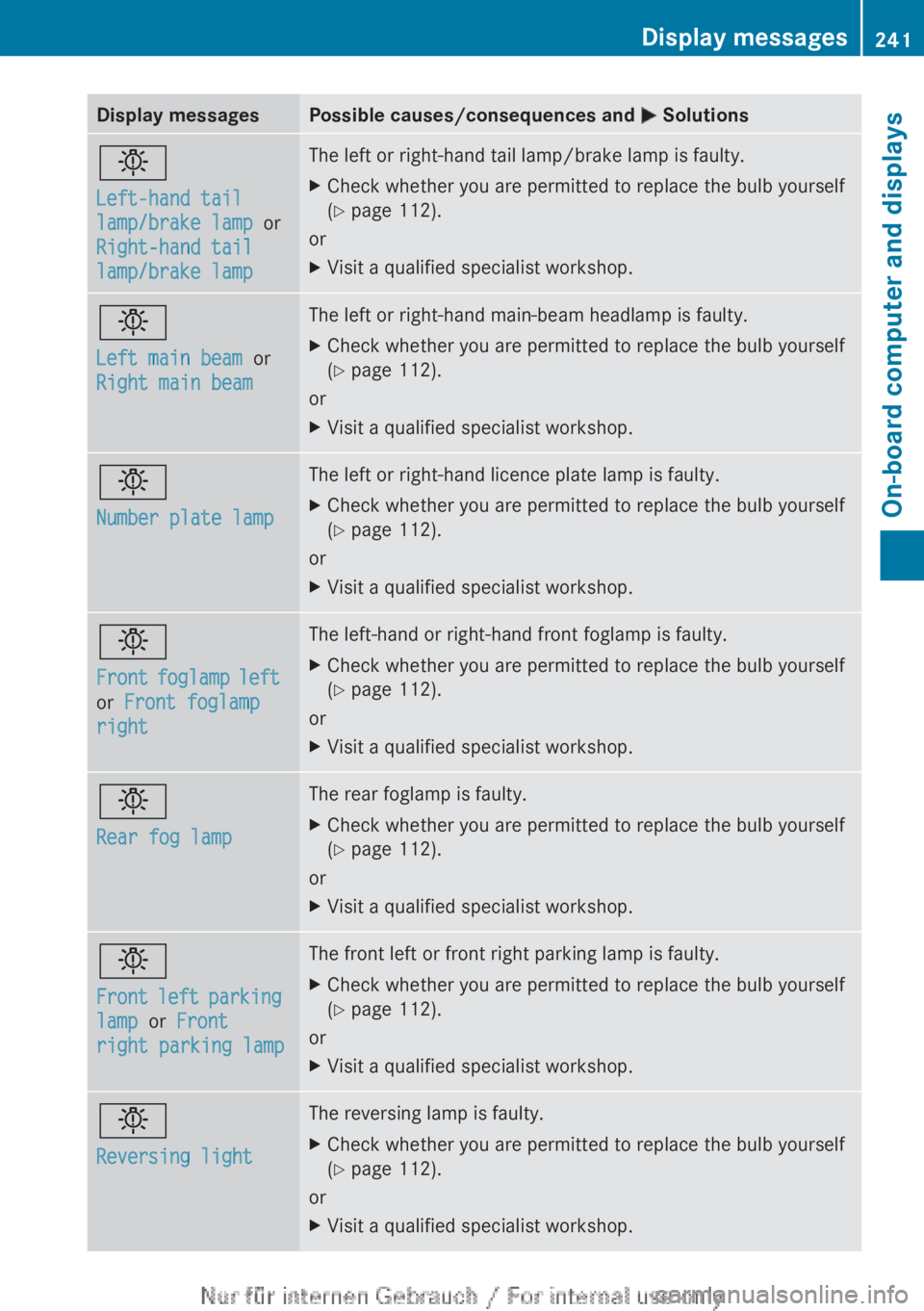
Display messages Possible causes/consequences and
M Solutionsb
Left-hand tail
lamp/brake lamp
or
Right-hand tail
lamp/brake lamp The left or right-hand tail lamp/brake lamp is faulty.
X
Check whether you are permitted to replace the bulb yourself
(Y page 112).
or
X Visit a qualified specialist workshop. b
Left main beam or
Right main beam The left or right-hand main-beam headlamp is faulty.
X
Check whether you are permitted to replace the bulb yourself
(Y page 112).
or
X Visit a qualified specialist workshop. b
Number plate lamp The left or right-hand licence plate lamp is faulty.
X
Check whether you are permitted to replace the bulb yourself
(Y page 112).
or
X Visit a qualified specialist workshop. b
Front
foglamp left
or Front foglamp
right The left-hand or right-hand front foglamp is faulty.
X
Check whether you are permitted to replace the bulb yourself
(Y page 112).
or
X Visit a qualified specialist workshop. b
Rear fog lamp The rear foglamp is faulty.
X
Check whether you are permitted to replace the bulb yourself
(Y page 112).
or
X Visit a qualified specialist workshop. b
Front
left parking
lamp or Front
right parking lamp The front left or front right parking lamp is faulty.
X
Check whether you are permitted to replace the bulb yourself
(Y page 112).
or
X Visit a qualified specialist workshop. b
Reversing light The reversing lamp is faulty.
X
Check whether you are permitted to replace the bulb yourself
(Y page 112).
or
X Visit a qualified specialist workshop. Display messages
241
On-board computer and displays Z
Page 248 of 356
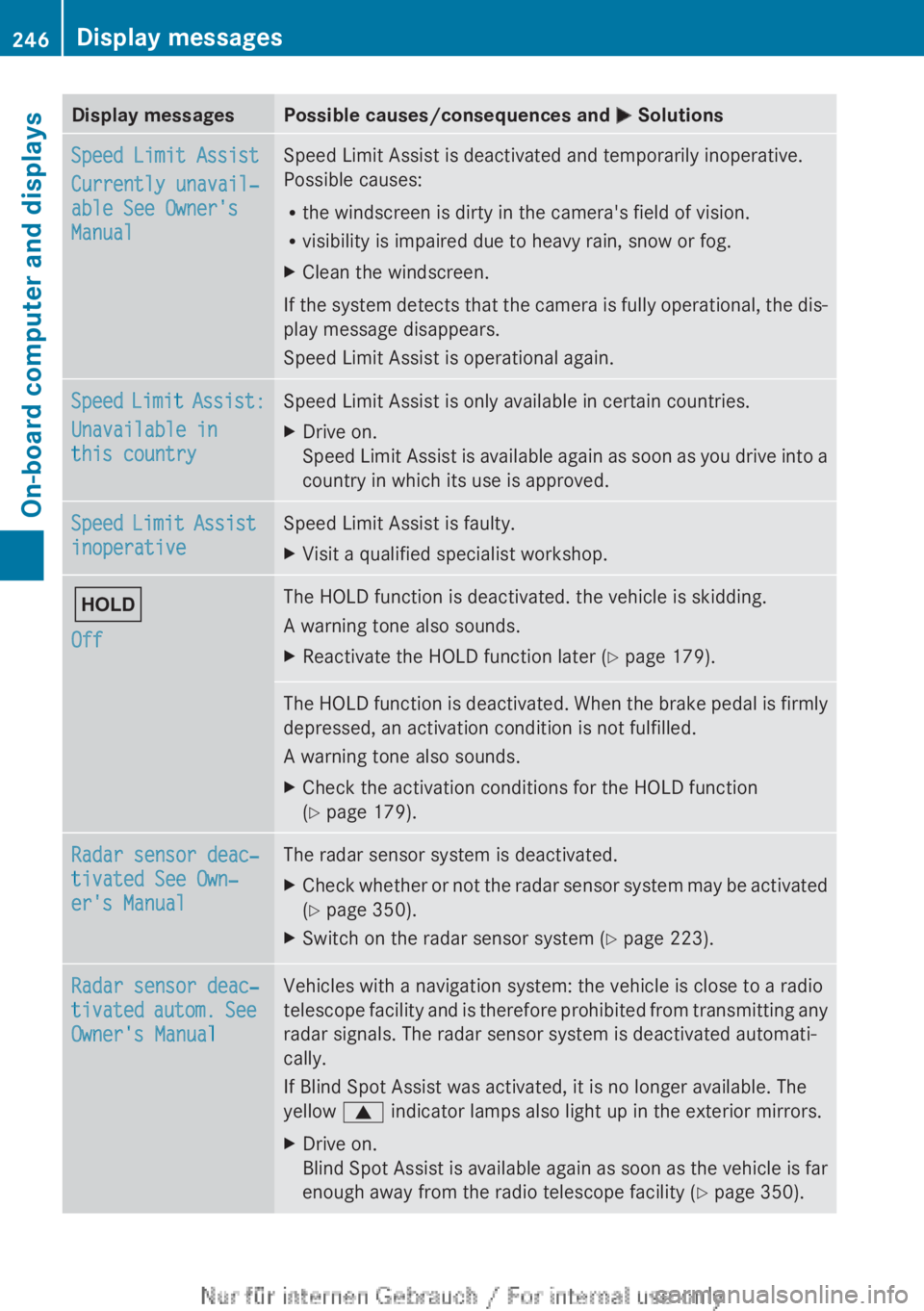
Display messages Possible causes/consequences and
M SolutionsSpeed Limit Assist
Currently unavail‐
able See Owner's
Manual Speed Limit Assist is deactivated and temporarily inoperative.
Possible causes:
R
the windscreen is dirty in the camera's field of vision.
R visibility is impaired due to heavy rain, snow or fog.
X Clean the windscreen.
If the system detects that the camera is fully operational, the dis-
play message disappears.
Speed Limit Assist is operational again. Speed Limit Assist:
Unavailable in
this country Speed Limit Assist is only available in certain countries.
X
Drive on.
Speed
Limit Assist is available again as soon as you drive into a
country in which its use is approved. Speed Limit Assist
inoperative Speed Limit Assist is faulty.
X
Visit a qualified specialist workshop. ë
Off The HOLD function is deactivated. the vehicle is skidding.
A warning tone also sounds.
X
Reactivate the HOLD function later (Y page 179). The HOLD function is deactivated. When the brake pedal is firmly
depressed, an activation condition is not fulfilled.
A warning tone also sounds.
X
Check the activation conditions for the HOLD function
(Y page 179). Radar sensor deac‐
tivated See Own‐
er's Manual The radar sensor system is deactivated.
X
Check whether or not the radar sensor system may be activated
(Y page 350).
X Switch on the radar sensor system (Y page 223). Radar sensor deac‐
tivated
autom. See
Owner's Manual Vehicles with a navigation system: the vehicle is close to a radio
telescope
facility and is therefore prohibited from transmitting any
radar signals. The radar sensor system is deactivated automati-
cally.
If Blind Spot Assist was activated, it is no longer available. The
yellow 9 indicator lamps also light up in the exterior mirrors.
X Drive on.
Blind
Spot Assist is available again as soon as the vehicle is far
enough away from the radio telescope facility ( Y page 350).246
Display messages
On-board computer and displays