driver door MERCEDES-BENZ A CLASS 2012 Owner's Manual
[x] Cancel search | Manufacturer: MERCEDES-BENZ, Model Year: 2012, Model line: A CLASS, Model: MERCEDES-BENZ A CLASS 2012Pages: 356, PDF Size: 4.96 MB
Page 198 of 356
R
if you have adopted a sporty driving style
with
high cornering speeds or high rates of
acceleration
R if you are predominantly driving slower
than 80 km/h or faster than 180 km/h
R if you are currently using COMAND Online
or making a telephone call with COMAND
Online
R if the time has been set incorrectly
R in active driving situations, such as when
you change lanes or change your speed
Warning and display messages in the
multifunction display X
Activate ATTENTION ASSIST using the on-
board computer ( Y page 219).
If ATTENTION ASSIST is active, you will be
warned no sooner than 20 minutes after
your journey has begun. You then hear an
intermittent warning tone twice and the
Attention Assist: Take a break!
message appears in the multifunction dis-
play.
X If necessary, take a break.
X Press the a or % button to confirm
the message.
On long journeys, take regular breaks in good
time to allow yourself to rest properly. If you
do
not take a break, you will be warned again
after 15 minutes at the earliest. This will only
happen if ATTENTION ASSIST still detects
typical indicators of fatigue or increasing lap-
ses in concentration.
ATTENTION ASSIST is reset and starts
assessing your tiredness again when you con-
tinue your journey if:
R you switch off the engine
R you take off your seat belt and open the
driver's door, e.g. for a change of drivers or
to take a break
When ATTENTION ASSIST is deactivated, the
é symbol appears in the multifunction
display in the assistance graphic display. Speed Limit Assist
General notes Speed Limit Assist shows you detected speed
limits in the multifunction display. Data from
the navigation system is also used for this
purpose. If a traffic sign indicating a speed
limit or the end of a speed limit is detected,
it is shown in the multifunction display. If
Speed
Limit Assist does not detect any traffic
signs, the speed limit from the digital road
map is taken and shown in the display.
Speed Limit Assist detects the traffic signs
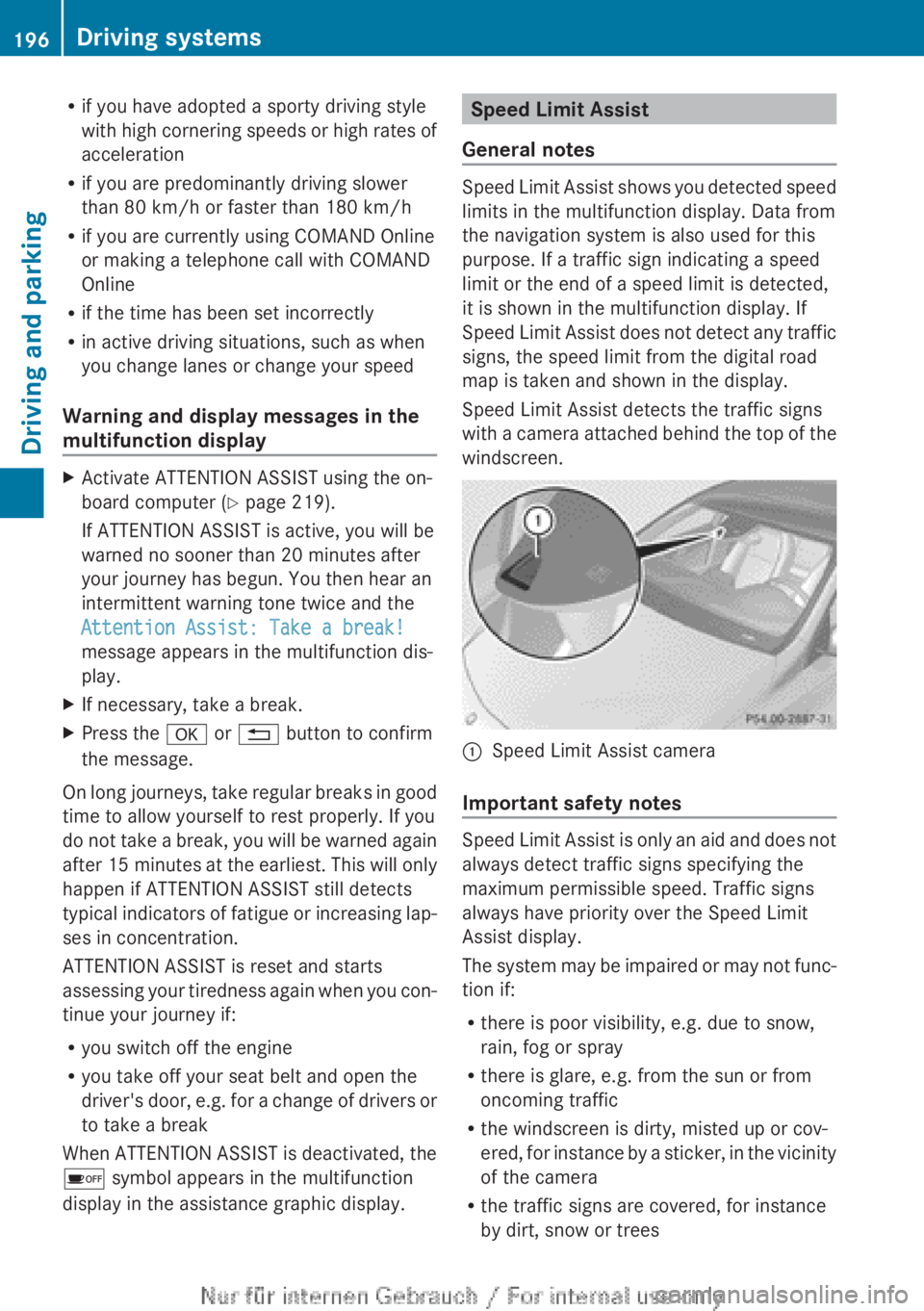
with a camera attached behind the top of the
windscreen. :
Speed Limit Assist camera
Important safety notes Speed Limit Assist is only an aid and does not
always detect traffic signs specifying the
maximum permissible speed. Traffic signs
always have priority over the Speed Limit
Assist display.
The
system may be impaired or may not func-
tion if:
R there is poor visibility, e.g. due to snow,
rain, fog or spray
R there is glare, e.g. from the sun or from
oncoming traffic
R the windscreen is dirty, misted up or cov-
ered, for instance by a sticker, in the vicinity
of the camera
R the traffic signs are covered, for instance
by dirt, snow or trees196
Driving systems
Driving and parking
Page 250 of 356
Display messages Possible causes/consequences and
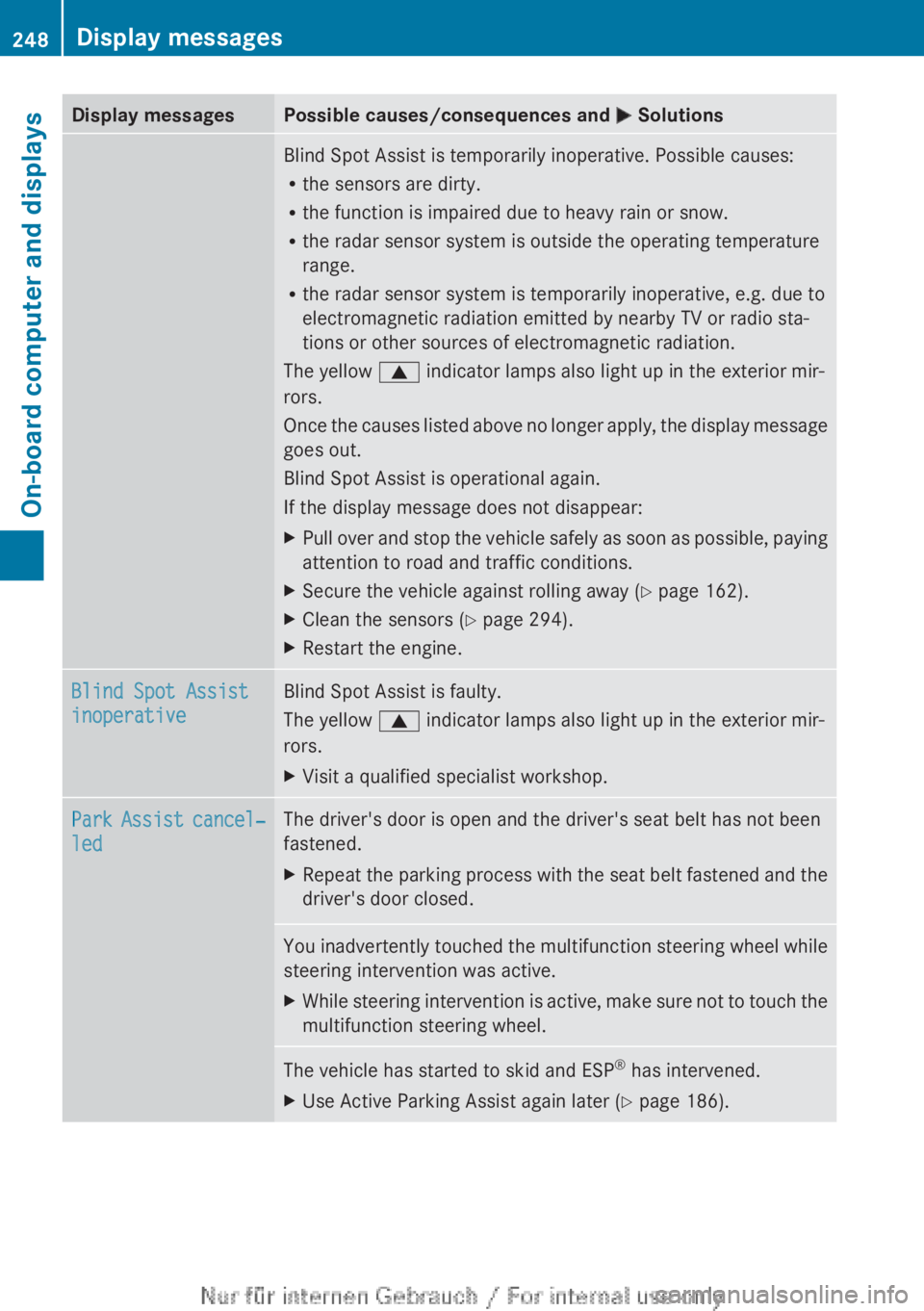
M SolutionsBlind Spot Assist is temporarily inoperative. Possible causes:
R
the sensors are dirty.
R the function is impaired due to heavy rain or snow.
R the radar sensor system is outside the operating temperature
range.
R the radar sensor system is temporarily inoperative, e.g. due to
electromagnetic radiation emitted by nearby TV or radio sta-
tions or other sources of electromagnetic radiation.
The yellow 9 indicator lamps also light up in the exterior mir-
rors.
Once
the causes listed above no longer apply, the display message
goes out.
Blind Spot Assist is operational again.
If the display message does not disappear:
X Pull over and stop the vehicle safely as soon as possible, paying
attention to road and traffic conditions.
X Secure the vehicle against rolling away ( Y page 162).
X Clean the sensors ( Y page 294).
X Restart the engine. Blind Spot Assist
inoperative Blind Spot Assist is faulty.
The yellow
9 indicator lamps also light up in the exterior mir-
rors.
X Visit a qualified specialist workshop. Park Assist cancel‐
led The driver's door is open and the driver's seat belt has not been
fastened.
X
Repeat the parking process with the seat belt fastened and the
driver's door closed. You inadvertently touched the multifunction steering wheel while
steering intervention was active.
X
While steering intervention is active, make sure not to touch the
multifunction steering wheel. The vehicle has started to skid and ESP
®
has intervened.
X Use Active Parking Assist again later (Y page 186).248
Display messages
On-board computer and displays
Page 254 of 356
Vehicle
Display messages Possible causes/consequences and
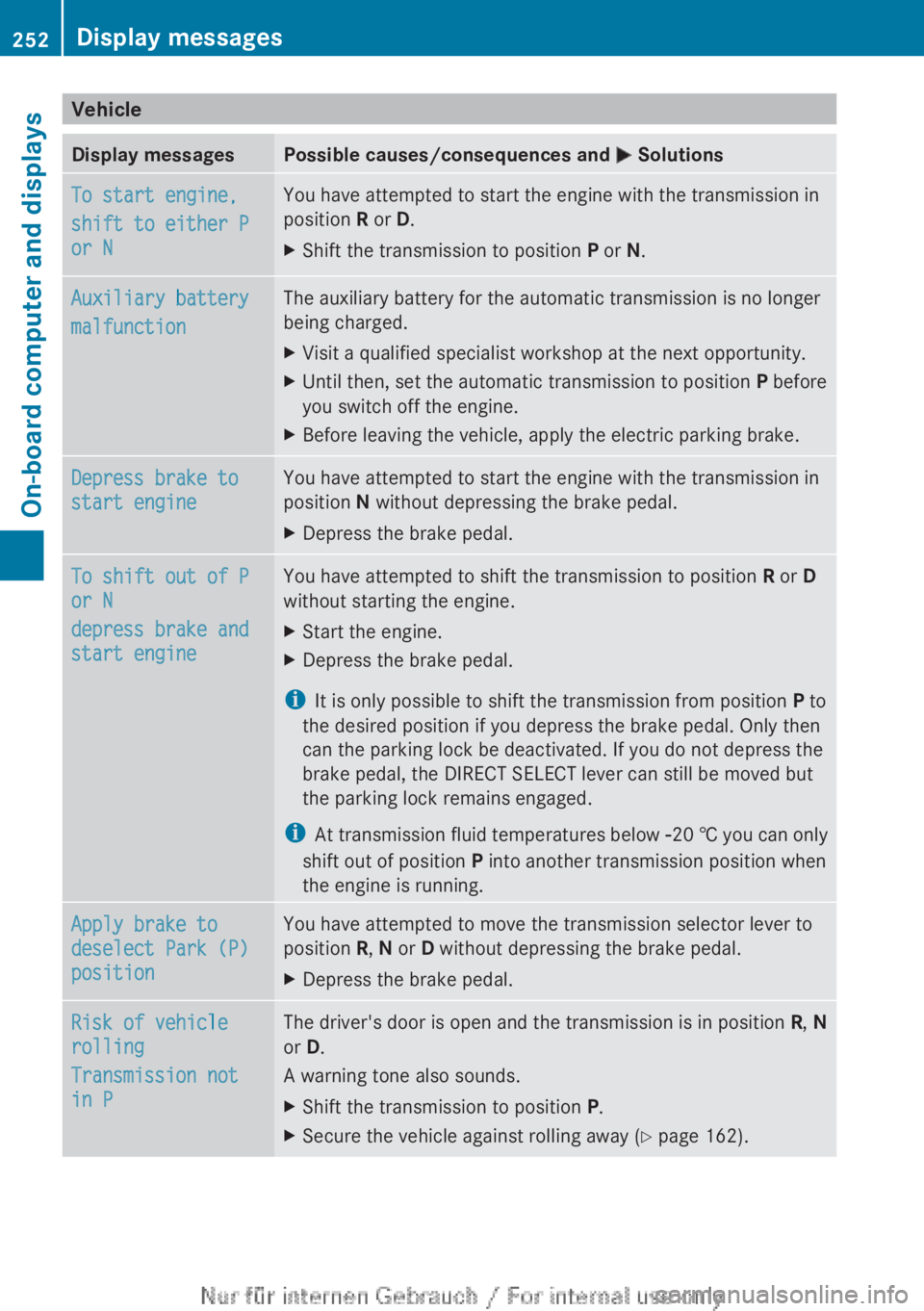
M SolutionsTo start engine,
shift to either P
or N You have attempted to start the engine with the transmission in
position R or D.
X
Shift the transmission to position P or N.Auxiliary battery
malfunction The auxiliary battery for the automatic transmission is no longer
being charged.
X
Visit a qualified specialist workshop at the next opportunity.
X Until then, set the automatic transmission to position P before
you switch off the engine.
X Before leaving the vehicle, apply the electric parking brake. Depress brake to
start engine You have attempted to start the engine with the transmission in
position N without depressing the brake pedal.
X
Depress the brake pedal. To shift out of P
or N
depress brake and
start engine You have attempted to shift the transmission to position
R or D
without starting the engine.
X Start the engine.
X Depress the brake pedal.
i It is only possible to shift the transmission from position P to
the desired position if you depress the brake pedal. Only then
can the parking lock be deactivated. If you do not depress the
brake pedal, the DIRECT SELECT lever can still be moved but
the parking lock remains engaged.
i At
transmission fluid temperatures below Ò20 † you can only
shift out of position P into another transmission position when
the engine is running. Apply brake to
deselect Park (P)
position You have attempted to move the transmission selector lever to
position R, N or D without depressing the brake pedal.
X
Depress the brake pedal. Risk of vehicle
rolling
Transmission not
in P The driver's door is open and the transmission is in position
R, N
or D.
A warning tone also sounds.
X Shift the transmission to position P.
X Secure the vehicle against rolling away ( Y page 162).252
Display messages
On-board computer and displays
Page 259 of 356
Warning and indicator lamps in the instrument cluster
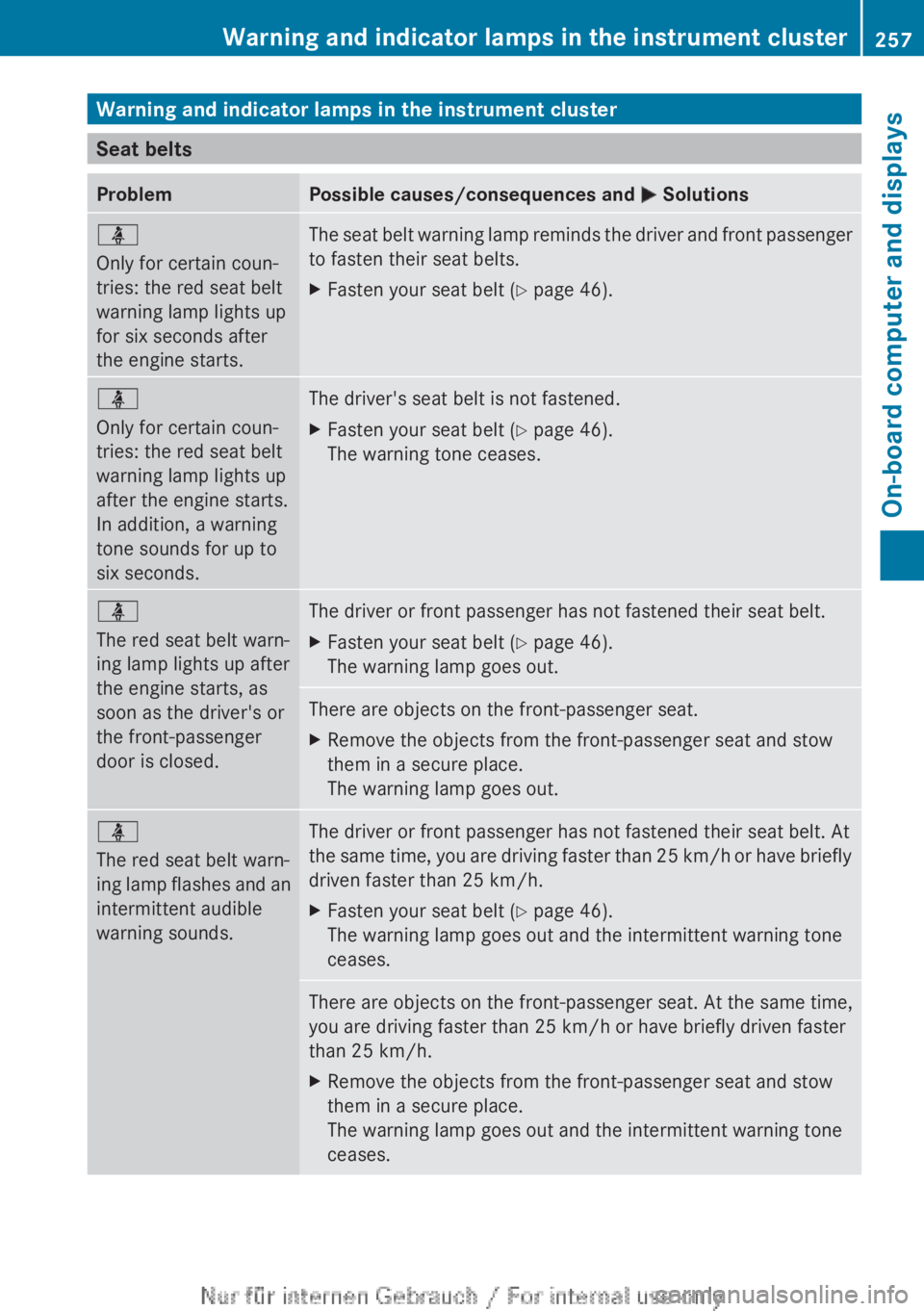
Seat belts
Problem Possible causes/consequences and
M Solutionsü
Only for certain coun-
tries: the red seat belt
warning lamp lights up
for six seconds after
the engine starts.
The seat belt warning lamp reminds the driver and front passenger
to fasten their seat belts.
X
Fasten your seat belt ( Y page 46).ü
Only for certain coun-
tries: the red seat belt
warning lamp lights up
after the engine starts.
In addition, a warning
tone sounds for up to
six seconds.
The driver's seat belt is not fastened.
X
Fasten your seat belt ( Y page 46).
The warning tone ceases. ü
The red seat belt warn-
ing lamp lights up after
the engine starts, as
soon as the driver's or
the front-passenger
door is closed.
The driver or front passenger has not fastened their seat belt.
X
Fasten your seat belt ( Y page 46).
The warning lamp goes out. There are objects on the front-passenger seat.
X
Remove the objects from the front-passenger seat and stow
them in a secure place.
The warning lamp goes out. ü
The red seat belt warn-
ing
lamp flashes and an
intermittent audible
warning sounds. The driver or front passenger has not fastened their seat belt. At
the
same time, you are driving faster than 25 km/h or have briefly
driven faster than 25 km/h.
X Fasten your seat belt ( Y page 46).
The warning lamp goes out and the intermittent warning tone
ceases. There are objects on the front-passenger seat. At the same time,
you are driving faster than 25 km/h or have briefly driven faster
than 25 km/h
.
X Remove the objects from the front-passenger seat and stow
them in a secure place.
The warning lamp goes out and the intermittent warning tone
ceases. Warning and indicator lamps in the instrument cluster
257
On-board computer and displays Z
Page 302 of 356
R
One pair of gloves
R Foldable wheel chock Flat tyre
Preparing the vehicle
Your vehicle may be equipped with:
R MOExtended
tyres (tyres with run-flat char-
acteristics) (Y page 300)
Vehicle preparation is not necessary on
vehicles with MOExtended tyres.
R a TIREFIT kit (Y page 299)
R an emergency spare wheel (only for certain
countries)
Information on changing/fitting a wheel
(Y page 325).
X Stop the vehicle as far away as possible
from
traffic on solid, non-slippery and level
ground.
X Switch on the hazard warning lamps.
X Secure the vehicle against rolling away
(Y page 162).
X If possible, bring the front wheels into the
straight-ahead position.
X Switch off the engine.
X Remove the key from the ignition lock.
X All occupants must get out of the vehicle.
Make
sure that they are not endangered as
they do so.
X Make sure that no one is near the danger
area while a wheel is being changed. Any-
one who is not directly assisting in the
wheel change should, for example, stand
behind the barrier.
X Get out of the vehicle. Pay attention to traf-
fic conditions when doing so.
X Close the driver's door.
X Place the warning triangle a suitable dis-
tance away
(Y page 298). Observe legal
requirements.
i Vehicles with MOExtended tyres are not
equipped with a TIREFIT kit at the factory.
It
is therefore recommended that you addi- tionally equip your vehicle with a TIREFIT kit
if you fit tyres that do not feature run-flat
characteristics,
e.g. winter tyres. A TIREFIT
kit can be obtained from a qualified spe-
cialist workshop. MOExtended tyres (tyres with run-flat
characteristics)
General notes With MOExtended tyres (tyres with run-flat
characteristics), you can continue to drive
your vehicle even if there is a total loss of
pressure in one or more tyres. The affected
tyre must not show any clearly visible dam-
age.
You can recognise MOExtended tyres by the
MOExtended marking which appears on the
tyre
wall. You will find this marking next to the
tyre size designation, the load-bearing capa-
city and the speed index.
MOExtended tyres may only be used in con-
junction with an active tyre pressure loss
warning system.
If the pressure loss warning message
appears in the multifunction display:
R Observe the instructions in the display
messages ( Y page 251).
R Check the tyre for damage.
R If driving on, observe the following notes.
The maximum driving distance is approx-
imately 80 km when the vehicle is partially
laden and approximately 30 km when the
vehicle is fully laden.
In addition to the vehicle load, the driving dis-
tance possible depends upon:
R speed
R road condition
R outside temperature
The driving distance possible in run-flat mode
may be reduced by extreme driving condi-
tions/manoeuvres, or it can be increased
through a moderate style of driving. 300
Flat tyre
Breakdown assistance
Page 315 of 356
Vehicles with automatic transmission:
the
automatic transmission automatically shifts
to position P when you open the driver's or
front-passenger door or when you remove the
key from the ignition lock. In order to ensure
that the automatic transmission stays in posi-
tion N when towing the vehicle, you must
observe the following points:
X Make sure that the vehicle is stationary.
X Turn the key to position 2 in the ignition
lock.
X Depress and hold the brake pedal.
X Shift the automatic transmission to posi-
tion N.
Vehicles with manual transmission:
X Turn the key to position 2 in the ignition
lock.
X Depress and hold the brake pedal.
X Engage neutral.
Vehicles with manual or automatic trans-
mission:
X Leave the key in position 2 in the ignition
lock.
X Release the brake pedal.
X Release the electric parking brake.
X Switch on the hazard warning lamps
(Y page 108).
It is important that you observe the safety
instructions when towing away your vehicle
(Y page 310). Transporting the vehicle
! Only
lash the vehicle down by the wheels
or wheel rims, not by parts of the vehicle
such as axle or steering components. Oth-
erwise, the vehicle could be damaged. X
Vehicles with manual transmission:
shift to neutral.
X Vehicles with automatic transmission:
turn the key to position 2 in the ignition
lock.
X Move the transmission to position N.
As soon as the vehicle is loaded:
X Prevent the vehicle from rolling away by
applying the electric parking brake.
X Vehicles with manual transmission:
engage first or reverse gear.
X Vehicles with automatic transmission:
shift the transmission to position P.
X Turn the key to position 0 in the ignition
lock and remove it.
X Secure the vehicle.
The towing eyes or trailer tow hitch can be
used
to pull the vehicle onto a trailer or trans-
porter if you wish to transport it. Notes for 4MATIC vehicles
! Vehicles
with 4MATIC must not be towed
with the front or rear axle raised; otherwise,
the transmission may be damaged.
Vehicles with 4MATIC may only be either
towed away with both axles on the ground or
be loaded up and transported.
If the vehicle has transmission damage or
damage to the front or rear axle, have it trans-
ported on a transporter or trailer.
In the event of damage to the electrical
system
If the battery is defective, the automatic
transmission will be locked in position P. To
shift the automatic transmission to position
N, you must provide power to the vehicle's
electrical system in the same way as when
jump-starting (Y page 308).
Have the vehicle transported on a transporter
or trailer. Towing and tow-starting
313
Breakdown assistance Z