driver door MERCEDES-BENZ A CLASS 2012 User Guide
[x] Cancel search | Manufacturer: MERCEDES-BENZ, Model Year: 2012, Model line: A CLASS, Model: MERCEDES-BENZ A CLASS 2012Pages: 356, PDF Size: 4.96 MB
Page 87 of 356
Convenience opening feature
You can ventilate the vehicle before you start
driving. To do this, the key is used to carry out
the following functions simultaneously:
R unlock the vehicle
R open the side windows
R open the panorama sliding sunroof and the
roller sunblinds
i The convenience opening feature can
only be operated using the key. The key
must be close to the driver's door handle.
X Point the tip of the key at the driver's door
handle.
X Press and hold the % button until the
side windows and the panorama sunroof
are in the desired position.
If
the roller sunblinds of the panorama slid-
ing sunroof are closed, the roller sunblinds
are opened first.
X Press and hold the %
button again until
the panorama sliding sunroof is in the
desired position.
X To interrupt convenience opening:
release the % button.Convenience closing feature
G
WARNING
When the convenience closing feature is oper-
ating,
parts of the body could become trapped
in the closing area of the side window and the
sliding sunroof. There is a risk of injury.
Observe the complete closing procedure
when the convenience closing feature is oper-
ating. When closing make sure that no parts
of the body are in the closing area.
When you lock the vehicle, you can simulta-
neously:
R close the side windows
R close the panorama sliding sunroof
On vehicles with a panorama sliding sunroof,
you can then close the roller sunblinds. i
The
key must be close to the driver's door
handle.
X Point the tip of the key at the driver's door
handle.
X Press and hold the & button until the
side windows and the panorama sliding
sunroof are fully closed.
X Make sure that all the side windows and the
panorama sliding sunroof are closed.
On vehicles with a panorama sliding sunroof:
X Press and hold the &
button again until
the roller sunblinds of the panorama sliding
sunroof close.
X To interrupt convenience closing:
release the & button. Resetting the side windows
You must reset each side window if:
R the side window opens again slightly after
being closed fully.
R the side window can no longer be fully
opened or closed.
X Close all doors.
X Turn the key to position 1
or 2 in the ignition
lock.
X Pull the corresponding switch on the door
control
panel until the side window is com-
pletely closed ( Y page 84).
X Hold the switch for an additional second.
If the side window opens again slightly:
X Immediately pull the corresponding switch
on
the door control panel until the side win-
dow is completely closed (Y page 84).
X Hold the switch for an additional second.
X If the corresponding side window remains
closed after the button has been released,
the side window has been reset correctly.
If this is not the case, repeat the steps
above again. Side windows
85
Opening and closing Z
Page 102 of 356
Folding the exterior mirrors in/out
automatically
If the "Fold in mirrors when locking" function
is activated in the on-board computer
(Y page 225):
R
the
exterior mirrors fold in automatically as
soon as you lock the vehicle from the out-
side.
R the exterior mirrors fold out again automat-
ically as soon as you unlock the vehicle and
then open the driver's or front-passenger
door.
i If the exterior mirrors have been folded in
manually, they do not fold out.
Exterior mirror pushed out of position If an exterior mirror has been pushed out of
position, proceed as follows.
X
Vehicles without electrically folding
exterior
mirrors: move the exterior mirror
into the correct position manually.
X Vehicles with electrically folding exte-
rior mirrors: press and hold the mirror-
folding button
(Y page 99) until you hear a
click and then the mirror engage in posi-
tion.
The mirror housing is engaged again and
you can adjust the exterior mirrors as usual
(Y page 99). Automatic anti-dazzle mirrors
The "Automatic anti-dazzle mirrors" function
is
only available if the vehicle is equipped with
the "Mirror package".
The rear-view mirror and the exterior mirror
on the driver's side automatically go into anti-
dazzle mode if:
R the ignition is switched on and
R incident light from headlamps strikes the
sensor in the rear-view mirror
The mirrors do not go into anti-dazzle mode if
reverse gear is engaged or if the interior light-
ing is switched on. Parking position of the exterior mirror
on the front-passenger side
General notes The "Parking position for the exterior mirror
on the front-passenger side" function is only
available if the vehicle is equipped with the
"Memory package".
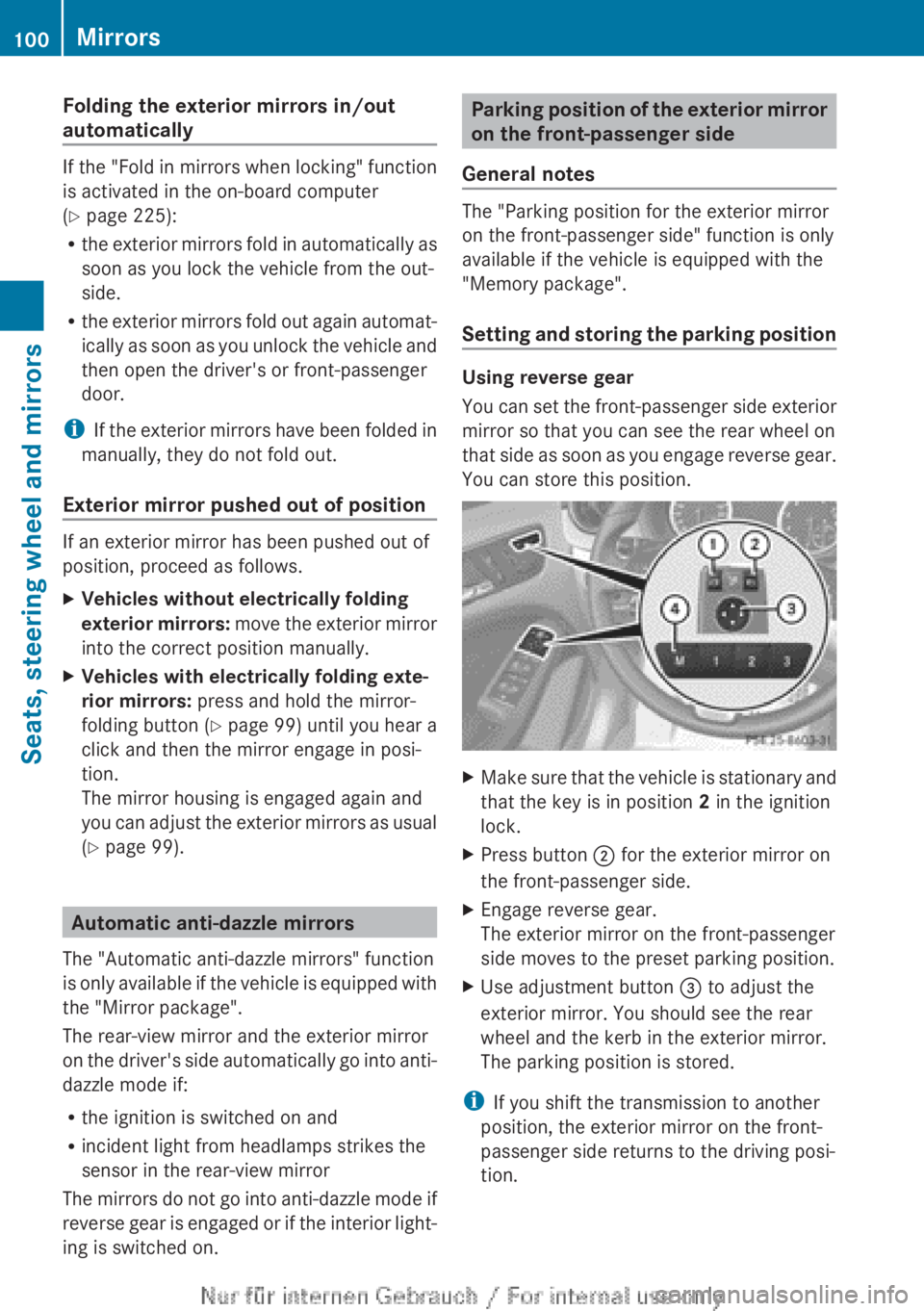
Setting
and storing the parking position Using reverse gear
You
can set the front-passenger side exterior
mirror so that you can see the rear wheel on
that side as soon as you engage reverse gear.
You can store this position. X
Make sure that the vehicle is stationary and
that the key is in position 2 in the ignition
lock.
X Press button ; for the exterior mirror on
the front-passenger side.
X Engage reverse gear.
The exterior mirror on the front-passenger
side moves to the preset parking position.
X Use adjustment button = to adjust the
exterior mirror. You should see the rear
wheel and the kerb in the exterior mirror.
The parking position is stored.
i If you shift the transmission to another
position, the exterior mirror on the front-
passenger side returns to the driving posi-
tion. 100
Mirrors
Seats, steering wheel and mirrors
Page 107 of 356
Setting the exterior lighting
Setting options Exterior lighting can be set using the:
R
light switch
R headlamp range control (vehicles with hal-
ogen headlamps only)
(Y page 107)
R combination switch (Y page 107)
R on-board computer (Y page 221)
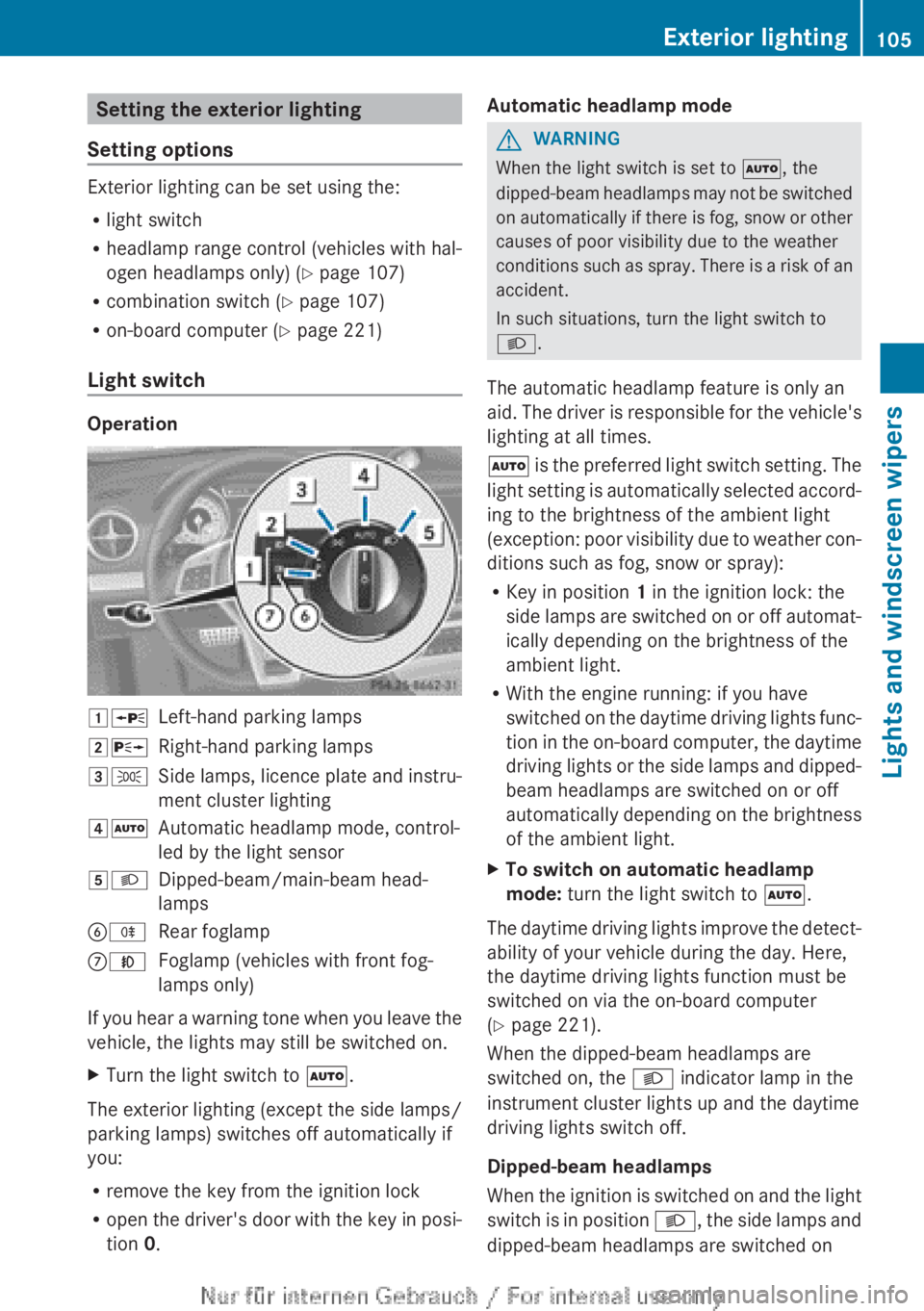
Light switch Operation
1W
Left-hand parking lamps
2X Right-hand parking lamps
3T Side lamps, licence plate and instru-
ment cluster lighting
4Ã Automatic headlamp mode, control-
led by the light sensor
5L Dipped-beam/main-beam head-
lamps
BR Rear foglamp
CN Foglamp (vehicles with front fog-
lamps only)
If you hear a warning tone when you leave the
vehicle, the lights may still be switched on.
X Turn the light switch to Ã.
The exterior lighting (except the side lamps/
parking lamps) switches off automatically if
you:
R remove the key from the ignition lock
R open
the driver's door with the key in posi-
tion 0. Automatic headlamp mode G
WARNING
When the light switch is set to Ã, the
dipped-beam
headlamps may not be switched
on automatically if there is fog, snow or other
causes of poor visibility due to the weather
conditions such as spray. There is a risk of an
accident.
In such situations, turn the light switch to
L.
The automatic headlamp feature is only an
aid. The driver is responsible for the vehicle's
lighting at all times.
à is the preferred light switch setting. The
light setting is automatically selected accord-
ing to the brightness of the ambient light
(exception: poor visibility due to weather con-
ditions such as fog, snow or spray):
R Key in position 1 in the ignition lock: the
side lamps are switched on or off automat-
ically depending on the brightness of the
ambient light.
R With the engine running: if you have
switched on the daytime driving lights func-
tion in the on-board computer, the daytime
driving lights or the side lamps and dipped-
beam headlamps are switched on or off
automatically depending on the brightness
of the ambient light.
X To switch on automatic headlamp
mode: turn the light switch to Ã.
The daytime driving lights improve the detect-
ability of your vehicle during the day. Here,
the daytime driving lights function must be
switched on via the on-board computer
(Y page 221).
When the dipped-beam headlamps are
switched on, the L indicator lamp in the
instrument cluster lights up and the daytime
driving lights switch off.
Dipped-beam headlamps
When
the ignition is switched on and the light
switch is in position L, the side lamps and
dipped-beam headlamps are switched on Exterior lighting
105
Lights and windscreen wipers Z
Page 148 of 356
Important safety notes
G
WARNING
If the engine is switched off automatically and
you exit the vehicle, the engine is restarted
automatically.
The vehicle may begin moving.
There is a risk of accident and injury.
If you wish to exit the vehicle, always turn off
the ignition and secure the vehicle against
rolling away.
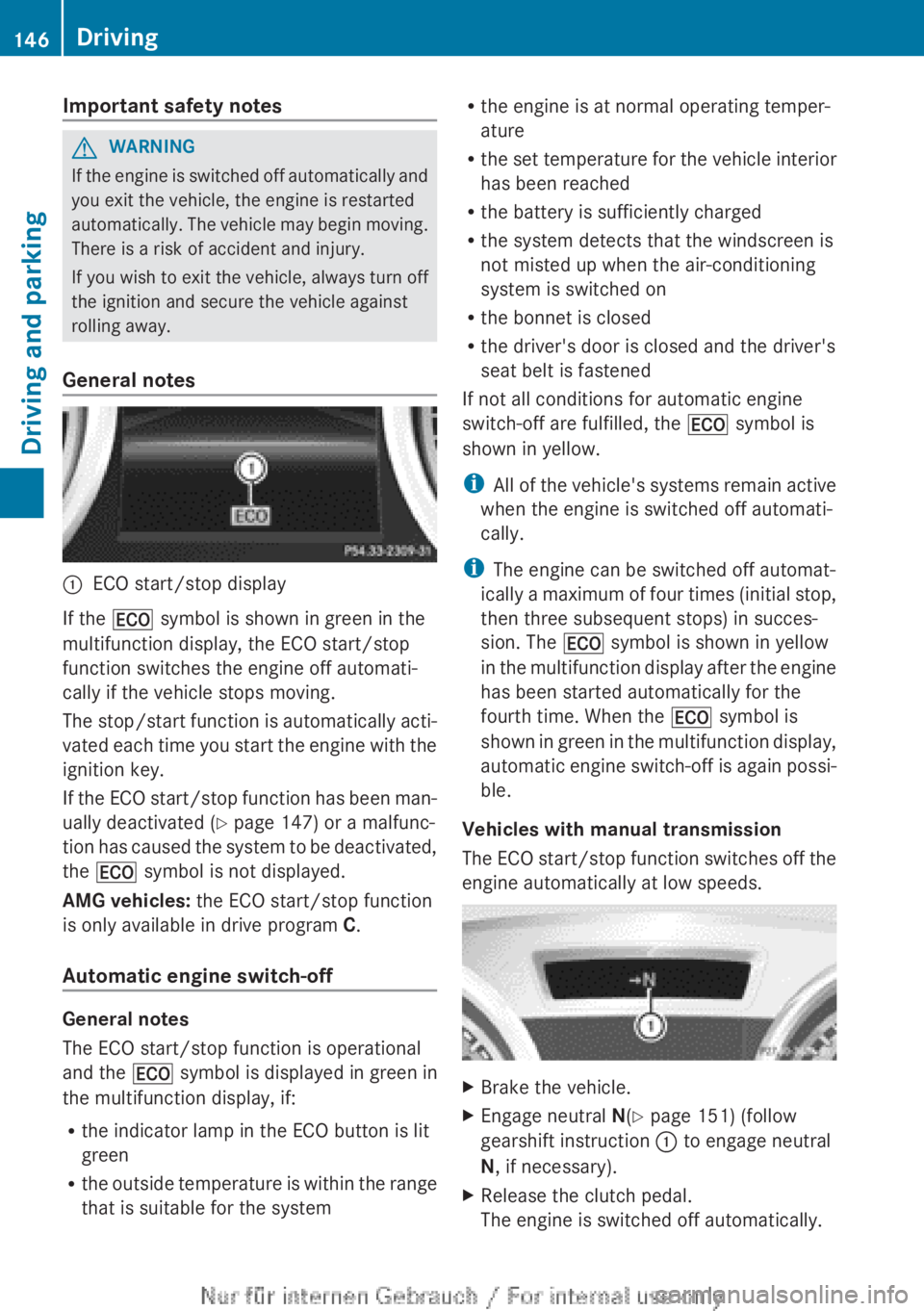
General notes :
ECO start/stop display
If the ¤ symbol is shown in green in the
multifunction display, the ECO start/stop
function switches the engine off automati-
cally if the vehicle stops moving.
The
stop/start function is automatically acti-
vated each time you start the engine with the
ignition key.
If the ECO start/stop function has been man-
ually deactivated ( Y page 147) or a malfunc-
tion has caused the system to be deactivated,
the ¤ symbol is not displayed.
AMG vehicles: the ECO start/stop function
is only available in drive program C.
Automatic engine switch-off General notes
The ECO start/stop function is operational
and the
¤ symbol is displayed in green in
the multifunction display, if:
R the indicator lamp in the ECO button is lit
green
R the
outside temperature is within the range
that is suitable for the system R
the engine is at normal operating temper-
ature
R the
set temperature for the vehicle interior
has been reached
R the battery is sufficiently charged
R the system detects that the windscreen is
not misted up when the air-conditioning
system is switched on
R the bonnet is closed
R the driver's door is closed and the driver's
seat belt is fastened
If not all conditions for automatic engine
switch-off are fulfilled, the ¤ symbol is
shown in yellow.
i All of the vehicle's systems remain active
when the engine is switched off automati-
cally.
i The engine can be switched off automat-
ically a maximum of four times (initial stop,
then three subsequent stops) in succes-
sion. The ¤ symbol is shown in yellow
in the multifunction display after the engine
has been started automatically for the
fourth time. When the ¤ symbol is
shown in green in the multifunction display,
automatic engine switch-off is again possi-
ble.
Vehicles with manual transmission
The ECO start/stop function switches off the
engine automatically at low speeds. X
Brake the vehicle.
X Engage neutral N(Y page 151) (follow
gearshift instruction : to engage neutral
N, if necessary).
X Release the clutch pedal.
The engine is switched off automatically.146
Driving
Driving and parking
Page 149 of 356
Vehicles with automatic transmission
If the vehicle is braked to a standstill in
D or
N, the ECO start/stop function switches off
the engine automatically.
i The
HOLD function can be activated if the
engine has been switched off automati-
cally. It is then not necessary to continue
applying the brakes during the automatic
stop phase. When you depress the accel-
erator pedal, the engine starts automati-
cally and the braking effect of the HOLD
function is deactivated.
Automatic engine start General notes
The engine is started automatically if:
R
you
switch off the ECO start/stop function
by pressing the ECO button
R you engage reverse gear R
R the vehicle starts to roll
R the brake system requires this
R the temperature in the vehicle interior devi-
ates from the set range
R the system detects moisture on the wind-
screen when the air-conditioning system is
switched on
R the battery's charge status is too low
R the driver's seat belt is released or the driv-
er's door is opened
Vehicles with manual transmission
! Only engage gear when the clutch pedal
is depressed.
The engine is started automatically if you:
R depress the clutch pedal fully
R depress the accelerator pedal Vehicles with automatic transmission
The engine is started automatically if you:
R
release the brake pedal when HOLD is not
activated and the transmission is in posi-
tion D or N
R depress the accelerator pedal
R move the transmission out of position P
i Shifting the transmission to position P
does not start the engine.
i If you shift the transmission from R to D,
the ECO start/stop function is available
again once the ¤ symbol reappears in
green in the multifunction display.
Deactivating/activating the ECO start/
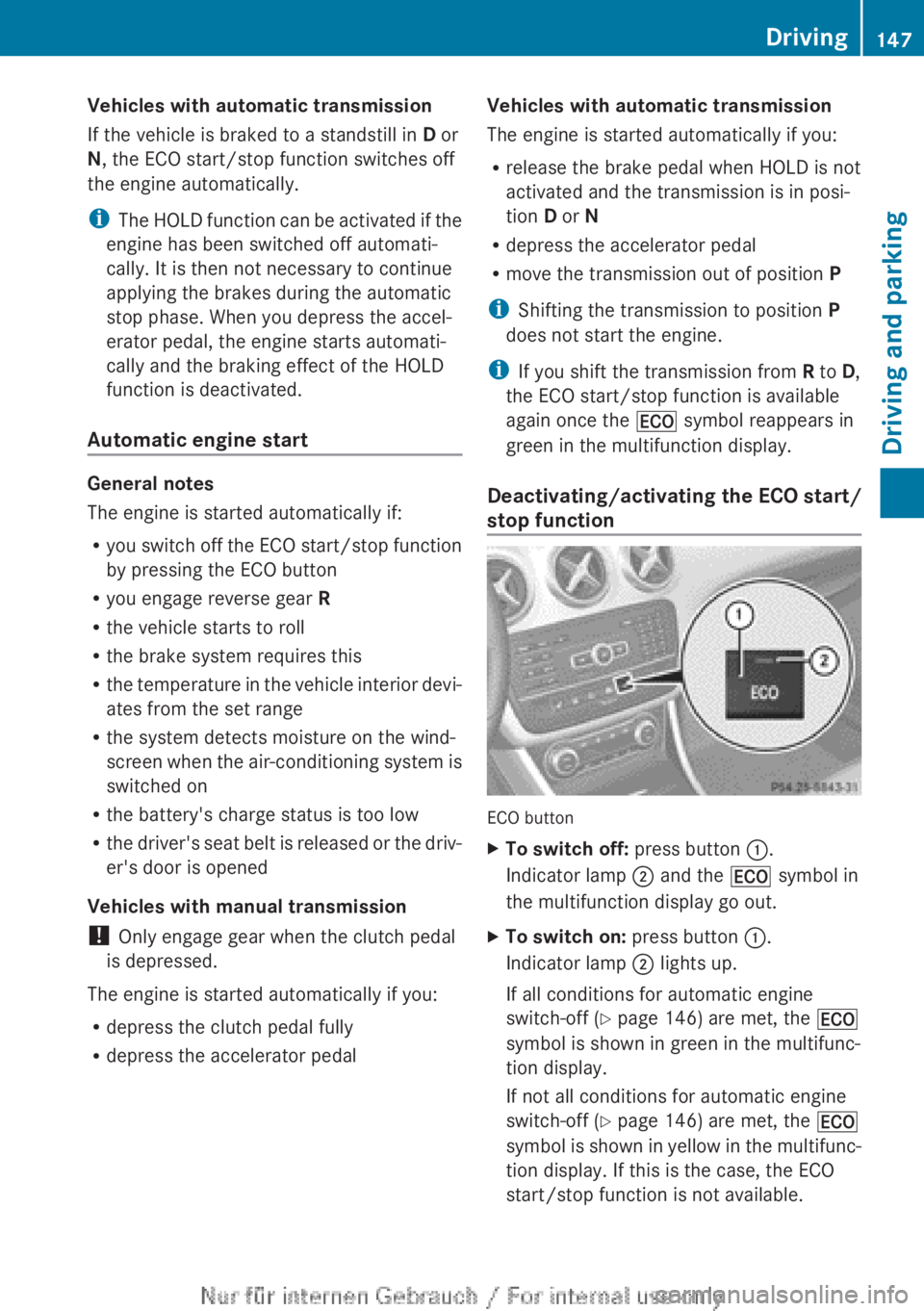
stop function ECO button
X
To switch off: press button :.
Indicator lamp ; and the ¤ symbol in
the multifunction display go out.
X To switch on: press button :.
Indicator lamp ; lights up.
If all conditions for automatic engine
switch-off ( Y page 146) are met, the ¤
symbol is shown in green in the multifunc-
tion display.
If not all conditions for automatic engine
switch-off ( Y page 146) are met, the ¤
symbol
is shown in yellow in the multifunc-
tion display. If this is the case, the ECO
start/stop function is not available. Driving
147
Driving and parking Z
Page 154 of 356
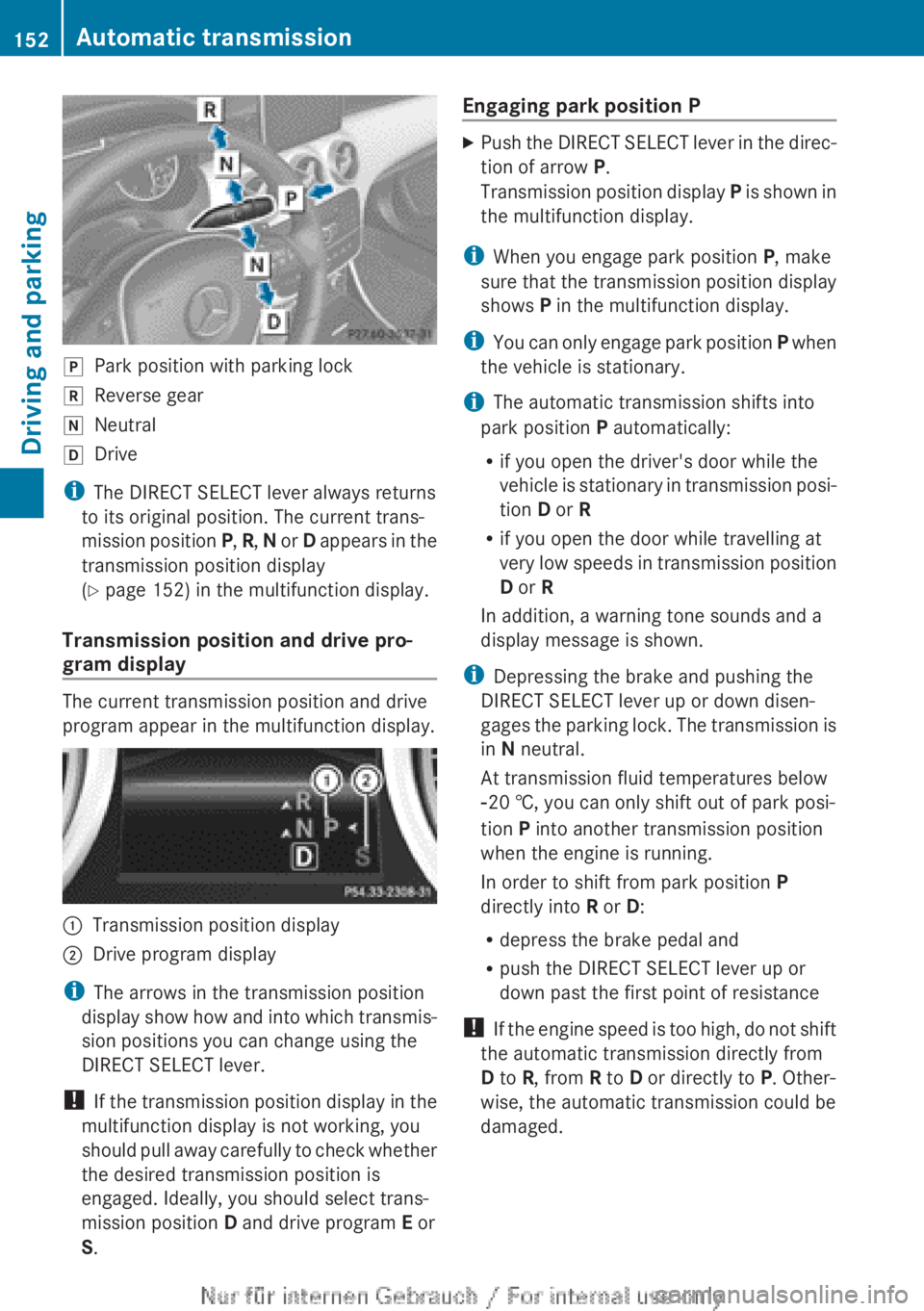
j
Park position with parking lock
k Reverse gear
i Neutral
h Drive
i The DIRECT SELECT lever always returns
to its original position. The current trans-
mission
position P, R, N or D appears in the
transmission position display
(Y page 152) in the multifunction display.
Transmission position and drive pro-
gram display The current transmission position and drive
program appear in the multifunction display.
:
Transmission position display
; Drive program display
i The arrows in the transmission position
display
show how and into which transmis-
sion positions you can change using the
DIRECT SELECT lever.
! If the transmission position display in the
multifunction display is not working, you
should pull away carefully to check whether
the desired transmission position is
engaged. Ideally, you should select trans-
mission position D and drive program E or
S. Engaging park position P X
Push the DIRECT SELECT lever in the direc-
tion of arrow P.
Transmission
position display P is shown in
the multifunction display.
i When you engage park position P, make
sure
that the transmission position display
shows P in the multifunction display.
i You can only engage park position P when
the vehicle is stationary.
i The automatic transmission shifts into
park position P automatically:
R if you open the driver's door while the
vehicle is stationary in transmission posi-
tion D or R
R if you open the door while travelling at
very low speeds in transmission position
D or R
In addition, a warning tone sounds and a
display message is shown.
i Depressing the brake and pushing the
DIRECT SELECT lever up or down disen-
gages the parking lock. The transmission is
in N neutral.
At transmission fluid temperatures below
Ò20 †, you can only shift out of park posi-
tion P into another transmission position
when the engine is running.
In order to shift from park position P
directly into R or D:
R depress the brake pedal and
R push the DIRECT SELECT lever up or
down past the first point of resistance
! If the engine speed is too high, do not shift
the automatic transmission directly from
D to R, from R to D or directly to P. Other-
wise, the automatic transmission could be
damaged. 152
Automatic transmission
Driving and parking
Page 166 of 356
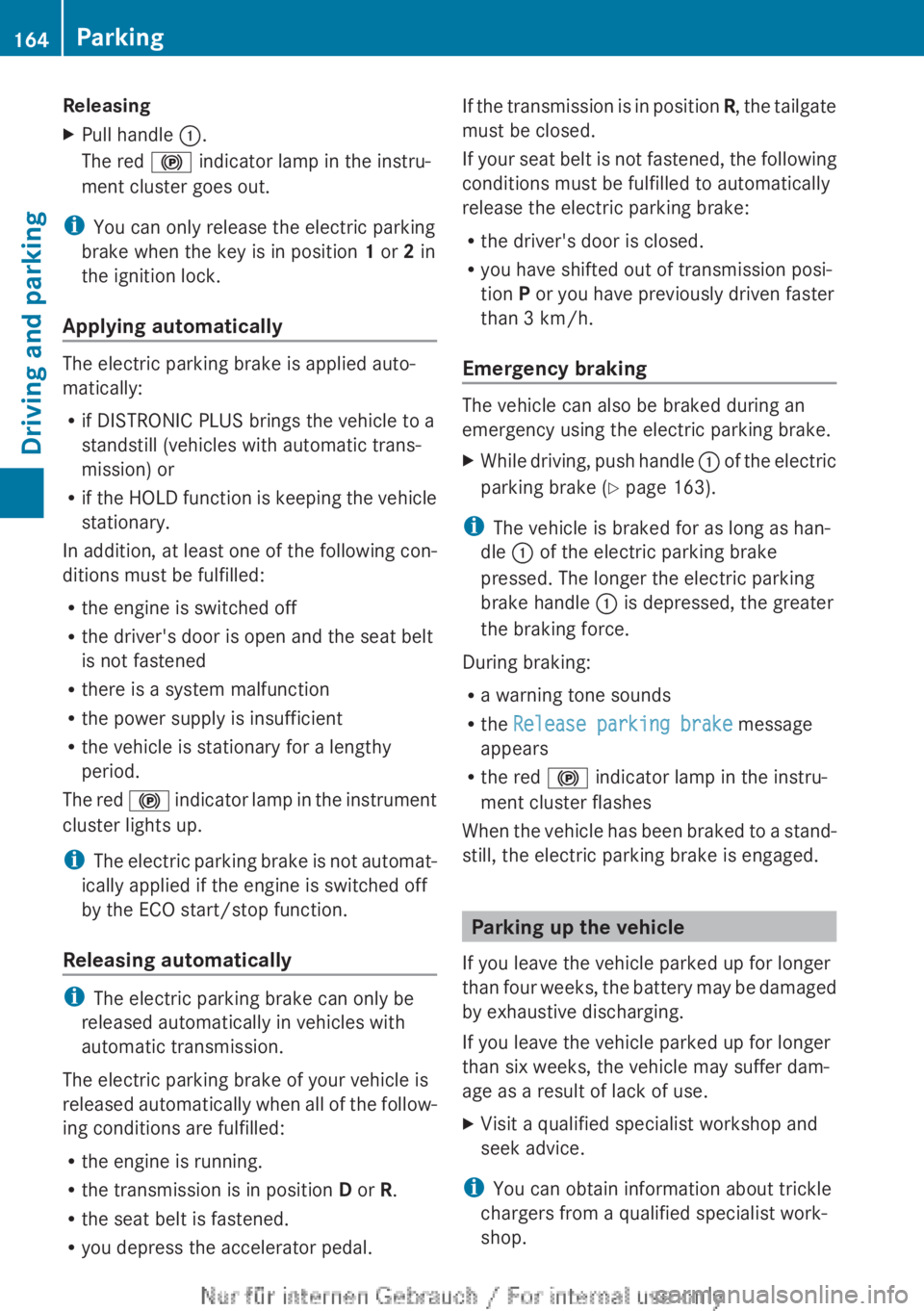
Releasing
X
Pull handle :.
The red ! indicator lamp in the instru-
ment cluster goes out.
i You can only release the electric parking
brake when the key is in position 1 or 2 in
the ignition lock.
Applying automatically The electric parking brake is applied auto-
matically:
R
if DISTRONIC PLUS brings the vehicle to a
standstill (vehicles with automatic trans-
mission) or
R if
the HOLD function is keeping the vehicle
stationary.
In addition, at least one of the following con-
ditions must be fulfilled:
R the engine is switched off
R the driver's door is open and the seat belt
is not fastened
R there is a system malfunction
R the power supply is insufficient
R the vehicle is stationary for a lengthy
period.
The red ! indicator lamp in the instrument
cluster lights up.
i The electric parking brake is not automat-
ically applied if the engine is switched off
by the ECO start/stop function.
Releasing automatically i
The electric parking brake can only be
released automatically in vehicles with
automatic transmission.
The electric parking brake of your vehicle is
released
automatically when all of the follow-
ing conditions are fulfilled:
R the engine is running.
R the transmission is in position D or R.
R the seat belt is fastened.
R you depress the accelerator pedal. If the transmission is in position
R,
the tailgate
must be closed.
If your seat belt is not fastened, the following
conditions must be fulfilled to automatically
release the electric parking brake:
R the driver's door is closed.
R you have shifted out of transmission posi-
tion P or you have previously driven faster
than 3 km/h.
Emergency braking The vehicle can also be braked during an
emergency using the electric parking brake.
X
While driving, push handle :
of the electric
parking brake ( Y page 163).
i The vehicle is braked for as long as han-
dle : of the electric parking brake
pressed. The longer the electric parking
brake handle : is depressed, the greater
the braking force.
During braking:
R a warning tone sounds
R the Release parking brake message
appears
R the red ! indicator lamp in the instru-
ment cluster flashes
When
the vehicle has been braked to a stand-
still, the electric parking brake is engaged. Parking up the vehicle
If you leave the vehicle parked up for longer
than
four weeks, the battery may be damaged
by exhaustive discharging.
If you leave the vehicle parked up for longer
than six weeks, the vehicle may suffer dam-
age as a result of lack of use.
X Visit a qualified specialist workshop and
seek advice.
i You can obtain information about trickle
chargers from a qualified specialist work-
shop. 164
Parking
Driving and parking
Page 177 of 356
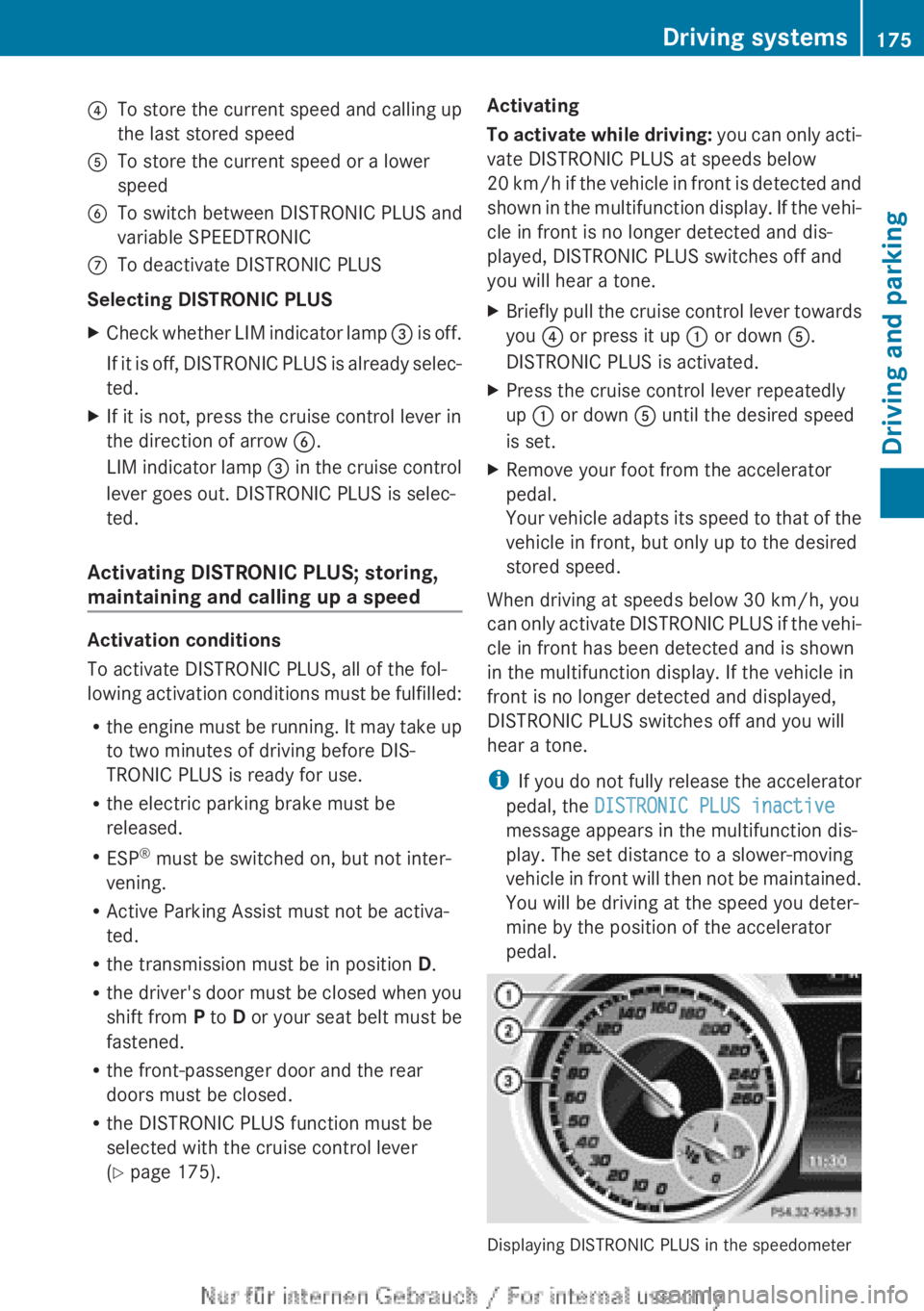
?
To store the current speed and calling up
the last stored speed
A To store the current speed or a lower
speed
B To switch between DISTRONIC PLUS and
variable SPEEDTRONIC
C To deactivate DISTRONIC PLUS
Selecting DISTRONIC PLUS
X Check whether LIM indicator lamp = is off.
If it is off, DISTRONIC PLUS is already selec-
ted.
X If it is not, press the cruise control lever in
the direction of arrow B.
LIM
indicator lamp = in the cruise control
lever goes out. DISTRONIC PLUS is selec-
ted.
Activating DISTRONIC PLUS; storing,
maintaining and calling up a speed Activation conditions
To activate DISTRONIC PLUS, all of the fol-
lowing
activation conditions must be fulfilled:
R the engine must be running. It may take up
to two minutes of driving before DIS-
TRONIC PLUS is ready for use.
R the electric parking brake must be
released.
R ESP ®
must be switched on, but not inter-
vening.
R Active Parking Assist must not be activa-
ted.
R the transmission must be in position D.
R the driver's door must be closed when you
shift from P to D or your seat belt must be
fastened.
R the front-passenger door and the rear
doors must be closed.
R the DISTRONIC PLUS function must be
selected with the cruise control lever
(Y page 175). Activating
To
activate while driving: you can only acti-
vate DISTRONIC PLUS at speeds below
20 km/h if the vehicle in front is detected and
shown in the multifunction display. If the vehi-
cle in front is no longer detected and dis-
played, DISTRONIC PLUS switches off and
you will hear a tone.
X Briefly pull the cruise control lever towards
you ? or press it up : or down A.
DISTRONIC PLUS is activated.
X Press the cruise control lever repeatedly
up : or down A until the desired speed
is set.
X Remove your foot from the accelerator
pedal.
Your
vehicle adapts its speed to that of the
vehicle in front, but only up to the desired
stored speed.
When driving at speeds below 30 km/h, you
can
only activate DISTRONIC PLUS if the vehi-
cle in front has been detected and is shown
in the multifunction display. If the vehicle in
front is no longer detected and displayed,
DISTRONIC PLUS switches off and you will
hear a tone.
i If you do not fully release the accelerator
pedal, the DISTRONIC PLUS inactive
message appears in the multifunction dis-
play. The set distance to a slower-moving
vehicle in front will then not be maintained.
You will be driving at the speed you deter-
mine by the position of the accelerator
pedal. Displaying DISTRONIC PLUS in the speedometer Driving systems
175
Driving and parking Z
Page 182 of 356
!
If DISTRONIC PLUS or the HOLD function
is activated, the vehicle brakes automati-
cally in certain situations. To prevent dam-
age to the vehicle, deactivate DISTRONIC
PLUS and the HOLD function in the follow-
ing or other similar situations:
R when towing the vehicle
R in the car wash
Deactivate the HOLD function (Y page 180).
General notes The HOLD function can assist the driver in the
following situations:
R
when pulling away, especially on steep
slopes
R when manoeuvring on steep slopes
R when waiting in traffic
The vehicle is kept stationary without the
driver having to depress the brake pedal.
The
braking effect is cancelled and the HOLD
function is deactivated when you depress the
accelerator pedal to pull away.
Activation conditions You can activate the HOLD function if:
R
the vehicle is stationary
R the
engine is running or if it has been auto-
matically switched off by the ECO start/
stop function
R the driver's door is closed or if your seat
belt is fastened
R the electric parking brake is released
R the transmission is in position D, R or N on
vehicles with automatic transmission
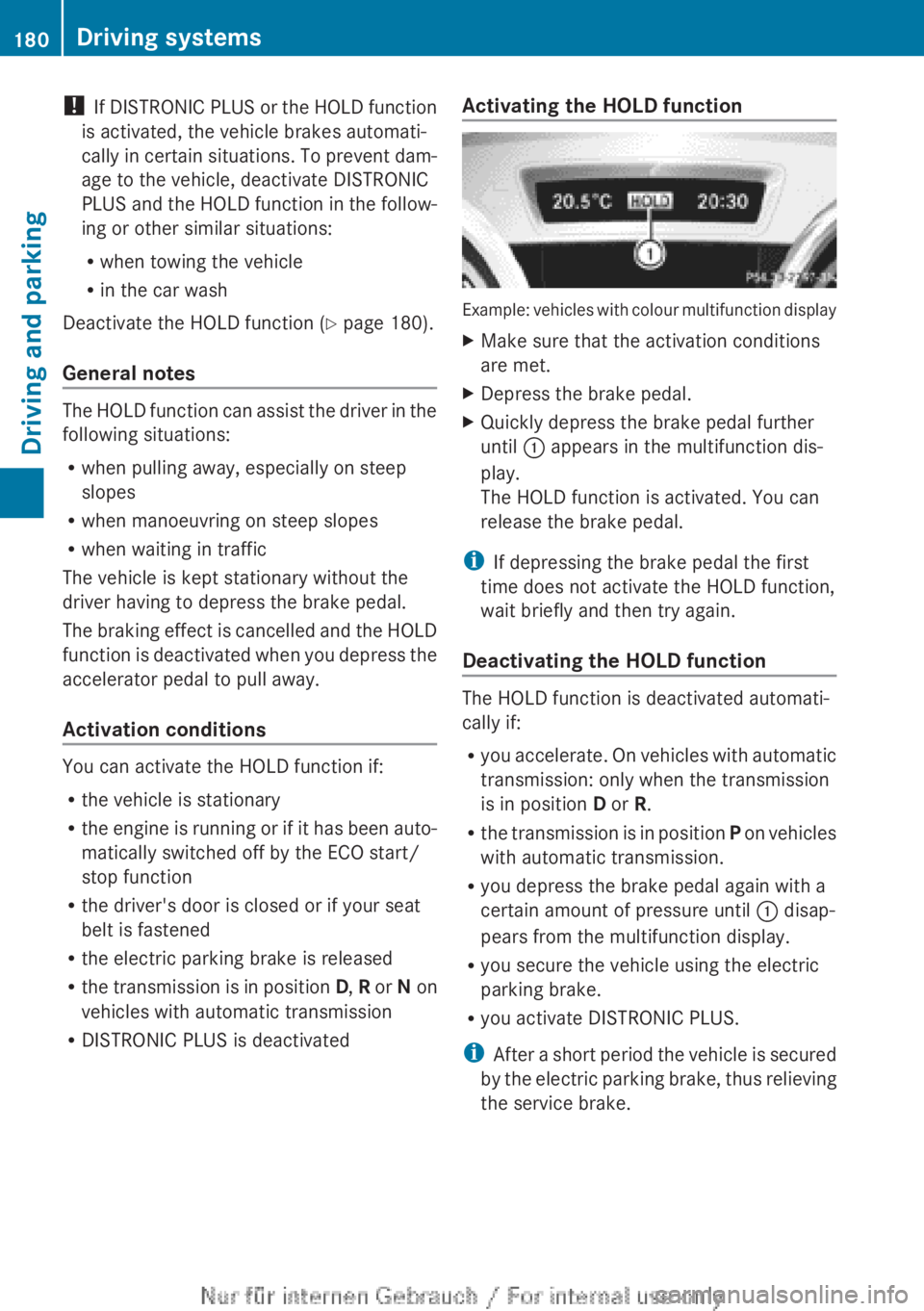
R DISTRONIC PLUS is deactivated Activating the HOLD function Example: vehicles with colour multifunction display
X
Make sure that the activation conditions
are met.
X Depress the brake pedal.
X Quickly depress the brake pedal further
until : appears in the multifunction dis-
play.
The HOLD function is activated. You can
release the brake pedal.
i If depressing the brake pedal the first
time does not activate the HOLD function,
wait briefly and then try again.
Deactivating the HOLD function The HOLD function is deactivated automati-
cally if:
R
you
accelerate. On vehicles with automatic
transmission: only when the transmission
is in position D or R.
R the transmission is in position P on vehicles
with automatic transmission.
R you depress the brake pedal again with a
certain amount of pressure until : disap-
pears from the multifunction display.
R you secure the vehicle using the electric
parking brake.
R you activate DISTRONIC PLUS.
i After a short period the vehicle is secured
by the electric parking brake, thus relieving
the service brake. 180
Driving systems
Driving and parking
Page 183 of 356
The electric parking brake secures the vehicle
automatically if the HOLD function is activa-
ted and:
R
the driver's door is open and the driver's
seat belt is unfastened
R the
engine is switched off, unless it is auto-
matically switched off by the ECO start/
stop function
R a system fault occurs
R the power supply is not sufficient
Vehicles with automatic transmission
If a fault occurs, then the transmission may
also be shifted into position P automatically.
Vehicles with manual transmission
The Brake immediately message can also
appear in the multifunction display.
X Immediately depress the brake pedal firmly
until
the warning message in the multifunc-
tion display goes out.
The HOLD function is deactivated.
A horn will sound at regular intervals if you
turn off the engine, take off your seat belt or
open the driver's door when the HOLD func-
tion is activated. The horn alerts you to the
fact that the HOLD function is still activated.
If you attempt to lock the vehicle, the tone
becomes louder. The vehicle cannot be
locked until you have deactivated the HOLD
function.
i Once you have switched off the engine,
you cannot restart it until you have deacti-
vated the HOLD function. RACE START
Important safety notes RACE START enables optimum acceleration
from a standing start. The precondition for
this is a suitable high-grip road surface.
Only
activate RACE START on dedicated race
circuits. i
RACE
START is only available in AMG vehi-
cles.
Activation conditions You can activate RACE START if:
R
the doors, the bonnet and the tailgate are
closed
R the
engine is running and the transmission,
traction control and engine are at operating
temperature
R SPORT handling mode is activated
(Y page 66)
R the steering wheel is in the straight-ahead
position.
R the vehicle is stationary and the brake
pedal is depressed (left foot)
R the transmission is in position D.
R drive program M is selected ( Y page 155).
Activating RACE START X
Depress the brake pedal with your left foot
and keep it depressed.
X Pull and hold both steering wheel gearshift
paddles.
X The RACE START Confirm: Paddle UP
Cancel: Paddle DOWN message appears
in the multifunction display.
X Release both steering wheel gearshift pad-
dles.
i If the activation conditions are no longer
fulfilled, RACE START is cancelled. The
RACE START not possible See Own‐
er's
Manual message appears in the mul-
tifunction display.
X To cancel:
pull the left steering wheel shift
paddle (Y page 156).
or
X To confirm: pull the right steering wheel
shift paddle
(Y page 156).
The RACE START available Depress
accelerator message appears in the mul-
tifunction display. Driving systems
181
Driving and parking Z