steering MERCEDES-BENZ A CLASS 2012 Service Manual
[x] Cancel search | Manufacturer: MERCEDES-BENZ, Model Year: 2012, Model line: A CLASS, Model: MERCEDES-BENZ A CLASS 2012Pages: 356, PDF Size: 4.96 MB
Page 189 of 356
R
at any time, you can intervene in the steer-
ing procedure to correct it. Active Parking
Assist will then be cancelled.
R when transporting a load which protrudes
from your vehicle, you should not use
Active Parking Assist.
R never use Active Parking Assist when snow
chains are fitted.
R make sure that the tyre pressures are
always correct. This has a direct influence
on the parking characteristics of the vehi-
cle.
General notes Active Parking Assist is an electronic parking
aid with ultrasound. Ultrasound is used to
measure
the road on both sides of the vehicle.
A suitable parking space is indicated by the
parking symbol. Active steering intervention
can assist you during parking.
You may also use PARKTRONIC
(Y page 182). When PARKTRONIC is switched
off, Active Parking Assist is also unavailable.
Use Active Parking Assist for parking spaces:
R that are parallel to the direction of travel
R that are on straight roads, not bends
R that are on the same level as the road, e.g.
not on the pavement
Detecting parking spaces Objects located above the height range of
Active Parking Assist will not be detected
when the parking space is measured. These
are not taken into account when the parking
procedure is calculated, e.g. overhanging
loads,
tail sections or loading ramps of goods
vehicles. G
WARNING
If objects are located above the detection
range,
Active Parking Assist may start to steer
into the parking space too soon. As a result,
you could cause a collision. There is a risk of
an accident. If objects are located above the detection
range, stop the vehicle and switch Active
Parking Assist off.
For further information on the detection
range (Y page 183).
Active Parking Assist does not support you
parking in spaces that are parallel to the
direction of travel if:
R the parking space is on a kerb stone
R the parking space appears to be blocked,
for example by foliage or grass paving
blocks
R the range of movement is too small
R the
parking space is bordered by an obsta-
cle which is not clearly defined such as a
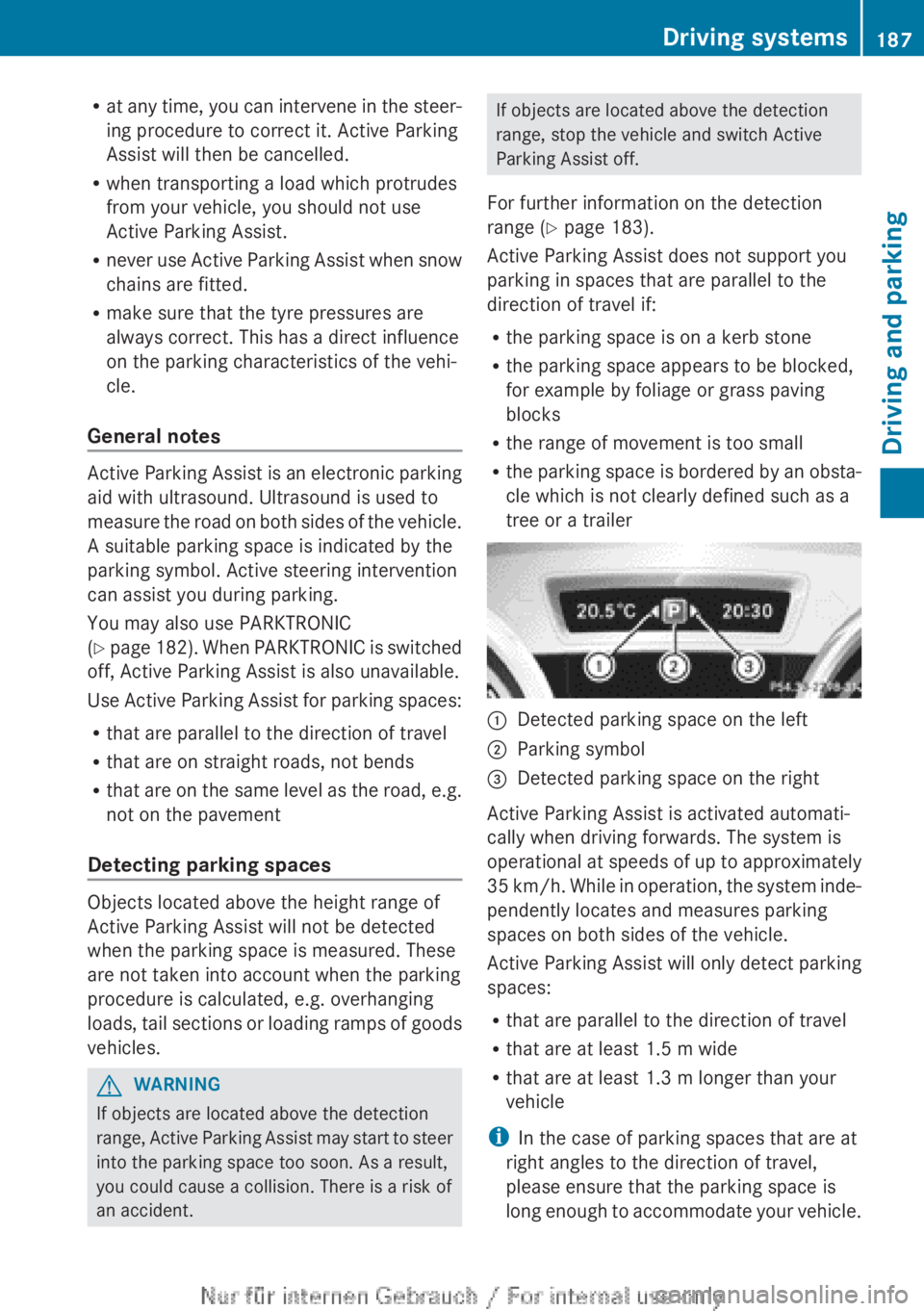
tree or a trailer :
Detected parking space on the left
; Parking symbol
= Detected parking space on the right
Active Parking Assist is activated automati-
cally when driving forwards. The system is
operational
at speeds of up to approximately
35 km/h. While in operation, the system inde-
pendently locates and measures parking
spaces on both sides of the vehicle.
Active Parking Assist will only detect parking
spaces:
R that are parallel to the direction of travel
R that are at least 1.5 m wide
R that are at least 1.3 m longer than your
vehicle
i In the case of parking spaces that are at
right angles to the direction of travel,
please ensure that the parking space is
long enough to accommodate your vehicle. Driving systems
187
Driving and parking Z
Page 190 of 356
When driving at speeds below 30 km/h, you
will see parking symbol
; as a status indi-
cator
in the instrument cluster. When a park-
ing space has been detected, an arrow
towards the right or the left also appears.
Active Parking Assist only displays parking
spaces on the front-passenger side as stand-
ard. Parking spaces on the driver's side are
displayed as soon as the turn signal on the
driver's side is activated. When parking on the
driver's side, this must remain switched on
until you acknowledge the use of Active Park-
ing Assist by pressing the a button on the
multifunction steering wheel.
A parking space is displayed while you are
driving past it, and until you are approx-
imately 15 m away from it.
Parking G
WARNING
Active Parking Assist merely aids you by inter-
vening
actively in the steering. There is a risk
of accident if you do not apply the brakes
yourself.
Always apply the brakes yourself when park-
ing and manoeuvring.
Active Parking Assist does not support you
with parking spaces parallel to the direction
of travel if:
R the parking space is on a kerbstone
R the parking space is apparently blocked,
for example by foliage or grass paving
blocks
R the range of movement is too small
R the parking space is bordered by an obsta-
cle which is not clearly defined such as a
tree or a trailer
X Stop the vehicle when the parking symbol
shows the desired parking space in the
instrument cluster.
X Vehicles with manual transmission: shift to
reverse gear. Vehicles with automatic transmission: shift
into position R.
The Start Park Assist? Yes: OK No:
%
message appears in the multifunction
display.
X To cancel the procedure: press the
% button on the multifunction steering
wheel or pull away.
or
X To park using Active Parking Assist:
press
the a button on the multifunction
steering wheel.
The Park Assist active Accelerate
and brake Observe surroundings mes-
sage appears in the multifunction display.
X Release the multifunction steering wheel.
X Reverse the vehicle, being ready to brake
at all times. Do not exceed a maximum
speed of approximately
10 km/h when
reversing. Otherwise, Active Parking Assist
will be cancelled.
i In tight parking spaces, you will achieve
the best parking results by backing up as
far as possible. When doing so, also
observe the PARKTRONIC messages.
X Stop as soon as PARKTRONIC sounds the
continuous warning tone, if not before.
Manoeuvring
may be required in tight park-
ing spaces.
Vehicles with manual transmission: the Park
Assist active Engage forward gear
Observe
surroundings message appears in
the multifunction display.
Vehicles with automatic transmission: the
Park Assist active Select D Observe
surroundings message appears in the mul-
tifunction display.
X Vehicles with manual transmission: while
the vehicle is stationary, shift to first gear.
Vehicles with automatic transmission:
select transmission position D while the
vehicle is stationary.
Active
Parking Assist immediately steers in
the other direction. 188
Driving systems
Driving and parking
Page 191 of 356
The Park Assist active Accelerate
and
brake Observe surroundings mes-
sage appears in the multifunction display.
i You will achieve the best results by wait-
ing
for the steering procedure to complete
before pulling away.
X Drive forwards and be ready to brake at all
times.
X Stop as soon as PARKTRONIC sounds the
continuous warning tone, if not before.
Vehicles with manual transmission: the Park
Assist active Engage reverse gear
Observe
surroundings message appears in
the multifunction display.
Vehicles with automatic transmission: the
Park Assist active Select R Observe
surroundings message appears in the mul-
tifunction display.
X Additional transmission shifts may be nec-
essary.
As soon as the parking procedure is com-
plete, the Park Assist switched off
message appears in the multifunction dis-
play.
Active Parking Assist is then deactivated.
PARKTRONIC is still available.
X Manoeuvre if necessary.
X Always observe the warning messages dis-
played by PARKTRONIC
(Y page 184).
Parking tips:
R the way your vehicle is positioned in the
parking space after parking is dependent
on various factors. These include the posi-
tion and shape of the vehicles parked in
front
and behind it and the conditions of the
location. It may be the case that Active
Parking Assist guides you too far into a
parking space, or not far enough into it. In
some cases, it may also lead you across or
onto the kerb. If necessary, you should can-
cel the parking procedure with Active Park-
ing Assist.
R you can also engage forward gear prema-
turely. The vehicle redirects and does not
drive as far into the parking space. Should a gear be changed too early, the parking
procedure will be cancelled. A sensible
parking
position can no longer be achieved
from this position.
Exiting a parking space In order that Active Parking Assist can sup-
port you when you exit the parking space:
R
the border of the parking space must not
be too low.
R the border of the parking space must not
be too wide. The system manoeuvres the
vehicle
into a position at a maximum of 45°
to the starting position in the parking
space.
R a manoeuvring distance of at least 0.60 m
must be available.
Active Parking Assist can only assist you with
exiting a parking space if you have parked the
vehicle using Active Parking Assist.
X Start the engine.
X Switch on the turn signal on the side facing
the street.
X Vehicles with manual transmission:
engage first or reverse gear.
Vehicles with automatic transmission:
shift the transmission to position D or R.
The Start Park Assist? Yes: OK No:
%
message appears in the multifunction
display.
X To cancel the procedure: press the
% button on the multifunction steering
wheel or pull away.
or
X To exit a parking space using Active
Parking Assist: press the a button on
the multifunction steering wheel.
The Park Assist active Accelerate
and
brake Observe surroundings mes-
sage appears in the multifunction display.
X Release the multifunction steering wheel.
X Reverse the vehicle or drive forwards, being
ready to brake at all times. Do not exceed
a maximum speed of approximately Driving systems
189
Driving and parking Z
Page 192 of 356
10 km/h when exiting a parking space.
Otherwise, Active Parking Assist will be
cancelled.
X Stop when PARKTRONIC sounds the con-
tinuous warning tone, if not before.
X Vehicles with manual transmission:
shift to first or reverse gear as required
while the vehicle is stationary.
Vehicles with automatic transmission:
shift
to position D or R as required while the
vehicle is stationary.
Active Parking Assist immediately steers in
the other direction. The Park Assist
active Accelerate and brake
Observe surroundings message appears
in the multifunction display.
i You will achieve the best results by wait-
ing
for the steering procedure to complete
before pulling away.
If you reverse after activation, the steering
wheel is moved to the straight-ahead posi-
tion.
X Drive forwards or reverse the vehicle, being
ready to brake at all times.
X Stop as soon as PARKTRONIC sounds the
continuous warning tone, if not before.
X Drive forwards and reverse as prompted by
the
PARKTRONIC warning displays, several
times if necessary.
Once you have exited the parking space com-
pletely, the steering wheel is moved to the
straight-ahead position. You hear a tone and
the Park Assist switched off message
appears
in the multifunction display. You will
then have to steer and merge into traffic on
your own. PARKTRONIC is still available. Cancelling Active Parking Assist You can cancel Active Parking Assist at any
time.
X
Stop the movement of the multifunction
steering wheel or steer yourself.
Active Parking Assist will be cancelled at
once. The Park Assist cancelled mes-
sage appears in the multifunction display.
or
X Press the PARKTRONIC button on the
centre console
(Y page 185).
PARKTRONIC is switched off and Active
Parking Assist is immediately cancelled.
The Park Assist cancelled message
appears in the multifunction display.
Active Parking Assist is cancelled automati-
cally if:
R you engage the electric parking brake.
R parking using Active Parking Assist is no
longer possible.
R you are driving faster than 10 km/h.
R a
wheel spins and ESP ®
intervenes or fails.
The ÷ warning lamp lights up in the
instrument cluster.
A warning tone sounds. The parking space
symbol disappears and the multifunction dis-
play shows the Park Assist cancelled
message.
When Active Parking Assist is cancelled, you
must steer again yourself.
If a system malfunction occurs, the vehicle is
braked to a standstill. To drive on, depress the
accelerator again.
Towing a trailer For vehicles with a trailer tow hitch, the min-
imum required length for parking spaces is
slightly increased.
If you have attached a trailer to your vehicle,
you should not use Active Parking Assist.
Once
the electrical connection is established
between your vehicle and the trailer, Active
Parking Assist is no longer available. PARK-
TRONIC is deactivated for the rear area. 190
Driving systems
Driving and parking
Page 194 of 356
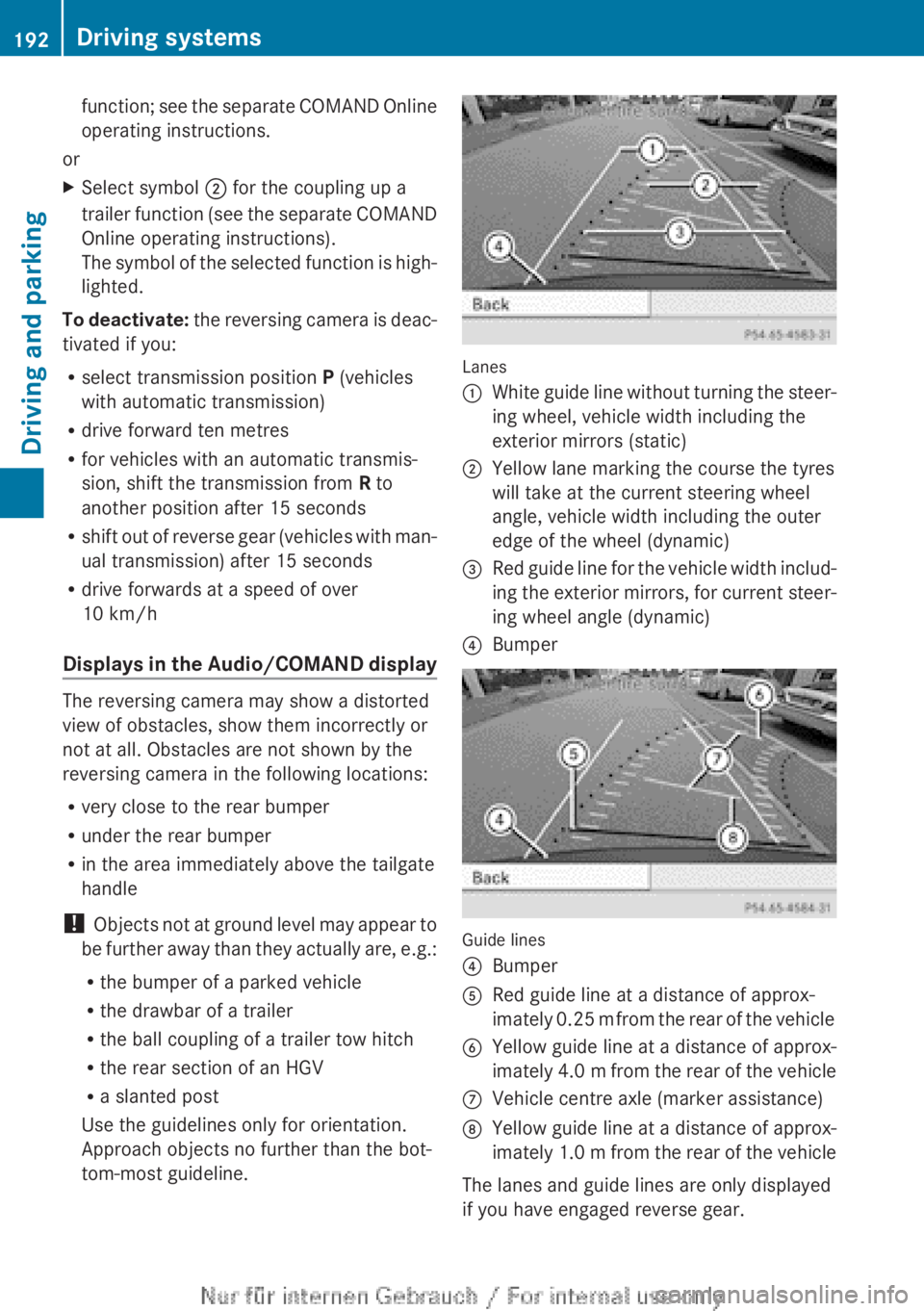
function; see the separate COMAND Online
operating instructions.
or
X Select symbol ; for the coupling up a
trailer
function (see the separate COMAND
Online operating instructions).
The symbol of the selected function is high-
lighted.
To deactivate:
the reversing camera is deac-
tivated if you:
R select transmission position P (vehicles
with automatic transmission)
R drive forward ten metres
R for vehicles with an automatic transmis-
sion, shift the transmission from R to
another position after 15 seconds
R shift out of reverse gear (vehicles with man-
ual transmission) after 15 seconds
R drive forwards at a speed of over
10 km/h
Displays in the Audio/COMAND display The reversing camera may show a distorted
view of obstacles, show them incorrectly or
not at all. Obstacles are not shown by the
reversing camera in the following locations:
R
very close to the rear bumper
R under the rear bumper
R in the area immediately above the tailgate
handle
! Objects
not at ground level may appear to
be further away than they actually are, e.g.:
R the bumper of a parked vehicle
R the drawbar of a trailer
R the ball coupling of a trailer tow hitch
R the rear section of an HGV
R a slanted post
Use the guidelines only for orientation.
Approach objects no further than the bot-
tom-most guideline. Lanes
:
White guide line without turning the steer-
ing wheel, vehicle width including the
exterior mirrors (static)
; Yellow lane marking the course the tyres
will take at the current steering wheel
angle, vehicle width including the outer
edge of the wheel (dynamic)
= Red guide line for the vehicle width includ-
ing
the exterior mirrors, for current steer-
ing wheel angle (dynamic)
? Bumper Guide lines
?
Bumper
A Red guide line at a distance of approx-
imately
0.25 m from the rear of the vehicle
B Yellow guide line at a distance of approx-
imately
4.0 m from the rear of the vehicle
C Vehicle centre axle (marker assistance)
D Yellow guide line at a distance of approx-
imately
1.0 m from the rear of the vehicle
The lanes and guide lines are only displayed
if you have engaged reverse gear. 192
Driving systems
Driving and parking
Page 195 of 356
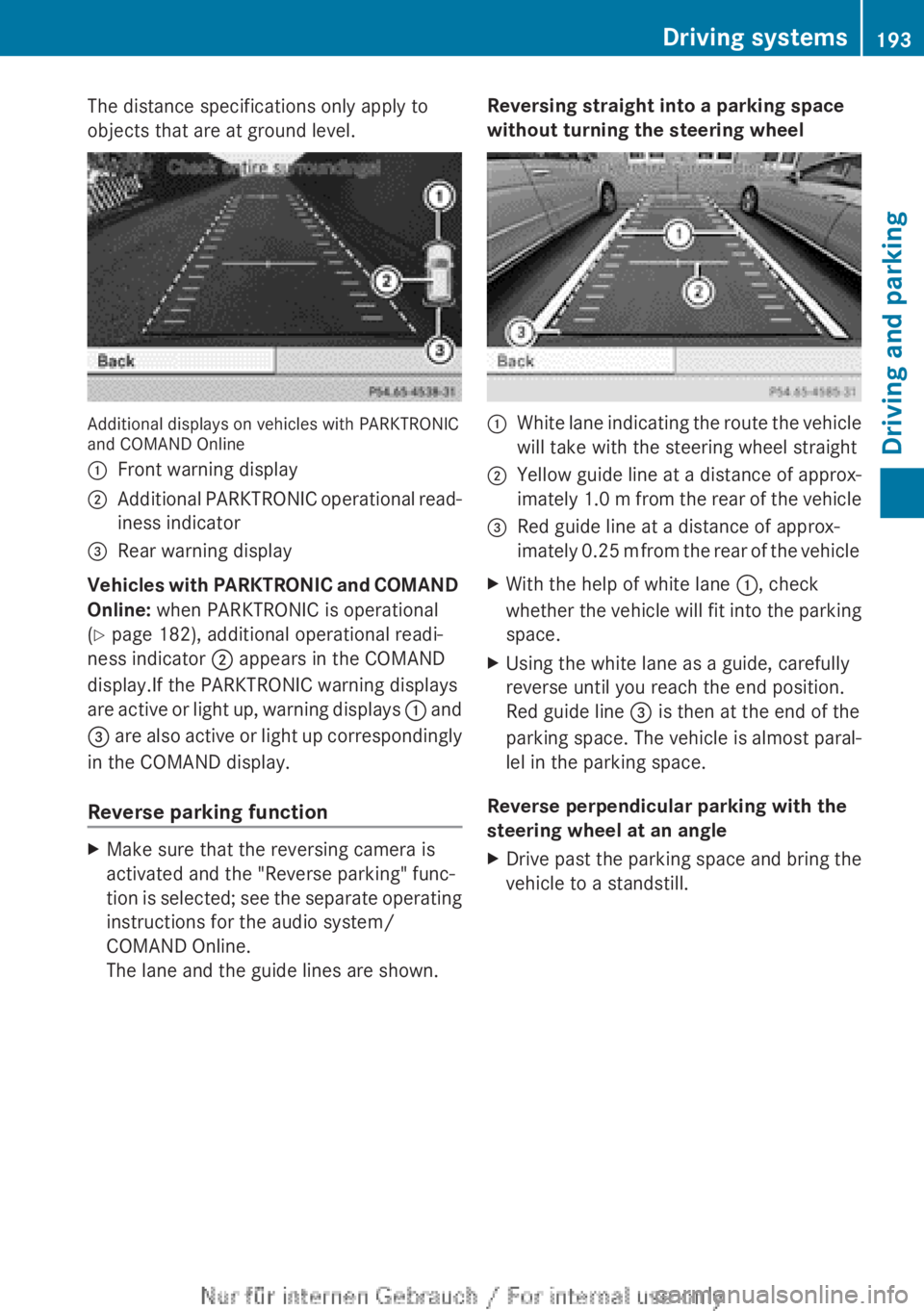
The distance specifications only apply to
objects that are at ground level.
Additional displays on vehicles with PARKTRONIC
and COMAND Online
:
Front warning display
; Additional PARKTRONIC operational read-
iness indicator
= Rear warning display
Vehicles with PARKTRONIC and COMAND
Online: when PARKTRONIC is operational
(Y page 182), additional operational readi-
ness indicator ; appears in the COMAND
display.If the PARKTRONIC warning displays
are
active or light up, warning displays : and
= are also active or light up correspondingly
in the COMAND display.
Reverse parking function X
Make sure that the reversing camera is
activated and the "Reverse parking" func-
tion
is selected; see the separate operating
instructions for the audio system/
COMAND Online.
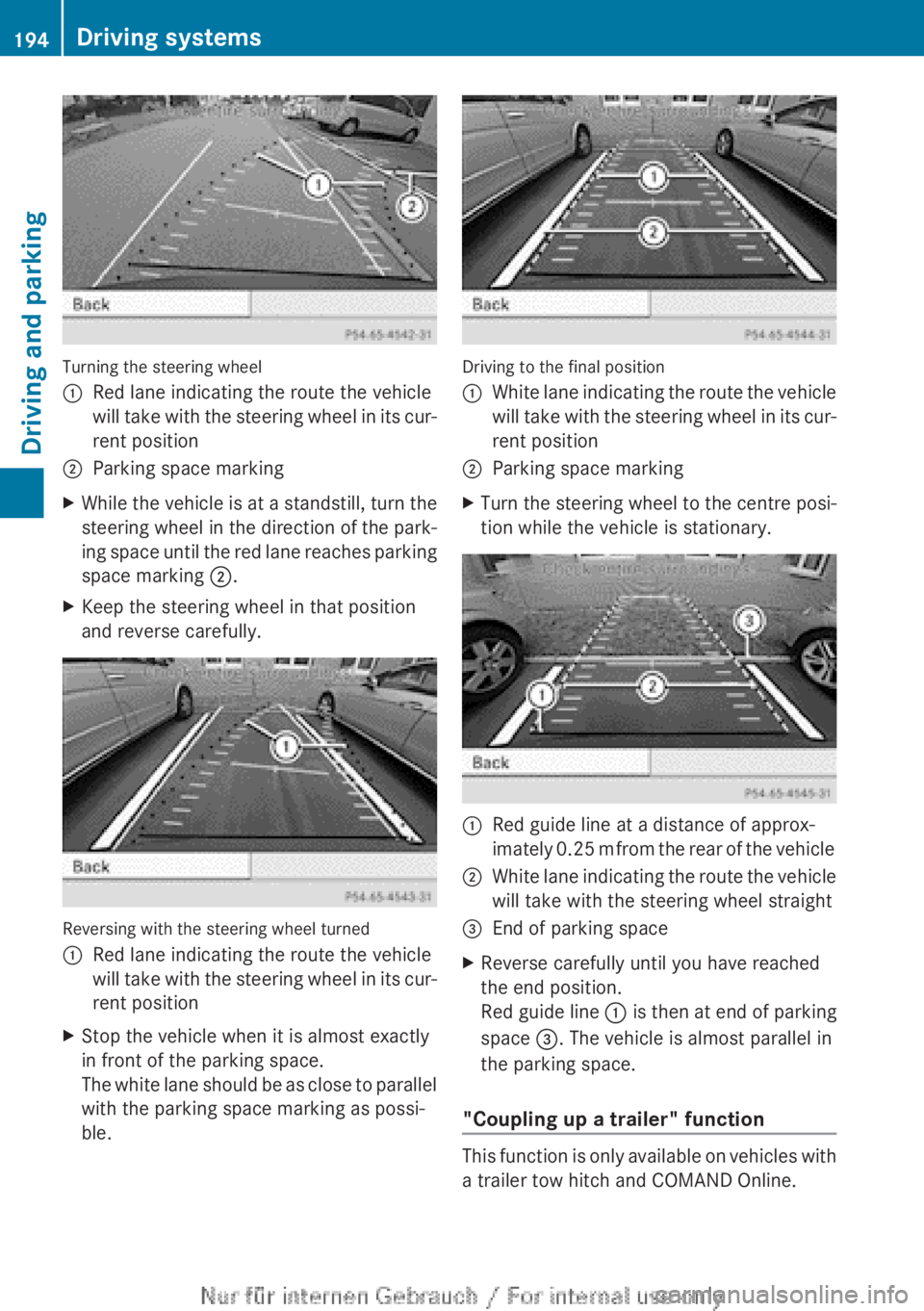
The lane and the guide lines are shown. Reversing straight into a parking space
without turning the steering wheel :
White lane indicating the route the vehicle
will take with the steering wheel straight
; Yellow guide line at a distance of approx-
imately
1.0 m from the rear of the vehicle
= Red guide line at a distance of approx-
imately
0.25 m from the rear of the vehicle
X With the help of white lane :, check
whether
the vehicle will fit into the parking
space.
X Using the white lane as a guide, carefully
reverse until you reach the end position.
Red guide line = is then at the end of the
parking
space. The vehicle is almost paral-
lel in the parking space.
Reverse perpendicular parking with the
steering wheel at an angle
X Drive past the parking space and bring the
vehicle to a standstill. Driving systems
193
Driving and parking Z
Page 196 of 356
Turning the steering wheel
:
Red lane indicating the route the vehicle
will
take with the steering wheel in its cur-
rent position
; Parking space marking
X While the vehicle is at a standstill, turn the
steering
wheel in the direction of the park-
ing space until the red lane reaches parking
space marking ;.
X Keep the steering wheel in that position
and reverse carefully. Reversing with the steering wheel turned
:
Red lane indicating the route the vehicle
will
take with the steering wheel in its cur-
rent position
X Stop the vehicle when it is almost exactly
in front of the parking space.
The
white lane should be as close to parallel
with the parking space marking as possi-
ble. Driving to the final position
:
White lane indicating the route the vehicle
will
take with the steering wheel in its cur-
rent position
; Parking space marking
X Turn the steering wheel to the centre posi-
tion while the vehicle is stationary. :
Red guide line at a distance of approx-
imately
0.25 m from the rear of the vehicle
; White lane indicating the route the vehicle
will take with the steering wheel straight
= End of parking space
X Reverse carefully until you have reached
the end position.
Red guide line :
is then at end of parking
space =. The vehicle is almost parallel in
the parking space.
"Coupling up a trailer" function This function is only available on vehicles with
a trailer tow hitch and COMAND Online.194
Driving systems
Driving and parking
Page 197 of 356
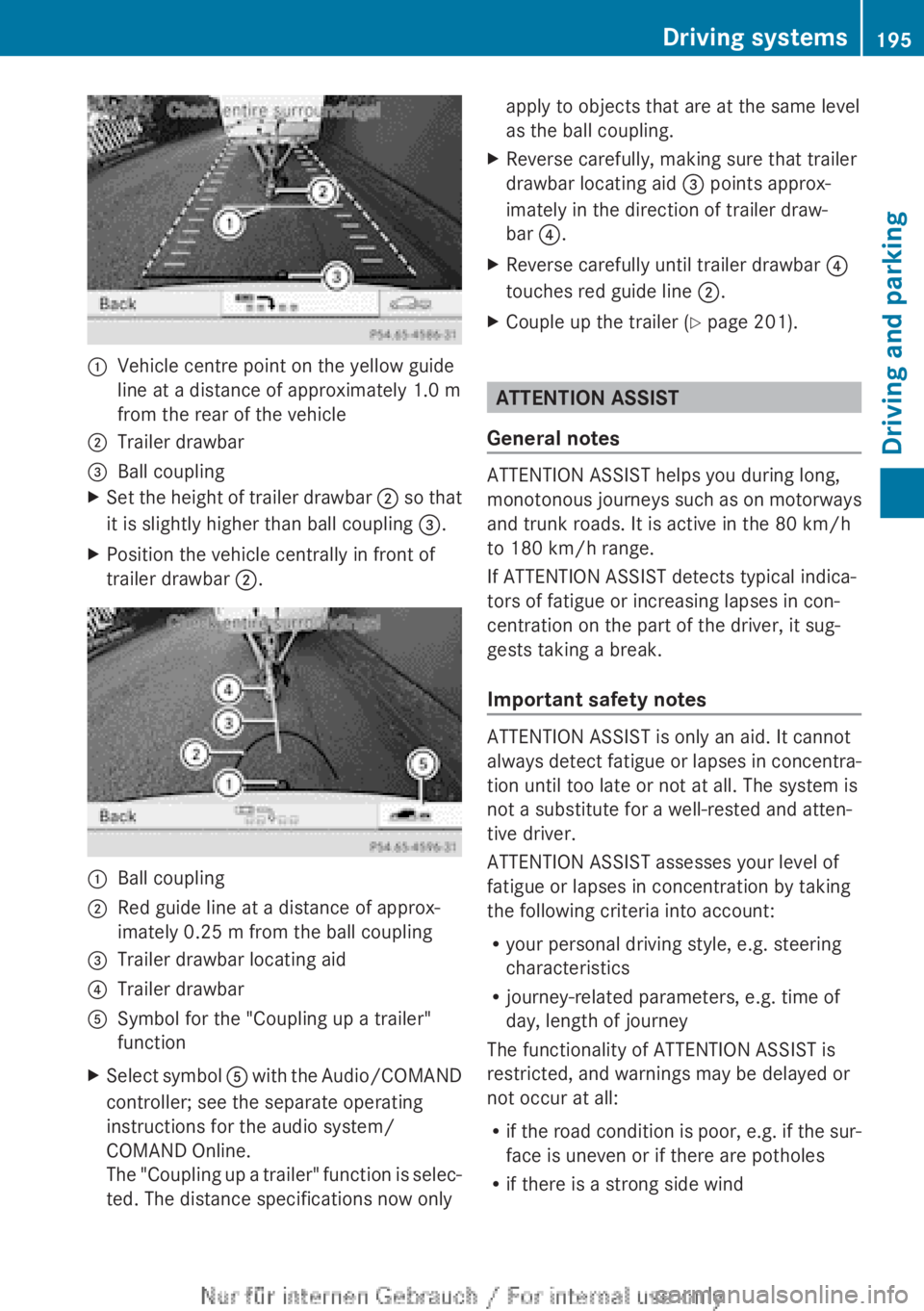
:
Vehicle centre point on the yellow guide
line at a distance of approximately
1.0 m
from the rear of the vehicle
; Trailer drawbar
= Ball coupling
X Set the height of trailer drawbar ;
so that
it is slightly higher than ball coupling =.
X Position the vehicle centrally in front of
trailer drawbar ;.:
Ball coupling
; Red guide line at a distance of approx-
imately
0.25 m from the ball coupling
= Trailer drawbar locating aid
? Trailer drawbar
A Symbol for the "Coupling up a trailer"
function
X Select symbol A
with the Audio/COMAND
controller; see the separate operating
instructions for the audio system/
COMAND Online.
The "Coupling up a trailer" function is selec-
ted. The distance specifications now only apply to objects that are at the same level
as the ball coupling.
X Reverse carefully, making sure that trailer
drawbar locating aid = points approx-
imately in the direction of trailer draw-
bar ?.
X Reverse carefully until trailer drawbar ?
touches red guide line ;.
X Couple up the trailer ( Y page 201). ATTENTION ASSIST
General notes ATTENTION ASSIST helps you during long,
monotonous
journeys such as on motorways
and trunk roads. It is active in the 80 km/h
to 180 km/h range.
If ATTENTION ASSIST detects typical indica-
tors of fatigue or increasing lapses in con-
centration on the part of the driver, it sug-
gests taking a break.
Important safety notes ATTENTION ASSIST is only an aid. It cannot
always
detect fatigue or lapses in concentra-
tion until too late or not at all. The system is
not a substitute for a well-rested and atten-
tive driver.
ATTENTION ASSIST assesses your level of
fatigue or lapses in concentration by taking
the following criteria into account:
R your personal driving style, e.g. steering
characteristics
R journey-related parameters, e.g. time of
day, length of journey
The functionality of ATTENTION ASSIST is
restricted, and warnings may be delayed or
not occur at all:
R if the road condition is poor, e.g. if the sur-
face is uneven or if there are potholes
R if there is a strong side wind Driving systems
195
Driving and parking Z
Page 202 of 356
:
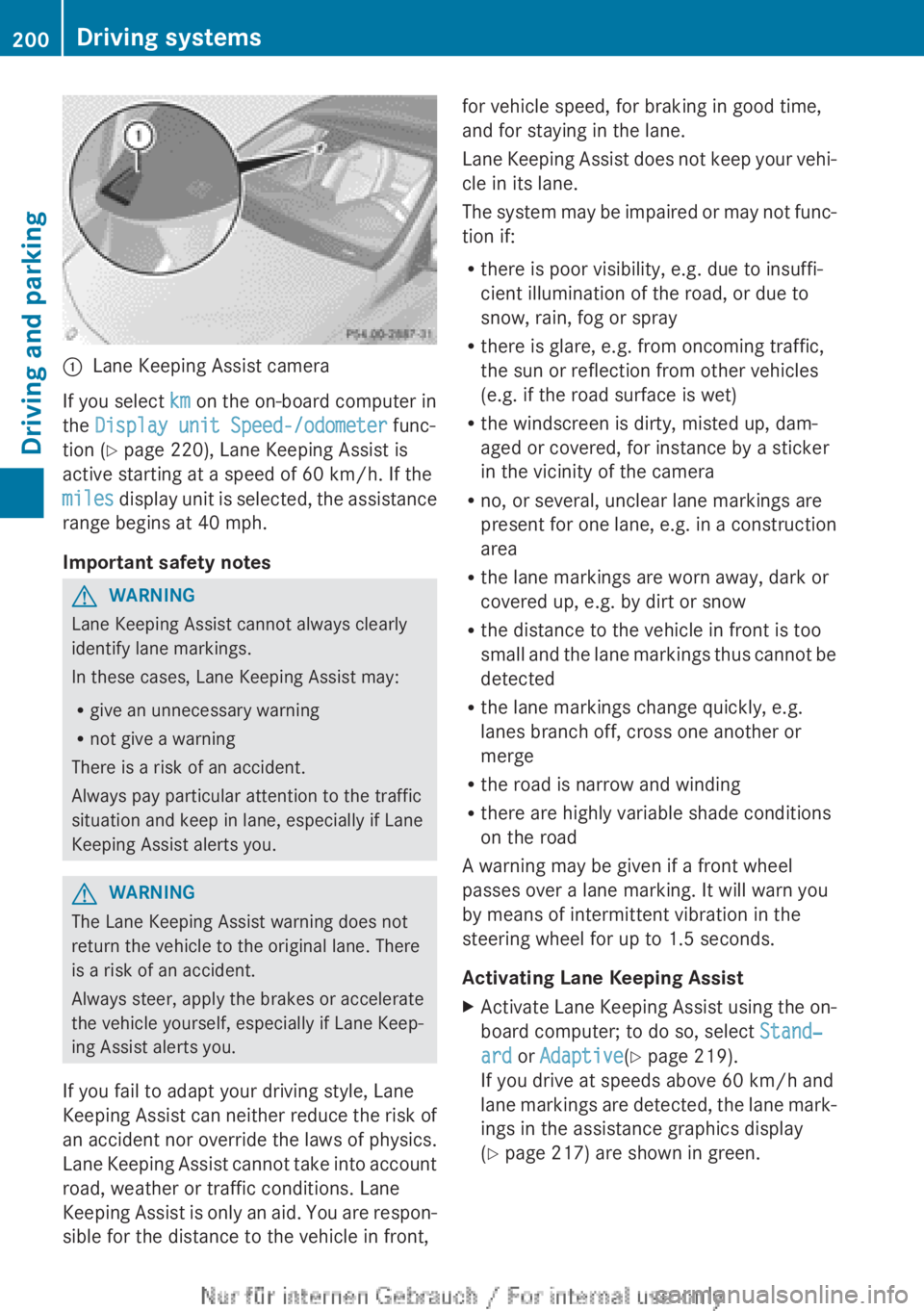
Lane Keeping Assist camera
If you select km on the on-board computer in
the Display unit Speed-/odometer func-
tion (Y page 220), Lane Keeping Assist is
active starting at a speed of 60 km/h
. If the
miles display unit is selected, the assistance
range begins at 40 mph.
Important safety notes G
WARNING
Lane Keeping Assist cannot always clearly
identify lane markings.
In these cases, Lane Keeping Assist may:
R give an unnecessary warning
R not give a warning
There is a risk of an accident.
Always pay particular attention to the traffic
situation and keep in lane, especially if Lane
Keeping Assist alerts you. G
WARNING
The Lane Keeping Assist warning does not
return the vehicle to the original lane. There
is a risk of an accident.
Always steer, apply the brakes or accelerate
the vehicle yourself, especially if Lane Keep-
ing Assist alerts you.
If you fail to adapt your driving style, Lane
Keeping
Assist can neither reduce the risk of
an accident nor override the laws of physics.
Lane Keeping Assist cannot take into account
road, weather or traffic conditions. Lane
Keeping Assist is only an aid. You are respon-
sible for the distance to the vehicle in front, for vehicle speed, for braking in good time,
and for staying in the lane.
Lane
Keeping Assist does not keep your vehi-
cle in its lane.
The system may be impaired or may not func-
tion if:
R there is poor visibility, e.g. due to insuffi-
cient illumination of the road, or due to
snow, rain, fog or spray
R there is glare, e.g. from oncoming traffic,
the sun or reflection from other vehicles
(e.g. if the road surface is wet)
R the windscreen is dirty, misted up, dam-
aged or covered, for instance by a sticker
in the vicinity of the camera
R no, or several, unclear lane markings are
present for one lane, e.g. in a construction
area
R the lane markings are worn away, dark or
covered up, e.g. by dirt or snow
R the distance to the vehicle in front is too
small and the lane markings thus cannot be
detected
R the lane markings change quickly, e.g.
lanes branch off, cross one another or
merge
R the road is narrow and winding
R there are highly variable shade conditions
on the road
A warning may be given if a front wheel
passes over a lane marking. It will warn you
by means of intermittent vibration in the
steering wheel for up to 1.5 seconds.
Activating Lane Keeping Assist
X Activate Lane Keeping Assist using the on-
board computer; to do so, select Stand‐
ard or Adaptive(Y page 219).
If you drive at speeds above
60 km/h and
lane markings are detected, the lane mark-
ings in the assistance graphics display
(Y page 217) are shown in green. 200
Driving systems
Driving and parking
Page 204 of 356
trailer combination could also become unsta-
ble.
To avoid hazardous situations:
R
make
sure to check the noseweight before
each journey.
R use a drawbar noseweight as close as pos-
sible to the maximum noseweight.
R do not exceed the maximum permissible
noseweight.
R do not use a noseweight lower than the
minimum permissible trailer drawbar nose-
weight.
When reversing the vehicle towards the
trailer, make sure there is nobody between
the trailer and the vehicle.
Couple and uncouple the trailer carefully. If
you do not couple the trailer to the towing
vehicle correctly, the trailer could become
detached.
Make sure that the following values are not
exceeded:
R the permissible trailer drawbar noseweight
R the permissible trailer load
R the permissible rear axle load of the towing
vehicle
R the maximum permissible gross vehicle
weight of both the towing vehicle and the
trailer
The applicable permissible values, which
must not be exceeded, can be found:
R in your vehicle documents
R on the identification plates of the trailer tow
hitch and the trailer
R on the vehicle identification plate
If the values differ, the lowest value applies.
You will find the values approved by the man-
ufacturer on the vehicle identification plates
and those for the towing vehicle under "Tech-
nical data" ( Y page 349).
When towing a trailer, your vehicle's handling
characteristics will be different in comparison
to when driving without a trailer. The vehicle/trailer combination:
R
is heavier
R is restricted in its acceleration and gradi-
ent-climbing capability
R has an increased braking distance
R is affected more by strong crosswinds
R demands more sensitive steering
R has a larger turning circle
This can impair the vehicle's handling char-
acteristics.
Adapt your style of driving accord-
ingly. Maintain a safe distance. Drive care-
fully.
When towing a trailer, always adjust your
speed to the current road and weather con-
ditions. Do not exceed the maximum permis-
sible speed for your vehicle/trailer combina-
tion.
General notes X
When towing a trailer, set the tyre pressure
on the rear axle of the towing vehicle for a
maximum
load; see the tyre pressure table
in the fuel filler flap ( Y page 321).
Please note that when towing a trailer, PARK-
TRONIC ( Y page 182) and Blind Spot Assist
(Y
page 197) availability is limited or not avail-
able at all.
i The height of the ball coupling changes
with the load of the vehicle. If necessary,
use a trailer with a height-adjustable draw-
bar.
You will find fitting dimensions and loads
under "Technical data" ( Y page 348).
Driving tips i
Observe the notes on ESP ®
trailer stabi-
lisation ( Y page 68).
The
maximum permissible speed for vehicle/
trailer combinations depends on the type of
trailer. Before beginning the journey, check
the trailer's documents to see what the max-
imum permitted speed is. Observe the legally 202
Towing a trailer
Driving and parking