brake light MERCEDES-BENZ A-CLASS HATCHBACK 2008 User Guide
[x] Cancel search | Manufacturer: MERCEDES-BENZ, Model Year: 2008, Model line: A-CLASS HATCHBACK, Model: MERCEDES-BENZ A-CLASS HATCHBACK 2008Pages: 305, PDF Size: 5.43 MB
Page 35 of 305

Centre console
32 Lower section
Function Page
1
Opens the stowage com-
partment
160
Socket 163
Opens the ashtray* 162
Cigarette lighter 163
2
Manual transmission: gear
lever
92
AUTOTRONIC*: selector
lever
94
3
Selects the drive program* 94
4
Parking brake 90
5
Adjusts the armrest* and
opens the stowage com-
partment*
67
6
Opens the stowage com-
partment/telephone com-
partment*
160
7
Cup holder 144At a glance
* optional
169_AKB; 2; 4, en-GB
wdomann,
Version: 2.10.6 2008-07-16T08:52:06+02:00 - Seite 32Dateiname: 6515_0315_02_buchblock.pdf; preflight
Page 58 of 305
Driving safety sys
tems 55Driving safety systems
Overview of driving safety systems
In this section, you will find information about
the following driving safety systems:
R ABS ( Anti-lock Braking System)
R BAS ( Brake Assist System)
R ESP ®
( Electronic Stability Program)
R Steering assistant STEER CONTROL
i In wintry road conditions, always use win-
ter tyres (M+S tyres) and, where necessary,
snow chains. Only in this way will the driv-
ing safety systems described in this section
work as effectively as possible. G
Risk of accident
The risk of an accident is significantly
increased by driving too fast. This is partic-
ularly the case when cornering as well as
on wet or slippery roads or when driving too
close to the vehicle in front.
The driving safety systems described in this
section can neither reduce this risk nor
override the laws of physics.
For this reason, always adapt your driving
style to suit prevailing road and weather
conditions. Maintain sufficient distance from other road users and objects on the
road.
ABS (Anti-lock Braking System)
ABS regulates brake pressure in such a way
that the wheels do not lock when you brake.
This allows you to continue steering the vehi-
cle when braking.
ABS works from a speed of about 8 km/h
upwards, regardless of road surface condi-
tions. ABS works on slippery surfaces, even
when you only brake gently. G
Risk of accident
Do not depress the brake pedal several
times in quick succession (pumping).
Depress the brake firmly and evenly. Pump-
ing the brake pedal reduces the braking
effect.
Braking If ABS intervenes when braking, you will feel
a pulsing in the brake pedal.
X
If ABS intervenes: continue to depress the
brake pedal with force until the braking sit-
uation is over. X
To make a full brake application:
depress the brake pedal with full force. G
Risk of accident
If ABS is faulty, the wheels could lock when
braking. This limits the steerability of the
vehicle when braking and the braking dis-
tance may increase.
If ABS is deactivated due to a malfunction,
then BAS and ESP are also deactivated.
There is an increased risk of your vehicle
skidding in certain situations.
You should always adapt your driving style
to suit prevailing road and weather condi-
tions. BAS (Brake Assist)
BAS operates in emergency braking situa-
tions. If you depress the brake pedal quickly,
BAS automatically boosts the braking force,
thus shortening the stopping distance.
X Keep the brake pedal firmly depressed until
the emergency braking situation is over.
ABS prevents the wheels from locking.
The brakes will function as usual once you
release the brake pedal. BAS is deactivated. Safety
169_AKB; 2; 4, en-GB
wdomann,
Version: 2.10.6 2008-07-16T08:52:06+02:00 - Seite 55 ZDateiname: 6515_0315_02_buchblock.pdf; preflight
Page 59 of 305

Driving safety sys
tems56 G
Risk of accident
If BAS has malfunctioned, the braking sys-
tem remains available with full brake boost-
ing effect. However, braking force is not
automatically increased in emergency
braking situations and the stopping dis-
tance may increase. Adaptive brake lamps
i Adaptive brake lamps are only available in
certain countries.
If you brake sharply from a speed of more
than 50 km/h or if braking is assisted by BAS,
the brake lamps flash rapidly. In this way,
traffic travelling behind you is warned in an
even more noticeable manner.
If you brake sharply from a speed of more
than 70 km/h to a standstill, the hazard warn-
ing lamps are activated automatically. If the
brakes are applied again, the brake lamps
light up continuously. The hazard warning
lamps switch off automatically if you travel
faster than 10 km/h. You can also switch off
the hazard warning lamps using the hazard
warning switch button ( Ypage 80). ESP
®
(Electronic Stability Program)
ESP ®
monitors driving stability and traction,
i.e. power transmission between tyres and
the road surface.
ESP ®
detects when a wheel spins or the vehi-
cle starts to skid. ESP ®
stabilises the vehicle
by targeted braking of individual wheels and
by limiting engine power. It assists you when
pulling away on wet or slippery roads. ESP ®
also stabilises the vehicle during braking.
When ESP ®
intervenes, the vwarning
lamp flashes in the instrument cluster. G
Risk of accident
If the v warning lamp in the instrument
cluster flashes, proceed as follows:
R only depress the accelerator pedal as far
as necessary when pulling away.
R adapt your driving style to suit the pre-
vailing road and weather conditions.
The vehicle could otherwise go into a skid.
ESP ®
cannot reduce the risk of an accident
if you drive too fast. ESP ®
cannot override
the laws of physics.
! The ignition must be switched off (key in
position 0or 1in the ignition lock), if: R
the parking brake is being tested using a
dynamometer
R the vehicle is being towed with the front
axle raised
Application of the brakes by ESP ®
could
otherwise destroy the brake system on the
front axle.
i Only use wheels with the recommended
tyre sizes. Only then will ESP ®
function
properly. Steering assistant STEER CONTROL
The steering assistant STEER CONTROL helps
you by transmitting a noticeable steering
force to the steering wheel in the direction
required for vehicle stabilisation. This steer-
ing assistance is provided in particular if:
R both right wheels or both left wheels are on
a wet or slippery road surface when you
brake
R the vehicle starts to skid
You have control over the steering at all
times. G
Risk of accident
If there is an ESP ®
malfunction, you will not
receive any steering assistance from the Safety
169_AKB; 2; 4, en-GB
wdomann,
Version: 2.10.6
2008-07-16T08:52:06+02:00 - Seite 56 Dateiname: 6515_0315_02_buchblock.pdf; preflight
Page 63 of 305
Opening and closing
60 Opening and closing
Key
The key centrally locks/unlocks:
R the doors
R the tailgate
R the fuel filler flap G
Risk of accident
If children are left unsupervised in the vehi-
cle, they could:
R open a door from the inside at any time,
even if it has been locked
R start the vehicle using a key which has
been left in the vehicle
R release the parking brake
They could endanger themselves and oth-
ers. Never leave children unsupervised in
the vehicle. Always take the key with you
when leaving the vehicle, even if you are
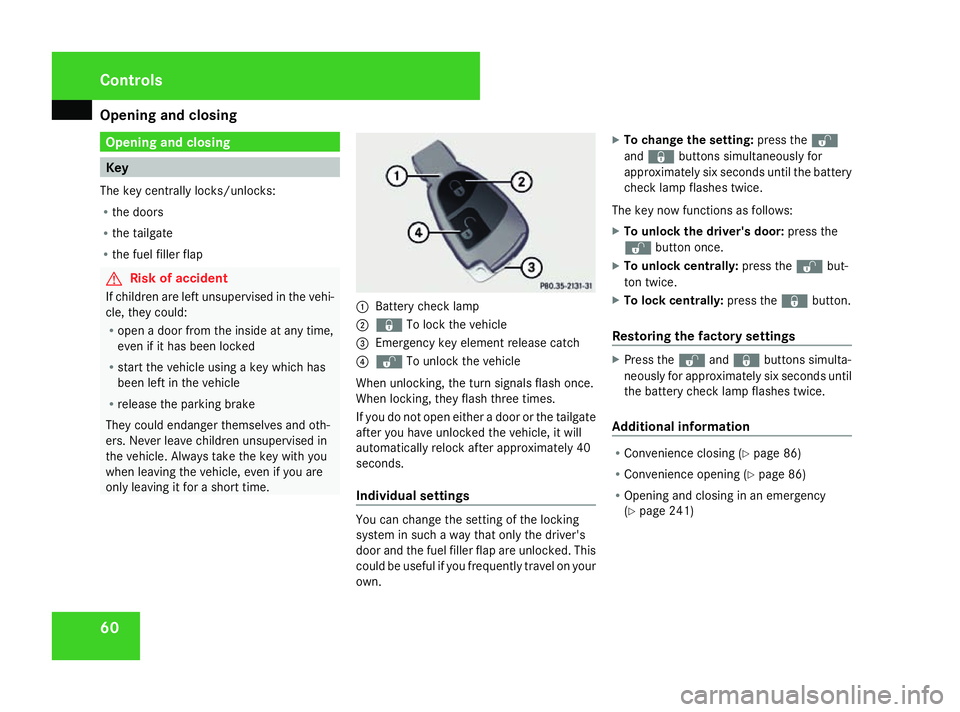
only leaving it for a short time. 1
Battery check lamp
2 j To lock the vehicle
3 Emergency key element release catch
4 k To unlock the vehicle
When unlocking, the turn signals flash once.
When locking, they flash three times.
If you do not open either a door or the tailgate
after you have unlocked the vehicle, it will
automatically relock after approximately 40
seconds.
Individual settings You can change the setting of the locking
system in such a way that only the driver's
door and the fuel filler flap are unlocked. This
could be useful if you frequently travel on your
own.X
To change the setting: press thek
and j buttons simultaneously for
approximately six seconds until the battery
check lamp flashes twice.
The key now functions as follows:
X To unlock the driver's door: press the
k button once.
X To unlock centrally: press thekbut-
ton twice.
X To lock centrally: press thejbutton.
Restoring the factory settings X
Press the kandj buttons simulta-
neously for approximately six seconds until
the battery check lamp flashes twice.
Additional information R
Convenience closing (Y page 86)
R Convenience opening (Y page 86)
R Opening and closing in an emergency
(Y page 241) Controls
169_AKB; 2; 4, en-GB
wdomann,
Version: 2.10.6 2008-07-16T08:52:06+02:00 - Seite 60Dateiname: 6515_0315_02_buchblock.pdf; preflight
Page 83 of 305

Lights
80
Main-beam headlamps X
Turn the ignition key to position 2in the
ignition lock or start the engine.
X Turn the light switch to BorU 9
.
X To switch on: press the combination
switch in the direction of arrow 1.
The A main-beam indicator lamp in the
instrument cluster lights up.
X To switch off: move the combination
switch back to its normal position.
The A main-beam indicator lamp in the
instrument cluster goes out.
Headlamp flasher X
To switch on: briefly pull the combination
switch in the direction of arrow =. Hazard warning lamps
The hazard warning lamps still operate if the
ignition is switched off. They switch on auto-
matically if an airbag is deployed or if you
brake sharply and bring the vehicle to a halt
from a speed of more than 70 km/h.
X
To switch on: press button1.
All turn signals flash. If you now switch on
a turn signal using the combination switch
(Y page 79), only the turn signal lamp on
the corresponding side of the vehicle will
flash.
X To switch off: press button1. Adjusting the headlamp range (halo-
gen headlamps)
The headlamp range control allows you to
adjust the cone of light from the headlamps
to suit the vehicle load.
You can only adjust the headlamp range while
the engine is running. Position Load
0
Driver's seat and front-
passenger seat occupied
1
Driver's seat, front-
passenger seat and rear
seats occupied
9
In the Uposition, the main-beam headlamps are only switched on when it is dark. Controls
169_AKB; 2; 4, en-GB
wdomann,
Version: 2.10.6
2008-07-16T08:52:06+02:00 - Seite 80 Dateiname: 6515_0315_02_buchblock.pdf; preflight
Page 90 of 305
Driving and pa
rking 87
X
Point the tip of the key at the driver's door
handle.
X Lock the vehicle with the jbutton.
X Press and hold the jbutton until the
side windows and the panorama louvred
sliding sunroof* are fully closed.
X Make sure that all the side windows and the
panorama louvred sliding sunroof* are
closed. Driving and parking
Starting the engine
G
Risk of accident
Do not keep any objects in the driver's foot-
well. If you use a floormat or carpet in the
driver's footwell, make sure that they are
correctly secured and that there is suffi-
cient clearance for the pedals.
Objects could otherwise get between the
pedals in the event of sudden braking or
acceleration. You may then no longer be
able to brake, change gear or accelerate as
intended. This may result in an accident and
injury. G
Risk of poisoning
Never leave the engine running in enclosed
spaces. The exhaust gases contain carbon
monoxide. Inhaling exhaust fumes consti-
tutes a health hazard and could lead to loss
of consciousness or even death.
! Do not depress the accelerator pedal
when starting the engine. i
If you depress the brake when starting the
engine, pedal travel will be unusually long
and there will be less pedal resistance.
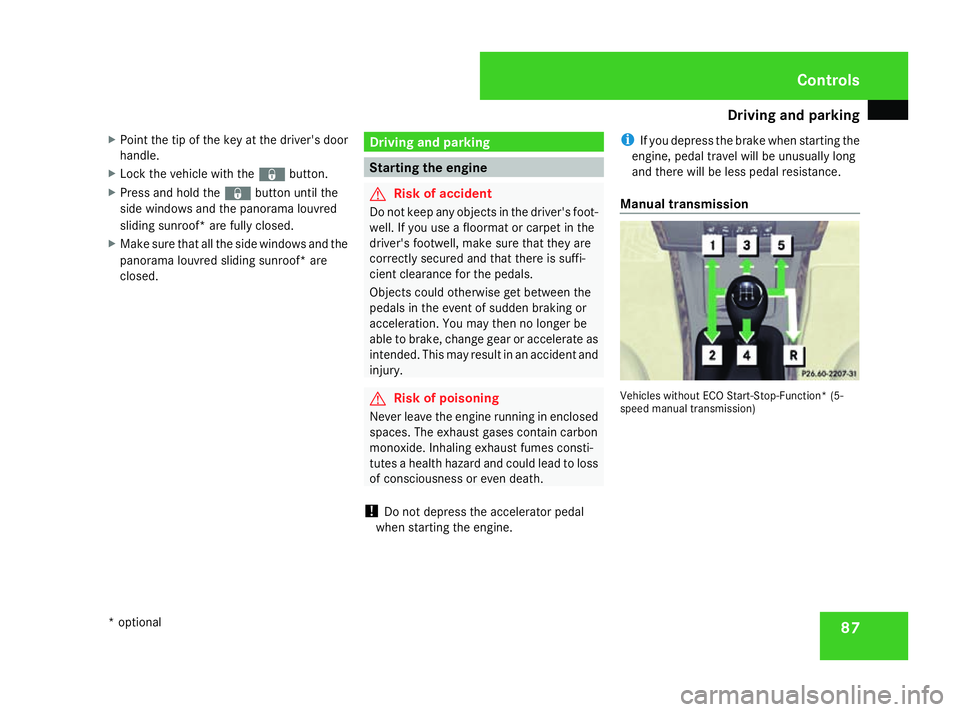
Manual transmission Vehicles without ECO Start-Stop-Function
*(5-
speed manual transmission) Controls
* optional
169_AKB; 2; 4, en-GB
wdomann
,V ersion: 2.10.6
2008-07-16T08:52:06+02:00 - Seite 87 ZDateiname: 6515_0315_02_buchblock.pdf; preflight
Page 91 of 305
Driving and pa
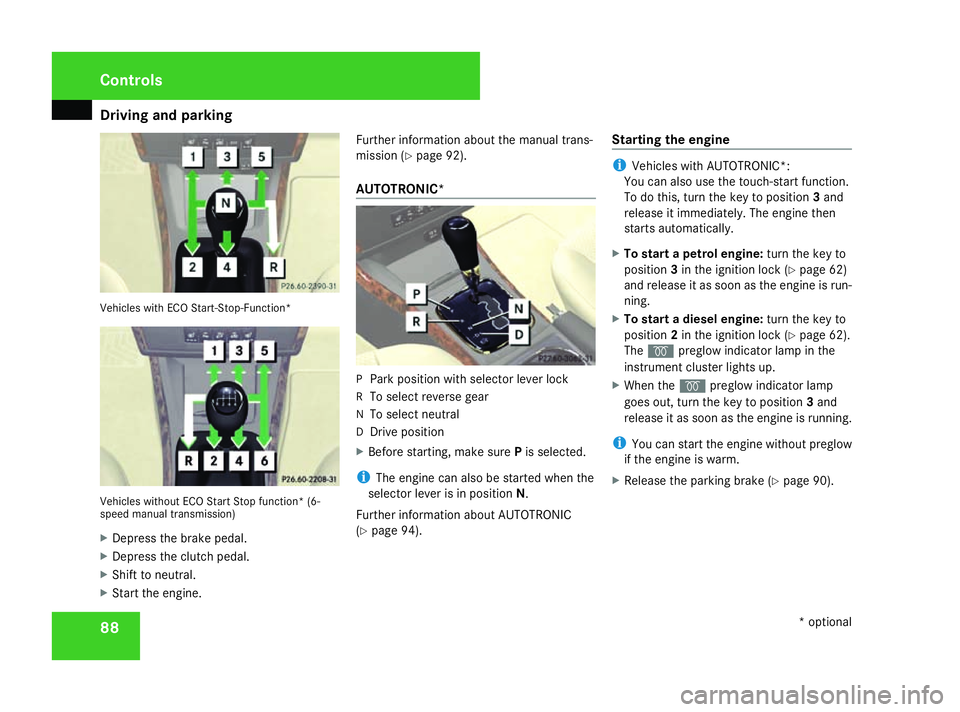
rking 88Vehicles with ECO Start-Stop-Function*
Vehicles without ECO Start Stop function* (6-
speed manual transmission)
X Depress the brake pedal.
X Depress the clutch pedal.
X Shift to neutral.
X Start the engine. Further information about the manual trans-
mission (Y
page 92).
AUTOTRONIC* P
Park position with selector lever lock
R To select reverse gear
N To select neutral
D Drive position
X Before starting, make sure Pis selected.
i The engine can also be started when the
selector lever is in position N.
Further information about AUTOTRONIC
(Y page 94). Starting the engine i
Vehicles with AUTOTRONIC*:
You can also use the touch-start function.
To do this, turn the key to position 3and
release it immediately. The engine then
starts automatically.
X To start a petrol engine: turn the key to
position 3in the ignition lock (Y page 62)
and release it as soon as the engine is run-
ning.
X To start a diesel engine: turn the key to
position 2in the ignition lock (Y page 62).
The q preglow indicator lamp in the
instrument cluster lights up.
X When the qpreglow indicator lamp
goes out, turn the key to position 3and
release it as soon as the engine is running.
i You can start the engine without preglow
if the engine is warm.
X Release the parking brake (Y page 90).Controls
* optional
169_AKB; 2; 4, en-GB
wdomann,
Version: 2.10.6
2008-07-16T08:52:06+02:00 - Seite 88 Dateiname: 6515_0315_02_buchblock.pdf; preflight
Page 92 of 305
Driving and pa
rking 89Automatic engine start (ECO start/
stop function)
The ECO start/stop function automatically
switches on the engine as soon as you pre-
pare to pull away, e.g. by engaging a gear.
X Depress the clutch pedal.
The engine starts automatically.
X Shift to either first or reverse gear and pull
away.
! Do not engage a gear without depressing
the clutch as this disables the automatic
engine start function. As a result, the bat-
tery cannot be recharged and the demister
function of Thermotronic* is not available.
i When manoeuvring in and out of parking
spaces, the ECO start/stop function will
not automatically switch off the vehicle's
engine. The engine will only be switched off
automatically if the vehicle has reached a
speed of at least 15 km/h before coming
to a standstill again.
i The system can differentiate between
starting the engine with the key and the
automatic engine start via the ECO start/
stop function. Pulling away
! Warm up the engine quickly. Do not use
the engine's full performance until it has
reached operating temperature.
Only shift into reverse gear when the vehi-
cle is stationary.
Where possible, avoid spinning the drive
wheels when pulling away on slippery
roads. You could otherwise damage the
drive train.
i The vehicle locks centrally once you have
pulled away. The locking knobs in the doors
drop down.
You can open the doors from the inside at
any time.
You can also deactivate the automatic lock-
ing feature (Y page 111).
Manual transmission X
Depress the brake pedal.
X Depress the clutch pedal.
X Shift to either first or reverse gear.
X Release the parking brake (Y page 90).
X Slowly release the clutch pedal and
depress the accelerator pedal. !
Change gear in good time and avoid spin-
ning the wheels. You could otherwise dam-
age the vehicle.
AUTOTRONIC* i
It is only possible to move the selector
lever to the desired position if you depress
the brake pedal. Only then is the selector
lever lock released.
X Depress the brake pedal and keep it
depressed.
The selector lever lock is released.
X Release the parking brake.
X Move the selector lever to position Dor R.
i Wait until the shift process is completed
before pulling away.
X Release the brake pedal.
X Carefully depress the accelerator pedal.
i Upshifts take place at higher engine
speeds after a cold start. This helps the
catalytic converter to reach its operating
temperature more quickly. Controls
* optional
169_AKB; 2; 4, en-GB
wdomann,
Version: 2.10.6 2008-07-16T08:52:06+02:00 - Seite 89 ZDateiname: 6515_0315_02_buchblock.pdf; preflight
Page 93 of 305
Driving and pa
rking 90
Hill start assist Hill start assist helps you when pulling away
on uphill gradients. It holds the vehicle for a
short time after you have removed your foot
from the brake pedal. This gives you enough
time to move your foot from the brake pedal
to the accelerator pedal and depress it before
the vehicle begins to roll. G
Risk of accident
Never leave the vehicle when it is held by
hill start assist. After approximately one
second, hill start assist will no longer brake
your vehicle and it could roll away.
X Remove your foot from the brake pedal.
i Once you have taken your foot off the
brake pedal, the vehicle is held for around
one second.
X Pull away.
Hill start assist does not function if:
R you are pulling away on a level road or a
downhill gradient.
R on vehicles with AUTOTRONIC *,the selec-
tor lever is in the Nposition. R
the vehicle is secured with the parking
brake.
R ESP ®
is malfunctioning. Parking
G
Risk of accident
Only remove the key from the ignition lock
when the vehicle is stationary as you can-
not steer the vehicle with the key removed.
Never leave children unsupervised in the
vehicle. They could release the parking
brake. This could lead to a serious or fatal
accident. G
Risk of fire
Make sure that the exhaust system does
not under any circumstances come into
contact with easily ignitable material such
as dry grass or petrol. The material could
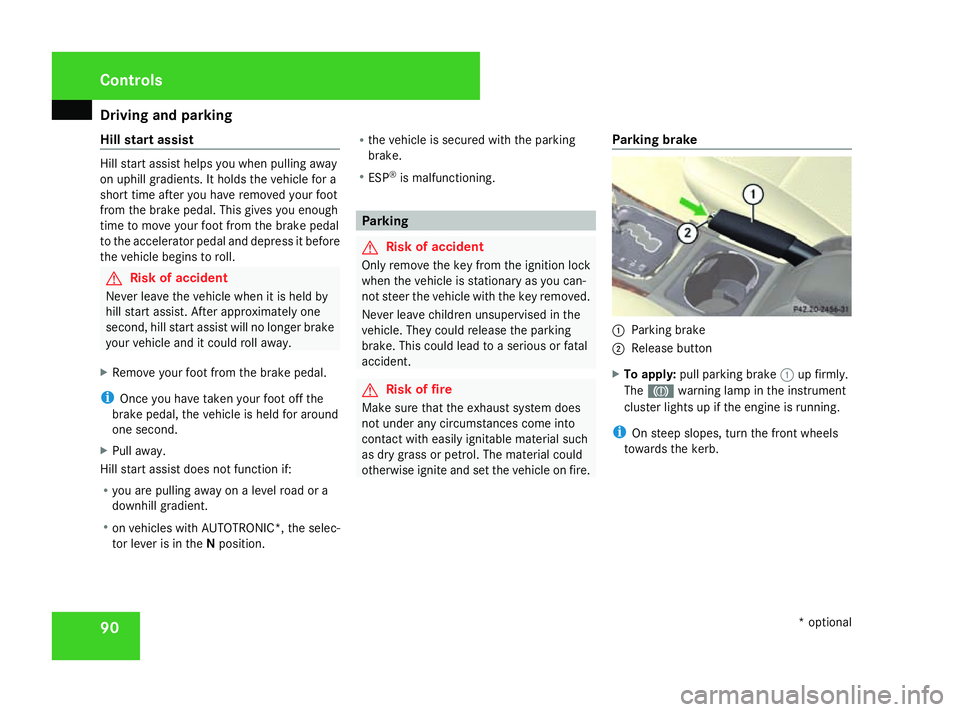
otherwise ignite and set the vehicle on fire. Parking brake 1
Parking brake
2 Release button
X To apply: pull parking brake 1up firmly.
The 3 warning lamp in the instrument
cluster lights up if the engine is running.
i On steep slopes, turn the front wheels
towards the kerb. Controls
* optional
169_AKB; 2; 4, en-GB
wdomann,
Version: 2.10.6
2008-07-16T08:52:06+02:00 - Seite 90 Dateiname: 6515_0315_02_buchblock.pdf; preflight
Page 94 of 305
Driving and pa
rking 91
X
To release: depress the brake pedal and
keep it depressed.
On vehicles with AUTOTRONIC*, the selec-
tor lever lock is released.
X Press release button 2on parking brake
1 and move the parking brake down to the
stop.
The 3 warning lamp in the instrument
cluster goes out. Switching off the engine
G
Risk of accident
If the engine is not running, there is no
power assistance for the steering and
brakes. Steering and braking then takes
much more effort.
As a result, you might lose control of the
vehicle, cause an accident and injure your-
self and others.
Do not switch off the engine while driving.
Vehicles with manual transmission X
Shift to either first or reverse gear.
X Turn the key to position 0(Y page 62) in
the ignition lock and remove it.
The immobiliser is activated. Vehicles with AUTOTRONIC* X
Move the selector lever to P.
X Turn the key to position 0(Y page 62) in
the ignition lock and remove it.
The immobiliser is activated. Automatic engine switch-off (ECO
start/stop function*)
The ECO start/stop function automatically
switches off the engine as soon as you stop
the vehicle, e.g. at traffic lights.
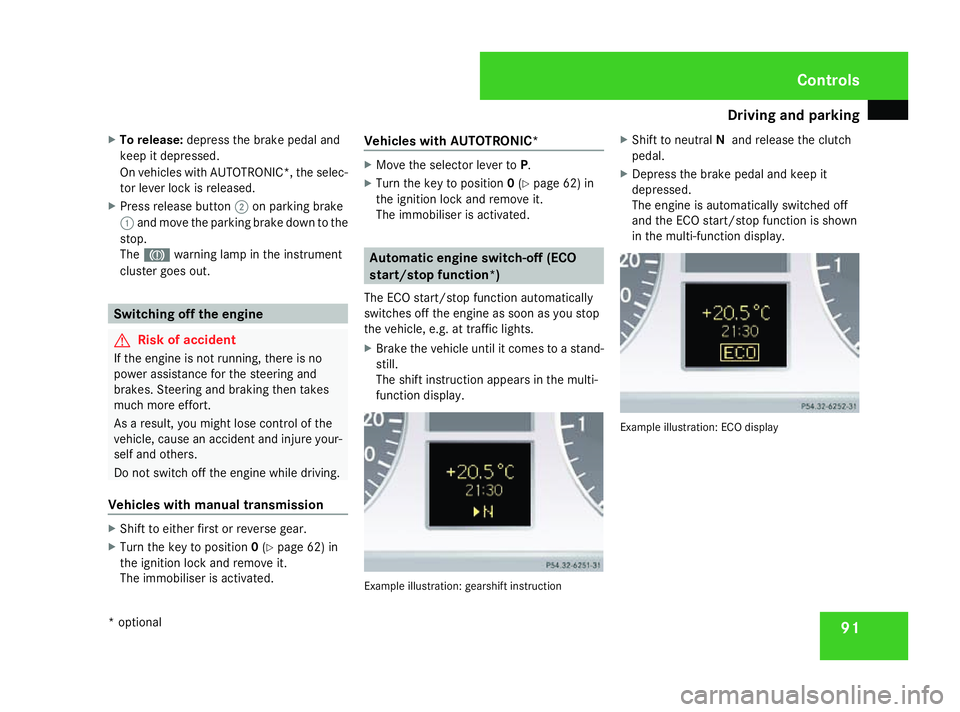
X Brake the vehicle until it comes to a stand-
still.
The shift instruction appears in the multi-
function display. Example illustration: gearshift instructionX
Shift to neutral Nand release the clutch
pedal.
X Depress the brake pedal and keep it
depressed.
The engine is automatically switched off
and the ECO start/stop function is shown
in the multi-function display. Example illustration: ECO display Controls
* optional
169_AKB; 2; 4, en-GB
wdomann,
Version: 2.10.6 2008-07-16T08:52:06+02:00 - Seite 91 ZDateiname: 6515_0315_02_buchblock.pdf; preflight