display MERCEDES-BENZ A-CLASS HATCHBACK 2008 Owner's Manual
[x] Cancel search | Manufacturer: MERCEDES-BENZ, Model Year: 2008, Model line: A-CLASS HATCHBACK, Model: MERCEDES-BENZ A-CLASS HATCHBACK 2008Pages: 305, PDF Size: 5.43 MB
Page 99 of 305
Transmission
96
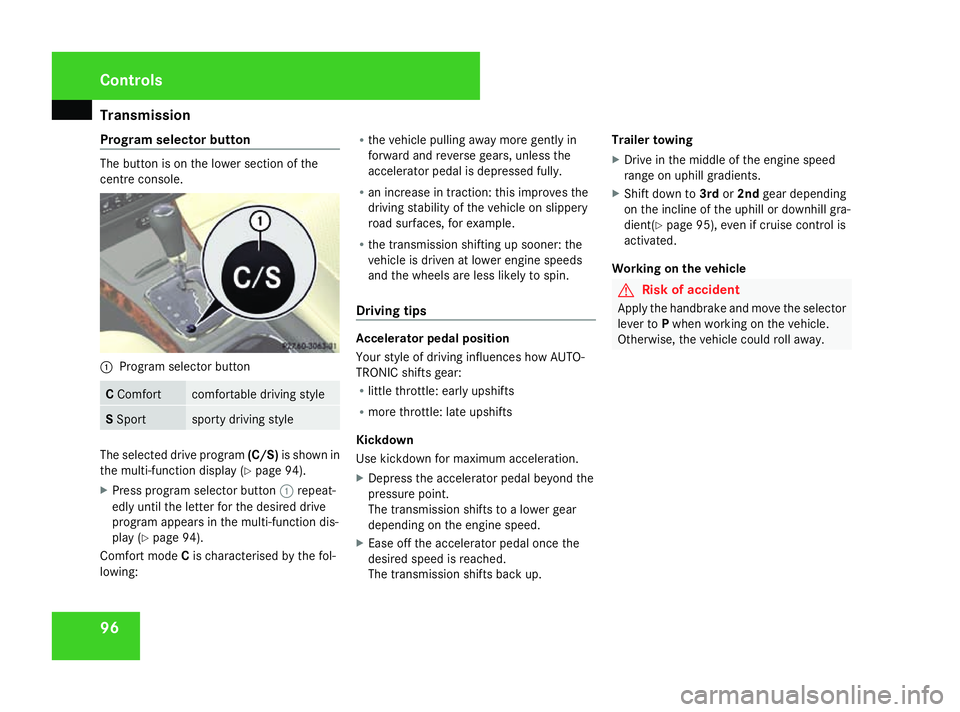
Program selector button The button is on the lower section of the
centre console. 1
Program selector button C
Comfort comfortable driving style
S
Sport sporty driving style
The selected drive program
(C/S)is shown in
the multi-function display (Y page 94).
X Press program selector button 1repeat-
edly until the letter for the desired drive
program appears in the multi-function dis-
play (Y page 94).
Comfort mode Cis characterised by the fol-
lowing: R
the vehicle pulling away more gently in
forward and reverse gears, unless the
accelerator pedal is depressed fully.
R an increase in traction: this improves the
driving stability of the vehicle on slippery
road surfaces, for example.
R the transmission shifting up sooner: the
vehicle is driven at lower engine speeds
and the wheels are less likely to spin.
Driving tips Accelerator pedal position
Your style of driving influences how AUTO-
TRONIC shifts gear:
R
little throttle: early upshifts
R more throttle: late upshifts
Kickdown
Use kickdown for maximum acceleration.
X Depress the accelerator pedal beyond the
pressure point.
The transmission shifts to a lower gear
depending on the engine speed.
X Ease off the accelerator pedal once the
desired speed is reached.
The transmission shifts back up. Trailer towing
X
Drive in the middle of the engine speed
range on uphill gradients.
X Shift down to 3rdor2nd gear depending
on the incline of the uphill or downhill gra-
dient( Ypage 95), even if cruise control is
activated.
Working on the vehicle G
Risk of accident
Apply the handbrake and move the selector
lever to Pwhen working on the vehicle.
Otherwise, the vehicle could roll away. Controls
169_AKB; 2; 4, en-GB
wdomann,
Version: 2.10.6
2008-07-16T08:52:06+02:00 - Seite 96 Dateiname: 6515_0315_02_buchblock.pdf; preflight
Page 100 of 305

Instrument cluster
97Instrument cluster
Points to remember
You will find an illustration of the instrument
cluster in the "At a glance" section
(Y page 26). G
Risk of accident
No further messages can be displayed if the
instrument cluster and/or the multi-func-
tion display fails.
This means that you will not see information
about the driving situation, such as the
speed, outside temperature, warning/indi-
cator lamps, display messages or system
failures. The vehicle's handling character-
istics may be affected. Adjust your driving
style and speed accordingly.
Immediately consult a qualified specialist
workshop which has the necessary special-
ist knowledge and tools to carry out the
work required. Mercedes-Benz recom-
mends that you use a Mercedes-Benz
Service Centre for this purpose. In particu-
lar, work relevant to safety or on safety-
related systems must be carried out at a
qualified specialist workshop. Activating the multi-function display
X Switch on the ignition. The multi-function display is also activated
when you:
R
switch on the lights
R press reset button 1
R open the driver's door Adjusting the instrument cluster
ligh
ting
X Brighter or dimmer: briefly turn reset but-
ton 1clockwise or anti-clockwise to the
stop and release.
The brightness of the instrument cluster
lighting changes by one level. There are
several possible levels. Coolant temperature gauge
The coolant temperature gauge is in the
instrument cluster on the left-hand side.
Under normal operating conditions and with
the specified coolant level, the coolant tem-
perature may rise to 120 †. The coolant tem-
perature may rise to the top end of the scale
at high outside temperatures and on long
uphill stretches. Controls
169_AKB; 2; 4, en-GB
wdomann, Version: 2.10.6 2008-07-16T08:52:06+02:00 - Seite 97 ZDateiname: 6515_0315_02_buchblock.pdf; preflight
Page 101 of 305
On-board computer
98 Resetting the trip meter
X Select the Standard display menu
(Y page 103).
X Press and hold the reset button on the left-
hand side of the instrument cluster until the
trip meter is reset. Rev counter
The red band in the rev counter indicates the
engine's overrevving range. The fuel supply is
interrupted to protect the engine when the
red band is reached.
! Do not drive in the overrevving range.
Doing so will damage the engine. H
Environmental note
Avoid driving at high engine speeds, as this
increases your vehicle's consumption
unnecessarily and pollutes the environ-
ment through increased emissions. Clock
On vehicles without an audio system or with
Audio 5*/Audio 20*, you can set the time
using the on-board computer (Y page 109). Outside temperature display
G
Risk of accident
The road surface may be icy, especially in
wooded areas or on bridges, even if tem-
peratures are just above freezing point. The
vehicle could skid if you fail to adapt your
driving style. You should therefore always
adapt your driving style and speed to suit
the weather conditions.
Changes in the outside temperature are dis-
played after a short delay. On-board computer
Points to remember
The on-board computer is activated as soon
as you turn the key to position 1in the ignition
lock. You can use the on-board computer to
call up information relating to your vehicle
and to make and adjust settings. G
Risk of accident
Only use the on-board computer when road
and traffic conditions permit. You would
otherwise be distracted and unable to con-
centrate properly on driving, and could
cause an accident. Multi-function steering wheel
You can control the multi-function display and
the settings in the on-board computer using
the buttons on the multi-function steering
wheel. Controls
* optional
169_AKB; 2; 4, en-GB
wdomann,
Version: 2.10.6
2008-07-16T08:52:06+02:00 - Seite 98 Dateiname: 6515_0315_02_buchblock.pdf; preflight
Page 102 of 305
On-board computer
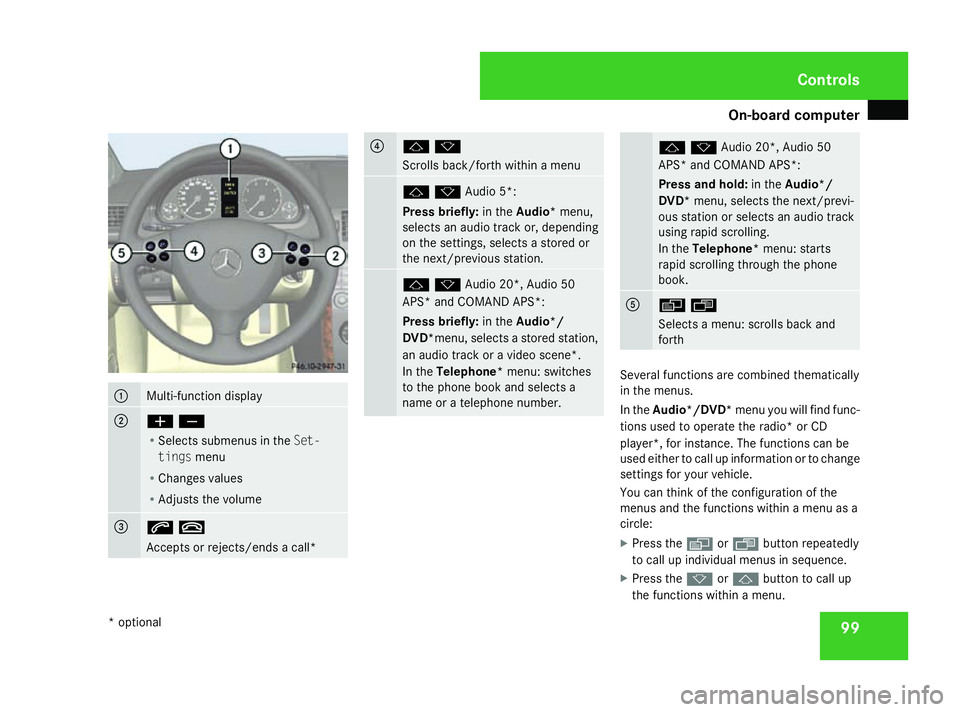
991
Multi-function display
2
æç
R
Selects submenus in the Set-
tings menu
R Changes values
R Adjusts the volume 3
st
Accepts or rejects/ends a call* 4
jk
Scrolls back/forth within a menu
jkAudio 5*:
Press briefly:
in theAudio* menu,
selects an audio track or, depending
on the settings, selects a stored or
the next/previous station. jkAudio 20*, Audio 50
APS* and COMAND APS*:
Press briefly:
in theAudio*/
DVD*menu, selects a stored station,
an audio track or a video scene*.
In the Telephone* menu: switches
to the phone book and selects a
name or a telephone number. jkAudio 20*, Audio 50
APS* and COMAND APS*:
Press and hold:
in theAudio*/
DVD* menu, selects the next/previ-
ous station or selects an audio track
using rapid scrolling.
In the Telephone* menu: starts
rapid scrolling through the phone
book. 5
èÿ
Selects a menu: scrolls back and
forth
Several functions are combined thematically
in the menus.
In the Audio*/DVD* menu you will find func-
tions used to operate the radio* or CD
player*, for instance. The functions can be
used either to call up information or to change
settings for your vehicle.
You can think of the configuration of the
menus and the functions within a menu as a
circle:
X Press the èorÿ button repeatedly
to call up individual menus in sequence.
X Press the korj button to call up
the functions within a menu. Controls
* optional
169_AKB; 2; 4, en-GB
wdomann, Version: 2.10.6 2008-07-16T08:52:06+02:00 - Seite 99 ZDateiname: 6515_0315_02_buchblock.pdf; preflight
Page 103 of 305
On-board computer
100
Unlike other menus, the
Settingsmenu con-
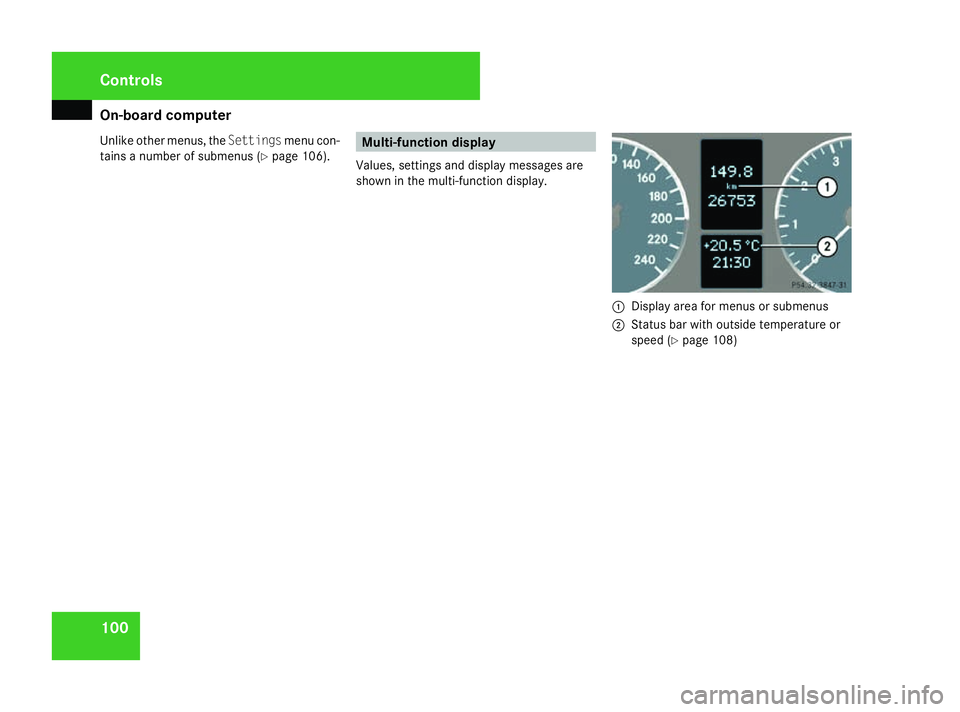
tains a number of submenus ( Ypage 106). Multi-function display
Values, settings and display messages are
shown in the multi-function display. 1
Display area for menus or submenus
2 Status bar with outside temperature or
speed (Y page 108) Controls
169_AKB; 2; 4, en-GB
wdomann,
Version: 2.10.6 2008-07-16T08:52:06+02:00 - Seite 100Dateiname: 6515_0315_02_buchblock.pdf; preflight
Page 105 of 305
On-board computer
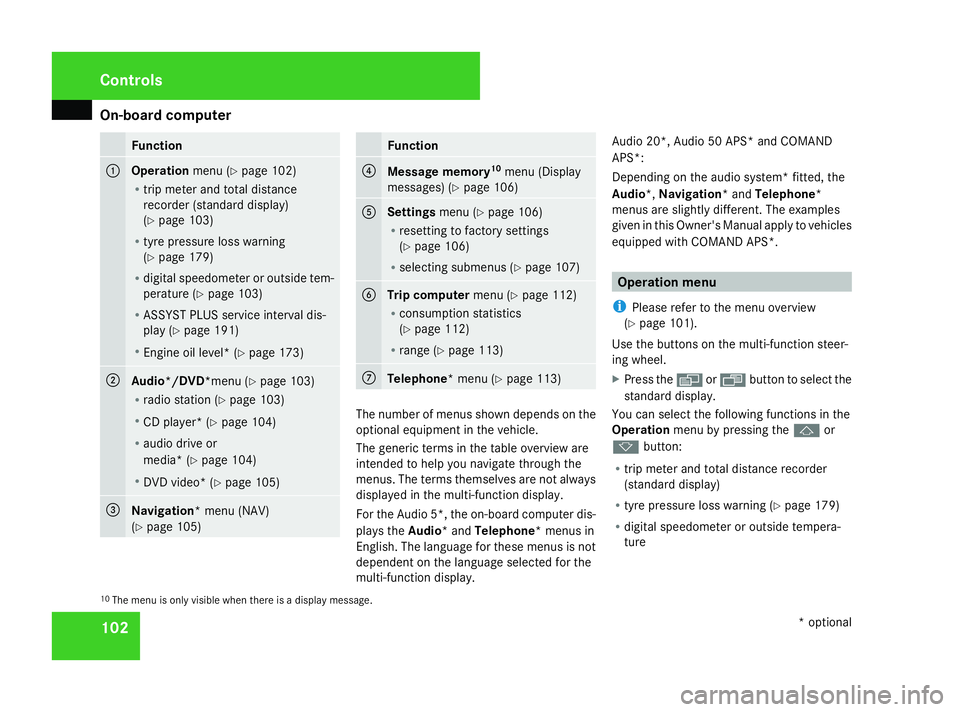
102 Function
1
Operation
menu (Ypage 102)
R trip meter and total distance
recorder (standard display)
(Y page 103)
R tyre pressure loss warning
(Y page 179)
R digital speedometer or outside tem-
perature (Y page 103)
R ASSYST PLUS service interval dis-
play (Y page 191)
R Engine oil level* (Y page 173)2
Audio*/DVD*menu (Y
page 103)
R radio station (Y page 103)
R CD player* (Y page 104)
R audio drive or
media* ( Ypage 104)
R DVD video* (Y page 105) 3
Navigation* menu (NAV)
(Y
page 105) Function
4
Message memory
10
menu (Display
messages) ( Ypage 106) 5
Settings
menu (Ypage 106)
R resetting to factory settings
(Y page 106)
R selecting submenus (Y page 107) 6
Trip computer
menu (Ypage 112)
R consumption statistics
(Y page 112)
R range (Y page 113) 7
Telephone* menu (Y
page 113) The number of menus shown depends on the
optional equipment in the vehicle.
The generic terms in the table overview are
intended to help you navigate through the
menus. The terms themselves are not always
displayed in the multi-function display.
For the Audio 5*, the on-board computer dis-
plays the
Audio* and Telephone* menus in
English. The language for these menus is not
dependent on the language selected for the
multi-function display. Audio 20*, Audio 50 APS* and COMAND
APS*:
Depending on the audio system* fitted, the
Audio*, Navigation* and Telephone*
menus are slightly different. The examples
given in this Owner's Manual apply to vehicles
equipped with COMAND APS*. Operation menu
i Please refer to the menu overview
(Y page 101).
Use the buttons on the multi-function steer-
ing wheel.
X Press the èor· button to select the
standard display.
You can select the following functions in the
Operation menu by pressing the jor
k button:
R trip meter and total distance recorder
(standard display)
R tyre pressure loss warning (Y page 179)
R digital speedometer or outside tempera-
ture
10 The menu is only visible when there is a display message. Controls
* optional
169_AKB; 2; 4, en-GB
wdomann,
Version: 2.10.6
2008-07-16T08:52:06+02:00 - Seite 102 Dateiname: 6515_0315_02_buchblock.pdf; preflight
Page 106 of 305
On-board computer
103
R
ASSYST PLUS service interval display
(Y page 191)
R engine oil level* (Y page 173)
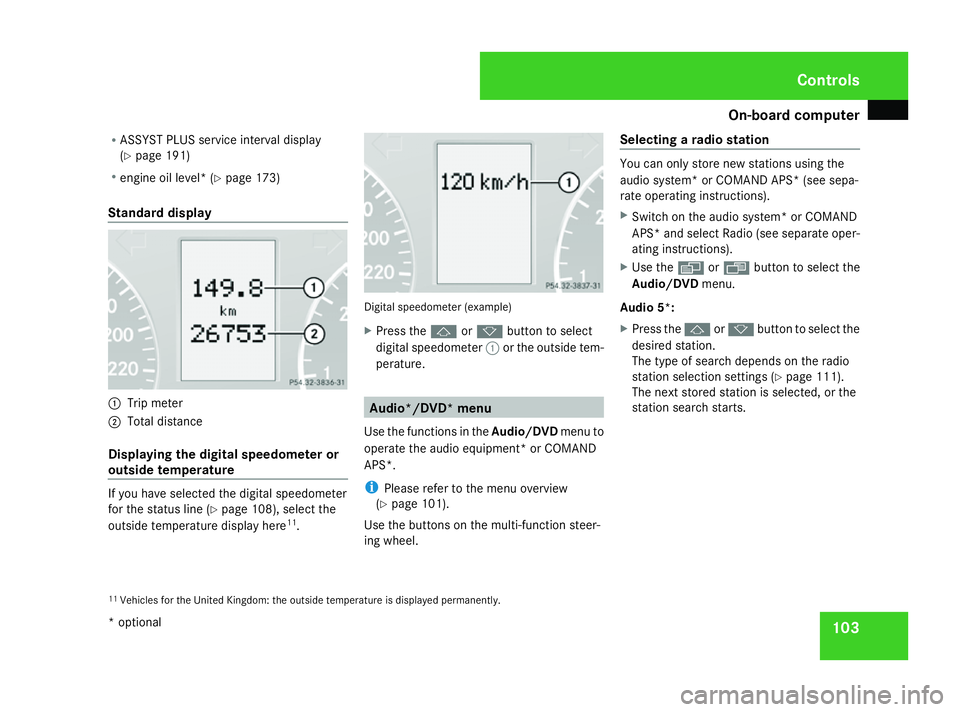
Standard display 1
Trip meter
2 Total distance
Displaying the digital speedometer or
outside temperature If you have selected the digital speedometer
for the status line (Y
page 108), select the
outside temperature display here 11
. Digital speedometer (example)
X
Press the jork button to select
digital speedometer 1or the outside tem-
perature. Audio*/DVD* menu
Use the functions in the Audio/DVDmenu to
operate the audio equipment* or COMAND
APS*.
i Please refer to the menu overview
(Y page 101).
Use the buttons on the multi-function steer-
ing wheel. Selecting a radio station You can only store new stations using the
audio system
*or COMAND APS* (see sepa-
rate operating instructions).
X Switch on the audio system* or COMAND
APS* and select Radio (see separate oper-
ating instructions).
X Use the èor· button to select the
Audio/DVD menu.
Audio 5*:
X Press the jork button to select the
desired station.
The type of search depends on the radio
station selection settings (Y page 111).
The next stored station is selected, or the
station search starts.
11 Vehicles for the United Kingdom: the outside temperature is displayed permanently. Controls
* optional
169_AKB; 2; 4, en-GB
wdomann,
Version: 2.10.6 2008-07-16T08:52:06+02:00 - Seite 103 ZDateiname: 6515_0315_02_buchblock.pdf; preflight
Page 107 of 305
On-board computer
104
Audio 20*, Audio 50 APS*or COMAND
APS*:
X
To select a stored station: briefly press
the j ork button.
X To select a channel from the channel
list: press and hold the jork but-
ton.
X To select a station using the station
search (only if no station list is received):
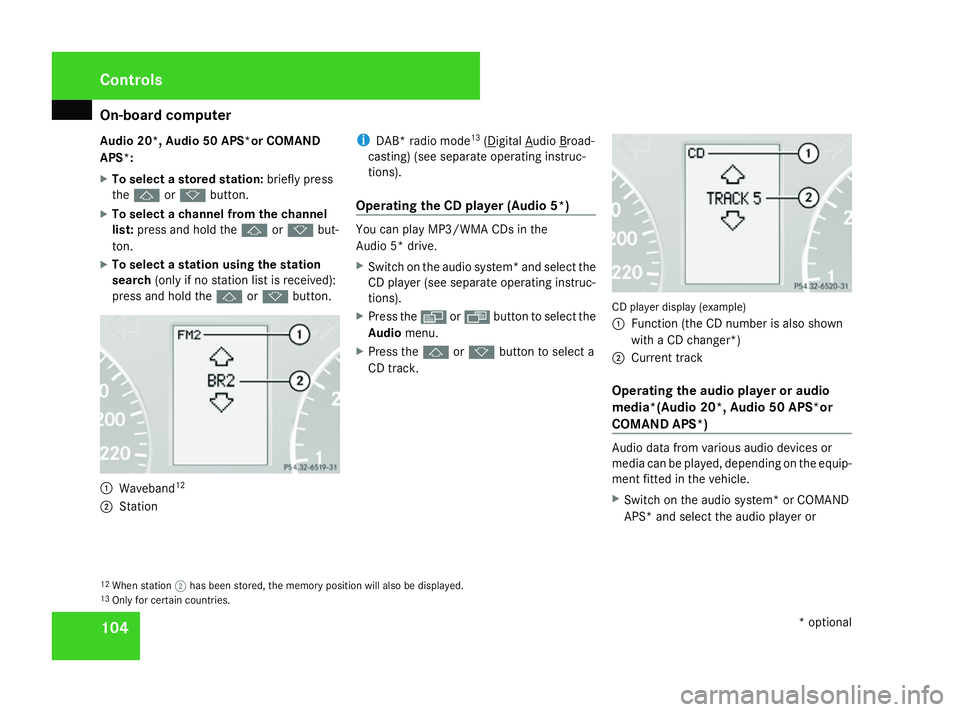
press and hold the jork button. 1
Waveband 12
2 Station i
DAB* radio mode 13
( Digital Audio Broad-
casting) (see separate operating instruc-
tions).
Operating the CD player (Audio 5*) You can play MP3/WMA CDs in the
Audio 5* drive.
X
Switch on the audio system* and select the
CD player (see separate operating instruc-
tions).
X Press the èor· button to select the
Audio menu.
X Press the jork button to select a
CD track. CD player display (example)
1
Function (the CD number is also shown
with a CD changer*)
2 Current track
Operating the audio player or audio
media*(Audio 20*, Audio 50 APS*or
COMAND APS*) Audio data from various audio devices or
media can be played, depending on the equip-
ment fitted in the vehicle.
X
Switch on the audio system* or COMAND
APS* and select the audio player or
12 When station ;has been stored, the memory position will also be displayed.
13 Only for certain countries. Controls
* optional
169_AKB; 2; 4, en-GB
wdomann
, Version: 2.10.6
2008-07-16T08:52:06+02:00 - Seite 104 Dateiname: 6515_0315_02_buchblock.pdf; preflight
Page 108 of 305
On-board computer
105
medium (see separate operating instruc-
tions).
X Use the èor· button to select the
Audio/DVD menu.
X To select next/previous track: briefly
press the jork button.
X To select a track from the track list
(rapid scrolling): press and hold the
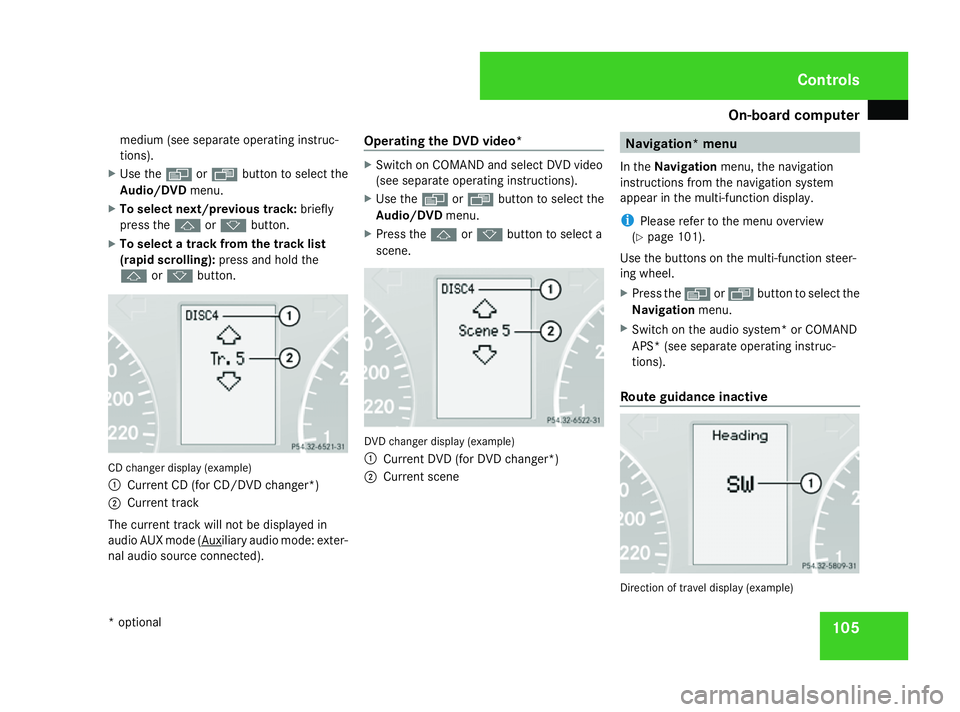
j ork button. CD changer display (example)
1
Current CD (for CD/DVD changer*)
2 Current track
The current track will not be displayed in
audio AUX mode ( Auxiliary audio mode: exter-
nal audio source connected). Operating the DVD video* X
Switch on COMAND and select DVD video
(see separate operating instructions).
X Use the èor· button to select the
Audio/DVD menu.
X Press the jork button to select a
scene. DVD changer display (example)
1
Current DVD (for DVD changer*)
2 Current scene Navigation* menu
In the Navigation menu, the navigation
instructions from the navigation system
appear in the multi-function display.
i Please refer to the menu overview
(Y page 101).
Use the buttons on the multi-function steer-
ing wheel.
X Press the èorÿ button to select the
Navigation menu.
X Switch on the audio system* or COMAND
APS* (see separate operating instruc-
tions).
Route guidance inactive Direction of travel display (example) Controls
* optional
169_AKB; 2; 4, en-GB
wdomann
, Version: 2.10.6 2008-07-16T08:52:06+02:00 - Seite 105 ZDateiname: 6515_0315_02_buchblock.pdf; preflight
Page 109 of 305

On-board computer
106
The direction of travel
1appears in the multi-
function display.
Route guidance active The multi-function display shows navigation
instructions, for example: Message memory menu
Previous display messages can be called up
in the Message memory menu. TheMes-
sage memory menu is visible only when
there is a display message.
i Please refer to the menu overview
(Y page 101). G
Risk of accident
The on-board computer only records and
displays messages and warnings from cer-
tain systems. For this reason, you should
always make sure that your vehicle is safe
to drive. You could otherwise cause an acci-
dent by driving an unsafe vehicle.
i All possible display messages are
explained in the "Practical advice" section
(Y page 202).
Switching off the ignition clears all display
messages except for the highest priority dis-
play messages. When the causes of the high-
priority display messages are rectified, these
display messages will be erased.
Displaying messages Use the buttons on the multi-function steer-
ing wheel.X
Press the èor· button repeatedly
until either the original menu or the Mes-
sage memory menu appears.
When there are display messages, 2 mes-
sages appears in the multi-function dis-
play, for example.
X Use the jork button to scroll
through the display messages. Settings menu
In the Settings menu, you will find the Set-
tings To reset Press reset button for
3 seconds function, with which you can
restore most settings to the factory settings.
You will also find submenus with which you
can make individual settings for your vehicle.
i Please refer to the menu overview
(Y page 101).
Use the buttons on the multi-function steer-
ing wheel.
Resetting to factory settings For safety reasons, not all functions will be
reset: permanent Speedtronic* can only be
set in the
Vehiclesubmenu. The Settings
Headlamps function in the Lightingsub- Controls
* optional
169_AKB; 2; 4, en-GB
wdomann,
Version: 2.10.6
2008-07-16T08:52:06+02:00 - Seite 106 Dateiname: 6515_0315_02_buchblock.pdf; preflight