steering wheel MERCEDES-BENZ A-CLASS HATCHBACK 2008 Owner's Manual
[x] Cancel search | Manufacturer: MERCEDES-BENZ, Model Year: 2008, Model line: A-CLASS HATCHBACK, Model: MERCEDES-BENZ A-CLASS HATCHBACK 2008Pages: 305, PDF Size: 5.43 MB
Page 128 of 305
Driving sys
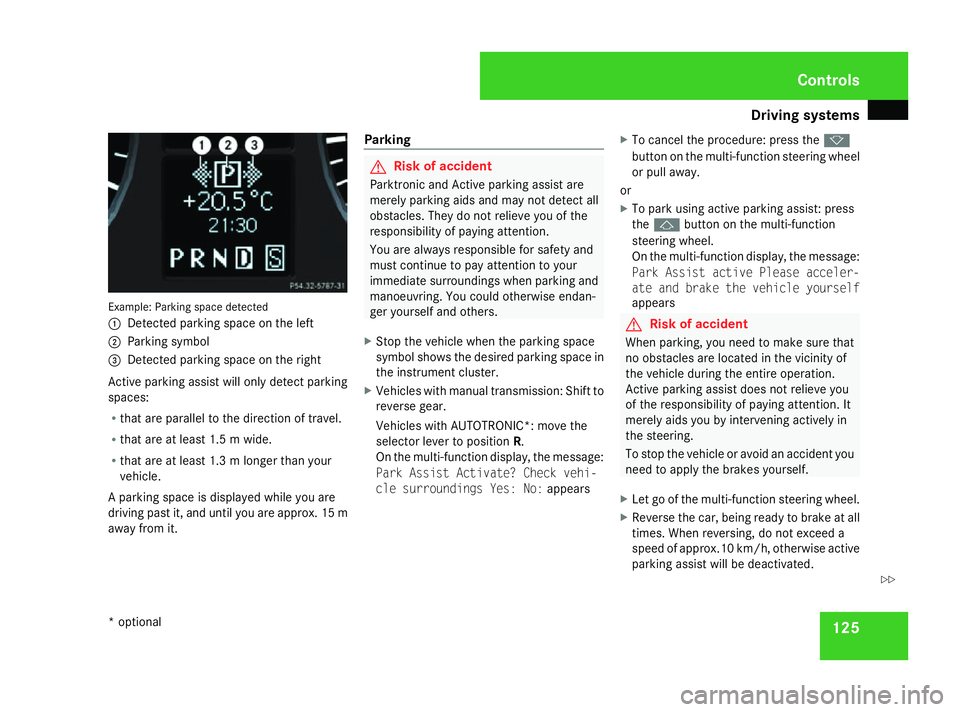
tems 125Example: Parking space detected
1
Detected parking space on the left
2 Parking symbol
3 Detected parking space on the right
Active parking assist will only detect parking
spaces:
R that are parallel to the direction of travel.
R that are at least 1.5 m wide.
R that are at least 1.3 m longer than your
vehicle.
A parking space is displayed while you are
driving past it, and until you are approx. 15 m
away from it. Parking G
Risk of accident
Parktronic and Active parking assist are
merely parking aids and may not detect all
obstacles. They do not relieve you of the
responsibility of paying attention.
You are always responsible for safety and
must continue to pay attention to your
immediate surroundings when parking and
manoeuvring. You could otherwise endan-
ger yourself and others.
X Stop the vehicle when the parking space
symbol shows the desired parking space in
the instrument cluster.
X Vehicles with manual transmission: Shift to
reverse gear.
Vehicles with AUTOTRONIC*: move the
selector lever to position R.
On the multi-function display, the message:
Park Assist Activate? Check vehi-
cle surroundings Yes: No: appearsX
To cancel the procedure: press the k
button on the multi-function steering wheel
or pull away.
or
X To park using active parking assist: press
the j button on the multi-function
steering wheel.
On the multi-function display, the message:
Park Assist active Please acceler-
ate and brake the vehicle yourself
appears G
Risk of accident
When parking, you need to make sure that
no obstacles are located in the vicinity of
the vehicle during the entire operation.
Active parking assist does not relieve you
of the responsibility of paying attention. It
merely aids you by intervening actively in
the steering.
To stop the vehicle or avoid an accident you
need to apply the brakes yourself.
X Let go of the multi-function steering wheel.
X Reverse the car, being ready to brake at all
times. When reversing, do not exceed a
speed of approx.10 km/h, otherwise active
parking assist will be deactivated. Controls
* optional
169_AKB; 2; 4, en-GB
wdomann,
Version: 2.10.6 2008-07-16T08:52:06+02:00 - Seite 125 ZDateiname: 6515_0315_02_buchblock.pdf; preflight
Page 129 of 305
Driving sys
tems 126
i
In tight parking spaces, you will achieve
the best parking results by reversing as far
as possible. When doing so, also observe
the Parktronic messages.
X Stop as soon as Parktronic sounds the con-
tinuous warning tone, if not before.
Manoeuvring may be required in tight park-
ing spaces.
Vehicles with manual transmission: the mes-
sage Park Assist active Please shift
to a forward gear appears in the multi-
function display.
Vehicles with AUTOTRONIC*: the message
Park Assist active Please shift to
D appears in the multi-function display.
X Vehicles with manual transmission: When
the car is stationary, shift to first gear.
Vehicles with AUTOTRONIC*: When the car
is stationary, set the selector lever to posi-
tion R.
Active parking assist immediately steers in
the other direction.
On the multi-function display, the message:
Park Assist active Please acceler- ate and brake the vehicle yourself
appears.
i You will achieve the best parking results
by waiting for the steering procedure to
complete before moving forwards.
X Drive forwards and be ready to brake at all
times.
X Stop as soon as Parktronic sounds the con-
tinuous warning tone, if not before.
Vehicles with manual transmission: the mes-
sage Park Assist active Please shift
into reverse gear appears in the multi-
function display.
Vehicles with AUTOTRONIC*, the message
Park Assist active Please shift to
R appears in the multi-function display.
X Further gear changes* may be necessary.
As soon as the parking procedure is com-
plete, the message Parking assistance
finished Please take over appears.
Active parking assist is now deactivated.
Parktronic is still available.
X Manoeuvre if necessary.
X Always observe the warning messages dis-
played by Parktronic (Y page 121).Cancelling active parking assist You can cancel active parking assist at any
time.
X
Stop the movement of the multi-function
steering wheel or steer yourself.
Active parking assist will be cancelled at
once. The multi-function display shows the
message: Park Assist cancelled.
or
X Press the Parktronic button on the centre
console (Y page 122).
Parktronic is switched off and active park-
ing assist is immediately cancelled. The
multi-function display shows the message:
Park Assist cancelled.
Active parking assist is cancelled automati-
cally if:
R a gear is changed* too early
R parking using active parking assist is no
longer possible
R you are driving faster than 10 km/h
R a wheel spins, ESP ®
is activated or fails. In
such cases the vwarning lamp lights
up in the instrument cluster. Controls
* optional
169_AKB; 2; 4, en-GB
wdomann,
Version: 2.10.6
2008-07-16T08:52:06+02:00 - Seite 126 Dateiname: 6515_0315_02_buchblock.pdf; preflight
Page 168 of 305
Features
165
mobile phone bracket installation instruc-
tions.
X Insert the mobile phone into the mobile
phone bracket; see the separate mobile
phone bracket installation instructions.
If the mobile phone is inserted in the mobile
phone bracket, you can speak to the person
you are calling using the hands-free system.
You can operate the telephone using the
s andt buttons on the multi-function
steering wheel. You can operate other mobile
phone functions via the on-board computer
(Y page 113).
When you take the key out of the ignition lock,
the mobile phone stays on but you can no
longer use the hands-free system.
If you are making a call and you would like to
take the key out of the ignition lock, first
remove the mobile phone from the bracket.
Otherwise, the call will be terminated. Floormat on the driver's side
G
Risk of accident
Make sure that there is sufficient clearance
around the pedals when floormats are
used, and that the floormats are properly
secured.
The floormats must be secured at all times
using retainers and studs.
Before you drive off, make sure that the
floormats are secure and rectify if neces-
sary. A floormat which is not properly
secured can slip and thereby interfere with
the movement of the pedals.
Do not place floormats on top of one
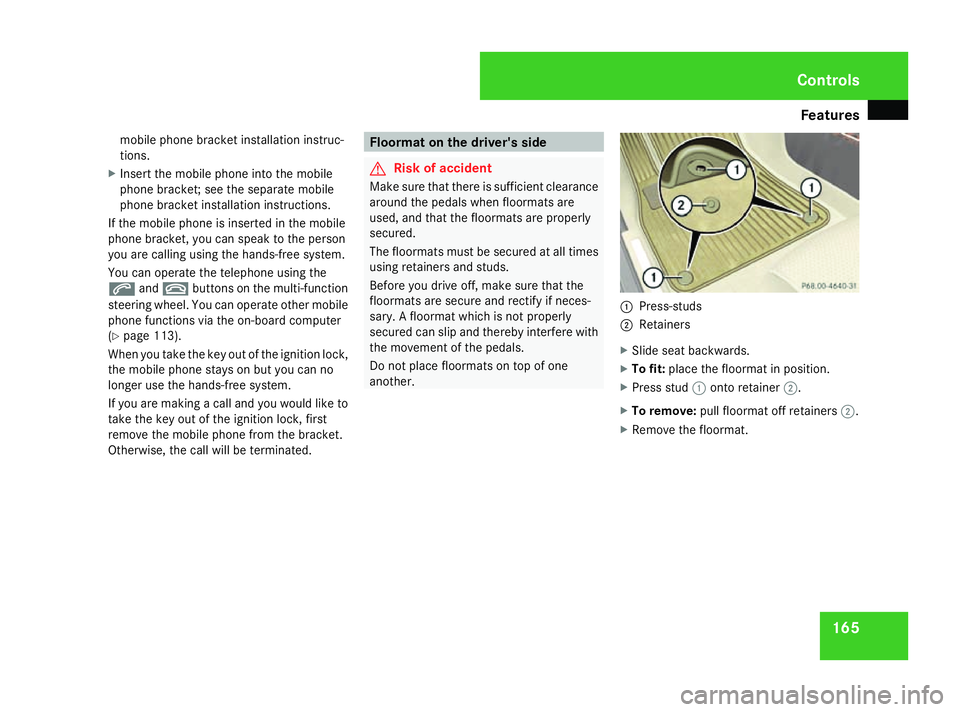
another. 1
Press-studs
2 Retainers
X Slide seat backwards.
X To fit: place the floormat in position.
X Press stud 1onto retainer 2.
X To remove: pull floormat off retainers 2.
X Remove the floormat. Cont
rols
169_AKB; 2; 4, en-GB
wdomann,
Version: 2.10.6 2008-07-16T08:52:06+02:00 - Seite 165 ZDateiname: 6515_0315_02_buchblock.pdf; preflight
Page 177 of 305
Engine compartment
174ature (if the engine was only started
briefly), before measuring.
i If you wish to cancel the measurement,
press the korj button on the multi-
function steering wheel.
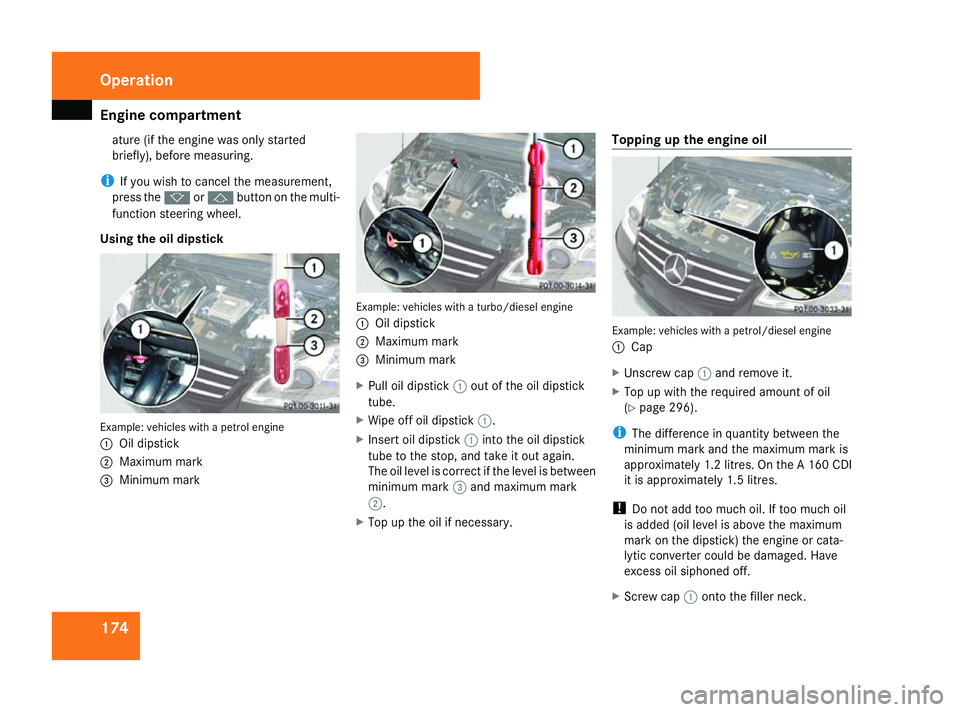
Using the oil dipstick Example: vehicles with a petrol engine
1
Oil dipstick
2 Maximum mark
3 Minimum mark Example: vehicles with a turbo/diesel engine
1
Oil dipstick
2 Maximum mark
3 Minimum mark
X Pull oil dipstick 1out of the oil dipstick
tube.
X Wipe off oil dipstick 1.
X Insert oil dipstick 1into the oil dipstick
tube to the stop, and take it out again.
The oil level is correct if the level is between
minimum mark 3and maximum mark
2.
X Top up the oil if necessary. Topping up the engine oil
Example: vehicles with a petrol/diesel engine
1
Cap
X Unscrew cap 1and remove it.
X Top up with the required amount of oil
(Y page 296).
i The difference in quantity between the
minimum mark and the maximum mark is
approximately 1.2 litres. On the A 160 CDI
it is approximately 1.5 litres.
! Do not add too much oil. If too much oil
is added (oil level is above the maximum
mark on the dipstick) the engine or cata-
lytic converter could be damaged. Have
excess oil siphoned off.
X Screw cap 1onto the filler neck. Operation
169_AKB; 2; 4, en-GB
wdomann,
Version: 2.10.6
2008-07-16T08:52:06+02:00 - Seite 174 Dateiname: 6515_0315_02_buchblock.pdf; preflight
Page 181 of 305

Tyres and wheels
178 MOExtended run-flat system*
The MOExtended run-flat system allows you
to continue driving the vehicle even when one
or more tyres lose all air pressure.
The MOExtended run-flat system may only be
used in combination with the tyre pressure
loss warning system and only on wheels spe-
cifically tested and approved by Mercedes-
Benz.
i Vehicles with MOExtended run-flat sys-
tem are not equipped with the TIREFIT
kit* 24
.
Therefore, it is recommended that you
equip your vehicle additionally with the
TIREFIT kit* when fitting tyres that do not
feature run-flat properties, e.g. winter
tyres.
i A TIREFIT kit* is available from any quali-
fied specialist workshop, e.g. a Mercedes-
Benz Service Centre.
You will find notes on driving with a flat tyre
in the "Practical advice" section
(Y page 262). Tyr
e tread G
Risk of accident
Bear in mind that:
R tyre grip decreases rapidly on wet roads
when the tread depth is less than 3 mm.
Thus, you should replace tyres that have
insufficient tread.
R winter tyres should be replaced when the
tread depth is 4 mm or less as they will
no longer provide adequate grip.
R the tread on a tyre may not wear evenly.
Thus, you should regularly check the
tread depth and the condition of the
tread across the entire width of all tyres.
If necessary, turn the steering wheel so
that you can see the tyre tread more eas-
ily.
Otherwise, you could lose control of the
vehicle and cause an accident due to the
reduced grip of the tyres on the road. Tyre pressures
i You will find a table of tyre pressures for
various operating conditions on the inside
of your vehicle's fuel filler flap.
The valid value for the spare wheel* is sta-
ted on the spare wheel and in the technical
data section. G
Risk of accident
Tyre pressure that is either too high or too
low has a negative effect on the vehicle’s
driving safety, which could lead you to
cause an accident. Therefore, you should
regularly check the pressure of all your
tyres (including the spare tyre *), particu-
larly prior to long trips, and correct the
pressure as necessary.
To test tyre pressure, use a suitable pressure
gauge. The outer appearance of a tyre does
not permit any reliable conclusion about the
tyre pressure. G
Risk of accident
Should the tyre pressure drop repeatedly:
24 Only for certain countries. Operation
* optional
169_AKB; 2; 4, en-GB
wdomann
,V ersion: 2.10.6
2008-07-16T08:52:06+02:00 - Seite 178 Dateiname: 6515_0315_02_buchblock.pdf; preflight
Page 183 of 305
Tyres and wheels
180 fully. Do not make any sudden steering
movements when doing so.
The function of the tyre pressure loss warning
system is limited or delayed if:
R snow chains are fitted to your vehicle's
tyres.
R road conditions are wintry.
R you are driving on sand or gravel.
R you adopt a very sporty driving style (cor-
nering at high speeds or driving with high
rates of acceleration).
R you are towing a very heavy or large trailer.
R you are driving with a heavy load (in the
vehicle or on the roof).
Restarting the tyre pressure loss warn-
ing system Restart the tyre pressure loss warning system
if you have:
R changed the tyre pressure
R changed the wheels or tyres
R fitted new wheels or tyres
X Before restarting, consult the table of tyre
pressures on the inside of the fuel filler flap
to ensure that the tyre pressure in all four tyres is set correctly for the operating con-
ditions concerned.
X Also observe the notes in the section on
tyre pressures ( Ypage 178). G
Risk of accident
The tyre pressure loss warning system can
only give reliable warnings if you have set
the correct tyre pressure.
If an incorrect tyre pressure is set, these
incorrect values will be monitored.
A tyre with insufficient pressure results in
vehicle instability when driving, thus
increasing the risk of an accident.
X Make sure that the key is in position
2(Y page 62) in the ignition lock.
You will see the following message on the
standard screen of the multi-function dis-
play (Y page 100)
X Press korj to select the tyre pres-
sure function:
Run Flat Indicator active
Menu: R-Button
X Press the reset button on the left of the
instrument cluster.
The following message appears in the
multi-function display: Restart Run Flat Indicat.? Yes Can-
cel
If you wish to confirm the restart:
X Press the æbutton.
The following message appears in the
multi-function display:
Run Flat Indicator restarted
After a teach-in period, the tyre pressure
loss warning system will monitor the set
tyre pressures of all four tyres.
If you wish to cancel the restart:
X Press the çbutton.
or
X Wait until the message
Restart Run Flat Indicator?
Yes Cancel disappears.
The tyre pressure values stored at the last
restart will continue to be monitored. Operation
169_AKB; 2; 4, en-GB
wdomann,
Version: 2.10.6
2008-07-16T08:52:06+02:00 - Seite 180 Dateiname: 6515_0315_02_buchblock.pdf; preflight
Page 185 of 305
Winter driving
182
in the driver's field of vision. This can be
obtained at a qualified specialist workshop,
e.g. from a Mercedes-Benz Service Centre.
Under these circumstances, you should also
restrict the maximum speed of the vehicle
using permanent Speedtronic* 25
to the max-
imum permissible speed for the winter tyres
(Y page 120).
Once you have fitted the winter tyres:
X Check the tyre pressures (Y page 178).G
Risk of accident
If you fit the spare wheel* when driving with
winter tyres, bear in mind that driving sta-
bility will be impaired owing to unstable
cornering characteristics caused by the dif-
ferent tyres. You should therefore adapt
your driving style and drive carefully.
Have the spare wheel* replaced at the
nearest qualified specialist workshop
which has the necessary specialist knowl-
edge and tools to carry out the work
required. Mercedes-Benz recommends
that you use a Mercedes-Benz Service
Centre for this purpose. In particular, work
relevant to safety or on safety-related sys- tems must be carried out at a qualified spe-
cialist workshop. Snow chains
For safety reasons, Mercedes-Benz recom-
mends that you only use snow chains which
have been specially approved for your vehicle
by Mercedes-Benz, or are of a corresponding
standard of quality.
! Information about the use of snow chain-
compatible AMG winter tyres is applicable
for AMG tyres. Use of snow chains is only
permissible with these tyres.
If you intend to fit snow chains, please bear
the following points in mind:
R snow chains cannot be fitted to all wheel/
tyre combinations.
R snow chains must not be fitted to emer-
gency spare wheels, e.g. on a "Minispare"
emergency spare wheel.
R Fit snow chains only in pairs and only to the
front wheels. Comply with the manufactur-
er's installation instructions.
! Vehicles with 17" tyres You may only fit snow chains as a pulling-
away aid. Only use fine-link snow chains.
When snow chains are fitted, you may only
drive straight ahead. The snow chains could
otherwise come into contact with the body-
work when you turn the front wheels.
When snow chains are fitted, you cannot use
Active Park Assist* (Y page 123).
Do not exceed the maximum permissible
speed of 50 km/h. Winter driving
G
Risk of accident
Do not shift down for additional engine
braking on a slippery road surface. This
could cause the drive wheels to lose their
grip and the vehicle could skid.
You should drive particularly carefully on slip-
pery road surfaces. Avoid sudden accelera-
tion, steering and braking manoeuvres.
If the vehicle threatens to skid or cannot be
stopped when moving at low speed:
25 Only available for certain countries. Operation
* optional
169_AKB; 2; 4, en-GB
wdomann,
Version: 2.10.6
2008-07-16T08:52:06+02:00 - Seite 182 Dateiname: 6515_0315_02_buchblock.pdf; preflight
Page 186 of 305
Driving
tips 183
X
Vehicles with manual transmission: engage
neutral.
X Vehicles with AUTOTRONIC*: shift the
selector lever to N.
X Try to bring the vehicle under control using
corrective steering. Driving tips
Rolling with the engine switched off
G
Risk of accident
Never switch the engine off while the vehi-
cle is in motion.
There is no power assistance for the steer-
ing and the service brake when the engine
is not running.
You will require considerably more effort to
steer and brake and, therefore, you could
lose control of the vehicle and cause an
accident. Braking
G
Risk of accident
Do not change down for additional engine
braking on a slippery road surface. This
could cause the drive wheels to lose their
grip and the vehicle could skid. G
Risk of accident
Make sure that other road users are not
endangered by your braking. Downhill gradients On long and steep downhill stretches, espe-
cially if the vehicle is laden or towing a trailer,
you must shift to a lower gear in good time or,
on vehicles with AUTOTRONIC*, select shift
range
1,2or 3.
i This also applies if you have activated
cruise control* or Speedtronic *.
This will use the braking effect of the engine,
so less braking will be required to maintain
the speed. This relieves the load on the brake
system and prevents the brakes from over-
heating and wearing too quickly. If you need
additional braking, depress the brake pedal
repeatedly rather than continuously.
Heavy and light loads If the brakes have been subjected to a heavy
load, do not stop the vehicle immediately, but
drive on for a short while. This allows the air-
flow to cool the brakes more quickly.
G
Risk of accident
Never depress the brake pedal continu-
ously while the vehicle is in motion, e.g.
never cause the brakes to rub by applying
constant slight pedal pressure. This causes
the brake system to overheat, increases Operation
* optional
169_AKB; 2; 4, en-GB
wdomann,
Version: 2.10.6 2008-07-16T08:52:06+02:00 - Seite 183 ZDateiname: 6515_0315_02_buchblock.pdf; preflight
Page 198 of 305
Care
195
You could otherwise scratch or damage the
surface of the lenses.
Cleaning the plastic trim !
Do not use dry, coarse or hard cloths and
do not scrub. Doing so will scratch or dam-
age the surfaces.
! In order to protect the vehicle's high-qual-
ity surfaces and to retain the overall
appearance, avoid contact with cosmetics
and suntan lotion.
X Wipe plastic parts with a damp, lint-free
cloth (e.g. a microfibre cloth).
X Light soiling: use a low-foaming soap (e.g.
a light liquid hand soap) diluted in water.
X Heavy soiling: use a cleaning agent that is
solvent-free and non-corrosive. Mercedes-
Benz recommends that you use a
Mercedes-Benz cleaning product for this
purpose.
Cleaning the steering wheel boss and
dashboard X
Moisten a clean lint-free cloth with water.
X Clean the plastic parts and the dashboard.
X If particularly dirty, use a mild detergent. G
Risk of injury
Do not use cleaners and cockpit care
sprays containing solvents to clean the
cockpit and steering wheel boss. Cleaners
containing solvents cause the surface to
become porous and in the event of an air-
bag being triggered, plastic parts that have
become loose could cause considerable
injuries.
Cleaning the leather upholstery* !
Cleaning
R Clean genuine leather covers using a
damp cloth, then wipe the covers down
using a dry cloth. Make sure that the
leather does not become soaked. For
leather care, use leather care foam A 001
986 59 71 10. You can purchase this
from any Mercedes-Benz Service Centre.
R Clean artificial leather covers with a cloth
moistened with a solution containing 1%
detergent (e. g. washing-up liquid).
R Clean fabric covers with a microfibre
cloth moistened with a solution contain-
ing 1% detergent (e. g. washing-up liquid).
When cleaning, take care not to rub too
vigorously and always wipe entire seat
sections to avoid leaving visible lines. Leave the seat to dry afterwards. Clean-
ing results depend on the type of dirt and
how long it has been there.
R Clean Alcantara covers with a damp
cloth. Make sure you wipe entire seat
sections to avoid leaving visible lines.
i Note that leather covers are a natural
product and as such are subject to a natural
ageing process and may react differently
(e.g. increased wrinkling) to certain envi-
ronmental influences (such as high humid-
ity, intense heat).
Note that regular care is essential to ensure
that the quality (both appearance and com-
fort) of the covers is retained over time.
Cleaning the trim strips (three-door
vehicles) !
Do not use dry cloths, abrasive products,
solvents or cleaning agents containing sol-
vents to clean the trim strips below the side
windows. You may otherwise damage the
surface of the trim strips.
Cleaning the padded table* The plastic parts of the padded table can be
cleaned using a detergent solution. Operation
* optional
169_AKB; 2; 4, en-GB
wdomann
,V ersion: 2.10.6
2008-07-16T08:52:06+02:00 - Seite 195 ZDateiname: 6515_0315_02_buchblock.pdf; preflight
Page 213 of 305
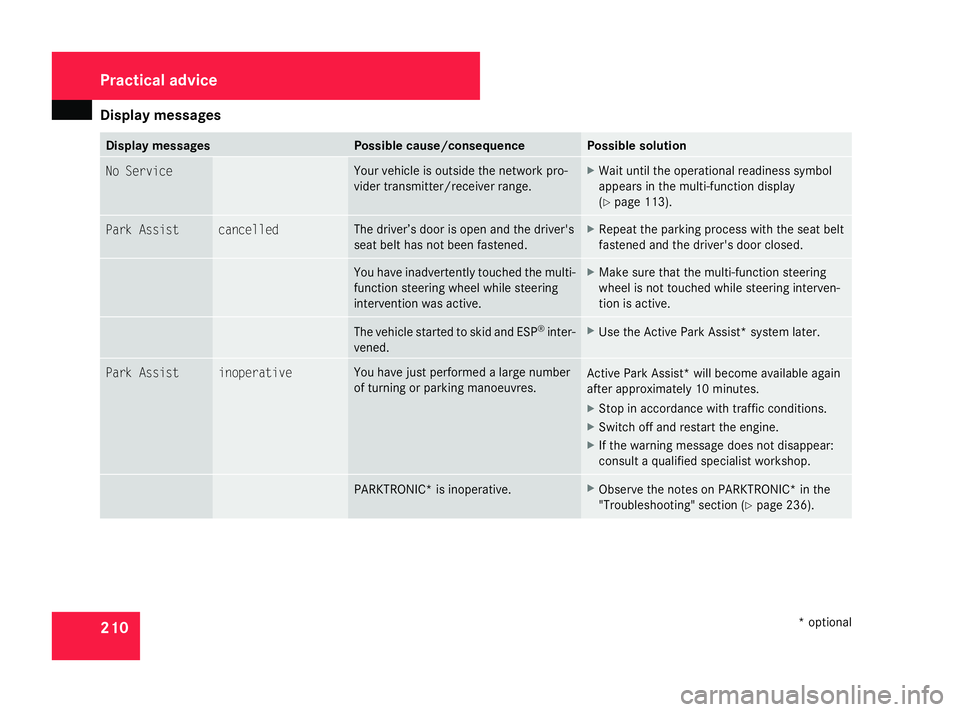
Display
messages 210 Display messages Possible cause/consequence Possible solution
No Service Yo
ur vehicle is outside the network pro-
vider transmitter/receiver range. X
Wait until the operational readiness symbol
appears in the multi-function display
(Y page 113). Park Assist cancelled The driver’s door is open and the driver's
seat belt has not been fastened. X
Repeat the parking process with the seat belt
fastened and the driver's door closed. You have inadvertently touched the multi-
function steering wheel while steering
intervention was active. X
Make sure that the multi-function steering
wheel is not touched while steering interven-
tion is active. The vehicle started to skid and ESP
®
inter-
vened. X
Use the Active Park Assist* system later. Park Assist inoperative You have just performed a large number
of turning or parking manoeuvres.
Active Park Assist* will become available again
after approximately 10 minutes.
X
Stop in accordance with traffic conditions.
X Switch off and restart the engine.
X If the warning message does not disappear:
consult a qualified specialist workshop. PARKTRONIC* is inoperative. X
Observe the notes on PARKTRONIC* in the
"Troubleshooting" section (Y page 236).Practical advice
* optional
169_AKB; 2; 4, en-GB
wdomann
,V ersion: 2.10.6
2008-07-16T08:52:06+02:00 - Seite 210 Dateiname: 6515_0315_02_buchblock.pdf; preflight