sport mode MERCEDES-BENZ A-CLASS HATCHBACK 2012 Owners Manual
[x] Cancel search | Manufacturer: MERCEDES-BENZ, Model Year: 2012, Model line: A-CLASS HATCHBACK, Model: MERCEDES-BENZ A-CLASS HATCHBACK 2012Pages: 357, PDF Size: 11.61 MB
Page 14 of 357

Problem (malfunction) ...................1
61
Quality (diesel )............................... 341
Refuelling ....................................... 159
Tank content/reserve fue l............. 339
Fuel filler flap
Opening/closing ............................ 160
Fuel filter (white display message) .. 245
Fuel level
Calling up the range (on-board
computer) ...................................... 212
Gaug e.............................................. 30
Fuel reserve
see Fuel
Fuel tank
Capacity ........................................ 339
Problem (malfunction) ................... 161
Fuses
Allocation chart ............................. 315
Before changing ............................. 314
Fuse box in the engine compart-
ment .............................................. 315
Fuse box in the front-passenger
footwell .......................................... 315
Important safety notes .................. 314 G
Gear indicator (on-board com-
puter) .................................................. 226
Gear or selector lever (cleaning
instructions) ...................................... 295
Gearshift program
SETUP (on-board computer) .......... 226
Genuine Mercedes-Benz parts ........... 21
Glove compartment .......................... 269H
Handbrake see Parking brake
Hazard warning lamps ...................... 108
Display message ............................ 256
Head restraints
Adjusting ......................................... 94
Adjusting (electrically) ..................... 95
Adjusting (manually) ........................ 95
Adjusting (rear) ................................ 96
Fitting/removing (rear) .................... 96 Headlamp
Cleaning system (function) ............ 108
Cleaning system (notes) ................ 345
Headlamps
Misting up ...................................... 110
Topping up the cleaning system .... 289
see Automatic headlamp mode
Heating
see Climate control
High-pressure cleaners .................... 291
Hill start assist .................................. 145
HOLD function
Deactivating ................................... 180
Display message ............................ 246
Function/note s............................. 180 I
Ignition lock see Key positions
Immobiliser .......................................... 69
Indicator and warning lamps
Coolant .......................................... 264
DISTRONIC PLUS ........................... 266
Engine diagnostics ......................... 264
SPORT handling mode ................... 261
Indicator lamps
Display message ............................ 240
see Warning and indicator lamps
Inspection
see ASSYST PLUS
Instrument cluster
Overview .......................................... 30
Setting s......................................... 220
Warning and indicator lamps ........... 32
Instrument cluster lighting .............. 208
Intelligent Light System
Activating/deactivating ................. 221
Display message ............................ 242
Overview ........................................ 108
Setting the dipped-beam head-
lamps for driving on the right/left .. 221
Interior lighting ................................. 111
Automatic control system .............. 111
Delayed switch-off (on-board
computer) ...................................... 223
Emergency lighting ........................ 111
Manual control ............................... 111 Index
11
Page 20 of 357
Speed, controlling
see Cruise control
Speedometer
Activating/deactivating the addi-
tional speedometer ........................ 220
Digital ............................................ 212
In the Instrument cluster ................. 30
Segments ...................................... 209
Selecting the unit of measure-
ment ..............................................2 20
see Instrument cluster
SPEEDTRONIC
Deactivating variable ..................... 172
Display message ............................ 250
Function/notes ............................ .171
Important safety notes .................. 171
LIM indicator lamp ......................... 171
Permanent ..................................... 172
Selecting ........................................ 171
Storing the current spee d.............. 172
Variabl e......................................... 171
SPORT handling mode
Activating/deactivating (AMG
vehicles) .......................................... 66
Warning lamp ................................. 261
SRS (Supplemental Restraint Sys-
tem)
Display message ............................ 238
Introduction ..................................... 41
Warning lamp ................................. 263
Warning lamp (function) ................... 41
Start/stop function
see ECO start/stop function
Starting (engine) ................................ 143
STEER CONTROL .................................. 69
Steering (display message) .............. 255
Steering wheel
Adjusting (manually) ........................ 98
Button overview ............................... 33
Buttons (on-board computer) ......... 209
Cleaning ......................................... 295
Gearshift paddle s........................... 156
Important safety notes .................... 98
Steering wheel gearshift paddles .... 156
Stopwatch (RACETIMER) ................... 226
Stowage areas ................................... 269 Stowage compartments
Armrest (front) ............................... 270
Armrest (under) ............................. 270
Centre console .............................. 269
Centre console (rear) ..................... 271
Cup holde r..................................... 275
Glove compartment ....................... 269
Important safety information ......... 269
Luggage net ................................... 271
Spectacles compartment ............... 269
Under driver's seat/front-
passenger sea t.............................. 270
Summer tyres .................................... 320
Sun visor ............................................ 277
Supplemental Restraint System
see SRS (Supplemental Restraint
System)
Surround lighting (on-board com-
puter) .................................................. 222
Switching off the alarm (ATA) ............ 69 T
Tail lamps Display message ............................ 241
see Lights
Tailgate
Display message ............................ 254
Emergency unlocking ....................... 83
Important safety notes .................... 82
Opening dimensions ...................... 346
Opening/closing (from outside) ....... 82
Technical data
Capacities ...................................... 338
Emergency spare whee l................. 333
Information .................................... 336
Trailer load s................................... 349
Tyres/wheels ................................. 329
Vehicle data ................................... 346
Telephone
Accepting a call ............................. 216
Display message ............................ 256
Menu (on-board computer) ............ 215
Number from the phone book ........ 216
Redialling ....................................... 217
Rejecting/ending a call ................. 216
Telephone compartment ................ 270 Index
17
Page 35 of 357

Warning and indicator lamps
Function Page
:
L
Dipped-beam head-
lamps 105
;
T
Side lamps 106
=
K
Main-beam head-
lamps 107
?
÷
ESP® 260
A
!
Electric parking brake
(red) 263
B
!
Electric parking brake
(yellow) 263
C
·
Distance warning 266
D
#!
Turn signals 107
E
6
SRS 263
F
ü
Seat belts 257 Function Page
G
%
Diesel engine: pre-
glow 144
M
SPORT handling
mode in AMG vehicles 261
H
?
Coolant 264
I
R
Rear foglamp 106
J
N
Front foglamps 106
K
;
Engine diagnostics 264
L
h
This lamp has no func-
tion M
æ
Reserve fuel 264
N
å
ESP®
OFF 260
O
!
ABS 258
P
J
Brakes 25832
Instrument clusterAt a glance
Page 69 of 357

If the
÷ ESP®
warning lamp and the å
ESP ®
OFF warning lamp are lit continuously,
ESP ®
is not available due to a malfunction.
Observe the information on warning lamps
(Y page 260) and display messages which
may be shown in the instrument cluster
(Y page 230).
i Only use wheels with the recommended
tyre sizes. Only then will ESP ®
function
properly.
Characteristics of ESP ®General notes
If the
÷ ESP warning lamp goes out before
beginning the journey, ESP ®
is automatically
active.
If ESP ®
intervenes, the ÷ESP®
warning
lamp flashes in the instrument cluster.
If ESP ®
intervenes:
X Do not deactivate ESP ®
under any circum-
stances.
X When pulling away, only depress the accel-
erator pedal as far as is necessary.
X Adapt your driving style to suit the prevail-
ing road and weather conditions.
ECO start/stop function
The ECO start/stop function switches the
engine off automatically if the vehicle stops
moving. When pulling away again, the engine
starts automatically. ESP ®
remains in its pre-
viously selected status. Example:if ESP®
was deactivated before the engine was
switched off, ESP ®
remains deactivated when
the engine is switched on again.
The ECO start/stop function switches the
engine off automatically if the vehicle stops
moving. When pulling away again, the engine
starts automatically. ESP ®
remains in its pre-
viously selected status. Example:if ESP®
was deactivated before the engine was
switched off, ESP ®
remains deactivated when
the engine is switched on again. Deactivating/activating ESP
®
(AMG
vehicles) Important safety notes
i Observe the "Important safety notes" sec-
tion (Y page 61).
You can select between the following states
of ESP ®
:
R ESP ®
is activated.
R SPORT handling mode is activated.
R ESP ®
is deactivated. G
WARNING
When SPORT handling mode is activated,
there is a greater risk of skidding and acci-
dents.
Only activate SPORT handling mode in the sit- uations described in the following. G
WARNING
If you deactivate ESP ®
, ESP ®
no longer sta-
bilises the vehicle. There is an increased risk
of skidding and an accident.
Only deactivate ESP ®
in the situations descri-
bed in the following.
In the following situations, it may be better to activate SPORT handling mode or deactivate
ESP ®
:
R when using snow chains
R in deep snow
R on sand or gravel
R on specially designated roads when the
vehicle's own oversteering and understeer-
ing characteristics are desired
Driving in SPORT handling mode or without
ESP ®
requires an extremely qualified and
experienced driver.
i Activate ESP ®
as soon as the situations
described above no longer apply. ESP ®
will
otherwise not be able to stabilise the vehi-
cle if the vehicle starts to skid or a wheel
starts to spin. 66
Driving safety systemsSafety
Page 70 of 357

Deactivating/activating ESP
®X
To activate SPORT handling mode:
briefly press button :.
The M handling mode warning lamp in
the instrument cluster lights up. The
SPORT handling mode
SPORT handling mode message appears
in the multifunction display.
X To deactivate SPORT handling mode:
briefly press button :.
The M handling mode warning lamp in
the instrument cluster goes out.
X To deactivate ESP ®
:press button :until
the å ESP®
OFF warning lamp lights up
in the instrument cluster.
The ÷OFF OFFmessage appears in the mul-
tifunction display.
X To activate ESP ®
:briefly press button :.
The å ESP®
OFF warning lamp in the
instrument cluster goes out. The ÷
ESP ®
ON
ON message appears in the multifunc-
tion display.
Characteristics of activated SPORT han-
dling mode
If SPORT handling mode is activated and one
or more wheels start to spin, the ÷ESP®
warning lamp in the instrument cluster
flashes. ESP ®
only stabilises the vehicle to a
limited degree.
When SPORT handling mode is activated:
R ESP ®
only improves driving stability to a
limited degree.
R traction control is still activated. R
engine torque is restricted to a limited
degree and the drive wheels are able to
spin.
The spinning of the wheels results in a cut-
ting action for better traction on loose sur- faces.
R ESP ®
still provides support when you
brake.
Characteristics when ESP ®
is deactivated
If ESP ®
is deactivated and one or more wheels
start to spin, the ÷ESP®
warning lamp in
the instrument cluster does not flash. In such
situations, ESP ®
will not stabilise the vehicle.
If you deactivate ESP ®
:
R ESP ®
no longer improves driving stability.
R engine torque is no longer limited and the
drive wheels are able to spin.
The spinning of the wheels results in a cut-
ting action for better traction on loose sur-faces.
R traction control is still activated.
R PRE-SAFE ®
is no longer available; nor is it
activated if you brake firmly with assis-
tance from ESP ®
.
R COLLISION PREVENTION ASSIST is no lon-
ger available; nor is it activated if you brake
firmly with assistance from ESP ®
.
R COLLISION PREVENTION ASSIST is no lon-
ger available; nor is it activated if you brake
firmly with assistance from ESP ®
.
R ESP ®
still provides support when you
brake.
Deactivating/activating ESP ®
(except
AMG vehicles) Important safety notes
You can select between the following states
of ESP
®
:
R ESP ®
is activated.
R ESP ®
is deactivated. Driving safety syste
ms
67Safety Z
Page 158 of 357
Towing a trailer
Trailer towing is not permissible on the fol-
lowing models:
R
A 45 AMG 4MATIC
R Vehicles with the AMG Sports package
X Drive in the middle of the engine speed
range on uphill gradients.
X Depending on the uphill or downhill gradi-
ent, select a lower gear (Y page 166), even
if cruise control, DISTRONIC PLUS, or
SPEEDTRONIC are activated. Program selector button
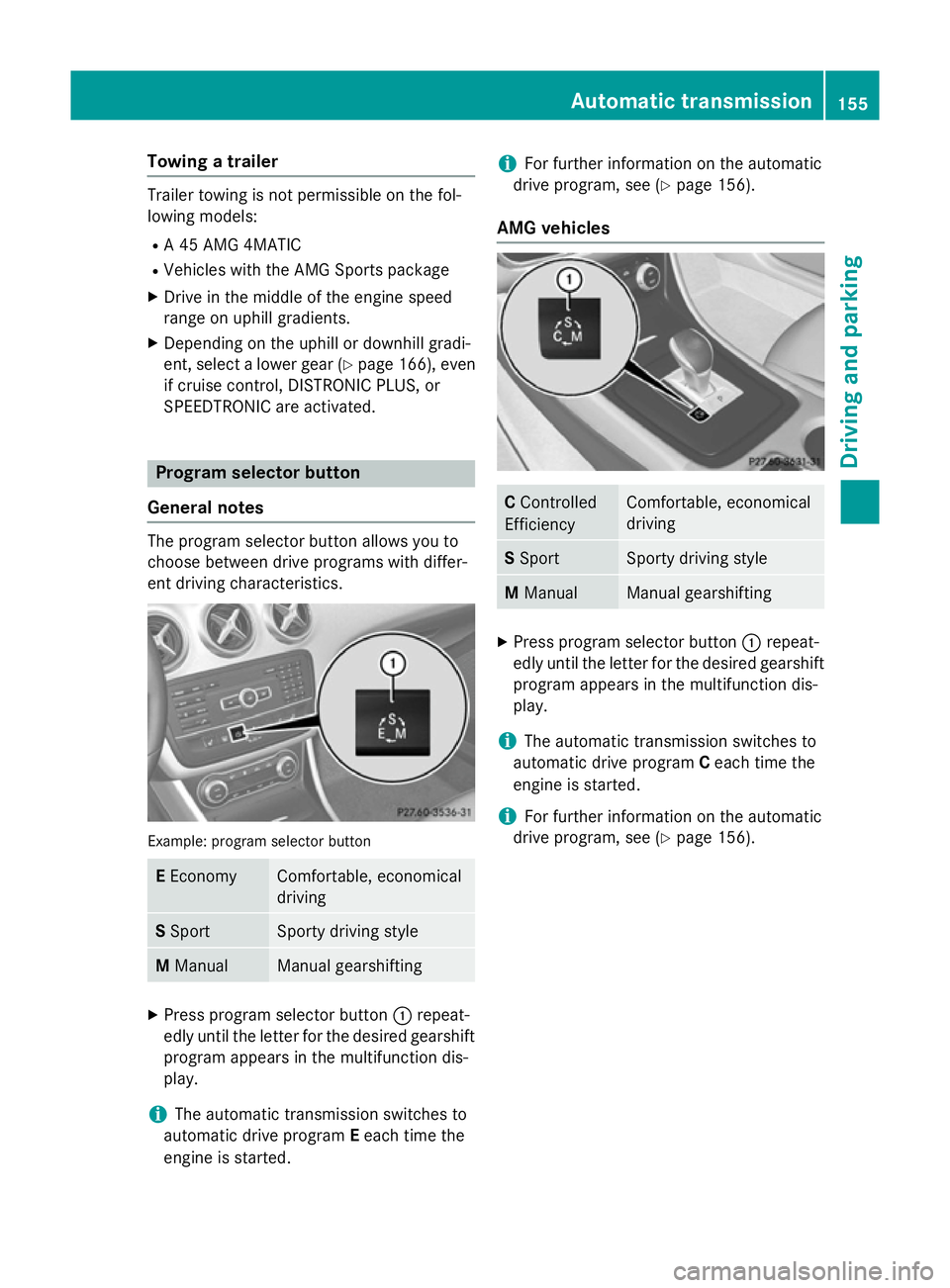
General notes The program selector button allows you to
choose between drive programs with differ-
ent driving characteristics. Example: program selector button
E
Economy Comfortable, economical
driving
S
Sport Sporty driving style
M
Manual Manual gearshifting
X
Press program selector button :repeat-
edly until the letter for the desired gearshift program appears in the multifunction dis-
play.
i The automatic transmission switches to
automatic drive program Eeach time the
engine is started. i
For further information on the automatic
drive program, see (Y page 156).
AMG vehicles C
Controlled
Efficiency Comfortable, economical
driving
S
Sport Sporty driving style
M
Manual Manual gearshifting
X
Press program selector button :repeat-
edly until the letter for the desired gearshift program appears in the multifunction dis-
play.
i The automatic transmission switches to
automatic drive program Ceach time the
engine is started.
i For further information on the automatic
drive program, see (Y page 156). Automatic transmission
155Driving and parking Z
Page 168 of 357
Driving tips
General notes
G
WARNING
If you switch off the ignition while driving,
safety-relevant functions are only available
with limitations, or not at all. This could affect, for example, the power steering and the brake
boosting effect. You will require considerably
more effort to steer and brake. There is a risk of an accident.
Do not switch off the ignition while driving. ECO display
The ECO display provides feedback on how
economical your driving characteristics are.
The ECO display assists you in achieving the
most economical driving style for the selec-
ted settings and prevailing conditions. Con-
sumption can be significantly influenced by
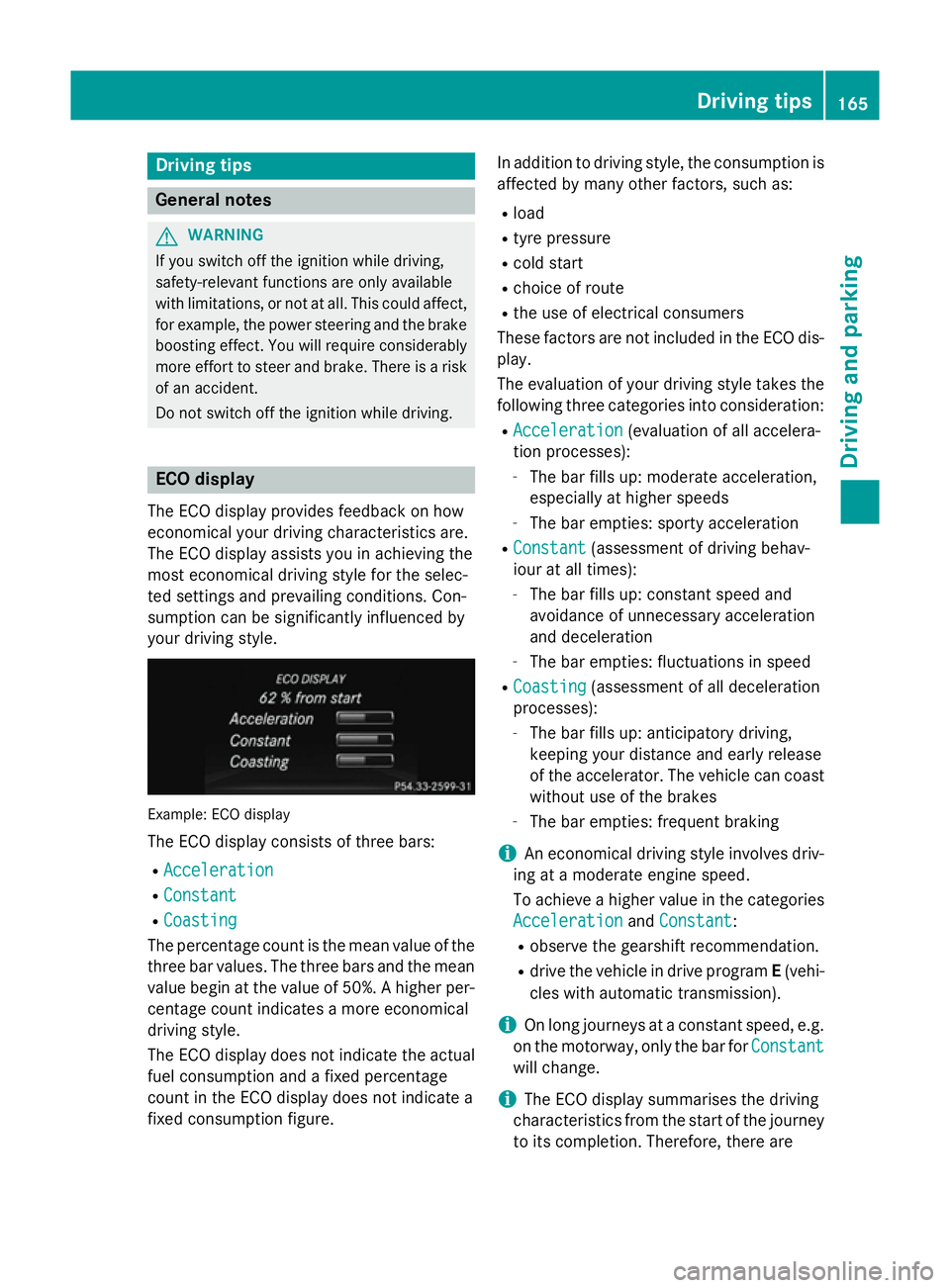
your driving style. Example: ECO display
The ECO display consists of three bars:
R Acceleration Acceleration
R Constant
Constant
R Coasting
Coasting
The percentage count is the mean value of the three bar values. The three bars and the mean
value begin at the value of 50%. A higher per- centage count indicates a more economical
driving style.
The ECO display does not indicate the actual
fuel consumption and a fixed percentage
count in the ECO display does not indicate a
fixed consumption figure. In addition to driving style, the consumption is
affected by many other factors, such as:
R load
R tyre pressure
R cold start
R choice of route
R the use of electrical consumers
These factors are not included in the ECO dis-
play.
The evaluation of your driving style takes the following three categories into consideration:
R Acceleration
Acceleration (evaluation of all accelera-
tion processes):
- The bar fills up: moderate acceleration,
especially at higher speeds
- The bar empties: sporty acceleration
R Constant Constant (assessment of driving behav-
iour at all times):
- The bar fills up: constant speed and
avoidance of unnecessary acceleration
and deceleration
- The bar empties: fluctuations in speed
R Coasting
Coasting (assessment of all deceleration
processes):
- The bar fills up: anticipatory driving,
keeping your distance and early release
of the accelerator. The vehicle can coast
without use of the brakes
- The bar empties: frequent braking
i An economical driving style involves driv-
ing at a moderate engine speed.
To achieve a higher value in the categories
Acceleration Acceleration andConstant
Constant:
R observe the gearshift recommendation.
R drive the vehicle in drive program E(vehi-
cles with automatic transmission).
i On long journeys at a constant speed, e.g.
on the motorway, only the bar for Constant
Constant
will change.
i The ECO display summarises the driving
characteristics from the start of the journey to its completion. Therefore, there are Driving tips
165Driving and pa rking Z
Page 184 of 357
The electric parking brake secures the vehicle
automatically if the HOLD function is activa-
ted and:
R the driver's door is open and the driver's
seat belt is unfastened
R the engine is switched off, unless it is auto-
matically switched off by the ECO start/
stop function
R a system fault occurs
R the power supply is not sufficient
Vehicles with automatic transmission
If a fault occurs, then the transmission may
also be shifted into position Pautomatically.
Vehicles with manual transmission
The Brake immediately Brake immediately message can also
appear in the multifunction display.
X Immediately depress the brake pedal firmly
until the warning message in the multifunc- tion display goes out.
The HOLD function is deactivated.
A horn will sound at regular intervals if you
turn off the engine, take off your seat belt or
open the driver's door when the HOLD func-
tion is activated. The horn alerts you to the
fact that the HOLD function is still activated.
If you attempt to lock the vehicle, the tone
becomes louder. The vehicle cannot be
locked until you have deactivated the HOLD
function.
i Once you have switched off the engine,
you cannot restart it until you have deacti-
vated the HOLD function. RACE START
Important safety notes RACE START enables optimum acceleration
from a standing start. The precondition for
this is a suitable high-grip road surface.
Only activate RACE START on dedicated race
circuits. i
RACE START is only available in AMG vehi-
cles.
Activation conditions You can activate RACE START if:
R the doors, the bonnet and the tailgate are
closed
R the engine is running and the transmission,
traction control and engine are at operating
temperature
R SPORT handling mode is activated
(Y page 66)
R the steering wheel is in the straight-ahead
position.
R the vehicle is stationary and the brake
pedal is depressed (left foot)
R the transmission is in position D.
R drive program Mis selected (Y page 155).
Activating RACE START X
Depress the brake pedal with your left foot
and keep it depressed.
X Pull and hold both steering wheel gearshift
paddles.
X The RACE START Confirm: Paddle UP RACE START Confirm: Paddle UP
Cancel: Paddle DOWN
Cancel: Paddle DOWN message appears
in the multifunction display.
X Release both steering wheel gearshift pad-
dles.
i If the activation conditions are no longer
fulfilled, RACE START is cancelled. The
RACE START not possible See Own‐
RACE START not possible See Own‐
er's er's Manual
Manual message appears in the mul-
tifunction display.
X To cancel: pull the left steering wheel shift
paddle (Y page 156).
or
X To confirm: pull the right steering wheel
shift paddle (Y page 156).
The RACE START available Depress
RACE START available Depress
accelerator
accelerator message appears in the mul-
tifunction display. Driving systems
181Driving and parking Z
Page 185 of 357

i
If you do not depress the accelerator
pedal within a few seconds, RACE START is cancelled. The multifunction display shows
the RACE START cancelled
RACE START cancelled message.
X Fully depress the accelerator pedal.
The engine speed is increased.
The RACE START Release brake to RACE START Release brake to
start
start message appears in the multifunc-
tion display.
i If the brake pedal is not released after a
short while, RACE START is cancelled. The
multifunction display shows the RACE
RACE
START cancelled START cancelled message.
X Take your foot off the brake, but keep the
accelerator pedal depressed.
The vehicle pulls away at maximum accel-
eration.
The RACE RACE START
START active
active message appears
in the multifunction display.
RACE START is deactivated when the vehicle
reaches a speed of approximately 50 km/h.
Drive program Sis activated. SPORT handling
mode remains activated.
RACE START is deactivated immediately if
you release the accelerator pedal during
RACE START or if any of the activation condi-
tions are no longer fulfilled. The RACE
RACESTART
START
not possible
not possible orRACE START cancelled
RACE START cancelled
message appears in the multifunction dis-
play.
i After using it several times in short suc-
cession, RACE START will be unavailable
until a certain distance has been driven. 4MATIC (permanent all-wheel drive)
4MATIC ensures that all four wheels are per-
manently driven. Together with ESP ®
, it
improves the traction of your vehicle when-
ever a drive wheel spins due to insufficient
grip.
If you fail to adapt your driving style, 4MATIC
can neither reduce the risk of accident nor
override the laws of physics. 4MATIC cannot take account of road, weather and traffic con-
ditions. 4MATIC is only an aid. You are
responsible for the distance to the vehicle in
front, for vehicle speed, for braking in good
time, and for staying in the lane.
If a drive wheel spins due to insufficient grip:
R when pulling away, only depress the accel-
erator pedal as far as is necessary.
R accelerate less when driving.
! Never tow the vehicle with one axle
raised. This may damage the transfer case.
Damage of this sort is not covered by the
Mercedes-Benz implied warranty. All
wheels must remain either on the ground or be fully raised. Observe the instructions for
towing the vehicle with all wheels in full
contact with the ground.
i In wintry driving conditions, the maximum
effect of 4MATIC can only be achieved if
you use winter tyres (M+S tyres), with snow
chains if necessary. PARKTRONIC
Important safety notes PARKTRONIC is only an aid. It is not a substi-
tute for your attention to the immediate sur-
roundings. The responsibility for safe
manoeuvring and parking remains with you.
Make sure that there are no persons, animals
or objects in range while manoeuvring and
parking.
! When parking, pay particular attention to
objects above or below the sensors, such
as flower pots or trailer drawbars. PARK-
TRONIC does not detect such objects when they are in the immediate vicinity of the
vehicle. You could damage the vehicle or
the objects.
The sensors may not detect snow and
objects which absorb ultrasonic sources.
Ultrasonic sources, such as an automatic
car wash, a lorry's compressed-air brakes 182
Driving systemsDriving and parking
Page 204 of 357
When
Standard is selected, no warning vibra-
tion occurs if:
R you have switched on the turn signals. In
this event, the warnings are suppressed for
a certain period of time.
R a driving safety system intervenes, such as
ABS, BAS or ESP ®
.
When Adaptive is selected, no warning vibra-
tion occurs if:
R you have switched on the turn signals. In
this case, the warnings are suppressed for
a certain period of time.
R a driving safety system intervenes, such as
ABS, BAS or ESP ®
.
R you accelerate hard, e.g. kickdown.
R you brake hard.
R you steer actively, e.g. swerve to avoid an
obstacle or change lane quickly.
R you cut the corner on a sharp bend.
In order that you are warned only when nec-
essary and in good time if you cross the lane marking, the system recognises certain con-
ditions and warns you accordingly.
The warning vibration occurs earlier if:
R you approach the outer lane marking on a
bend.
R the road has very wide lanes, e.g. a motor-
way.
R the system recognises solid lane markings.
The warning vibration occurs later if:
R the road has narrow lanes.
R you cut the corner on a bend. Towing a trailer
Notes on towing a trailer
Important safety notes G
WARNING
The braking system can overheat if you leave your foot on the brake pedal while driving.
This increases the braking distance and could even cause the braking system to fail. There is
a risk of an accident.
Never use the brake pedal as a footrest. Do
not simultaneously depress both the brake
pedal and the accelerator pedal while driving. G
WARNING
You could lose control of the vehicle/trailer
combination if it begins to swerve. The vehi-
cle/trailer combination could even overturn.
There is a risk of an accident.
On no account should you attempt to
straighten out the vehicle/trailer combina-
tion by increasing speed. Decrease your
speed and do not countersteer. Brake if nec-
essary. G
WARNING
If the maximum the permissible load for a car- rier system is exceeded, the carrier could
come loose from the vehicle and endanger
other road users. There is a risk of an accidentand injury.
Never exceed the permissible noseweight
when using a carrier.
! Depressing the brake pedal constantly
results in excessive and premature wear to
the brake pads.
Trailer towing is not permissible on the fol-
lowing models: R A 45 AMG 4MATIC
R Vehicles with the AMG Sports package
If you exceed the maximum permissible nose- weight of the trailer drawbar on the ball cou-
pling, the following may become damaged:
R your vehicle
R the trailer
R the ball coupling
R the trailer tow hitch
The vehicle/trailer combination could
become unstable.
If the noseweight used is lower than the min- imum permissible noseweight, the vehicle/ Towing a trailer
201Driving and parking Z