phone MERCEDES-BENZ A-CLASS HATCHBACK 2015 Owners Manual
[x] Cancel search | Manufacturer: MERCEDES-BENZ, Model Year: 2015, Model line: A-CLASS HATCHBACK, Model: MERCEDES-BENZ A-CLASS HATCHBACK 2015Pages: 417, PDF Size: 11.91 MB
Page 14 of 417
Folding in when locking (on-board
computer) ...................................... 253
Folding in/out (automatically )....... 114
Folding in/out (electrically) ........... 114
Out of position (troubleshooting) ... 114
Parking position ............................. 115
Resetting ....................................... 114
Storing settings (memory func-
tion) ............................................... 116 F
Fault message see Display messages
Filler cap
see Fuel filler flap
Fire extinguisher ............................... 339
First-aid kit ......................................... 338
Fitting a wheel
Fitting a wheel ............................... 371
Lowering the vehicle ...................... 372
Preparing the vehicle ..................... 368
Raising the vehicle ......................... 369
Removing a wheel .......................... 371
Securing the vehicle against roll-
ing away ........................................ 369
Flat tyre
Changing a wheel/fitting the
spare wheel ................................... 367
MOExtended tyre s......................... 340
Preparing the vehicle ..................... 340
TIREFIT kit ...................................... 341
see Emergency spare wheel
Floormat ............................................. 319
Frequencies
Mobile phone ................................. 394
Two-way radio ................................ 394
Front-passenger front airbag deac-
tivation
Display message ............................ 270
Front-passenger front airbag deac-
tivation system
Operation ......................................... 50
Problems ......................................... 54
System self-test ............................... 52
Fuel
Additives ........................................ 399
Consumption information .............. 400 Consumption statistics .................. 242
Displaying the current consump-
tion ................................................ 242
Displaying the range ...................... 242
Driving tip
s.................................... 188
E10 ................................................ 398
Fuel gaug e....................................... 30
Grade (petrol) ................................ 398
Important safety notes .................. 397
Low outside temperatures ............. 400
Notes for Mercedes‑ AMG vehi-
cles ................................................ 398
Problem (malfunction) ................... 183
Quality (diesel )............................... 399
Refuelling ....................................... 180
Tank content/reserve fue l............. 397
Fuel filler flap
Opening ......................................... 181
Fuel filter (white display message) .. 277
Fuel level
Calling up the range (on-board
computer) ...................................... 242
Gauge .............................................. 30
Fuel reserve
see Fuel
Fuel tank
Capacity ........................................ 397
Problem (malfunction) ................... 183
Fuses
Allocation chart ............................. 356
Before changing ............................. 355
Fuse box in the engine compart-
ment .............................................. 355
Fuse box in the front-passenger
footwell .......................................... 356
Important safety notes .................. 355 G
Gear indicator (on-board com-
puter, Mercedes-AMG vehicles) ....... 254
Gearshift program
SETUP (on-board computer) .......... 254
Genuine Mercedes-Benz parts ........... 22
Glove compartment .......................... 307 Index
11
Page 17 of 417
Mercedes-Benz Service Centre
see Qualified specialist workshop
Message memory (on-board com-
puter) .................................................. 257
Messages
see Display messages
Mirror turn signal
Cleaning ........................................ .332
Mirrors
see Exterior mirrors
see Rear-view mirror
see Vanity mirror (in sun visor)
Mobile phone
Frequencies ................................... 394
Installation ..................................... 394
Menu (on-board computer) ............ 246
Notes/placing in the bracket ......... 318
Transmission output (maximum) .... 394
Mobile telephone
Pre-installed bracket ..................... .319
Modifying the programming (key) ..... 84
MOExtended tyres .............................340
MP3
Operating ....................................... 245
Multifunction display
Function/notes ............................ .241
Permanent display ......................... 251
Multifunction steering wheel
Operating the on-board computer .. 239
Overview .......................................... 32 N
Navigation Menu (on-board computer) ............ 243
Notes on running in a new vehicle .. 156O
Occupant safety Automatic front-passenger front
airbag deactivatio n.......................... 49
Automatic measures after an acci-
dent ................................................. 57
Children in the vehicle ..................... 57
Important safety notes .................... 41
PASSENGER AIRBAG indicator
lamp ................................................. 41 Pets in the vehicle ........................... 69
PRE-SAFE
®
(anticipatory occu-
pant protection) ............................... 56
Restraint system introduction .......... 40
Restraint system warning lamp ........ 41
Seat belts ........................................ 42
Odometer ........................................... 242
On-board computer
AMG menu ..................................... 254
Assistance graphic menu ............... 248
Assistance menu ........................... 247
Audio menu ................................... 245
Convenience submenu .................. 253
Display messages .......................... 257
Displaying a service message ........ 328
DISTRONIC PLUS ........................... 202
Factory settings ............................. 253
Heating submenu ........................... 252
Important safety notes .................. 238
Instrument cluster submenu .......... 250
Light submenu ............................... 251
Menu overview .............................. 241
Message memory .......................... 257
Navigation menu ............................ 243
Operating the TV ............................ 246
Operating video DVD ..................... 245
Operation ....................................... 239
RACETIMER ................................... 254
Service menu ................................. 250
Settings menu ............................... 250
Standard display ............................ 242
Telephone menu ............................ 246
Trip menu ...................................... 242
Vehicle submenu ........................... 251
Opening and closing the side trim
panels ................................................. 128
Operating instructions
Vehicle equipment ........................... 23
Operating safety
Declaration of conformity ................ 23
Operating system
see On-board computer
Outside temperature display ........... 239
Overhead control panel ...................... 38
Override feature
Rear side window s........................... 68 14
Index
Page 21 of 417
Selecting ........................................ 195
Storing the current speed .............. 195
Variabl e......................................... 195
SPEEDTRONIC (variable)
Storing the current speed and
calling up the last stored speed ..... 195
SPORT handling mode
Deactivating/activating
(Mercedes-AMG vehicles) ................ 75
Warning lamp ................................. 298
Start-off assist
Activating ....................................... 206
Important safety notes .................. 206
Start/Stop button
Removing ....................................... 159
Starting the engine ........................ 160
Start/stop function
see ECO start/stop function
Starting (engine) ................................ 159
STEER CONTROL .................................. 77
Steering
Display message ............................ 290
Steering assistant STEER CON-
TROL
see STEER CONTROL
Steering wheel
Adjusting (manually) ...................... 112
Button overview ............................... 32
Buttons (on-board computer) ......... 239
Cleaning ......................................... 334
Gearshift paddle s........................... 177
Important safety notes .................. 112
Steering wheel gearshift paddles .... 177
Stopwatch (RACETIMER) ................... 254
Stowage compartment
Map pockets .................................. 309
Stowage compartments
Armrest (front) ............................... 308
Armrest (under) ............................. 308
Centre console .............................. 307
Centre console (rear) ..................... 309
Cup holde r..................................... 313
Glove compartment ....................... 307
Important safety information ......... 307
Spectacles compartment ............... 307
Under driver's seat/front-
passenger sea t.............................. 308 Stowage net
....................................... 309
Stowage space
Stowage net ................................... 309
Summer tyres .................................... 360
Sun visor ............................................ 315
Suspension
Adaptive Damping System ............. 208
Suspension settings
AMG RIDE CONTROL sports sus-
pension .......................................... 207 T
Tail lamps see Lights
Tailgate
Display message ............................ 288
Emergency unlocking ....................... 93
Important safety notes .................... 92
Opening dimensions ...................... 404
Opening/closing (from outside) ....... 93
Tank
see Fuel tank
Technical data
Capacities ...................................... 396
Emergency spare wheel ................. 392
Information .................................... 394
Trailer load s................................... 406
Tyres/wheels ................................. 372
Vehicle data ................................... 404
Telephone
Accepting a call (multifunction
steering wheel) .............................. 247
Display message ............................ 290
Introduction ................................... 246
Menu (on-board computer) ............ 246
Number from the phone book ........ 247
Redialling ....................................... 247
Rejecting/ending a call ................. 247
Telephone compartment ................ 308
Temperature
Coolant .......................................... 239
Coolant (on-board computer,
Mercedes-AMG vehicles) ............... 254
Engine oil (on-board computer,
Mercedes-AMG vehicles) ............... 254
Outside temperature ...................... 239
Setting (climate control )................ 142 18
Index
Page 35 of 417
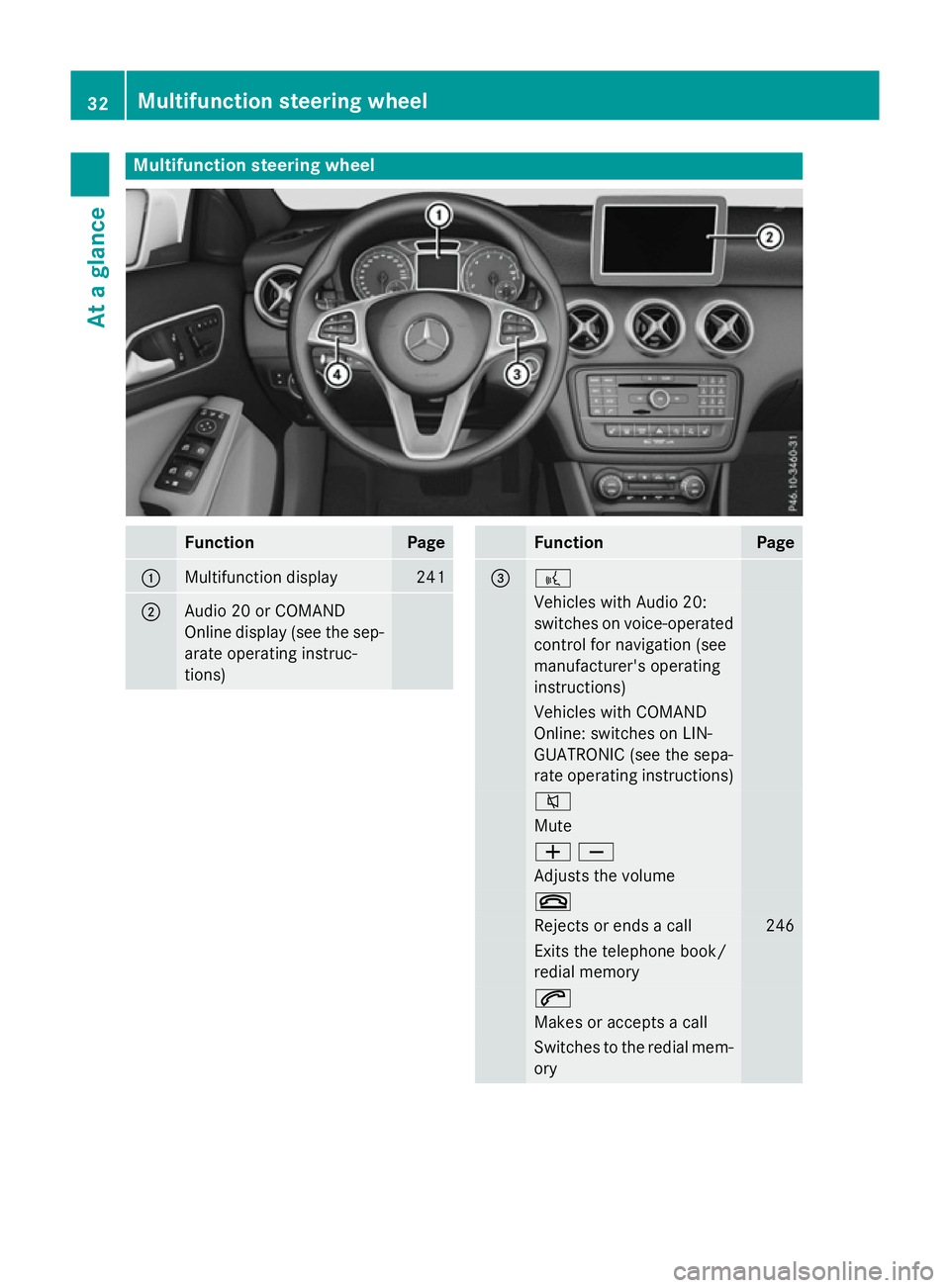
Multifunction steering wheel
Function Page
:
Multifunction display 241
;
Audio 20 or COMAND
Online display (see the sep-
arate operating instruc-
tions) Function Page
= ?
Vehicles with Audio 20:
switches on voice-operated
control for navigation (see
manufacturer's operating
instructions) Vehicles with COMAND
Online: switches on LIN-
GUATRONIC (see the sepa-
rate operating instructions)
8
Mute
WX
Adjusts the volume
~
Rejects or ends a call 246
Exits the telephone book/
redial memory 6
Makes or accepts a call
Switches to the redial mem-
ory 32
Multifunction steering wheelAt a glance
Page 81 of 417
ATA (Anti-Theft Alarm system)
X
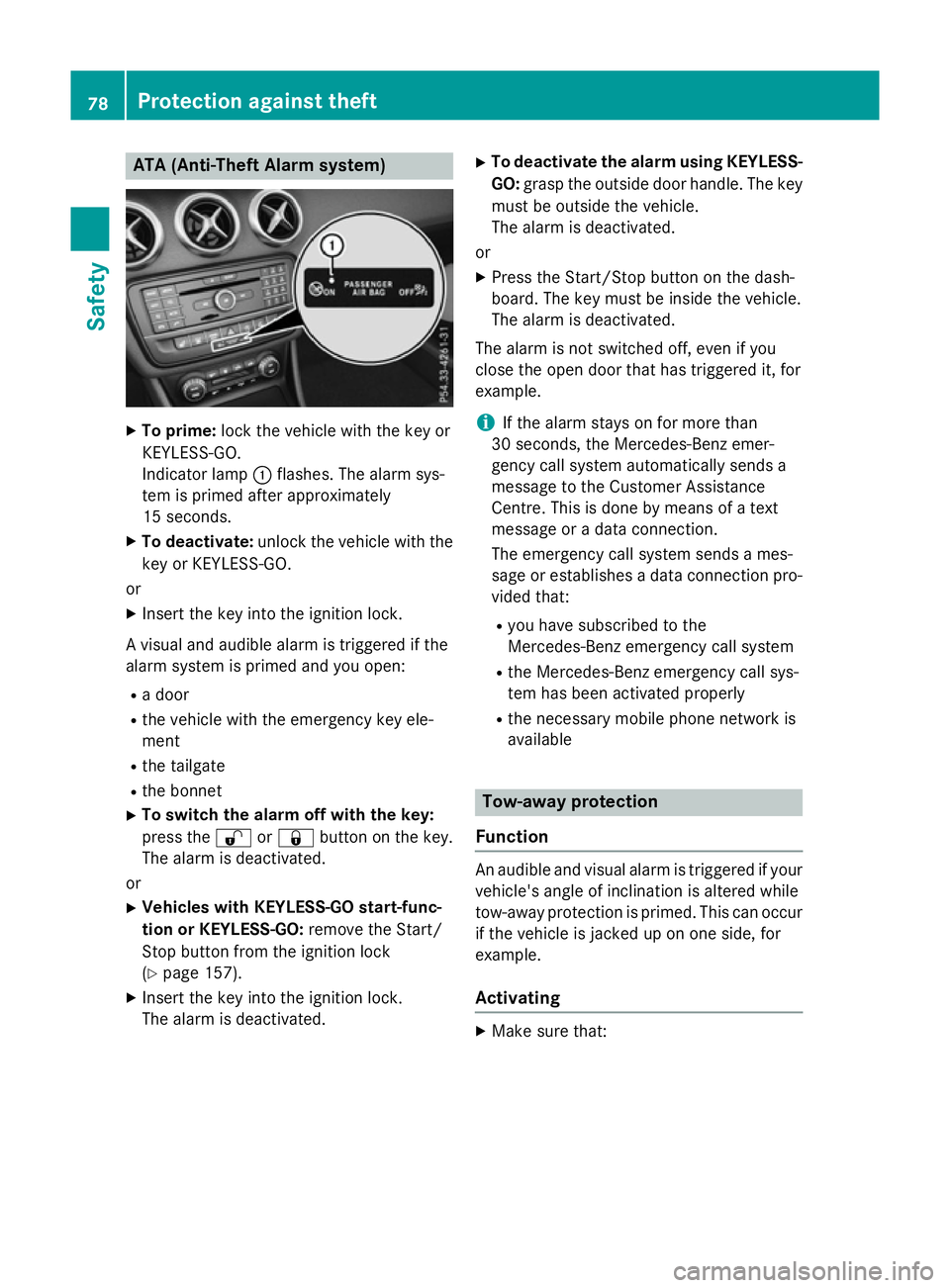
To prime: lock the vehicle with the key or
KEYLESS-GO.
Indicator lamp :flashes. The alarm sys-
tem is primed after approximately
15 seconds.
X To deactivate: unlock the vehicle with the
key or KEYLESS-GO.
or X Insert the key into the ignition lock.
A visual and audible alarm is triggered if the
alarm system is primed and you open:
R a door
R the vehicle with the emergency key ele-
ment
R the tailgate
R the bonnet
X To switch the alarm off with the key:
press the %or& button on the key.
The alarm is deactivated.
or X Vehicles with KEYLESS-GO start-func-
tion or KEYLESS-GO: remove the Start/
Stop button from the ignition lock
(Y page 157).
X Insert the key into the ignition lock.
The alarm is deactivated. X
To deactivate the alarm using KEYLESS-
GO: grasp the outside door handle. The key
must be outside the vehicle.
The alarm is deactivated.
or
X Press the Start/Stop button on the dash-
board. The key must be inside the vehicle.
The alarm is deactivated.
The alarm is not switched off, even if you
close the open door that has triggered it, for
example.
i If the alarm stays on for more than
30 seconds, the Mercedes‑Benz emer-
gency call system automatically sends a
message to the Customer Assistance
Centre. This is done by means of a text
message or a data connection.
The emergency call system sends a mes-
sage or establishes a data connection pro-
vided that:
R you have subscribed to the
Mercedes‑ Benz emergency call system
R the Mercedes‑Benz emergency call sys-
tem has been activated properly
R the necessary mobile phone network is
available Tow-away protection
Function An audible and visual alarm is triggered if your
vehicle's angle of inclination is altered while
tow-away protection is primed. This can occur if the vehicle is jacked up on one side, for
example.
Activating X
Make sure that: 78
Protection against theftSafety
Page 85 of 417
Useful information
i This Owner's Manual describes all mod-
els, series and optional equipment for your
vehicle that were available at the time of
going to press. National variations are pos- sible. Note that your vehicle may not be
equipped with all of the functions descri-
bed. This is also the case for systems and
functions relevant to safety.
i Read the information on qualified special-
ist workshops: (Y page 24). Key
Important safety notes
G
WARNING
If children are left unsupervised in the vehicle, they could:
R open doors, thereby endangering other per-
sons or road users
R get out and be struck by oncoming traffic
R operate vehicle equipment and become
trapped, for example
In addition, the children could also set the
vehicle in motion, for example, if they:
R release the parking brake
R shift the automatic transmission out of park
position P or shift manual transmission into
neutral
R start the engine
There is a risk of an accident and injury.
When leaving the vehicle, always take the key with you and lock the vehicle. Never leave
children and animals unattended in the vehi-
cle. Keep the keys out of the reach of children. G
WARNING
If you attach heavy or large objects to the key, the key could be unintentionally turned in the
ignition lock. This could cause the engine to
be switched off. There is a risk of an accident. Do not attach any heavy or large objects to the
key. Remove any bulky keyrings before insert-
ing the key into the ignition lock.
! Keep the key away from strong magnetic
fields. Otherwise, the remote control func-
tion could be affected.
Strong magnetic fields can occur in the
vicinity of powerful electrical installations.
Do not keep the key:
R with electronic devices, e.g. a mobile
phone or another key
R with metallic objects, e.g. coins or metal
film
R inside metallic objects, e.g. a metal case
Vehicles with KEYLESS-GO start function: do not keep the key in the luggage compart-
ment. Otherwise, the key may not be detec-
ted, e.g. when starting the engine using the
Start/Stop button.
United Kingdom only: G
WARNING
When the double locks are activated, the
doors can no longer be opened from the
inside. People in the vehicle can no longer get out, e.g. in hazardous situations. There is a
risk of injury.
Therefore, do not leave any people unsuper-
vised in the vehicle, particularly children, eld-
erly people or people in need of special assis-
tance. Do not activate the double lock when
people are in the vehicle.
If the vehicle has been locked from the out-
side, the double lock function is activated as
standard. It is then not possible to open the
doors from inside the vehicle. You can deac-
tivate the double lock function by deactivat-
ing the interior motion sensor (Y page 80).
The doors can then be opened from the inside after the vehicle has been locked from the
outside. You can open the rear doors from
inside the vehicle if they are not secured by
the child-proof locks (Y page 68). The anti-
theft alarm system is triggered if the door is 82
KeyOpening and closing
Page 161 of 417
Pressing the Start/Stop button several times
in succession corresponds to the different
key positions in the ignition lock. Pre-requi-
site for this is that:
R you do not depress the brake pedal (vehi-
cles with automatic transmission)
R you do not depress the clutch pedal (vehi-
cles with manual transmission)
If you depress the brake pedal and press the
Start/Stop button, the engine starts immedi- ately (vehicles with automatic transmission).
If you depress the clutch pedal and press the
Start/Stop button, the engine starts immedi- ately (vehicles with manual transmission).
To start the vehicle without actively using the
key:
R the Start/Stop button must be inserted in
the ignition lock
R the key must be in the vehicle
R the vehicle must not be locked with the key
or KEYLESS-GO (Y page 83)
Do not keep the KEYLESS-GO key:
R with electronic devices, e.g. a mobile
phone or another key
R with metallic objects, e.g. coins or metal
film
R inside metallic objects, e.g. a metal case
This can affect the functionality of KEYLESS-
GO.
If you lock the vehicle with the key's remote
control or with KEYLESS-GO, after a short
time:
R you will not be able to switch on the ignition
with the Start/Stop button
R you will not be able to start the engine with
the Start/Stop button until the vehicle is
unlocked again
If you lock the vehicle centrally using the but- ton on the front door (Y page 90), you can
continue to start the engine with the Start/
Stop button.
The engine can be switched off while the vehi-
cle is in motion by pressing and holding the
Start/Stop button for three seconds. This function operates independently of the ECO
start/stop automatic engine switch-off func-
tion.
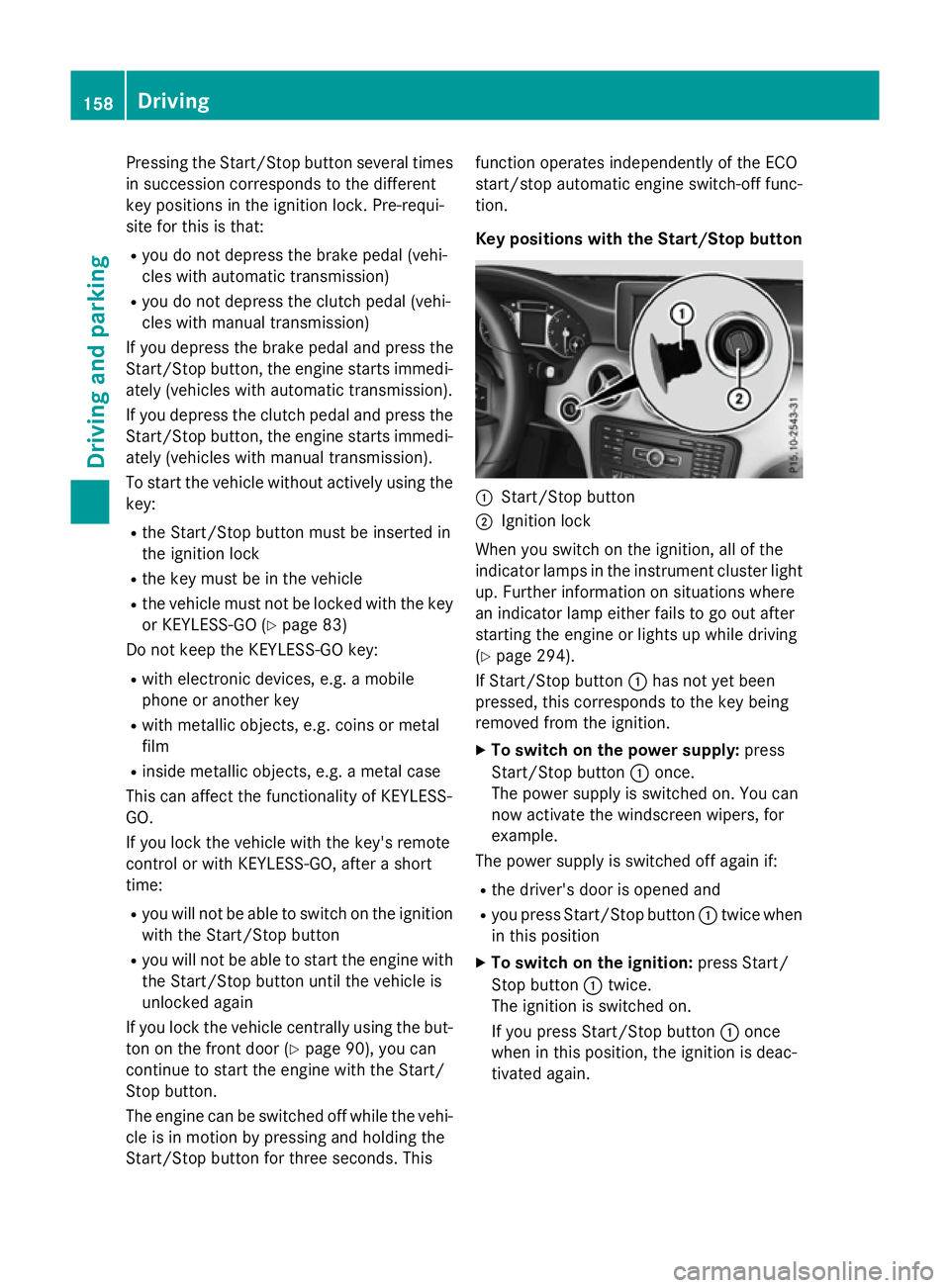
Key positions with the Start/Stop button
:
Start/Stop button
; Ignition lock
When you switch on the ignition, all of the
indicator lamps in the instrument cluster light up. Further information on situations where
an indicator lamp either fails to go out after
starting the engine or lights up while driving
(Y page 294).
If Start/Stop button :has not yet been
pressed, this corresponds to the key being
removed from the ignition.
X To switch on the power supply: press
Start/Stop button :once.
The power supply is switched on. You can
now activate the windscreen wipers, for
example.
The power supply is switched off again if:
R the driver's door is opened and
R you press Start/Stop button :twice when
in this position
X To switch on the ignition: press Start/
Stop button :twice.
The ignition is switched on.
If you press Start/Stop button :once
when in this position, the ignition is deac-
tivated again. 158
DrivingDriving and parking
Page 243 of 417
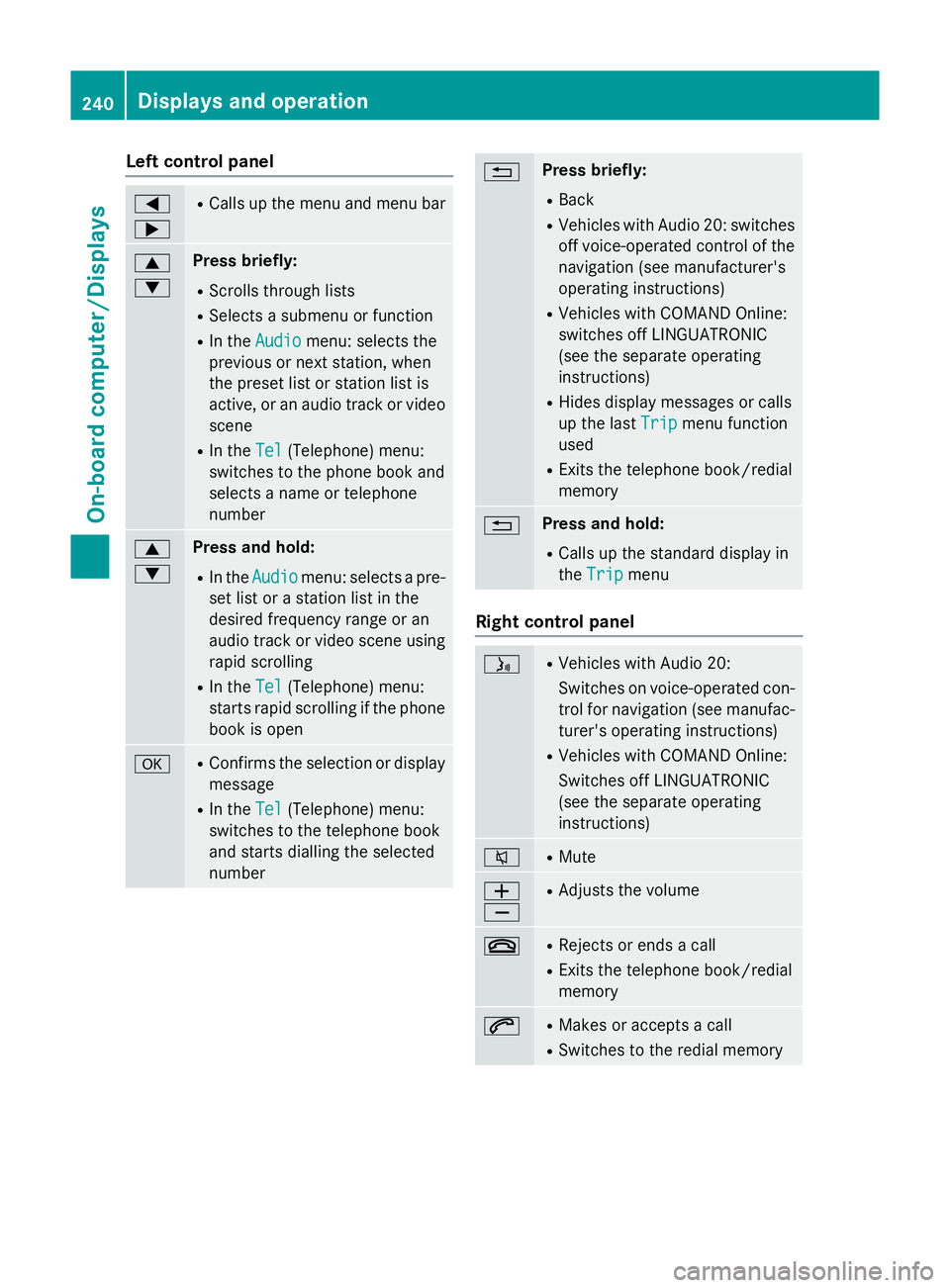
Left control panel
=
; R
Calls up the menu and menu bar 9
: Press briefly:
R Scrolls through lists
R Selects a submenu or function
R In the Audio Audio menu: selects the
previous or next station, when
the preset list or station list is
active, or an audio track or video
scene
R In the Tel
Tel (Telephone) menu:
switches to the phone book and
selects a name or telephone
number 9
: Press and hold:
R In the Audio Audio menu: selects a pre-
set list or a station list in the
desired frequency range or an
audio track or video scene using
rapid scrolling
R In the Tel Tel(Telephone) menu:
starts rapid scrolling if the phone book is open a R
Confirms the selection or display
message
R In the Tel
Tel(Telephone) menu:
switches to the telephone book
and starts dialling the selected
number % Press briefly:
R Back
R Vehicles with Audio 20: switches
off voice-operated control of thenavigation (see manufacturer's
operating instructions)
R Vehicles with COMAND Online:
switches off LINGUATRONIC
(see the separate operating
instructions)
R Hides display messages or calls
up the last Trip
Trip menu function
used
R Exits the telephone book/redial
memory % Press and hold:
R Calls up the standard display in
the Trip Trip menu Right control panel
ó R
Vehicles with Audio 20:
Switches on voice-operated con-
trol for navigation (see manufac-
turer's operating instructions)
R Vehicles with COMAND Online:
Switches off LINGUATRONIC
(see the separate operating
instructions) 8 R
Mute W
X R
Adjusts the volume ~ R
Rejects or ends a call
R Exits the telephone book/redial
memory 6 R
Makes or accepts a call
R Switches to the redial memory 240
Displays and operationOn-board computer/Displays
Page 244 of 417
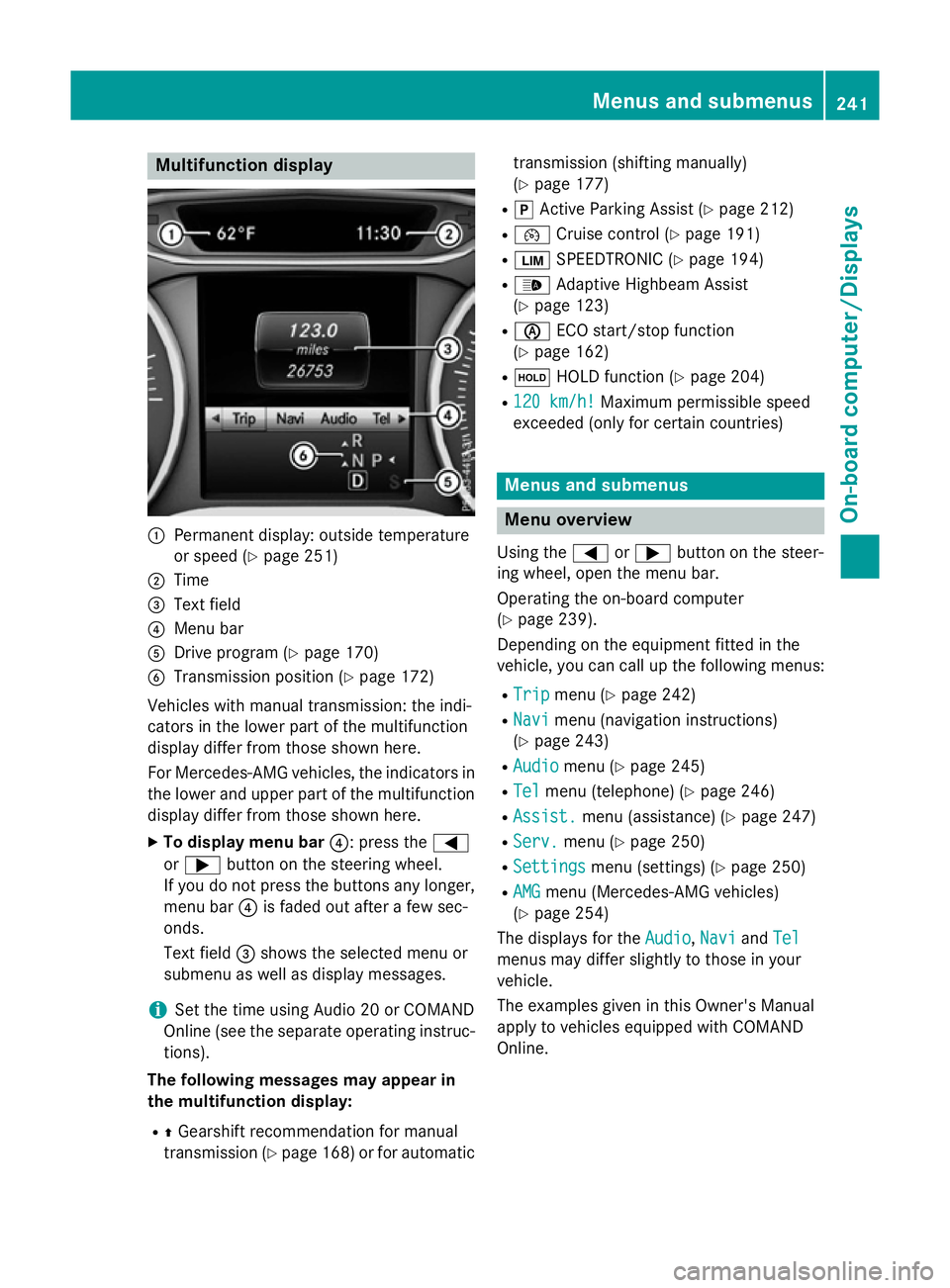
Multifunction display
:
Permanent display: outside temperature
or speed (Y page 251)
; Time
= Text field
? Menu bar
A Drive program (Y page 170)
B Transmission position (Y page 172)
Vehicles with manual transmission: the indi-
cators in the lower part of the multifunction
display differ from those shown here.
For Mercedes-AMG vehicles, the indicators in
the lower and upper part of the multifunction display differ from those shown here.
X To display menu bar ?: press the=
or ; button on the steering wheel.
If you do not press the buttons any longer, menu bar ?is faded out after a few sec-
onds.
Text field =shows the selected menu or
submenu as well as display messages.
i Set the time using Audio 20 or COMAND
Online (see the separate operating instruc-
tions).
The following messages may appear in
the multifunction display:
R ZGearshift recommendation for manual
transmission (Y page 168) or for automatic transmission (shifting manually)
(Y
page 177)
R j Active Parking Assist (Y page 212)
R ¯ Cruise control (Y page 191)
R È SPEEDTRONIC (Y page 194)
R _ Adaptive Highbeam Assist
(Y page 123)
R è ECO start/stop function
(Y page 162)
R ë HOLD function (Y page 204)
R 120 km/h!
120 km/h! Maximum permissible speed
exceeded (only for certain countries) Menus and submenus
Menu overview
Using the =or; button on the steer-
ing wheel, open the menu bar.
Operating the on-board computer
(Y page 239).
Depending on the equipment fitted in the
vehicle, you can call up the following menus:
R Trip Trip menu (Y page 242)
R Navi
Navi menu (navigation instructions)
(Y page 243)
R Audio
Audio menu (Y page 245)
R Tel
Tel menu (telephone) (Y page 246)
R Assist.
Assist. menu (assistance) (Y page 247)
R Serv.
Serv. menu (Y page 250)
R Settings
Settings menu (settings) (Y page 250)
R AMG
AMG menu (Mercedes-AMG vehicles)
(Y page 254)
The displays for the Audio
Audio,Navi
NaviandTel
Tel
menus may differ slightly to those in your
vehicle.
The examples given in this Owner's Manual
apply to vehicles equipped with COMAND
Online. Menus and submenus
241On-board computer/Displays Z
Page 249 of 417
X
Switch on COMAND Online and select
video DVD (see the separate operating
instructions).
X Press the =or; button on the steer-
ing wheel to select the Audio Audiomenu.
X To select the next or previous scene:
briefly press the 9or: button.
X To select a scene from the scene list
(rapid scrolling): press and hold the 9
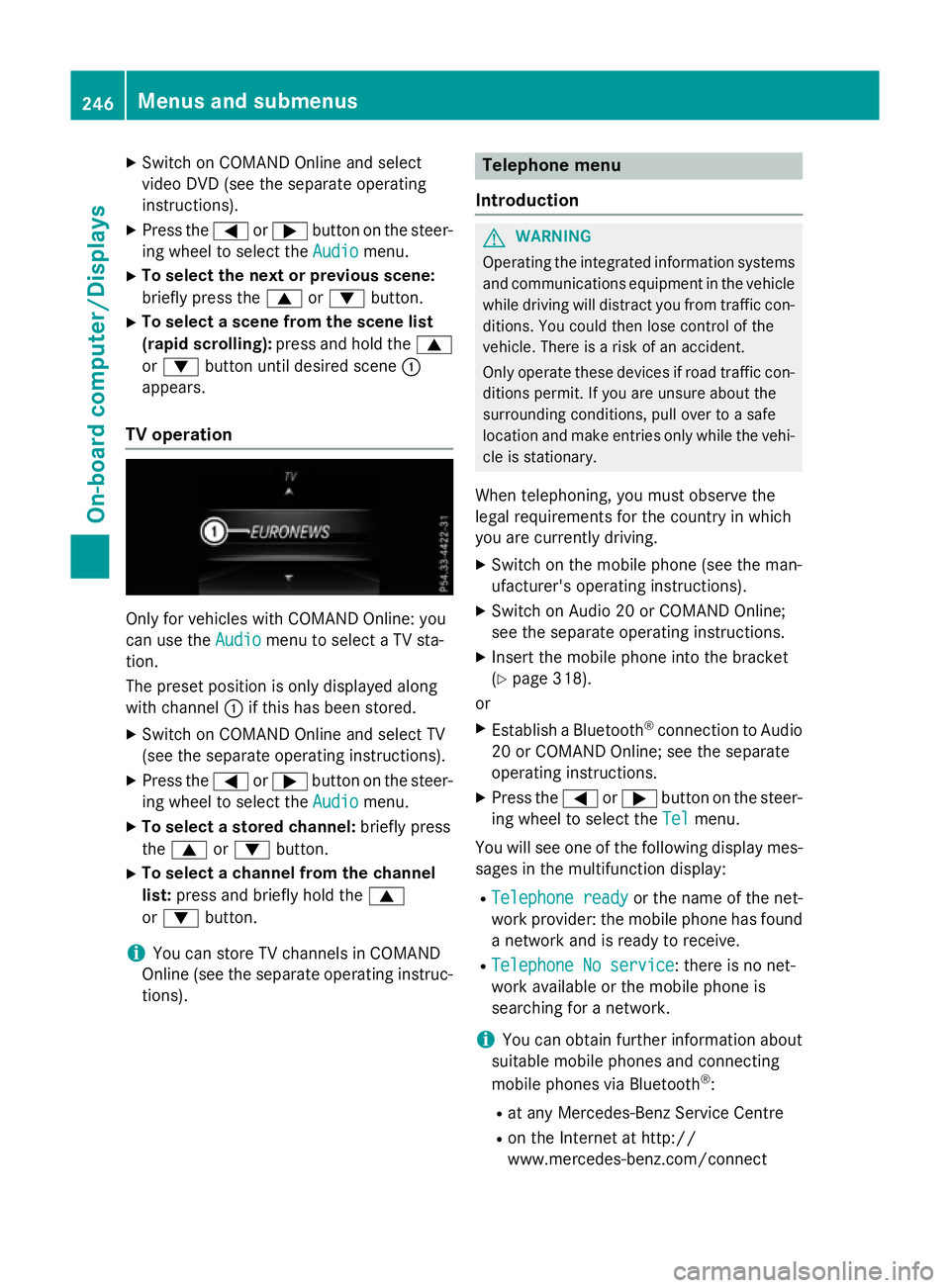
or : button until desired scene :
appears.
TV operation Only for vehicles with COMAND Online: you
can use the Audio Audiomenu to select a TV sta-
tion.
The preset position is only displayed along
with channel :if this has been stored.
X Switch on COMAND Online and select TV
(see the separate operating instructions).
X Press the =or; button on the steer-
ing wheel to select the Audio
Audio menu.
X To select a stored channel: briefly press
the 9 or: button.
X To select a channel from the channel
list: press and briefly hold the 9
or : button.
i You can store TV channels in COMAND
Online (see the separate operating instruc-
tions). Telephone menu
Introduction G
WARNING
Operating the integrated information systems and communications equipment in the vehicle
while driving will distract you from traffic con-
ditions. You could then lose control of the
vehicle. There is a risk of an accident.
Only operate these devices if road traffic con-
ditions permit. If you are unsure about the
surrounding conditions, pull over to a safe
location and make entries only while the vehi-
cle is stationary.
When telephoning, you must observe the
legal requirements for the country in which
you are currently driving. X Switch on the mobile phone (see the man-
ufacturer's operating instructions).
X Switch on Audio 20 or COMAND Online;
see the separate operating instructions.
X Insert the mobile phone into the bracket
(Y page 318).
or
X Establish a Bluetooth ®
connection to Audio
20 or COMAND Online; see the separate
operating instructions.
X Press the =or; button on the steer-
ing wheel to select the Tel Telmenu.
You will see one of the following display mes- sages in the multifunction display:
R Telephone ready
Telephone ready or the name of the net-
work provider: the mobile phone has found
a network and is ready to receive.
R Telephone No service
Telephone No service: there is no net-
work available or the mobile phone is
searching for a network.
i You can obtain further information about
suitable mobile phones and connecting
mobile phones via Bluetooth ®
:
R at any Mercedes-Benz Service Centre
R on the Internet at http://
www.mercedes-benz.com/connect 246
Menus and submenusOn-board computer/Displays