phone MERCEDES-BENZ A-CLASS HATCHBACK 2018 Manual Online
[x] Cancel search | Manufacturer: MERCEDES-BENZ, Model Year: 2018, Model line: A-CLASS HATCHBACK, Model: MERCEDES-BENZ A-CLASS HATCHBACK 2018Pages: 609, PDF Size: 10.73 MB
Page 406 of 609
Internet
radio Calling up In
ternetradio
Re quirements:
R There is an account on http://
www.me rcedes.me.
R The Internet radio service is activated.
R The data volume is available. Depending on
the count ry, data volume may
need tobe pur chased.
R Afast Internet connection for data transmis‐
sion free of inter fere nce.
% The functions and services are countr y-
dependent. For more information, consult a
Mercedes-Benz service centre. Multimedia sy
stem:
, © .
Radio #
Select TuneIn radio.
The Internet radio menu appears. The last
st ation set starts playing.
% The connection quality depends on the local
mobile phone reception. MBUX multimedia sy
stem 403
Page 409 of 609
The multimedia sy
stem supports thefo llow‐
ing form ats and data media:
Pe rm issible
fi le sy stems FA
T32, exFA T,NTFS
Pe rm issible
data car riers USB devices, iPod
®
/iPhone ®
,
MTP devices, Blue tooth®
audio equipment
Suppor ted
audio form ats MP3, WMA, AAC,
WAV,FLAC,
AL AC
Suppor ted
video form ats MPEG,
AVI, DivX, MKV, MP4,
M4V, WMV %
Obser vethefo llowing no tes:
R The multimedia sy stem supports a total
of up to50,000 files.
R Data storage media up to2 TB are sup‐
por ted (32‑bit address space).
R Due tothe large variet y of available
music and video files rega rding encod‐
ers, sampling rates and data transfer
ra tes, playback cannot be guaranteed. R
Due tothe wide range of USB devices
av ailable on the mar ket, pl ayback cann ot
be guaranteed for all USB devices.
R Videos up toFullHD (1920x1080) are
suppor ted.
R Cop y-pr otected music and video files or
DRM (Digital Rights Management)
enc rypte dfiles cannot be pla yed bac k.
R MP3 pla yers must support Media Trans‐
fe r Pr otocol (MTP).
In fo rm ation on copy right pr otection and
tradema rks
Au dio files which you create yourself (e.g. copies
of data storage media you make yourself) are
ge neral lysubject tocopyright pr otection. In
many count ries, reproductions are not permitted
without the prior consent of the copyright
holder, evenfo r private use. Make sure that you
know about the applicable copyright regulations
and that you co mply wi th th ese. Manufactured under licence from Dolby Laborato‐
ri
es. Dolb y,Dol byAudio and the double-D symbol
are trademar ksof Dolby Laboratories. 406
MBUX multimedia sy stem
Page 413 of 609
#
Select an audio device.
Auth orisation starts. A code is displa yed on
th e multimedia sy stem and on the mobile
phone. #
Ifth e codes are identical, confi rmonthe
audio equipment. #
Select Only as Bluetooth audio device .
The Blue tooth®
audio equipment is connec‐
te d with the multimedia sy stem.
Connecting pr eviously authorised Blue tooth ®
audio equipment #
Select a Blue tooth®
audio device from the
list.
The connection is es tablished. St
arting media playback Re
quirements:
R A data storage medium is connected tothe
multimedia sy stem. Multimedia sy
stem:
, © .
Media #
Select USBorBluetooth asthe media
source. Controlling media playback
Multimedia sy
stem:
, © .
Media #
Topause playback: select8. #
Tocontinue playba ck:select 6. #
Torepeat a track: select:.
Fo rth ere peat function there are thefo llow‐
ing settings:
R Select once: the active pla ylist is repea‐
te d.
R Select twice: the cur rent track is repea‐
te d.
R Select three times: there peat function
is deactivated. #
Toplay back trac ksinrandom order:
select 9. #
Towind a track forw ards or backwards:
ta p on the desired point on the timeline. #
Toselect the next track: selectü. #
Toselect the pr evious track: selectû. #
Toscroll through trac ksquickl y:press and
hold û orü. #
Toshow the cur rent track lis t:select the
track image shown. Ad
ditional options for setting media play‐
back Multimedia sy
stem:
, © .
Media
Calling up additional options #
Select f.
The additional options are shown.
The following options are available:
R Play similar tracks 41 0
MBUX multimedia sy stem
Page 446 of 609
Damaged tyres and a tyre pressure
that is
to o low can significantly impair braking and
handling characteristics. #
Do not drive on. #
Consult a qualified specialist workshop. If, af
terte n minutes, a tyre pressure of
200 kPa (2.0 bar/29 psi) has been achie ved: #
Switch off the tyre inflation compressor. #
Unscr ew thefilling hose from theva lve of the
defective tyre. &
WARNING Risk of accident from driving
wi th sealed tyres
A tyre temp orarily sealed with tyre sealant
impairs driving characteristics and is not
suitable for higher speeds. #
Adapt your driving style according lyand
drive carefull y. #
Do not exceed the maximum speed
limit with a tyre that has been repaired
using tyre sealant. #
Obser vethe maximum permissible speed for
a tyre sealed with tyre sealant 80 km/h. #
Affix th e upper section of the TIREFIT sticker
to the instrument clus ter in a location where
it will be easi lyseen bythe driver.
* NO
TEStaining from leaking tyre sealant Af
ter use, excess tyre sealant may leak out
from thefilling hose. #
Therefore, place thefilling hose in the
plastic bag that con tained the TIREFIT
kit. +
ENVIRONMEN
TALNO TEEnvironmental
pollution caused byenvironmen tally ir re‐
sponsible disposal Ty
re sealant contains polluta nts. #
Have the tyre sealant bottle disposed of
professionall y,e.g. at a Mercedes-Benz
Service Centre. #
Stow th e tyre sealant bottle, the tyre inflation
compressor and thewa rning triangle. #
Pull away immediatel y. #
Stop driving af ter appro ximately ten minu tes
and check the tyre pressure using the tyre
inflation compressor.
The tyre pressure must now be at least
13 0 kPa (1.3 bar/19 psi). &
WARNING Risk of accident due tothe
specified tyre pressure not being ach‐
ie ved
If th e specified tyre pressure is not achie ved
af te r a brief drive, the tyre is too badly dam‐
aged. The tyre sealant cannot repair the tyre
in this ins tance.
Dama ged tyres and a tyre pressure that is
to o low can significantly impair braking and
handling characteristics. #
Do not drive on. #
Consult a qualified specialist workshop. Countries
that ha veMercedes-Benz
Service24h: you will find a sticke r with thete le‐
phone number, e.g. on the B‑pillar on the driver's
side. Breakdown assis
tance 443
Page 486 of 609
Fr
equency band and maximum transmission
output Fr
equency band Maximum transmis‐
sion output
Sho rtwa ve
3 - 54 MHz 10
0 W
4 m waveband
74 - 88 MHz 30 W
2 m waveband
14 4 - 174 MHz 50 W
Tr unked radio sys‐
te m/T etra
380 - 460 MHz 10 W
70 cm waveband
420 - 450 MHz 35 W
Tw o-w ayradio
(2G/3G/4G) 10 W The
following devices can be used in theve hicle
without restrictions:
R two-w ayradios with a maximum transmission
output of up to100 mW
R two-w ayradios with transmit ter frequencies
in the 380 - 410 MHz frequency band and a
maximum transmission output of up to2 W
(trunked radio sy stem/T etra)
R mobile phones (2G/3G/4G)
There are no restrictions when positioning the
aerial on the outside of theve hicle forth efo llow‐
ing wavebands:
R trunked radio sy stem/T etra
R 70 cm waveband
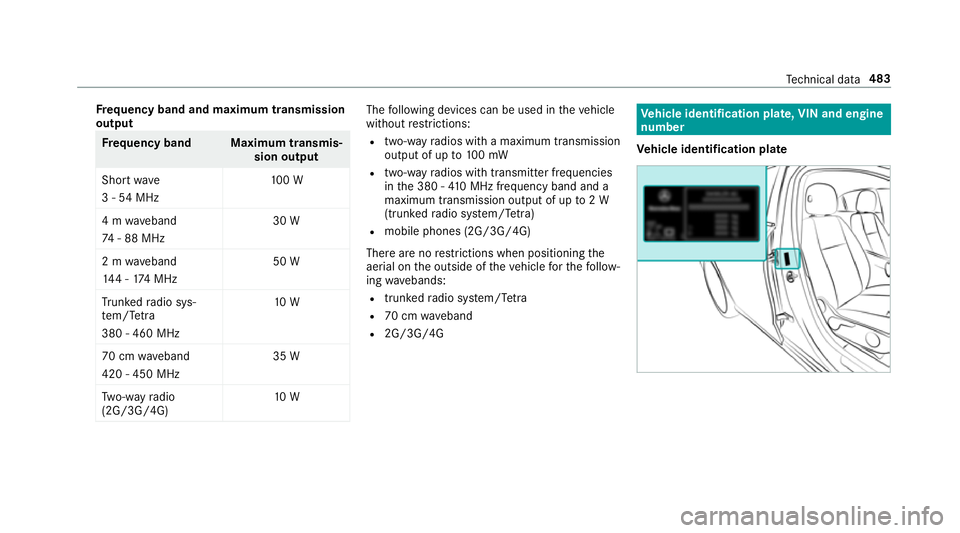
R 2G/3G/4G Ve
hicle identification plate, VIN and engine
number
Ve hicle identification plate Te
ch nical da ta483
Page 526 of 609
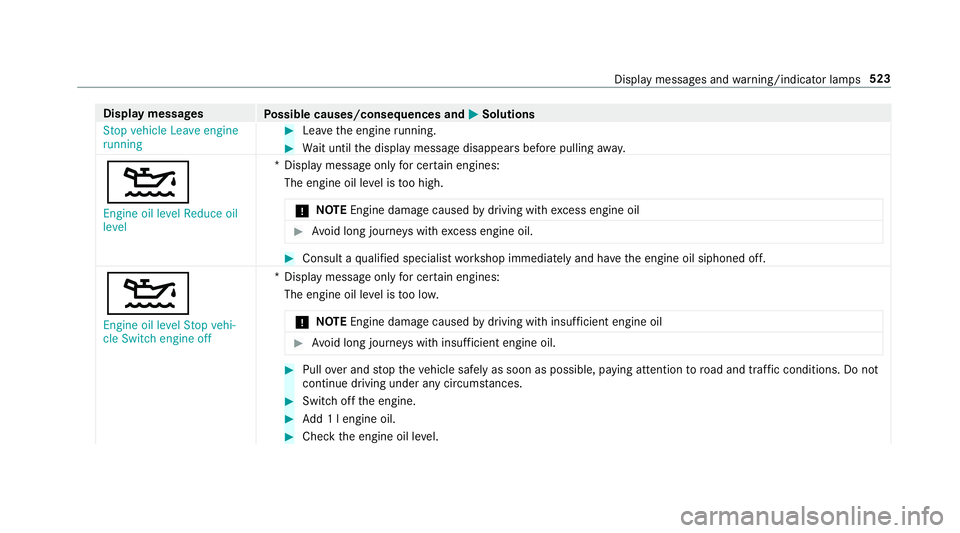
Display messages
Possible causes/consequences and M
MSolutions
Stop vehicle Leave engine
running #
Lea vethe engine running. #
Wait until the display message disappears before pulling away.
4 Engine oil level Reduce oil
level *D
isplay message only for cer tain engines:
The engine oil le vel is too high.
* NO
TEEngine dama gecaused bydriving with excess engine oil #
Avoid long journe yswith excess engine oil. #
Consult a qualified specialist workshop immediately and ha vethe engine oil siphoned off.
4 Engine oil level Stop vehi-
cle Switch engine off *D
isplay message only for cer tain engines:
The engine oil le vel is too lo w.
* NO
TEEngine dama gecaused bydriving with insuf ficient engine oil #
Avoid long journe yswith insuf ficient engine oil. #
Pull over and stop theve hicle safely as soon as possible, paying attention toroad and traf fic conditions. Do not
continue driving under any circums tances. #
Switch off the engine. #
Add 1 l engine oil. #
Check the engine oil le vel. Display messages and
warning/indicator lamps 523
Page 537 of 609
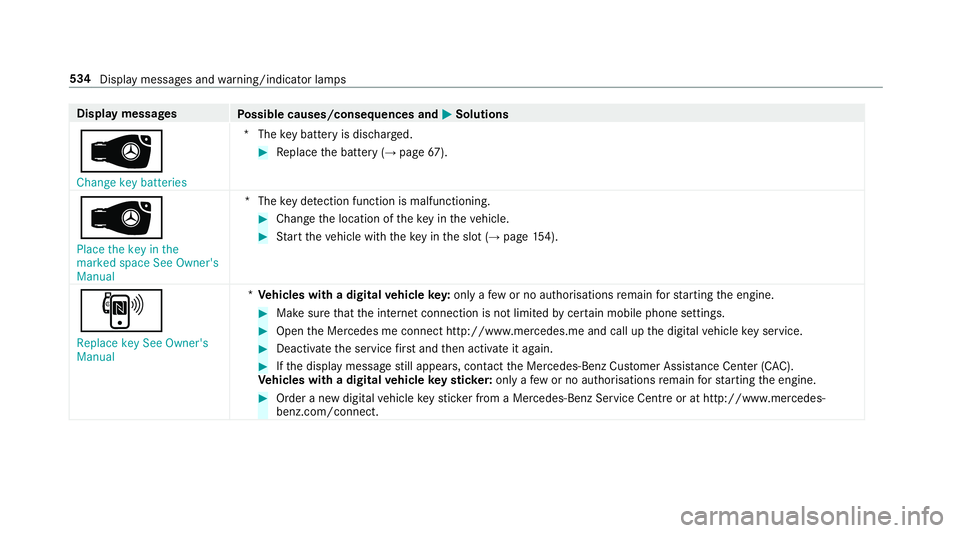
Display messages
Possible causes/consequences and M
MSolutions
 Change key batteries *T
hekey bat tery is dischar ged. #
Replace the battery (→ page67).
Â
Place the key in the
marked space See Owner's
Manual *T
hekey de tection function is malfunctioning. #
Change the location of theke y in theve hicle. #
Start theve hicle with theke y in the slot (→ page154).
,
Replace key See Owner's
Manual *
Ve hicles with a digital vehicle key:only a few or no authorisations remain forst arting the engine. #
Make sure that the internet connection is not limited bycer tain mobile phone settings. #
Open the Mercedes me connect http://www.mercedes.me and call up the digital vehicle key service. #
Deactivate the service firs t and then activate it again. #
Ifth e display message still appears, con tact the Mercedes-Benz Cus tomer Assis tance Center (C AC).
Ve hicles with a digital vehicle keyst icke r:on lyafe w or no authorisations remain forst arting the engine. #
Order a new digital vehicle keyst icke r from a Mercedes-Benz Service Centre or at http://www.mercedes-
benz.com/connect. 534
Display messa ges and warning/indicator lamps
Page 566 of 609
Ad
vanced sound sy stem
Ac tivating/deactivating au tomatic
vo lume adjustment .............................. 41 8
Ad justing the balance/fader ................4 18
Ad justing treble, mid-range and bass
settings ................................................ 41 8
Calling up the sound menu .................. 417
Information .......................................... 417
Af ter-sales service centre
see ASS YST PLUS
Air conditioning menu Calling up ............................................ 14 3
Air conditioning sy stem
see Climate control
Air distribution Setting ................................................ .141
Setting (multimedia sy stem) ................1 43
Air inl et
see Air-water duct
Air pressure see Tyre pressure
Air vents ................................................... 14 9
Ad justing (front) .................................. 14 9Ad
justing (rear) .................................... 15 0
Air vents
see Air vents
Ai r-re circulation mode ............................ 14 4
Air-water duct .......................................... 427
Ke eping free ........................................4 27
Airbag ........................................................ .37
Ac tivation .............................................. 31
Fr ont airbag (driver, front passenger) ....37
Ins tallation locations ............................ .37
Knee airbag ........................................... 37
Overview ............................................... 37
PA SSENGER AIR BAG indicator lamp .... .41
Pr otection ..............................................38
Re duced pr otection ...............................39
Side impact airbag ................................. 37
Wi ndow airbag ....................................... 37
Airflow Setting ................................................ .141
Alarm see Panic alarm
Alarm sy stem
see ATA (anti-theft alarm sy stem) Alternative
route
see Route
Ambiance light Setting (mutlimedia sy stem) ................1 30
Android Auto ............................................ 386
Connecting a mobile phone ................. 386
Ending ................................................. 387
Information .......................................... 386
Overview ............................................. 386
Sound settings .................................... 387
Tr ans ferred vehicle data ......................3 87
Animals Pets in theve hicle ................................. 63
Answering e-mails see In Car Of fice
Anti-lock braking sy stem
see ABS (Anti-lock Braking Sy stem)
Anti-skid chains
see Snow chains
Anti-theft ala rmsystem
see ATA (anti-theft alarm sy stem)
Anti-theft pr otection
Ad ditional door lock .............................. 69 Index
563
Page 567 of 609
Immobiliser ...........................................85
Anti-theft pr otection
see ATA (anti-theft alarm sy stem)
Anticipatory occupant pr otection
see PRE- SAFE®
(anticipatory occu‐
pant pr otection)
see PRE-SAFE ®
PLUS (anticipatory
occupant pr otection plus)
Apple CarPlay™ ....................................... 384
Connecting an iPhone ®
....................... 385
Ending .................................................3 86
No tes .................................................. 385
Overview ............................................. 384
Sound settings .................................... 386
Tr ans ferred vehicle data ......................3 87
Asht ray
Using ....................................................1 14
Assistance sy stems
see Driving saf ety sy stem
Assistant display Menu (on-board computer) .................. 254
ASS YST PLUS ............................................ 419
Battery disconnection periods ............. 420 Displaying
the service due date ........... 419
Fu nction/no tes .................................... 419
Re gular maintenance work .................. 419
Special service requ irements .............. .419
ATA (anti-theft ala rmsystem) .................. 85
Deactivating the alarm .......................... 85
Fu nction ................................................ 85
Fu nction of interior pr otection ............... 86
Priming/deactivating interior pr otec‐
tion ........................................................ 87
Priming/deactivating tow- aw ay pro‐
te ction ................................................... 86
To w- aw ay protection function ................86
AT TENTION ASSI ST.......................... 231, 233
Fu nction .............................................. 231
Setting ................................................. 233
Sy stem limitations ...............................2 31
At tention assistant
see ATTENTION ASSIST
Au thorised workshop
see Qualified specialist workshop
Au tomatic distance control
see Active Dis tance Assi stDISTRONIC
Au tomatic driving lights .........................12 3Au
tomatic engine start (ECO start/
sto p function) .......................................... 15 8
Au tomatic engine stop (ECO start/
sto p function) .......................................... 15 8
Au tomatic front passen ger front air‐
bag deacti vation sy stem
see Automatic front passenger front
airbag shutoff
Au tomatic front passen ger front air‐
bag shu toff ........................................... 40, 41
Fu nction of the automatic front
passenger front airbag deactivation
sy stem ................................................... 40
PA SSENGER AIR BAG indicator lamp .... .41
Au tomatic mir rorfo lding function
Ac tivating/deactivating ...................... .140
Au tomatic seat adjustment
Setting ................................................... 94
Au tomatic transmission
DIRECT SELECT le ver ........................... 16 4
Drive prog ram display ......................... .161
Drive prog rams ................................... .160
DY NA MIC SELECT switch .................... 16 0
Engaging drive position ....................... 16 6564
Index
Page 571 of 609
Ac
tivating/deactivating the synchro‐
nisation function (multimedia sys‐
te m) ..................................................... 14 4
Air di stribution settings .......................1 43
Air-recirculation mode ......................... 14 4
Au tomatic control ................................ 14 3
Defrosting the windscreen ...................1 41
Demi sting windo ws............................. 14 4
Fr ont air vents ..................................... 14 9
No te ..................................................... 141
Re ar air vents ...................................... 15 0
Re sidual heat ....................................... 14 4
Sets the air flow .................................... 141
Setting (multimedia sy stem) ................1 43
Setting the air distribution ...................1 41
Setting thete mp erature ....................... 141
St ationary heater/ ventilation .............. 14 4
Switching on/off ................................. 14 2
Switching there ar wind owheater
on/off .................................................. 141
THERMATIC contro l panel .................... 141
THERMOTRONIC contro l panel ............141
Ve ntilating theve hicle (con venience
opening) ................................................ 77
Coat hook on the tailgate ...................... .109 Cock
pit......................................................... 6
Overview ................................................. 6
Co ffee cup symbol
see ATTENTION ASSIST
Combination switch ................................124
Compass .................................................. 362
Compu ter
see On-board computer
Connection status
Displ aying ............................................ 399
Overview ............................................ .399
Connectivity Switching transmission of theve hicle
position on/off .................................... 313
Contacts .................................................. .374
Calling up ............................................ 375
Del eting .............................................. .377
Del eting favo urites .............................. 377
Downloading (from mobile phone) ....... 375
Importing ............................................. 376
Importing (o verview) ............................ 376
Information ..........................................3 74
Making a call ....................................... 376Na
me form at ...................................... .375
Options ................................................ 376
Saving as a favo urite .......................... .377
Selecting options for suggestions ........ 377
St oring .................................................3 76
Con venience closing ................................. 78
Con venience opening ................................ 77
Coolant (engine) Check le vel .......................................... 425
No tes .................................................. 492
Cooling see Climate control
Co pyright ...................................................29
Cornering light ........................................ .126
Cross Traf fic Alert .................................. .231
Crosswind Assist Function/no tes ................................... 189
Cruise control .......................................... 19 6
Ac tivating ............................................ 19 8
Buttons ................................................ 19 8
Calling up a speed .............................. .198
Deactivating ........................................ 19 8
Fu nction .............................................. 19 6568
Index