buttons MERCEDES-BENZ A-CLASS HATCHBACK 2018 Owners Manual
[x] Cancel search | Manufacturer: MERCEDES-BENZ, Model Year: 2018, Model line: A-CLASS HATCHBACK, Model: MERCEDES-BENZ A-CLASS HATCHBACK 2018Pages: 609, PDF Size: 10.73 MB
Page 6 of 609
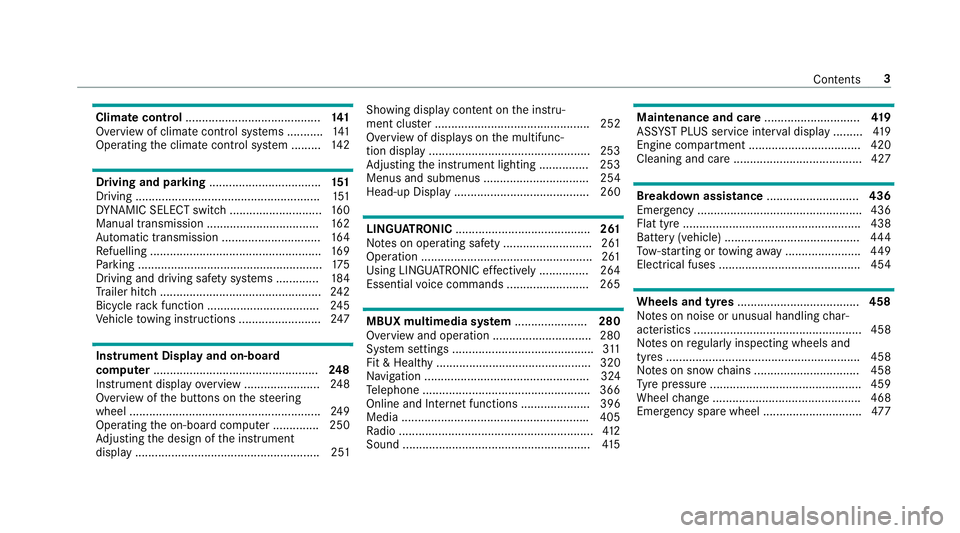
Climate control
......................................... 141
Overview of climate contro l systems ........... 141
Operating the climate control sy stem ......... 14 2 Driving and pa
rking .................................. 151
Driving ........................................................ 151
DY NA MIC SELECT switch ............................1 60
Manual transmission .................................. 16 2
Au tomatic transmission .............................. 16 4
Re fuelling .................................................... 16 9
Pa rking ........................................................ 175
Driving and driving sa fety sy stems .............1 84
Tr ailer hit ch................................................. 24 2
Bicycle rack function .................................. 24 5
Ve hicle towing instructions ........................ .247 Instrument Display and on-board
compu ter.................................................. 248
Instrument display overview ...................... .248
Overview of the buttons on thesteering
wheel ..........................................................2 49
Operating the on-board computer .............. 250
Ad justing the design of the instrument
display ........................................................ 251 Showing display conte
nt onthe instru‐
ment clus ter ............................................... 252
Overview of displa yson the multifunc‐
tion display .................................................2 53
Ad justing the instrument lighting ............... 253
Menus and submenus ................................ 254
Head-up Display ......................................... 260 LINGU
ATRO NIC ......................................... 261
No tes on operating saf ety .......................... .261
Operation ....................................................2 61
Using LINGU ATRO NIC ef fectively ............... 264
Essential voice commands ........................ .265 MBUX multimedia sy
stem ...................... 280
Overview and operation .............................. 280
Sy stem settings ...........................................3 11
Fit & Healt hy............................................... 320
Na vigation .................................................. 324
Te lephone .................................................. .366
Online and Internet functions ..................... 396
Media ........................................................ .405
Ra dio ...........................................................4 12
Sound ......................................................... 41 5 Maintenance and care
.............................419
ASS YST PLUS service inter val display ........ .419
Engine compartment .................................. 420
Cleaning and care ....................................... 427 Breakdown assistance
............................436
Emergency ................................................. .436
Flat tyre ...................................................... 438
Battery (vehicle) ......................................... 444
To w- starting or towing away ....................... 449
Electrical fuses ........................................... 454 Wheels and tyres
..................................... 458
No tes on noise or unusual handling char‐
acteristics .................................................. .458
No tes on regular lyinspecting wheels and
tyres .......................................................... .458
No tes on snow chains ................................ 458
Ty re pressure .............................................. 459
Wheel change ............................................ .468
Emergency spa rewheel .............................. 477 Con
tents 3
Page 20 of 609
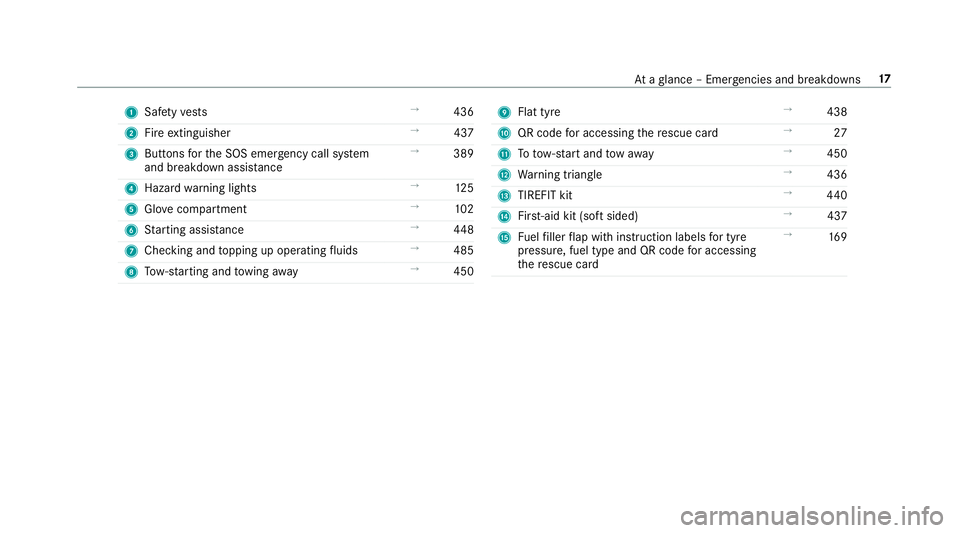
1
Safetyve sts →
436
2 Fire extinguisher →
437
3 Buttons forth e SOS emer gency call sy stem
and breakdown assis tance →
389
4 Haza rdwa rning lights →
12 5
5 Glovecompa rtment →
102
6 Starting assis tance →
448
7 Checking and topping up operating fluids →
485
8 Tow- starting and towing away →
450 9
Flat tyre →
438
A QR code for accessing there scue card →
27
B Totow- start and tow aw ay →
450
C Warning triangle →
436
D TIREFIT kit →
440
E First-aid kit (so ftsided) →
437
F Fuelfiller flap with instruction labels for tyre
pressu re, fuel type and QR code for accessing
th ere scue card →
16 9 At
aglance – Emer gencies and breakdowns 17
Page 66 of 609
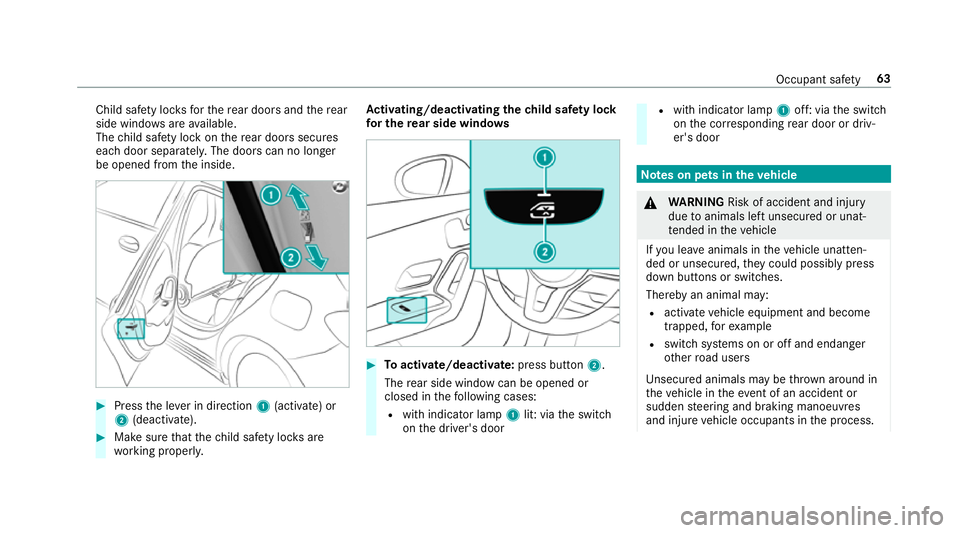
Child saf
ety loc ksforth ere ar doors and there ar
side wind owsareavailable.
The child saf ety lock on there ar doors secures
each door separatel y.The doors can no longer
be opened from the inside. #
Press the le ver in direction 1(activate) or
2 (deactivate). #
Make sure that thech ild saf ety loc ksare
wo rking properly. Ac
tivating/deactivating the child saf ety lock
fo r the rear side windo ws #
Toactivate/deacti vate:press button 2.
The rear side wind owcan be opened or
closed in thefo llowing cases:
R with indicator lamp 1lit: via the switch
on the driver's door R
with indicator lamp 1off: via the switch
on the cor responding rear door or driv‐
er's door Note
s on pets in theve hicle &
WARNING Risk of accident and inju ry
due toanimals left unsecured or unat‐
te nded in theve hicle
If yo u lea veanimals in theve hicle unatten‐
ded or unsecured, they could possib lypress
down buttons or switches.
Thereby an animal may:
R activate vehicle equipment and become
trapped, forex ample
R swit chsystems on or off and endanger
ot her road users
Uns ecured animals may be throw n around in
th eve hicle in theeve nt of an accident or
sudden steering and braking manoeuvres
and injure vehicle occupants in the process. Occupant saf
ety63
Page 69 of 609
The indicator lamp in
the door trim on the driv‐
er's side flashes when theve hicle is loc ked from
outside. The indicator lamp goes out if theve hi‐
cle is loc ked from inside or while theve hicle is in
motion.
If th eve hicle is not opened within appr oximately
40 seconds af ter unlocking, it loc ksagain. Anti-
th eft pr otection is primed again.
Do not keep theke yto ge ther with electronic
devices or me tal objects. This can af fect the
ke y's functionalit y.
% If battery check lamp 2does not light up
af te r pressing the% or& button, the
battery is dischar ged.
Re placing theke y bat tery ( →page 67). Ac
tivating/deactivating the acoustic lo cking
ve rification signal Multimedia sy
stem:
, © .
Settings .
Vehicle #
Activate or deacti vate Acoustic lock . Ac
tivating/deactivating the panic alarm Re
quirements:
% The panic alarm function is only available in
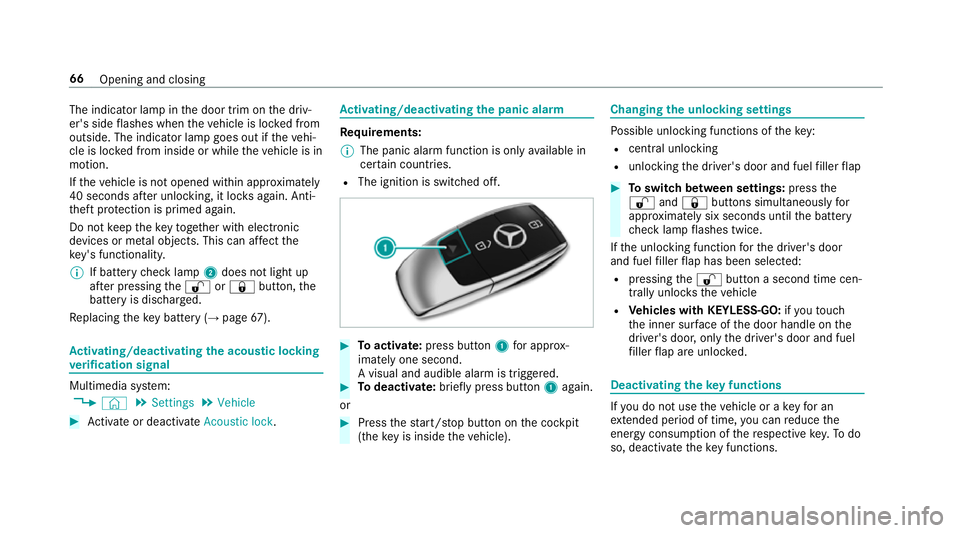
cer tain countries.
R The ignition is switched off. #
Toactivate: press button 1for appro x‐
ima tely one second.
A visual and audible alarm is triggered. #
Todeactivate: briefly press but ton1 again.
or #
Press thest art/ stop button on the cockpit
(the key is inside theve hicle). Changing
the unlocking settings Po
ssible unlocking functions of theke y:
R cent ral unlocking
R unlocking the driver's door and fuel filler flap #
Toswitch between settings: pressthe
% and& buttons simultaneously for
appr oximately six seconds until the battery
ch eck lamp flashes twice.
If th e unlocking function forth e driver's door
and fuel filler flap has been selec ted:
R pressing the% button a second time cen‐
trally unloc kstheve hicle
R Vehicles with KEYLESS-GO: ifyo uto uch
th e inner sur face of the door handle on the
driver's door, only the driver's door and fuel
fi ller flap are unlo cked. Deactivating
theke y functions If
yo u do not use theve hicle or a keyfo r an
ex tended pe riod of time, you can reduce the
energy consum ption of there spective key.Todo
so, deactivate theke y functions. 66
Opening and closing
Page 79 of 609
Side windo
ws Opening and closing
the side windo ws &
WARNING Risk of becoming trapped
when opening a side window
When you open a side wind ow, parts of the
body could be dr awn in or become trapped
between the side window and window frame. #
When opening, make sure that nobody
is touching the side windo w. #
If someone is trapped, release the but‐
to n immedia tely or pull it in order to
close the side window again. &
WARNING Risk of becoming trapped
when closing a side window
When closing a side windo w,body parts
could be trapped in the closing area in the
process. #
When closing, make sure that no body
parts are in the closing area. #
If someone is trapped, release the but‐
to n immedia tely or press the button in
order toreopen the side windo w. &
WARNING Risk of becoming trapped
when children opera tethe side windo ws
Children could become trapped if they oper‐
ate the side windo ws, particularly when unat‐
te nded. #
Activate theove rride feature forthe
re ar side wind ows. #
When leaving theve hicle, alw aysta ke
th eke y with you and lock theve hicle. #
Never lea vechildren unat tended in the
ve hicle. Re
quirements:
R The po wer supply or the ignition is switched
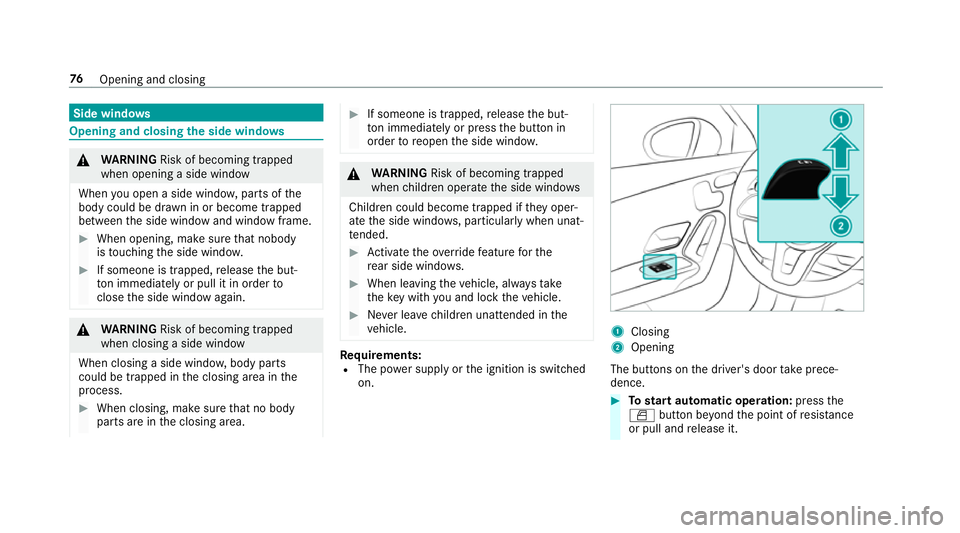
on. 1
Closing
2 Opening
The buttons on the driver's door take prece‐
dence. #
Tostart automatic operation: pressthe
W button be yond the point of resis tance
or pull and release it. 76
Opening and closing
Page 93 of 609
Children in particular could acciden
tally
press the electrical seat adjustment buttons
and become trapped. #
While moving the seats, make sure that
hands or other body parts do not get
under the le ver assembly of the seat
adjustment sy stem. &
WARNING Risk of inju rydue tohead
re stra ints which are not fitted or are
adjus ted incor rectly
If head restra ints are not fitted or are adjus‐
te d incor rectl y,they cannot pr ovide pr otec‐
tion as intended.
There is an increased risk of injury in the
head and neck area, e.g. in theeve nt of an
accident or when braking. #
Alw ays drive with the head restra ints
fi tted. #
Before driving off, ma kesure forev ery
ve hicle occupant that the cent reofthe
head restra int supports the back of the
head at about eye le vel. Do not inter
change the head restra ints of the
front and rear seats. Otherwise, you will not be
able toadjust the height and angle of the head
re stra ints cor rectl y.
Ad just the head restra int fore -and-aft position so
th at it is as close as possible tothe back of your
head. &
WARNING Risk of inju ryor death due to
incor rect seat position
The seat belt does not of ferth e intended
le ve l of pr otection if you ha venot mo vedthe
seat backrest toan almost vertical position.
When braking or in theeve nt of an accident,
yo u could slide underneath the seat belt and
sus tain abdominal or neck injuries, forex am‐
ple. #
Adjust the seat proper lybefore begin‐
ning your journe y. #
Alw ays ensure that the seat backrest is
in an almost vertical position and that
th e shoulder section of your seat belt is
ro uted across the cent reofyour shoul‐
der. #
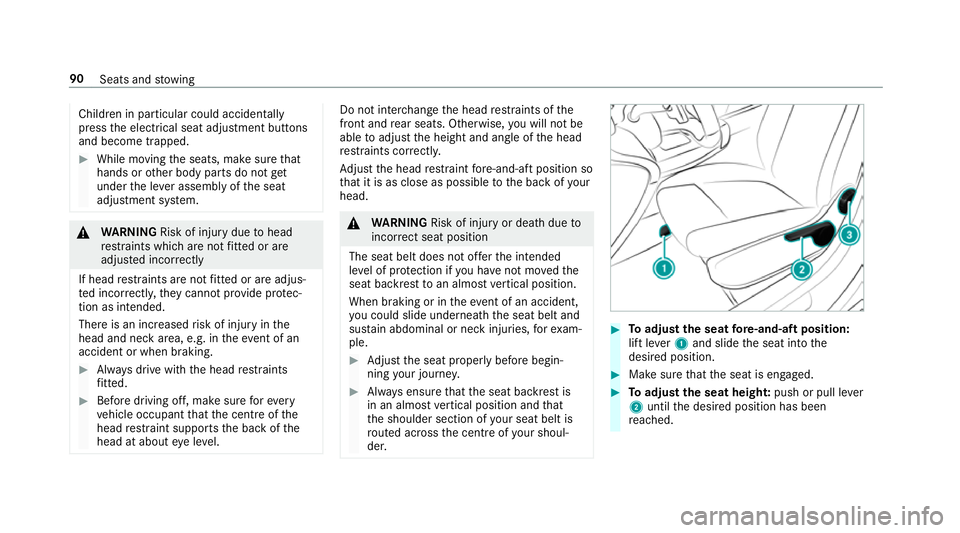
Toadjust the seat fore -and-aft position:
lift le ver1 and slide the seat into the
desired position. #
Make sure that the seat is engaged. #
Toadjust the seat heigh t:push or pull le ver
2 until the desired position has been
re ached. 90
Seats and stowing
Page 95 of 609
Ad
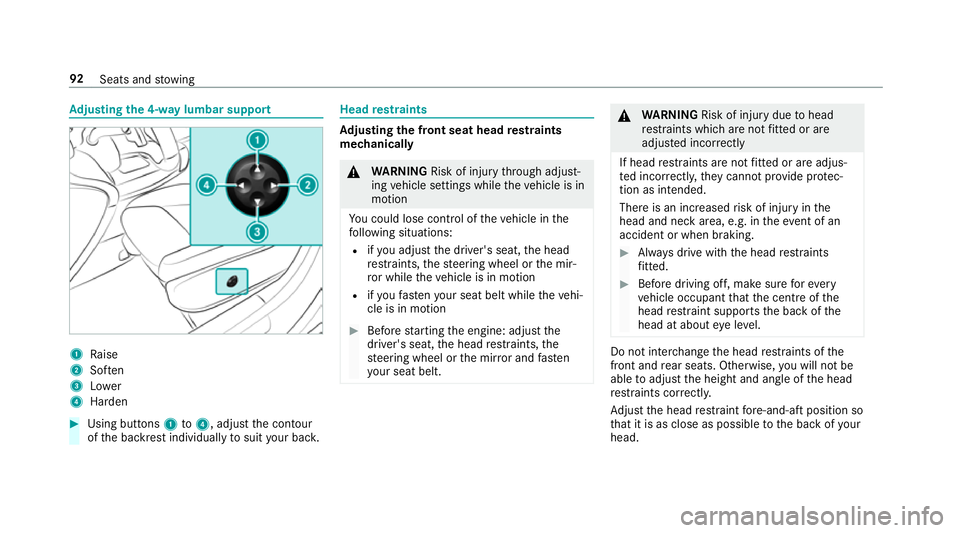
justing the 4-w aylumbar support 1
Raise
2 Soften
3 Lower
4 Harden #
Using buttons 1to4 , adjust the conto ur
of the backrest individually tosuit your bac k. Head
restra ints Ad
justing the front seat head restra ints
mechanically &
WARNING Risk of inju rythro ugh adjust‐
ing vehicle settings while theve hicle is in
motion
Yo u could lose cont rol of theve hicle in the
fo llowing situations:
R ifyo u adjust the driver's seat, the head
re stra ints, thesteering wheel or the mir‐
ro r while theve hicle is in motion
R ifyo ufast enyour seat belt while theve hi‐
cle is in motion #
Before starting the engine: adjust the
driver's seat, the head restra ints, the
st eering wheel or the mir ror and fasten
yo ur seat belt. &
WARNING Risk of inju rydue tohead
re stra ints which are not fitted or are
adjus ted incor rectly
If head restra ints are not fitted or are adjus‐
te d incor rectl y,they cannot pr ovide pr otec‐
tion as intended.
There is an increased risk of injury in the
head and neck area, e.g. in theeve nt of an
accident or when braking. #
Alw ays drive with the head restra ints
fi tted. #
Before driving off, ma kesure forev ery
ve hicle occupant that the cent reofthe
head restra int supports the back of the
head at about eye le vel. Do not inter
change the head restra ints of the
front and rear seats. Otherwise, you will not be
able toadjust the height and angle of the head
re stra ints cor rectl y.
Ad just the head restra int fore -and-aft position so
th at it is as close as possible tothe back of your
head. 92
Seats and stowing
Page 98 of 609
#
Select OnorOff.
% This setting is available on lyfor individual
user profiles. Forth e guest profile, auto‐
matic seat adjustment cann otbe switched
on or off. Further information about user
profiles (→ page 289).
Ad justing
The vehicle calculates a suitable on the basis of
th e driver's body size and sets this direct ly. #
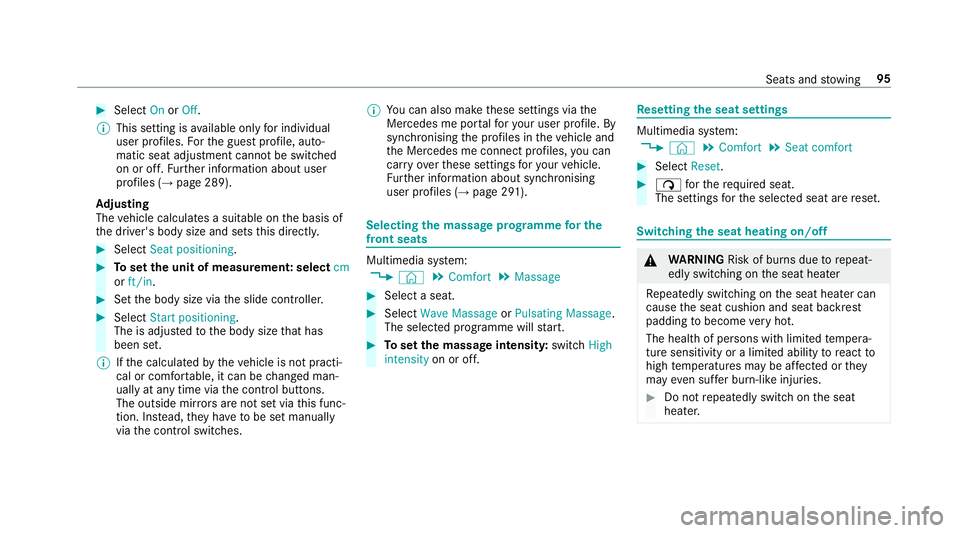
Select Seat positioning . #
Toset the unit of measurement: select cm
or ft/in. #
Set the body size via the slide controller. #
Select Start positioning.
The is adjus tedto the body size that has
been set.
% Ifth e calculated bytheve hicle is not practi‐
cal or comfor table, it can be changed man‐
ually at any time via the control buttons.
The outside mir rors are not set via this func‐
tion. Ins tead, they have tobe set manually
via the control switches. %
You can also make these settings via the
Mercedes me por talfo ryo ur user profile. By
syn chro nising the profiles in theve hicle and
th e Mercedes me connect profiles, you can
car ryove rth ese settings foryo ur vehicle.
Fu rther information about synchronising
user profiles (→ page 291). Selecting
the massage prog ramme for the
front seats Multimedia sy
stem:
, © .
Comfort .
Massage #
Select a seat. #
Select Wave Massage orPulsating Massage .
The selected prog ramme will start. #
Toset the massage intensit y:switch High
intensity on or off. Re
setting the seat settings Multimedia sy
stem:
, © .
Comfort .
Seat comfort #
Select Reset. #
ß forth erequ ired seat.
The settings forth e selected seat are reset. Switching
the seat heating on/off &
WARNING Risk of bu rns due torepeat‐
edly switching on the seat heater
Re peatedly switching on the seat heater can
cause the seat cushion and seat backrest
padding tobecome very hot.
The health of persons with limited temp era‐
ture sensitivity or a limited ability toreact to
high temp eratures may be af fected or they
may even su ffer burn-like injuries. #
Do not repeatedly switch on the seat
heater. Seats and
stowing 95
Page 102 of 609
th
at no one has any body parts in the
sweep of the driver's seat.
If th ere is a risk of becoming trapped bythe
driver's seat: #
Press the seat adjustment switch.
The adjustment process is stopped. #
Never lea vechildren unat tended in the
ve hicle. #
When leaving theve hicle, alw aysta ke
th eke y with you and lock theve hicle.
This also applies tothe Digital Vehicle
Ke y if the "Digital Vehicle Key" function
is activated via Mercedes me connect. Yo
u can stop the adjustment process bypress‐
ing one of the memory function position buttons. &
WARNING Risk of becoming trapped
du ring acti vation of the easy entry and
ex itfeature bychildren
If ch ildren activate the easy entry andexit
fe ature, they can become trapped, pa rticu‐
lar lywhen unat tended. #
Never lea vechildren unat tended in the
ve hicle. #
When leaving theve hicle, alw aysta ke
th eke y with you and lock theve hicle. When
the easy entry andexitfeature is active,
th e driver's seat mo ves backwards and the back‐
re st is mo vedto ast eeper position when:
R you swit chthe ignition off when the driver's
door is open
R you open the driver's door when the ignition
is switched off
% The driver's seat will mo vebackwards only if
it is not already in there armost position.
The seat backrest will mo veforw ards on lyif
it is not already in the frontmost position.
The driver's seat mo ves back tothe last drive
position in thefo llowing cases:
R you swit ch the ignition on when the driver's
door is closed
R you close the driver's door when the ignition
is switched on The last drive position is
stored in thefo llowing
situations:
R you swit ch the ignition off
R you call up the seat settings via the memory
function
R you sa vethe seat setting using the memory
function Setting
the easy entry and exitfeature Re
quirements:
R Automatic seat adju stment has been activa‐
te d (→ page 94).
Multimedia sy stem:
, © .
Settings .
Fahrzeug (Vehi‐
cle) .
Easy Entry/Exit #
Activate or deacti vate the function.
% Ifyo u use an individual user profile and ha ve
set your body size, this information is car ried
ove rfo rth e easy entry andexitfeature.
Au tomatically into the cor rect position. For
fur ther information about automatic seat
positioning (→ page94). Seats and
stowing 99
Page 144 of 609
Overview of climate control sy
stems Note
s on climate control An interior air
filter must alw ays be used so that
th e air conditioning sy stem, pollution le vel moni‐
to ring and the air filtering function workcor‐
re ctly. Ma kesure that thefilter is ins talled cor‐
re ctly and thefilter housing in the engine com‐
partment is closed cor rectly using the cap and
alw ays tightly sealed when in operation. Use fil‐
te rs recommended and appr ovedby Mercedes-
Benz. Alw ays ha veservice workcar ried out at a
qu alified specialist workshop. THERMATIC control panel
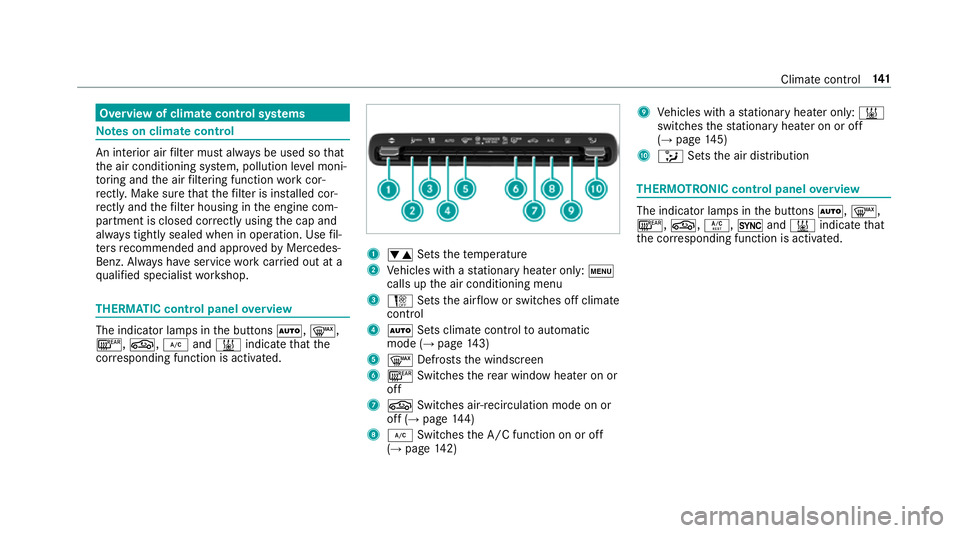
overview The indicator lamps in
the buttons Ã,¬,
¤, g,¿and& indicate that the
cor responding function is activated. 1
w Setsthete mp erature
2 Vehicles with a stationary heater on ly:t
calls upthe air conditioning menu
3 H Setsthe air flow or switches off climate
control
4 Ã Sets climate control toautomatic
mode (→ page143)
5 ¬ Defrosts the windscreen
6 ¤ Switches there ar wind owheater on or
off
7 g Switches air-recirculation mode on or
off (→ page144)
8 ¿ Switches the A/C function on or off
(→ page 142) 9
Vehicles with a stationary heater on ly:&
swit ches thest ationary heater on or off
(→ page 145)
A _ Setsthe air distribution THERMOTRONIC control panel
overview The indicator lamps in
the buttons Ã,¬,
¤, g,Á,0and& indicate that
th e cor responding function is activated. Climate
control 141