ECO mode MERCEDES-BENZ AMG GT ROADSTER 2019 Owner's Manual
[x] Cancel search | Manufacturer: MERCEDES-BENZ, Model Year: 2019, Model line: AMG GT ROADSTER, Model: MERCEDES-BENZ AMG GT ROADSTER 2019Pages: 298, PDF Size: 7.9 MB
Page 7 of 298
Alarm system
see ATA (Anti-Theft Alarm system)
AMG
Adaptive sport suspension sys-
tem ................................................ 147
E-SELECT lever .............................. 117
Menu (on-board computer) ............ 170
Performance Seat ............................ 87
SPEEDSHIFT DCT 7-gear sport
transmission .................................. 117
AMG ceramic brakes .........................133
AMG high-performance and
ceramic brakes .................................. 133
AMG sports exhaust system ............ 114
Animals
see Pets in the vehicle
Anti-entrapment function
see Reversing feature
Anti-lock braking system
see ABS (Anti-lock Braking System)
Anti-skid chains
see Snow chains
Anti-theft alarm system
see ATA (Anti-Theft Alarm system)
Ashtray ............................................... 221
Assistance display (on-board com-
puter) ................................................. .167
Assistance menu (on-board com-
puter) ................................................. .168
Assistance system
see Driving systems
ASSYST PLUS
Displaying a service message ....... .241
Hiding a service message .............. 241
Resetting the service interval dis-
play ................................................ 241
Service message ............................ 240
Special service requirements ......... 241
ATA (Anti-Theft Alarm system)
Activating/deactivating ................... 64
Function .......................................... .64
Switching off the alarm .................... 64
ATTENTION ASSIST
Activating/deactivating ................. 168
Display message ............................ 189
Function/note s............................. 154 Authorized Mercedes-Benz Center
see Qualified specialist workshop
Authorized workshop
see Qualified specialist workshop
AUTO lights
Display message ............................ 186
see Lights
Automatic car wash (care) ............... 242
Automatic engine start (ECO start/
stop function) .................................... 114
Automatic engine switch-off (ECO
start/stop function) .......................... 113
Automatic headlamp mode ................ 96
Automatic transmission
Accelerator pedal position ............. 120
Automatic drive program ............... 122
Changing gear ............................... 120
Display message ............................ 194
Double-clutch function .................. 120
Drive program display .................... 119
Driving tips .................................... 120
Emergency running mode .............. 125
Engaging neutral ............................ 118
Engaging park position automati-
cally ............................................... 118
Engaging reverse gear ................... 118
Engaging the park position ............ 118
Gearshift recommendation ............ 123
Gliding mod e................................. 120
Important safety notes .................. 117
Kickdown ....................................... 120
Manual drive progra m.................... 122
Manual mod e................................. 123
Oil temperature (on-board com-
puter) ............................................. 170
Overview ........................................ 117
Problem (malfunction) ................... 125
Pulling away ................................... 112
Rocking the vehicle free ................ 120
Shift override ................................. 124
Starting the engine ........................ 112
Steering wheel paddle shifters ...... 121
Transmission position display ........ 119
Transmission positions .................. 119
Automatic transmission emer-
gency mode ....................................... 125 Index
5
Page 9 of 298
Seat belt ........................................ 248
Seat cove
r..................................... 248
Sensors ......................................... 246
Soft top .......................................... 245
Steering wheel ............................... 247
Trim pieces .................................... 247
Washing by hand ........................... 243
Wheels ........................................... 245
Windows ........................................ 245
Wiper blades .................................. 246
CD
see also Digital Operator's Man-
ual .................................................. 209
CD player (on-board computer) ........ 165
Center console
Overview .......................................... 36
Central control panel
Overview .......................................... 38
Central locking
Locking/unlocking (SmartKey )........ 66
Changing the media source ............. 165
Charge retention
Socket ........................................... 130
Charge-air pressure (on-board
computer) .......................................... 170
Child
Restraint system .............................. 56
Child seat
Forward-facing restraint system ...... 57
On the front-passenger sea t............ 57
Rearward-facing restraint system .... 57
Children
Special seat belt retractor ............... 56
Children in the vehicle
Important safety notes .................... 55
Cigarette lighter ................................ 222
Cleaning
Mirror turn signal ........................... 246
Climate control
Air-recirculation mode ................... 107
Automatic climate control (dual-
zone) .............................................. 103
Controlling automaticall y............... 105
Cooling with air dehumidification .. 104
Cooling with air dehumidification
(multimedia system) ...................... 213
Defrosting the windows ................. 106
Defrosting the windshield .............. 106 ECO start/stop function (3-zone
automatic climate control) ............. 104
General notes ................................ 103
Indicator lamp ................................ 105
Information about using auto-
matic climate control ..................... 104
Overview ........................................ 213
Overview of systems ...................... 103
Problem with the rear window
defroster ........................................ 107
Problems with cooling with air
dehumidification ............................ 105
Refrigerant ..................................... 293
Refrigerant filling capacity ............. 293
Setting the air distribution ............. 105
Setting the air vents ...................... 107
Setting the airflow ......................... 106
Setting the climate mode (multi-
media system) ............................... 213
Setting the temperature ................ 105
Switching air-recirculation mode
on/of f............................................ 107
Switching on/of f........................... 104
Switching the rear window
defroster on/of f............................ 106
Switching the synchronization
function on and off ........................ 106
Synchronization function (multi-
media system) ............................... 214
Climate control settings
Multimedia system ........................ 213
Climate control system
Climate control (3-zone automatic
climate control )............................. 104
Cockpit
Overview .......................................... 33
Code for Apps
see QR code
COMAND display
Cleaning ......................................... 247
Combination switch ............................ 97
Connecting a USB device
see also Digital Operator's Man-
ual .................................................. 209
Consumption statistics (on-board
computer) .......................................... 162
Controller ........................................... 210
Convenience closing feature .............. 78 Index
7
Page 10 of 298
Convenience opening
With the SmartKey .......................... .78
Coolant (engine)
Checking the level ........................ .239
Display message ............................ 187
Filling capacity ............................... 292
Important safety notes .................. 292
Temperature display in the instru-
ment cluster .................................. 159
Warning lamp ................................. 204
Cooling
see Climate control
Copyright ............................................. 32
Cornering light function
Display message ............................ 186
Cruise control
Cruise control lever ....................... 135
Deactivating ................................... 136
Display message ............................ 191
General notes ................................ 134
Setting a speed .............................. 136
Storing and maintaining current
speed ............................................. 135
Storing, maintaining and calling
up a spee d..................................... 135
Cup holder
Center console .............................. 220
Important safety notes .................. 220
Customer Assistance Center
(CAC) ..................................................... 28
Customer Relations Department ....... 28D
Dashboard see Cockpit
Dashboard lighting
see Instrument cluster lighting
Data
see Technical data
Data carrier
Selecting ........................................ 165
Daytime running lamp mode
see Daytime running lamps
Daytime running lamps
Display message ............................ 186
Function/note s................................ 96 Switching on/off (on-board com-
puter) ............................................. 169
Declarations of conformity ................. 27
Decorative film
Cleaning instructions ..................... 244
Diagnostics connection ...................... 27
Digital Operator's Manual
Help ................................................. 23
Introduction ..................................... 23
Digital speedometer ......................... 162
Display
see Display messages
see Warning and indicator lamps
Display messages
ASSYST PLU S................................ 240
Calling up (on-board computer) ..... 174
Driving system s............................. 189
Engine ............................................ 187
General notes ................................ 173
Hiding (on-board computer) ........... 174
Introduction ................................... 173
Lights ............................................. 186
Safety systems .............................. 175
SmartKey ....................................... 197
Tires ............................................... 192
Vehicle ........................................... 194
Distance recorder ............................. 161
Distance warning (warning lamp) .... 206
Distance warning function
Function/note s................................ 60
Door control panel
Overview .......................................... 39
Doors
Automatic locking (switch) ............... 73
Central locking/unlocking
(SmartKey) ....................................... 66
Display message ............................ 196
Emergency locking ........................... 73
Emergency unlocking ....................... 73
Important safety notes .................... 72
Opening (from inside) ...................... 72
Drinking and driving ......................... 131
Drive program
Automatic ...................................... 122
Display ........................................... 119
Manual ........................................... 122
Selecting ........................................ 116 8
Index
Page 13 of 298
Preparing the vehicle ..................... 250
TIREFIT kit ...................................... 251
Floormats ...........................................2 34
Frequencies
Mobile phone ................................. 287
Two-way radio ................................ 287
Front passenger seat
see Seat
Fuel
Additives ........................................ 290
Consumption statistics .................. 162
Displaying the current consump-
tion ................................................ 162
Displaying the range ..................... .162
Driving tips ................................... .131
E10 ................................................ 290
Fuel gauge ....................................... 34
Grade (gasoline) ............................ 290
Important safety notes .................. 289
Problem (malfunction) ................... 127
Refueling ........................................ 125
Tank content/reserve fuel ............. 289
Fuel filler flap
Closing .......................................... .126
General information ....................... 126
Opening ......................................... 126
Problem (malfunction) ................... 127
Fuel level
Calling up the range (on-board
computer) ...................................... 162
Fuel tank
Capacity ........................................ 289
Problem (malfunction) ................... 127
Fuses
Allocation chart ............................ .262
Before changing ............................ .261
Fuse box in the front-passenger
footwell .......................................... 261
Fuse box in the rear compartment .. 262
Important safety notes .................. 261 G
G-Meter (on-board computer) .......... 171
Garage door opener
Clearing the memory ..................... 234
General notes ................................ 231
Important safety notes .................. 231 Opening/closing the garage door .. 233
Problems when programming .......
.233
Programming (button in the rear-
view mirror) ................................... 231
Synchronizing the rolling code ....... 232
Gasoline ............................................. 290
Gear indicator (on-board com-
puter) ................................................. .170
Genuine parts ...................................... 24
Glove box .......................................... .219
Google™ Local Search
see also Digital Operator's Man-
ual ................................................. .209 H
Handling control system see ESP ®
(Electronic Stability Program)
Handwriting recognition
Switching text reader function
on/off ............................................ 212
Touchpad ....................................... 211
Hazard warning lamps ........................ 98
Head bags
Operation ......................................... 47
Head level heating (AIRSCARF) .......... 89
Head restraints
Adjusting ......................................... 86
Headlamps
Cleaning system (notes) ................ 292
Fogging up ....................................... 99
see Automatic headlamp mode
Heating
see Climate control
High beam flasher ............................... 97
High-beam headlamps
Display message ............................ 186
Switching on/off .............................. 97
Hill start assist .................................. 112
HOLD function
Activating ....................................... 145
Activation conditions ..................... 145
Deactivating ................................... 145
Display message ............................ 190
General notes ................................ 144
Home address
see also Digital Operator's Man-
ual ................................................. .209 Index
11
Page 20 of 298
Sockets
General notes ................................ 222
Trunk ............................................. 222
Soft top
Cleaning ......................................... 245
Important safety notes .................... 80
Opening/closing (SmartKey) ........... 81
Opening/closing (with soft-top
switch) ............................................. 80
Problem (malfunction) ..................... 83
Relocking ......................................... 81
Wind screen .....................................82
Soft-top switch .................................... 80
Sound
Switching on/off ........................... 210
Special seat belt retractor .................. 56
Specialist workshop ............................28
Speed, controlling
see Cruise control
Speedometer
Activating/deactivating the addi-
tional speedometer ........................ 170
Digital ............................................ 162
Segments ...................................... 159
Selecting the display unit ............... 169
SPORT handling mode
Activating/deactivating ...................62
Warning lamp ................................. 203
Sports exhaust system
see AMG sports exhaust system
Standing lamps
Display message ............................1 86
Switching on/off .............................. 97
Start/Stop button
General notes ................................ 110
Key positions ................................. 110
Starting the engine ........................ 112
Start/stop function
see ECO start/stop function
Starting (engine) ................................ 111
Steering
Display message ............................ 197
Warning lamps ............................... 208
Steering wheel
Adjusting (electrically) ..................... 90
Button overview ............................... 35
Buttons (on-board computer) ......... 160 Calling up a stored setting (mem-
ory function) ...................................
.95
Cleaning ........................................ .247
EASY ENTRY/EXIT feature .............. .90
Important safety notes .................... 90
Paddle shifters ............................... 121
Storing settings (memory func-
tion) .................................................94
Steering wheel paddle shifters ........ 121
Stopwatch (RACETIMER) ...................172
Stowage areas ................................... 218
Stowage compartments
Armrest (front) ............................... 219
Armrest (under) ............................ .219
Cup holders ................................... 220
Glove box ....................................... 219
Important safety information ......... 218
Stowage net ................................... 219
see Stowage areas
Stowage net ....................................... 219
Summer opening
see Side windows
Summer tires
In winter ........................................ 265
Sun visor ............................................ 220
Suspension setting
AMG adaptive sport suspension
system .......................................... .147
Suspension tuning
SETUP (on-board computer,
Mercedes-AMG vehicles) .............. .171
Switching air-recirculation mode
on/off ................................................. 107
Switching on media mode
Via the device lis t.......................... 217 T
Tachometer ........................................ 159
Tail lamps
Display message ............................ 186
see Lights
Tank
see Fuel tank
Tank content
Fuel gauge ....................................... 34
Technical data
Capacities ...................................... 289 18
Index
Page 28 of 298
Mercedes-Benz USA, LLC
Customer Assistance Center
One Mercedes Drive
Montvale, NJ 07645-0350
Maintenance
USA only:
Always have the Service and Warranty Booklet
with you when you bring the vehicle to an
authorized Mercedes-Benz Center. The service
advisor will record every service for you in the
Service and Warranty Booklet.
Canada only:
Have every service in a qualified specialist work-
shop confirmed in the service report. Roadside Assistance
The Mercedes-Benz Roadside Assistance Pro-
gram offers technical help in the event of a
breakdown. Calls to the toll-free Roadside Assis-
tance Hotline are answered by our agents 24
hours a day, 365 days a year.
1-800-FOR-MERCedes (1-800-367-6372)
(USA)
1-800-387-0100 (Canada)
For additional information, refer to the
Mercedes-Benz Roadside Assistance Program
brochure (USA) or the "Roadside Assistance"
section in the Service and Warranty Booklet
(Canada). You will find both in the vehicle docu-
ment wallet. Change of address or change of own-
ership
In the event of a change of address, please send us the "Notification of Address Change" in the
Service and Warranty Booklet or simply call the
Mercedes-Benz Customer Assistance Center
(USA) at the hotline number
1-800-FOR-MERCedes (1-800-367-6372) or
Customer Service Center (Canada) at
1-800-387-0100. This will assist us in contact-
ing you in a timely manner should the need arise.
If you sell your Mercedes, please leave all liter-
ature in the vehicle so that it is available to the
next owner. If you have purchased a used car, please send us
the "Notification of Used Car Purchase" in the
Service and Warranty Booklet or simply call the
Mercedes-Benz Customer Assistance Center
(USA) at the hotline number
1-800-FOR-MERCedes (1-800-367-6372) or
Customer Service (Canada) at 1-800-387-0100. Vehicle operation outside the USA
and Canada
When you are abroad with your vehicle, observe
the following points:
R Service facilities or replacement parts may
not be readily available.
R Lead-free fuel for vehicles with a catalytic
converter may not be available. Leaded fuel
can cause damage to the catalytic converter.
R The fuel may have a considerably lower
octane number. Unsuitable fuel can cause
engine damage.
Some Mercedes-Benz models are available for
delivery in Europe through our European Deliv-
ery Program. For details, consult an authorized
Mercedes-Benz Center or write to one of the
following addresses.
In the USA
Mercedes-Benz USA, LLC
European Delivery Department
One Mercedes Drive
Montvale, NJ 07645-0350
In Canada
Mercedes-Benz Canada, Inc.
European Delivery Department
98 Vanderhoof Avenue
Toronto, Ontario M4G 4C9 Operating safety
Important safety notes
G
WARNING
If you do not have the prescribed service/
maintenance work or any required repairs
carried out, this can result in malfunctions or system failures. There is a risk of an accident. 26
Operating safetyIntroduction
Page 38 of 298
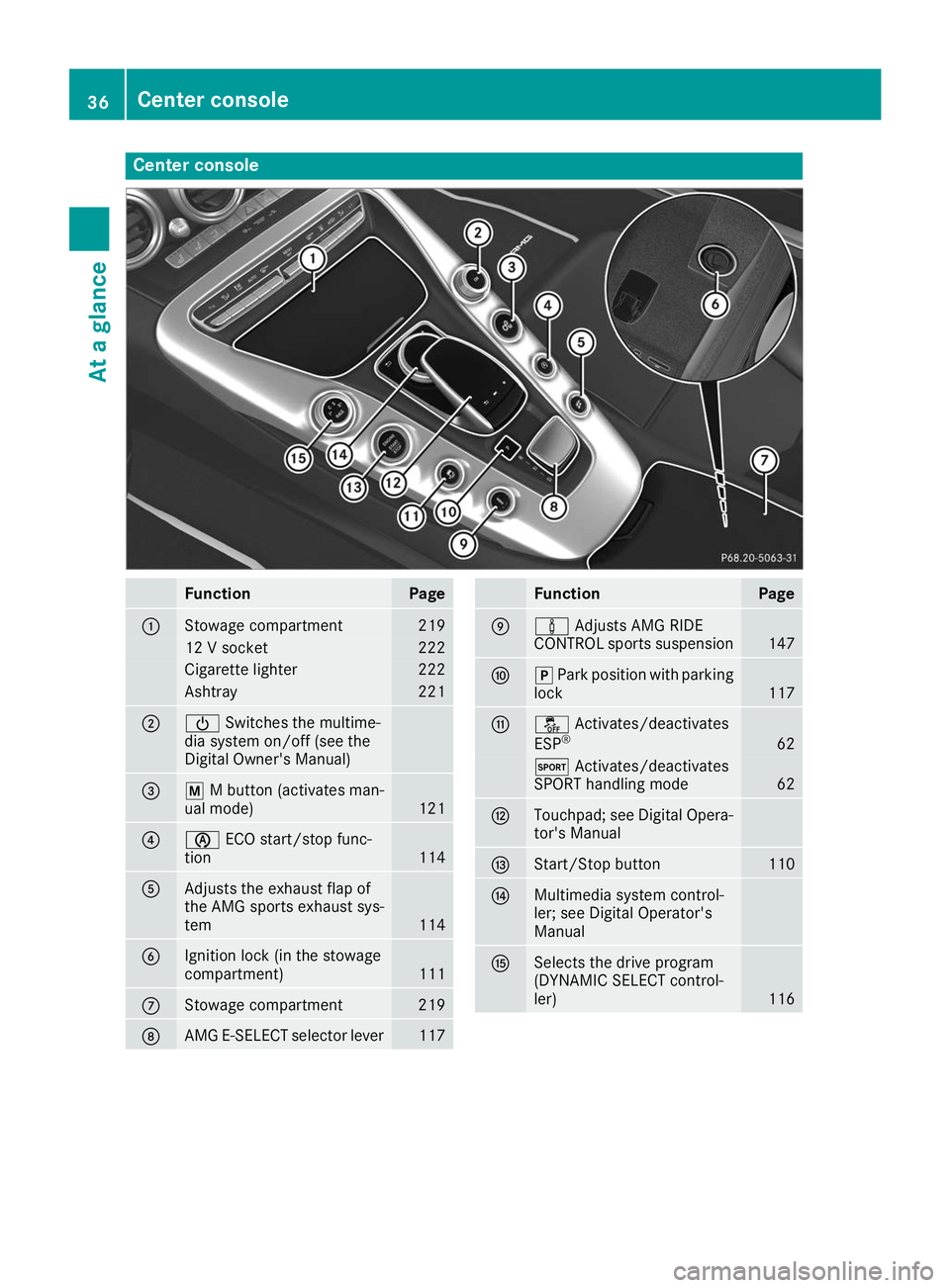
Center console
Function Page
0043
Stowage compartment 219
12 V socket 222
Cigarette lighter 222
Ashtray 221
0044
00D0
Switches the multime-
dia system on/off (see the
Digital Owner's Manual) 0087
0063
M button (activates man-
ual mode) 121
0085
00D6
ECO start/stop func-
tion 114
0083
Adjusts the exhaust flap of
the AMG sports exhaust sys-
tem
114
0084
Ignition lock (in the stowage
compartment)
111
006B
Stowage compartment 219
006C
AMG E-SELECT selector lever 117 Function Page
006D
00CC
Adjusts AMG RIDE
CONTROL sports suspension 147
006E
005D
Park position with parking
lock 117
006F
00BB
Activates/deactivates
ESP ® 62
0074
Activates/deactivates
SPORT handling mode 62
0070
Touchpad; see Digital Opera-
tor's Manual 0071
Start/Stop button 110
0072
Multimedia system control-
ler; see Digital Operator's
Manual 0073
Selects the drive program
(DYNAMIC SELECT control-
ler)
11636
Center consoleAt a glance
Page 47 of 298
fastened or a front door is opened again, the
0076 seat belt warning lamp goes out.
If the driver's seat belt is not fastened after the engine is started, an additional warning tone will
sound. The warning tone switches off after six
seconds or once the driver's seat belt is fas-
tened.
If the vehicle's speed exceeds 15 mph
(25 km/h) once and the driver's and front-
passenger seat belts are not fastened, a warning
tone sounds. A warning tone also sounds with
increasing intensity for 60 seconds or until the
driver or front passenger have fastened their
seat belts.
If the driver or front passenger unfasten their
seat belts during the journey, the seat belt warn- ing is activated again. Air bags
Introduction The installation point of an air bag can be rec-
ognized by the AIRBAG marking.
An air bag complements the correctly fastened
seat belt. It is no substitute for the seat belt. The
air bag provides additional protection in appli-
cable accident situations.
Not all air bags are deployed in an accident. The
different air bag systems function independ-
ently from one another (Y page 52).
However, no system available today can com-
pletely eliminate injuries and fatalities.
It is also not possible to rule out a risk of injury
caused by an air bag due to the high speed at
which the air bag must be deployed.
Important safety notes G
WARNING
If you do not sit in the correct seat position,
the air bag cannot protect as intended and
could even cause additional injury when
deployed. This poses an increased risk of
injury or even fatal injury. To avoid hazardous situations, always make
sure that all of the vehicle's occupants:
R have fastened their seat belts correctly,
including pregnant women
R are sitting correctly and maintain the great-
est possible distance to the air bags
R follow the following instructions
Always make sure that there are no objects
between the air bag and the vehicle's occu-
pants.
R Adjust the seats properly before beginning
your journey. Always make sure that the seat
is in an almost upright position. The center of
the head restraint must support the head at
about eye level.
The setting options are different depending
on the seat model.
R Move the driver's and front-passenger seats
as far back as possible. The driver's seat posi-
tion must allow the vehicle to be driven safely.
R Only hold the steering wheel on the outside.
This allows the air bag to be fully deployed.
R Always lean against the backrest while driv-
ing. Do not lean forward or lean against the
door or side window. You may otherwise be in
the deployment area of the air bags.
R Always keep your feet in the footwell in front
of the seat. Do not put your feet on the dash-
board, for example. Your feet may otherwise
be in the deployment area of the air bag.
R For this reason, always secure persons less
than 5 ft (1.50 m) tall in suitable restraint sys-
tems. Up to this height, the seat belt cannot
be worn correctly.
If a child is traveling in your vehicle, also
observe the following notes:
R Always secure children under twelve years of
age and less than 5 ft (1.50 m)tall in suitable
child restraint systems.
R Only secure a child in a rearward-facing child
restraint system on the front-passenger seat
when the front-passenger front air bag is
deactivated. If the PASSENGER AIR BAG OFF
indicator lamp is permanently lit, the front-
passenger front air bag is deactivated
(Y page 41).
R Always observe the instructions and safety
notes on the "Occupant Classification System
(OCS)" (Y page 48) and on "Children in the Occupant safety
45Safety Z
Page 64 of 298
ESP
®
(Electronic Stability Program)
General notes i
Observe the "Important safety notes" sec-
tion (Y page 58).
ESP ®
monitors driving stability and traction, i.e.
power transmission between the tires and the
road surface.
If ESP ®
detects that the vehicle is deviating from
the direction desired by the driver, one or more
wheels are braked to stabilize the vehicle. The
engine output is also modified to keep the vehi- cle on the desired course within physical limits.
ESP ®
assists the driver when pulling away on
wet or slippery roads. ESP ®
can also stabilize
the vehicle during braking.
ETS (Electronic Traction System) i
Observe the "Important safety notes" sec-
tion (Y page 58).
ETS traction control is part of ESP ®
.
Traction control brakes the drive wheels indi-
vidually if they spin. This enables you to pull
away and accelerate on slippery surfaces, for
example if the road surface is slippery on one
side. In addition, more drive torque is transfer-
red to the wheel or wheels with traction.
Traction control remains active, even if you
deactivate ESP ®
.
Important safety notes i
Observe the "Important safety notes" sec-
tion (Y page 58). G
WARNING
If ESP ®
is malfunctioning, ESP ®
is unable to
stabilize the vehicle. Additionally, further driv- ing safety systems are deactivated. This
increases the risk of skidding and an accident.
Drive on carefully. Have ESP ®
checked at a
qualified specialist workshop.
ESP ®
is only deactivated if the 00BBwarning
lamp is lit continuously.
When SPORT handling mode is activated, the
0074 warning lamp lights up in the instrument
panel. When the
00BBand0089 warning lamps light up
continuously, ESP ®
is not available due to a mal-
function.
Observe the information on warning lamps
(Y page 201) and display messages which may
be shown in the instrument cluster
(Y page 175).
Only use wheels with the recommended tire
sizes. Only then will ESP ®
function properly.
Characteristics of ESP ® General information
If the 00E5 ESP®
warning lamp goes out before
beginning the journey, ESP ®
is automatically
active.
If ESP ®
intervenes, the 00E5ESP®
warning lamp
flashes in the instrument cluster.
If ESP ®
intervenes:
X Do not deactivate ESP ®
under any circum-
stances.
X Only depress the accelerator pedal as far as
necessary when pulling away.
X Adapt your driving style to suit the prevailing
road and weather conditions.
ECO start/stop function
The ECO start/stop function switches the
engine off automatically when the vehicle stops moving. The engine starts automatically when
the driver wants to pull away again. ESP ®
remains in its previously selected status. Exam-
ple: if ESP ®
was deactivated before the engine
was switched off, ESP ®
remains deactivated
when the engine is switched on again.
Deactivating/activating ESP ® Important safety notes
i Observe the "Important safety notes" sec-
tion (Y page 58).
You can select between the following states of
ESP ®
:
R ESP ®
is activated
R SPORT handling mode is activated
R ESP ®
is deactivated 62
Driving safety systemsSafety
Page 93 of 298
Press one of the memory function position but-
tons. The adjustment process is stopped. This
function is only available on vehicles with mem-
ory function. G
WARNING
If children activate the EASY-ENTRY/EXIT fea- ture, they can become trapped, particularly
when unattended. There is a risk of injury.
When leaving the vehicle, always take the
SmartKey with you and lock the vehicle. Never leave children unsupervised in the vehicle. G
WARNING
If you drive off while the EASY-ENTRY/EXIT
feature is making adjustments, you could lose
control of the vehicle. There is a risk of an
accident.
Always wait until the adjustment process is
complete before driving off.
The EASY-ENTRY/EXIT feature makes getting in
and out of your vehicle easier.
You can activate and deactivate the EASY-
ENTRY/EXIT feature using the multimedia sys-
tem (see the Digital Operator's Manual)
Position of the steering wheel when the
EASY-ENTRY/EXIT feature is active The steering wheel swings up when you:
R remove the SmartKey from the ignition lock
R open the driver's door with the Start/Stop
button in position 0047
i The steering wheel only moves up if it has
not already reached the upper stop.
Position of the steering wheel for driv-
ing The steering wheel is moved to the previously
set position if you:
R close the driver's door and
R press the Start/Stop button once
When you close the driver's door with the igni-
tion switched on, the steering wheel is also
automatically moved to the previously set posi- tion.
The last position of the steering wheel column is
stored after each manual setting or when you store the setting with the memory function
(Y
page 94).
Crash-responsive EASY-EXIT feature If the crash-responsive EASY-EXIT feature is trig-
gered in an accident, the steering column will
move upwards in the following situations:
R when you open the driver's door
R when you remove the key
This makes it easier to exit the vehicle and res-
cue the occupants. Mirrors
Inside rearview mirror
X
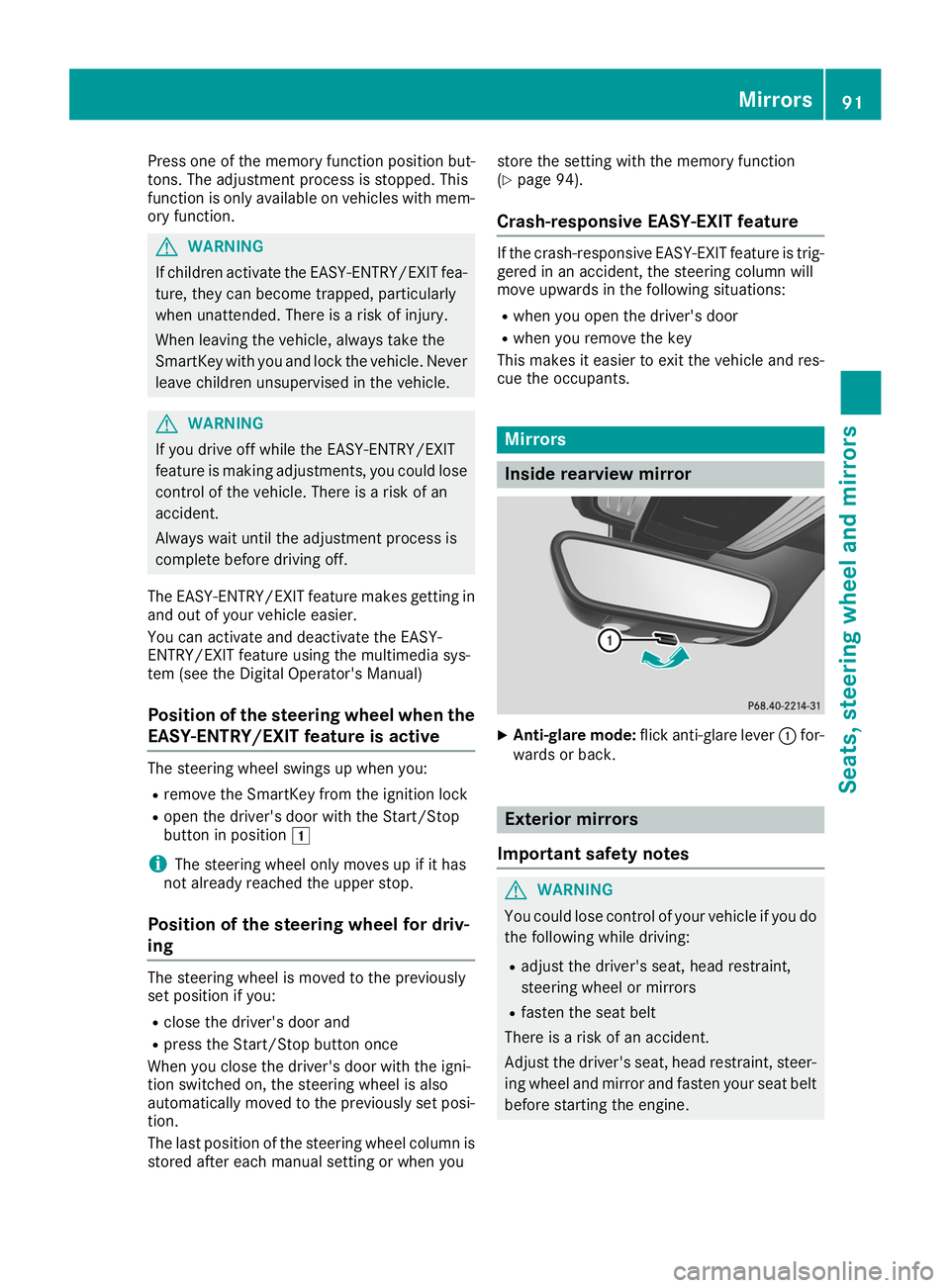
Anti-glare mode: flick anti-glare lever 0043for-
wards or back. Exterior mirrors
Important safety notes G
WARNING
You could lose control of your vehicle if you do the following while driving:
R adjust the driver's seat, head restraint,
steering wheel or mirrors
R fasten the seat belt
There is a risk of an accident.
Adjust the driver's seat, head restraint, steer-
ing wheel and mirror and fasten your seat belt before starting the engine. Mirrors
91Seats, steering wheel and mirrors Z