ESP MERCEDES-BENZ B-CLASS 2012 Owner's Manual
[x] Cancel search | Manufacturer: MERCEDES-BENZ, Model Year: 2012, Model line: B-CLASS, Model: MERCEDES-BENZ B-CLASS 2012Pages: 340, PDF Size: 3.09 MB
Page 81 of 340
When you lock the vehicle, you can
simultaneously:
R
close the side windows
R close the panorama roof with power tilt/
sliding panel
On vehicles with
a panorama roof with power
tilt/sliding panel, you can then close the
roller sunblinds.
i The SmartKey must be close to the
driver's door handle.
X Point the tip of the SmartKey at the driver's
door handle.
X Press and hold the & button until the
side windows and the panorama roof with
power tilt/sliding panel are fully closed.
X Make sure that all the side windows and the
panorama roof with power tilt/sliding
panel are closed.
On vehicles with a panorama roof with power
tilt/sliding panel:
X Press and hold the & button again
until
the roller sunblinds of the panorama roof
with power tilt/sliding panel close.
X To interrupt convenience closing:
release the & button.Resetting the side windows
You must reset each side window if:
R the side window opens again slightly after
being closed fully.
R the side window can no longer be fully
opened or closed.
X Close all the doors.
X Turn the SmartKey to position 1
or 2
in the
ignition lock.
X Pull the corresponding switch on the door
control panel until the side window is
completely closed ( Y page 77).
X Hold the switch for an additional second. If the side window opens again slightly:
X
Immediately
pull the corresponding switch
on the door control panel until the side
window is completely closed ( Y page 77).
X Hold the switch for an additional second.
X If the corresponding side window remains
closed after the button has been released,
the side window has been reset correctly.
If this is not the case, repeat the steps
above again. Problems with the side windows
G
WARNING
If you close a side window again immediately
after it has been blocked or reset, the side
window closes with increased or maximum
force. The reversing
feature is then not active.
Parts of the body could be trapped in the
closing area in the process. This poses an
increased risk of injury or even fatal injury.
Make sure that no parts of the body are in the
closing area. To stop the closing process,
release the switch or push the switch again to
reopen the side window.
Problem: a side window cannot be closed
because it is blocked by objects, e.g.
leaves in the window guide.
X Remove the objects.
X Close the side window.
Problem: a side window cannot be closed
and you cannot see the cause. If a side
window is obstructed during closing and
reopens again slightly:
X Immediately after the window blocks, pull
the corresponding switch again until the
side window has closed.
The side window is closed with increased
force. Side windows
79
Opening and closing Z
ProCarManuals.com
Page 82 of 340
If a side window is obstructed again during
closing and reopens again slightly:
X
Immediately after the window blocks, pull
the corresponding switch again until the
side window has closed.
The side window
is closed without the anti-
entrapment feature. Panorama roof with power tilt/sliding
panel
Important safety notes
In the following section, the term "sliding
sunroof" refers to the panorama roof with
power tilt/sliding panel. G
WARNING
While opening and closing the sliding sunroof,
body parts in close proximity could become
trapped. There is a risk of injury.
Make sure that no body parts are in close
proximity during the opening and closing
procedures.
If somebody becomes trapped:
R release the switch immediately, or
R during automatic operation, push the
switch briefly in any direction
The opening or closing procedure will be
stopped. G
WARNING
If children operate the sliding sunroof they
could become trapped,
particularly if they are
left unsupervised. There is a risk of injury.
When leaving the vehicle, always take the
SmartKey with you and lock the vehicle. Never
leave children unsupervised in the vehicle.
! Only open the sliding sunroof if it is free
of snow and ice. Otherwise, malfunctions
may occur.
Do not allow anything to protrude from the
sliding sunroof. Otherwise, the seals could
be damaged. !
The weather can
change abruptly. It could
start to rain or snow. Make sure that the
sliding sunroof is closed when you leave the
vehicle. The vehicle electronics can be
damaged if water enters the vehicle
interior.
i Resonance noises can occur in addition
to the usual airflow noises when the sliding
sunroof is open. They are caused by minor
pressure fluctuations in the vehicle interior.
Change the position of the sliding sunroof
or open a side window slightly to reduce or
eliminate these noises. Sliding sunroof reversing feature
The sliding sunroof is equipped with an
automatic reversing feature. If a solid object
blocks or restricts the sliding sunroof during
the closing process,
the sliding sunroof opens
again automatically. However, the automatic
reversing feature is only an aid and does not
relieve you of the responsibility of paying
attention when closing the sliding sunroof. G
WARNING
The reversing feature does not react:
R to soft, light and thin objects, e.g. small
fingers
R over the last
4 mm of the closing movement
R during resetting
R when closing the sliding sunroof again
manually immediately after automatic
reversing
This means that the reversing feature cannot
prevent someone being trapped in these
situations. There is a risk of injury.
Make sure that no body parts are in close
proximity during the closing procedure.
If somebody becomes trapped:
R release the switch immediately, or
R during automatic operation, push the
switch briefly in any direction
The closing process is stopped. 80
Panorama roof with power tilt/sliding panel
Opening and closing
ProCarManuals.com
Page 83 of 340
Operating the sliding sunroof
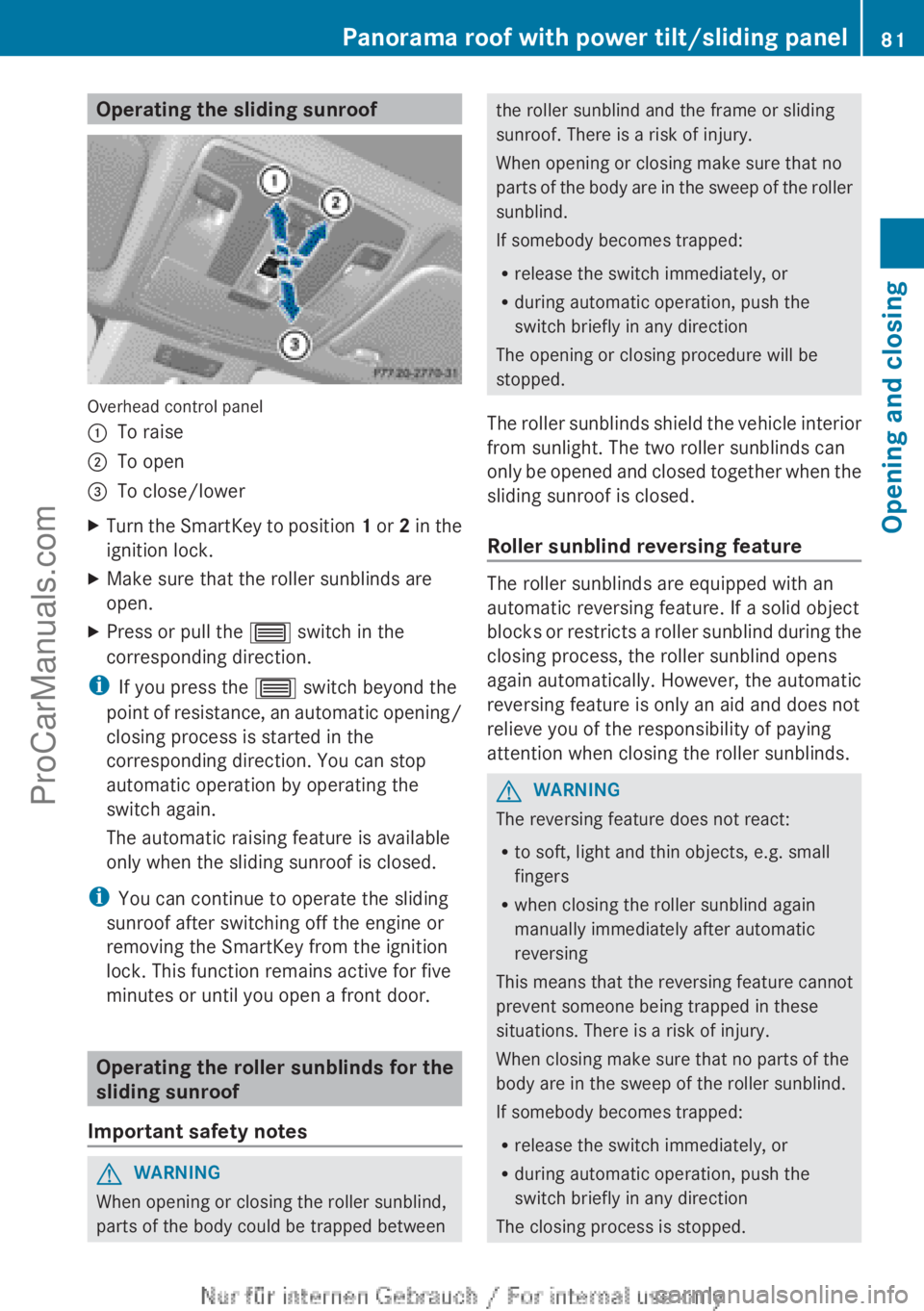
Overhead control panel
:
To raise
; To open
= To close/lower
X Turn the SmartKey to position 1 or
2 in the
ignition lock.
X Make sure that the roller sunblinds are
open.
X Press or pull the 3 switch in the
corresponding direction.
i If you press the 3 switch beyond the
point of resistance,
an automatic opening/
closing process is started in the
corresponding direction. You can stop
automatic operation by operating the
switch again.
The automatic raising feature is available
only when the sliding sunroof is closed.
i You can continue to operate the sliding
sunroof after switching off the engine or
removing the SmartKey from the ignition
lock. This function remains active for five
minutes or until you open a front door. Operating the roller sunblinds for the
sliding sunroof
Important safety notes G
WARNING
When opening or closing the roller sunblind,
parts of the body could be trapped between the roller sunblind and the frame or sliding
sunroof. There is a risk of injury.
When opening or closing make sure that no
parts of
the
body are in the sweep of the roller
sunblind.
If somebody becomes trapped:
R release the switch immediately, or
R during automatic operation, push the
switch briefly in any direction
The opening or closing procedure will be
stopped.
The roller sunblinds shield the vehicle interior
from sunlight. The two roller sunblinds can
only be opened and closed together when the
sliding sunroof is closed.
Roller sunblind reversing feature The roller sunblinds are equipped with an
automatic reversing feature. If a solid object
blocks or
restricts
a roller sunblind during the
closing process, the roller sunblind opens
again automatically. However, the automatic
reversing feature is only an aid and does not
relieve you of the responsibility of paying
attention when closing the roller sunblinds. G
WARNING
The reversing feature does not react:
R to soft, light and thin objects, e.g. small
fingers
R when closing the roller sunblind again
manually immediately after automatic
reversing
This means that the reversing feature cannot
prevent someone being trapped in these
situations. There is a risk of injury.
When closing make sure that no parts of the
body are in the sweep of the roller sunblind.
If somebody becomes trapped:
R release the switch immediately, or
R during automatic operation, push the
switch briefly in any direction
The closing process is stopped. Panorama roof with power tilt/sliding panel
81
Opening and closing Z
ProCarManuals.com
Page 84 of 340
Opening and closing
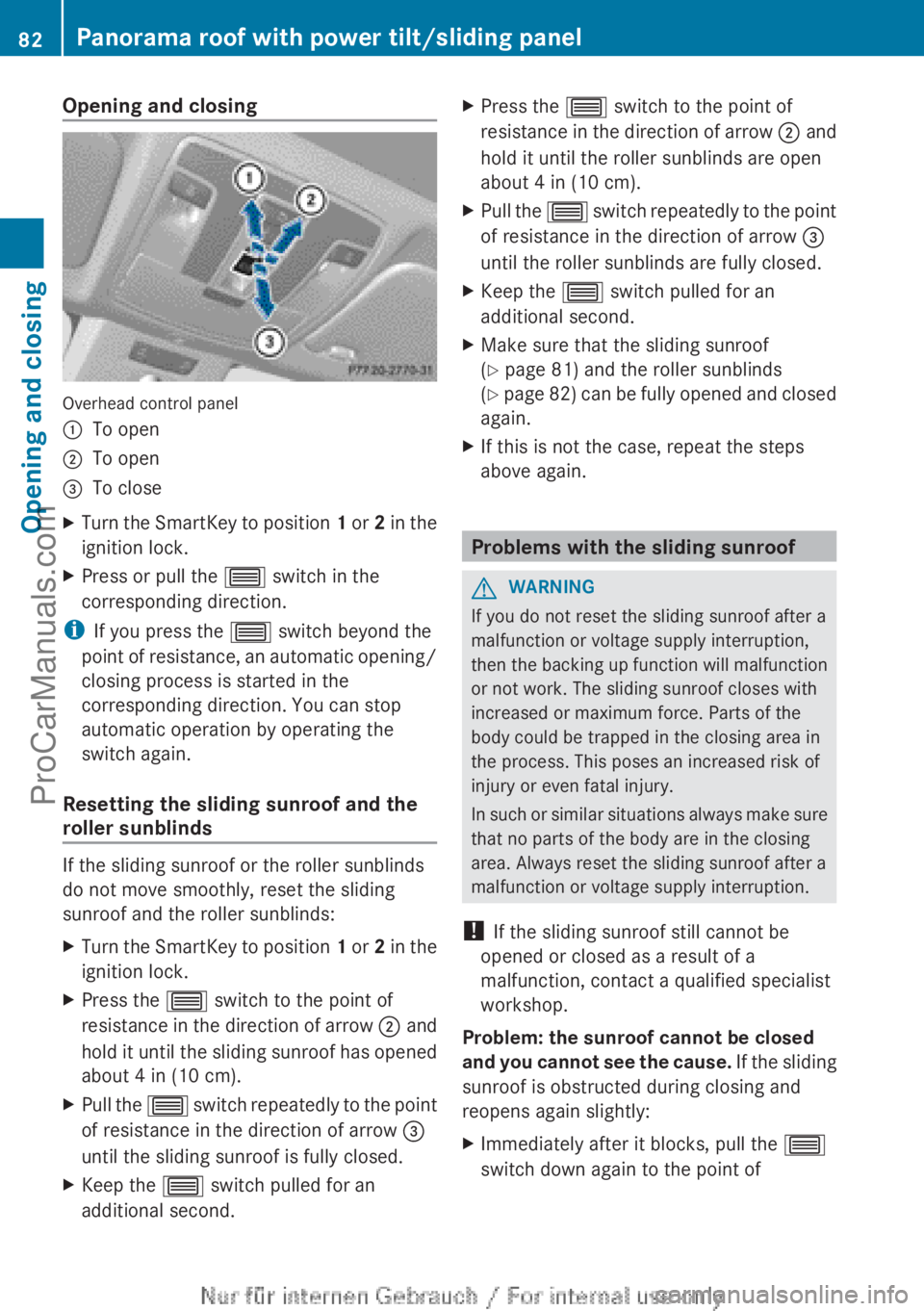
Overhead control panel
:
To open
; To open
= To close
X Turn the SmartKey to position 1 or
2 in the
ignition lock.
X Press or pull the 3 switch in the
corresponding direction.
i If you press the 3 switch beyond the
point of resistance,
an automatic opening/
closing process is started in the
corresponding direction. You can stop
automatic operation by operating the
switch again.
Resetting the sliding sunroof and the
roller sunblinds If the sliding sunroof or the roller sunblinds
do not move smoothly, reset the sliding
sunroof and the roller sunblinds:
X
Turn the SmartKey to position 1 or 2
in the
ignition lock.
X Press the 3 switch to the point of
resistance in the
direction of arrow ; and
hold it until the sliding sunroof has opened
about 4 in (10 cm).
X Pull the 3 switch
repeatedly
to the point
of resistance in the direction of arrow =
until the sliding sunroof is fully closed.
X Keep the 3 switch pulled for an
additional second. X
Press the 3 switch to the point of
resistance in the
direction of arrow ; and
hold it until the roller sunblinds are open
about 4 in (10 cm).
X Pull the 3 switch
repeatedly
to the point
of resistance in the direction of arrow =
until the roller sunblinds are fully closed.
X Keep the 3 switch pulled for an
additional second.
X Make sure that the sliding sunroof
(Y page 81) and the roller sunblinds
(Y page
82)
can be fully opened and closed
again.
X If this is not the case, repeat the steps
above again. Problems with the sliding sunroof
G
WARNING
If you do not reset the sliding sunroof after a
malfunction or voltage supply interruption,
then the backing
up function will malfunction
or not work. The sliding sunroof closes with
increased or maximum force. Parts of the
body could be trapped in the closing area in
the process. This poses an increased risk of
injury or even fatal injury.
In such or similar situations always make sure
that no parts of the body are in the closing
area. Always reset the sliding sunroof after a
malfunction or voltage supply interruption.
! If the sliding sunroof still cannot be
opened or closed as a result of a
malfunction, contact a qualified specialist
workshop.
Problem: the sunroof cannot be closed
and you cannot see the cause. If the sliding
sunroof is obstructed during closing and
reopens again slightly:
X Immediately after it blocks, pull the 3
switch down again to the point of 82
Panorama roof with power tilt/sliding panel
Opening and closing
ProCarManuals.com
Page 94 of 340

:
Release lever
; To adjust the steering wheel height
= To adjust the steering wheel position
(fore-and-aft adjustment)
X Push release lever : down completely.
The steering column is unlocked.
X Adjust the steering wheel to the desired
position.
X Push release lever : up completely.
The steering column is locked.
X Check if the steering column is locked.
When doing so, try to push the steering
wheel up or down or try to move it in the
fore-and-aft direction. Mirrors
Rear-view mirror
X
Anti-glare mode: flick anti-glare lever :
forwards or back. Exterior mirrors
Adjusting the exterior mirrors G
WARNING
The exterior mirror on the front-passenger
side reduces the size of the image. Visible
objects are actually closer than they appear.
This means that you could misjudge the
distance from road users traveling behind,
e.g. when changing
lane. There is a risk of an
accident.
For this reason, always make sure of the
actual distance from the road users traveling
behind by glancing over your shoulder. X
Make sure that the SmartKey is in position
1 or 2 in the ignition lock.
X Press button : for the left-hand exterior
mirror or button ; for the right-hand
exterior mirror.
The indicator lamp in the corresponding
button lights up in red.
The indicator lamp goes out again after
some time. You can adjust the selected
mirror using adjustment button = as long
as the indicator lamp is lit.
X Press adjustment button = up, down, or
to the left or right until you have adjusted
the exterior mirror to the correct position.
You should have a good overview of traffic
conditions.
The convex exterior mirrors provide a larger
field of vision.
The exterior
mirrors
are automatically heated
after starting the vehicle if the rear window 92
Mirrors
Seats, steering wheel and mirrors
ProCarManuals.com
Page 96 of 340
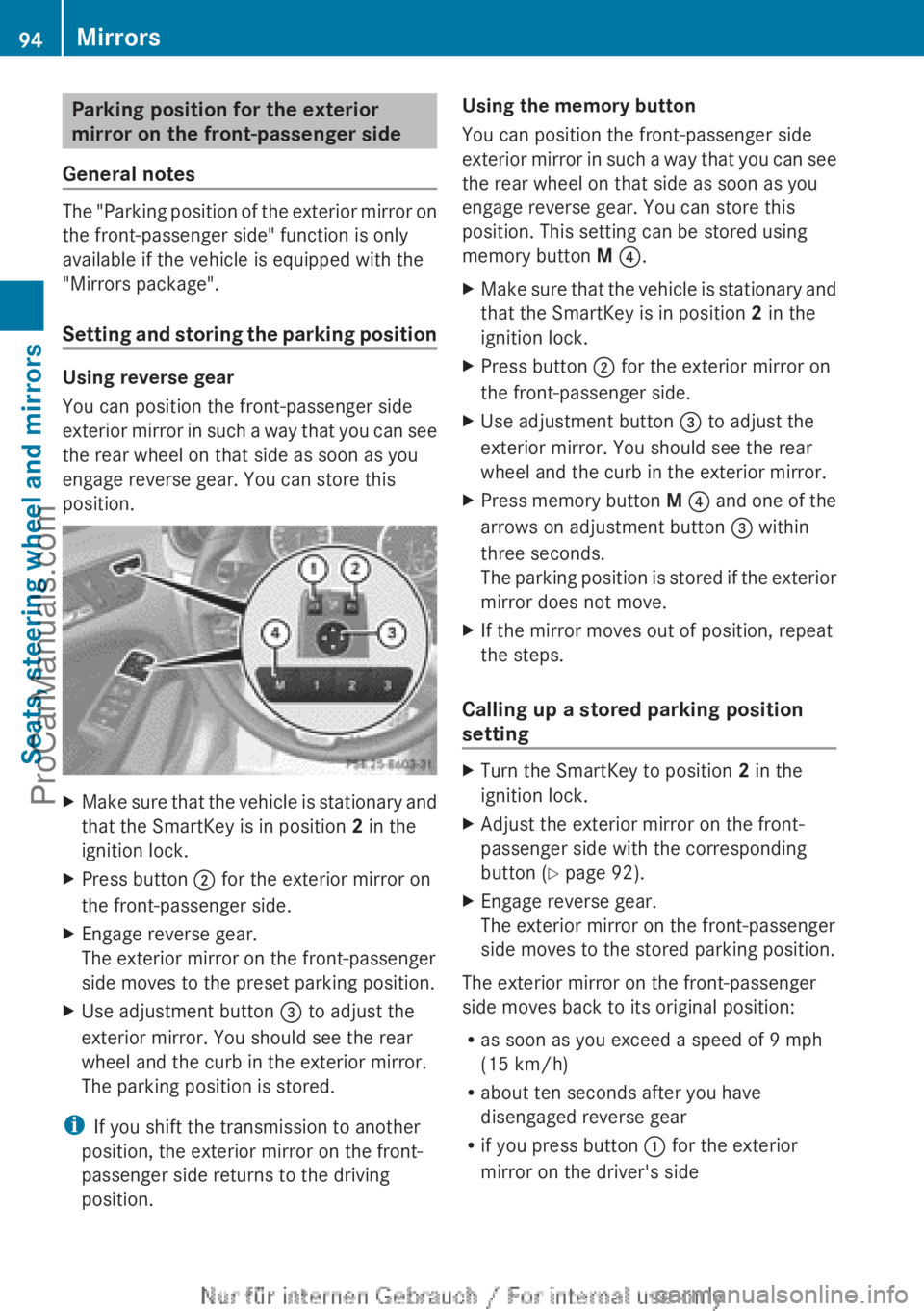
Parking position for the exterior
mirror on the front-passenger side
General notes The "Parking position of the exterior mirror on
the front-passenger side" function is only
available if the vehicle is equipped with the
"Mirrors package".
Setting and
storing
the parking positionUsing reverse gear
You can position the front-passenger side
exterior mirror
in
such a way that you can see
the rear wheel on that side as soon as you
engage reverse gear. You can store this
position. X
Make sure that the vehicle is stationary and
that the SmartKey is in position 2 in the
ignition lock.
X Press button ; for the exterior mirror on
the front-passenger side.
X Engage reverse gear.
The exterior mirror on the front-passenger
side moves to the preset parking position.
X Use adjustment button = to adjust the
exterior mirror. You should see the rear
wheel and the curb in the exterior mirror.
The parking position is stored.
i If you shift the transmission to another
position, the exterior mirror on the front-
passenger side returns to the driving
position. Using the memory button
You can position the front-passenger side
exterior mirror
in
such a way that you can see
the rear wheel on that side as soon as you
engage reverse gear. You can store this
position. This setting can be stored using
memory button M ?.
X Make sure that the vehicle is stationary and
that the SmartKey is in position 2 in the
ignition lock.
X Press button ; for the exterior mirror on
the front-passenger side.
X Use adjustment button = to adjust the
exterior mirror. You should see the rear
wheel and the curb in the exterior mirror.
X Press memory button M ? and
one
of the
arrows on adjustment button = within
three seconds.
The parking position is stored if the exterior
mirror does not move.
X If the mirror moves out of position, repeat
the steps.
Calling up a stored parking position
setting X
Turn the SmartKey to position 2 in the
ignition lock.
X Adjust the exterior mirror on the front-
passenger side with the corresponding
button ( Y page 92).
X Engage reverse gear.
The exterior mirror on the front-passenger
side moves to the stored parking position.
The exterior mirror on the front-passenger
side moves back to its original position:
R as soon as you exceed a speed of 9 mph
(15 km/h)
R about ten seconds after you have
disengaged reverse gear
R if you press button : for the exterior
mirror on the driver's side 94
Mirrors
Seats, steering wheel and mirrors
ProCarManuals.com
Page 101 of 340
Automatic headlamp mode
G
WARNING
When the light switch is set to Ã,
the low-
beam headlamps may not be switched on
automatically if there is fog, snow or other
causes of poor visibility due to the weather
conditions
such as spray. There is a risk of an
accident.
In such situations, turn the light switch to
L.
The automatic headlamp feature is only an
aid. The driver is responsible for the vehicle's
lighting at all times.
à is the favored light switch setting. The
light setting is automatically selected
according to the brightness of the ambient
light (exception: poor visibility due to weather
conditions such as fog, snow or spray):
R SmartKey in position 1 in the ignition lock:
the parking lamps are switched on or off
automatically depending on the brightness
of the ambient light.
R With the engine running: if you have
activated the daytime running lamps
function via the on-board computer, the
daytime running lamps or the low-beam
headlamps and parking lamps are switched
on or off automatically depending on the
brightness of the ambient light.
X To switch on automatic headlamp
mode: turn the light switch to Ã.
The daytime running lamps improve the
visibility of your vehicle during the day. The
daytime running lamps
function is required by
law in Canada.
When the engine is running and the vehicle is
stationary: if you move the selector lever from
a drive position to P, the daytime running
lamps/low-beam headlamps go out after
three minutes.
When the engine is running, the vehicle is
stationary and in high ambient light: if you
turn the light switch to T, you turn on the
daytime running lamps and parking lamps. If the engine is running and you turn the light
switch to L, the manual settings take
precedence over the daytime running lamps.
Low-beam headlamps
Even if the light sensor does not detect that
it is dark, the parking lamps and low-beam
headlamps switch on when the ignition is
switched
on and
the light switch is set to the
L position. This is a particularly useful
function in the event of rain and fog.
X To switch on the low-beam headlamps:
turn the SmartKey in the ignition lock to
position 2 or start the engine.
X Turn the light switch to L.
The green L indicator lamp in the
instrument cluster lights up.
Front fog lamps
In conditions where visibility is poor due to
fog, snow or rain, the fog lamps improve
visibility as well as making it easier for other
road users to see you. They can be operated
together with the parking lamps or together
with the parking lamps and low-beam
headlamps.
X To switch on the front fog lamps: turn
the SmartKey in
the ignition lock to position
2 or start the engine.
X Turn the light switch to L or Ã.
X Press the N button.
The green N indicator lamp in the
instrument cluster lights up.
X To switch off the front fog lamps: press
the N button.
The green N indicator lamp in the
instrument cluster goes out.
Only vehicles with front fog lamps are
equipped with the "fog lamp" function;
information on the fog lamp function for
vehicles with Intelligent Light System
(Y page 102). Exterior lighting
99Lights and windshield wipers Z
ProCarManuals.com
Page 102 of 340
Rear fog lamp
The rear fog lamp improves visibility of your
vehicle for the traffic behind in the event of
thick fog. Please take note of the country-
specific regulations for the use of rear fog
lamps.
X
To switch on the rear fog lamps: turn the
SmartKey in the ignition lock to position 2
or start the engine.
X Turn the light switch to
L or Ã.
X Press the R button.
The yellow R indicator lamp in the
instrument cluster lights up.
X To switch off the rear fog lamp: press the
R
button.
The yellow R indicator lamp in the
instrument cluster goes out.
Parking lamps
! If the battery has been excessively
discharged, the parking lamps or standing
lamps are automatically switched off to
enable the next engine start. Always park
your vehicle safely and sufficiently lit
according to legal standards. Avoid the
continuous use of the T parking lamps
for several hours.
If possible, switch on the
X right or the W left standing lamp.
X To switch on: turn the light switch to
T.
The green T indicator lamp in the
instrument cluster lights up.
Standing lamps
Switching on the
standing lamps ensures the
corresponding side of the vehicle is
illuminated.
X To switch on the standing lamps: the
SmartKey is not in the ignition lock or it is
in position 0.
X Turn the light switch to W (left-hand side
of the vehicle) or
X (right-hand side of
the vehicle). Combination switch
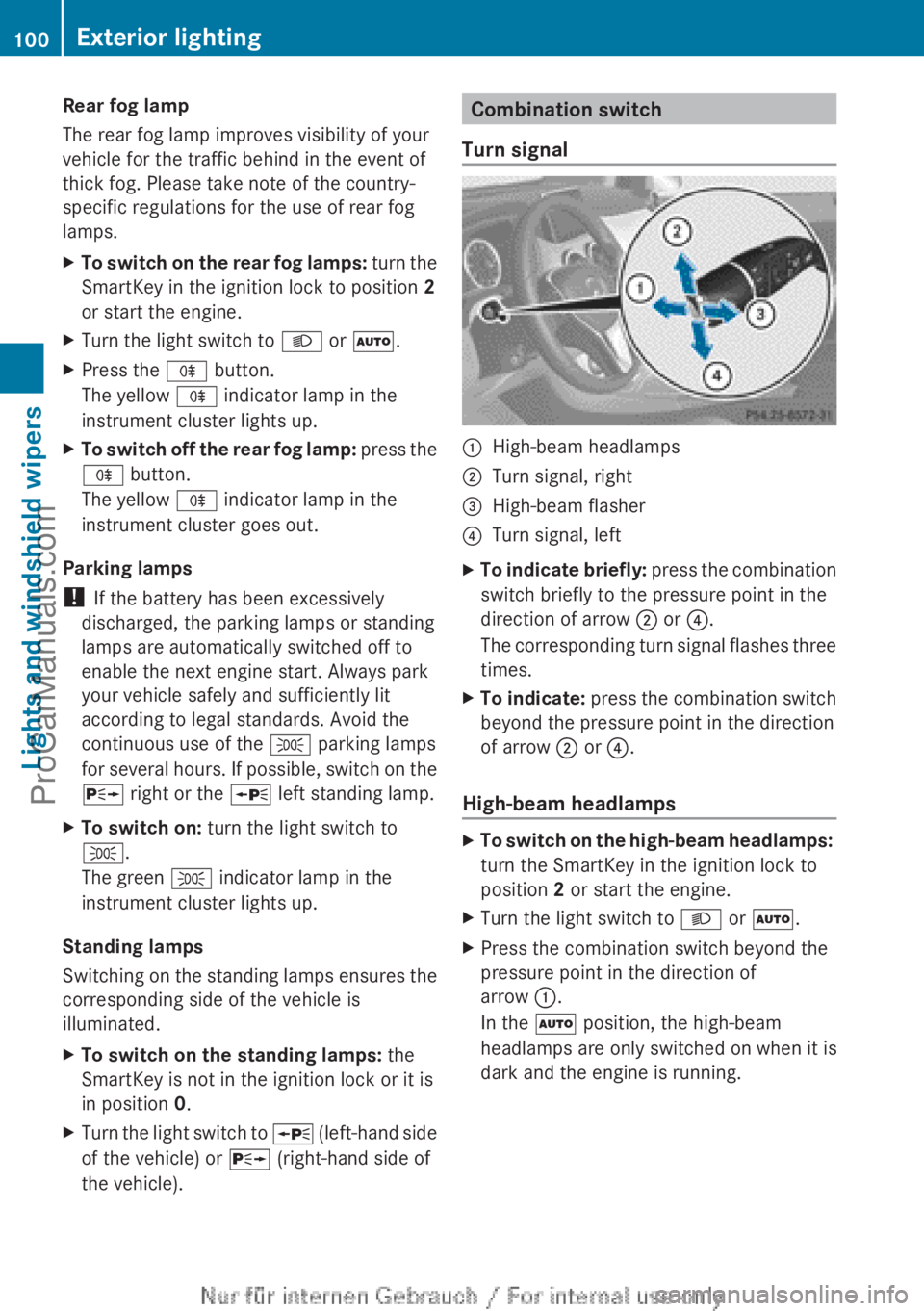
Turn signal :
High-beam headlamps
; Turn signal, right
= High-beam flasher
? Turn signal, left
X To indicate briefly: press the
combination
switch briefly to the pressure point in the
direction of arrow
; or ?.
The corresponding turn signal flashes three
times.
X To indicate: press the combination
switch
beyond the pressure point in the direction
of arrow ; or ?.
High-beam headlamps X
To switch on the high-beam headlamps:
turn the SmartKey in the ignition lock to
position 2 or start the engine.
X Turn the light switch to L or Ã.
X Press the combination switch beyond the
pressure point in the direction of
arrow :.
In the à position, the high-beam
headlamps are only switched on when it is
dark and the engine is running. 100
Exterior lighting
Lights and windshield wipers
ProCarManuals.com
Page 103 of 340
The blue
K indicator lamp in the
instrument cluster lights
up when the high-
beam headlamps are switched on.
X To switch off the high-beam
headlamps: move the combination
switch
back to its normal position.
The blue K indicator lamp in the
instrument cluster goes out.
i Vehicles with Adaptive Highbeam Assist:
when Adaptive Highbeam Assist is active,
it controls activation of the high-beam
headlamps (Y page 102).
High-beam flasher X
To switch on: turn the SmartKey in the
ignition lock to position 1 or 2 or start the
engine.
X Pull the combination switch in the direction
of arrow =. Hazard warning lamps
The hazard warning lamps automatically
switch on if:
R
an air bag is deployed
R the vehicle decelerates rapidly from a
speed of
more
than 45mph (70 km/h) and
comes to a standstill
X To switch on the hazard warning lamps:
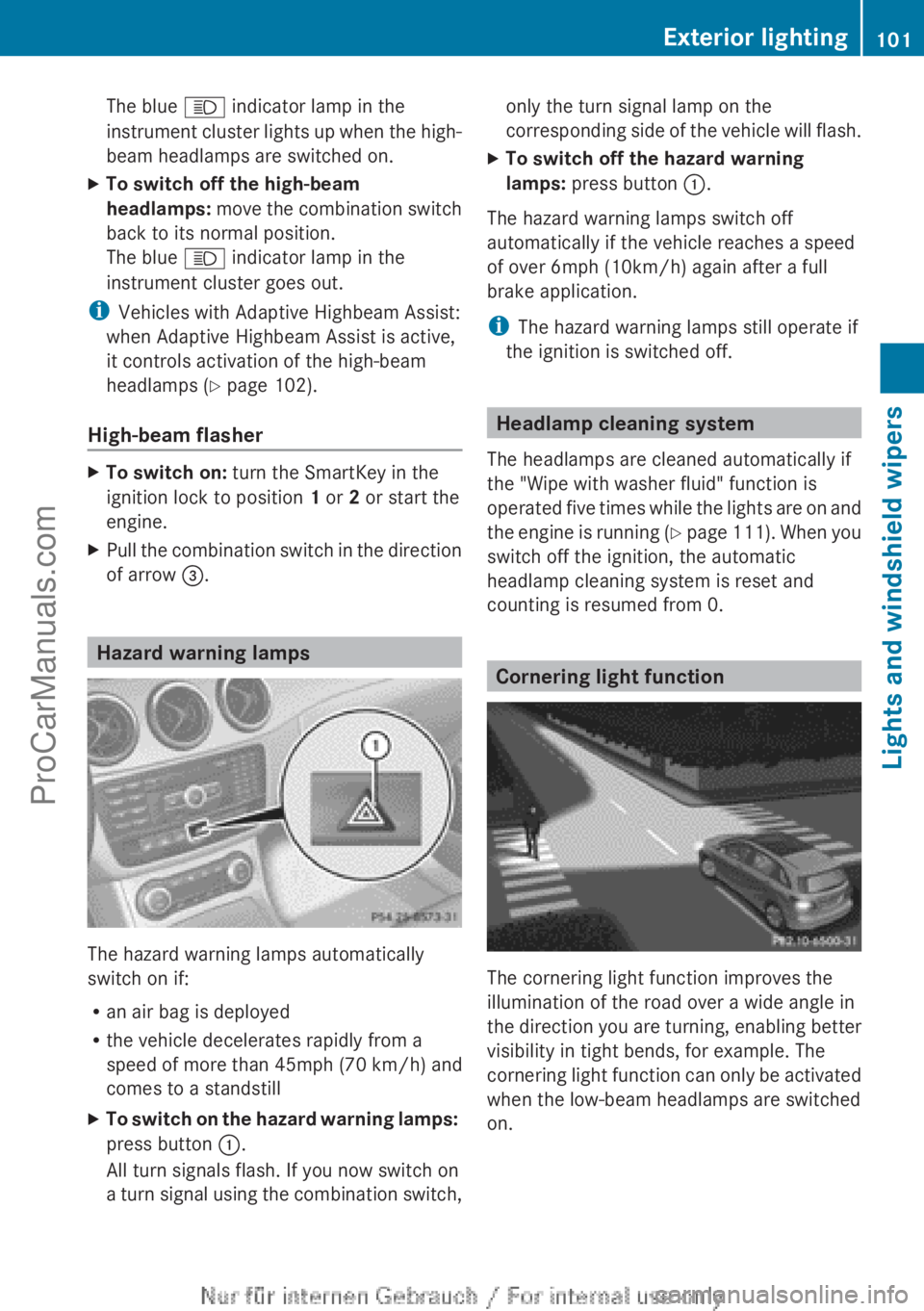
press button :.
All turn signals flash. If you now switch on
a turn signal
using the combination switch, only the turn signal lamp on the
corresponding side
of
the vehicle will flash.
X To switch off the hazard warning
lamps: press button :.
The hazard warning lamps switch off
automatically if the vehicle reaches a speed
of over 6mph (10km/h) again after a full
brake application.
i The hazard warning lamps still operate if
the ignition is switched off. Headlamp cleaning system
The headlamps are cleaned automatically if
the "Wipe with washer fluid" function is
operated five times
while the lights are on and
the engine is running (Y page 111). When you
switch off the ignition, the automatic
headlamp cleaning system is reset and
counting is resumed from 0. Cornering light function
The cornering light function improves the
illumination of the road over a wide angle in
the direction
you
are turning, enabling better
visibility in tight bends, for example. The
cornering light function can only be activated
when the low-beam headlamps are switched
on. Exterior lighting
101
Lights and windshield wipers Z
ProCarManuals.com
Page 106 of 340
?
| To switch the front interior lighting/
automatic interior lighting control off
A p To switch the right-hand front
reading lamp on/off
B To switch the automatic interior lighting
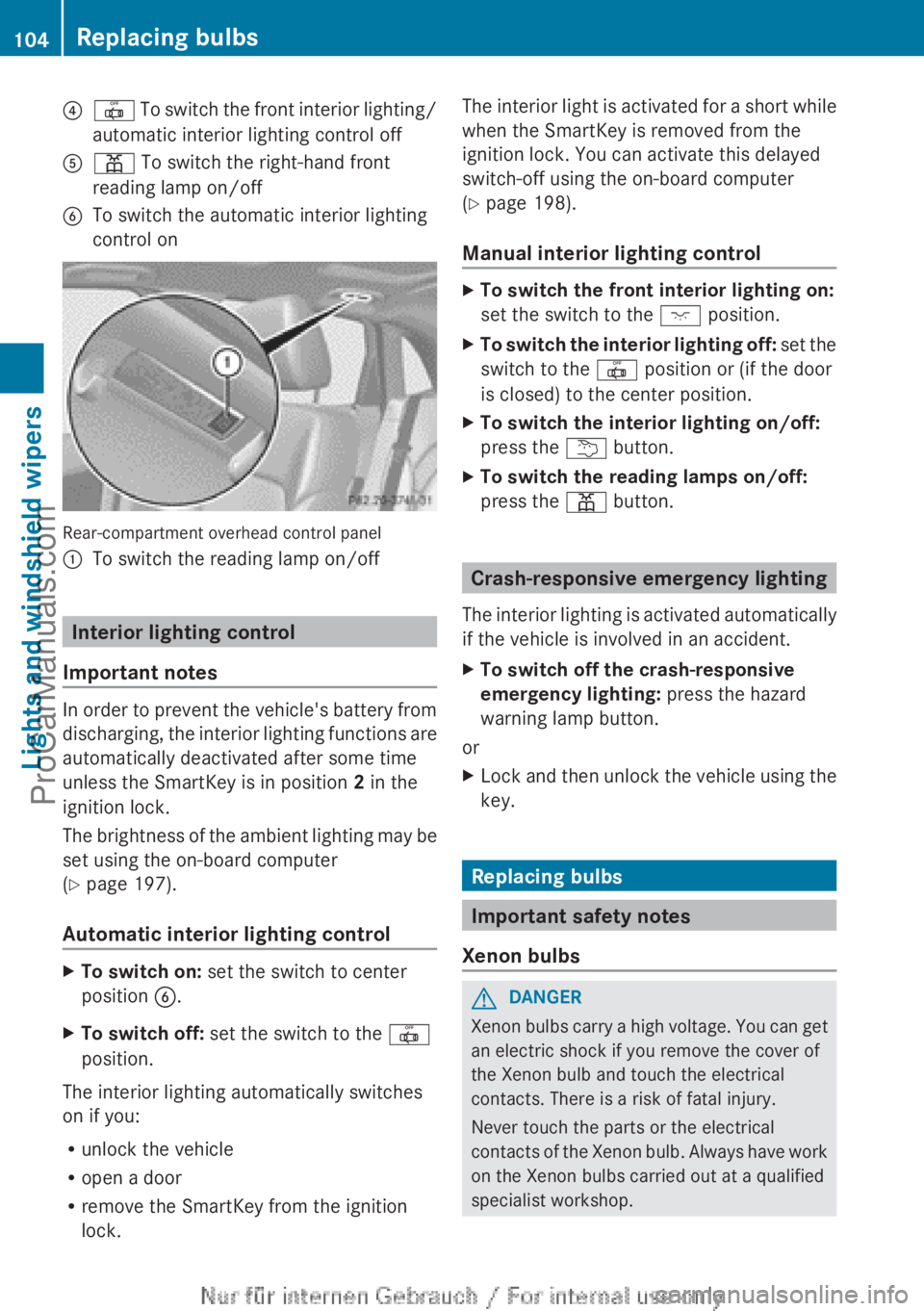
control on Rear-compartment overhead control panel
:
To switch the reading lamp on/off Interior lighting control
Important notes In order to prevent the vehicle's battery from
discharging, the
interior
lighting functions are
automatically deactivated after some time
unless the SmartKey is in position 2 in the
ignition lock.
The brightness of the ambient lighting may be
set using the on-board computer
(Y page 197).
Automatic interior lighting control X
To switch on: set the switch to center
position B.
X To switch off: set the switch to the |
position.
The interior lighting automatically switches
on if you:
R unlock the vehicle
R open a door
R remove the SmartKey from the ignition
lock. The interior light is activated for a short while
when the SmartKey is removed from the
ignition lock. You can activate this delayed
switch-off using the on-board computer
(Y page 198).
Manual interior lighting control
X
To switch the front interior lighting on:
set the switch to the c position.
X To switch the interior lighting off: set the
switch to the |
position or (if the door
is closed) to the center position.
X To switch the interior lighting on/off:
press the u button.
X To switch the reading lamps on/off:
press the p button. Crash-responsive emergency lighting
The interior lighting
is activated automatically
if the vehicle is involved in an accident.
X To switch off the crash-responsive
emergency lighting: press the hazard
warning lamp button.
or
X Lock and then unlock the vehicle using the
key. Replacing bulbs
Important safety notes
Xenon bulbs G
DANGER
Xenon bulbs carry a high voltage. You can get
an electric shock if you remove the cover of
the Xenon bulb and touch the electrical
contacts. There is a risk of fatal injury.
Never touch the parts or the electrical
contacts of the
Xenon bulb. Always have work
on the Xenon bulbs carried out at a qualified
specialist workshop. 104
Replacing bulbs
Lights and windshield wipers
ProCarManuals.com